




AI product listing images are generated or edited photos that fill a marketplace listing’s image slots. The slot count sets the size of the job before any generator does. Amazon recommends a main image plus at least six more images and one video. Etsy takes twenty photos, eBay takes twenty-four, and Walmart recommends at least four. Every platform also restricts what the main image may contain, and Etsy requires original photos of the actual product.
That last set of numbers is the part most listing guides skip. They open with a shot list of twelve or fifteen image types, then hand you a generator and tell you to produce all of them. Amazon recommends seven images, and its clothing guide allows a main image plus up to eight alternates. Most of those fifteen types never earn a slot.
This guide gives you the verified image counts and main-image rules for the five platforms most brands sell on, then the set worth generating once and cropping everywhere.
Key Takeaways
- Amazon recommends seven images and a video. Its product image guide recommends a main image plus at least six more images and one video, and its clothing guide allows up to eight alternates per SKU (sellercentral.amazon.com, September 2026). Producing fifteen types makes more images than a listing can use well.
- eBay allows up to 24 free pictures. Minimum 500 x 500px, recommended about 1600 x 1600px, 12MB per file (ebay.com, September 2026).
- The main image runs on different rules from every other slot. Amazon and Walmart both restrict logos, watermarks, promotional text and accessories that do not ship with the product in that slot. Half the image types on a typical shot list are disqualified from slot one by definition.
- Etsy is the exception that breaks a shared workflow. Its Listing Image Requirements policy requires “original photos of the actual product buyers will receive, not renderings or stock photos”, with two exceptions for mockups (etsy.com, September 2026). An image made fully by AI is not a photo of the actual product.
- 42% of users try to judge a product’s size from its images, and 37% of the sites in Baymard’s 2026 benchmark give them no in-scale image (baymard.com, updated March 2026, accessed October 2026). The scale frame earns a slot ahead of any badge or infographic.
- Pixels travel between platforms. Policy stays behind. One master file crops to every channel. For most categories the same generated packshot meets Amazon’s image rules and is questionable on Etsy, and no export setting fixes that.
What are AI product listing images?
AI product listing images are the photos in a marketplace listing gallery, produced by an image model from a real product photo rather than a studio session. The typical set covers a packshot on white, several angles, a scale reference, a detail crop, and a lifestyle frame. Most marketplace rules judge the image itself, so the specs below apply the same way to a camera and to a model. Etsy, and Amazon for clothing, also ask for photos, which is covered below.

Two things decide how many you need. The first is how many images the platform allows or recommends. The second is what the platform forbids in the first one. Neither is a creative question, and both are cheap to get wrong.
How many listing images does each marketplace show?
Image counts are published, and they vary widely across the platforms most brands sell on. Every figure below comes from the platform’s own documentation, checked in September 2026.
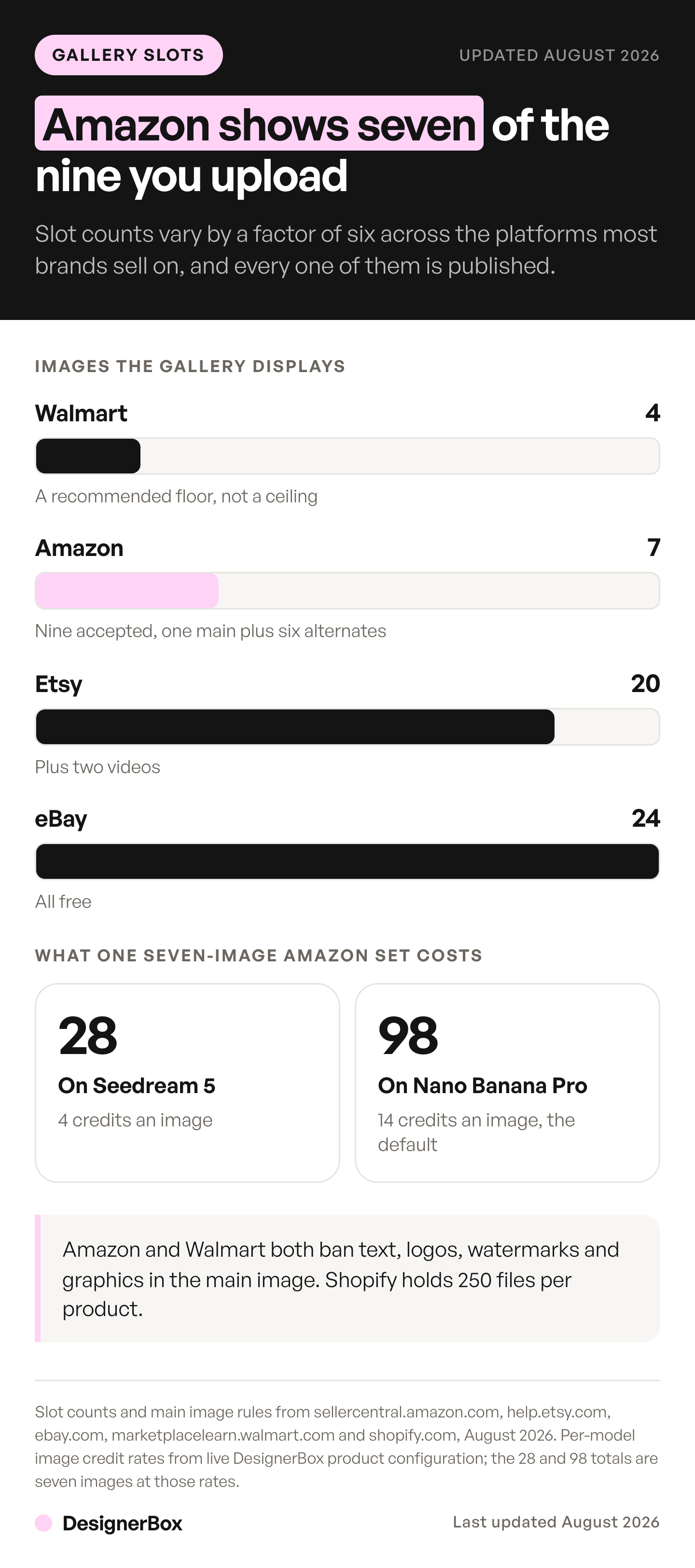
| Platform | Images allowed or recommended | What the main image may not contain |
|---|---|---|
| Amazon | Main image plus at least 6 more and 1 video recommended; clothing guide allows up to 8 alternates | Text, logos, borders, color blocks, watermarks, graphics, props not included |
| Etsy | Up to 20 photos, plus 2 videos | Etsy requires original photos of the actual product, with two mockup exceptions |
| eBay | Up to 24 pictures, free | Stock photos are not allowed for used, damaged or defective items |
| Walmart | At least 4 recommended | Watermarks, seller names, logos, promotional language, accessories not included |
| Shopify | 250 media per product | Your call, it is your store |
Sources: Amazon Seller Central, Etsy Help, eBay Help, Walmart Marketplace Learn and Shopify Help Center, all September 2026.
Amazon is the number that changes the work. Its product image guide recommends a main image plus at least six more images and one video. Its clothing guide allows up to eight alternate images for each SKU (Amazon Seller Central, clothing image guide, September 2026). Any shot list much longer than seven is producing images that compete for the same few slots.
eBay sits at the other end, with up to 24 free pictures. Walmart recommends at least four images for each listing and gives 1500 x 1500px as the minimum for zoom. It also says images that do not comply may lead to products being unpublished.
Shopify is not a marketplace, and its 250-file cap behaves differently once variants multiply. The variant math behind Shopify’s media cap is the version of this problem that bites own-store catalogs, and Shopify product image size covers the dimensions each of those slots needs. Where those files end up once uploaded is a separate question with a documented answer.
Two social channels run their own numbers alongside these five. TikTok Shop has its own image and video rules, covered in TikTok Shop product images. Instagram crops twice, once on the feed and again on the profile grid, and the set you already shot for the store reframes into a month of posts.
The main image is a different job from every other slot
The first slot is regulated. The rest are close to open.
Amazon requires the main image to show only the product for sale on a pure white background, RGB 255, 255, 255, and the product should fill 85% of the frame. It must not carry text, logos, borders, color blocks, watermarks or other graphics over the product or in the background, and it must not include props or accessories that do not ship with the purchase (sellercentral.amazon.com, September 2026). Walmart writes a similar restriction in its own words: the primary image may not include watermarks, seller names, logos, promotional language or accessories that are not included, and it should show the item on a seamless white background (marketplacelearn.walmart.com, page updated 12 May 2026, accessed September 2026). The file spec, the variant codes and what Amazon does when an image fails are in Amazon image requirements.
Read a standard listing shot list against that rule and most of it fails slot one at once. Promotional banners, trust badges, certification marks, warranty seals, review quotes, comparison charts and benefit infographics are all text and graphics over an image. None of them belongs in the main image on Amazon, and Walmart restricts most of them there too. They compete for the six alternates instead, against the angles and the scale shot that shoppers use. Comparison charts and brand graphics also have a place outside the gallery, in Amazon A+ Content, the block under the product description.
That is the real ceiling: how many images the platform recommends, and how few of those the rules leave free.
Some categories spend those alternate slots before you get to choose. A supplement listing has to show the full label and the complete Supplement Facts panel somewhere in the set, which claims a slot every time. The supplement shot list sets out the six frames and what each has to do.
Etsy is the exception that breaks the workflow
Etsy allows 20 photos, which reads like a generous allowance. Its image policy is the strictest on the list.
Etsy’s Listing Image Requirements policy says Etsy requires sellers “to use original photos of the actual product buyers will receive, not renderings or stock photos, except in the situations outlined below” (Etsy, Listing Image Requirements, accessed September 2026). The two exceptions are computer-made mockups in extra images for personalized items, and stock photo mockups for print-on-demand designs. The policy never says AI. It requires photos of the actual product, and an image made fully by AI is not a photo of the actual product, so the safe reading is that it does not satisfy the rule. This is general information, not legal advice.
Separately, Etsy’s Seller Policy requires disclosure in the listing when AI created the item itself. Those are two different rules catching two different things, and running them together is where sellers get it wrong. The full split across platforms is in what each marketplace requires for AI product images, and Etsy’s video side is covered in Etsy listing video specs and rules. For the shooting and editing half of an Etsy listing, see what to shoot for Etsy and what AI can fix.
What survives on Etsy is editing a photo you took. Background cleanup, color correction and relighting act on your own photograph. An Amazon staff member said on the seller forums that simple AI retouching, such as background removal, is treated like normal photo editing, though that is a forum reply and not a policy page. Generating the product from a description is the risky case on both.
What belongs in the six alternate slots
A complete listing set has seven frames, and each one answers a question the shopper still has. Order them the way people swipe.
- Main, on white. Product only, 85% of frame, no text, no props. This is the search thumbnail and it decides the click.
- Second angle. Back or three-quarter. Confirms the product is a real object with sides.
- Scale. A hand, a common object, or a measured context. Baymard’s product page research found 42% of users try to judge a product’s size from its images, and 37% of the sites in its 2026 benchmark provide no in-scale image (baymard.com, accessed October 2026). A misjudged size costs the sale, or costs a return after it.
- Detail crop. Material, stitching, finish, closure. Answers whether it is well made.
- In use. The product in a real setting, with a human or an environment for context.
- What ships. Everything in the box, including accessories, laid out.
- One category-specific frame. A size chart for apparel, an ingredient panel for consumables, a comparison for a technical product.
Slots two through five are the ones a model produces well from a single source photo, because they are camera moves rather than new information. Generating every product angle from one photo covers how far that goes before a second real photo is needed. Slots six and seven usually need something real: a photograph of the actual contents, or typeset data.

DesignerBox starts this as a fixed set. Anyone can make an AI picture. Making hundreds that still look like your brand is the hard part. The full listing photoshoot template returns six shots from one product photo, which covers the main image plus the alternates that carry the most weight. Build the set once on your hardest SKU and settle the framing, the light and the crop there. Save it as a workflow. A saved workflow runs the same way on the next product and the one after it, so you do not assemble the set again by hand. Batch runs one workflow over a whole sheet of products. Planning slot counts is only worth it if the set behind them repeats.
The image editor, the video editor, your brand rules, your Assets and the AI models sit in the same place. The full workflow from the first product photo to the finished ad, in one subscription.
What travels between platforms and what does not
Pixels travel. Generate one master file above the highest recommendation on your channel list, then export down. A resize is a file operation and costs nothing. Regenerating per platform spends credits again on every channel, and it lets the versions drift apart. Set that master well clear of the floor rather than at it, since Google’s minimum rises to 500 x 500 on 31 January 2027. The exact master spec, the aspect ratios and the file-size ceilings are worked out channel by channel in the five-channel image spec.
Policy does not travel, and that is the part a shared pipeline gets wrong.
The same generated packshot can meet the image rules on Amazon, Walmart and eBay and still be questionable on Etsy, because Etsy requires photos of the actual product. On Amazon, clothing is the exception, since the clothing guide says only photos are allowed. The resale apps split the same way and harder, which resale marketplace photo rules works through platform by platform. The same infographic is fine in an Amazon alternate slot and not allowed in the Amazon main slot. The same lifestyle frame that works as Etsy’s first image would fail Amazon’s main image on background alone.
Accuracy is the other thing that does not travel, and it fails in the opposite direction. A generated image that shifts a color or softens a logo passes review on every platform here, then fails when the box arrives. That is where it turns into a return and a bad review. The accuracy checks worth running before you ship a set matter more than any spec on this page.
Accuracy is hardest to hold when you have never touched the product. Dropshipping product photos covers where restaging a supplier image stops being presentation and starts being a claim you cannot support.
One newer surface reads the same record. ChatGPT shows product cards from a store’s catalog or product feed, and the feed asks for one main image per variant. The routes in are in the guide to how sellers get products shown in ChatGPT shopping, and the variant rule is in product images for AI shopping agents.
Cost before the run
In DesignerBox each model costs a different number of credits, so the model you pick sets the cost of a listing set. You see what a run costs before you start it, so the image counts price out ahead of the work instead of after it. A product photography workflow can run on one shot first, so you see one frame before you commit a catalog.
Uploading your own photos and the commercial license start on the Pro plan. AI video, virtual try-on, upscaling, the image editor and the video editor start on the Premium plan. Plans and credits are on the pricing page.
Two notes on planning. Filling every eBay slot is rarely the first job for a large catalog, because the core set above already answers most shopper questions. And the “what ships” Amazon slot is often better spent on a real photograph than a generated one, because that is where the shipped contents live.
Against a studio, the comparison is less about the per-image price than about which SKUs get covered at all. Where the photoshoot budget goes has that breakdown. How to choose an ecommerce photography service covers the hiring side, and what to show and in what order on your own PDP applies the same sequence outside a marketplace.
There is a free plan. Start on the free plan to see how a run works. Then test your hardest SKU on the Pro plan, where uploading your own photos starts.
FAQ
How many product listing images do I need?
Seven for Amazon, plus a video: Amazon recommends a main image and at least six more images, and its clothing guide allows up to eight alternates. Etsy allows 20 photos and eBay 24, and you do not have to fill every slot. Walmart recommends at least four.
Can I use AI-generated images on Amazon?
Mostly, as of September 2026. Amazon’s general image guide sets standards for the image itself: pixel minimums, a white background, and the product filling 85% of the frame. It has no rule against AI product images. Two exceptions apply. For clothing, Amazon says only photos are allowed. And Amazon asks sellers to tag images of photorealistic people generated entirely by AI with the keyword contains-synthetic-performer. An Amazon staff member said on the seller forums that simple retouching such as background removal and color correction is treated like traditional photo editing.
Does Etsy allow AI-generated listing photos?
Etsy requires “original photos of the actual product buyers will receive, not renderings or stock photos”, with two exceptions for mockups (etsy.com, September 2026). Etsy’s image rules do not mention AI. An image made fully by AI is not a photo of the actual product, so the safe reading is that it does not qualify. Editing a photo you took, including background cleanup and relighting, is a different matter. Etsy separately requires disclosure when AI created the item itself.
What size should product listing images be?
Build one square master above the highest recommendation on your channel list, then export down. Amazon needs at least 500 pixels on the longest side, and 1,000 pixels or more to turn on zoom. Etsy recommends at least 2000 pixels wide and tall, and says the first photo should be at least 635 pixels so it does not appear lower in search. eBay suggests about 1600 x 1600px. The full channel-by-channel master spec is in the five-channel image spec.
Can I use the same images on Amazon, Etsy and Shopify?
The pixels port. The policy stays with each platform. One master set crops to every platform without regenerating. Etsy is the blocker: it requires photos of the actual product, so a generated product image is questionable there even when it meets the image rules on Amazon, Walmart and eBay. Photograph Etsy’s listing images and generate the rest.
What can’t go in the main listing image?
On Amazon: text, logos, borders, color blocks, watermarks, other graphics over the product or in the background, illustrations instead of the product, and props or accessories that do not ship with the purchase. Walmart restricts watermarks, seller names, logos, promotional language and accessories that are not included. That rules out promotional banners, trust badges, warranty seals and review quotes from slot one on both platforms.
Do AI listing images reduce shopper trust?
Not on their own. What loses trust is a mismatch between the image and the box, which predates AI and applies equally to an over-styled studio photo. Walmart says AI images must be truthful, accurate and not misleading, and eBay makes sellers responsible for listing content. Etsy also requires photos of the actual product. Detecting a real conversion difference between two image treatments needs more traffic than most product pages get, which is covered in ecommerce image testing.
Sources
- Amazon main image rules, the 85% frame fill, the 500px minimum and 1,000px zoom threshold, the image and video recommendation, and the contains-synthetic-performer tag: Amazon Seller Central, product image guide, September 2026
- Amazon’s eight alternate images per SKU and the photos-only rule for clothing: Amazon Seller Central, clothing image guide, September 2026
- Etsy’s requirement for original photos of the actual product and its two mockup exceptions: Etsy, Listing Image Requirements, September 2026
- Etsy’s 20 photos and 2 videos per listing, the 2000px recommendation and the 635px first-photo guidance: Etsy Help and Etsy Help, photo sizes, September 2026
- eBay’s 24 free pictures, the 500 x 500px minimum, the 1600 x 1600px recommendation and the 12MB file cap: eBay Help, adding pictures, September 2026
- Walmart’s four-image recommendation, the 1500 x 1500px zoom minimum, the primary-image restrictions and the rule on AI images: Walmart Marketplace Learn, image guidelines, page updated 12 May 2026, accessed September 2026
- Shopify’s 250 media files per product limit: Shopify Help Center, September 2026
- The finding that 42% of users try to judge a product’s size from its images and that 37% of sites provide no in-scale image, from Baymard Institute’s product page UX benchmark: baymard.com, updated 18 March 2026, accessed October 2026
Marketplace image specifications and policies verified from each platform’s own documentation as of September 2026. The Baymard figures were re-checked on 2 October 2026. Image counts and requirements change, so recheck before a catalog-wide rollout. This is general information, not legal advice. Individual results vary.

