


To make an AI influencer, decide what the character is for and write its rules on one page. Then make one face, build a reference set of nine views, and lock that face in your tool. Test it before you post. Add motion and one voice. Label the account and every realistic post, and make the posts in a weekly batch. The face is the fast part. The rules decide whether post 30 shows the same person.
A face alone does not hold a character. Post 12 comes out with a different jaw, a follower asks in the comments whether she is real, and an ad is rejected because the video carries no AI label. None of those problems comes from the image model. Each one comes from a decision nobody wrote down.
This guide is the build order for a character a brand owns, for product content and ads. The same steps work for a personal account, but the label and rights steps matter more when a brand pays for the posts. If you still need to pick the tool, our guide to the AI influencer generator sorts ten tools into four kinds first.
Key Takeaways
- Make the face third. A brief and a one-page character bible come first, so every prompt starts from the same rules.
- Nine views make the reference set. Front, both three-quarters, profile, full body, seated, a smile, hands and a close-up. Every later image starts from those files.
- Lock the face, then test it. Run the same face through ten scenes, a product in hand, a second outfit and a short clip before any post goes live.
- One voice, kept for every clip. A realistic clone of a real person’s voice needs that person’s consent.
- Labels are part of the account. TikTok and YouTube ask creators to label realistic AI content. Meta asks for it on realistic video and audio.
- The character can show the product. It cannot say it used it. An invented person has no experience of the product to report.
How to make an AI influencer in 8 steps
- Write the brief. The job, the channels, the audience, what it sells and what it never does.
- Write the character bible. One page that fixes the look, wardrobe, voice, opinions, limits and label.
- Make the face. Pick one candidate you can describe in words and that resembles no real person.
- Build a reference set of nine views. Fixed angles on a plain background, stored by the brand.
- Lock and test the face. Ten scenes, the product in hand, a second outfit and a short clip.
- Add motion and a voice. One still per clip, one voice for every clip.
- Label the account and every realistic post. Follow each platform’s rule and the ad laws where you run.
- Run a weekly content system. Three to five formats, one batch a week, one person checking each post.
What is an AI influencer?
An AI influencer is an invented person who posts on social media like a creator, with images and video made by AI. A brand uses one to front product content without casting, booking or reshooting a real person. The character is useful only if it looks like the same person in every post. So most of the work is rules and references.
Some people say virtual influencer or AI character for the same thing. The tool guide linked above covers the four kinds of tool that make one. If the character has to wear your garments, AI fashion model generators compared maps the tools to the shots a drop needs.
Step 1: Write the brief
The brief says what the character is for, in five lines. Write it before you open any tool:
- The job. Presenter who explains products, model who wears them, or narrator who talks over b-roll.
- The channels. Instagram, TikTok, YouTube Shorts, paid ads, or the product page. Each one has its own label rules (Step 7).
- The audience. Who should stop scrolling, in one sentence.
- What it sells. The product lines it may appear with.
- What it never does. Claims, topics and formats that are off limits.
Write the fifth line with care. It keeps a character out of trouble when three people write its posts.
Step 2: Write the character bible
A character bible is one page that fixes the character, so every person who writes a prompt starts from the same facts. Keep it short enough to paste into a prompt.
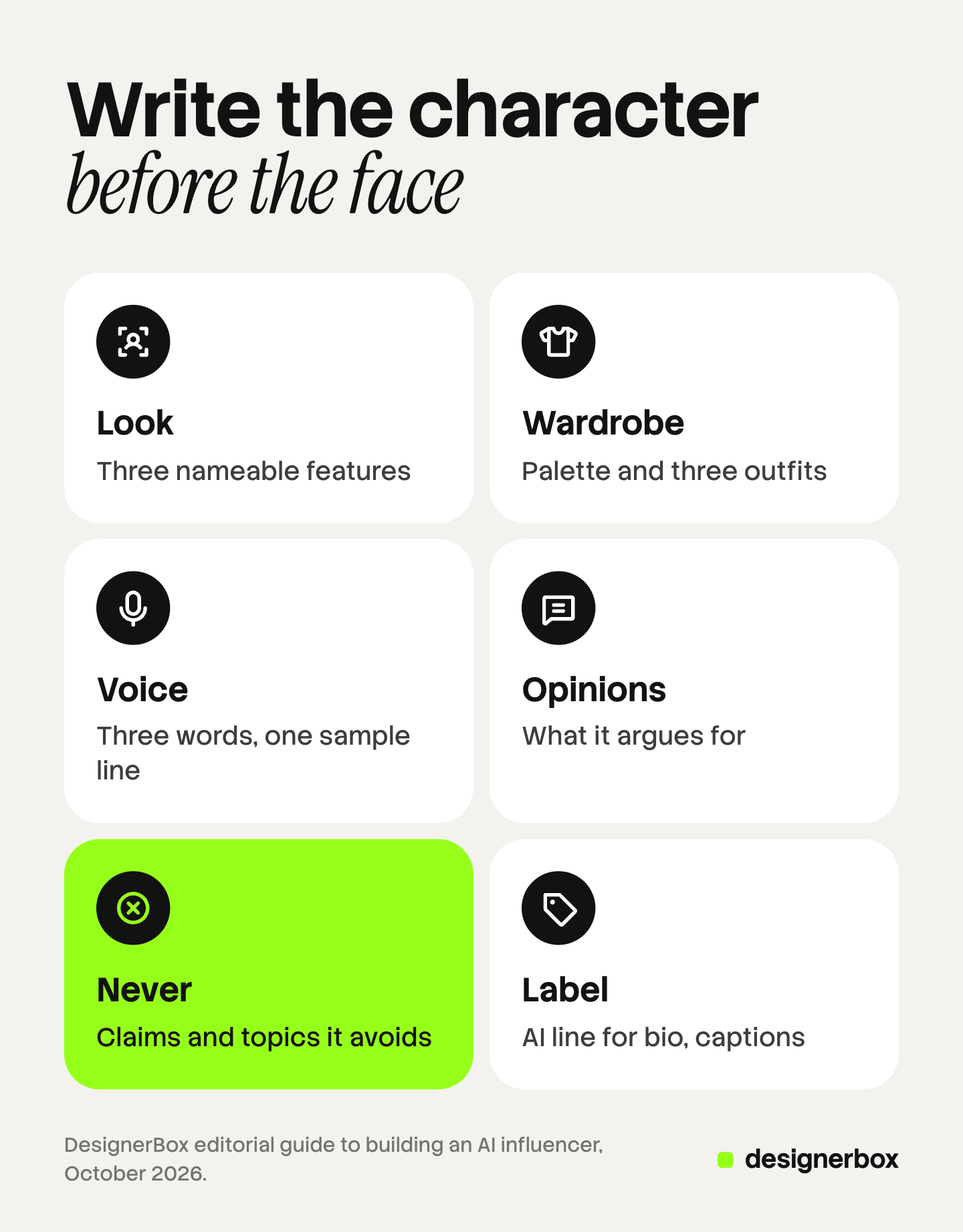
| Field | What to write | Example |
|---|---|---|
| Look | Three features anyone can name | Short dark bob, freckles, round silver glasses |
| Age band | A five-year range | 28 to 33 |
| Wardrobe | A color palette and three outfits | Cream, olive and navy; a trench coat, a knit, a work shirt |
| Setting | Two or three places it returns to | A bright kitchen, a studio desk, a city street |
| Voice | Three words and one sample line | Calm, dry, practical: “Here is what I check first.” |
| Opinions | What it likes and argues for | Repair over replace, fewer and better things |
| Never | Topics and claims it avoids | Health claims, politics, “I use this every day” |
| Label | The AI line for bio and captions | ”AI character created by [brand]” |
The “Never” field matters most for a brand. A character that says it uses a product every day is claiming an experience it never had, and Step 7 explains why that is a legal problem. Our guide to AI creative direction covers the same idea for a whole set: decide what stays fixed and what may change.
Step 3: Make the face
Make 20 to 40 face candidates from the bible, then pick one by three rules. You can describe its features in words. It still looks right in your own light and settings. And it does not resemble a real person.

Check the last rule on purpose. Run a reverse image search on your pick. FTC staff say it would violate the reviews and testimonials rule “to use a celebrity avatar without the celebrity’s permission to speak favorably about a product, if reasonable consumers would think that the celebrity actually gave a testimonial” (ftc.gov, read October 2026). A face that looks like someone famous carries that risk even if you never meant it.
Never train a character on a real person’s photos without that person’s written consent. Talking-avatar tools build consent into the product, as our talking avatar guide shows. An image tool may not ask, so the duty sits with you.
Step 4: Build a reference set of nine views
A reference set is a group of images of the same character from fixed angles. Every later image starts from it. Nine views cover most posts:
- Front, neutral expression
- Front, smiling
- Three-quarter, left side
- Three-quarter, right side
- Profile
- Full body, standing
- Seated
- Hands, holding an object
- Close-up of eyes and skin
Use the same plain background and soft light for all nine, so the model reads the face and not the room. Google’s image documentation describes the method: generate views of a character at different angles, and include the earlier images in later prompts to keep the character consistent (ai.google.dev, read October 2026).
Store the nine files yourself, with the bible, in one folder the brand owns. A reference set that lives only inside one tool cannot move with you. Our guide to the AI character reference image goes deeper on how to shoot and pick each view.
Step 5: Lock and test the face
There are two ways to lock a face. The first sends reference images with every request. Google’s documentation says Gemini 3 Pro Image takes up to 5 images of characters to keep them consistent, and Nano Banana 2.1 takes up to 4 (ai.google.dev, read October 2026). The second trains an identity inside one tool from a set of photos, so you select it by name later. The first is portable. The second can be faster, but the identity often cannot leave the tool.

Then test the face before anything is posted. Make ten images in ten scenes and put them in one grid. Put your real product in its hands five times and check the label letter by letter. Change the outfit and hair, and keep the face. Turn the best still into a short clip. The tool guide linked at the top writes out five tests with a pass rule for each, and our guide to character consistency in AI video explains why a face drifts between clips.
If the face fails a test, go back to Step 4 and add the view that failed. Do not fix it post by post.
Step 6: Add motion and a voice
Motion comes from a still. Pick the best still from the reference set, then turn it into a short clip with an image-to-video model. One simple action per clip holds the face better than a busy one. Check the last frame against the first: the face should match.

Pick one voice and keep it for every clip. Write its speed and tone into the bible next to the sample line. If the voice is a clone of a real person, that person’s consent is required, the same as for a face. A talking-avatar tool makes a spoken clip from a script, and a lip-sync step matches the mouth to the words.
Keep scripts short and in the character’s own words. If the character explains a product, it can show what the product does. It should not report how the product felt to use.
Step 7: Label the account and every realistic post
Label the character in two places: once in the bio, and on each post that shows a realistic person or scene. Each platform asks for something slightly different. This is general information, not legal advice.
| Where | What it asks of creators | Source |
|---|---|---|
| TikTok | Label AI-generated or significantly edited content that shows realistic-looking scenes or people. Unlabeled content may be removed, restricted, or labeled | tiktok.com, read October 2026 |
| YouTube | Disclose AI-generated or altered content that seems realistic, with the “AI use” setting in YouTube Studio | support.google.com, read October 2026 |
| Instagram and Facebook | Disclose organic posts with photorealistic video or realistic-sounding audio. Meta adds an “AI info” label when it detects AI signals in a file | transparency.meta.com, read September 2026 |
Paid ads add their own rules. TikTok asks advertisers to label AI-generated ad media, and Meta labels ads itself when it detects AI signals. Our guide to AI disclosure in advertising goes through each placement.
Three laws apply to a character in an ad, depending on where it runs:
- New York. General Business Law section 396-b has required a business to disclose a synthetic performer in an ad since June 9, 2026 (nysenate.gov, read October 2026).
- California. SB 1050 was signed on September 16, 2026 and takes effect on January 1, 2027. It asks for a clear disclosure on ads that prominently show a synthetic performer (leginfo.legislature.ca.gov, read September 2026).
- The EU. Article 50 of the AI Act has applied since August 2, 2026. A deep fake must be disclosed, and the European Commission says a person only needs to be one who can plausibly exist (digital-strategy.ec.europa.eu, read October 2026).
The script decides the US advertising question. The FTC’s 2023 update to its Endorsement Guides changed the definition of endorsements “to clarify the extent to which it includes … virtual influencers” (ftc.gov, June 2023, read October 2026). FTC staff also say the reviews rule “has no blanket prohibition on the use of AI-generated avatars in marketing” (ftc.gov, read October 2026). So the character may show and explain the product. It may not say it tried the product.
Step 8: Run a weekly content system
An AI influencer needs a schedule. Pick three to five formats and rotate them, so each week is a batch of the same kinds of post:
- Product in use. The character holds, wears or uses the product in one of its settings.
- How-to. A short clip that explains one thing about the product.
- Opinion. One line from the bible’s opinions field, in the character’s voice.
- Trend. A current format, played straight by the character.
- Reply. A clip that answers a real comment.
Make the week’s posts in one session, from the bible and the reference set. Before anything is posted, a person checks four things: the face against the reference set, the hands, the product label, and the claims in the caption.
Decide who answers comments and messages. A person usually does, and the bio line already tells followers the character is AI. To test which character earns the most for an ad, run the test in our guide to AI influencer marketing before you settle on one face.
When a brand should not make one
An AI character is the wrong tool in four cases:
- The product needs proof of real use. Skincare results, fit on a real body, a before and after. An invented person cannot give that proof.
- The brand sells on a real founder or team. Followers who come for a person will notice the switch.
- The plan is a testimonial. A character that reports its own experience gives a testimonial nobody had. FTC staff say the reviews rule applies when the testimonial behind an avatar is fake.
- Nobody owns the upkeep. A character needs the bible, the reference set and the weekly check. Without an owner, the face drifts within weeks.
In those cases, film a real person, or use the character only as a presenter who explains the product.
A brand character in DesignerBox
DesignerBox is AI creative production for brands and agencies. You build a workflow once with your brand rules and run it on every product.
Anyone can make an AI picture. Making hundreds that still look like your brand is the hard part. That is the same problem as keeping one character’s face from post 1 to post 300.
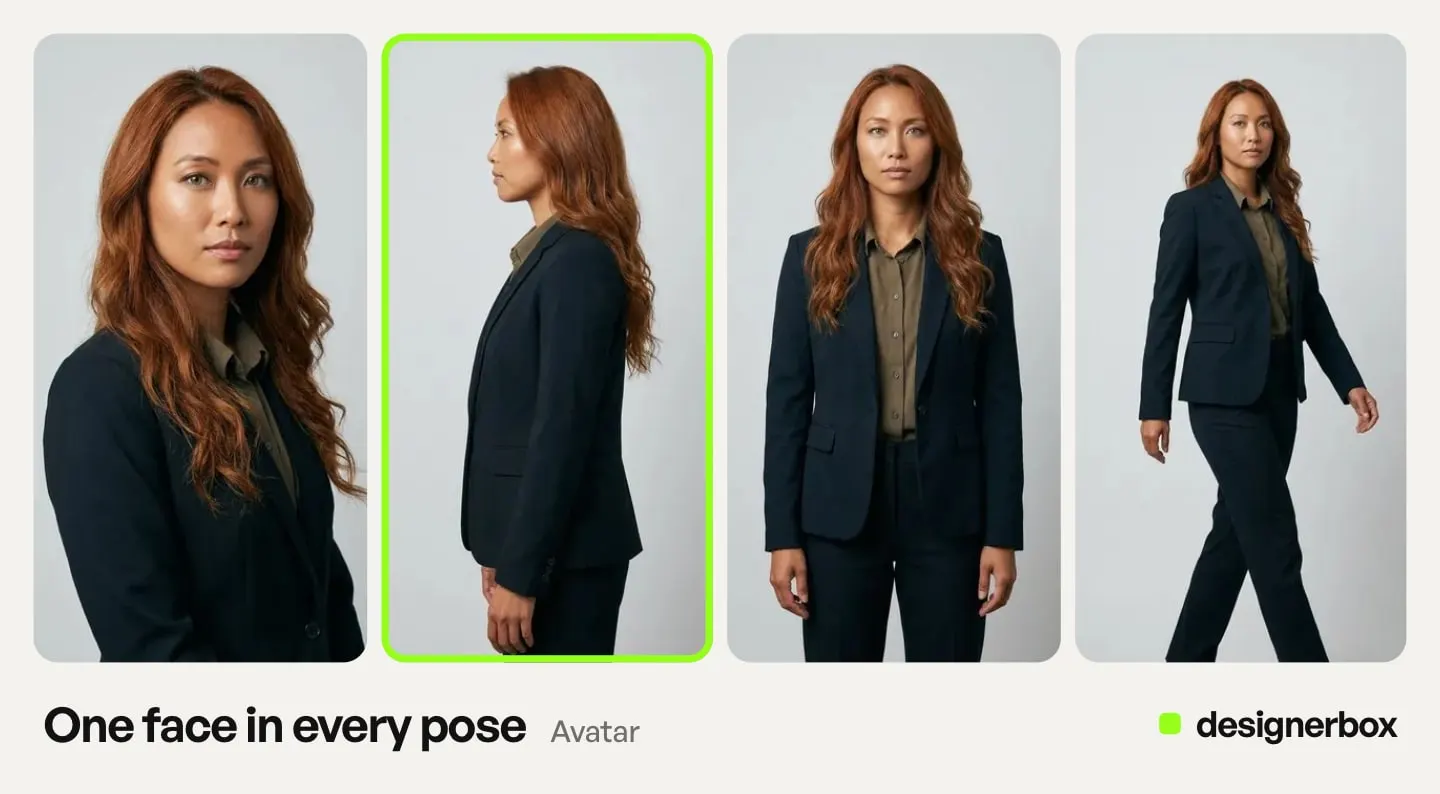
In DesignerBox the character starts as an avatar. You make your own from one sentence or one photo, or start from the ready avatars. An avatar run returns nine fixed poses of one person: front, back, left, right, head shot, full body, walking, running and sitting. That set does the job of the reference set in Step 4, in one run, and the cost shows before you start. A photo of a real person needs that person’s clear permission. The AI character page lets you pick a look, an age range and a scene, then make photos of that character.
The avatar then works in the next steps. The Clothes on a model app puts your garment on it. The Video with a person app makes a clip with it. The video editor’s Talking tab makes a presenter from one picture, a script and one of 20 voices. The AI Influencer community app is a ready start for a new character.
Your bible’s look, palette and rules go into a brand profile, and the workflow reads it on every run. You save the steps once as a workflow, so the next product gets the same character, light and framing. Batch runs that workflow over a sheet of up to 200 products, and you keep or discard each result. An 8-second clip costs 40 to 560 credits, depending on the model.
The character, the garment runs, the video cut and your brand rules sit in one account, so post 300 uses the same face as post 1.
The limits, stated plainly. DesignerBox does not post to a social account: you download the results, or send them with a webhook or an S3 step. Uploading your own photos and the commercial license start on the Pro plan. AI video, virtual try-on and the video editor start on the Premium plan. Plans and credits are on the pricing page.
There is a free plan, and it runs on sample products. Start from a template and see how an avatar and a product step fit together: Get started free.
FAQ
How do you make an AI influencer for free?
Many tools have a free tier or a trial, so you can make a face and a reference set without paying. Check the commercial terms before a brand uses the character in posts or ads. Some tools allow commercial use only on paid plans. OpenArt’s Terms of Service, section 4.1, allow it from the Plus level up (openart.ai/terms, October 2026). Our OpenArt review reads the rest of those terms.
How long does it take to make an AI influencer?
The face can come out of one working session. The brief, the bible, the nine-view reference set and the five tests take longer, and they decide whether the character still looks the same in its thirtieth post. Plan the weekly batch from the start.
Do you have to say an AI influencer is AI?
On the main platforms, yes, for realistic content. TikTok asks creators to label realistic AI-generated content, YouTube asks for the “AI use” setting, and Meta asks for a disclosure on realistic video and audio. In ads, New York has required a synthetic performer disclosure since June 9, 2026.
Can an AI influencer be based on a real person?
Only with that person’s written consent, for both the face and the voice. Training on someone’s photos without consent creates a likeness and publicity problem. In an ad, a face that looks like a celebrity can also break the FTC’s reviews rule, if viewers would think the celebrity gave the testimonial.
Can an AI influencer promote products?
Yes, as a presenter who shows and explains the product. It cannot say it used the product, because an invented person has no experience to report. The FTC’s 2023 Endorsement Guides update clarified that endorsements can include virtual influencers.
How do you keep an AI influencer’s face the same?
Build a reference set of nine views and send it with every request, or train an identity on it in one tool. Test the face across ten scenes before posting, and check every new post against the reference set. An avatar run in DesignerBox returns nine fixed poses of one person.
Sources
- FTC, Consumer Reviews and Testimonials Rule: Questions and Answers (ftc.gov, read October 2026)
- FTC, press release on the updated Endorsement Guides, June 29, 2023 (ftc.gov, read October 2026)
- Google, Gemini API image generation documentation: reference images, characters per model, views at different angles (ai.google.dev, read October 2026)
- TikTok Community Guidelines, integrity and authenticity: AI-generated content labels (tiktok.com, read October 2026)
- YouTube Help, Disclosing use of GenAI content (support.google.com, read October 2026)
- Meta Transparency Center, Community Standards on misinformation: AI disclosure for organic video and audio (transparency.meta.com, read September 2026)
- New York General Business Law section 396-b (nysenate.gov, read October 2026)
- California SB 1050, bill text as approved by the Governor (leginfo.legislature.ca.gov, read September 2026)
- European Commission, FAQ on the transparency obligations under Article 50 of the AI Act (digital-strategy.ec.europa.eu, read October 2026)
- OpenArt Terms of Service, section 4.1 (openart.ai/terms, October 2026)
- DesignerBox AI character page (designerbox.ai/create-character) and DesignerBox pricing (designerbox.ai/pricing), October 2026
Platform rules and laws verified on the pages above in September and October 2026. This is general information, not legal advice. Rules change, so check each page before you launch a character.