AI creative direction is the set of decisions a person makes so that AI images, ads and video look like one brand instead of the model’s defaults. You decide the cast, the references, the product photo, which result ships, the color grade, the type and the words. Then you decide what stays fixed across the whole set and what changes from one asset to the next.
A 20-second reel by the creator Joey Mulcahy listed 18 reasons why creative looks AI (instagram.com/byjoeym, September 2026). Each item is a decision that someone left to the model. Several of them are hard to see in one image. They show when you put 40 assets side by side: the same face, the same frame, the same color grade, the same font.
This guide sorts the 18 by when you make each decision: before the run, at the run, after it, or on every run. It grades each one by the evidence behind it. It also sets one rule for brands: the scene can get grain and flaws, the product cannot. Recorded once, the decisions that stay fixed become a brand record that every run reads.
Key Takeaways
- Direction is a list of decisions. Cast, references, product photo, pick, grade, type and copy. The model uses its default for any decision you do not make.
- Sameness shows across the set. One image can look real. Forty images with the same face, frame and grade do not.
- Research backs 6 of the 18 defaults. Heavy color saturation, too-perfect faces, the first result and AI-written emotional copy all have studies behind them. A centered subject and a voice’s accent have none.
- Choosing is measurable. In a CHI 2025 study, AI images picked by researchers looked more real than 84% of unpicked results from the same prompt.
- The product stays exact. Grain, grade and flaws go on the scene. Amazon says the color in a clothing image must match the product for sale.
- Looking real does not remove the need for a label. Disclosure rules depend on how an image was made and how real it looks. A more realistic AI person is more likely to need one.
What is AI creative direction?
AI creative direction is the job of deciding how AI-made work should look, before, during and after each run. Creative direction for AI images, ads and video covers eight decisions: the people, the references, the product photo, the prompt, which result ships, the finish, the type and the copy. The creative director sets the rules the images follow. Then they check the whole set against those rules.
The model makers now describe prompting as direction. Google published a prompting guide for its Nano Banana image models in March 2026. It tells users to “stop typing keywords and start directing the scene” and to “prompt like a Creative Director” (cloud.google.com, March 2026). Every decision you skip goes to the model’s default.
Why does AI creative look AI?
AI creative looks AI when the model makes decisions that a person should have made. Every model has a default face, frame, light and grade. The model uses those defaults for every decision you do not make. Across 40 assets, the same defaults repeat. That repetition makes the set look AI.
Here are the reel’s 18 items in our own words. We sorted them by when you make each decision and graded each one by what supports it. “Measured” means a study tested it on viewers or on model results. “Vendor guidance” means the model makers’ own documentation recommends it. “Craft judgment” means it is common practice, but we found no study that tests it.
| # | The default | Where you decide it | Evidence |
|---|---|---|---|
| 1 | One default face for everyone | Before the run | Measured |
| 2 | No cast sheet for the person | Before the run | Vendor guidance |
| 3 | No reference images | Before the run | Vendor guidance |
| 4 | Nothing real in the set | Before the run | Craft judgment |
| 5 | A weak product photo as the reference | Before the run | Craft judgment |
| 6 | A prompt copied from someone else | At the run | Vendor guidance |
| 7 | A prompt full of filler words | At the run | Vendor guidance |
| 8 | Every prompt written from zero | At the run | Vendor guidance |
| 9 | The first result ships | At the run | Measured |
| 10 | A small file, or no upscale | At the run | Vendor guidance |
| 11 | The subject always in the center | At the run | Craft judgment |
| 12 | Heavy color saturation | After the run | Measured |
| 13 | No flaw anywhere | After the run | Measured |
| 14 | No finishing pass | After the run | Measured |
| 15 | The model chose the font | After the run | Vendor guidance |
| 16 | The model wrote the copy | After the run | Measured |
| 17 | A voice with no accent | After the run | Craft judgment |
| 18 | No system that holds the rest | Every run | Craft judgment |
The count is 6 measured, 7 vendor guidance and 5 craft judgment. The reel names the items. The order and the grades are ours. For the flaws inside one picture, such as badly drawn hands and broken text, see the signs that show a single image is AI.
Which signs of AI do viewers notice?
The strongest evidence covers four signs: heavy color saturation, faces and skin that look too perfect, the same average face across a set, and a first result that nobody chose. One common belief has no test behind it. We found no study showing that viewers read a centered subject as AI. Treat centering as a sameness problem across a set.
Saturation. A Columbia Business School working paper, written with data from the ad platform Taboola, compared 4,633 AI-made and human-made ads that the same advertisers ran at the same time. The AI ads did better when they did not look like AI. The current version says “aesthetics, lower warmth, and intense color saturation in ads signal AI generation”. Sharper images with larger faces read as human-made (papers.ssrn.com, revised August 2026). Intense saturation signals AI in every version of the paper.
Too perfect. Northwestern researchers wrote that “AI-generated images often look a bit too perfect”, with “glossy, shiny skin” (arxiv.org, June 2024). In a separate test, people judged a face as human more often when it was less symmetrical, less attractive and less smooth-skinned (Psychological Science, November 2023). In the same paper, people judged the AI faces as human more often than the real faces: 65.9% against 51.1%. The faces came from StyleGAN2, an older face model, and all of them were White.
The same face. The Psychological Science study also found AI faces “significantly more average (less distinctive), familiar, and attractive, and less memorable than human faces”. A 2025 study found that Stable Diffusion drew people of the same race to look alike, which the authors call “racial homogenization” (nature.com, April 2025).
The first result. In a CHI 2025 study, AI images picked by the research team looked more photorealistic than 408 of 482 unpicked results from the same prompts, which is 84% (arxiv.org, February 2025).
Voices. In a WPP Media study, fewer than half of the listeners could identify generic AI voices: 42% for single sentences and 47% for full ads. Ads with AI voices matched ads with human voices on brand engagement and purchase intent. Listeners still scored the voices they believed were human as more relatable (wppmedia.com, October 2025). So a voice alone is a weak sign.
Words. In seven experiments, readers who believed AI wrote an emotional marketing message were less willing to recommend the brand and less loyal to it (sciencedirect.com, January 2025).
Before the run: people, references and the product
Before the run you decide who appears in the images, what the model copies from, and which photo of the product it must keep. Every result in the set inherits these decisions. A missing decision here repeats in every image that follows.
Cast on purpose. Write the cast the way a casting director would: age range, body, skin, hair, expression and gaze. Vary it across the set. Image models default to a narrow, thin body ideal, and a brief that asks for a range of bodies does not always get one. OpenAI’s own guide asks you to “describe body framing, relative scale, gaze, and interaction with objects” (developers.openai.com, September 2026).
Give the person a cast sheet. A cast sheet is a face close-up, a profile and a full-body view, used as reference images. Google’s Nano Banana Pro takes up to 5 character images for consistency and up to 14 references in total (ai.google.dev, September 2026). Keep a one-page cast sheet next to the face files. A face that repeats on purpose is a brand character. A face that repeats by default makes the set look AI.
Give every reference a role. OpenAI’s guide says: “Assign roles to references. Identify each input by number and purpose: subject, style, clothing, or background.” Its GPT Image models accept up to 16 input images (developers.openai.com, September 2026). Black Forest Labs’ FLUX.2 [pro], [max] and [flex] models take up to 8 references through the API (docs.bfl.ai, September 2026).
Put something real in every set. Use the real product photo, a real location photo or a real lighting reference. The model copies what you give it, so give it a real photo to copy.
Shoot the product photo well. The product photo is the upper limit of the set. Shoot it sharp, in even light, in its true color, from every angle the set needs. With a soft or badly lit photo, the model has to guess. When it guesses, the product in the result can be wrong. A product photography checklist lists the checks for the source photo before any run.
At the run: prompts, picks and resolution
At the run you decide how you write the prompt, how many results you make, which one you keep and at what size. The model makers’ own guides agree on most of this. Be specific, cut filler, give references a role, expect several tries, and ask for the size you need.
A copied prompt. Black Forest Labs warns that “each model interprets prompts differently, so the same wording will not behave identically everywhere” (docs.bfl.ai, September 2026). A prompt copied from a list also gives you the same look as everyone else who copied it.
Too much filler. The reel calls this overprompting. The model makers want detail, and Google says “Be hyper-specific” (ai.google.dev, September 2026). What they warn against is filler. Black Forest Labs says “Specific detail helps. Filler hurts.” (docs.bfl.ai, September 2026). A 150-word prompt that names the lens, the light and the materials is fine. A list of general quality words, such as “highly detailed” and “8K”, is filler.
Every prompt from zero. Write the brief once as a structure: subject, setting, light, camera and what must not change. Then reuse it. For ads, the structure has six parts, with 24 image prompts to copy. OpenAI’s guide asks you to “organize the prompt as scene, subject, details, and constraints, using labeled sections” (developers.openai.com, September 2026). Some model makers also rewrite your prompt for you. OpenAI says its main model “will automatically revise your prompt” in the Responses API.
The first result. Make several results and choose one against written rules. OpenAI’s image API returns 1 to 10 images per request (developers.openai.com, September 2026). Google’s developer docs say: “Don’t expect a perfect image on the first try” (ai.google.dev, September 2026). Then check the pick with a four-step review that starts with the most costly defects.
Size before upscale. Google’s Nano Banana Pro and Nano Banana 2 return 1K images by default and can return 2K or 4K when you ask (ai.google.dev, September 2026). Ask for the size first. Upscale second, and check the product and any text afterward. An upscaler adds pixels, and it can invent detail. See the guide to low resolution product images. The authors of SeedVR2, a video restoration model, write that it “tends to overly generate details” on inputs with only light damage, such as AI-made video at 720p. The result is sometimes too sharp (arxiv.org, January 2026). Amazon tells sellers: “Do not artificially enlarge small images” (sellercentral.amazon.com, September 2026).
The subject in the center. A centered subject is fine in one image. The problem is repetition: 40 assets with the subject in the same place. The fix depends on where the image will appear. The section on what stays fixed and what varies explains it.
After the run: grade, texture, type and words
After the run you finish the work the way a photographer and a designer would. You grade the color, add texture where a real camera would record it, set the type yourself, and write or edit the words. Each one is a decision the model would otherwise make for you.
Grade the scene. Lower the saturation of the scene to your brand palette. Color grading is a decision about the whole set, so make it once. The guide to AI generated ads covers the Columbia study in full.
Add flaws where a camera would. One of OpenAI’s example prompts asks for “real skin texture” and ends “No glamorization, no heavy retouching” (developers.openai.com, September 2026). Black Forest Labs suggests asking for “real texture (pores, wrinkles, fabric wear, imperfections)” (docs.bfl.ai, September 2026). Put these on skin, hair, props and surfaces. Never on the product.
Do a finishing pass. Crop, grade, clean the edges and check each detail. NIQ tested AI-generated video ads with EEG, which measures brain activity, and with eye tracking. Asked for their impressions, viewers named most of the ads as AI without being prompted. The only ad they did not immediately see as AI “was created by an advertising professional through considerable iterative editing” (nielseniq.com, December 2024).
Set the type yourself. The model makers list text as a known limit. Google DeepMind says its model “can still struggle with small faces, accurate spelling, and fine details” (deepmind.google, September 2026). Use your brand fonts in a design step and set every word and the type on the canvas.
Write the words yourself. In the copy study, the penalty applied to emotional messages that readers believed AI wrote. It was smaller for factual copy and when AI only edited the text. So a person writes or rewrites the emotional line.
Choose the voice like a cast. Pick the accent, age and pace that fit the market. Decide first whether the voice should be AI at all. Gallup found that 62% of US adults call AI-created people or voices in ads unacceptable, even when disclosed (news.gallup.com, August 2026).
What stays fixed and what varies across a set
Keep the product, the type, the palette and the framing rules the same on every asset. The buyer checks these, and they make the brand recognizable. Vary what a real shoot would vary: the people, the pose, the place, the props and the small flaws. Then review the set side by side. A repeat only appears when the assets sit together.
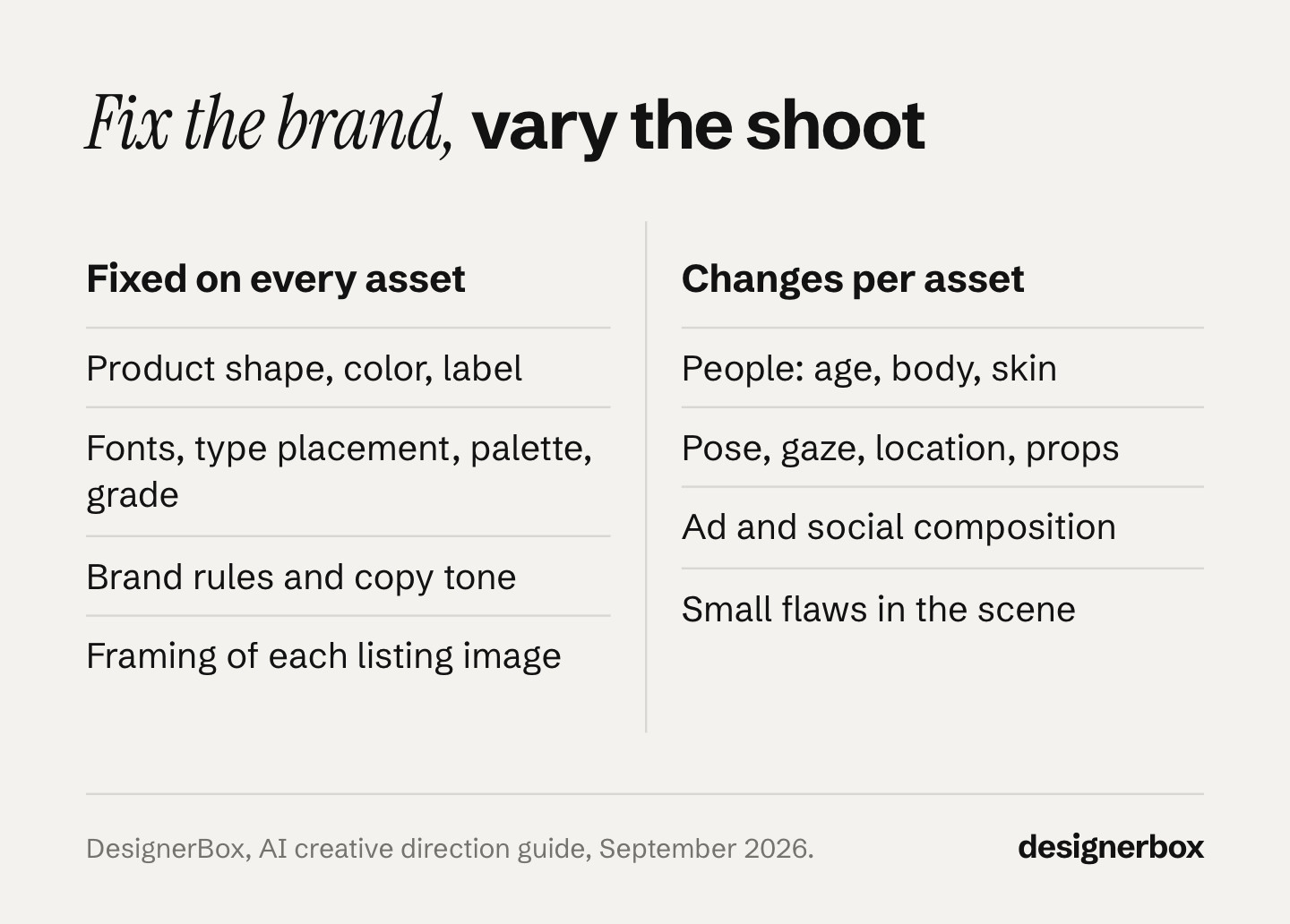
| Stays fixed on every asset | Varies from asset to asset |
|---|---|
| The product: shape, color, label, logo | The people: age, body, skin, expression |
| The fonts and where type sits | The pose and the gaze |
| The palette and the grade | The location and the props |
| The brand rules and the tone of the copy | The composition in ads and social posts |
| The framing of each listing image | The small flaws in the scene |
Framing depends on where the image runs. A marketplace main image follows the marketplace’s rules. Amazon asks for the product to fill 85% of the frame on a pure white background (sellercentral.amazon.com, September 2026). A product page gallery keeps one framing so shoppers can compare products. In ads, social posts and lifestyle scenes, the composition changes from asset to asset.
No added flaws on the product. Amazon’s clothing guide says: “The color in the image must match the product for sale” (sellercentral.amazon.com, September 2026). In a 2014 case, the UK ad regulator ruled against an ad for a nail buffer. Editing, including a brighter nail color, made the result look better than the product could deliver (asa.org.uk, September 2026). Know the line between fixing the light and changing the product. If an edit touches the product, restore the real product pixels.
Getting this wrong has a cost. In Salsify’s 2025 consumer report, 71% of 1,910 US and UK shoppers had returned an item bought online in the past year because of incorrect product content. The survey’s first example was images that did not match the product. Salsify sells product content software and ran the survey itself (salsify.com, fieldwork October 2024).
A written system. Written down, this split is the system that item 18 asks for. A brand guidelines template gives the fixed column 12 sections to fill. When no person steers the process, results can drift to a few safe looks. In one experiment, an image model and a captioning model fed each other’s results in 700 automated loops, with no person involved. Every loop ended with nearly identical visuals, which the authors call “visual elevator music” (cell.com, December 2025). We found no study that tests a production system directly, so the table grades this item as craft judgment.
Does creative that looks real still need an AI label?
Yes, where a rule applies. Disclosure rules depend on how the image was made and how real it looks. Hiding the signs of AI does not remove the duty. So a more realistic AI person is more likely to need a label.
- TikTok asks advertisers to label ads with completely AI-generated or significantly AI-modified media. It counts changes to lighting, brightness or color saturation as small edits. A color grade does not change the label a generated image needs (ads.tiktok.com, April 2026).
- The EU AI Act requires a business that uses an AI tool to make a deep fake to say clearly that it was made or changed with AI, at the latest when people first see it. This has applied since 2 August 2026 (ai-act-service-desk.ec.europa.eu, September 2026). The European Commission’s FAQ says the test covers simulated people who “can plausibly exist”, so an invented person, such as an AI fashion model, can count (digital-strategy.ec.europa.eu, July 2026).
- New York has required ads to clearly disclose synthetic performers, meaning digitally created people, since 9 June 2026 (nysenate.gov, September 2026). California signed a similar law, SB 1050, on 16 September 2026, and it is scheduled to take effect on 1 January 2027 (leginfo.legislature.ca.gov, September 2026).
- The FTC says its reviews and testimonials rule has “no blanket prohibition on the use of AI-generated avatars in marketing”. A fake testimonial is still illegal, and an avatar can still make an ad deceptive (ftc.gov, September 2026).
A label does not repair a misleading image either. The UK ad regulator says “disclosure alone is very unlikely to mitigate the harm caused by a fundamentally misleading message” (asa.org.uk, May 2025). The AI disclosure rules for ads show which of your assets need a label. This is general information, not legal advice.
AI creative direction as a workflow
Anyone can make an AI picture. Making hundreds that still look like your brand is the hard part.
DesignerBox is AI creative production for brands and agencies. Scale your images, ads and video with AI and keep your brand on every piece: build the workflow once with your brand rules, run it on every product, see the cost before each run, and keep everything from the first product photo to the finished ad in one place.
You keep most of the fixed column in a brand record: your logos, colors and fonts, your voice and rules, and each product with its photo and its colors. The template sets the light, the angle and the crop. The workflow reads your brand rules before it runs (DesignerBox brand page, September 2026). Prompt help inside the workflow turns a rough brief into an art-directed prompt. Critic steps score the results of a run, and best-of-N keeps the best one. The image editor makes one edit after another. The picture keeps its detail and resolution.
The varied half is the brief and the references you add per product. Clothing catalog turns one garment into four shots: front, three-quarter, back and a fabric close-up. A saved workflow runs the same way on the next product, and batch runs it over the whole sheet at once. You keep or discard per row, and re-run one row alone. Several of these decisions become workflow steps. The reference photo, the brand record and the text on the picture are each a step. Publish the workflow as an app, and a colleague runs your direction from a short form without reading this list. For an in-house team, that is one workflow per shot type, with your brand rules, for the shop, social posts and ads. The full workflow from the first product photo to the finished ad, in one subscription.
Uploading your own photos, writing your own brief and the commercial license start on the Pro plan. The image editor, relight, the upscaler, AI video and virtual try-on start on the Premium plan. Team features, shared brand kits and white label are on the Ultra plan, and every plan below Ultra is one seat. The free plan cannot make video. Plans and credits are on the pricing page.
There is a free plan, and it runs on sample products. Get started free.
FAQ
What does an AI creative director do?
An AI creative director sets the look for work made with AI models and checks each result against the brand’s rules. They build AI steps into the team’s production, review results before anything ships, and train the team on the tools. The staffing agency Artisan Talent lists these duties (artisantalent.com, June 2025), and a published job ad lists the same work (careers.superside.com, September 2026).
Is an AI art director the same as an AI creative director?
The two roles overlap. A creative director sets the direction for a whole brand or campaign. An art director decides how each piece looks: the image, the layout and the type. With AI models, both choose the cast, the references and the grade. Both check each result against the brand’s rules before it ships.
Should I desaturate AI images?
Lower the saturation of the scene to your brand palette. Intense color saturation signals AI to viewers in every version of a large Columbia Business School ad study. Leave the product at its true color. Amazon requires the color in a clothing image to match the product for sale, and a grade that changes the product breaks that rule.
Do I need to upscale AI images?
Ask the model for the size you need first. Google’s Nano Banana Pro and Nano Banana 2 return 1K images by default and can return 2K or 4K. Upscale only when you still need more pixels. Then check faces, text and the product, because generative upscalers can invent detail. Amazon tells sellers not to enlarge small images artificially. Google Merchant Center recommends images of around 1500 x 1500 pixels or above (support.google.com, October 2026).
How many results should I make before I choose one?
Make several and choose against written rules. In a CHI 2025 study, a pick by the research team looked more real than 84% of unpicked results from the same prompt. OpenAI’s image API returns 1 to 10 images per request. In DesignerBox, critic steps score the results against your rules, and best-of-N keeps the best one. You still keep or discard each result yourself. The cost is shown before the run.
Sources
- Mulcahy, J., “18 Reasons Your Creative Looks AI”, Instagram reel (instagram.com/byjoeym), posted 9 September 2026, viewed September 2026
- Google Cloud, “Ultimate prompting guide for Nano Banana”. cloud.google.com, March 2026, read September 2026
- Google AI for Developers, image generation docs: reference images, 1K default, 2K and 4K, prompting best practices. ai.google.dev, read September 2026
- Google DeepMind, Gemini 3 Pro Image model page. deepmind.google, read September 2026
- OpenAI, image prompting guide. developers.openai.com, read September 2026
- OpenAI, image generation guide (prompt revision) and Images API reference (1 to 10 images per request, up to 16 input images). developers.openai.com, API reference and edit reference, read September 2026
- Black Forest Labs, FLUX.2 overview, prompt building and photorealism guides. docs.bfl.ai, prompt building, photorealistic images, read September 2026
- ByteDance Seed, “SeedVR2: One-Step Video Restoration via Diffusion Adversarial Post-Training”, ICLR 2026, arXiv v2 28 January 2026. arxiv.org, read September 2026
- Exner, Y., Hartmann, J., Ding, Z., Zhang, S. and Netzer, O., “AI in Disguise”, Columbia Business School Research Paper, SSRN 5096969, last revised 12 August 2026. papers.ssrn.com, read September 2026
- Kamali, N. et al., “Characterizing Photorealism and Artifacts in Diffusion Model-Generated Images”, CHI 2025. arxiv.org, read September 2026
- Kamali, N. et al., “How to Distinguish AI-Generated Images from Authentic Photographs”, June 2024. arxiv.org, read September 2026
- Miller, E. J. et al., “AI Hyperrealism: Why AI Faces Are Perceived as More Real Than Human Ones”, Psychological Science, November 2023. journals.sagepub.com, read September 2026
- AlDahoul, N., Rahwan, T. and Zaki, Y., “AI-generated faces influence gender stereotypes and racial homogenization”, Scientific Reports, April 2025. nature.com, read September 2026
- Hintze, A., Proschinger Åström, F. and Schossau, J., “Autonomous language-image generation loops converge to generic visual motifs”, Patterns, December 2025. cell.com, read September 2026
- WPP Media, “AI Voices in Audio Ads: Unpacking Consumer Trust and Engagement”, 27 October 2025. wppmedia.com, read September 2026
- Kirk, C. P. and Givi, J., “The AI-authorship effect”, Journal of Business Research, January 2025. sciencedirect.com, read September 2026
- NIQ, “Will AI-generated advertising disrupt the creative industry?”, 12 December 2024. nielseniq.com, read September 2026
- Gallup, “Americans Aren’t Sold on Businesses Using AI in Advertising”, 19 August 2026. news.gallup.com, read September 2026
- Amazon Seller Central, product image guide (G1881) and clothing image guidelines (G200498950). G1881 and G200498950, read September 2026
- Google Merchant Center Help, image link page, recommended image size. support.google.com, read October 2026
- CAP, “Beauty and Cosmetics: The use of production techniques”. asa.org.uk, read September 2026
- CAP, “Disclosure of AI in Advertising: Striking the Balance Between Creativity and Responsibility”, 29 May 2025. asa.org.uk, read September 2026
- Salsify, 2025 Consumer Research report, fieldwork October 2024. salsify.com, read September 2026
- TikTok Business Help Center, ads policy on misleading and false content, April 2026. ads.tiktok.com, read September 2026
- European Commission, AI Act Article 50 and the Article 50 FAQ (last updated 24 July 2026). AI Act Service Desk and FAQ, read September 2026
- New York General Business Law 396-B. nysenate.gov, read September 2026
- California SB 1050. leginfo.legislature.ca.gov, read September 2026
- FTC, Consumer Reviews and Testimonials Rule: questions and answers. ftc.gov, read September 2026
- Artisan Talent, “AI Creative Director Job Description”, June 2025. artisantalent.com, read September 2026
- Superside careers, “AI Creative Director” job ad (careers.superside.com), read September 2026
- DesignerBox brand page (designerbox.ai/product/brand) and pricing page (designerbox.ai/pricing), September 2026
Research findings, model documentation, platform rules and laws verified from the sources above as of September 2026. The Google Merchant Center image link page was re-checked on 2 October 2026. Platform and legal rules change often. This is general information, not legal advice. Individual results vary.