A talking avatar is a digital presenter that speaks a script on screen. The face comes from a photo, a stock library or a generated character. The speech comes from a synthetic or recorded voice, and the mouth moves to match the words. For a brand or an agency, five parts decide the result: the character, the start frame, the voice, the script and the lip sync.
One clip is easy to make. A series is harder. The presenter in clip twelve must have the same face and the same voice as the presenter in clip one, or viewers stop seeing one person.
Key Takeaways
- A talking avatar has five parts. The character, the start frame, the voice, the script and the lip sync. A weak part shows in every clip.
- The character and the voice are made once. A series reuses both. Each new clip needs only a script and a start frame.
- Audio comes before video in most avatar tools. The mouth follows the audio track, so approve the audio first.
- A synthetic presenter in an ad can need a label. New York requires a disclosure now. California’s law applies from 1 January 2027. The EU has required deep fake disclosure since 2 August 2026.
- A real person’s face or voice needs consent. New York asks for written consent, and California asks for prior consent.
What is a talking avatar?
A talking avatar is a face on screen that speaks words someone typed or recorded. HeyGen describes it as “a digital face, from a photo, stock library, or your own recording, that speaks a script with synced lips and expressions” (heygen.com, October 2026). The definition has three inputs: a face, a script and a voice.
The format replaces a filming day for a presenter clip. A changed script means a new run, and nobody books a room or a camera. Brands use it for product explainers, ad variants, training clips and versions in other languages.
The face is one of three kinds: a stock avatar, an invented character or a clone of a real person. AI spokesperson explains the three kinds and what each one needs.
The five parts of a talking avatar
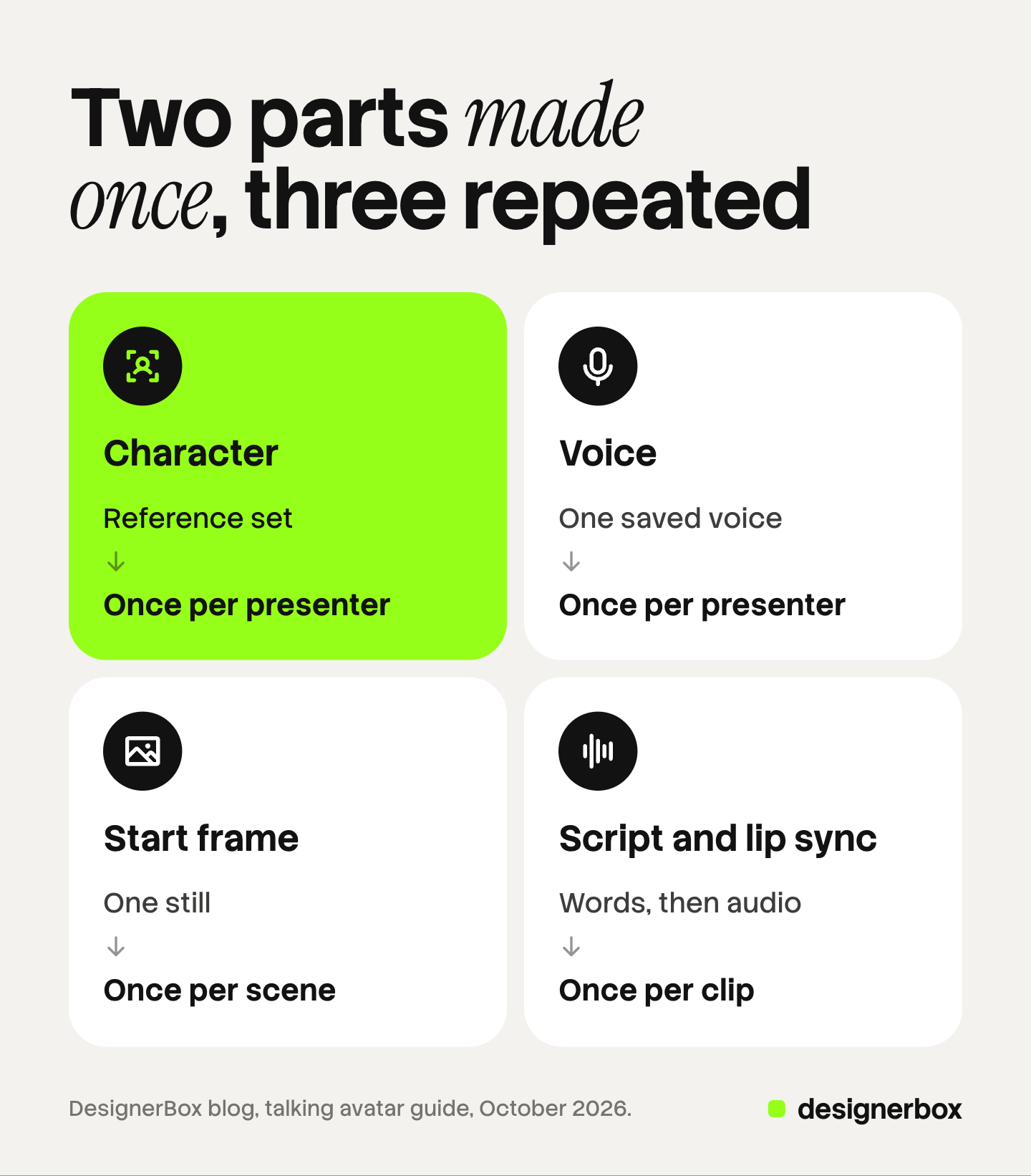
Every talking avatar clip has the same five parts. Some tools hide a part, but each one still exists. The table shows what each part is and how often a series makes it.
| Part | What it is | How often you make it |
|---|---|---|
| Character | The face and body of the presenter, saved as reference images | Once per presenter |
| Start frame | One still image of the presenter in a scene | Once per scene |
| Voice | One saved voice, from a library or a recording | Once per presenter |
| Script | The words for one clip | Once per clip |
| Lip sync | The step that matches the mouth to the audio | Once per clip |
Two parts are made once and three repeat. That split is also where a series breaks. If the character or the voice changes between clips, the presenter becomes a different person.
The character and the start frame
The character is the identity. It is a set of images of one person, and every later step reads that set. A set works better than one image because it shows the face from several directions. AI avatars for brands explains why a face drifts and what stops it.
The start frame is one still image of that character in one scene: a kitchen, an office, a shop floor. Most avatar models take a still as the input. Hedra says its avatar models “take a still either way”, from a photo or from a generated character (hedra.com, October 2026).
Two choices in the start frame carry into the clip:
- The framing. A chest-up shot with the eyes toward the camera suits a presenter. Keep the same framing across a series so the clips sit together in one feed.
- The scene. Everything in the frame stays in the clip. Remove anything you do not want on screen for the full length.
Model rules also apply here. Google’s Veo 3.1 allows only adults when a clip starts from an image (ai.google.dev, October 2026). Check the model’s page before you plan a presenter around it.
The voice
The voice is the second part that a series makes once. It is a saved asset, like the character. Each new script uses the same voice, so the presenter sounds like one person in every clip.

There are two sources. A library voice is ready at once and belongs to nobody the viewer knows. A cloned voice copies a real speaker from a recording. ElevenLabs recommends one to two minutes of clear audio for an instant clone, and asks the user to confirm “that you have the right and consent to clone the voice” (elevenlabs.io, October 2026).
Choose the voice before you write the first script. Pace, accent and age should match the face. Then write the choice down: the voice name, the speed setting and the language. A series that changes any of the three sounds like a new presenter.
The script and the lip sync
The script changes in every clip, and it has to fit the clip length. Some models fix the length in advance. Veo 3.1 makes clips of 4, 6 or 8 seconds (ai.google.dev, October 2026). Hedra’s avatar models run “for as long as the audio runs” (hedra.com, October 2026). So write the script for the tool you use.

Three rules keep a script speakable:
- One idea per clip. A presenter who explains one point is easier to follow and easier to run again.
- Short sentences. Long sentences leave no place for a pause.
- No first-person product story for an invented person. “I used it for a month” claims an experience that nobody had.
Lip sync is the last part. In most avatar tools the order is audio first, then video. The tool makes the speech, and the video step moves the mouth to match that track. So listen to the audio and approve it before you run the video.
Some video models make the picture and the speech in one pass, which gives less control over the exact voice. Realistic AI lip sync compares the two routes.
How does a series reuse one talking avatar?
A series is the same presenter in many clips. The work splits into a setup and a loop.
The setup, done once:
- Build the character and save its reference set.
- Choose the voice and record its name and settings.
- Make one test clip. Check the face against the set, the voice against the choice and the mouth against the words.
Fix problems at the test clip. A fault found at clip one costs one run. The same fault found at clip ten costs ten.
The loop, done for each clip:
- Write the script.
- Make a start frame for the scene.
- Generate the audio and approve it.
- Run the clip and compare it with the test clip.
Keep a short record for the series: the character set, the voice, the framing, the outfit rules and the label text. A new team member can then make clip thirteen the same way. For a clip that starts from an existing photograph of a person, see how to make a photo talk with AI.
Which disclosure and likeness rules apply to a talking avatar?
No rule read for this guide bans a talking avatar. The rules ask for honesty about three things: what the presenter claims, whether the presenter is synthetic, and whose face and voice it is. This is general information, not legal advice.
What the presenter claims. The FTC says its reviews and testimonials rule “has no blanket prohibition on the use of AI-generated avatars in marketing”. An avatar’s message is prohibited under the rule “only if the underlying testimonials were fake or false” (ftc.gov, October 2026).
Whether the presenter is synthetic. Four sources apply to ads:
- New York. A business that makes an ad must “conspicuously disclose in such advertisement that a synthetic performer is in such advertisement”, where it has actual knowledge. Audio advertisements are exempt (nysenate.gov, October 2026). The governor’s office says the law is in effect (governor.ny.gov, October 2026).
- California. SB 1050 covers an ad that “prominently includes a synthetic performer”. The governor signed it on 16 September 2026, and it applies from 1 January 2027 (leginfo.legislature.ca.gov, October 2026).
- The EU. Article 50 of the AI Act has applied since 2 August 2026. The Commission says: “Deployers must disclose deepfake content to a natural person upon first exposure at the latest” (digital-strategy.ec.europa.eu, October 2026). A realistic presenter can meet the deep fake definition.
- The ad platforms. TikTok asks advertisers to “apply the AIGC label” or add their own clear disclaimer, and it rejects or restricts ads with undisclosed AI content (ads.tiktok.com, October 2026). Meta adds an AI info label itself when it detects third-party generative AI in an ad (facebook.com, October 2026).
Whose face and voice it is. A clone of a real person needs that person’s consent. New York requires “written consent” before a business uses a living person’s “name, portrait, picture, likeness, or voice” for advertising (nysenate.gov, October 2026). California requires “prior consent” for a person’s name, voice, signature, photograph or likeness in advertising (leginfo.legislature.ca.gov, October 2026).
An invented character avoids the consent question and keeps the disclosure question. Put the label text in the series record so every clip carries it.
Can you make a talking avatar in Claude or another AI chat?
Yes, when the chat is connected to a product that makes the face, the audio and the video. Claude does not generate video by itself. A connector built on the Model Context Protocol (MCP) gives the chat access to another product’s functions. Anthropic says custom connectors that use remote MCP are available on its Free, Pro, Max, Team and Enterprise plans (support.claude.com, October 2026).
Several vendors now offer this route:
- HeyGen lists MCP as one of three ways to connect its video features, next to an API and skills for coding software (heygen.com, October 2026).
- ElevenLabs has a hosted MCP server for text to speech and audio, with sign-in over OAuth (github.com/elevenlabs, October 2026).
- Higgsfield published a guide in August 2026 that builds a presenter, a voice and a set of talking clips from one Claude chat over its MCP connector (higgsfield.ai, October 2026).
The five parts do not change in a chat. You describe each step in plain words, and the files stay in the connected product.
Open each finished clip in that product, because the chat confirms a run but does not watch the video. Claude AI video generator explains how the chat and the video model split the work. For long training video with a large avatar library, a dedicated avatar platform fits well, and HeyGen vs Synthesia compares the two best-known ones.
Talking avatar series as a saved workflow
DesignerBox is AI creative production for brands and agencies. It makes images, ads and video, and a presenter is one input, like a product photo or a brand rule. Anyone can make an AI picture. Making hundreds that still look like your brand is the hard part.
These parts are live in DesignerBox:
- The character. An avatar run returns nine fixed poses for 25 credits. Six ready-made avatars are also available.
- The voice. Text to speech has 20 voices, so one presenter keeps one voice.
- The lip sync. The talking avatar takes a face and a script, or your own audio, and returns a clip with lip sync.
The start frame is an image step. You make the presenter in a scene, then pass that still to the talking avatar.
A series fits a saved workflow. You build it once with the presenter, the voice and the brand rules. A saved workflow runs the same way on the next script, and batch runs it over a whole sheet of scripts. The full workflow from the first product photo to the finished ad, in one subscription.
The same work runs from an AI chat. DesignerBox MCP connects Claude, ChatGPT or Cursor to your workspace, and your chat client asks you to confirm each run. An 8-second clip costs 40 to 560 credits, depending on the model, and the cost is shown before the run.
The limits are these. DesignerBox does not collect consent for you: a release for a real person is your document, signed before you upload a photo. You download the results, or send them with a webhook or an S3 step. Every plan below Ultra is one seat.
Uploading your own photos and the commercial license start on the Pro plan. AI video, virtual try-on, upscaling, the image editor and the video editor start on the Premium plan. Plans and credits are on the pricing page.
One presenter for each client
An agency builds the presenter once per client and reuses it for every script. See how that works on the agencies page.
FAQ
What is a talking avatar?
A talking avatar is a digital presenter that speaks a script on screen. The face comes from a photo, a stock library or a generated character. The voice is synthetic or recorded, and the mouth moves to match the words.
What is an AI talking avatar made of?
It has five parts: the character, the start frame, the voice, the script and the lip sync. The character and the voice are made once. The other three are made again for each scene or clip.
How do you keep the same talking avatar across many clips?
Save the character as a reference set and save one voice. Use both without changes in every clip. Keep the framing and the outfit rules in a short record, and compare each new clip with the first approved one.
Can you make a talking avatar in Claude?
Yes, with a connector. Claude does not generate video by itself. A product with an MCP server gives the chat its avatar, audio and video functions. HeyGen, ElevenLabs, Higgsfield and DesignerBox each offer an MCP route (heygen.com, github.com/elevenlabs, higgsfield.ai and designerbox.ai, October 2026).
Do you have to label a talking avatar in an ad?
In some places, yes. New York requires a disclosure when an ad contains a synthetic performer, and California’s similar law applies from 1 January 2027. The EU requires disclosure of deep fakes, and TikTok requires an AI label or disclaimer on ads (nysenate.gov, leginfo.legislature.ca.gov, digital-strategy.ec.europa.eu and ads.tiktok.com, October 2026).
Can a talking avatar use a real person’s face or voice?
Only with that person’s consent. New York requires written consent to use a living person’s likeness or voice in advertising, and California requires prior consent (nysenate.gov and leginfo.legislature.ca.gov, October 2026). An invented character avoids this question.
Sources
- FTC, Consumer Reviews and Testimonials Rule: Questions and Answers: ftc.gov, October 2026
- New York General Business Law section 396-b, synthetic performers in advertisements: nysenate.gov, October 2026
- New York Governor, announcement that the synthetic performer law is in effect: governor.ny.gov, October 2026
- New York Civil Rights Law section 50, right of privacy: nysenate.gov, October 2026
- California SB 1050, synthetic performers in advertisements (Chapter 246, Statutes of 2026): leginfo.legislature.ca.gov, October 2026
- California Civil Code section 3344: leginfo.legislature.ca.gov, October 2026
- European Commission, FAQ on transparency obligations under Article 50 of the AI Act: digital-strategy.ec.europa.eu, October 2026
- TikTok, ads policy on misleading and false content: ads.tiktok.com, October 2026
- Meta, AI info labels on ads: facebook.com, October 2026
- Google, Veo video generation in the Gemini API: ai.google.dev, October 2026
- Anthropic, custom connectors using remote MCP: support.claude.com, October 2026
- Vendor pages for HeyGen, Hedra, ElevenLabs and Higgsfield (heygen.com/tool/ai-talking-avatar, heygen.com/integrations, hedra.com/uses/ai-talking-avatar, elevenlabs.io/docs, github.com/elevenlabs/elevenlabs-mcp, higgsfield.ai/blog), October 2026
- DesignerBox MCP page and plans: DesignerBox MCP (designerbox.ai/mcp) and DesignerBox pricing (designerbox.ai/pricing), October 2026
Laws, platform policies and vendor features checked against each source’s own pages as of October 2026. This is general information, not legal advice. Individual results vary.