An AI influencer generator is a tool that makes a reusable AI character and then makes images or video of that same character. The name covers four kinds of tool. One makes still images from a prompt or a reference image. One trains an identity on a set of photos. One makes a talking avatar from a script. One animates a still image with a video model.
The search term has two senses. One is a person who wants a character for a personal account. The other is a brand, an operator or an agency that wants a character the brand owns, for product content. This guide serves the second sense.
A team that needs ten product stills with one face needs a different tool from a team that needs a spoken clip. This guide sorts 10 named tools into the four kinds. Then it covers three more things: how to test a character, who owns the face, and which disclosure rules apply.
Key Takeaways
- One name, four kinds of tool. A character image generator, a trained-identity tool, a talking-avatar tool and a motion model all answer to “AI influencer generator”.
- The input tells you the kind. A prompt or one reference image, a set of 8 to 80 photos, a script, or a still plus a video.
- Most campaigns need two kinds. One kind makes the face. Another kind makes it speak or move.
- Test before you launch. Five tests show whether a character holds: ten images, hands on the product, the label, a second outfit and a video clip.
- The face has an owner. Read the tool’s commercial terms, and never train on a real person’s photos without written consent.
- Disclosure follows the character. New York has required a disclosure for a synthetic performer in an ad since June 9, 2026. The EU’s Article 50 has applied since August 2, 2026.
What is an AI influencer generator?
An AI influencer generator makes one invented person and keeps that person the same across many images or clips. Any image model can make a face once. A character is useful to a brand only when the same face appears in the next image, the next outfit and the next video. So ask of any tool how it holds the identity.
A virtual influencer is the same thing in most uses, and some tools call themselves an AI influencer creator. The method matters more than the name.
Our guide to AI influencer marketing shows how a brand tests three to five characters on one script before a campaign. Our guide to building a consistent AI character covers the reference set that holds one face across a campaign.
The four kinds of AI influencer generator
The four kinds differ in what you give the tool and what you get back. A character image generator takes a prompt or a reference image and returns stills. A trained-identity tool takes a set of photos and returns a saved face. A talking-avatar tool takes a script and returns a spoken clip. A motion model takes a still and returns a moving clip.
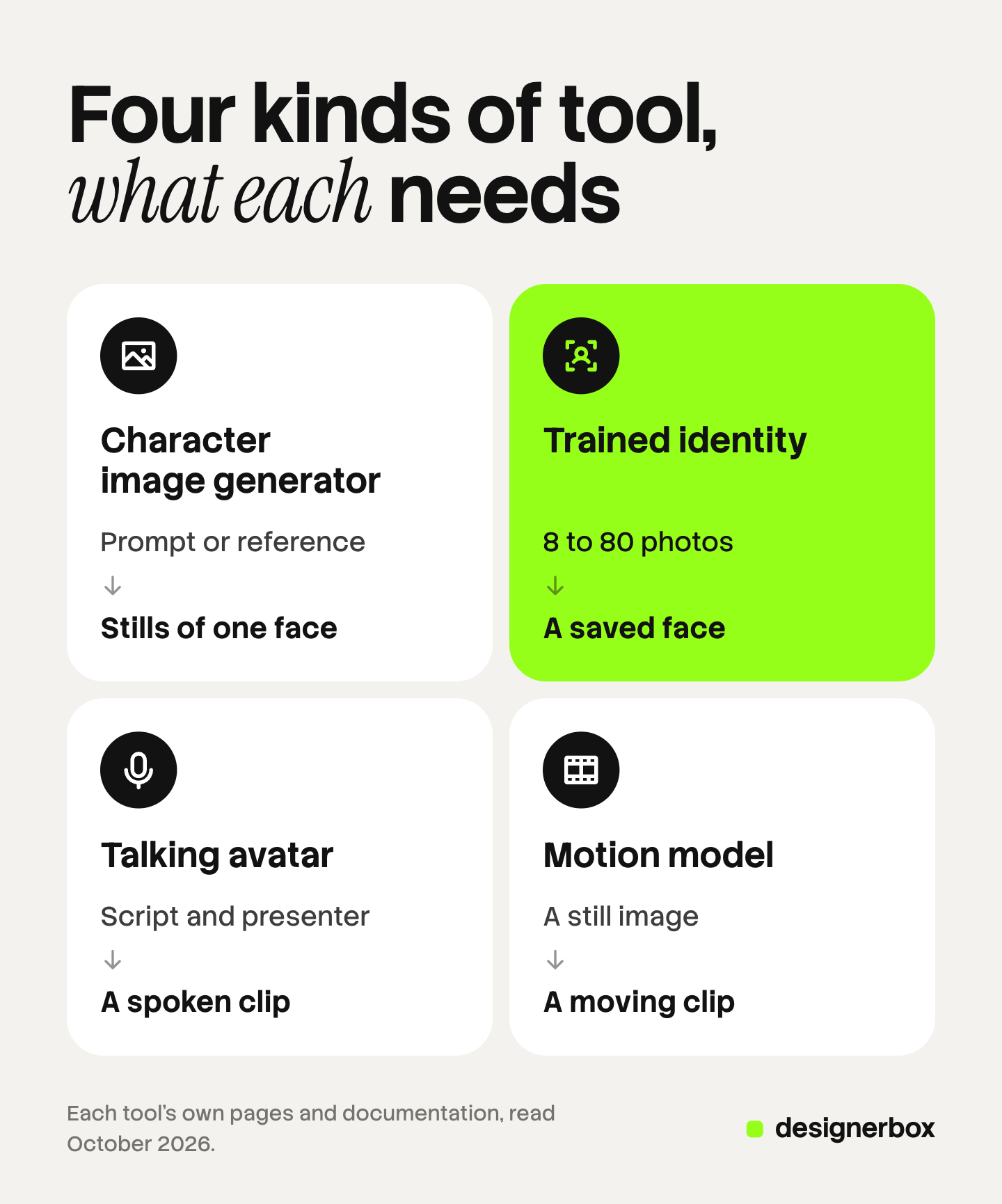
| Kind | What you give it | What you get | How it holds the face |
|---|---|---|---|
| Character image generator | A prompt, or one to five reference images | Still images of one character | It reads the reference again on every image |
| Trained-identity tool | A set of photos of one person, 8 to 80 depending on the tool | A saved identity you select for later images | It learned the face once, from the photo set |
| Talking-avatar tool | A script, plus a stock or custom presenter | A clip of a presenter who speaks the script | The presenter is a fixed asset |
| Motion or video model | A still image, plus a prompt or a reference video | A short clip of the still in motion | The still is the anchor for the clip |
The kinds combine: one makes the face, and another makes it speak or move. Some products cover more than one kind.
Kind 1: a character image generator with a consistency feature
You describe the character, or you upload a reference image. The tool uses that reference on each new still.
OpenArt. Its character page lists three ways to start: a reference image, a text prompt, or a builder with preset options such as age range and style. It says a saved character can be reused in its image generator and its video generator (openart.ai/features/ai-character, October 2026). A trained set of many photos is outside what that page describes.
starryai. Its AI influencer generator page describes portrait variations of the same character across outfits, settings and moods. It advises a stable character prompt that repeats the same core facial features (starryai.com/tools/ai-influencer-generator, October 2026). That page describes still images.
Google’s Gemini image models. Google’s documentation says Gemini 3 Pro Image accepts up to 5 images of characters to maintain character consistency, and Gemini 3.1 Flash Image accepts up to 4. The models mix up to 14 reference images in total (ai.google.dev, October 2026). These are general image models, so you supply the reference images on every request. Our guide to the AI character reference image covers how to build one that holds.
APOB AI. Its site says you upload a photo or write a description, and the tool creates a character portrait. It also lists a talking avatar, lip sync and image to video, so it covers kind three as well (apob.ai, October 2026). Its FAQ says commercial use depends on you holding the copyrights of the source images and any permissions.
Kind 2: a trained-identity tool
You upload a set of photos of one person. The tool learns that identity once, and you select it for later images.
Higgsfield. Its help center says Soul ID is trained once on 20 or more photos of one person, up to 80, and training takes a few minutes. It says the trained character also carries into its Seedance video generation. It states two limits itself: a Soul ID holds one person, and the trained identity is not exportable as a file. The images and videos you make with it are regular downloads (higgsfield.ai help center, “How to Create and Use a Soul ID Character”, October 2026). Higgsfield also has a separate AI Influencer builder for an invented character, set from menus with no prompt (higgsfield.ai help center, “How to Use Higgsfield AI Influencer”, October 2026). Our guide to AI Influencer Studio covers that builder and its latest update.
The Influencer AI. Its site describes two starts: build a persona trait by trait, or upload 8 to 12 photos of a person. From one persona it lists photos, talking videos with lip sync in more than 40 languages, try-ons, product shots and motion transfer from a reference video. It says users have full commercial rights to what they create (theinfluencer.ai, October 2026). So it covers kinds two, three and four in one product.
Kind 3: a talking-avatar video tool
You write a script and choose a presenter. The tool returns a clip of the presenter speaking it, with matched lips.
HeyGen. Its avatar page lists three presenter types: a stock avatar, a Photo avatar that animates a single image, and a Custom avatar built from a short recording of a person. It says custom avatars require verified consent from the person being recreated, and that a custom avatar is not made available to other users (heygen.com/avatars, October 2026).
Synthesia. Its avatar page says its stock avatars are built from footage of real actors who give explicit consent and are paid each time their avatar is used. It says videos publish in more than 140 languages. A custom avatar starts from a photo or a short video, and the person records a live consent statement. Its custom avatar page says it is not possible to create an avatar of anyone without that person’s explicit consent (synthesia.io/features/avatars and synthesia.io/features/custom-avatar, October 2026).
A stock avatar is shared with other customers of the tool, so it is a presenter and not a face your brand owns. Our guide to the AI spokesperson compares stock avatars, custom characters and clones of a real person.
Kind 4: a motion or video model that animates a still
You already have the face as a still image. The model turns that still into a clip.
Kling Motion Control. Kling’s user guide says you upload a reference action video and a character image. The reference video runs from 3 to 30 seconds, and the generated clip matches its length. The guide asks for a single continuous shot with one character fully visible (kling.ai, October 2026).
Google Veo 3.1. Google’s documentation says Veo 3.1 accepts up to three reference images to guide a generated video (ai.google.dev, October 2026). So a set of character stills can anchor a clip.
A motion model needs a good still first, and the still sets the limit for the clip. Our guide to character consistency in AI video covers why a face drifts between clips and how a reference image stops it.
How do you choose an AI influencer generator?
Choose by the content you will publish, then check the input you can supply. Product stills need kind one or two. A spoken explainer needs kind three. A clip of the character using the product needs kind four, with a still from kind one or two. Most brand campaigns use two kinds.
| You need | Start with | Then add |
|---|---|---|
| Stills of one face with your products | A character image generator | Nothing, if the face holds across ten images |
| The same face for months, in many scenes | A trained-identity tool | A motion model for clips |
| A presenter who explains the product | A talking-avatar tool | A custom avatar, with consent |
| A clip of the character moving with the product | A still from kind one or two | A motion or video model |
Also ask where the character lives. A reference image is a file you keep. A trained identity can live only inside the tool that trained it, as the Higgsfield help center says of Soul ID.

How do you test a character before a campaign?
Run five tests on the character before any budget goes behind it. Each test makes a small set of results and has one pass rule. A character that fails a test is not ready for a product campaign.
- The same face across ten images. Make ten stills in ten different scenes and light. Put them in one grid. Pass: a person who has never seen the character says all ten are the same person.
- Hands holding the product. Make five stills where the character holds your real product. Pass: five fingers on each hand, a natural grip, and the product at its true size.
- The product label intact. Zoom in on the label in those five stills. Pass: the brand name, the logo and the main text match your packaging letter for letter.
- A second outfit. Change the outfit and the hair style, and keep the face. Pass: the character is still the same person, and the first outfit does not return on its own.
- A video clip from the still. Turn the best still into a clip of five to eight seconds with one simple action. Pass: the face at the last frame matches the face at the first frame, and the label is still readable.
Watch tests two and three closely. A character tool is built to hold a face, and your packaging is a separate job. Add the product in a separate step, with your real product photo as the reference, and check the label by eye.
Who owns the face of an AI influencer?
Two documents decide who owns the face: the tool’s commercial terms, and a consent from any real person the face is based on. The tool’s terms say what you may do with the images. The consent says whether you may use the likeness at all. A brand needs both in writing before the character appears in a paid ad.
Commercial terms. Tools state this differently. The Influencer AI says users have full commercial rights to what they create (theinfluencer.ai, October 2026). Higgsfield’s blog says a brand may train a Soul ID for a spokesperson as long as it holds usage rights for the photos it uploads (higgsfield.ai/blog, October 2026). Read the full terms, and save a dated copy.
A real person’s photos. Training on a real person’s photos needs that person’s written consent. The talking-avatar tools build this into the product: HeyGen requires verified consent for a custom avatar, and Synthesia requires a live consent statement. An image tool may not ask, so the duty sits with you. Our guide to whether AI fashion models are real people covers the three sources of a face.
A face that resembles a real person. The FTC’s staff guidance says it would violate its reviews and testimonials rule “to use a celebrity avatar without the celebrity’s permission to speak favorably about a product, if reasonable consumers would think that the celebrity actually gave a testimonial” (ftc.gov, read October 2026). New York’s synthetic performer law says it does not limit any rights a person has under sections 50, 50-f and 51 of the state’s Civil Rights Law (nysenate.gov, read October 2026). So check the finished face against known people before launch. If it resembles one, change it.
Which disclosure rules apply to an AI influencer?
No rule read for this guide bans an AI influencer. The rules ask for honesty about two things: what the character claims, and whether viewers are told it is synthetic. The FTC covers the claims. New York, the EU and the ad platforms cover the label. This is general information, not legal advice.
| Rule | What it says | Source |
|---|---|---|
| FTC Endorsement Guides, US | The 2023 update changed the definition of endorsements to clarify the extent to which it includes virtual influencers | ftc.gov, June 2023, read October 2026 |
| FTC reviews and testimonials rule, US | FTC staff say the rule “has no blanket prohibition on the use of AI-generated avatars in marketing”. It applies when the testimonial behind the avatar is fake or false | ftc.gov, read October 2026 |
| New York General Business Law section 396-b | A business that produces an ad must conspicuously disclose that a synthetic performer is in it, where it has actual knowledge. In effect since June 9, 2026 | nysenate.gov and governor.ny.gov, read October 2026 |
| EU AI Act, Article 50 | In application since August 2, 2026. A deep fake must be disclosed at first exposure at the latest. A simulated person only needs to resemble someone who can plausibly exist | European Commission FAQ, read October 2026 |
| Meta ads | Meta says it automatically applies an AI info label when it detects that an ad was created or edited with third-party generative AI tools | facebook.com, read October 2026 |
| TikTok ads | AI-generated ad content needs the AIGC label or a clear disclaimer of your own. Undisclosed AI content means the ad is rejected or restricted | ads.tiktok.com, read October 2026 |
| YouTube uploads | Creators must disclose realistic content that is generated or meaningfully altered with AI, with the “AI use” setting in YouTube Studio | support.google.com, read October 2026 |
Three points follow for a brand character.
The script decides the FTC question. A character that shows and explains the product makes no personal claim. A character that says it used the product claims an experience it never had.
New York’s law fits the invented face. It defines a synthetic performer as a digitally created asset that looks like a human performer “who is not recognizable as any identifiable natural performer”.
The platform label does not replace your own. The EU duty and the New York duty sit with the business that makes the ad. Our guide to AI disclosure in advertising goes through each rule and each placement.
A brand character in a DesignerBox workflow
Anyone can make an AI picture. Making hundreds that still look like your brand is the hard part.
In the four kinds above, DesignerBox covers kind one and kind three, inside a workflow that also holds your products and your brand rules.
The character starts as an avatar. An avatar run returns nine fixed poses for 25 credits. Those nine poses are the reference set for later runs. There are also six ready-made avatars, and a talking avatar with lip sync for a spoken clip. The AI UGC page shows that presenter job from product photo to finished clip.
Dress my model puts one garment on the character. Try-on is garment-only.
Your brand rules sit in a brand profile, and the workflow reads it on every run. Three critic steps score the results of a run, and best-of-N keeps the best one. A person still checks the hands and the label.
You save the steps once as a workflow. The next product then gets the same character, light and framing. Batch runs that workflow over a sheet, and row one and row two hundred get the same standard. You see the cost before you press Run.
The full workflow from the first product photo to the finished ad, in one subscription.
The limits, stated plainly:
- No motion transfer. DesignerBox has no step that copies movement from your own recording onto the character. For that, use a motion model such as Kling Motion Control first.
- No publishing to a social account. You download the results, or send them with a webhook or an S3 step.
- One seat below Ultra. Team features, shared brand kits and white label are on the Ultra plan.
Uploading your own photos and the commercial license start on the Pro plan. AI video, virtual try-on, upscaling, the image editor and the video editor start on the Premium plan. Plans and credits are on the pricing page.
There is a free plan, and it runs on sample products. Start from a template and see how an avatar and a product step fit together: Get started free.
FAQ
What is an AI influencer generator?
An AI influencer generator is a tool that makes a reusable AI character and then makes images or video of that same character. The name covers four kinds of tool: a character image generator, a trained-identity tool, a talking-avatar tool, and a motion model that animates a still.
How do you create an AI influencer for a brand?
Make the face with a character image generator or a trained-identity tool. Run the five tests: ten images, hands on the product, the label, a second outfit and a video clip. Then check the commercial terms and add the disclosure each channel asks for.
Can I train an AI influencer on a real person’s photos?
Only with that person’s written consent. HeyGen requires verified consent for a custom avatar, and Synthesia requires a live consent statement. An image tool may not ask for consent, so the duty sits with the brand. This is general information, not legal advice.
Do I have to disclose a virtual influencer in an ad?
In several places, yes. New York has required a disclosure for a synthetic performer in an ad since June 9, 2026. The EU’s Article 50 requires a label on a deep fake, and a realistic invented person can count. TikTok asks advertisers to label AI-generated ad content.
Can an AI influencer say it used my product?
No. An invented person has not used the product. FTC staff say an avatar’s message is prohibited under the reviews and testimonials rule when the testimonial behind it is fake or false. The character can show the product and explain what it does.
What does a brand character cost in DesignerBox?
An avatar run returns nine fixed poses for 25 credits. An 8-second clip costs 40 to 560 credits, depending on the model. For every other step, the cost is shown before the run. AI video starts on the Premium plan.
Sources
- OpenArt, AI character page: three ways to start a character, reuse in the image and video generators (openart.ai/features/ai-character, October 2026)
- starryai, AI influencer generator page: portrait variations of one character, the stable character prompt, transparency about an AI persona (starryai.com/tools/ai-influencer-generator, October 2026)
- Google, Gemini API image generation documentation: up to 5 and up to 4 images of characters, up to 14 reference images (ai.google.dev, October 2026)
- Google, Gemini API Veo documentation: up to three reference images for Veo 3.1 (ai.google.dev, October 2026)
- APOB AI: character portrait from a photo or a description, talking avatar, lip sync, image to video, commercial use condition (apob.ai, October 2026)
- Higgsfield help center, How to Create and Use a Soul ID Character: 20 to 80 photos, one person, not exportable, use in Seedance (higgsfield.ai/creator-hub/help-center, October 2026)
- Higgsfield help center, How to Use Higgsfield AI Influencer: a character set from menus (higgsfield.ai/creator-hub/help-center, October 2026)
- Higgsfield blog, Soul ID explained: usage rights for uploaded photos (higgsfield.ai/blog, October 2026)
- The Influencer AI: persona builder, 8 to 12 photos, lip sync in more than 40 languages, motion transfer, commercial rights statement (theinfluencer.ai, October 2026)
- HeyGen, avatars page: stock, Photo and Custom avatars, verified consent (heygen.com/avatars, October 2026)
- Synthesia, avatars and custom avatar pages: actor consent and payment, more than 140 languages, live consent statement (synthesia.io/features/avatars and synthesia.io/features/custom-avatar, October 2026)
- Kling, Motion Control user guide: reference video of 3 to 30 seconds, character image, single continuous shot (kling.ai, October 2026)
- FTC, updated Endorsement Guides announcement, June 29, 2023 (ftc.gov, read October 2026)
- FTC, Consumer Reviews and Testimonials Rule: Questions and Answers (ftc.gov, read October 2026)
- New York General Business Law section 396-b: synthetic performer definition, disclosure duty, Civil Rights Law carve-out (nysenate.gov, read October 2026)
- Governor of New York, announcement that the law is in effect, June 9, 2026 (governor.ny.gov, read October 2026)
- European Commission, FAQ on the transparency obligations under Article 50 of the AI Act (digital-strategy.ec.europa.eu, read October 2026)
- Meta Business Help Center, About AI info on ads created or edited with generative AI tools (facebook.com, read October 2026)
- TikTok advertising policies, misleading and false content (ads.tiktok.com, read October 2026)
- YouTube Help, Disclosing use of GenAI content (support.google.com, read October 2026)
- DesignerBox AI UGC page (designerbox.ai/ai-ugc) and DesignerBox pricing (designerbox.ai/pricing), October 2026
Tool features verified on each tool’s own pages in October 2026. Laws and platform rules verified on the pages listed above in October 2026. This is general information, not legal advice. Tools and rules change, so check each page before you launch a campaign.