




An AI storyboard generator turns a script or a short prompt into a sequence of frames, one per shot, so a video gets approved before it gets made. The tools split three ways: script-first boards that also produce a shot list, prompt-first boards that produce styled panels, and animatic tools that put the board on a timeline. Pick by what the board has to do.
Cut a 30-second product film into twelve shots. Generate those as video first and you pay for every wrong guess at the video rate. In DesignerBox, an 8-second clip costs 40 to 560 credits, depending on the model. A brand storyboard shows the same twelve shots as stills first.
This guide compares six tools on the three things that decide the purchase: what you feed in, what comes out, and how a plan is metered. It also covers character consistency, which is the spec that decides whether a board survives past frame four. Written for agency creative directors and marketing leads who need a board signed off before anyone spends video money.
Key Takeaways
- Three board types, three tool shapes. A client approval board wants finish, an internal shot list wants numbering and coverage, an animatic wants timing. Almost no tool is strongest at all three.
- Plans are metered in three different ways. Storyboarder.ai meters by projects and script length in pages (storyboarder.ai, September 2026). Boords sells by seat with a monthly AI image allowance (boords.com/pricing, September 2026). Katalist sells monthly plans with image and video credits (katalist.ai/pricing, September 2026).
- Character consistency is the spec that decides the board. Before you pick a model for the board, check how many character reference images it takes in one request. Google lists the limits for Nano Banana Pro in its docs (ai.google.dev, September 2026).
- The board is the cheap place to be wrong. On Google’s API list prices, twelve Nano Banana Pro frames at 2K cost $1.61, and twelve 8-second Veo 3.1 clips at 1080p cost $38.40 (ai.google.dev, September 2026). An approved frame can then become the first frame of its video shot.
- Most of these tools have a free way to start. Adobe Firefly Boards is free with a free Adobe account on free daily generations (adobe.com, September 2026).
What is an AI storyboard generator?
An AI storyboard generator is software that turns a script or a text prompt into storyboard frames, one frame per shot, with no drawing involved. Most tools run the same three jobs in order: split the text into scenes and shots, write a description for each shot, then generate an image per shot. The stronger ones hold the same character and location across every frame.
The phrase covers two different products. One reads a screenplay and returns a numbered shot list with a frame attached to every row. The other reads a paragraph and returns styled panels you arrange yourself. Read the input format before you read the plan.
The sorting question is whether you already hold a written script or only a description of the idea. That answer narrows the shortlist before price does, because the two halves of this category expect different inputs.
Which AI storyboard generator fits your board?
Match the tool to the input you already have. With a finished script, a script-first tool saves the most work because it does the shot breakdown as well as the frames. With a brief and a product photo, a prompt-first tool gets further, because you are inventing the shots rather than transcribing them. If the board has to move, you need animatic export in the same place.
| Tool | Input it takes | Output it produces | How plans are metered (September 2026) |
|---|---|---|---|
| Adobe Firefly Boards | Prompts, reference shots or sketches | Frames or a full board exported as JPEG, PNG or MP4 | Free with a free Adobe account on free daily generations (adobe.com) |
| Storyboarder.ai | A script as PDF, FDX, Fountain, Word or text | Scene breakdown, shot list, frames, MP4 animatic | A free tier it calls a trial; paid plans metered by projects and script length (storyboarder.ai) |
| Higgsfield Popcorn | Text prompts, optional reference images | Up to 8 consistent images per sequence, export to Sora 2 | Free daily credits for all users (higgsfield.ai) |
| Boords | A script, uploaded images, or frames built in the app | Storyboards, animatics, and a client review link that needs no account | Sold by seat with a monthly AI image allowance (boords.com/pricing) |
| Katalist | A script written in the app or imported | Shot breakdown, a board with consistent characters and scenes, and video export | Monthly plans with image and video credits and a custom enterprise plan, each opening with a free trial (katalist.ai/pricing) |
| DesignerBox | Your product photo plus a shot brief | Storyboard frames made from your product photo, in the same workspace as the video clips | A free plan; paid plans on the pricing page, in credits priced per model |
Two of these are different jobs wearing one label. Storyboarder.ai and Katalist are built around a screenplay and return production paperwork. Firefly Boards and Higgsfield Popcorn are built around a prompt and return images with a look. Boords sells the board as a shared document with review built around it, so it meters by seat alongside a monthly AI image allowance. Higgsfield Popcorn’s export goes to Sora 2, and OpenAI removed Sora 2 and Sora 2 Pro from its API on 24 September 2026 (OpenAI API deprecations, accessed September 2026).
DesignerBox sits on the commercial side of the same problem. The brand storyboard app plans a campaign as a board built from your actual product photo. The frames a client approves are then made of the same source image the finished ads will use.
What is the storyboard actually for?
A storyboard does one of three jobs, and the job decides the tool. A client approval board sells the idea, so it needs finish and consistency above all. An internal shot list runs the production day, so it needs numbering, framing notes and coverage. An animatic tests timing, so it needs frames on a timeline with audio. A spec ad goes one step further and shows a prospect the finished piece. Few products are strongest at all three.
Client approval board. Consistency is the whole thing, because a client reads a drifting character as a mistake rather than a placeholder. Reference-image control matters more than script parsing here.
Internal shot list. Shot numbers, framing labels and full coverage matter more than beauty. A script-first tool hands you those for free because it built them on the way to the images.
Animatic. The board becomes timed video with a scratch voiceover so you can test pacing before committing. Storyboarder.ai exports an MP4 animatic directly (storyboarder.ai, September 2026). On the DesignerBox side, you save the steps from board to clip as a workflow and cut the clips in the video editor.
Is there a free AI storyboard generator?
Yes, and free comes in two shapes. A daily credit allowance refills every day and suits someone boarding one idea a week. A capped free tier gives you a fixed number of projects or generations once, which suits a single evaluation and then stops. Every tool in the table runs on an account.
Adobe Firefly Boards is free with a free Adobe account and free daily generations (adobe.com, September 2026). Higgsfield gives free daily credits to all users (higgsfield.ai, September 2026). Storyboarder.ai has a free tier it calls a trial, with capped projects and image generations, and says free trials stay free (storyboarder.ai, September 2026). Katalist’s plans open with a 7-day free trial (katalist.ai/pricing, September 2026). Canva publishes a free online storyboard maker built on editable templates (canva.com/create/storyboards, September 2026). If you are weighing Firefly for more than boards, Adobe Firefly alternatives by team type compares five other picks.
DesignerBox has a free plan, and it runs on sample products. Uploading your own photos and the commercial license start on the Pro plan. Plans and credits are on the pricing page.
How does script to storyboard actually work?
Script to storyboard works in five steps, in the same order in every tool. Break the script into shots at each cut, camera move or change of subject. Lock the character, the product and the location as reference images. Write one line per shot naming framing and action. Generate the frames. Review the board, then spend video credits only on the shots that survived.
The second step matters most. Reference images are what stop frame nine looking like a different product from frame two, and every consistency feature in the table above depends on them. Where that reference set comes from is the step before the board, and six moodboard tools compared covers turning an agreed direction into a reusable one. Nano Banana Pro takes up to five character images per request (ai.google.dev, September 2026), which is the ceiling worth designing a board around. It is one of the image models on the DesignerBox model list.
The full process, including how to phrase a shot line, is covered in the step-by-step script to storyboard workflow. For the prompt wording itself, writing prompts a video model can follow covers the wording in more detail.
What does an AI storyboard cost in credits?
In DesignerBox, every run shows its cost before you start it, whether it is a board, a single frame or a clip. Stills and clips are priced per model, so there is no flat figure to quote. Video is where most of the spend sits, and the model you pick for the clips sets it.
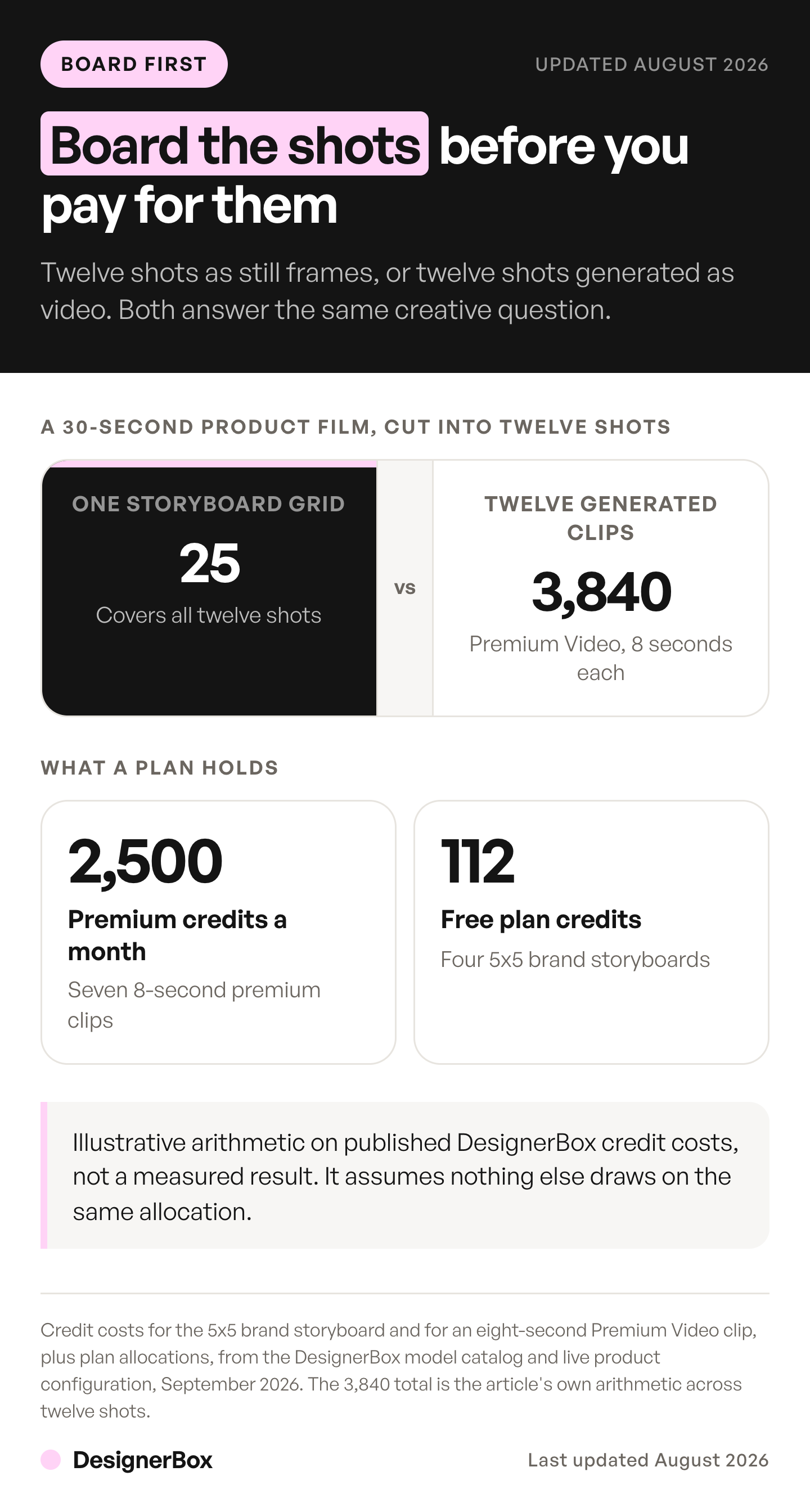
Google’s own API price list shows the gap between frames and clips for the twelve shots of a 30-second product film.
| Model, twelve shots | Google Gemini API list price |
|---|---|
| Nano Banana Pro, twelve frames at 2K | $1.61 |
| Veo 3.1 Lite, twelve 8-second clips at 720p | $4.80 |
| Veo 3.1, twelve 8-second clips at 1080p | $38.40 |
Those totals are illustrative arithmetic on Google’s published per-image and per-second prices (ai.google.dev, September 2026), not a measured result. They are vendor API prices. DesignerBox bills in credits, and AI video starts on the Premium plan. Google lists 22 October 2026 as the earliest shutdown date for the Veo 3.1 preview models in the Gemini API, and names Gemini Omni Flash as the replacement (Gemini API deprecations, October 2026). Recheck these prices after that date.
Read the rows together. Frames cost a small part of what clips cost, and the same twelve shots cost eight times as much on Veo 3.1 at 1080p as on Veo 3.1 Lite. So the expensive decision is which model you run the video on. A board answers the creative question first. What AI video costs per clip breaks the video side down further.
What no storyboard generator does for you
Generated boards are weakest at the judgment a boarding artist is hired for. A board carries staging and intent, and a generated frame shows what a shot looks like without saying why the camera is standing there. Arrows, eyelines and camera-move notation still get added by a person on top of the image.

Consistency has published ceilings, and they sit below a full campaign. Higgsfield Popcorn generates up to 8 images in a single sequence, and describes the process beyond that as theoretically limitless (higgsfield.ai, September 2026). Our Higgsfield AI review covers the rest of that product for brands and agencies. Nano Banana Pro’s five character images is generous for a product film and tight for an ensemble scene.
The board also cannot fix a brief. Frames come back on-model and still wrong when nobody decided what the ad is arguing. Deciding what a set of campaign assets from one product photo has to prove comes before any of this. After the board, the six rules that decide whether an AI product video works cover what changes once a model draws each shot.
Which tools take the board through to video?
Tools take a board through to video in two different ways. An animatic times the frames you already hold, and Boords, Storyboarder.ai and Adobe Firefly Boards each export one. A generated clip makes the subject move, which is a model call. Higgsfield Popcorn exports a sequence to Sora 2, Katalist turns approved shots into video, and DesignerBox runs them from the same frames (boords.com, storyboarder.ai, adobe.com, higgsfield.ai, katalist.ai, September 2026). OpenAI removed Sora 2 from its API on 24 September 2026, so check what that export does now.
The handover is worth reading closely, because an approved frame should become the first frame of the shot rather than a mood reference the model reinterprets. Veo 3.1 accepts up to three reference images of a person, character or product, and always generates audio with the video. Clip lengths are 4, 6 or 8 seconds, and 1080p and 4K are available at 8 seconds only (ai.google.dev, September 2026).
Those limits set the shape of the board. If your finished shots are 8 seconds, a 12-shot board is a 96-second film, and every frame you approve is a clip you have already paid to specify. The takes you never generate are the saving. Three shots at three takes each is a planning figure of about 45 generated seconds for one 15-second ad, priced out in what a shipped AI video ad costs. On the DesignerBox side, the Video ad with several scenes template sits in the same account as the boards.
One board, one workflow
DesignerBox is AI creative production for brands and agencies. The board and the clips sit in one workspace, so you can animate an approved frame into its shot. Save the steps from brief to board to clip as a workflow, and it runs the same way on the next product. You set the brand once, and the workflow reads it on every run. Publish the workflow as an app, and a colleague adds the next product photo and presses Run. Batch runs one workflow over a whole sheet of products.
Start from a template, add your brand and your products, and run it. See the templates.
FAQ
What is the best AI storyboard generator?
There is no single answer, because the tools split by input. Script-first products like Storyboarder.ai and Katalist read a screenplay and return a shot list with frames. Prompt-first products like Adobe Firefly Boards and Higgsfield Popcorn read a description and return styled panels. Boords meters by seats and a monthly AI image allowance, for teams reviewing boards together. Pick on the input you already hold.
Is there a free storyboard generator with no sign up?
Not among the tools compared here. Each one runs on an account. Adobe Firefly Boards is free with a free Adobe account on daily generations, Higgsfield gives free daily credits to all users, and Storyboarder.ai has a free tier it calls a trial (adobe.com, higgsfield.ai, storyboarder.ai, September 2026).
Can these tools build a storyboard from a script?
Yes. Storyboarder.ai accepts a script as PDF, FDX, Fountain, Word or plain text and returns a scene breakdown, a shot list and frames (storyboarder.ai, September 2026). Katalist works from a written script as well (katalist.ai, September 2026). Prompt-first tools expect a description per frame instead, so you do the shot breakdown yourself before you generate anything.
How do you keep the same character across storyboard frames?
Lock the character as a reference image before you generate frame one, then pass that same reference into every frame. Nano Banana Pro takes up to 14 reference images, including up to 5 character images, and outputs at 1K, 2K or 4K (ai.google.dev, September 2026). Regenerating a face from a text description alone is what produces drift by frame four.
How much cheaper is a storyboard than generated video?
On Google’s API list prices, twelve Nano Banana Pro frames at 2K cost $1.61, and twelve 8-second clips on Veo 3.1 Lite at 720p cost $4.80 (ai.google.dev, September 2026). The board answers the creative question before you pay for video. In DesignerBox, the cost of every run is shown before you start it.
Can a storyboard frame become a video shot?
Yes, which is the argument for boarding inside a tool that also generates the video. Veo 3.1 accepts up to three reference images of a person, character or product, always generates audio, and runs at 4, 6 or 8 seconds (ai.google.dev, September 2026). The approved still becomes the shot’s first frame instead of a separate reference.
Do AI storyboards replace a storyboard artist?
No. A generated board shows what each shot looks like, and it does not carry the staging logic, eyelines, camera-move notation or coverage judgment a boarding artist brings. Teams use generation to get a rough board in front of a client fast, then bring a person in on the sequences that carry the idea. The two jobs stack.
Sources
- ai.google.dev, image generation, September 2026. Nano Banana Pro reference-image and character limits, and 1K/2K/4K output.
- ai.google.dev, Veo, September 2026. Veo 3.1 image-based direction, three reference images, native audio, 4/6/8 second clips, 1080p and 4K at 8 seconds only.
- ai.google.dev, pricing, September 2026. Nano Banana Pro per-image and Veo 3.1 per-second list prices.
- ai.google.dev, deprecations, October 2026. Earliest shutdown date of 22 October 2026 for the Veo 3.1 preview models in the Gemini API, and the named replacement.
- OpenAI API deprecations, September 2026. Sora 2 and Sora 2 Pro removal from the API on 24 September 2026.
- adobe.com/products/firefly/features/storyboard.html, September 2026. Firefly Boards inputs, export formats, free access with a free Adobe account and free daily generations.
- storyboarder.ai and app.storyboarder.ai/pricing, September 2026. Script formats, MP4 animatics, the free trial tier, and how paid plans are metered.
- higgsfield.ai/storyboard-generator, September 2026. Popcorn inputs, 8 images per sequence, export to Sora 2, free daily credits.
- boords.com and boords.com/pricing, September 2026. Script and image inputs, storyboards, animatics, the no-account client review link, seat-based plans and AI image allowances.
- katalist.ai and katalist.ai/pricing, September 2026. Script input, shot breakdown, board and video output, monthly plans with image and video credits, the enterprise plan, and the free trial.
- canva.com/create/storyboards, September 2026. Free template-based storyboard maker.
- DesignerBox pricing page (designerbox.ai/pricing), September 2026. Plan gates and the video credit range.
Tool plan metering and model capabilities checked against vendor documentation and published plan pages as of September 2026. Google’s Veo 3.1 shutdown dates were re-checked on 7 October 2026. Individual results vary.