A product photography style guide is the document that tells every photographer, retoucher and AI tool how your product images must look. It fixes the background, light, framing, angles, color, styling, retouching, AI use and export size. Each one is written as a value someone can check. Write it once, test it on a stranger, and update it when a channel changes its rules.
The second shoot is where a style guide gets tested. The first photographer helped write the guide, so the guide looked complete. The second photographer reads “bright, clean, natural” and shoots something bright, clean and different. The supplier sends images that follow no guide at all. An AI tool never opens the PDF. Six months later the collection page shows three whites and two shadow directions.
This guide turns each section into a rule someone can check, with a template to copy and the marketplace rules to add. It is for brands with 20 to 500 products and for agencies that keep one guide per client. Consistent product images covers the tools that hold each layer. This article covers the document those tools follow.
Key Takeaways
- A style guide is a list of checkable values. “Soft light” is taste. “Key light from the left, one soft shadow under the product” is a rule.
- Ten sections cover product photos. Scope, background, light, framing, angles, color, styling, retouching, AI use and export.
- Marketplaces write part of it for you. Amazon’s main image needs pure white and the product at 85% of the image. Google Merchant Center does not accept watermarks or added logos.
- A 2026 guide needs an AI section. Suppliers, retouchers and your own team already use AI tools.
- Test the guide on someone new. Give it to a person who was not in the room, and compare 12 thumbnails.
- Give the guide an owner and a version number. Channel rules change, and Google’s 500 x 500 px minimum starts on 31 January 2027.
What is a product photography style guide?
A product photography style guide is a short document that sets how every product image looks. It names one background, one light setup, one framing rule, an angle list for each product type, one color standard, the styling rules, the retouching limits, the AI rules and the export sizes. Anyone who makes or edits an image reads it first. Anyone who approves an image checks against it.

Shoppers look at images before anything else. In Baymard Institute’s usability testing, 56% of users started by exploring the product images as their first action on a product page (baymard.com, published April 2020, read September 2026). The same research found that sites with high-resolution images on every product felt more polished to users.
Where the guide lives matters less than whether people use it. Shopify’s own article on the topic shows a clothing brand that put its photography rules inside its main brand guidelines (shopify.com, May 2025, read September 2026). A separate file for product photos is easier to hand to a supplier.
How is a style guide different from a shot list or a brand kit?
Three documents often get mixed up. Each one answers a different question, and a team needs all three.
| Document | The question it answers | How long it lasts | Who reads it |
|---|---|---|---|
| Style guide | How must every image look? | Until you change the brand’s look | Photographers, retouchers, suppliers, AI tools |
| Shot list | Which images do we make on this shoot? | One shoot | The photographer and the stylist on the day |
| Brand kit | Which files do we use? | Until the files change | Anyone making a design or an ad |
The style guide sets the rules. The shot list applies them to one shoot, row by row. The brand kit holds the logo, fonts and color files. A shot list without a style guide produces the right images in the wrong look.
The ten sections of a product photography style guide
Every section needs a value, not an adjective. The test for each line: could a new photographer check their own image against it, without asking you?
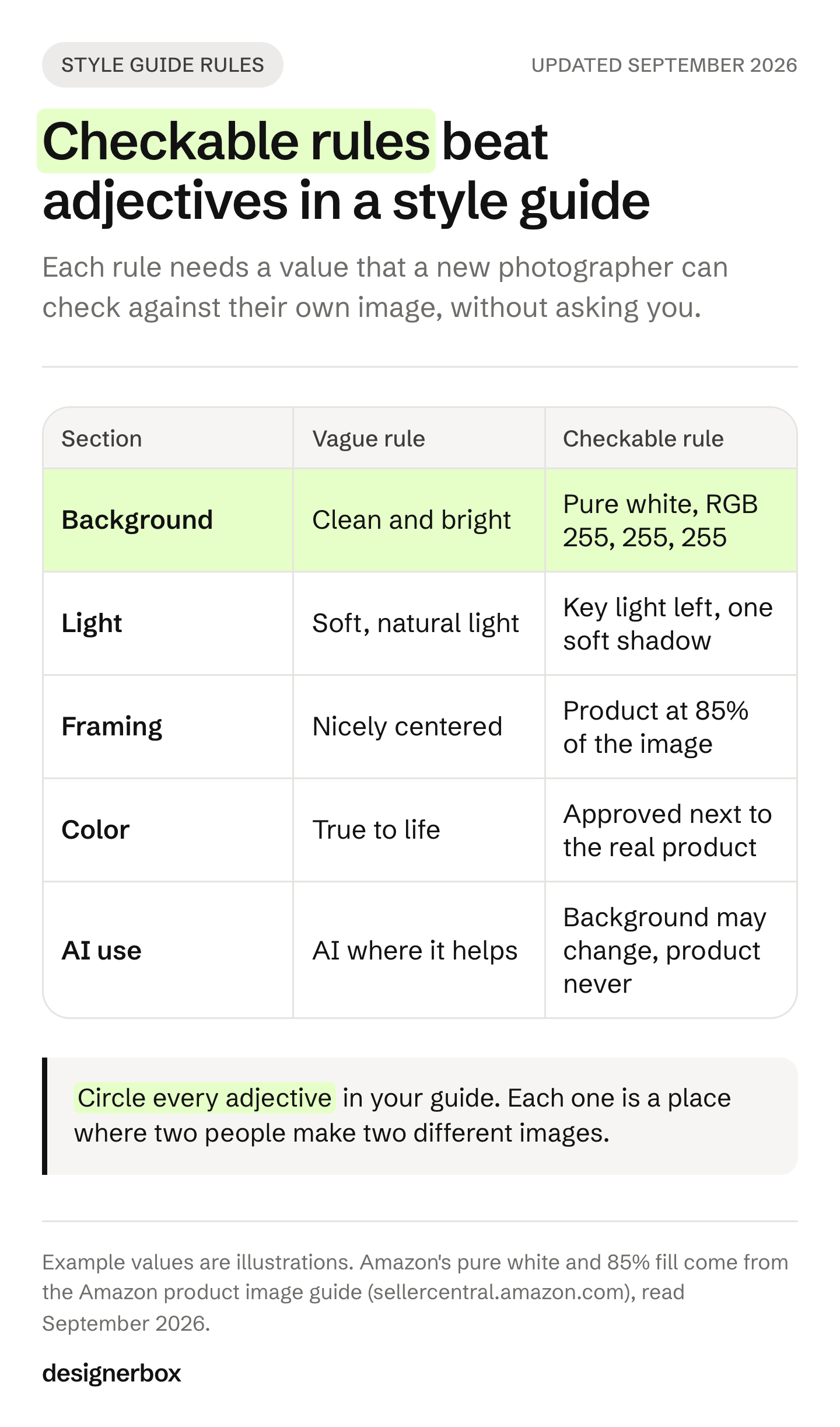
| Section | A vague rule | A rule someone can check |
|---|---|---|
| 1. Scope | ”All our product photos" | "Main and gallery images for the store, Amazon and Google Shopping. Ads have their own guide.” |
| 2. Background | ”Clean and bright" | "Pure white, RGB 255, 255, 255, on every main image” |
| 3. Light | ”Soft, natural light" | "Key light from the left. One soft shadow under the product, falling right.” |
| 4. Framing | ”Product nicely centered" | "Product at 85% of the image, centered, same margin on every side” |
| 5. Angles | ”Show all sides" | "Shoes: single shoe, facing left, 45 degrees first, then side, back, sole, top” |
| 6. Color | ”True to life" | "One white balance for every shoot. Approve color next to the physical product.” |
| 7. Styling | ”Minimal props" | "No props on main images. Gallery image 4: one prop from the approved list.” |
| 8. Retouching | ”Light retouching" | "Remove dust, lint and loose threads. Never change shape, color, print or logo.” |
| 9. AI use | ”AI where it helps" | "AI may change the background and scene. It never changes the product.” |
| 10. Export | ”High resolution" | "2048 x 2048 px square, JPG, named sku_color_angle.jpg” |
The values in the right column are examples. Yours will differ. The shape of the rule is what carries over.
Light and color
Light and color drift in different places. Light drifts on set, when a second photographer puts the key light on the other side. Color drifts in editing, when each retoucher trusts their own screen. So write two separate rules.
For light, name the direction of the key light, the kind of shadow and where the shadow falls. A sketch of the setup from above helps more than any adjective. Fixing product photo lighting without a reshoot covers what to do when the light rule was broken.
For color, set one white balance value for every shoot. Then name who approves color and how: next to the real product, on a calibrated screen, before export. A set can match itself and still show the wrong color on every product. How to test AI product photos for accuracy covers that second check.
Angles
Write one angle list per product type, in order. Shoes, bags, clothing and jewelry need different lists. Amazon sets part of it for some categories. For footwear the main image shows a single shoe, facing left, at a 45-degree angle. For adult clothing the main image shows the item on a standing model (Amazon product image guide, read September 2026). The seven angles every listing needs gives a starting list.
Retouching
The retouching section says what an editor may remove and what they must never touch. Remove dust, lint, loose threads and fingerprints. Keep the fabric texture and the real color. Never change the product’s shape, print, logo or size. The last rule protects you from returns: the customer should receive the product the photo showed.
AI use
A 2026 guide needs an AI section, because suppliers, retouchers and your own team already use AI tools. Write three rules:
- What AI may change. For example: the background, the scene, the model and the light direction.
- What AI must never change. The product’s shape, color, print, logo, text, stitching and size.
- What stays on the file. Google Merchant Center requires AI-made product images to keep metadata that says AI made them. Its example is the IPTC DigitalSourceType value TrainedAlgorithmicMedia (Google Merchant Center image requirements, read September 2026). Amazon asks sellers to tag images of photorealistic people made fully by AI with the keyword contains-synthetic-performer in the XMP dc:subject field (Amazon product image guide, September 2026).
Etsy is stricter about the source. It requires original photos of the actual product, not renderings or stock photos, with a few exceptions (Etsy listing image requirements, read September 2026). Its image rules do not mention AI. If you sell on Etsy, write that channel’s rule into the guide on its own line.
Marketplace rules to copy into your style guide
Each marketplace already sets some of your values. Copy them into the guide as rules for that channel, with the date you read them. Platform rules change, so check each page before a big shoot.
| Channel | Rule | Source |
|---|---|---|
| Amazon | Main image on pure white, RGB 255, 255, 255 | Amazon product image guide |
| Amazon | Product fills 85% of the main image | Amazon product image guide |
| Amazon | 500 px minimum on the longest side. 1,000 px or more turns on zoom | Amazon product image guide |
| Google Merchant Center | Main image shows the whole product without staging | Merchant Center image requirements |
| Google Merchant Center | No watermarks, promotional text, borders or added logos | Merchant Center image requirements |
| Google Merchant Center | Recommended: product at 75% to 90% of the image, on white or transparent | Merchant Center image requirements |
| Google Merchant Center | At least 500 x 500 px from 31 January 2027 | Merchant Center image size change |
| Shopify | A 2048 x 2048 px square usually displays best. Main images need a consistent aspect ratio to display at the same size | Shopify Help Center |
| Etsy | Original photos of the actual product. At least 2000 px wide and tall is recommended | Etsy Help and listing image requirements |
Two rules conflict in a useful way. Amazon asks for the product at 85% of the image, and Google recommends 75% to 90%. A single fill of 85% satisfies both, so one export can serve two channels. Where rules do conflict, write one export per channel and name each file for its channel.
A product photography style guide template
Copy this table into a document and fill in the middle column. Keep it to one page for the main rules. Put the angle list per product type on a second page.
| Field | Your value | How to check it |
|---|---|---|
| Version and owner | v1.0, owner’s name, date | The date is under 6 months old |
| Channels covered | Store, Amazon, Google, Etsy | Every channel you sell on is listed |
| Main image background | Color value or named scene | Sample the pixel value in the corner |
| Gallery backgrounds | Allowed scenes or colors | Compare with the approved examples |
| Key light | Direction, height, softness | Shadow falls the same way on every product |
| Shadow | Type and direction | Same as above |
| Fill and margin | Product height as a percentage, margin | Measure one image per batch |
| Aspect ratio and size | Per channel | Check export settings before upload |
| Angle list | Per product type, in order | Count images per product |
| White balance | One value for every shoot | Neutral gray card reads neutral |
| Color approval | Who approves, and against what | Approved next to the physical product |
| Props and surfaces | Approved list | Nothing outside the list |
| Models | Approved faces, poses, crop line | Compare with the pose sheet |
| Retouching | What to remove, what never to change | Before and after at full size |
| AI use | May change, never change, metadata | Metadata present on AI files |
| File naming | Pattern, for example sku_color_angle | Names sort in angle order |
| Approved examples | Three images that pass, three that fail | Every new image sits beside them |
The last row matters most. Three passing images and three failing images, each with a one-line reason, teach faster than any paragraph. Put them on the first page.
How do you test a style guide before you share it?
Give the guide to someone who was not in the room, with three products they have not seen. Ask them to make or brief the images using only the document. Then place their results beside your approved examples. Every question they ask you is a missing rule.
Then run a grid test on your wider catalog:
- Pick 12 products from at least three sources: an old shoot, a new shoot and a supplier.
- Export the thumbnails at the size your collection page shows them.
- Place them four across and three down.
- Check one section at a time. Background, then light, then framing, then color.
- Mark every break against the section it broke.
Then read the guide for adjectives. Circle every word like “clean”, “bright”, “natural”, “premium” or “minimal”. Each one is a place where two people will make two different images. Replace it with a value, or delete it.
How do you keep a style guide current?
A style guide goes out of date in two ways. The brand changes its look, or a channel changes its rules. Give the guide one owner, a version number and a short change log at the end. Every image brief then names the version it follows.
Put channel dates in the log when they arrive. Google Merchant Center starts enforcing its 500 x 500 px minimum on 31 January 2027 (Merchant Center image size change, September 2026). Amazon added its synthetic performer tag for AI-made people in July 2026. Both changed what a correct export looks like. An old guide can approve an image that the channel now rejects.
An agency keeps one guide per client brand. The sections stay the same, and only the values change. That makes a new client quicker to start: copy the template, fill in the values with the client, and test it on three products before the first full batch.
A style guide the workflow reads
DesignerBox is AI creative production for brands and agencies. A written style guide only works when every person and every tool follows it. In DesignerBox the rules become part of the workflow, so the tool does not need to read a PDF.
Anyone can make an AI picture. Making hundreds that still look like your brand is the hard part. You set the brand once, in a brand profile with your logo, fonts, palette and rules. The workflow reads that profile on every run. You set the background, light, framing and model once, in its steps. The next product runs through the same steps.
Batch runs one workflow over a whole sheet of products. You review the results in one pass, keep or discard per row, and re-run one row alone. Critic steps score the results of a run, and best-of-N keeps the best one. The cost is shown before you press Run.
The full workflow from the first product photo to the finished ad, in one subscription. An agency builds one brand profile and one workflow per client, and the guide to client brand consistency covers that job.
The limits, stated plainly (DesignerBox pricing, September 2026):
- The written guide still matters. Photographers, suppliers and retouchers outside DesignerBox still need the document.
- Color is still your check. Compare results with the physical product before they reach your store.
- Metadata is your check too. Confirm each channel’s AI rules before you upload.
- Plan gates apply. The commercial license starts on the Pro plan. Team features and shared brand kits are on the Ultra plan, and every plan below Ultra is one seat.
Plans and credits are on the pricing page.
A free plan for your first run
Start from a template, add your brand and your products, and see the cost before you run it.
FAQ
What should a product photography style guide include?
It should include ten sections: scope, background, light, framing, angles, color, styling, retouching, AI use and export. Each section needs a value someone can check, not an adjective. Add three approved images and three rejected images, each with a one-line reason, on the first page.
How long should a photography style guide be?
Keep the main rules to one page, so people read all of it. Put the angle list for each product type on a second page. Mood boards and brand stories can live in the brand guidelines. A long guide that nobody finishes holds nothing steady.
What is the difference between a style guide and a shot list?
A style guide sets how every image looks, and it lasts until the brand changes its look. A shot list names the images for one shoot, row by row. The shot list follows the style guide, so write the style guide first.
Do I need a separate style guide for Amazon?
You need separate rules for Amazon, not a separate guide. Add an Amazon row to each section where its rules differ: pure white main images, the product at 85% of the image, and its angle rules for shoes and adult clothing. Keep the rest of the guide the same.
Should a style guide cover AI-generated images?
Yes. Say what AI may change, what it must never change, and which metadata stays on the file. Google Merchant Center requires AI-made product images to keep the metadata that says AI made them. Amazon asks for a tag on photorealistic people made fully by AI.
Who should own the product photography style guide?
One person should own it, usually the ecommerce or brand lead. The owner approves changes, keeps the version number and dates each change. Without one owner, each photographer edits the guide in their head, and the catalog starts to drift.
Sources
- Baymard Institute: 56% of users’ first action on a product page was exploring the images (baymard.com, published 2 April 2020, read 24 September 2026)
- Shopify blog, Brand Photography Style Guide: a brand that put its photography rules inside its brand guidelines (shopify.com, 28 May 2025, read 24 September 2026)
- Amazon product image guide: pure white, 85% fill, 500 px and 1,000 px thresholds, the footwear angle, adult clothing on a standing model, and the contains-synthetic-performer tag (sellercentral.amazon.com, read September 2026)
- Google Merchant Center image requirements: whole product without staging, no overlays or borders, the 75% to 90% recommendation, and the AI metadata rule (support.google.com, read 24 September 2026)
- Google Merchant Center image size change: 500 x 500 px minimum from 31 January 2027 (support.google.com, read 24 September 2026)
- Shopify Help Center, product media types: the 2048 x 2048 px square and a consistent aspect ratio (help.shopify.com, read September 2026)
- Etsy listing image requirements and Etsy Help: original photos of the actual product, and the 2000 px recommendation (etsy.com, read September 2026)
- DesignerBox brand, workflows, batch and pricing pages (DesignerBox, September 2026)
Marketplace rules verified from each platform’s own pages in September 2026. Platform rules change often, so check each page before a shoot. The example values in the tables are illustrations, not requirements. Individual results vary.