SKU images are the product photos tied to one stock keeping unit: one exact color, size or material of a product. Each SKU needs one assigned image that shows its version, and two sizes of one color can share it. Images that look the same for every version, such as a size chart or a fabric close-up, belong to the parent product and are made once.
Most image plans count products. A store counts SKUs. One linen shirt in four colors and five sizes is one product and 20 SKUs. Plan a full photo set for each of the 20 and you make far more images than the shopper will ever see.
This guide is for a brand with 20 to 500 products, or the agency that makes its images. It defines the terms, shows which images are made per SKU and which are shared, and gives a routine you can repeat for every new SKU. Each platform rule was read on October 7, 2026.
Key Takeaways
- A SKU is your own code. Shopify describes SKUs as codes you use internally to track inventory. A GTIN is the global number that GS1 issues.
- One variant, one assigned image. On Shopify, each variant takes one image from the product’s media list. The rest of the gallery is shared.
- Color gets its own images. Size usually does not. Google asks for an image that matches the exact color, pattern, finish and material.
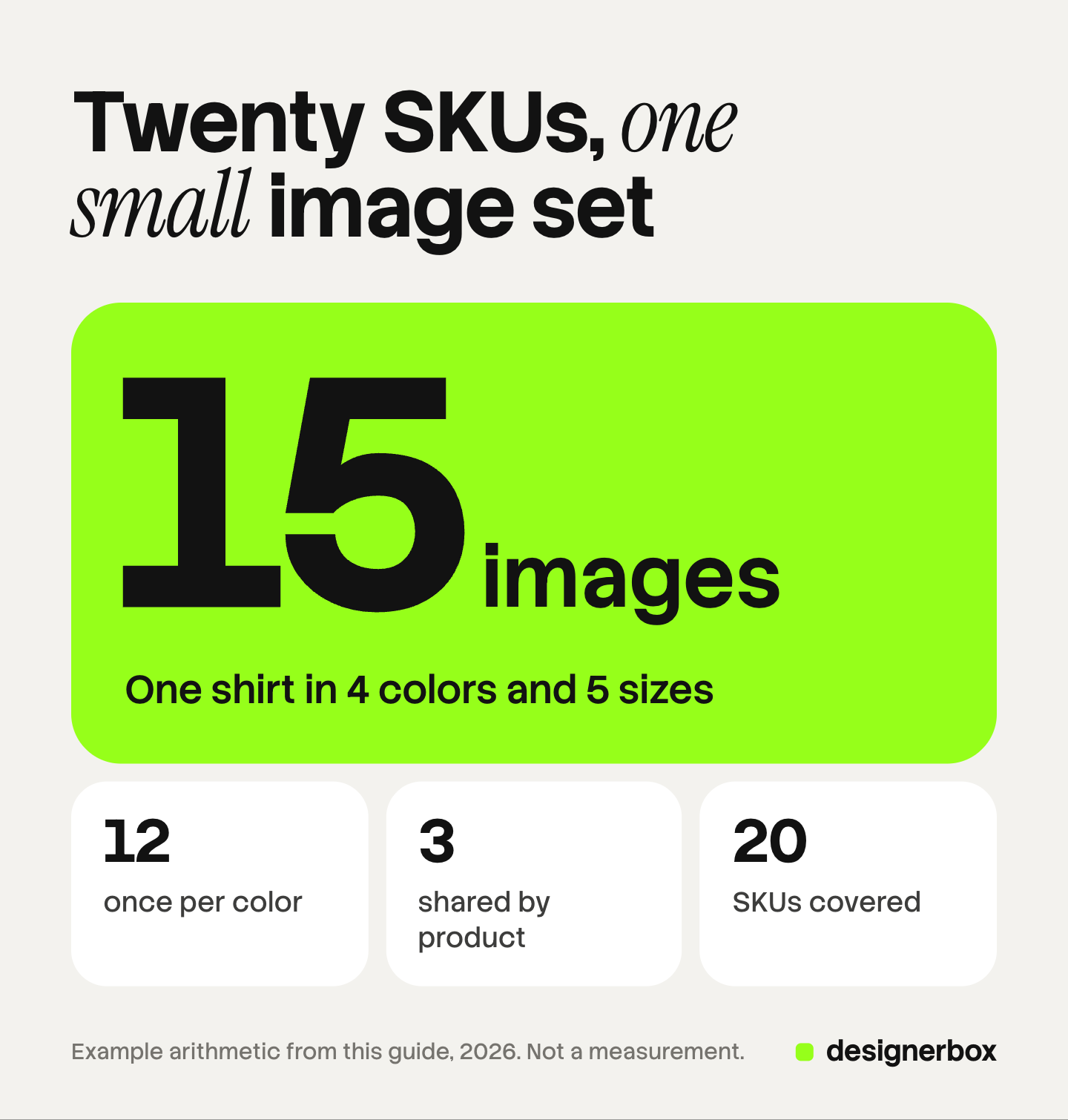
- Count looks first. One shirt in 4 colors and 5 sizes is 20 SKUs. It needs 15 images in our example, and all 20 SKUs are covered.
- Put the SKU in the file name. An upload app or a script can then match each file to its SKU.
- Check the exceptions. A fixed list of six checks per SKU lets you look closely at the few images that fail.
What is a SKU image?
A SKU image is a product image that belongs to one stock keeping unit. It shows the version the shopper selects, in the right color, pattern, finish and material.
The term is used in two ways. In stock and warehouse systems, the SKU image is the one picture next to a stock line. It helps staff pick the right item. In a store, SKU images are all the pictures a shopper sees after choosing an option.
Product, variant, SKU and GTIN: the four terms
Four words describe one item at four levels.
| Term | What it is | Who sets it | What it means for images |
|---|---|---|---|
| Product | The parent: one linen shirt | You | Holds the shared gallery |
| Variant | One combination of options: white, size M | You, in the store | Takes one assigned image |
| SKU | Your internal code for one variant | You | Ties a file to a variant |
| GTIN | The global number in the barcode | GS1 | Identifies the item outside your store |
Shopify says each combination of option values for a product can be a variant. A product can have up to three options and up to 2,048 variants (Shopify Help Center, October 2026).
Shopify describes SKUs as codes you use internally to track inventory and report on sales. They are optional, but no two variants should share one. Its example is direct: a shirt in 3 sizes and 4 colors needs 12 different SKUs (Shopify Help Center, October 2026).
The GTIN sits one level above your own codes. GS1 defines trade items as products or services that are priced, ordered or invoiced at any point in the supply chain (GS1, October 2026). GS1 US adds that each distinct option, such as a size or a flavor, requires its own GTIN (GS1 US, October 2026). Several retailers can sell one GTIN, and each gives it a different SKU.
Which images belong to the SKU and which to the product?
An image belongs to the SKU when the picture changes with the option. An image belongs to the product when it looks the same for every option.
Two platform rules set that line. Google asks sellers to submit a unique image for each variant. The photo must reflect the exact color, pattern, finish and material, and it must show only one variant (Google Merchant Center Help, October 2026). Size is not on that list of four.
Shopify works the same way from the other side. Each variant supports one assigned image. Shopify’s own steps say to add all images to the product’s gallery and then assign one image to the variant (Shopify Help Center, October 2026).
Here is the split for the linen shirt.
| Image | Changes with color? | Changes with size? | Level | Made |
|---|---|---|---|---|
| Front on white | Yes | No | SKU, by color | Once per color |
| Back on white | Yes | No | SKU, by color | Once per color |
| On-model shot | Yes | No | SKU, by color | Once per color |
| Collar and button close-up | No | No | Product | Once |
| Size chart | No | No | Product | Once |
| Scale or lifestyle scene | No | No | Product | Once |
Size M and size L of the white shirt look the same in a photo. Both SKUs point to the same front image. This is our reading of Google’s four named details. It is not a Google statement, so check the Diagnostics page in Merchant Center after you submit a feed.
Size does need its own image in three cases:
- The size changes the look. A 50 ml bottle and a 200 ml bottle have different shapes.
- The size changes the content. A pack of three and a pack of six show different items.
- The size changes the proportions. A rug, a table or a poster looks different in a room at each size.
How many SKU images does one product need?
Count the looks first, then the SKUs. A look is one version that a camera can tell apart.
The formula has two parts:
Images = (looks × images per look) + shared images
For the linen shirt:
- 4 colors × 5 sizes = 20 SKUs
- 4 looks × 3 images per look = 12 images
- 3 shared images
- 12 + 3 = 15 images
Compare three ways to plan the same shirt.
| Plan | Sum | Images |
|---|---|---|
| A full set of 6 for every SKU | 20 × 6 | 120 |
| A full set of 6 for every color | 4 × 6 | 24 |
| Per-color images plus shared images | (4 × 3) + 3 | 15 |
All three plans cover all 20 SKUs. The third one makes 15 images, and each of the 20 variants still has its assigned image. Across 100 similar products, that is 1,500 images for 2,000 SKUs. These numbers are example arithmetic and your shot list will differ.
A Shopify product holds up to 250 media items, and 15 is far below that. Our guide to AI product images for Shopify covers the case where a wide color range comes close to the cap.
A fixed shot list per SKU type
Decide the shot list once per SKU type. Then a new SKU never starts with the question of which images to make.
| SKU type | New images for this SKU | Reuses from the product |
|---|---|---|
| New color or finish | Front, back, on-model or in-use | Detail, size chart, scene |
| New apparel size | None | The images of its color |
| New volume, pack size or dimension | Front, plus one scale shot | Detail, scene |
| New material | Front, back, material close-up | Size chart, scene |
| Bundle or set | One front that shows every item | The images of each item |
A product that fits no row is an exception, and one person decides it by hand.
The shot list says which images exist. It does not say how they look. Background, crop, light and shadow belong in a separate standard, which our guide to consistent product images sets out on one page.
A file name that carries the SKU
The file name is the cheapest link between an image and a SKU. Build it from the SKU itself.
Start with the SKU format. Shopify suggests short codes of no more than 16 characters, with dashes or underscores between the parts and no spaces or symbols. It also asks for the same short word everywhere: if BLK means black on one product, it means black on all of them.
Put the parts in this order: style, color, size. The shirt becomes LS01-WHT-M. The first two parts, LS01-WHT, name the look. That is the level where the images are made.
Then name the files at the look level:
- LS01-WHT-front-01.jpg
- LS01-WHT-back-02.jpg
- LS01-WHT-model-03.jpg
- LS01-detail-04.jpg
- LS01-sizechart-05.jpg
Two rules make this work. Per-color files start with style and color. Shared files start with the style only, so nobody attaches them to one color by mistake.
The number at the end is the position in the gallery. Our guide to an image file naming convention covers dates, versions and the characters to avoid.
How do you match images to the right SKU?
Keep one sheet with one row per SKU. This sheet is the only place where a file and a SKU meet, so every later step reads from it.
| SKU | Product | Color | Size | Image prefix | Assigned image | Status |
|---|---|---|---|---|---|---|
| LS01-WHT-S | Linen shirt | White | S | LS01-WHT | LS01-WHT-front-01.jpg | Ready |
| LS01-WHT-M | Linen shirt | White | M | LS01-WHT | LS01-WHT-front-01.jpg | Ready |
| LS01-NVY-S | Linen shirt | Navy | S | LS01-NVY | LS01-NVY-front-01.jpg | Check color |
The image prefix column does the work. Every size of one color has the same prefix, so every size gets the same assigned image.
On Shopify, the match has three steps, taken from Shopify’s own page:
- Add all images for the product to its media gallery.
- Put them in order, so the images of one color sit together.
- Assign one image to each variant. You can select several variants with the checkboxes and add one image to all of them.
When a shopper selects the variant, the assigned image appears first. The shopper can then scroll the rest of the gallery. Shopify notes that showing a full group of images per option needs its Combined Listings app, on the Plus and Enterprise plans. For hundreds of products, the CSV route is faster. Our guide to Shopify bulk upload images explains the variant image column.
In a Google product feed, every variant is its own row. Google’s example is a T-shirt in 3 sizes and 3 colors, submitted as 9 separate products with one shared item group ID (Google Merchant Center Help, October 2026). Each row carries its own image link, taken from the same sheet.
The ready to publish check
A SKU is ready when it passes a fixed list. Without a list, every image can start one more round of edits.
Six checks cover one SKU:
- The assigned image exists. The SKU’s row in the sheet names a real file.
- The color matches the sample. Compare the image with the physical product in daylight.
- One variant is in the frame. No group photo of several colors.
- The product details are intact. Logo, label, print, stitching and shape match the source photo.
- The standard is met. Background, crop, size and shadow follow your rules.
- The shared images are attached. The product’s detail shot and size chart are in the gallery.
Checks 2 and 4 matter most for generated or recolored images. Our guide to AI product photo accuracy lists what to compare against the source.
Review by exception
Do not review a catalog one product page at a time. Review one image role across many SKUs.

Open all the front images in a grid. One wrong crop or one warm white is easy to see among 40 correct tiles. Mark the SKUs that fail and leave the rest. Then open the back images, and then the on-model images.
The status column in the sheet records the result, so the next person works on the marked rows only.
This is also where the per-look count pays off. At 15 images per product, a person can look at every image once. At 120, people stop looking. Where a bulk catalog run breaks covers the review cost at that scale.
Images, ads and video from one workflow
DesignerBox is AI creative production for brands and agencies. It makes images, ads and video, and a product photo is one of the inputs.
You build the set once as a workflow: the front, the back, the on-model shot. A batch then runs that workflow over a sheet, up to 200 rows in one sheet. Use one row per look, so the four shirt colors are four rows and the sizes add none.
Anyone can make an AI picture. Making hundreds that still look like your brand is the hard part. Every row reads the same brand rules, so row one and row two hundred have the same light and framing. You keep or discard each result in the sheet and run one row again on its own. The cost is shown before the run.
The full workflow from the first product photo to the finished ad, in one subscription. The page for ecommerce brands shows the image set per product.
State the limits before you plan around DesignerBox:
- DesignerBox does not send finished work to Shopify. You download the results, or send them with a webhook or an S3 step. Then you name the files by SKU and upload them.
- Every plan below Ultra is one seat.
- Virtual try-on covers garments only.
Uploading your own photos and the commercial license start on the Pro plan. AI video, virtual try-on, upscaling, the image editor and the video editor start on the Premium plan. Plans and credits are on the pricing page.
There is a free plan, and it runs on sample products. Start from a template and look at the set it returns.
FAQ
What is a SKU image?
A SKU image is a product photo tied to one stock keeping unit. It shows the exact version the shopper selects, in the right color, pattern, finish and material. In a stock system it is the one picture next to a stock line.
How many images does each SKU need?
Each SKU needs one assigned image that shows its version, and two sizes of one color can share it. On Shopify, a variant takes one assigned image from the product’s media list. Other images, such as a size chart, are shared by every SKU of the product.
Does every size need its own image?
Usually not. Two sizes of one color look the same in a photo, so both SKUs can use the same image. A size needs its own image when it changes the shape, the pack content or the proportions of the product.
How do you match product images to the right SKU or variant?
Keep one sheet with one row per SKU and a column for the assigned image. Name each file with the style and color code. In Shopify, add the images to the product’s gallery and assign one image to each variant.
What is the difference between a SKU and a GTIN?
A SKU is a code you create for your own inventory. A GTIN is a global number that GS1 issues, and it sits in the barcode. Several retailers can sell the same GTIN, and each one gives it a different SKU.
Can a Shopify variant have more than one image?
No. Shopify says you can add only one image to each product variant. To show more images for an option, add them to the product’s gallery and place them together. The shopper sees the assigned image first.
Does DesignerBox assign images to SKUs in my store?
No. DesignerBox does not send finished work to a store. You download the results, or send them with a webhook or an S3 step, and you match the files with your own sheet. In DesignerBox you see the cost before each run.
Sources
- Shopify Help Center, using SKUs to manage your inventory: SKUs as internal codes, optional, unique per variant, the 3 sizes and 4 colors example, 16 characters, consistent abbreviations (help.shopify.com, read October 7, 2026)
- Shopify Help Center, adding variants: a variant as a combination of option values, three options, 2,048 variants, 250 media items, one media item per variant (help.shopify.com, read October 7, 2026)
- Shopify Help Center, adding images to product variants: one assigned image per variant, the three gallery steps, selecting several variants, the Combined Listings app (help.shopify.com, read October 7, 2026)
- Google Merchant Center Help, image link: a unique image for each variant, exact color, pattern, finish and material, one variant per image (support.google.com, read October 7, 2026)
- Google Merchant Center Help, item group ID: variants as separate products, the 9-variant T-shirt example (support.google.com, read October 7, 2026)
- GS1, Global Trade Item Number: the definition of a trade item (gs1.org, read October 7, 2026)
- GS1 US, what is a GTIN: one GTIN per distinct option, the difference between a GTIN and a SKU (gs1us.org, read October 7, 2026)
- DesignerBox batch: one sheet, up to 200 rows, results kept or discarded per row: DesignerBox batch page (designerbox.ai/product/batch), October 2026
Platform rules verified on Shopify’s, Google’s and GS1’s own pages on October 7, 2026. The linen shirt, its SKU codes and the 15, 24, 120, 1,500 and 2,000 figures are example arithmetic, not measurements. Platforms change their rules, so check each page before a large upload. Individual results vary.