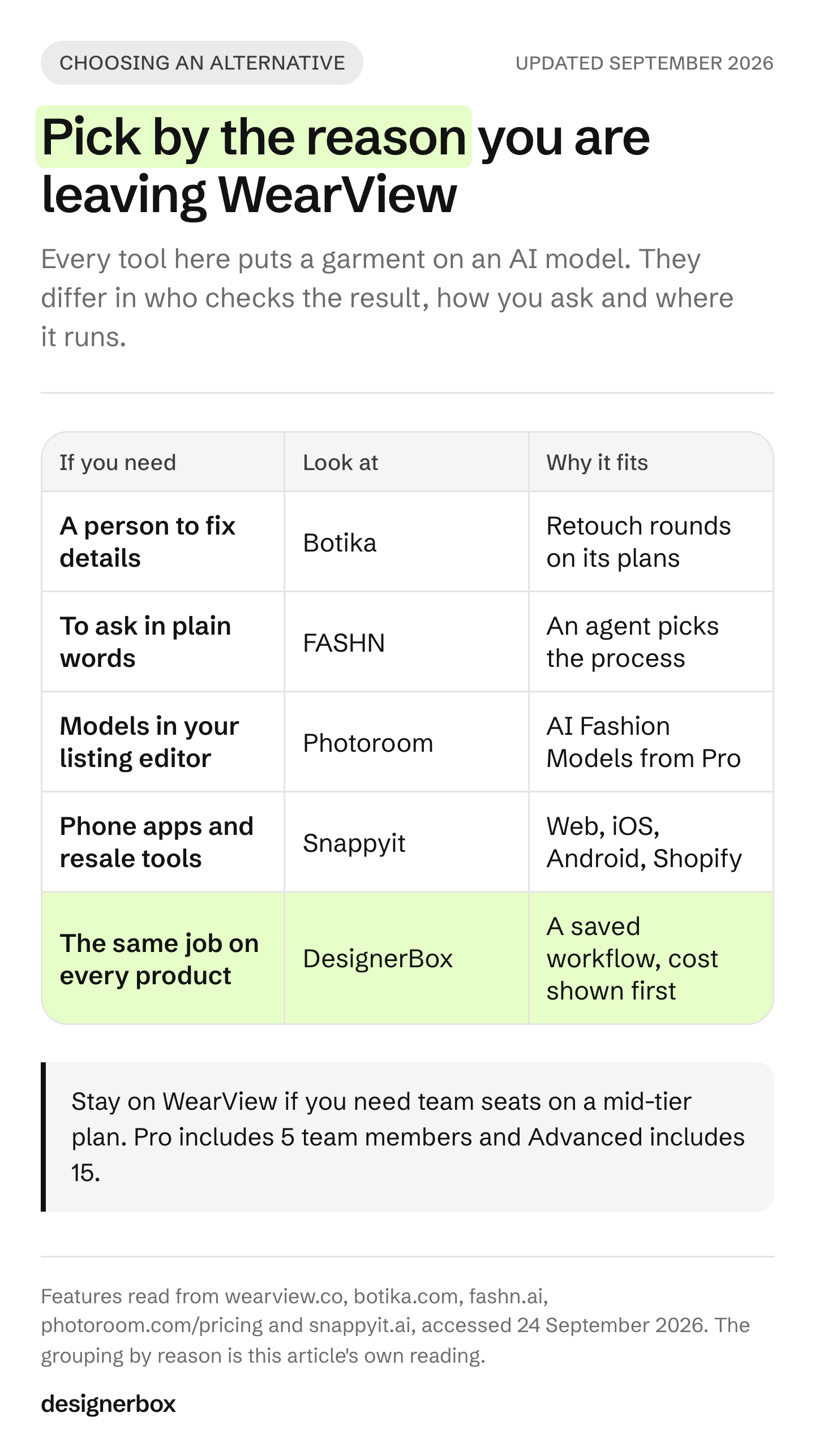
The best WearView alternatives depend on why you are leaving. Botika adds human retouch rounds to every photo. FASHN lets you ask for a shot in plain words. Photoroom puts fashion models inside a listing editor. Snappyit covers ghost mannequin, flat lay and recolors on web, phone and Shopify. DesignerBox saves the whole job as a workflow and runs it on every product.
WearView is a focused AI fashion model generator. You upload a garment photo, pick an AI model and download on-model shots (wearview.co, September 2026). Trustpilot’s WearView page lists four tools under “People also looked at”: Botika, FASHN AI, Photoroom and Snappyit (trustpilot.com, September 2026). This article compares those four, plus DesignerBox.
DesignerBox publishes this article, and DesignerBox is on the list. That is our bias. To keep it in check, every tool leads with what it does well, the article says where WearView is the better pick, and it prints no competitor prices. Each vendor’s own page is named with a date so you can check it.
Key Takeaways
- WearView covers the garment-to-model job end to end: try-on, product to model, consistent models, pose control, ghost mannequin, model swap and video (wearview.co, September 2026).
- Botika adds people to the loop. Its plans include retouch rounds, where you ask for a fix and Botika’s team retouches the image (botika.com/pricing, September 2026).
- FASHN now works as an agent. You describe the model, pose and setting in words, and the FASHN Agent picks the process (fashn.ai, September 2026).
- Photoroom fits sellers who already edit listings there. AI Fashion Models start on its Pro plan, and its pricing page lists batch processing and a custom connector in Claude (photoroom.com/pricing, September 2026).
- Snappyit is built for apparel sellers and resellers, on web, iOS, Android and Shopify (snappyit.ai, September 2026).
- DesignerBox fits the job you repeat. You build the on-model job once as a workflow, run it on every product and see the cost before each run.
- Stay on WearView if you need several team seats on a mid-tier plan. Every DesignerBox plan below Ultra is one seat.
What WearView does well
WearView is built for one job, and its feature list is coherent. Its homepage lists AI virtual try-on, product to model, a fashion video generator, model creation, consistent models, pose control, ghost mannequin, a ghost mannequin service and model swap (wearview.co, September 2026). It offers more than 100 AI models and states full commercial rights on every image.
The plan structure is also clear. WearView sells Lite, Pro, Advanced and Enterprise plans. Video starts on Pro at 720p and reaches 1080p on Advanced. Pro includes 5 team members and Advanced includes 15. API access sits on Enterprise (wearview.co/pricing, September 2026).
Two details matter before you compare. WearView’s pricing page offers a money-back guarantee and no free trial. And WearView does not publish to a store: you download the images and upload them to Shopify, Amazon, Etsy or another marketplace (wearview.co, September 2026).
Why teams look for a WearView alternative
Teams rarely leave a focused tool because it fails at its job. They leave because the job changed shape. Five reasons come up most often.
- You want a person to check the result. Some brands want a retoucher to fix hair, hands or a collar before an image goes live.
- You want to ask in words. Picking a model, a pose and a background from menus is fast. Describing a campaign scene is faster for some teams.
- You already live in a listing editor. If cut-outs, backgrounds and exports happen in one tool, adding fashion models there saves a step.
- You sell second-hand or on a phone. Resellers on eBay, Poshmark and Depop often shoot and list from a phone.
- The same job repeats across a range. At forty garments one person holds the standard. At four hundred, across two people and three drops, the standard has to live in the tool.
The 5 best WearView alternatives in 2026
Each tool below starts with what it does well. Pick by the reason you are leaving, then read that tool’s section.
1. DesignerBox, for the on-model job you repeat on every product
DesignerBox is AI creative production for brands and agencies. You set your brand, your products and your rules once. Then you save the steps as a workflow. A saved workflow runs the same way on the next garment, with the same model, light and framing. Batch runs one workflow over a whole sheet of products, and you review the results in one pass.
Anyone can make an AI picture. Making hundreds that still look like your brand is the hard part.
Dress my model turns one garment into a full on-model set. Clothing catalog turns one garment into four shots: front, three-quarter, back and a fabric close-up. The image editor makes one edit after another, and the picture keeps its detail and resolution. Three critic steps score the results of a run, and best-of-N keeps the best one. You set the brand once in a brand profile, and the workflow reads it on every run.
The full workflow from the first product photo to the finished ad, in one subscription. The on-model shot can become a PDP hero, a static ad and a video in the same place.
The commercial license starts on the Pro plan. Virtual try-on and AI video start on the Premium plan. Every plan below Ultra is one seat. Plans and credits are on the pricing page.
Best for: fashion brands with 20 to 500 products, and agencies doing that job for several brands.
2. Botika, for on-model photos with human retouching
Botika turns flat lay, mannequin and on-model photos into new on-model images with AI fashion models, and it makes short videos (botika.com, September 2026). Its strength is the human layer. Its plans include retouch rounds per photo: you submit the fix you need, and Botika’s team retouches the image (botika.com/pricing, September 2026).
Botika sells Pro, Advanced and Enterprise plans. Pro gives 2K images and a limited set of models and backgrounds. Advanced adds all models, all backgrounds, 4K and team collaboration. Enterprise adds exclusive AI models built for your brand and custom retouching briefs (botika.com/pricing, September 2026). Botika lists its prices on the same page.
Best for: brands that want a person to fix hands, hair or fit before a photo goes live. DesignerBox and Botika compared covers the two side by side.
3. FASHN, for describing the shot in words
FASHN now presents itself as an AI agent for fashion ecommerce (fashn.ai, September 2026). You bring a product photo, a model image or an asset from its library. Then you describe the model, pose, styling or setting, and the FASHN Agent chooses the process. Its tools include try-on, product to model, packshot, model swap, AI fashion models and short videos.
FASHN also sells an API to add virtual try-on to your own app or store (fashn.ai, September 2026). That makes it the pick here for a team with a developer who wants try-on inside a product page.
Best for: teams who brief in plain words, and developers who need a try-on API. Our full FASHN AI alternatives article covers its app and API in more depth.
4. Photoroom, for fashion models inside a listing editor
Photoroom is a broad product photo editor. Its pricing page lists AI Fashion Models, a Video Generator, Brand Kit, batch processing, an API, team workspaces and a custom connector in Claude (photoroom.com/pricing, September 2026). AI Fashion Models start on Pro. Max adds the Video Generator, and Ultra adds 4K images and video. Photoroom offers a free trial.
Photoroom’s strength is breadth for a seller. Cut-outs, backgrounds, exports and fashion models sit in one editor, so a seller adds on-model shots without a second tool.
Best for: Shopify and marketplace sellers who already remove backgrounds in Photoroom. See the Photoroom alternatives we checked for the other direction.
5. Snappyit, for apparel sellers and resellers on any device
Snappyit is an AI product photography platform for apparel. It makes AI model shots, flat lays, ghost mannequin images, recolors and videos from one product photo (snappyit.ai, September 2026). Its tool list also includes jewelry retouching, a jewelry model, face swap, wrinkle removal and a batch editor.
Snappyit runs on web, iOS, Android and Shopify. It names three audiences: high-volume sellers, fashion brands, and resellers on eBay, Poshmark, Depop and Etsy. New users get free credits to try selected tools (snappyit.ai, September 2026). Its own FAQ tells sellers to check color, pattern, logos and seams before they publish, which is good advice for every tool on this list.
Best for: one-person shops and resellers who shoot on a phone and need ghost mannequin and recolors as well as model shots.
WearView alternatives side by side
| Tool | Starts from | Built around | Delivery |
|---|---|---|---|
| WearView | A garment photo | Try-on, model creation, pose control, model swap, ghost mannequin | Download |
| DesignerBox | Your product photo and brand profile | A saved workflow run on every product, with the cost shown first | Download, or a webhook or S3 step |
| Botika | Flat lay, mannequin or on-model photo | AI models plus human retouch rounds | Download |
| FASHN | A product photo or a written request | An agent that picks the process, plus a try-on API | App or API |
| Photoroom | A product photo | A listing editor with AI Fashion Models from Pro | App, API, Claude connector |
| Snappyit | A phone or product photo | Ghost mannequin, flat lay, recolor, model shots | Web, iOS, Android, Shopify |
Sources for each row: wearview.co, botika.com, fashn.ai, photoroom.com/pricing and snappyit.ai, all read in September 2026. Each vendor lists its plans on its own pricing page.
How to pick, in four questions
Answer these in order, and the shortlist gets short.
- Is the on-model shot the deliverable, or one step in a job you repeat? If it is the deliverable, a focused fashion tool such as WearView, Botika or Snappyit fits. If it repeats across a range, look for a tool that saves the settings and runs them again.
- Who checks the result? If you want a retoucher, Botika sells that. If your own team checks, look at how each tool helps with review. In DesignerBox, critic steps score the results and keep the best one.
- How many people work on it? WearView includes team members from Pro, and Botika adds team collaboration on Advanced. DesignerBox is one seat below Ultra.
- Does anything else need the image next? If the shot becomes an ad, a resized banner or a video, count the tools you would need. A consistent model across a whole range is a separate question, and it has its own guide.
For a wider view, the best AI fashion photography tools sorts 15 garment-first tools by the jobs a drop needs. If ghost mannequin is the main job, read AI ghost mannequin tools compared.
When to stay on WearView
Switching tools has a cost, so stay when these hold.
- You need seats on a mid-tier plan. WearView includes 5 team members on Pro and 15 on Advanced (wearview.co/pricing, September 2026).
- You use its ghost mannequin service. WearView sells mannequin removal as a service as well as a tool (wearview.co, September 2026).
- Your models and poses are already set up. A trained team and a saved set of consistent models are worth more than a feature you have not tried.
- The shot is the last step. If on-model photos are the whole deliverable, WearView does that job with focused tools.
Move when the same job starts to repeat across a range and the settings live in one person’s head.
One on-model job, built once
WearView gives you the garment on a model. The question is what happens the hundredth time you need it. In DesignerBox, the hundredth run uses the same workflow and the same brand rules as the first. Batch runs it over the whole range, and you review the results in one pass. You see the cost before you press Run.
A free plan for your first run. Start from a template, add your brand and your products, and see the cost before you run it. Get started free.
FAQ
What is WearView?
WearView is an AI fashion model generator. You upload a clothing photo, pick an AI model, and download on-model images for a store, a lookbook or social media. Its features include virtual try-on, product to model, pose control, ghost mannequin, model swap and video (wearview.co, September 2026).
Does WearView have a free trial?
WearView’s pricing page lists no free trial and offers a money-back guarantee instead (wearview.co/pricing, September 2026). Botika, Photoroom and Snappyit each offer a free way to try their tools. For free try-on routes and what their licenses allow, see the free virtual try-on tools we checked.
What is the difference between WearView and Botika?
Both turn garment photos into on-model images. Botika includes human retouch rounds on its plans, so a person fixes the details you flag (botika.com/pricing, September 2026). WearView is self-serve, with pose control, model swap and a ghost mannequin service on its own feature list (wearview.co, September 2026).
Which WearView alternative has an API?
FASHN sells an API for virtual try-on (fashn.ai, September 2026). Photoroom lists an API on its pricing page (photoroom.com/pricing, September 2026). WearView includes API access on its Enterprise plan. DesignerBox has 68 tools over MCP, plus an API on the Ultra plan.
Which alternative works on a phone?
Snappyit runs on web, iOS, Android and Shopify (snappyit.ai, September 2026). It is the one tool in this list that names iOS and Android apps on its own homepage.
Can I use AI on-model photos in paid ads?
That depends on each tool’s commercial terms and on each ad platform’s rules. WearView states full commercial rights on every image (wearview.co, September 2026). The DesignerBox commercial license starts on the Pro plan. Read the current terms on each vendor’s own site before you spend money on ads.
How do I put my own garment on an AI model?
Start from a clear photo of the garment, flat or on a mannequin. Then use a product-to-model or try-on tool, and check the collar, print and hem against the real item. How to put clothes on a model with AI walks through the steps.
Sources
- WearView features, AI models, commercial rights and download-based delivery: wearview.co, accessed September 2026
- WearView plans, team members, video resolution, API access, money-back guarantee and no free trial: wearview.co/pricing, accessed September 2026
- Tools listed under “People also looked at” on WearView’s page: trustpilot.com, accessed September 2026
- Botika product scope and video: botika.com, accessed September 2026
- Botika plans, retouch rounds, resolution, team collaboration and Enterprise features: botika.com/pricing, accessed September 2026
- FASHN Agent, tools and try-on API: fashn.ai, accessed September 2026
- Photoroom AI Fashion Models, Video Generator, 4K, Brand Kit, batch processing, API, team workspaces, Claude connector and free trial: photoroom.com/pricing, accessed September 2026
- Snappyit tools, platforms, audiences, free credits and review advice: snappyit.ai, accessed September 2026
- DesignerBox plan gates and the cost shown before each run: DesignerBox pricing, September 2026
Competitor features change often, so confirm the current details on each vendor’s own page before you commit budget. This article prints no competitor prices. Individual results vary.