The best AI fashion photography tool is the one that starts from your garment photo and keeps the garment intact. It should also cover the jobs your drop needs: on-model shots, one model for the whole collection, more than one view, and video. Of the 15 fashion tools compared here, seven state all four jobs on their own pages: Claid.ai, FASHN, Uwear, WearView, The Fabricant, Modelia and Veeton.
You have 40 new styles landing in six weeks. Each one needs a front shot on a model, a back shot, a detail and something that moves. The studio is booked for next month, and the model you used last season is no longer available.
Software sold for AI fashion photography comes in two kinds. Some tools start from your garment photo. Others start from a text prompt and invent the clothes. Only the first kind can make a product photo, because a buyer has to receive the garment in the picture. This guide covers 15 tools of the first kind, sorted by the job each one says it does, from each vendor’s own pages on 24 September 2026. We sell DesignerBox, which does the same job, so read its lines as our own case.
Key Takeaways
- Start from the garment, not a prompt. A product photo has to show the garment the buyer receives. Tools that invent clothes from text belong in campaign moodboards.
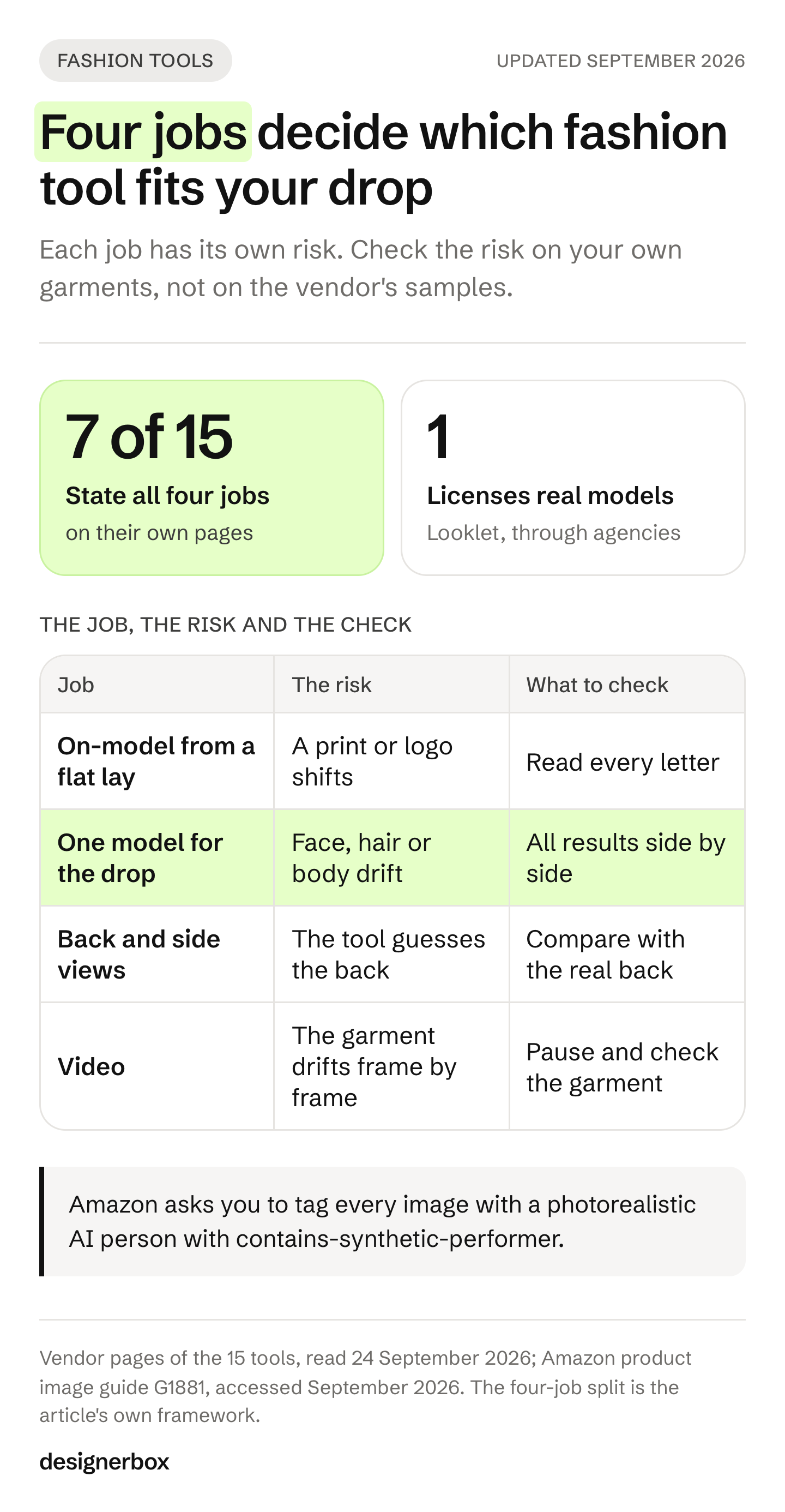
- Four jobs split the field. On-model shots from a flat lay, one model across the drop, more than one view, and video. Seven of the 15 tools here state all four.
- Model reuse is the hardest part. A test by Fstoppers found that consistency across shots of one look was “the bigger problem” for a general image model.
- Amazon wants a standing model for adult apparel. Its image guide also asks you to tag every photorealistic AI person with contains-synthetic-performer.
- Real faces need written consent. New York’s Fashion Workers Act requires a model’s written approval before you make or use a digital replica.
- Read the rights line before the first run. Only some vendors say whether your uploads train their models, and one free plan allows personal use only.
- Test on your five hardest garments. A logo print, a back detail, a sheer or knit fabric, hardware and a black garment show problems first.
What is an AI fashion photography tool?
An AI fashion photography tool turns a photo of your garment into images of that garment on a model. You upload a flat lay, a ghost mannequin shot or a hanger photo. The tool fits the garment to a generated person, places the shot in a studio or a scene, and returns stills or a short video. Brands use it for product pages, marketplace listings and ads, without a model booking or a studio day.
The tools differ in four places. First, what they accept as input. Second, whether the same model can wear the whole collection. Third, whether they can show the back and the side of the garment. Fourth, whether they make video from the stills. Those four decide which listing slots a tool can fill.
Two nearby jobs use similar words and are different purchases. Virtual try-on for shoppers lets a customer see clothes on their own photo in your store. Prompt-first image models, such as Midjourney or Adobe Firefly, make new pictures from text. This guide covers the tools a brand uses to photograph its own garments. If you want the step-by-step method first, how to put clothes on a model with AI covers the inputs and the prompts.
The four jobs a fashion drop asks of a tool
A drop asks for the same set of images on every style. Each job in that set has its own risk, and the risk tells you what to check on a vendor’s page.
1. On-model shots from a flat photo. This is the core job. The input decides the result: a clean flat lay or ghost mannequin shot gives the tool the whole garment. Claid says “flatlays, ghost mannequin images, and hanger shots work well” (claid.ai/clothing-on-models, September 2026). The risk is the garment itself: a print that shifts, a logo that loses letters, a collar that changes shape.
2. One model across the drop. A catalog reads as one brand when the same person wears every style. A tool needs a saved model, a face reference or a saved art direction for this. The risk is drift: the face, the hair or the body changes from one style to the next.
3. Back and side views. Buyers want to see the back of a dress and the side of a pair of trousers. Some tools state front, back and side views. Others show one front shot. The risk is invention: the tool has not seen the back, so it guesses.
4. Video. A short walk or a turn fills the video slot on a product page and in paid social. The risk is the same garment drift, frame after frame. How to make a virtual try-on video covers the extra photos each kind of motion needs.
The four jobs follow the general limits of image models. Fstoppers tested Google’s Nano Banana Pro on reference shots from a real campaign of about 15 looks. The writer found that “consistency across multiple shots of the same look is the bigger problem”. Some garments were “swapped out entirely for something that didn’t exist”, and the resolution did not “come close to what a modern camera produces” (Fstoppers, published April 2026). The test used a general model with manual prompts, not one of the tools below. It still shows where to look first.
What Amazon, Google and the law ask of fashion images
Each marketplace sets its own rules for clothing images. Those rules decide what a tool has to produce before image quality does.
Amazon. For adult apparel, Amazon’s product image guide says to show the product on a model. “The model must be standing, not sitting, kneeling, leaning, or lying down.” The same page says not to show any part of a mannequin. If an image includes photorealistic AI-generated people, you must tag it with the keyword contains-synthetic-performer in the XMP dc:subject field (Amazon product image guide, accessed September 2026). Amazon’s page on human models confirms that models in main images are allowed only for adult apparel (Amazon human models, accessed September 2026).
Google. Merchant Center accepts product images made with AI. Each one must keep the metadata that says AI made it, such as the IPTC DigitalSourceType value TrainedAlgorithmicMedia, and you must not remove it. Google also recommends images of clothing worn by people as a best practice (Google Merchant Center image requirements, accessed September 2026).
The EU. Article 50 of the EU AI Act has applied since 2 August 2026. A realistic AI-generated person can count as a deep fake. The Commission’s guidelines list “realistic AI-generated human avatars or personas” as persons, and a deep fake must be labeled clearly when people first see it (European Commission FAQ on Article 50, accessed September 2026). Whether one of your images is in scope depends on whether it can mislead people about what is real. Say “likely in scope”, and check with your counsel.
New York. Since 19 June 2025, New York’s Fashion Workers Act requires a model’s written approval before you create or use their digital replica. The approval must state the scope, purpose, pay and how long the replica will be used (New York State Department of Labor FAQ, accessed September 2026). This matters for tools that build a model from a real person’s photo. Routine edits such as color correction are not digital replicas.
This is general information, not legal advice. How to label AI-generated fashion images covers the labels platform by platform.
AI fashion photography tools compared
The table records what each vendor’s own pages state on 24 September 2026. It does not score image quality, which changes with every model update and every source photo. “Not listed” means the pages we read did not state it that day. No price appears in this guide: each vendor lists its plans on its own pricing page.
| Tool | Starts from | One model for the drop | Back or other views | Video | Bulk, API or Shopify |
|---|---|---|---|---|---|
| Botika | Flat lay, mannequin, a photo on a person | FAQ says no custom models | ”More angles” from a flat lay | Yes | Bulk upload, Shopify app |
| Claid.ai | Flat lay, ghost mannequin, hanger | Upload a model you have rights to | Eight studio poses | From on-model shots | API |
| Photoroom | Flat lay, a photo on a person | Custom models saved in Brand Kit | Not listed | Not listed on this page | Batch, API |
| FASHN | Flat lay, mannequin, ghost mannequin | Face Reference | Angles and poses | Short video | API with SDKs |
| Uwear | Flat lay, ghost mannequin, supplier photos | Saved art direction and model library | Front, three-quarter, side, back | 360 loops, PDP clips | Batch, API, MCP |
| WearView | Flat lay, hanger, mannequin, a photo on a person | Saved model profiles | Pose control | Yes | Download and upload |
| Hautech | Phone photo, flat lay, mannequin | Digital twin from one photo | Not listed | Brand and UGC video | API, batch |
| The Fabricant | A garment or a sketch | A chosen model holds across angles | Yes | Yes | Batch, API on request |
| Modelia | Flat lay, mannequin, model, sketch | Consistent Character tool | Repose, more poses | Yes | Shopify app, API |
| Pixelcut | Garment alone or on a person | Your own model or a persona | Not listed | Not listed | Batch, API |
| Veeton | Ghost mannequin, flat lay, phone photo | An exclusive AI model | Custom angles | Yes | Batch, Shopify app |
| Ayna | Flat lay, mannequin, on-model photo | Private brand models on higher tiers | Not listed | Product video | Bulk, push to Shopify |
| Looklet | Front and back ghost images | Licensed real digital models | Front and back | Not listed | Custom API |
| WeShop AI | Flat lay, mannequin, garment alone | Not listed | Multiple poses | Yes | API |
| The New Black | Product photo, flat lay, mannequin, sketch | The same model for the whole collection | A 360 turn in video | Walk, 360 turn | Bulk, API, MCP, Shopify |
| DesignerBox | Flat lay, hanger, mannequin | Save the model once, every run reads it | Front, three-quarter, back, fabric close-up | From the Premium plan | Batch, API on Ultra |
DesignerBox’s own pages compare it with one tool at a time, including Botika, Photoroom and Claid.ai. The comparison hub lists the rest.
The tools, one by one
The tools are not ranked. The seven that state all four jobs come first. Tools built around fewer jobs come after.
Uwear
Uwear starts from flat lays, cutouts, ghost mannequin shots or supplier photos. It says “the flat lay is the garment reference for every result”. It lists front, three-quarter, side and back views, packshots, detail shots and video such as 360 loops and PDP clips (uwear.ai, September 2026). A saved art direction holds casting, light and framing, and an asset library holds the models. Batch workflows, an API with webhooks and an MCP server cover volume.
Uwear adds C2PA metadata and an invisible watermark to its results. Its trust page says customers keep all rights to their uploaded images. The same page says its published documents do not yet settle whether customer content is used as training data. It works pay as you go, and no free trial is listed.
Best for: catalog teams that need the full view set per style and want to connect it to a PIM or a DAM.
FASHN
FASHN takes flat lays, mannequin and ghost mannequin shots, and also accessories, shoes and jewelry. It makes on-model shots, “different angles, poses, and backgrounds”, packshots, model swaps and short video. Face Reference “anchors identity to a single face across all tools” (fashn.ai, September 2026). Uploading your own face is on its Agency plan, and FASHN says you need a real person’s permission first.
FASHN says it does not use your uploads or results to train models unless you opt in. It is careful about fidelity. It says it is “built to keep product details like color, print, logos, materials, and construction intact”, and adds that “AI can still get small details wrong”. There is a free plan, a REST API and TypeScript and Python SDKs. FASHN alternatives sets it against the nearest tools.
Best for: teams that want an API and one face reference across stills and video.
The Fabricant
The Fabricant’s photo studio starts from a garment or a sketch. It says “a chosen model holds consistent across angles and scenes”. It also says the fabric, color, fit and detail stay true to the source product (thefabricant.com, September 2026). It makes on-model and product images, editorials and video, with an upscaler to 2048 and 4096 pixels square.
Its rights terms are specific. It says it never uses customer projects or personal data for training, and that its models are trained on licensed or proprietary data. Its terms bar content that shows real people without consent. The free plan is for personal portfolios only, so commercial use needs a paid plan. Batch runs across hundreds of SKUs happen on its Canvas, and the API is on request.
Best for: brands that need a clear written position on training data before legal approves the tool.
Claid.ai
Claid.ai converts flat lays, ghost mannequin images, hanger shots and mannequin photos into on-model shots. It offers eight studio poses or a prompt, lifestyle backgrounds, and video made from on-model shots. It says it keeps “the item’s textures and prints” and “logos, branding and product shapes” (claid.ai/clothing-on-models, September 2026). Results are “native 4K”.
You can upload “photos of a model whose likeness you have the right to use”. Face swap runs through the API, which also handles bulk work for “hundreds or thousands of SKUs”. The pages we read do not list back views or state a training policy. There is a free trial.
Best for: teams that work through an API and want to bring their own licensed model.
WearView
WearView starts from a flat lay, a hanger, a mannequin or a photo on a person. It makes on-model shots, ghost mannequin shots and video, with pose control and model swap. You can “store your consistent model profiles in your library for easy access and reuse” (wearview.co, September 2026). It says paid plans include full commercial rights.
If WearView is already on your shortlist, our WearView alternatives comparison sorts five other tools by the reason you would leave it.
Delivery to Shopify and Amazon is a download and an upload, not a native app. The pages we read do not state an output resolution in pixels, an API or a training policy.
Best for: small brands and resellers that want saved models and one tool for stills and short video.
Veeton
Veeton works from ghost mannequin shots, flat lays and phone photos “as long as the garment is fully visible”. It makes on-model shots, flat lay and ghost mannequin clean-ups, outfits and video, with custom angles. You can “generate your own exclusive AI model”, and kids models are available (veeton.com, September 2026).
Its Shopify app imports your catalog and pushes results back to the right product pages. Veeton says you own the photos and videos, with a commercial license. Its fidelity wording is about realism rather than the garment, and it does not list an API or a resolution. There is a free trial.
Best for: Shopify brands that want results written back to product pages, including kidswear.
Modelia
Modelia starts from a flat lay, a mannequin or a model photo, and also from a sketch. Its Repose feature makes “multiple poses while keeping the same outfit, model”, and a Consistent Character tool holds one person across images (modelia.ai, September 2026). It also makes video and puts accessories on a model.
Its Shopify listing names bulk editing, and there is an API and a free plan. The pages we read do not state a resolution, a fidelity promise, commercial-use terms or a training policy.
Best for: Shopify brands that want pose variations of one look from inside their store admin.
The New Black
The New Black starts from a product photo, a flat lay, a mannequin shot or a sketch. It makes on-model shots, ghost mannequin shots, flat sketches and video such as “a model walking, a 360 turn”. It says “the same model can wear the whole collection”, and its Visual DNA feature keeps one look across results (thenewblack.ai, September 2026).
On fabric changes it says “shape, seams and fit stay exactly as they are”. It lists bulk generation, an API, MCP, a command line tool, Shopify publishing and social publishing. Paid plans carry full commercial rights, and new accounts get free credits. Its page does not state an output resolution beyond a 2K or 4K upscale.
Best for: brands that want one model and one look across stills and video, with Shopify publishing.
Photoroom
Photoroom’s AI Fashion Models tool starts from “a shot of someone wearing your products or simple flat lays”. You can “save your own custom models within Brand Kit so you can easily reuse your models for future collections” (photoroom.com/tools/virtual-model, September 2026). It offers 2K and 4K results, batch editing and an API. It pairs with Photoroom’s ghost mannequin tool.
The page does not list back views or video, and it does not state a training policy. There is a free trial. Photoroom alternatives compares it with the tools nearest to it.
Best for: teams already using Photoroom for backgrounds that want saved models in the same account.
Botika
Botika takes a photo on a person, a flat lay or a mannequin shot, with “front or back shots” accepted. It makes on-model stills and video, and its flat-lay page offers “more angles”. It says “garments remain flawless in every texture and pattern” (botika.com, September 2026). Uploads go up to 4K depending on the plan.
Botika’s FAQ says “we don’t support custom models or backgrounds”. It also says its models are fully AI-generated, with no stock models and no real people. It covers clothing only, not accessories or footwear. Commercial use is allowed, with limits on reselling and on presenting the models as real people. There is a free trial and a Shopify app.
Best for: clothing brands that want on-model shots from its own model library, without building a model.
Hautech
Hautech starts from “a quick mobile shot” or a flat lay or mannequin shot. It makes AI models, model swaps, try-on, brand videos and UGC-style videos. Its Digital Twins are built “from a single photo”, including a brand-master twin, and it offers custom training (hautech.ai, September 2026). An API, batch runs and node-based workflows cover volume.
Its Digital Twins page does not describe a consent process. If a twin is built from a real model, collect their written approval first. New York requires it, as the section above explains. The pages we read do not state a resolution, a training policy or a free trial.
Best for: brands that want a custom-trained brand model and are ready to handle consent themselves.
Ayna
Ayna (getayna.com) starts from a flat lay, a mannequin or an on-model photo. It makes on-model shots, product video, marketplace variations and listing copy. It says “the garment in your input is the garment in your output”, and that it will not add embellishments or alter fabric patterns (getayna.com, September 2026). Private brand models are on higher tiers.
It pushes results to Shopify and handles bulk runs. There is a free account. The pages we read do not state a resolution, commercial-use terms or a training policy.
Best for: Shopify fashion brands that want images and listing copy from one upload.
Looklet
Looklet works differently from the tools above. Its Virtual Studio starts from front and back ghost images of your garment. Its enterprise service shoots your garments in its own studio and returns front, back, side, ghost and detail shots. It offers more than 1,000 digital fashion models built from real people and says, “We work with model agencies and sub-license the rights to you” (looklet.com, September 2026).
That licensed-model program is unique in this list. Looklet does not process eyewear, scarves, footwear, jewelry or bags. Virtual Studio images carry no usage restrictions, and enterprise model rights are agreed per model. Integration is a custom API.
Best for: larger retailers that want real, licensed models and a consistent studio look across seasons.
Pixelcut
Pixelcut’s try-on takes clothing “on its own or on a person”, and you can upload an image of your own model. Its try-on page says it currently works on tops, with pants, dresses and accessories “coming soon” (pixelcut.ai/virtual-try-on, September 2026). Its Product Studio makes unworn shots such as folded, flat and hanging, at up to 4K. Batch editing, an API and mobile apps are listed, and there is a free plan.
Best for: brands whose range is mostly tops and that already use Pixelcut for product shots.
WeShop AI
WeShop AI starts from a flat lay, a mannequin photo or a garment alone. It makes on-model shots in multiple poses, model-to-mannequin changes and video, with 4K downloads. It says it keeps “the same outfit, styling, and garment details” (weshop.ai, September 2026). Its commercial-use answer says rights depend “on the platform’s usage rights”, so read the terms before you publish. It lists an API and desktop and mobile apps, and new accounts get free points.
Best for: sellers who want quick pose variations and 4K files from a garment photo.
Also on fashion tool lists
Lalaland, an AI fashion model company, is now part of Browzwear. Lalaland.ai redirects to a Browzwear page that offers customized and exclusive AI models with IP ownership, sold to enterprise teams through a contact form (browzwear.com, September 2026). VModel appears on older lists. On 24 September 2026 neither of its domains hosted an AI fashion photography tool.
Swimwear and lingerie add two checks this list does not cover: the model filter and the platform rule. AI swimwear and lingerie photography tools sorts the tools on both. For shoes, jewelry, eyewear, bags and hats on a model, AI on-model photography tools by product shows which tools name each type.
Why Midjourney, Firefly and Canva are not on this list
General image tools also make fashion pictures. Midjourney makes stylized images from prompts. Adobe Firefly adds generation inside Photoshop and Illustrator. Canva adds AI images inside a design editor. Runway makes video from text or images. All four are strong at campaign concepts, moodboards and social layouts.
They start from a prompt or a free-form edit, not a garment-to-model step. None of them is built to return the same garment on the same model in front, back and side views. A product page needs that set, and marketplaces require the actual product. Use them for the campaign around the product, and a garment-first tool for the product photos themselves. AI fashion editorial tools sorts them by the campaign frames each one can fill. AI tools for fashion brands maps the whole stack, stage by stage.
Rights, training data and real faces
Four questions decide whether you can ship what a tool makes. Ask them before the first run, not after the first campaign.
Can you use free results commercially? Not always. The Fabricant’s free plan is for personal portfolios only. WeShop AI says rights depend on its usage terms. Botika allows commercial use but limits reselling and presenting its models as real people.
Do your uploads train the vendor’s models? FASHN says no unless you opt in. The Fabricant says it never uses customer projects for training. Uwear’s own trust page says its documents do not settle the question yet. The Claid.ai, Photoroom, WearView, Modelia, Hautech and Ayna pages we read do not state a training policy.
Whose face is it? Botika uses only AI-generated models. Looklet sub-licenses real models from agencies. Claid, FASHN, Hautech and Pixelcut let you bring your own model, and FASHN and Claid state that you need the rights or permission first. In New York, a real model’s digital replica needs their written approval.
Does the file carry AI metadata? Uwear adds C2PA metadata and a watermark. Google asks you to keep AI metadata on product images, and Amazon asks you to add the synthetic performer tag. Keep whatever the tool writes, and add what the marketplace asks for.
How to test an AI fashion photography tool
Vendor pages describe the best case. Your own garments show the real case. Run every tool on your shortlist through the same five garments before you pick one.
Choose the five garments that are hardest to get right:
- A print with a logo or text. It shows whether letters survive.
- A garment with a back detail. An open back, a back print or a back pocket shows whether the tool invents the back.
- A sheer or knit fabric. It shows whether texture and drape hold.
- A garment with hardware. Zips, buttons and buckles show whether small parts stay in place.
- A black or very dark garment. It shows whether seams and texture stay visible.
Then check every result against the physical sample, not against the source photo alone:
- Print and text. Read every letter on the logo.
- Color. Hold the sample next to the screen in daylight.
- Construction. Count buttons, check collar ribbing, seams and the hem.
- The back. Compare the back view with the real back of the garment.
- The model. Put all five results side by side and check that the face, hair and body match.
- Size. Open each file at full size and zoom in the way a buyer would on a product page.
A tool that passes on your five hardest garments will usually pass on the easy ones. Keep the test set, and run it again after each vendor update. Consistent AI fashion images covers how to hold one model and one light across a whole catalog.
DesignerBox for a whole drop
Anyone can make an AI picture. Making hundreds that still look like your brand is the hard part. DesignerBox is AI creative production for brands and agencies. It treats the drop as one job you build once.
You save the model once, and every run reads it, so the whole collection is worn by the same person in the same way. The input can be the garment laid flat, on a hanger or on a mannequin. The workflow removes the background, fits the garment to the model and places the shot in the scene you chose. Clothing catalog turns one garment into four shots: front, three-quarter, back and a fabric close-up. Dress my model puts that job behind a short form, so a colleague adds the garment photos and presses Run.
Three critic steps score the results of a run, and best-of-N keeps the best one. You keep or discard each result, so you can stop a result that drifts before it ships. Batch runs one workflow on a whole spreadsheet of styles and you review the results in one pass. You see the cost before each run. The full workflow from the first product photo to the finished ad, in one subscription. That includes the video editor.
The limits, stated plainly:
- Virtual try-on and AI video start on the Premium plan. The commercial license starts on the Pro plan.
- Team features and the API are on the Ultra plan, and every plan below Ultra is one seat.
- Delivery is a download, or a webhook or an S3 step that sends the results to your own systems.
- We make no accuracy percentage claim. Run your own five-garment test, the same as for every tool above.
DesignerBox for fashion brands shows the on-model, variant, scene and video results from one garment photo. Plans and credits are on the pricing page.
FAQ
Which AI tool is best for fashion photography?
The best tool starts from your garment photo and fills the slots you need. Claid.ai, FASHN, Uwear, WearView, The Fabricant, Modelia and Veeton state all four jobs on their own pages: on-model shots, one model, more than one view and video. Uwear lists the back view by name. For licensed real models, Looklet is the only one in this list.
Can AI fashion photography replace a photoshoot?
It can replace many product page shots, and it has limits. In Fstoppers’ test of a general image model, consistency across shots of one look was the biggest problem, and resolution fell short of a modern camera. Garment-first tools claim to address both. Check back views, prints and resolution on your own garments first.
What photos do I need for AI fashion photography?
Start with a clean, well-lit flat lay or ghost mannequin shot of the whole garment, front and back. Add a close-up of the fabric and any logo or hardware. Fstoppers’ tester said “you need the front, back, side, and ideally a texture detail” for a general model. The more the tool sees, the less it has to guess.
Can I use AI fashion photos on Amazon?
Yes, if they follow Amazon’s image rules. For adult apparel, the main image shows the product on a standing model and no mannequin. Amazon asks you to tag any image with a photorealistic AI-generated person with contains-synthetic-performer in the XMP dc:subject field. Check the current product image guide before a large upload.
Do I need consent to use an AI version of a real model?
In New York, yes. The Fashion Workers Act requires the model’s written approval before you create or use their digital replica. The approval must state the scope, purpose, pay and duration. Other places have their own rules, so check the law everywhere you sell.
Is there a free AI fashion photography tool?
Several tools in this list have a free plan, a free trial or free starting credits. These include FASHN, Pixelcut, Modelia, The Fabricant, Botika, Claid.ai and Photoroom. Free results do not always carry commercial rights. The Fabricant’s free plan, for example, is for personal portfolios only. Free AI virtual try-on tools compares what each free plan lets you publish.
How do I keep the same AI model across a whole collection?
Use a tool that saves the model: a saved model profile, a face reference or a saved art direction. Then run every style through the same saved model and the same light. Put the results side by side before you publish, and regenerate any style where the face or body has changed.
A free plan for your first run
Start from a template, add your brand and your products, and see the cost before you run it.
Sources
- Vendor pages read 24 September 2026 (not linked): botika.com, claid.ai/clothing-on-models, photoroom.com/tools/virtual-model, fashn.ai, uwear.ai, wearview.co, hautech.ai, thefabricant.com, modelia.ai, pixelcut.ai/virtual-try-on, veeton.com, getayna.com, looklet.com, weshop.ai, thenewblack.ai, browzwear.com
- Fstoppers: Can AI Replace Fashion E-Commerce Photography?, April 2026
- Amazon product image guide (G1881), accessed September 2026
- Amazon human models (GBESJNTVU5XPKVVU), accessed September 2026
- Google Merchant Center image requirements, accessed September 2026
- European Commission FAQ on Article 50 of the AI Act, accessed September 2026
- New York State Department of Labor: Fashion Workers Act FAQ, accessed September 2026
- DesignerBox for fashion brands and Dress my model (designerbox.ai, September 2026)
Tool features verified from each vendor’s own pages as of September 2026. Features change often, so check each vendor’s page before you buy. Individual results vary.