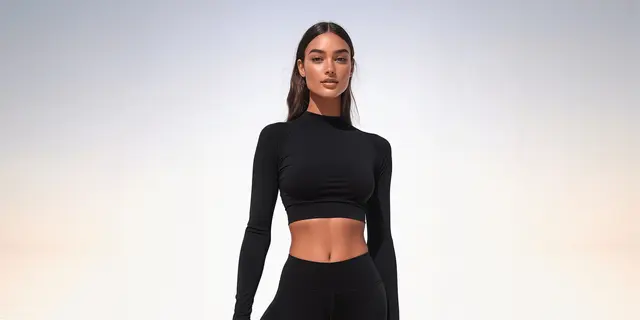
An AI ghost mannequin turns a photo of a garment laid flat, on a hanger or on a person into a hollow, worn-looking product image on a clean background. You need no mannequin, no model and no Photoshop composite. The AI removes whatever held the garment and draws the parts the camera never saw. That means the inside of the neck is a guess unless you photograph it.
That last point is where most AI ghost mannequin images fail. The front of the garment is in your photo, so the tool copies it. The shoulder volume, the back of the collar and the brand label inside the neck are not, so the tool invents them. A wrong label or a collar that is too high reads as a different product.
This guide sorts the job by the photo you start from. It shows what each source photo gives the AI and what the AI has to make up. Then it covers how to shoot a source photo that works, six checks before an image ships, and where Amazon, Google and Etsy accept the result. The studio method, with a paneled form and a composite, is in our guide to ghost mannequin photography.
Key Takeaways
- The source photo decides the result. An AI ghost mannequin copies what the camera saw and invents the rest. A flat lay gives it no volume. A hanger or on-model photo gives it shape.
- Photograph the inside of the neck. The brand label, the size and the collar lining sit there, and no source photo shows them from the front. Give the tool a second photo of that area.
- Use several photos at once where the tool allows it. AdWorker accepts an optional inside-label shot (adworker.ai, September 2026). Google’s Gemini 3 Pro Image takes up to 6 object images in one request (Google AI for Developers, September 2026).
- Check six areas before it ships. The neck opening, the label, the print and seams, the color, the hem and cuffs, and any sheer fabric.
- Amazon US wants adult clothing on a model in the main image. Its clothing guide bans a visible mannequin or hanger there and says “Only photos are allowed” (Amazon clothing image guide, September 2026). Put AI ghost mannequin images in the alternate slots.
- Google Merchant Center wants the AI metadata kept. Images made with generative AI must carry metadata that says so, and you must not remove it (Google Merchant Center Help, September 2026).
What is an AI ghost mannequin?
An AI ghost mannequin is an image edit that makes a garment look worn by an invisible body. You upload a photo of the garment on a flat surface, a hanger, a mannequin or a person. The AI removes the support and the background, adds shoulder and chest volume, and draws the inside of the neck. The result is the same hollow, three-dimensional product shot a studio makes by compositing two photos.
The names vary. Invisible mannequin, hollow man and 3D mannequin all describe the same image. “Ghost mannequin app” usually means a web tool that does this in one step.
The studio version needs a form with removable panels, two photos per view and a retoucher to join them. The AI version needs one photo, sometimes two. The difference is where the information comes from. In the studio, a second photo shows the inside of the neck. With AI, the model draws it unless you supply it.
What the AI can see in each source photo
Every source photo shows some of the garment and hides the rest. The AI copies the part it can see. It invents the part it cannot. So the right question is which parts of your garment the source photo leaves out.
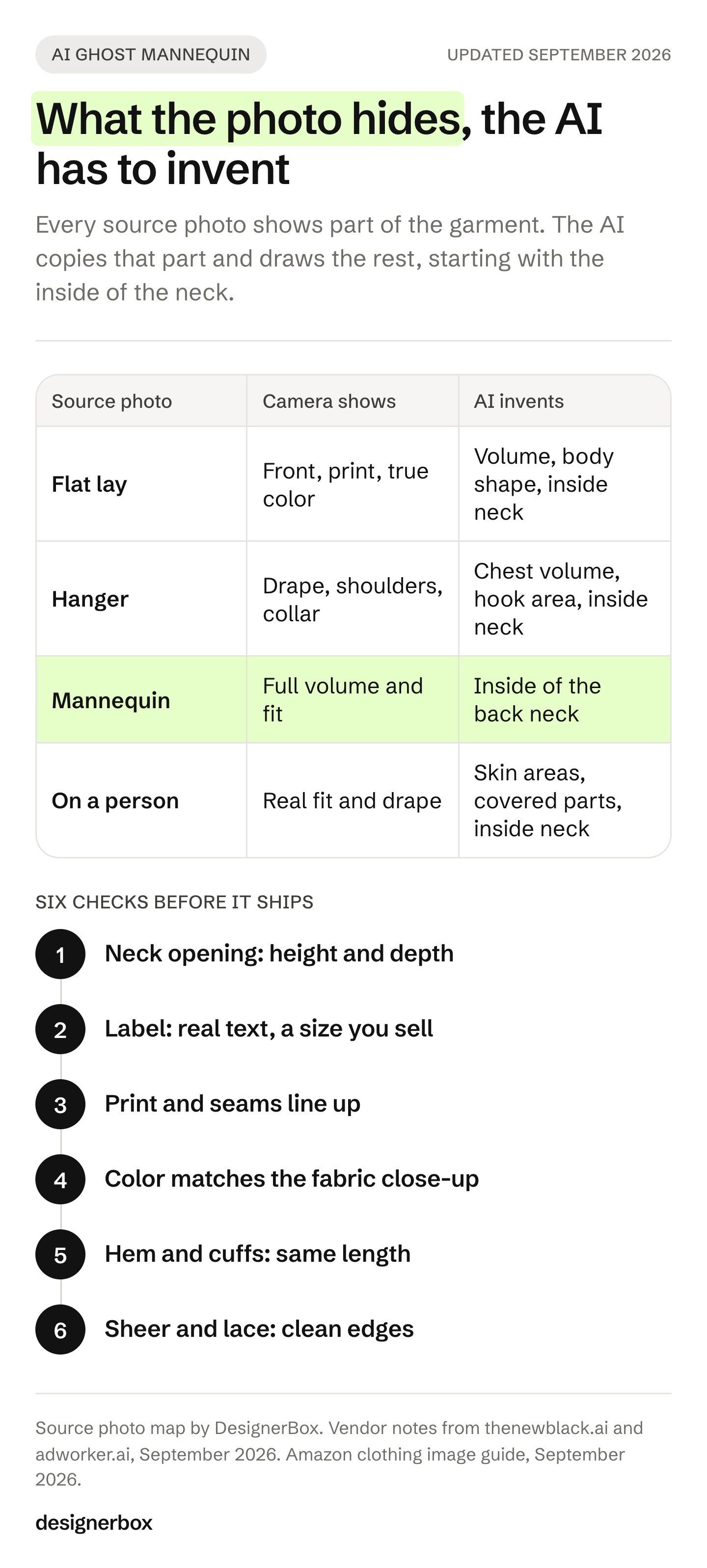
| Source photo | What the camera shows | What the AI has to invent | Works best for |
|---|---|---|---|
| Flat lay | The full front, the print, the true color under even light | Shoulder and chest volume, body curve, the inside of the back neck, side depth | T-shirts, sweatshirts, knits that lie flat |
| Hanger | Drape, the shoulder line, the collar shape | Chest volume, the area where the hook sat, the inside of the back neck | Shirts, dresses, jackets |
| Mannequin or dress form | Full volume and fit | The inside of the back neck behind the form’s neck | Structured pieces, tailoring |
| On a person | Real fit and drape | The neckline and armholes where skin showed, anything arms or hair covered | Ranges that already have on-model photos |
The pattern is simple. The more of the garment your photo shows, the less the result is a guess. A flat lay shows the most surface and the least shape. A form shows the most shape and hides only the inside of the neck.
Vendors say the same thing about their own tools. The New Black says halternecks and deep cowls force its model to “invent an interior it can barely see”, and that sheer and lace pieces “can come back cloudier” (thenewblack.ai, September 2026). AdWorker says lace, mesh and unusual necklines “may still benefit from a manual review pass” (adworker.ai, September 2026). Both notes point at the same parts of a garment: the parts the camera did not see.
If you have not picked a source format yet, flat lay photography covers how to shoot the flat version well. A flat lay is also the cheapest photo to take.
Why the inside of the neck is the hard part
The inside of the back neck carries information a shopper reads. The brand label is there. So is the size, and on many garments the care label and a strip of collar tape. No front-facing source photo shows any of it.
When the AI draws that area, it draws a plausible label. The text on it may be nonsense, a size you do not sell, or a brand mark that is close to yours but wrong. On a knit, it may draw a seam or a rib that the real garment does not have. Each of these makes the image describe a different product.
There are three fixes, in order of preference:
- Photograph the inside of the neck and give it to the tool. Turn the collar toward the lens, or fold the back of the garment down, and shoot the label in the same light. AdWorker accepts “an optional inside-label shot” next to the main photo (adworker.ai, September 2026). In a general image model, add it as a second reference image. Google’s Gemini 3 Pro Image, which Google calls Nano Banana Pro, takes up to 6 object images in one request (Google AI for Developers, September 2026).
- Ask for a plain inside neck. Tell the tool to show the lining with no label, and add a separate close-up of the real label as a detail image. The main image then claims nothing it cannot back up.
- Shoot on a form and let the AI remove it. The form holds the shape, so the AI only has to draw the inside of the neck. That is the smallest guess of the four source photos.
Amazon’s clothing guide also asks that “The color in the image must match the product for sale”, in the main and the alternate images (Amazon clothing image guide, September 2026). An invented lining in the wrong color can fail that rule without anyone noticing on a phone screen.
How to shoot a source photo the AI can use
A phone is enough for the source photo if the light is even and the whole garment is in frame. Preparation matters more than the camera.
- Steam the garment. Every crease in the source photo becomes a crease in the result. The AI does not know which folds are fabric and which are storage.
- Use soft, even light. Shoot near a window with no direct sun, or under two soft lights. A hard shadow across a print can come back as part of the print.
- Keep the whole garment in frame. Both shoulders, both cuffs and the hem. The New Black says a photo with “the hem or a shoulder outside the frame” cannot be completed convincingly (thenewblack.ai, September 2026).
- Shoot straight on. For a flat lay, hold the camera directly above the garment and parallel to it. For a hanger, put the lens at chest height. An angled camera gives the AI a distorted shape to copy.
- Take the inside-neck photo. Same light, same distance, label readable.
- Take a fabric close-up. It gives you a color and texture reference for the checks later, and it is a useful detail image on its own.
- Keep the resolution high. Amazon turns on zoom at 1,000 pixels or more on the longest side (Amazon product image guide, September 2026). A small source photo limits the result, which low-resolution product images explains in more detail.
Shoot the whole range this way in one session, with the same light and the same camera position. A consistent set of source photos gives you a consistent set of results. Consistent product images covers the other layers a catalog needs to match.
How to make a ghost mannequin from a flat lay
The flat lay is the most common starting point, because it needs no form and no hanger. It is also the input where the AI invents the most. Here is the process.
- Pick the route. A dedicated ghost mannequin tool does this one job. A general image model with a prompt gives you more control over each part. A saved workflow runs the same steps on every garment.
- Upload the flat lay and the inside-neck photo. If the tool takes one image only, run the flat lay alone and plan to check the neck closely.
- Say what must not change. In a prompt-based tool, name the color, the print, the seams, the buttons and the hem. A prompt without a keep line lets the model “improve” the garment.
- Run it and compare the result with the physical garment. Lay the real piece next to the screen.
- Export to the channel’s spec. White background, frame fill and pixel size come from the channel, not from the tool.
A prompt for step 3 in a general image model can read like this:
Change the first image into a ghost mannequin photo. The garment looks worn by an invisible body. Use the second image for the inside of the back neck and the label. Pure white background, soft even light. Keep the color, the print, the seam lines, the buttons and the hem exactly as in the first image.
Our list of AI prompts for clothing product photos has more prompts in this shape, including hanger removal and background changes.
Six checks before the image ships
Check every result against the physical garment, not against the source photo. The source photo is also missing the parts the AI invented.
- The neck opening. The New Black calls this the most reliable sign of quality (thenewblack.ai, September 2026). Check the collar height, the rib width and the depth of the opening. A neck that is too deep or too round changes how the garment reads.
- The label. Is the text real and the size correct? If you did not supply a label photo, remove the label or replace it.
- The print and the seams. Stripes should continue across the side seams. A logo should sit where it sits on the garment. Pockets, darts and topstitching should match in number and position.
- The color. Compare the result with the fabric close-up under the same light. Look for a shift in the main color and in the lining.
- The hem and the cuffs. The length should match the real piece. A hem the AI made longer or wider is a fit claim you did not make.
- Sheer and lace areas. Look at the edges where fabric meets background. These are the areas vendors say may need a manual pass.
If a result fails one check, fix that area in an image editor or run it again with a better source photo. Do not publish it and plan to fix it later. A shopper judges the garment from the image, so a wrong detail is a wrong product description.
Where an AI ghost mannequin image can run
Channel rules decide which slot the image can go in. They also decide what you must keep in the file.
| Channel | Main image | AI ghost mannequin image |
|---|---|---|
| Amazon US, adult clothing | Standing model, pure white background, product fills 85% | Alternate slots |
| Google Merchant Center | Whole product, little or no staging, white or transparent background recommended | Allowed, with its AI metadata kept |
| Etsy | Original photos of the actual product | Read the rule before you list it |
| Your own store | Your choice | Anywhere, including the main image |
Amazon. Amazon’s product image guide asks for adult clothing on a standing model in the main image (Amazon product image guide, September 2026). Its clothing guide bans a “visible mannequin, hanger, or holder” in the main image and says “Only photos are allowed” (Amazon clothing image guide, September 2026). It does not say whether a photorealistic AI image counts as a photo. An Amazon staff member said on the seller forums that simple AI retouching, such as background removal, is treated like normal photo editing (Amazon seller forums, September 2026). That is a forum reply, not a policy page. An AI ghost mannequin redraws more than a background, so keep it in the alternates.
Amazon’s AI tag rule does not apply here. The keyword contains-synthetic-performer is for images of photorealistic people made fully by AI (Amazon product image guide, September 2026). A ghost mannequin image shows no person.
Google. Google Merchant Center accepts product images made with AI. Each one must carry metadata that says AI made it, for example the IPTC DigitalSourceType value TrainedAlgorithmicMedia, and you must not remove it (Google Merchant Center Help, September 2026). Check that your resize and compression step keeps that metadata. Google also plans a 500 x 500 pixel minimum from 31 January 2027. Until then, the clothing minimum is 250 x 250 (Google Merchant Center Help, September 2026).
Etsy. Etsy asks for original photos of the actual product buyers will receive, not renderings or stock photos (Etsy Listing Image Requirements, September 2026). An AI ghost mannequin made from your own photo of the real item sits closer to an edit than a rendering. Etsy does not say where the line is, so read the rule before you use one as the first image.
These are platform rules, and they change. What each marketplace requires for AI product images tracks them in more detail. For the whole shot list by slot, see clothing photography.
Dedicated ghost mannequin tools
Several tools do this one job well. Each takes a garment photo and returns a hollow product image. They differ in which source photos they accept and whether they take a second photo.
- Photoroom accepts a “flat lay, hanging garment, mannequin, or model image”, and offers batch editing and an API for the same feature (photoroom.com, September 2026).
- AdWorker takes up to three garment photos: a main image, plus an optional inside-label shot or extra angle (adworker.ai, September 2026). It exports white-background PNG files.
- Photta accepts photos on a mannequin, a hanger or a flat lay, from front, back, side and 45-degree angles, with batch processing (photta.app, September 2026).
- The New Black accepts a garment on a model, on a mannequin or laid flat, and publishes which garment types it handles less well (thenewblack.ai, September 2026).
- WearView adds the invisible mannequin effect to flat lays and other garment photos (wearview.co, September 2026).
Each lists its plans on its own pricing page. For a handful of garments, any of them may be enough. The choice matters more at catalog scale, where the ghost mannequin image is one shot in a set and every garment has to look the same.
Ghost mannequin shots as a workflow
Anyone can make an AI picture. Making hundreds that still look like your brand is the hard part. A ghost mannequin tool fixes one photo. A catalog needs the same background, the same light and the same framing on every garment, plus the other shots each listing needs.
DesignerBox is AI creative production for brands and agencies. You build the job once as a workflow: the ghost mannequin step, then a white background at your channel’s spec, then the other shots. Start from the ghost mannequin template and add your own photo. Clothing catalog turns one garment into four shots: front, three-quarter, back and a fabric close-up. The image editor makes one edit after another, and the picture keeps its detail and resolution.
You set the brand once, and the workflow reads it on every run. Three critic steps score the results, and best-of-N keeps the best one. You still run the six checks above. Batch runs one workflow over a whole sheet of products, and you review the results in one pass. The cost is shown before each run. The full workflow from the first product photo to the finished ad, in one subscription.
Here are the limits. DesignerBox does not publish into your Amazon or Shopify listing. You download the results, or send them with a webhook or an S3 step. The commercial license starts on the Pro plan. Virtual try-on and AI video start on the Premium plan. Team features, shared brand kits, white label and the API are on the Ultra plan, and every plan below Ultra is one seat. An agency doing this for several clients needs Ultra. Plans and credits are on the pricing page.
For the on-model shot that Amazon wants first, see how to put clothes on a model with AI.
The first job, built once
Start from a template, add your brand and your products, and run it. The cost is shown before the run. See the templates.
FAQ
Can you make a ghost mannequin photo without a mannequin?
Yes. An AI ghost mannequin tool makes the hollow effect from a photo of the garment laid flat, on a hanger or on a person. No form is needed. The AI adds the volume and draws the inside of the neck, so photograph that area separately if you can.
Can AI turn a flat lay into a ghost mannequin?
Yes, and it is the most common input. A flat lay shows the full front and the true color, but no volume. The AI invents the shoulders, the chest shape and the inside of the neck. Check those areas against the real garment before you publish.
Is there a free ghost mannequin app?
Some tools have a free tier. AdWorker gives new users free credits with no account needed to start, and Photta offers a free tier with no watermark on results (adworker.ai and photta.app, September 2026). Read each tool’s terms on commercial use before you put a result on a product page.
Does Amazon accept AI ghost mannequin images?
Amazon US wants adult clothing on a standing model in the main image, and its clothing guide says only photos are allowed there. It does not say whether a photorealistic AI image counts. Use AI ghost mannequin images in the alternate slots, and check the current guide for your category.
How do you fix the inside of the neck on an AI ghost mannequin?
Give the tool a second photo of the inside of the back neck, with the label readable, in the same light. If the tool takes one image only, ask for a plain lining with no label. Then add a close-up of the real label as a separate detail image.
Do AI ghost mannequin images need an AI label?
On Google Merchant Center, an image made with generative AI must keep metadata that says so. Amazon’s contains-synthetic-performer tag is for images of people made fully by AI, so it does not cover a ghost mannequin image. Check each channel’s current rule.
Which garments are hardest for an AI ghost mannequin?
Sheer fabric, lace and mesh, deep cowls, halternecks and open backs. The AI has little information about their interiors, and vendors name them as the cases that may need a manual review. The New Black says jackets, coats, shirts and knitwear work cleanly (thenewblack.ai, September 2026).
Sources
- Amazon clothing main and alternate image rules: Amazon clothing image guide, accessed 24 September 2026
- Amazon main image, zoom and AI people tag: Amazon product image guide, accessed 24 September 2026
- Amazon staff reply on AI retouching: Amazon seller forums, accessed September 2026
- Google Merchant Center image requirements and AI metadata: Google Merchant Center Help, accessed September 2026
- Google Merchant Center image size change: Google Merchant Center Help, accessed September 2026
- Gemini 3 image model reference images: Google AI for Developers, accessed 24 September 2026
- Etsy image rules: Etsy Listing Image Requirements, accessed September 2026
- Ghost mannequin tool features: photoroom.com/tools/ghost-mannequin, adworker.ai/tools/ghost-mannequin, photta.app/tools/ai-ghost-mannequin-free, thenewblack.ai (ghost mannequin feature page), wearview.co/ghost-mannequin, accessed 24 September 2026
- DesignerBox plan gates and the cost shown before each run: DesignerBox pricing page (designerbox.ai/pricing), September 2026
Platform rules and tool features verified on each company’s own page as of September 2026. Rules change often, so check the current version before you list. Individual results vary.