





MCP marketing means using the Model Context Protocol to connect an AI chat, such as Claude or ChatGPT, to the systems a marketing team already uses. A server gives the chat tools for one system: an ad account, an analytics property, a CRM, a design file or a creative tool. The chat can then pull a report, update a record or run a creative job from one conversation.
A marketing team works in many systems each week. The ad numbers are in one, the site numbers in a second, the leads in a third and the ads themselves in a fourth. Someone copies figures between them by hand, and the weekly report takes a morning.
This guide is for an agency or a brand marketing team. It groups MCP servers by the marketing job they do, shows which ones can change your data, and lists what MCP cannot do. Every vendor fact below was read on the vendor’s own page in October 2026.
Key Takeaways
- MCP is an open standard. One server connects one system to your AI chat.
- Marketing servers cover 5 jobs. Ads data, analytics, CRM, design, and image and video creative.
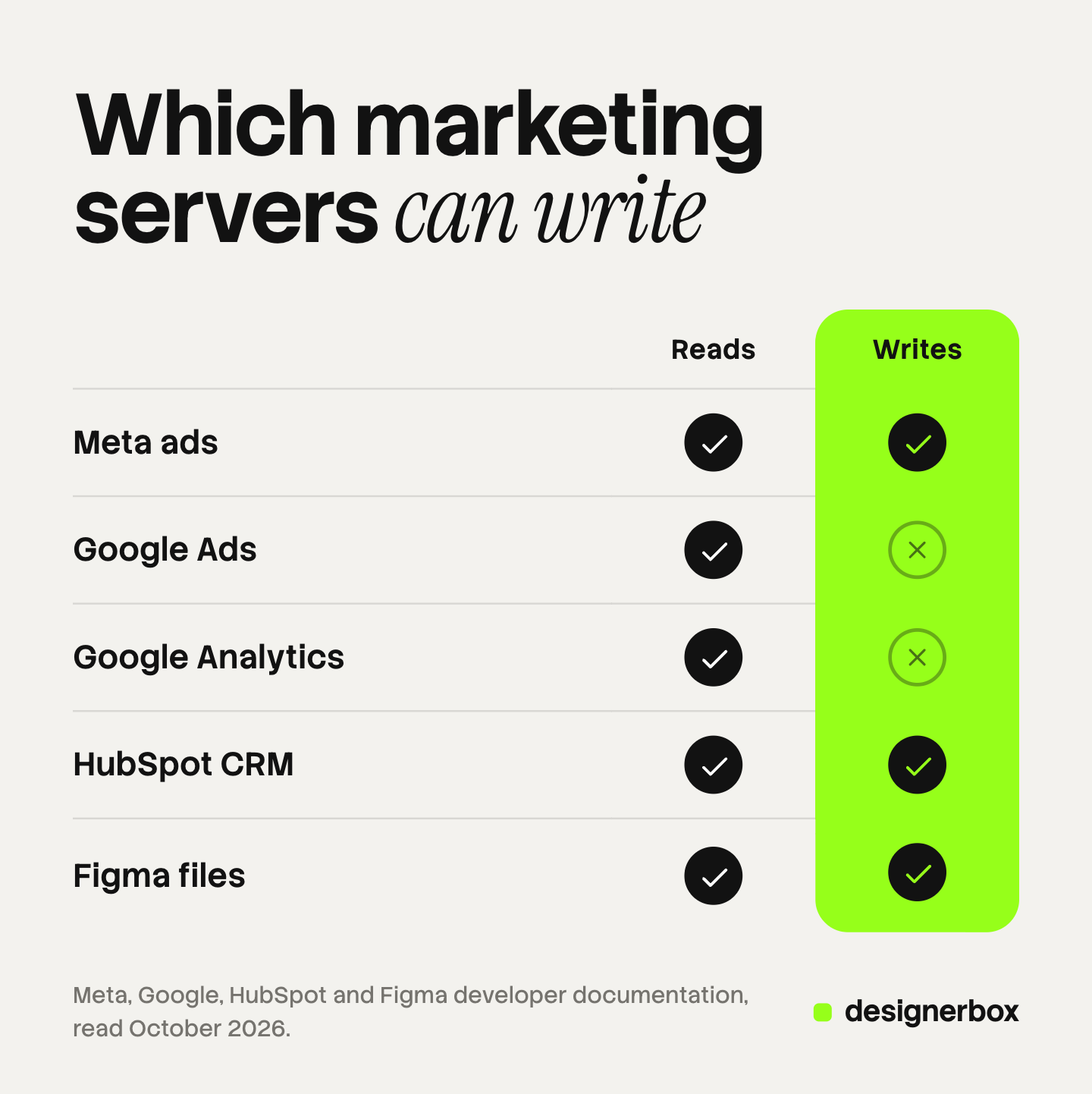
- Some servers only read. Google’s Ads and Analytics servers read data. They do not change it.
- Some servers write. Meta’s ads server and the HubSpot server can create and edit records.
- A data server does not make creative. A creative server makes the image, the ad or the video.
- A person still approves. Budgets, live ads and brand checks stay with your team.
What is MCP in marketing?
MCP, the Model Context Protocol, is “an open-source standard for connecting AI applications to external systems” (modelcontextprotocol.io, October 2026). In marketing, the external systems are the ad platforms, the analytics property, the CRM, the design files and the creative tools.
A server exposes three kinds of things, in the protocol’s own terms. Tools are functions the model can call, such as “run a report”. Resources are read-only data the application can load. Prompts are ready instruction templates that a user picks (modelcontextprotocol.io, October 2026).
For a marketer, the tools matter most. A tool can read, or it can write. The same page says tools “may require user consent prior to execution”, which is why a chat asks you before it changes something. How MCP differs from a written skill covers the basics in more detail.
MCP servers, MCP connectors and Claude connectors
These three names describe one thing from different sides.
MCP server. The program a vendor runs. It holds the tools for one system.
MCP connector. The same server, as it appears in your AI chat’s settings. You add it, sign in and turn it on.
Claude connectors. Anthropic’s name for them. Its help center says connectors “let Claude access your apps and services, retrieve your data, and take actions within connected services” (support.claude.com, October 2026). Claude has a directory of ready connectors and also accepts custom connectors. Custom connectors work on the Free, Pro, Max, Team and Enterprise plans, and Free accounts are limited to one (support.claude.com, October 2026).
ChatGPT calls them apps. Its developer mode gives “full Model Context Protocol (MCP) client support for all tools, both read and write”. OpenAI lists it for Pro, Plus, Business, Enterprise and Education accounts on the web (developers.openai.com, October 2026). The steps are in the ChatGPT MCP setup guide.
The best MCP servers for marketing, by job
“Best” depends on the job. A list of the best MCP servers in general mixes code tools, databases and file tools that a marketing team never opens. The table groups servers by the five marketing jobs. Each example is the vendor’s own server, with a note on who runs it.
| Marketing job | Example server | Who runs it | What the chat can do |
|---|---|---|---|
| Ads data and campaign changes | Meta Ads MCP server | Meta hosts it | Pull reports, create and edit campaigns, manage catalogs |
| Ads data | Google Ads MCP server | You run it | List accounts and run reporting queries |
| Analytics | Google Analytics MCP server | You run it | Run standard, funnel and realtime reports |
| CRM | HubSpot MCP server | HubSpot hosts it | Read and update contacts, companies and deals |
| Design | Figma MCP server | Figma hosts it | Read design context and write content to the canvas |
| Image and video creative | A creative tool’s server | The creative tool hosts it | Make images, ads and video |
Ads data
Meta hosts an ads server at mcp.facebook.com/ads. Its documentation lists seven tool categories, from reporting to activity logs (developers.facebook.com, October 2026). It can write. Meta’s tool page says “write tools create entities in a paused state; your AI client asks for confirmation before activation” (developers.facebook.com, October 2026). The Meta Ads MCP guide covers its setup and its rules.

Google’s server for the Google Ads API is narrower. Google lists its mode as “Read-only (current release)” and names three tools: one lists accounts, one runs queries and one describes data fields (developers.google.com, October 2026). You run it yourself, on your computer or on a cloud service.
Analytics
Google publishes an MCP server for Google Analytics. Google says it “lets you connect your Analytics data to an LLM, like Gemini” (developers.google.com, October 2026). Its repository labels the server experimental. The tools run standard, funnel and realtime reports, and the sign-in uses a read-only scope (github.com, October 2026). You install it and run it yourself.
CRM
HubSpot hosts a remote server at mcp.hubspot.com. HubSpot made it generally available on April 13, 2026. It reads CRM records, campaigns, landing pages and blog posts. It can create and update contacts, companies, deals and tickets. Quotes, invoices, orders, carts and segments stay read-only. HubSpot states that “all actions respect your existing HubSpot user permissions” (developers.hubspot.com changelog, October 2026).
Design
Figma’s server gives “design information and context to AI agents generating code from Figma design files”. It also lets an agent “write native Figma content back to the canvas” (developers.figma.com, October 2026). For a marketing team this helps with landing pages and design systems. It does not produce a campaign photo.
Image and video creative
Creative tools run their own servers. One example is Higgsfield. Its MCP server connects its image, video and audio models to Claude, Cursor and command-line agents, and ChatGPT connects through a Higgsfield plugin. It offers ready-made skills in six categories, including ad creative, product video and localization, and it needs an active subscription (higgsfield.ai blog, October 2026).
DesignerBox is a second example, covered in the last section. How Claude makes images through a connector explains the general setup.
Which marketing MCP servers read and which write
Read access and write access carry different risks. A wrong report costs you time. A wrong write can spend budget or change a customer record.
Anthropic’s help center notes that Team and Enterprise owners can limit which actions a connected service can take, split by read-only tools and write or delete tools. OpenAI states that in developer mode “write actions by default require confirmation”.
A sensible first month uses read access only. Then you allow one write action at a time and name the person who approves it. Agent orchestration explains why the risk grows when several servers share one conversation.
What MCP cannot do for a marketing team
It does not pick your tools. MCP is the connection. If a system has no server, the chat cannot reach it.
It does not join your data for you. Each server answers for its own system. The chat can compare two answers, but a name spelled two ways in two systems stays a mismatch.
It does not make a data server creative. An ads server places an image that already exists into an ad. It does not make the image.
It does not remove the review. Anthropic warns that a malicious MCP server “may include hidden instructions”. It advises connecting only to servers built and hosted by organizations you trust.
It does not remember your brand. A chat starts each conversation without your brand rules, unless a connected system holds them.
It does not approve spend. A person decides what goes live and what it costs.

How to pick MCP connectors
- Start from one weekly job. Pick the report or the task that takes the most hours. Connect the one server that job needs.
- Check who runs the server. A vendor’s own server follows the vendor’s sign-in and permissions. A third-party server holds your access token, so ask who hosts it.
- Check read or write. Read the tool list before you connect. Ask the chat to list the tools it sees.
- Check the plan on both sides. Your AI chat plan sets how many connectors you can add. The vendor’s plan may set what the server returns.
- Check how you sign in. A hosted server with a sign-in page takes minutes. A server you run yourself needs a developer.
- Name the approver. Write down who confirms each write action and each creative run.
For agents that run several of these jobs together, see the main kinds of AI marketing agents. For the text side of the work, see what Claude does for marketing teams.
Creative production over MCP
DesignerBox is AI creative production for brands and agencies. It covers the fifth job in the table: the images, ads and video. DesignerBox has 68 tools over MCP, and it runs inside an AI chat such as Claude, ChatGPT or Cursor. The setup for Claude is on the DesignerBox for Claude page, and the DesignerBox MCP launch post lists the tools by group.
Anyone can make an AI picture. Making hundreds that still look like your brand is the hard part. In DesignerBox you build a workflow once with your brand, your products and your rules. The chat then runs that saved workflow, so each result follows the same rules. The chat asks you to confirm each run, and the cost is shown before the run.
The full workflow from the first product photo to the finished ad, in one subscription. Other creative tools also have MCP servers, so compare them on the job you repeat each week.
Here are the limits. DesignerBox does not connect to an ad account, an analytics property or a CRM. It does not have a public API. You download the results, or send them with a webhook or an S3 step. Every plan below Ultra is one seat. Uploading your own photos and the commercial license start on the Pro plan. AI video, virtual try-on, upscaling, the image editor and the video editor start on the Premium plan. Plans and credits are on the pricing page.
The creative job in your AI chat
Connect one creative server next to your data servers, and run a saved workflow from the same conversation. See the DesignerBox MCP page
FAQ
What is MCP marketing?
MCP marketing is the use of the Model Context Protocol in marketing work. An AI chat connects to ad accounts, analytics, a CRM, design files and creative tools through servers. The chat can then report, update records and run creative jobs in one conversation.
What are the best MCP servers for a marketing team?
Start with the vendor’s own server for each system you use. Meta and HubSpot host theirs. Google publishes servers for Google Ads and Google Analytics that you run yourself. Add one creative server for images, ads and video.
What is the difference between MCP connectors and MCP servers?
They are two names for one connection. The server is the program the vendor runs. The connector is how that server appears in your AI chat’s settings. Anthropic uses the name connectors in Claude, and OpenAI uses the name apps in ChatGPT.
Do Claude connectors work on every Claude plan?
Anthropic says custom connectors that use remote MCP work on the Free, Pro, Max, Team and Enterprise plans. Free accounts are limited to one custom connector. On Team and Enterprise plans, an owner adds the connector first.
Can MCP for marketing change my ad account?
It depends on the server. Meta’s ads server can create and edit campaigns, and new ones start paused. Google’s server for the Google Ads API is read-only in its current release. Read the tool list before you connect.
Does a marketer need a developer to use MCP?
For a hosted server, no. You paste the server address into your AI chat and sign in. A server you run yourself, such as Google’s Analytics server, needs someone who can install it.
Does DesignerBox connect to ad or analytics data?
No. DesignerBox makes the images, ads and video. An AI chat such as Claude, ChatGPT or Cursor runs a saved workflow over MCP, and the cost is shown before the run. You download the results, or send them with a webhook or an S3 step.
Sources
- Model Context Protocol, “What is the Model Context Protocol (MCP)?”: open-source standard, clients that support it: modelcontextprotocol.io, October 2026
- Model Context Protocol, “Understanding MCP servers”: tools, resources, prompts, user consent: modelcontextprotocol.io, October 2026
- Anthropic, “Use connectors to extend Claude’s capabilities”: connector definition, directory, read and write permissions for Team and Enterprise: support.claude.com, October 2026
- Anthropic, “Get started with custom connectors using remote MCP”: plans, owner setup, security guidance: support.claude.com, October 2026
- OpenAI, “ChatGPT Developer mode”: MCP client support, eligible accounts, confirmation of write actions: developers.openai.com, October 2026
- Meta for Developers, Ads MCP Server overview: server address, seven tool categories: developers.facebook.com, October 2026
- Meta for Developers, Ad creation and management tools: paused state, confirmation before activation: developers.facebook.com, October 2026
- Google Ads API documentation, Google Ads MCP server: read-only mode, three tools, self-hosted setup (last updated August 3, 2026): developers.google.com, October 2026
- Google Analytics, “Try the Google Analytics MCP server”: developers.google.com, October 2026
- Google Analytics MCP Server repository: experimental label, report tools, read-only scope: github.com, October 2026
- HubSpot developer changelog, “Remote HubSpot MCP server is now generally available” (April 13, 2026): read and write access, read-only objects, permissions (developers.hubspot.com/changelog), October 2026
- Figma developer documentation, Figma MCP server (developers.figma.com/docs/figma-mcp-server), October 2026
- Higgsfield blog, “MCP for Marketers” (August 17, 2026): supported clients, skills, subscription (higgsfield.ai/blog), October 2026
- DesignerBox MCP and plan gates: DesignerBox MCP page (designerbox.ai/mcp) and DesignerBox pricing page (designerbox.ai/pricing), October 2026
Anthropic, OpenAI, Meta, Google, HubSpot, Figma and Higgsfield features checked against each company’s own pages as of October 2026. Servers change often, so your account may show different tools. Individual results vary.


