
Ecommerce advertising is paid promotion that sends shoppers to a product you sell online. In 2026 it runs on five channels: Google Shopping and search, Meta, TikTok Shop, Amazon and Pinterest. Each channel now has a campaign type that sets bids, audiences and placements for you. Your store still supplies two inputs: a correct product feed, and enough creative for every product.
That changes where the work is. Five years ago a store owner chose keywords, audiences and placements by hand. Today each platform asks for a goal, a budget and a catalog, and its system does the rest. The settings got shorter. The list of images and videos each product needs got longer.
This guide is for brands that advertise a catalog of 20 to 500 products. It covers the five channels, what each one automates as of October 2026, how far AI use in advertising has gone, and the part no platform does for you.
Key Takeaways
- Five channels carry most ecommerce ads. Google Shopping and search, Meta, TikTok Shop, Amazon and Pinterest.
- Each channel has an automated campaign type. Performance Max, Advantage+ sales campaigns, GMV Max, Sponsored Products with automatic targeting, and Pinterest Performance+.
- The platform sets bids, audiences and placements. You set a goal and a budget, and you supply the feed and the creative.
- AI use in ad creative is rising fast. Nearly two in three video ad buyers use generative AI for creative, according to the IAB’s July 2026 report.
- The platforms also make creative now. Amazon and Pinterest generate backgrounds and lifestyle images from your product image. Each tool works inside one platform only.
- Two inputs stay with the store. A product image that matches what ships, and enough creative for every product, in the same brand look on every channel.
What is ecommerce advertising?
Ecommerce advertising is every paid placement that leads a shopper to a product page or a marketplace listing. It includes Shopping and search ads, paid social, marketplace ads and shoppable video. The market behind it keeps growing. US retail ecommerce sales were $340.2 billion in the second quarter of 2026, or 17.1 percent of total retail sales, in the Census Bureau’s 18 August 2026 release. The Bureau publishes revised figures on 19 November 2026 (US Census Bureau, read October 2026).

Ad budgets follow the sales. In September 2026 the IAB raised its forecast for US ad spend growth in 2026 to 12.3 percent. It expects social media to grow 16.5 percent, commerce media 13.6 percent and paid search 8.1 percent. The forecast uses answers from more than 200 brand and agency decision-makers (IAB, 10 September 2026).
Ecommerce ads differ from other ads in one way. Most of them start from a product feed: a file that lists each product with its title, price and image. The platform reads the feed and builds the ad. That is why the feed comes up in every section below. AI shopping systems read the same feed, as the guide to agentic commerce explains.
The five ecommerce advertising channels and what each automates
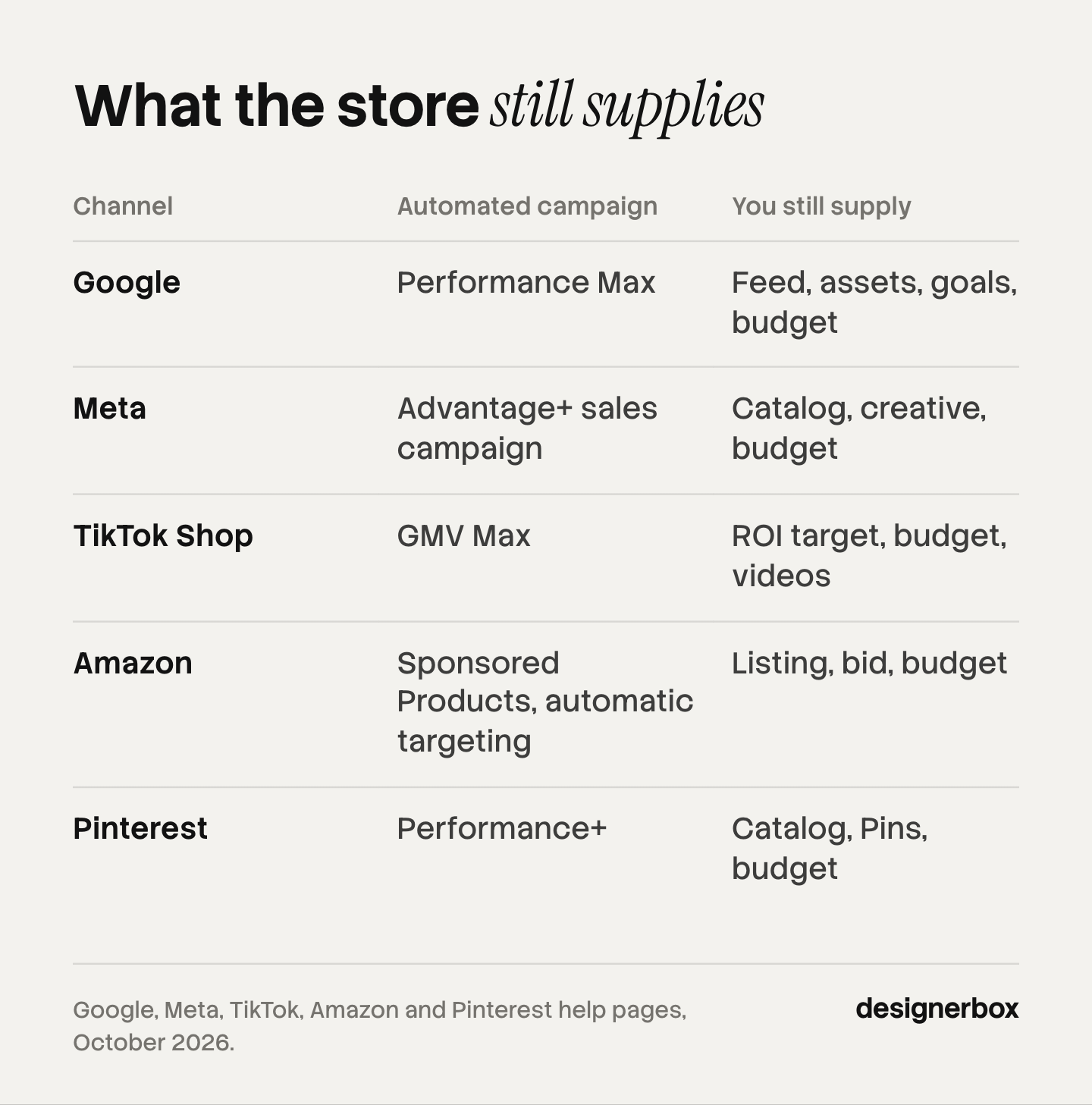
Each of the five channels has one campaign type built for online stores. The table shows the campaign type, what the platform decides, and what you still supply. Every row comes from the platform’s own help pages, read in October 2026.
| Channel | Automated campaign type | The platform decides | You still supply |
|---|---|---|---|
| Performance Max | Bids, placements across Google, asset mix | Feed, assets, goals, budget | |
| Meta | Advantage+ sales campaign | Audience, placements, budget split | Catalog, creative, budget |
| TikTok Shop | GMV Max | Products, creative choice, audience, placements | ROI target, budget, videos |
| Amazon | Sponsored Products, automatic targeting | Keywords and product matches | Listing, bid, budget |
| Performance+ | Targeting, bids, ad formats | Catalog, Pins, budget |
Read the last column. The words that repeat are feed, catalog, listing and creative. The platform takes the decisions. The store brings the material.
Google: Shopping ads and Performance Max
Google describes Performance Max as “a goal-based campaign type that allows you to access all Google Ads inventory, including YouTube, Display, Search, Discover, Gmail, and Maps, from a single campaign” (Google Ads Help, accessed October 2026). You give it text, images, video, a data feed, a conversion goal and a budget. Smart Bidding sets the bid in each auction, and Google’s AI combines your assets into ads.
The Shopping part of the campaign reads your Merchant Center feed. The main image must give a clean view of the product, with no promotional elements or overlays. Google requires at least 500 x 500 pixels for all products from 31 January 2027, and it recommends 1500 x 1500. An image made with generative AI must keep the metadata that says so (Google Merchant Center Help, accessed October 2026).
Meta: Advantage+ sales campaigns and catalog ads
Meta calls Advantage+ sales campaigns “the most efficient way for advertisers using the sales objective to drive online sales”. Its page says the most advanced AI features are on when the campaign uses Advantage+ audience, placement and budget. Meta’s own figure is a 9 percent improvement in cost per conversion, on average (Meta Business Help Center, accessed October 2026). That number is Meta’s, and no outside party checked it.
Catalog ads are the feed format on Facebook and Instagram. Advantage+ catalog ads “automatically show people the most relevant products or services from your catalog” (Meta Business Help Center, accessed October 2026). For how a platform builds an ad per viewer, see dynamic creative optimization.
Meta also tells you what it wants from you. Its first best practices are to connect your own data, and to “provide a wide variety of diverse creative assets”.
TikTok Shop: GMV Max
TikTok describes GMV Max as “an automated ad campaign type that optimizes for total channel ROI for your TikTok Shop”. The campaign chooses the products, the creative assets and the placements. You choose an ROI target and a daily budget, and the campaign spends inside the range of that target (TikTok Business Help Center, accessed October 2026).
The creative here is video. GMV Max picks from the videos connected to your shop, so a product with no video gives the campaign nothing to choose. For the format, see TikTok Shop product videos. How the shops on TikTok, Instagram and Facebook differ is covered in social commerce.
Amazon: Sponsored ads
Amazon’s ads sit inside the marketplace, which is the core of retail media. Sponsored Products are “cost-per-click (CPC) ads that promote individual product listings on Amazon and select premium apps and websites”. With automatic targeting, Amazon’s systems match your product to relevant keywords. A click leads to the product detail page (Amazon Ads, accessed October 2026). So the listing image is the ad image.
Amazon also makes creative. Its Image Generator turns a product into lifestyle images, and its Video Generator turns a product into a video for Sponsored Brands. Amazon reports a 10.3 percent higher return on ad spend, on average, for Sponsored Brands campaigns that used AI-generated images. The source is Amazon’s internal US data for April to June 2025 (Amazon Ads, accessed October 2026).
Pinterest: Performance+
Pinterest Performance+ “bundles Pinterest’s automation and AI features to simplify campaign creation”. Pinterest says setup takes 50 percent fewer inputs. Targeting is limited to country, age and customer lists, and bidding is automatic. For the Sales objective, Performance+ creative turns product Pins into collections and shopping ads, crops and resizes Pins, and uses generative AI to apply backgrounds to product images (Pinterest Help Center, accessed October 2026).
How far has AI adoption in ecommerce advertising gone?
On the buying side, AI use is close to complete: the default campaign type on each of the five channels is automated. On the creative side, adoption is rising and uneven. The clearest current data comes from the IAB, and it covers digital video ad buyers in the US, not ecommerce stores only.
The IAB’s 2026 Digital Video Ad Spend and Strategy report, run with Advertiser Perceptions and Guideline, found three things (IAB, 14 July 2026):
| Finding | 2025 | 2026 | 2027 (projected) |
|---|---|---|---|
| Buyers who use generative AI for video creative | Half | Nearly two in three | Not given |
| Share of buyers’ ad assets that use generative AI | One-fourth | One-third | 43 percent |
The third finding matters most for a small store. Among smaller buyers, 96 percent are not satisfied with their current level of generative AI use for creative. More than four in ten want more proof of performance and easier connections with the ad platforms.
Read those numbers with care. They describe video buyers, and a share of them are large advertisers. No primary source we found in October 2026 gives an adoption rate for ecommerce stores alone, so this guide does not print one. For the wider picture, see AI in advertising and generative AI in ecommerce.
The input the platforms do not make for you
The platforms automate the buying, and some now generate creative. Two inputs still come from the store: a product that stays true in every image, and enough creative for every product on every channel.
A product that stays true. Every platform holds the merchant responsible for the image. Meta’s catalog rule is one sentence: “Images must accurately represent the specific product for sale” (Meta Business Help Center, accessed October 2026). Google asks for a clean view of the item. A generated scene that changes the color, the label or the shape of the product breaks these rules, and it leads to returns. The checks are in AI product ads.
Creative volume. An automated campaign can only choose from what it has. Meta asks for a wide variety of assets. GMV Max needs videos. Performance Max needs text, images and video. Take a store with 200 products. A main image, three angles, one lifestyle image and one short clip per product is 1,200 files. That is plain arithmetic for one example store. The file types behind that count are listed in creative assets. For measured monthly numbers, see ad creative volume.
One look across channels. Amazon’s generator makes images for Amazon ads. Pinterest’s backgrounds stay on Pinterest. Each tool is useful inside its own platform. None of them keeps your brand the same across all five, because none of them sees the other four. Ad creative generators by input shows what each kind reads before it makes an ad.
This is the reason creative is the constraint. The repeat costs behind it are in ecommerce creative production.
An ecommerce advertising strategy for a catalog
A workable ecommerce advertising strategy for 20 to 500 products has six steps. The order matters, because each step feeds the next.
- Fix the feed first. One clean product feed serves Google, Meta, TikTok and Pinterest. Check titles, prices and the main image against each platform’s rules.
- Start with two channels. Pick the one where shoppers already search for your product type, and one where they discover it. Add a third when the first two are stable.
- Give each campaign a goal and a budget. The automated campaign types need a conversion goal or an ROI target. Set limits you can afford while the system learns.
- Build the same creative set for every product. A main image, extra angles, a lifestyle image and a short clip cover the formats above.
- Check the product in every file. Compare color, shape and label with the real item before you upload.
- Measure by channel, then refresh. Read results per channel and replace tired creative on a schedule. Ad fatigue explains the signals, and this guide to ROAS for fashion ecommerce shows what the number hides.
Steps 1 to 3 take days. Steps 4 and 5 repeat for every product and every season, so they decide how much the automated campaigns can do.

One workflow for every product
Anyone can make an AI picture. Making hundreds that still look like your brand is the hard part. DesignerBox is AI creative production for brands and agencies. You build the creative set once as a workflow, with your brand, your products and your rules. Then you run it on every product.
- The product stays the product. The workflow starts from your own product photo and builds the scene around it. Critic steps score the results of a run, and best-of-N keeps the best one. You still compare each file with the real item.
- You set the brand once. Logos, fonts, colors and rules live in your brand profile. The workflow reads it on every run, so the look is the same on every channel.
- The catalog runs in one pass. Batch runs one workflow over a whole sheet of products. You keep or discard each row, and re-run one row on its own.
- Stills, ads and clips share one place. The full workflow from the first product photo to the finished ad, in one subscription.
The cost is shown before each run. Uploading your own photos and the commercial license start on the Pro plan, and AI video starts on the Premium plan. Plans and credits are on the pricing page.
DesignerBox has two limits here. It does not send files to your product feed or your ad accounts: you download the results, or send them with a webhook or an S3 step. Every plan below Ultra is one seat. The page for ecommerce brands shows the same job by product type.
A free plan for your first run
There is a free plan, and it runs on sample products. Start from a template and see the cost before you run it.
FAQ
What is ecommerce advertising?
Ecommerce advertising is paid promotion that leads shoppers to a product you sell online. It covers Shopping and search ads, paid social, marketplace ads and shoppable video. Most formats start from a product feed, and the platform builds the ad from the title, price and image in that feed.
Which channels work best for ecommerce ads?
The five main channels are Google Shopping and search, Meta, TikTok Shop, Amazon and Pinterest. Google and Amazon reach shoppers who already search for a product. Meta, TikTok and Pinterest reach shoppers before they search. Most stores start with one channel of each kind.
What does AI automate in ecommerce advertising?
On each of the five channels, an automated campaign type sets bids, audiences and placements. Examples are Performance Max on Google, Advantage+ sales campaigns on Meta and GMV Max on TikTok Shop. You set a goal and a budget, and you supply the product feed and the creative.
Do the ad platforms make the creative for you?
In part. Amazon generates lifestyle images and videos from a product, and Pinterest applies AI backgrounds to product images. Each tool works inside its own platform. You remain responsible for an image that matches the product, and for one brand look across channels.
How many ecommerce ads does one product need?
Plan for a main image, several extra angles, one lifestyle image and one short video per product. Those four types cover feed ads, social formats and marketplace listings. For 200 products that set is 1,200 files, which is why stores build it as a repeatable process.
Is advertising for ecommerce worth it for a small catalog?
It can be, if the feed is clean and each product has creative. The automated campaign types need less setup than manual campaigns did. They still need a goal, a budget you can afford during the learning period, and several assets per product to choose from.
How does DesignerBox help with ecommerce advertising?
You build the creative set once as a workflow and run it on every product. Batch runs it over a whole sheet of products, and you see the cost before the run. You download the results and add them to your feed and ad accounts yourself.
Sources
- US Census Bureau: Quarterly Retail E-Commerce Sales, 2nd quarter 2026, released 18 August 2026, revised estimates due 19 November 2026, accessed October 2026
- IAB: IAB raises 2026 US ad spend forecast, 10 September 2026, accessed October 2026
- IAB: 2026 Digital Video Ad Spend and Strategy full report, news release, 14 July 2026, accessed October 2026
- Google Ads Help: about Performance Max campaigns, accessed October 2026
- Google Merchant Center Help: image link attribute, accessed October 2026
- Meta Business Help Center: about Advantage+ sales campaigns, accessed October 2026
- Meta Business Help Center: about Meta Advantage+ catalog ads, accessed October 2026
- Meta Business Help Center: product image specifications for catalogs, accessed October 2026
- TikTok Business Help Center: about GMV Max campaigns in TikTok Ads Manager, accessed October 2026
- Amazon Ads: Sponsored Products, accessed October 2026
- Amazon Ads: generative AI creative solutions, accessed October 2026
- Pinterest Help Center: Pinterest Performance+, accessed October 2026
- DesignerBox brand, batch and pricing pages (designerbox.ai), October 2026
Platform features, forecasts and sales figures verified from the sources above as of October 2026. Individual results vary.