AI shoe design is the use of AI tools to make concept images, renders and colorways of a shoe from a text prompt, a sketch or a photo. It speeds up the picture stages of footwear design. It does not make the last, the pattern pieces or the tech pack a factory builds from. Those still come from footwear CAD software and a developer.
Most lists of AI shoe design tools rank image generators side by side. A design lead reads them, picks the best renderer, and then finds that nothing on the list produces a file the factory can cut from. The render looks finished. The shoe is not.
This guide sorts 17 tools by the file each one hands over and the person who receives it: 10 AI tools for concepts and renders, and 7 footwear design software tools for the last and the pattern. Every tool was checked against its maker’s own pages on 24 September 2026. It is written for the design or product lead at a footwear brand, and for agencies that design for footwear clients. It lists no prices: each maker publishes its own plans.
Key Takeaways
- AI covers the picture stages. Concept images, sketch-to-render, colorways and presentation sheets are where AI tools save the most time.
- A render is not a tech pack. The New Black states it plainly on its own shoe page: “A factory quotes from a tech pack. It cannot quote from a render.”
- The last and the pattern still come from CAD. Romans CAD and 3DShoemaker flatten 3D designs into 2D pattern pieces. Romans CAD also grades them into sizes and widths.
- Vizcom reaches furthest across the stages. It has a footwear page, live render, part-by-part colorways and 2D-to-3D export as GLB, OBJ, STL, USDZ and FBX files.
- Check privacy before you upload a design that is not released yet. Midjourney makes content public by default. Leonardo’s free-tier outputs belong to Leonardo.
- Ownership needs a human. US copyright does not cover purely AI-generated material. A US design patent needs a human who conceived the design.
What is AI shoe design?
AI shoe design means using generative AI at the image stages of footwear design. You type a brief, upload a sketch or photograph a sample. The tool returns a concept image, a photo-style render or a set of colorways. The best tools edit one part of the shoe at a time, such as the upper, the outsole or the laces.
Footwear design software is the wider group. It also covers the CAD programs that build a shoe on a last, flatten the surface into pattern pieces and grade those pieces into sizes. Traditional CAD makes the files a factory needs. AI tools make the pictures that decide which design goes to the factory.
The two groups meet in the middle. Vizcom converts a 2D render into a 3D model. Autodesk Fusion has a plugin that works with Vizcom (docs.vizcom.com, September 2026). A 3D mesh from an image is still a starting point. Vizcom’s own docs say detailed mesh editing “should be done in external 3D software” (docs.vizcom.com, September 2026).
Which file does each stage of shoe design hand over?
Each stage of footwear design ends in a file, and a different person needs it. Sort the tools by that file, and the right tool for each stage becomes clear.
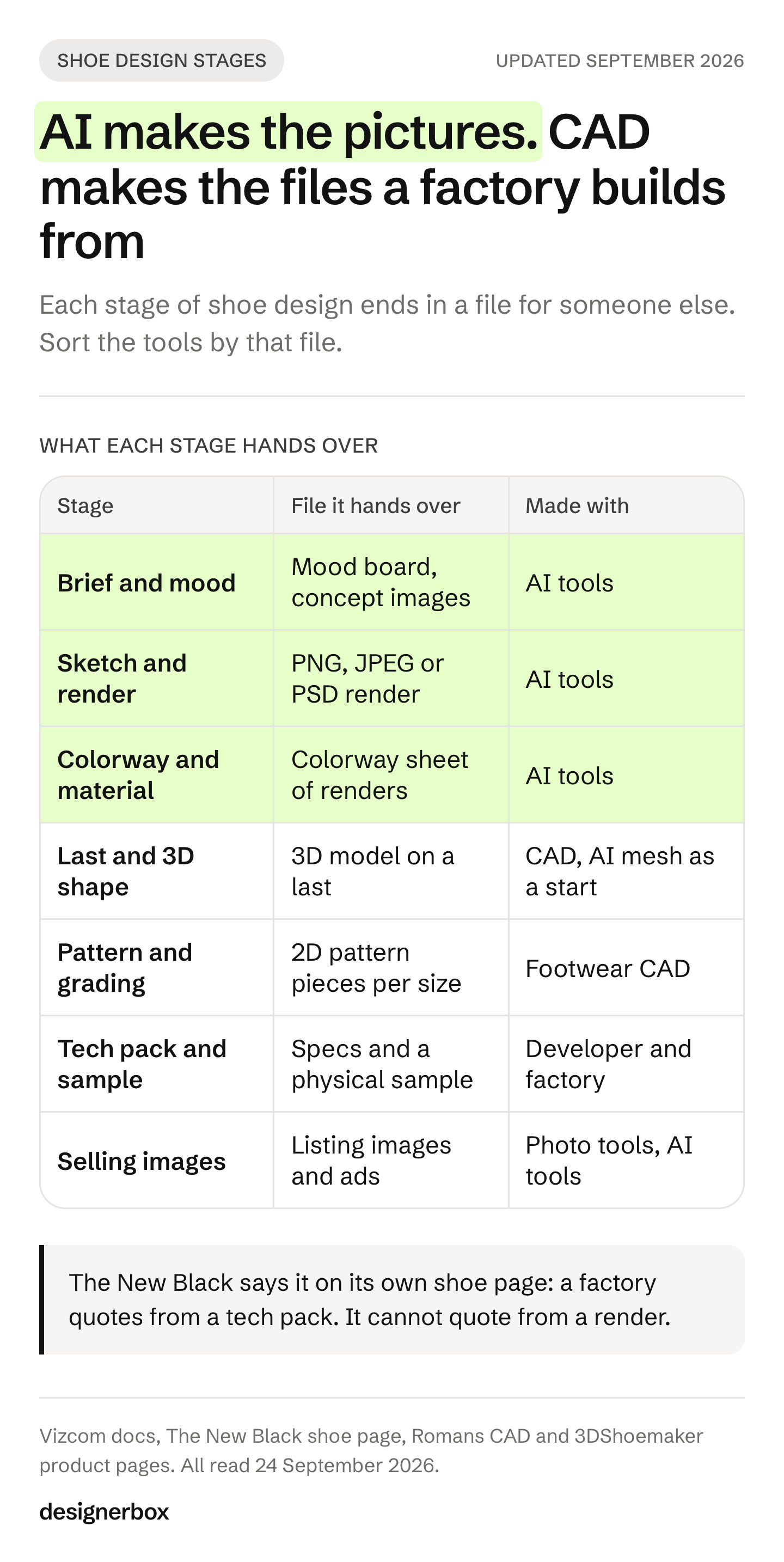
| Stage | What it decides | File it hands over | Who receives it | Where AI helps |
|---|---|---|---|---|
| Brief and mood | The direction for the season | Mood board, concept images | Design team | Yes: Midjourney, Krea, Leonardo, The New Black, OpenArt |
| Sketch and render | The chosen design as a picture | PNG, JPEG or PSD render | Product team, sales, leadership | Yes: Vizcom, NewArc.ai, PromeAI, Krea, Photoshop |
| Colorway and material | Each color and material version | A colorway sheet of renders | Merchandising | Yes: Vizcom, Sole Studio, NewArc.ai |
| Last and 3D shape | The shape on a real last | 3D model (Rhino, OBJ, FBX, GLB) | Developer, last maker | Partly: Vizcom makes a mesh, CAD makes the last |
| Pattern and grading | Flat pieces in every size | 2D pattern pieces for cutting | Factory | No: Romans CAD, 3DShoemaker, Shoemaster |
| Tech pack and sample | Materials, measurements, construction | Tech pack, physical sample | Factory | No, a render cannot replace it |
| Selling images | How the approved sample looks for sale | Listing images, ads | Store and marketplaces | Yes: photo tools and DesignerBox |
The first three rows are where AI saves the most time: more concepts and more colorways before any sample exists. The last three rows are where a shoe becomes real, and AI tools do not produce those files.
AI shoe design tools compared
The table lists the 10 AI tools in this guide by the stage each one serves. The last column quotes what each maker says about uploads, because a design that is not released yet needs to stay private.
| Tool | Main stage | What it returns | Free plan | What its terms say about your content |
|---|---|---|---|---|
| Vizcom | Render, colorway, 3D | PNG, JPEG, SVG, PSD; 3D as GLB, OBJ, STL, USDZ, FBX | Yes | No training on data from paid plans |
| NewArc.ai | Sketch to render, colorway | Images and video | Yes | Does not train its model on your images |
| The New Black | Text-to-shoe concept | Images | Trial only | Not used to train any model, on any plan |
| Sole Studio | Colorway, part edits | PNG and JPEG | Trial only | No training statement found |
| Krea | Real-time concept render, 3D | Images, video, 3D mesh | Yes | No-training clause in the Business terms |
| Midjourney | Concept, mood | Images | Not stated | Public and remixable by default |
| Photoshop Generative Fill | Retouch, composite | PSD and images | Not checked | Adobe does not train on subscribers’ content |
| Leonardo AI | Sketch to image, concept | Images | Yes | Free-tier outputs are owned by Leonardo |
| PromeAI | Sketch to render | Images | Yes | No training statement found |
| OpenArt | Text-to-shoe concept | Images | Yes | Page says “All private” |
Sources for each row are in the tool sections below and in the Sources list.
AI tools for concepts and renders
These 10 tools make pictures. Pick them by the input you start from: a text brief, a sketch or a photo of a sample.
Vizcom
Vizcom has a footwear solution page: “Turn sketches into lifelike footwear concepts in seconds” (vizcom.com/solutions/footwear, September 2026). Live render updates the image “as you draw, prompt, and edit your idea” (vizcom.com/product, September 2026). The pricing page lists Live Render on the paid Professional plan.
For colorways, Region Maps let you “segment your product render once, then edit color and material on individual parts without re-rendering” (docs.vizcom.com, September 2026). Try-On is described as “built for fashion, footwear, accessories”. 2D to 3D exports a mesh as GLB, OBJ, STL, USDZ or FBX (docs.vizcom.com, September 2026).
- Best for: design teams who sketch and want renders, colorways and a first 3D mesh in one tool.
- Privacy: the pricing page says “Vizcom does not use your data to train AI models if you’re on a paid plan.” Its data security page says “We don’t train models on your designs. Ever.” (vizcom.com/pricing and vizcom.com/data-security, September 2026). Read both before you upload.
- Students: Vizcom is “Free while you’re enrolled” for verified students and educators (vizcom.com/programs/students, September 2026).
NewArc.ai
NewArc.ai is a sketch-to-image tool for apparel, footwear and accessories designers. Its homepage describes it as an “AI Sketch to Image Generator” and lists Colorways, Virtual Try-On, Image-to-Sketch and Material references (newarc.ai, September 2026). It has a free tier.
- Best for: designers who draw clean line sketches and want photo-style results fast.
- Privacy: “We do not use your images to fine-tune (train) our AI model” (newarc.ai/terms-of-service, September 2026).
- Scope: NewArc.ai returns images and video. We found no 3D export on its pages.
The New Black
The New Black has an AI shoe design generator for sneakers, heels, boots and mules. You describe the “type, last and sole first”, then the upper and materials (thenewblack.ai, September 2026). It also puts shoes on AI models and runs shoe try-on.
The same page states the limit honestly: “What it does not return is a last, a grading, sole tooling or a stitch spec.” That sentence is the clearest line on the whole subject.
- Best for: early concepts from a written brief.
- Privacy: uploads and results are “never used to train or fine-tune any model, on any plan” (thenewblack.ai/security, September 2026).
- Plan: there is a free trial and no free plan.
Sole Studio
Sole Studio is built for footwear only. “Click any part of the shoe and change it.” You can take “the upper from one, the outsole from another”, edit by prompt (“Make it leather with white stitching”), rotate the view and export presentation sheets (solestudio.ai, September 2026).
- Best for: colorway and material studies on an existing design, and line sheets for a sales meeting.
- Output: “high-resolution PNG or JPEG images”. “All plans include a commercial license” (solestudio.ai, September 2026).
- Privacy: we found no statement about training on uploads. Ask before you upload unreleased work.
Krea
Krea’s real-time canvas updates the image “as you draw, type, or adjust elements” (krea.ai/docs, September 2026). It also makes 3D meshes from an image or text.
- Best for: fast exploration of shape, texture and color while you draw.
- Rights: paid plans allow use of “all generated content for commercial purposes”. The free plan does not include the commercial license (krea.ai/pricing, September 2026).
- Privacy: the Business terms offer “no-training clauses for your content”. The standard terms give Krea a license to what you submit (krea.ai/terms, September 2026).
Midjourney
Midjourney is a general image generator that designers use for mood and silhouette ideas. The default version is V8.2, released 24 July 2026. Its Edit Model edits with text and up to four reference images (docs.midjourney.com, September 2026).
- Best for: mood boards and early direction, where exact control matters less.
- Privacy: “By default, Your Content is publicly viewable and remixable.” Stealth mode is “available only to Pro and Mega Plan members” (docs.midjourney.com, September 2026).
- Ownership: a company with more than $1M in yearly revenue “must be subscribed to a ‘Pro’ or ‘Mega’ plan to own Your Assets” (Midjourney Terms of Service, September 2026).
Adobe Photoshop Generative Fill
Photoshop is where many teams finish a render for a presentation: clean the background, extend the frame, fix a sole edge. Generative Fill can run Adobe Firefly and partner models, including Nano Banana Pro, Nano Banana 2 and FLUX (helpx.adobe.com, September 2026).
- Best for: teams already in Creative Cloud who refine renders layer by layer.
- Rights: Adobe says you can use Firefly outputs commercially for features without the beta label. For partner models, Adobe says “You are responsible for determining whether a model is appropriate for your project” (helpx.adobe.com, September 2026).
- Privacy: “We don’t train on any Creative Cloud subscribers’ personal content” (Adobe Firefly FAQ, September 2026).
Leonardo AI
Leonardo’s Realtime Canvas is “an Image-to-Image tool designed to convert drawings”. Image Guidance adds Depth, Sketch and Pose controls, and the Canvas Editor does inpainting (intercom.help/leonardo-ai, September 2026).
- Best for: texture and material ideas from a rough sketch.
- Ownership: Leonardo’s terms say ownership of free-tier outputs “will vest in us upon creation” (leonardo.ai/terms-of-service, updated 19 January 2026). Use a paid plan for brand work.
- Privacy: private content is not used for training “without your express written consent”. Only paid users can make content private.
PromeAI
PromeAI renders from “sketch design drafts, photos, or 3D models” (promeai.pro, September 2026). It has a free plan, and its terms allow “personal or commercial purposes”. It has no footwear-specific features.
- Best for: a low-cost test of sketch-to-render before a team picks a main tool.
OpenArt shoe generator
OpenArt has a text-to-shoe page that says “Free to use” and “All private” (openart.ai/generator/shoe, September 2026). It is a quick way to see what text-to-image does with a shoe brief. It is not a design tool for a collection.
Footwear design software for the last and the pattern
These 7 tools make the files a factory builds from. None of them is an image generator. This is the software most “shoe design software” searches are looking for.
| Tool | What it does for footwear | Platform or format | Free |
|---|---|---|---|
| Romans CAD | 3D design on the last, flattening, 2D pattern grading by size and width, cutting | Desktop CAD | No |
| 3DShoemaker | Parametric lasts, footbeds and components, pattern flattening | Rhino plugin, Windows | No |
| Shoemaster | 2D and 3D footwear CAD and CAM, collections, 3D models | Desktop CAD | No |
| Adobe Substance 3D | Shoe shape, materials, stitching, final 3D renders | Five apps | Not checked |
| Autodesk Fusion and Alias | 3D modeling and manufacturing design | Desktop | Fusion trial |
| CLO | Shoes as avatar accessories, patterns inside CLO | Desktop, FBX or COLLADA import | Trial |
| Open Shoe Designer | Last, sole and flattened pattern (goal) | Open source, pre-alpha | Yes |
Romans CAD. Romans CAD is developed by Stratégies, and the current release is RCS 2026 V16. Its 3D module designs on the last and creates “the 2D flattened forms needed for the 2D patterns and grading”. Its 2D module grades patterns “in different sizes and widths” and works with “the different cutting machines on the market” (romans-cad.com, September 2026).
3DShoemaker. 3DShoemaker is a Rhino 3D plugin for Windows. “Shoe lasts, footbed surfaces, and components are parametrically designed”, and pattern flattening is on its feature list (3dshoemaker.com, September 2026).
Shoemaster. Shoemaster started at the CAD/CAM division of Clarks and has been part of the Atom group since 2016. It covers 2D and 3D footwear CAD and CAM (atom-shoemaster.com, September 2026). Its design page describes designing a collection, creating 3D models and developing a virtual sample.
Adobe Substance 3D. Adobe’s shoe page names five apps: Modeler for the shape, Designer and Sampler for materials, Painter for materials and stitching, and Stager for final renders (adobe.com, September 2026). It is a 3D look pipeline. Flattening and grading are outside its scope.
Autodesk. Autodesk’s shoe design page features Fusion, the Fusion Design Extension and Fusion for Manufacturing. It also names Alias for work “like automotive and footwear” (autodesk.com, September 2026).
CLO. CLO’s help center describes two ways to make shoes: build them in other 3D software, or “create shoes with the patterns in CLO”. Shoes are then registered as an avatar accessory (support-connect.clo-set.com, September 2026). CLO is a garment tool first. Teams that design clothes and shoes together use it to show a full outfit.
Open Shoe Designer. It is free and open source under GPLv3, and its stated goal is “the last, the sole and the flattened pattern”. Its status is pre-alpha (sourceforge.net, September 2026). Watch it. Do not plan a season on it.
Why an AI render is not a tech pack
A render shows what a shoe looks like. A factory needs to know how to make it. The New Black puts it in one line on its own shoe page: “A factory quotes from a tech pack. It cannot quote from a render” (thenewblack.ai, September 2026).
A footwear tech pack answers questions a picture cannot answer:
- The last. Which last, which size, which toe shape. The last sets the fit, and every other part follows it.
- The pattern. The flat pieces of the upper, with seam allowances, in every size and width.
- The materials. Leather or textile type, thickness, color codes and suppliers for each part.
- The sole. Outsole and midsole tooling, which often needs a mold made for that design.
- The construction. Stitching, cementing or another method, and the stitch spec.
So plan the workflow in two halves. Use AI to decide faster: more concepts, more colorways, quicker approval. Then hand the approved design to a developer with CAD, who turns it into a last, a pattern and a tech pack. The guide to AI pattern making software covers where AI starts to help on the pattern side for garments. Shoes are further behind.
Who owns an AI shoe design?
In the US, a shoe design made purely by AI is hard to own. Copyright needs a human author, and a design patent needs a human who conceived the design. The more human design work there is, from the sketch to the final changes, the stronger the claim.
Copyright. The US Copyright Office says copyright “does not extend to purely AI-generated material”. It also says “prompts alone do not provide sufficient human control to make users of an AI system the authors of the output” (US Copyright Office, Part 2 report, 29 January 2025). Human selection, arrangement and creative changes can still be protected.
Shoes are useful articles. Copyright only protects a feature of a useful article if it “can be perceived as a two- or three-dimensional work of art separate from the useful article” (Star Athletica v. Varsity Brands, US Supreme Court, 2017). A print on an upper may qualify. The shape of the shoe usually does not.
Design patents. Footwear brands usually protect a shape with a design patent. On 28 November 2025 the USPTO replaced its 2024 guidance on AI-assisted inventions. The new guidance says AI systems “are analogous to laboratory equipment, computer software, research databases, or any other tool”. It says this guidance applies “not only to utility patents and patent applications but also to design and plant patents” (Federal Register, Revised Inventorship Guidance for AI-Assisted Inventions, 28 November 2025). The inventor must be a person who conceived the design.
In practice: keep your sketches, your prompts and your edit history. Record which person made which design decision. The guide to what you own from creative tools covers the vendor terms side. This is general information, not legal advice. Talk to an IP lawyer before you file.
How to keep unreleased shoe designs private
A leaked design can cost a season. Before your team uploads a sketch of next season’s shoe, check three things in the tool’s terms.
- Is content public by default? Midjourney content is public and remixable unless you use Stealth mode on the Pro or Mega plan. Stealth does not hide work made in public Discord channels (docs.midjourney.com, September 2026).
- Does the tool train on your uploads? Vizcom (paid plans), NewArc.ai, The New Black and Adobe state that they do not. Krea offers a no-training clause in its Business terms. For Sole Studio and PromeAI we found no statement.
- Who owns the result? Leonardo owns free-tier outputs. Midjourney requires a Pro or Mega plan for companies over $1M in yearly revenue. Sole Studio and The New Black say the outputs belong to you.
Put the answer in a one-page tool policy for the design team. Name the tools that may see unreleased work, and the plan each one must be on.

How to choose an AI shoe design tool
Choose by the file you need next, not by the image quality you saw in a demo.
- You start from a written brief: The New Black, Midjourney or Krea for concepts. Use a moodboard to agree on a direction first.
- You start from a sketch: Vizcom, NewArc.ai or PromeAI. Test each one on the same three sketches.
- You need 20 colorways of one design: Vizcom Region Maps or Sole Studio.
- You need a 3D shape: Vizcom 2D to 3D for a first mesh, then CAD for the last.
- You need a pattern for the factory: Romans CAD, 3DShoemaker or Shoemaster, used by a developer.
- You are a student or a beginner: start with the Vizcom education plan and the guide to fashion design software for beginners.
Run one test before you commit. Take three shoes your team already sold: a sneaker, a boot and a sandal. Give each tool the same sketch or photo of each. Compare four things: the sole shape, the stitching, the logo area and how well the tool keeps the design when you change one part.
Product images after the sample
Design ends at the approved sample. Then every style needs images in every color: a white-background main image, side and back views, a sole view, a pair shot and a scene. The guide to shoe photography covers the camera route. The roundup of AI footwear product photography tools covers the AI route and Amazon’s footwear image rules.
DesignerBox is AI creative production for brands and agencies. It does not design shoes, build lasts or draft patterns. It makes the images you sell with, starting from a photo of the real sample.
- Listing images. A marketplace listing set and clean white-background images start from one photo of the sample.
- Scenes and ads. The same photo becomes a styled scene or a static ad.
- Edits that keep the detail. The image editor makes one edit after another. The picture keeps its detail and resolution.
Virtual try-on in DesignerBox is for clothing. For shoes on a person, the guide to virtual try-on for shoes compares the routes built for footwear.
Anyone can make an AI picture. Making hundreds that still look like your brand is the hard part. You set the brand once, and the workflow reads it on every run. A saved workflow runs the same way on the next style, with the same light and framing. Batch runs it over a whole sheet of styles, and you review the results in one pass. The cost is shown before the run.
The image editor, the video editor, your brand rules and your Assets sit in the same place. The full workflow from the first product photo to the finished ad, in one subscription. The commercial license starts on the Pro plan. Plans are on the pricing page. See how AI product photography works in DesignerBox.
The first job, built once
Start from a template, add your brand and your products, and run it. The cost is shown before the run.
FAQ
Can AI design shoes?
AI can design the look of a shoe: concept images, renders and colorways. It cannot yet produce the last, the graded pattern or the tech pack a factory needs. Treat AI results as design pictures, and have a developer turn the approved design into CAD files.
What is the best AI tool for footwear design?
Pick by the file you need. Vizcom covers the most stages, from sketch to render to colorway to a first 3D mesh. The New Black and Midjourney are strong for concepts from text. Sole Studio is built only for footwear colorways and edits.
What software do footwear designers use?
Common choices are a drawing tool, Adobe Photoshop and Illustrator, and a footwear CAD program. Romans CAD, Shoemaster and 3DShoemaker for Rhino build lasts and patterns. Many teams now add an AI render tool such as Vizcom for concepts and colorways.
Is there free shoe design software?
Yes. Vizcom, NewArc.ai, Krea, Leonardo, PromeAI and OpenArt have free plans for AI images. Open Shoe Designer is free and open source, but it is pre-alpha. Check the license before you use free results for a product you sell.
Can I patent a shoe designed with AI?
In the US, a design patent needs a human inventor who conceived the design. The USPTO’s November 2025 guidance treats AI as a tool, like software or lab equipment. Keep records of the human design decisions. This is general information, not legal advice.
Is it safe to upload unreleased shoe designs to AI tools?
Only after you check the terms. Midjourney content is public by default unless you use Stealth mode on the Pro or Mega plan. Leonardo owns free-tier outputs. Vizcom, NewArc.ai, The New Black and Adobe say they do not train on your uploads, and Vizcom limits that statement to paid plans.
Sources
- AI copyright: US Copyright Office, Copyright and Artificial Intelligence, Part 2: Copyrightability, 29 January 2025, accessed 24 September 2026
- Useful articles: Star Athletica, L.L.C. v. Varsity Brands, Inc., US Supreme Court, 2017, accessed 24 September 2026
- Design patents and AI: USPTO, Revised Inventorship Guidance for AI-Assisted Inventions, Federal Register, 28 November 2025, accessed 24 September 2026
- Vizcom footwear, product, pricing, data security and student pages, and docs for Region Maps, Try-On, 2D to 3D and export (vizcom.com, docs.vizcom.com), September 2026
- NewArc.ai homepage and terms of service (newarc.ai), September 2026
- The New Black AI shoe design generator, security and pricing pages (thenewblack.ai), September 2026
- Sole Studio homepage, pricing and terms (solestudio.ai), September 2026
- Krea real-time and 3D docs, pricing and terms (krea.ai), September 2026
- Midjourney version, Edit Model, Stealth Mode and Terms of Service (docs.midjourney.com), September 2026
- Adobe Firefly FAQ and non-Adobe models in Adobe products (helpx.adobe.com), September 2026
- Leonardo AI Realtime Canvas and Image Guidance help pages, and terms of service (leonardo.ai), September 2026
- PromeAI render page and terms (promeai.pro), September 2026
- OpenArt shoe generator page (openart.ai), September 2026
- Romans CAD company, 3D design and 2D design pages (romans-cad.com), September 2026
- 3DShoemaker product pages (3dshoemaker.com), September 2026
- Shoemaster homepage and shoe design page (atom-shoemaster.com), September 2026
- Adobe Substance 3D shoe design page (adobe.com), September 2026
- Autodesk shoe design software page (autodesk.com), September 2026
- CLO help center, Creating Shoes (support-connect.clo-set.com), September 2026
- Open Shoe Designer project page (sourceforge.net), September 2026
- DesignerBox image editor, plans and gating: DesignerBox image editor and pricing pages (designerbox.ai), September 2026
Tool features, free plans, file formats and terms verified against each maker’s own pages as of September 2026. Terms change often, so read the current page before you upload unreleased designs. This is general information, not legal advice.