
Virtual try-on for shoes shows a shoe on a foot before anyone buys it. It runs four ways. Google’s try-on in Search builds the picture from your product images. Amazon and Google show shoes in 3D and AR from a 3D model you upload. An AR widget does the same on your own site or app. AI on-foot images put the shoe on a model’s feet on your product page, from a product photo.
Check Google before you compare try-on vendors. If your shoes sit in a Google Shopping feed, Google’s try-on button may already be on your listings, and you never chose it.
This guide sorts the four routes by the one thing you have to supply for each: a set of product photos, or a 3D model of every style. It is written for footwear brands with 20 to 500 styles, and for the agencies that make their images.
Key Takeaways
- Google already runs shoe try-on. Shoes joined Google’s try-on tool in October 2025. Merchants with a Shopping feed that qualify for free listings are opted in automatically.
- Google’s try-on is built from your images. Google says the result depends on the quality of the product images you supply, and it shows no fit or size.
- AR needs a 3D model of each style. Amazon, Google and all six AR tools in this guide work from a 3D asset. Google cannot make one from photos.
- Google can make a 360 spin from 5 photos. For shoes, all five must show the same shoe, in the same color, foot and size. It is US only.
- AI on-foot images need no 3D model and no shopper photo. They are product page images, so they show style and not fit.
- Every route shows a picture, not a fitting. None of them tells a shopper which size to order.
What is virtual try-on for shoes?
Virtual try-on for shoes is any tool that shows a shoe on a foot before purchase. Shopper-facing try-on uses the shopper’s own photo or live camera. AR versions track the feet and place a 3D model of the shoe on them. Generative versions, like Google’s, build a new image from a photo. Brand-side try-on uses AI to put the shoe on a model’s feet for your product pages and ads.
The two sides answer different questions. Shopper-facing try-on answers “how would these look on me?” Brand-side imagery answers “how does this shoe look when someone wears it?” The second one sits in the product gallery, so every shopper who opens the page sees it.
If you sell clothing as well, the same split applies there, and the guide on how to add virtual try-on to your store covers the privacy surface a shopper photo opens.
The four routes, and what each needs from you
Each route asks you for one of two assets. Photos feed Google’s try-on, Google’s 360 spin and AI on-foot images. A 3D model feeds every AR experience.
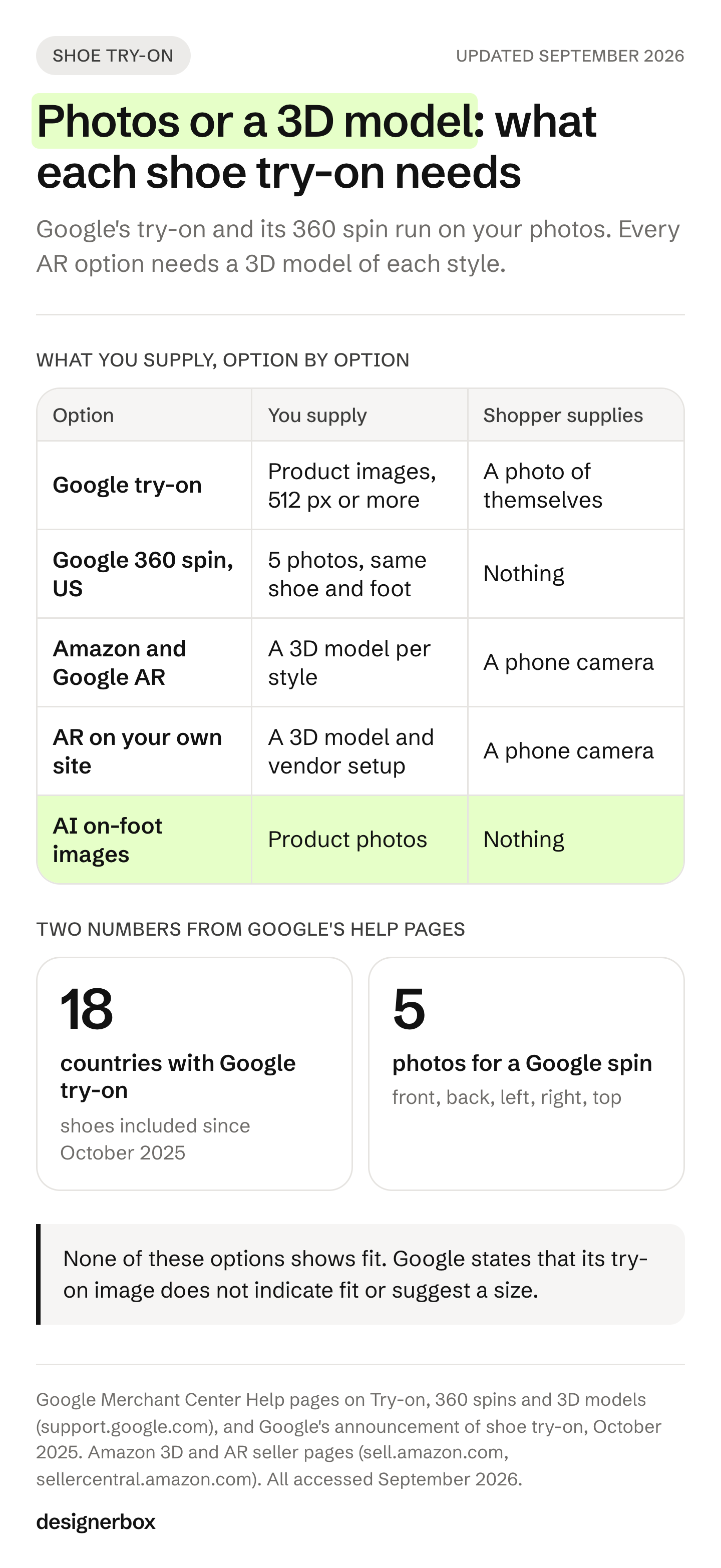
| Route | Where the shopper sees it | What you supply | What the shopper supplies |
|---|---|---|---|
| Google try-on | Google Search and Shopping, free listings | Product images in a Shopping feed | A photo of themselves |
| Marketplace 3D and AR | Amazon app, Google Search | A 3D model per style, or 5 photos for a Google spin | A phone camera, for AR |
| AR on your own channels | Your site, your app, Snapchat | A 3D model per style, plus the vendor’s setup | A phone camera |
| AI on-foot images | Your product page, listings and ads | Product photos | Nothing |
The table also shows who controls the result. You control the photo set and the 3D models. You do not control how Google or Amazon render them.
Google try-on: already on, and built from your images
Google added shoes to its AI try-on tool on 8 October 2025. A shopper taps a product listing, selects “try it on” and adds a full-length photo of themselves (Google, The Keyword, October 2025).
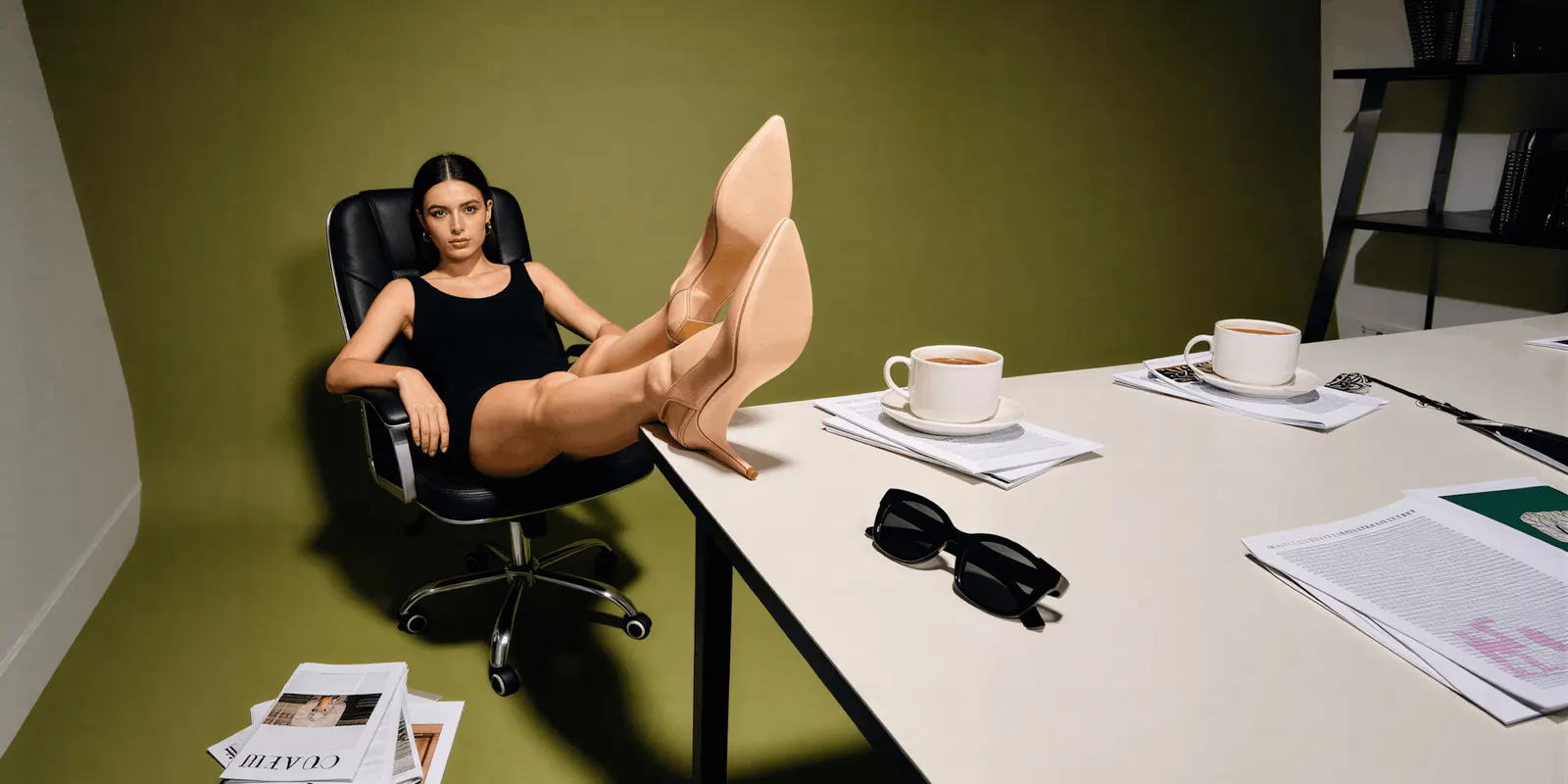
For a merchant, the important line is in Google’s help center. “Any merchant with a shopping feed and who is eligible to show free listings is automatically opted into this feature.” The supported categories are shoes, tops, bottoms and dresses (Google Merchant Center Help, accessed September 2026).
Four more details from that page matter to a footwear brand:
- It runs in 18 countries, including the US, UK, Canada, Australia and Japan, as of September 2026.
- It does not appear on Shopping ads. Products under “Sponsored” show no “Try it on” button.
- Your images set the quality. Google combines the shopper’s photo with an analysis of your product images. It says the result “depends on the quality of the images you provide”. It asks for images of at least 512 by 512 pixels, ideally 1024 or higher.
- It shows no fit. Google states that the image “doesn’t indicate fit, suggest a size, or indicate size availability”.
You can opt out through Merchant Center support. Opting out removes the button from your listings only. Other merchants who sell the same shoe keep theirs.
So the first job is a photo job. Google recommends showing shoes alone in the main image and on a model in the additional images (Google Merchant Center Help, accessed September 2026). A catalog with sharp, well-lit product images and a worn shot per style gives Google’s try-on better material to work from. The full image set a footwear listing needs is in the shoe photography shot list.
3D and AR on Amazon and Google
Amazon launched Virtual Try-On for Shoes in June 2022. It started in the US and Canada, in the Amazon shopping app on iOS. A shopper points the phone camera at their feet and moves them to see the shoe from every angle (About Amazon, June 2022).
For sellers, Amazon’s program runs on 3D models. Amazon says its augmented reality try-on covers shoes and eyewear. You upload existing 3D models in the Image manager in Seller Central, and Amazon states there is no cost for adding 3D models and AR to a listing (Sell on Amazon, 3D models and AR, accessed September 2026). View in 3D supports all shoe types on amazon.com, amazon.ca, amazon.co.uk, amazon.de, amazon.es, amazon.fr and amazon.it (Amazon Seller Central Help, accessed September 2026).
Google offers two things here, and they need different inputs.
A 3D model for AR. Google’s 3D model link attribute works “for home goods and shoes only”, for products sold in the US, Australia, Canada, Japan and India. The model is a glTF or GLB file. Only a merchant’s own 3D model lets a shopper view the shoe in their space (Google Merchant Center Help, accessed September 2026).
A 360 spin from photos. Upload at least 5 high-resolution images to Merchant Center: front, back, left, right and top. Google’s AI can then build a 180 or 360 spin. For shoes, each image must show a single shoe of the same color, foot and size. Google’s example is “a red left foot shoe of size 9”. The spin is available to US merchants, can take up to two weeks, and has no view-in-your-space option (Google Merchant Center Help, accessed September 2026).
Google also answers the obvious next question. It cannot create a glTF 3D model from your images. For that, it points to partners such as CGTrader, Epigraph, Ocavu and VNTANA.
The same-foot rule fits the listing rules you already follow. Amazon asks for a single shoe, facing left, at a 45-degree angle in the main image (Amazon product image guide, accessed September 2026). The product photography angles guide covers the other views a spin needs. One clean five-view shoot of one shoe serves the listing and the spin.
AR shoe try-on on your own site, app or social
This guide looks at six tools on this route. Each one tracks the shopper’s feet through a phone camera and places a 3D shoe on them. Each one needs a 3D model of every style you offer.
| Tool | What it does well | Where it runs | The 3D model |
|---|---|---|---|
| WANNA | Named range from sneakers and loafers to high heels | iOS app, mobile browsers, a 3D viewer | WANNA builds it |
| Vyking | Scanning studios in London, Berlin and Paris | iOS and Android apps, the web | One scan per product, colorways made digitally |
| Fibbl | AR in the browser, with no app to download | Web, with Shopify, WooCommerce and Magento | One scan per product, colorways made digitally |
| DeepAR | Shoe try-on for any website | Web | Yours, or built by DeepAR |
| Fittingbox Footwear | Real-time foot tracking, and a library of existing 3D shoes | Mobile, with a QR code for desktop visitors | Built from the shoe or 5 to 7 photos |
| Snap Lens Studio | A free tool that can erase the shopper’s real shoes from the camera feed | Snapchat, or your own app through Camera Kit | Yours, as FBX, glTF or OBJ |
A few details from each vendor’s own pages, as of September 2026:
- WANNA launched try-on for high-heeled shoes in June 2025 (Perfect Corp press release, businesswire.com). It has been part of Perfect Corp since January 2025 (perfectcorp.com), and Farfetch runs its SDK for sneaker try-on (wanna.fashion).
- Vyking says one scan in its studios lets it create every colorway of a shoe (vyking.io).
- Fibbl scans one physical sample per product and creates the colorways digitally. A variant in a different material needs its own scan (fibbl.com).
- DeepAR takes 3D files in FBX, glTF, GLB, DAE and STL, or its designers build the asset (deepar.ai).
- Fittingbox delivers its models as glTF and GLB files, and its try-on runs on mobile (footwear.fittingbox.com).
- Snap calls Lens Studio its free AR development platform (Snap AR, April 2026). Its foot tracking attaches a 3D model to each foot, and an Erase Shoes option removes the shopper’s own footwear from the feed (Snap for Developers, accessed September 2026).
The common thread is the asset. None of these tools puts a shoe on a foot without a 3D model of that shoe. Some build the model for you from a scan or from photos. Either way, a new style needs a model before its try-on button can appear.
AI on-foot images: try-on for the product page
The fourth route skips the shopper and the 3D model. An AI image tool takes a photo of your shoe and puts it on a model’s feet, in a studio or a street scene. The result goes into your product gallery, your marketplace listing and your ads.

Several AI image tools do this job. WearView makes on-model shoe photos from a product shot, and states that it has no shopper-facing AR (wearview.co, September 2026). The New Black replaces the shoes in an existing photo with your pair, and describes the result as a photographic swap, not a fitting (thenewblack.ai, September 2026).
This route has two strengths. It needs no 3D asset, so a new style or colorway starts from a photo. And the images it makes sit in the same feed that Google’s try-on reads.
It also has failure modes that are specific to footwear. Image models can mirror a left shoe into a right one, invent a tread pattern, reroute the laces or blur a logo on the heel counter. The shoe photography guide covers each one. Check every result against the real shoe before it goes live. Which AI footwear photography tools keep your photographed shoe is covered tool by tool.
Marketplaces have their own rule for AI people. On Amazon, an image with a photorealistic person made fully by AI needs the keyword contains-synthetic-performer in its XMP dc:subject field before upload (Amazon product image guide, accessed September 2026). An on-foot shot with an AI model in it falls under that rule.
That check has a legal side in the EU. The European Commission’s guidelines on the AI Act treat an AI product image as a possible deep fake when it can mislead people about how the real product looks (European Commission, July 2026). A tread that is not yours is that kind of change. The guide to labeling AI-generated fashion images covers when a label applies. This is general information, not legal advice.
How many 3D models a footwear catalog needs
The AR routes scale with your range, because every tool needs a 3D model of each style. Vyking and Fibbl make the other colorways digitally from one scan. Fibbl scans again when a variant changes material or construction. Here is an illustrative count, not a quote from any vendor.
A brand that launches 60 new styles a season needs 60 models before a shopper opens a camera. If 10 of those styles also come in a second material, such as suede next to leather, the count can reach 70. When a style is dropped, its model has to come down too.
The photo routes scale differently. Google’s spin needs 5 photos of one shoe. An AI on-foot set starts from the photos you shoot for the listing anyway. Every route, AR included, still shows product images next to the try-on button. That is the case for doing the photo set first.
Which route fits your catalog
Start from where your shoppers already are.
- You sell through Google Shopping free listings in one of the 18 countries. You are already in route one. Improve the product images first, then decide whether to opt out.
- You sell on Amazon. Upload 3D models if you have them. Amazon does not charge to add them.
- You run a busy app, or you launch drops on social. An AR vendor or a Snapchat Lens fits, and a 3D model becomes a standing cost of every new style.
- You have many styles and colorways that turn every season. Start with a clean photo set and AI on-foot images. Together they feed Google’s try-on, Google’s spin and your own product page.
Whatever you choose, measure it on a small group of products against similar products left alone. The evidence on try-on and returns is thinner than vendor pages suggest. The guide to whether virtual try-on reduces returns reviews what retailers have published, and virtual try-on fit accuracy explains why a picture cannot show fit yet.
Footwear images in DesignerBox
DesignerBox is AI creative production for brands and agencies. It sits in the fourth route. It does not run AR, and it does not build 3D models. Its virtual try-on template is a garment job: it puts one garment on the person in your photo.
For footwear, DesignerBox makes the image set the other routes read. That means the marketplace listing set from one shoe photo, the alternate views, on-foot and lifestyle frames, and the ad.
Anyone can make an AI picture. Making hundreds that still look like your brand is the hard part. So you build the footwear job once as a workflow. It holds the left-shoe rule, the alternate views your listing needs, the on-foot frames and the export size for each destination. The saved workflow runs the same way on the next pair.
Batch runs one workflow over a whole sheet of products, and you review the results in one pass. Three critic steps score the results, and best-of-N keeps the best one. You still check the foot, the tread and the logo on every result. The full workflow from the first product photo to the finished ad, in one subscription.
You see what a run costs before you start it. The commercial license starts on the Pro plan. AI video and virtual try-on start on the Premium plan. Plans and credits are on the pricing page. Brands that sell shoes next to clothing can see the rest of the set on DesignerBox for fashion brands.
To build the footwear set once, start from a template, add your left shoe, and run it. Get started free.
FAQ
How does virtual try-on for shoes work?
There are two main methods. AR try-on tracks the shopper’s feet through a phone camera and places a 3D model of the shoe on them. Generative try-on, like Google’s, builds a new image from the shopper’s photo and your product images. Brand-side AI tools put the shoe on a model’s feet for product pages.
Does Google have virtual try-on for shoes?
Yes. Google added shoes to its try-on tool on 8 October 2025. As of September 2026 it runs in 18 countries, including the US, UK, Canada, Australia and Japan.
Do I need 3D models of my shoes for virtual try-on?
For AR, yes. Amazon’s try-on, Google’s view-in-your-space and AR tools on your own site all work from a 3D model of each style. Some AR vendors build the model from a scan or from photos of the shoe. Google’s generative try-on and its 360 spin work from photos only.
Can I stop Google from showing try-on on my shoes?
Yes. Contact Google support from your Merchant Center account. Opting out removes the “Try it on” button from your own listings only. Other merchants who sell the same shoe keep it. Domain owners without Merchant Center can use Google’s opt-out form.
Does virtual shoe try-on show fit or size?
No. Google states that its try-on image does not indicate fit or suggest a size. AR places a 3D model on the foot, which shows style and proportion, not how the shoe fits your foot. Size guidance still comes from size charts and reviews.
Can AI put my shoes on a model without a photoshoot?
Yes. AI image tools take a product photo of the shoe and place it on a model’s feet in a new scene. Check each result against the real shoe: models can mirror left and right, change the tread, reroute the laces or blur a logo.
Sources
- Google, The Keyword, “Google Shopping’s try on tool adds shoes, expands to new countries”, 8 October 2025
- Google Merchant Center Help, how Google’s Try-on tool works, accessed September 2026
- Google Merchant Center Help, 180 and 360 spins made with Google AI, accessed September 2026
- Google Merchant Center Help, display your products in 3D and augmented reality, accessed September 2026
- Google Merchant Center Help, image link [image_link], accessed September 2026
- Amazon Seller Central Help, product image guide, accessed September 2026
- About Amazon, “Amazon makes shopping easier with Virtual Try-On for Shoes”, 9 June 2022
- Sell on Amazon, 3D models and augmented reality, accessed September 2026
- Amazon Seller Central Help, 3D shopping experience and supported product types, accessed September 2026
- European Commission, guidelines on transparency obligations for providers and deployers of AI systems, published 20 July 2026, accessed September 2026
- Snap AR, virtual try-on with Lens Studio, 27 April 2026
- Snap for Developers, Lens Studio foot tracking, accessed September 2026
- WANNA footwear and Farfetch pages (wanna.fashion), September 2026
- Perfect Corp, high-heeled shoe try-on press release (businesswire.com), 12 June 2025
- Perfect Corp, Wannaby acquisition announcements (perfectcorp.com), December 2024 and January 2025
- Vyking scanning page (vyking.io), September 2026
- Fibbl footwear try-on and how-it-works pages (fibbl.com), September 2026
- DeepAR shoe try-on page and asset guide (deepar.ai), September 2026
- Fittingbox Footwear try-on and 3D digitizing pages (footwear.fittingbox.com), September 2026
- WearView, blog post on shoe try-on (wearview.co), September 2026
- The New Black, AI virtual try-on for shoes feature page (thenewblack.ai), September 2026
- DesignerBox pricing page (designerbox.ai/pricing), September 2026
Platform features verified from Google and Amazon documentation as of September 2026. Vendor features taken from each vendor’s own pages, September 2026. This is general information, not legal advice. Individual results vary.