The best AI clothes changer for a store takes an image of your real garment and puts it into your own model photo. It keeps the face, the pose and the background. FASHN, bitStudio, Magic Hour, Krea, Pincel, Photta and Kling’s try-on all state that they work this way. Before you choose one, check two more things: the output size, and whether your plan covers commercial use.
Most of page one for this search ranks clothes changers on realism and speed. That fits a person trying a new look. A brand has one more question, and it decides whether the edited photo is honest: where does the new garment come from? It can come from a picture of the product you sell, from a text prompt, or from a preset outfit. Only the first can show the garment the buyer receives.
We compared 16 tools from their own product pages, docs and terms, read on 24 September 2026. We also checked six model APIs for teams that build their own pipeline, and two marketplace rules that every edited photo has to pass. We sell DesignerBox, so read its lines as our own case.
Key Takeaways
- Start with where the garment comes from. A picture of your product can match what ships. A text prompt or a preset outfit cannot, however good the result looks.
- Seven tools edit your own model photo from a garment image. FASHN, bitStudio, Magic Hour, Krea, Pincel, Photta and Kling’s try-on say they change the clothes in the photo you upload.
- Four tools dress a library model or build a new image. Photoroom, Claid, WearView and Uwear put your garment on a model, and none of their pages says the original frame is kept.
- Commercial rights vary more than the results do. Magic Hour, Krea, YouCam and Photoroom tie commercial use to a paid plan. Kling’s free terms ban it. Claid, Cloudinary and VModel say nothing clear about it.
- Resolution is often not stated. FASHN, Photoroom, Claid, WearView and Photta’s API name 4K. Eight tools publish no output size at all.
- The marketplaces judge the result, not the tool. Amazon says the color in a clothing image must match the product for sale. Google asks for the correct color, pattern and material, and keeps the AI metadata.
What is an AI clothes changer?
An AI clothes changer is a tool that replaces the garment in a photo of a person. You upload the person photo, then define the new garment with an image, a text prompt or a preset. The model redraws the clothing and keeps the rest of the frame. For a store, the useful version starts from a photo of the real product and keeps your model, pose, light and background.
The name covers three jobs. Changing the garment in a finished photo is this article. Putting a flat garment on a model with no photo yet is covered in putting clothes on a model with AI. Changing only the color of the same garment is a recolor, covered in the AI clothes color changer guide. For the method step by step, and the rights when a real person is in the shot, read how to change clothes in a photo with AI.
Four checks for a clothes changer used on product photos
These four questions sort the tools faster than any sample image. Each answer comes from the vendor’s own pages, not from a test we ran.
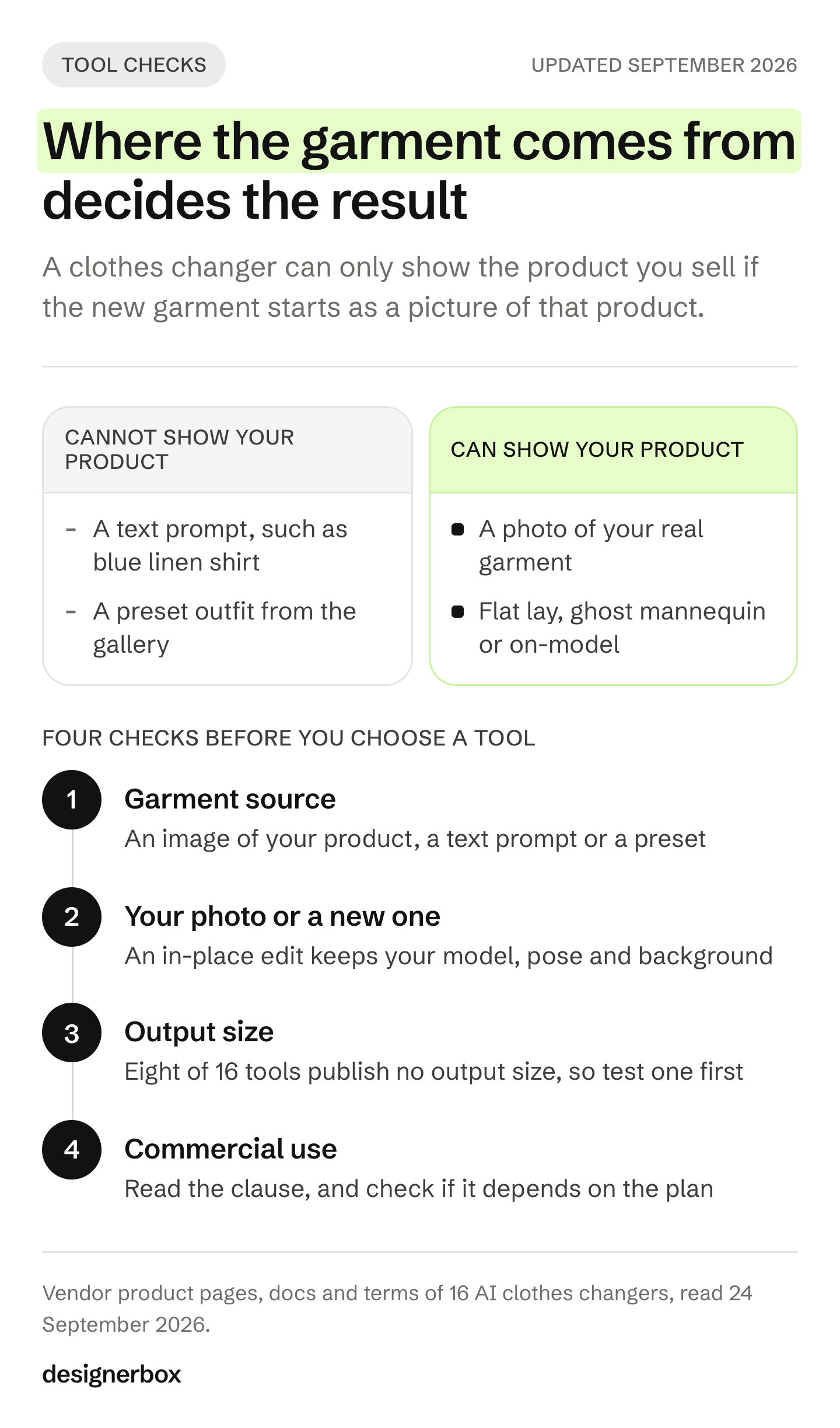
- Where does the new garment come from? An image of your product, a text prompt, or a preset from the tool’s gallery. Only an image of your product can hold your print, trim and logo.
- Does it edit your photo, or make a new one? An in-place edit keeps your model, pose and background. A new image puts your garment on the tool’s own model or scene.
- What output size does the vendor state? A product page zoom needs a large file. If the vendor states no size, test one on your real listing before you pay for scale.
- Do the terms allow commercial use of the result? Read the clause, and check whether it depends on the plan.
A clean source photo helps every tool on this list. Use a full-length frame, even light, a plain background and a garment with nothing covering it. The garment image should show the whole product, flat or on a ghost mannequin. Our guide to ghost mannequin photography covers how to shoot one.
AI clothes changers compared
Every cell below is what the vendor states on its own pages, read in September 2026. “Not stated” means we did not find it, not that the feature is missing.
| Tool | Edits your own photo | New garment from | Output size stated | Commercial use of results | API |
|---|---|---|---|---|---|
| FASHN | Yes, or a library model | Garment image, optional prompt | Up to 4K | Per your plan | Yes |
| bitStudio | Yes | Garment image, optional instructions | ”Standard” or “high” | FAQ says yes, free or paid | Yes |
| Magic Hour | Yes | Garment image, upper, lower or full outfit | Not stated | Paid plan or credit pack | Yes |
| Krea | Yes | Garment image | Not stated | With a subscription | Not stated for this app |
| Pincel | Yes | Garment image | Not stated | Yes | Mentioned |
| Photta | Yes | Garment image | 2K or 4K through the API | Yes | Yes |
| Kling (Kolors try-on) | Yes | Garment image, white background advised | Not stated | Paid members only | Yes |
| Pixelcut | Yes, or a library model | Garment image, tops only | Not stated | API: yes. App: not stated | Yes, beta |
| YouCam | Yes | Garment image, preset or text prompt | Not stated | Pro plan only | Yes |
| AI Clothes Changer app in Canva | Yes | Garment image | Not stated | Subscription needed | Not stated |
| Photoroom | Try-on, or your model as a reference | Garment image, optional prompt | 1K, 2K or 4K by quality setting | Paid plan | Yes, and batch |
| Claid | Mostly its own models, or yours as a reference | Garment image plus prompt | ”Native 4K” | Not stated in the terms | Yes, and a batch API |
| WearView | Its models, or your model photo | Garment image | HD, 2K or 4K | Yes, a subscription is needed to generate | Bulk, API not stated |
| Uwear | Your photo becomes a reusable avatar | Garments plus a scene prompt | A setting, no figure | Yes | Yes, plus CSV batch and MCP |
| VModel | Yes | Garment image, optional text | Not stated | Not stated | Yes |
| Cloudinary Generative Replace | Yes | A text prompt only | Processed at up to 2048 by 2048, then upscaled | Not stated in the terms | Yes, as a URL transformation |
| DesignerBox (ours) | Yes, in the image editor. Dress my model makes new shots of your model | A description in the editor, garment photos in Dress my model | 1024 by 1536 from Dress my model | From the Pro plan | API on Ultra, plus 68 MCP tools |
Edit your own photo from a garment image
FASHN describes its try-on as changing “what someone is wearing in an existing photo.” It says it keeps “facial features, skin tone, body proportions, pose, and background,” plus “prints, logos, colors, textures” (fashn.ai/virtual-try-on, September 2026). Its API offers a 4K setting of about 16 megapixels. Its terms say you own the results for commercial use “in accordance with your subscription plan” (fashn.ai/legal/terms-of-service, September 2026). It is the most complete spec sheet on this list. If it heads your shortlist, FASHN alternatives compares it with other options.
bitStudio says it changes “any outfit, in any photo” and blends the garment “into the lighting of your photo.” It takes a flat lay, mannequin or on-model garment photo. Its FAQ says users have full ownership and rights “whether you’re using it free or paid” (bitstudio.ai/ai-clothes-changer, September 2026). Its terms page does not cover results, so keep a copy of the FAQ answer.
Magic Hour asks you to upload “the photo with the person whose clothes you want to change,” then a garment image for the upper body, lower body or full outfit (magichour.ai/products/ai-clothes-changer, September 2026). Its terms allow commercial use for customers with a paid subscription or credit pack (magichour.ai/terms-of-service, September 2026).
Krea has a change-clothes app that edits the uploaded photo from a garment image. Its FAQ names fashion brands and ecommerce stores as users “with the purchase of a subscription” (krea.ai/apps/edit/change-clothes, September 2026).
Pincel says any image you create “belongs to you, so you have the full commercial rights.” It also states that the tool “may modify the original clothing and photo,” so check the whole frame (pincel.app/tools/clothes-swap, September 2026).
Photta takes “a full-body photo of yourself or an AI model” and says it keeps “pose and background natural.” Its try-on API returns “a 2K or 4K on-model photo” (photta.app/api/virtual-try-on-api, September 2026). Its terms allow commercial use of generated images (photta.app/legal/terms, September 2026).
Kling runs a Kolors virtual try-on that it says can “preserve clothing SKUs, adjust human poses, and restore backgrounds” (app.klingai.com, try-on guide, September 2026). The model is available through its API. Check the plan: Kling’s user terms say free users may not use the output commercially, and its payment terms say members’ commercial use “is not restricted.” The user terms also ask for Kling branding on outputs unless you have written permission (kling.ai/docs, September 2026).
Consumer apps that also take a garment photo
Pixelcut fits clothing “onto our library of models, or onto the custom model that you uploaded.” Its FAQ says it works on tops today, with pants and dresses listed as coming (pixelcut.ai/create/ai-outfit-changer, September 2026). Its API FAQ allows commercial use.
YouCam lets you pick from a fashion gallery or “upload a reference image,” and also offers a text-prompt replace (yce.perfectcorp.com, September 2026). Its terms say only the Pro plan allows commercial use of results.
The AI Clothes Changer app in Canva is built by a third party. Canva’s listing names Imgkits as the app, and Imgkits says a subscription is needed for commercial use (canva.com/apps and imgkits.com, September 2026). Read the developer’s terms, not Canva’s.
Your garment on a library or new model
Photoroom covers two routes. Its try-on puts a garment on an uploaded person photo, and its AI fashion models use a library or a custom model image as a reference (help.photoroom.com, September 2026). It says each render “is checked against the original garment for colour, print and detail.” Quality runs from 1K to 4K, with 4K on its top plan. Commercial use needs a paid plan.
Claid offers 100 or more AI models “or upload your own,” and its fashion API takes flat lay or mannequin garment photos (claid.ai/fashion/virtual-try-on, September 2026). It states “native 4K” output and has a batch API.
WearView works from its own model library or “your own model photo,” with downloads in HD, 2K or 4K (wearview.co/virtual-try-on, September 2026). Its terms allow commercial use, and an active subscription is needed to generate.
Uwear turns one photo into a reusable avatar, then generates new images of that avatar in your garments (uwear.ai/use-cases/virtual-try-on, September 2026). It has an API, CSV batch and an MCP server. Its terms allow commercial use.
For this group, none of the pages we read says the original frame is kept pixel for pixel. That is fine for a new catalog image. It matters if you need the exact photo you already approved.
Text-only replace, and one license note
Cloudinary Generative Replace swaps an object described in words for another described in words. Its docs advise: “Don’t attempt to replace faces, hands or text” (cloudinary.com/documentation/generative_replace, September 2026). It fits scripted edits in a media pipeline. It does not take your garment image, so it cannot show a specific product.
VModel takes your person image and a garment image through its API. Its try-on page says it uses “the DressCode version of IDM-VTON” (vmodel.ai, September 2026). The IDM-VTON code is published under CC BY-NC-SA 4.0, a non-commercial license (github.com, accessed September 2026). Ask VModel how that applies before you publish results.
Model APIs for your own pipeline
If your team builds its own pipeline, you can call the models directly. These are model makers, and their documentation is the primary source.
| Model or endpoint | What goes in | Output size stated | Marking |
|---|---|---|---|
| Google Virtual Try-On (virtual-try-on-001) | One person image and one product image | Same as the input image | SynthID watermark, C2PA |
| FLUX Virtual Try-On (Black Forest Labs) | A person image and one or more garment images | Follows the model image, inputs up to 4 MP | Not stated |
| Nano Banana Pro (Gemini 3 Pro Image) | Up to 6 object images and 5 character images | 1K, 2K or 4K | SynthID watermark |
| GPT Image 2.5 Sunburst (OpenAI) | Up to 16 images; the mask applies to the first | Up to 3,840 pixels on an edge | C2PA and SynthID |
| FLUX.2 (Black Forest Labs) | Up to 8 reference images through the API | Up to 4 MP | Not stated |
| Seedream 5.0 pro (ByteDance) | Up to 10 reference images | 1K, 1.5K or 2K | A visible label, on by default |
Google Virtual Try-On is a dedicated endpoint. It takes a person image and “a single product image,” returns up to four images per request, and keeps the input’s size and aspect ratio (cloud.google.com, accessed September 2026). It costs $0.06 per image (cloud.google.com, accessed September 2026). Google says it does not assert ownership of generated output (cloud.google.com, accessed September 2026).
FLUX Virtual Try-On from Black Forest Labs takes “a person image plus one or more garment references.” Its docs note that “some artifacts from existing clothing may be retained,” so check the edges of the old garment (docs.bfl.ai, accessed September 2026).
Nano Banana Pro is a general image model, and Google’s own docs include a garment example: take the dress from one image and let the woman from another wear it. Google advises describing critical details, such as a face or a logo, “in great detail” (ai.google.dev, accessed September 2026).
GPT Image 2.5 Sunburst was released on 8 September 2026, and OpenAI recommends it where “editing precision matters most” (developers.openai.com, accessed September 2026). Masking is prompt-based, so the edit “may not follow its exact shape” (developers.openai.com, accessed September 2026).
Photoshop Generative Fill also takes a reference image now, with an intent that “replaces an existing object in the selected area” (helpx.adobe.com, September 2026). It suits a retoucher who fixes one hero image by hand. Adobe says Firefly results from features without a beta label can be used commercially. Generative Fill also offers partner models such as FLUX and Gemini, and the Adobe pages we read do not cover their results.
Which clothes changer fits which job
| You have | What to use | Tools to test first |
|---|---|---|
| Approved model photos and new garments | A clothes changer that edits in place from a garment image | FASHN, bitStudio, Photta, Kling try-on |
| Flat lays and no model photos | A tool that dresses a library model | Photoroom, Claid, WearView |
| A saved model you reuse across the catalog | An avatar or saved-model tool | Uwear, WearView, Dress my model in DesignerBox |
| Your own engineering team | A model API | Google Virtual Try-On, FLUX Virtual Try-On, Nano Banana Pro |
| One hero image to fix by hand | An editor with a reference image | Photoshop Generative Fill |
| New products every week | A saved workflow from garment photo to finished set | DesignerBox |
Checks before an edited photo goes live
A changed garment is a claim about the product. Check each result at full size against the garment photo you used.
- Color. Compare it with the real fabric in the same light, not with the source photo.
- Print and pattern. The scale, placement and repeat match the product.
- Logos and labels. Spelling, size and position are right.
- Trim and hardware. Zips, buttons, seams and ribbing are all there.
- Edges. Look at the hands, the hair and the old garment’s outline, where leftovers show first.
- Everything else. The face, pose and background are the ones you approved.
The marketplaces set the bar the file has to clear. Amazon’s clothing guide says: “The color in the image must match the product for sale,” and you must supply a main image for every color you sell (sellercentral.amazon.com, accessed September 2026). Google Merchant Center asks you to show “the correct color, pattern, and material.” It also says not to remove the IPTC DigitalSourceType tag from images made with generative AI (support.google.com, accessed September 2026). Several tools above add a watermark or C2PA data, so keep it when you export. Labeling AI-generated fashion images covers when a visible label is required.
If a real, identifiable model is in the photo, check their release before you change what they wear. The change clothes guide covers the likeness and disclosure rules.
Clothes changing in DesignerBox
Anyone can make an AI picture. Making hundreds that still look like your brand is the hard part. DesignerBox is AI creative production for brands and agencies. A clothes change across a whole collection is that problem in one job.
Two routes start from your own garment photos. The image editor changes one picture from a description or a brush. Each edit keeps the detail and the resolution of the edit before it, so a garment change and then a relight stay sharp. Dress my model is an app with a short form: add your model photo and your garment photos, then press Run. Three on-model photos come back at 1024 by 1536, with the same face and the same garment in every shot.
You set the brand once as a record, and the workflow reads it on every run. Three critic steps score the results of a run, and best-of-N keeps the best one. Batch runs the same workflow over a whole drop, and you review the results in one pass. You see the cost before each run. The full workflow from the first product photo to the finished ad is in one subscription.
The limits, stated plainly:
- The commercial license starts on the Pro plan. Virtual try-on and AI video start on the Premium plan.
- Team features and the API are on the Ultra plan, and every plan below Ultra is one seat.
- Delivery is a download, or a webhook or an S3 step to your own systems.
- We publish no accuracy percentage. Run the checks above on your own garments, as with every tool here.
DesignerBox for fashion brands shows the on-model, scene and video results from one garment photo. Plans and credits are on the pricing page.
A free plan for your first run
Start from a template, add your brand and your products, and see the cost before you run it.
FAQ
What is the best AI clothes changer for ecommerce?
The best one takes an image of your real garment and edits your own model photo. FASHN, bitStudio, Photta and Kling’s try-on state that they do this, and FASHN also states 4K output. Test each on three of your hardest garments, such as a print, a knit and a piece with a logo, and check the terms for commercial use.
Is there a free AI clothes changer I can use for product photos?
Some tools have free runs, but most tie commercial use to a paid plan. Magic Hour, Krea, YouCam and Photoroom say so in their terms, and Kling’s free terms ban commercial use. bitStudio’s FAQ says free results can be used, and Pincel says results belong to you. Keep a copy of the terms page with the date you read it.
Can AI change clothes in a photo without changing the face?
Yes. FASHN says its try-on keeps facial features, skin tone, body proportions, pose and background. bitStudio, Magic Hour and Photta describe the same kind of in-place edit. Check the face and the hands on every result, because an edit can still shift them. Pincel states that its tool may change the original photo.
Which AI clothes changers have an API?
FASHN, bitStudio, Magic Hour, Photta, Kling, Pixelcut, YouCam, Photoroom, Claid, Uwear, VModel and Cloudinary all list an API. Google and Black Forest Labs, two model makers, sell dedicated try-on endpoints. In DesignerBox, the API is on the Ultra plan, and 68 tools run over MCP.
Can I use an AI clothes-changed photo on Amazon?
Yes, if it shows the product accurately. Amazon’s clothing guide says the color in the image must match the product for sale, and it asks for a main image for every color you sell. Compare each edited photo with the real garment before you upload it.
What is the difference between an AI clothes changer and virtual try-on?
The tools overlap. Virtual try-on usually places a garment on a model or a shopper. A clothes changer replaces the garment in a photo that already exists. Most brand tools do both, as the table shows. For the free options and what their terms allow, see free AI virtual try-on tools.
Sources
- Clothes changer and try-on tool pages read 24 September 2026 (not linked): fashn.ai/virtual-try-on, docs.fashn.ai and fashn.ai/legal/terms-of-service; bitstudio.ai/ai-clothes-changer; magichour.ai/products/ai-clothes-changer and magichour.ai/terms-of-service; krea.ai/apps/edit/change-clothes; pincel.app/tools/clothes-swap; photta.app/tools/ai-clothes-changer, photta.app/api/virtual-try-on-api and photta.app/legal/terms; app.klingai.com try-on guide and user policy, kling.ai/docs/payment-policy; pixelcut.ai/create/ai-outfit-changer and the Pixelcut API FAQ; yce.perfectcorp.com/ai-clothes and the YouCam terms; canva.com/apps AI Clothes Changer listing and imgkits.com/ai-clothes-changer; photoroom.com/tools/virtual-try-on and help.photoroom.com (AI fashion models, image quality, commercial use); claid.ai/fashion/virtual-try-on and docs.claid.ai; wearview.co/virtual-try-on and wearview.co/terms-of-use; uwear.ai/use-cases/virtual-try-on and uwear.ai/legal/terms; vmodel.ai try-on page; cloudinary.com/documentation/generative_replace; helpx.adobe.com (reference images in Generative Fill, Firefly FAQ)
- IDM-VTON repository and license, accessed September 2026
- Google Cloud: Virtual Try-On model card, accessed September 2026
- Google Cloud: generative AI pricing, accessed September 2026
- Google Cloud: service terms, accessed September 2026
- Google AI for Developers: image generation with Gemini, accessed September 2026
- OpenAI API changelog, accessed September 2026
- OpenAI: image generation guide, accessed September 2026
- Black Forest Labs: FLUX Virtual Try-On, accessed September 2026
- Black Forest Labs: FLUX.2 image editing, accessed September 2026
- BytePlus ModelArk: Seedream 5.0, accessed September 2026
- Amazon Seller Central: image guidelines for clothing (G200498950), accessed September 2026
- Google Merchant Center: image requirements, accessed September 2026
- DesignerBox image editor, Dress my model, Batch and DesignerBox for fashion brands (designerbox.ai, September 2026)
Tool features and terms verified from each vendor’s own pages as of September 2026. Features and terms change often, so check each vendor’s page before you commit to it. Individual results vary.