Ghost mannequin photography shows a garment holding its own shape with no model and no visible mannequin inside it. You shoot the piece on a collapsible form, shoot the inside of the neck separately, then composite the two so the garment looks filled by an invisible body. It is the standard alternate view on most apparel listings, and on Amazon US it does not meet the main image rule for adult clothing.
Amazon’s current product image guide asks for adult clothing on a standing model in the main image. Amazon’s 2021 clothing imaging guide also lists ghost mannequins in its main-image DON’Ts, right next to visible mannequins and gray backgrounds. You can produce a technically perfect ghost mannequin shot and still have it rejected from the one slot that decides whether anyone clicks.
So this guide starts with the channel rules, because they decide which method you need. Then come the three ways to make the shot, where the cost of each one sits, and the failure modes that cause rework.
Key Takeaways
- Amazon US asks for adult clothing on a standing model in the main image, and says not to show any part of a mannequin there (Amazon product image guide, as of September 2026). Its 2021 clothing guide, which Amazon marks as informational, lists ghost mannequins under main image DON’Ts.
- The alternate slots are where ghost mannequin belongs. The glossary in Amazon’s 2021 guide names it as an off-figure image type, so the shot still earns its place. It just does not go first.
- Regions differ, so check yours. Amazon.ae allows an invisible mannequin main image for clothing as a “less preferable” option (Amazon.ae clothing style guide, accessed September 2026). The US guide does not.
- Retouching and capture are priced differently. The retouching half is billed per image, and the capture half is billed per garment, per day or as equipment you buy once (pathedits.com and pixelz.com, September 2026).
- Capture carries the fixed costs. You pay a studio per garment, per photo or per day, or you buy a paneled ghost mannequin form on top of your lighting.
- Images are the first thing shoppers touch. Baymard Institute found 56% of users’ first action on a product page is exploring the images (baymard.com, April 2020).
- AI changes the input, not the rule. Generating the shot does not exempt it from the channel spec. Resolution, background and frame fill still apply.
What is ghost mannequin photography?
Ghost mannequin photography is a compositing technique that makes a garment appear worn by an invisible body. The photographer shoots the piece on a mannequin built from removable panels, takes a second frame of the inside of the collar or waistband, then merges the two so the interior shows through where the mannequin used to be. The result shows fit and drape with nothing to distract from the product.
It goes by several names. Invisible mannequin, hollow man, and 3D mannequin all describe the same output. Retouching vendors tend to use “ghost mannequin” because that is what buyers search for.
The technique sits between two other formats. A flat lay shows the garment laid out on a surface, which is fast and cheap but flattens structure. An on-model shot shows a real person wearing it, which reads as the most lifelike but costs the most to produce. Ghost mannequin lands in the middle: it holds three-dimensional shape without the cost or the casting. All three are variants on the seven shot formats set out in the types of product photography.
That middle position is exactly why it became the catalog default. A rail of forty products all shot the same way on the same form looks like one coherent collection. Swap in forty different models and it does not.
Where a ghost mannequin image is allowed to run
Marketplace rules decide the method. Amazon’s current product image guide says the main image should “Show on a model if the product is clothing in adult sizes”, with the model standing. It also says “Don’t show any part of a mannequin” in the main image, and Amazon may remove a listing from search until the main image complies (Amazon product image guide, as of September 2026). Amazon’s 2021 Seller Imaging Guide for Clothing & Accessories, which Amazon marks “for informational purposes only”, lists “Ghost mannequins” under MAIN IMAGE REQUIREMENTS - DON’Ts, alongside visible mannequins, gray backgrounds and promotional text.
The main image also carries three specs on Amazon. It needs a pure white background at RGB 255, 255, 255. The product should fill 85% of the image. Images need at least 500 pixels on the longest side, up to 10,000, and 1,000 pixels or more on the longest side turn on zoom.
Here is the part that redeems the technique. The glossary in Amazon’s 2021 guide defines off-figure images as those “without a model” and names three types: flat or laydown, on a ghost mannequin, or on a traditional visible mannequin. The same glossary adds a note that mannequins are not allowed in product images. Amazon’s current guide lists its mannequin rule under the main image requirements. As of September 2026, we found no current Amazon rule against ghost mannequin shots in the alternate images.
Some kids items, accessories and multipacks flip the instruction, and this is where sellers most often assume ghost mannequin is the answer. It is not what Amazon US asks for. Children’s and baby underwear, leotards, swimwear and other tight-fitting items must be shown flat, with no model. Accessories and multipacks are shown flat, with no model. The 2021 guide describes the method: shoot the item flat, using pins, liner or stuffing, and use the seams to keep it symmetrical. Use flat for the main image in these categories, and keep ghost mannequin for the alternates. Bags sit under that same off-model instruction, and the handbag shot list works through what the remaining slots have to carry. For adult apparel, the clothing photography shot list sets out which slot each method belongs in and how Amazon wants each garment category cropped.
Regions do not agree with each other either. The Amazon.ae clothing style guide takes the opposite position for clothing main images, allowing an “invisible” (“ghost”) mannequin or flat shot as a “less preferable” alternative to a model, and asking specifically for flat or ghost mannequin on girls’ and boys’ clothing rather than a child model.
| Channel | Main image | Ghost mannequin |
|---|---|---|
| Amazon US, adult apparel | On-model, pure white, 85% frame fill | Alternate slots only |
| Amazon US, tight-fitting kids items, accessories, multipacks | Flat, no model | Alternates only |
| Amazon UAE, clothing | Model preferred | Permitted as a less preferable main |
| eBay | No mannequin rule in the picture policy | Permitted |
| Etsy | No mannequin rule in image requirements | Permitted |
| Your own Shopify store | Your call | Anywhere, including the main image |
The permissive end is eBay. Its picture policy does not allow inaccurate photos, placeholders, added borders, added text or watermarks, and says nothing about mannequins. Photos need at least 500 pixels on the longest side, and eBay recommends about 1600 x 1600 (ebay.com, accessed September 2026).
Etsy publishes no mannequin rule either. Its constraint is provenance rather than presentation. Etsy requires original photos of the actual product. It does not accept renderings or stock photos in their place, with two exceptions for mockups (Etsy Listing Image Requirements, as of September 2026). Etsy’s image rules do not mention AI. An image made fully by AI is not a photo of the actual product, so read that policy before you list a generated shot.
Your own store is the free space. Shopify accepts product images up to 5000 x 5000 pixels or 25 megapixels, under 20 MB, and notes that 2048 x 2048 usually displays best for square images (Shopify Help Center, accessed September 2026). Nothing in there restricts how the garment is presented. If you sell mainly direct, the marketplace argument does not apply to you and ghost mannequin can lead.
Because these rules move and vary by category, check the current spec for every channel you list on before you brief a shoot. We keep a separate breakdown of what each marketplace requires for AI-generated product images, including the disclosure rules that landed in 2026. Athletic clothing gets its own crop rules and a main-image instruction no other category receives, which the activewear shot list sets out in full.
How to shoot a ghost mannequin in a studio
The studio route gives you the most control and the highest fixed cost. You need a segmented mannequin whose neck, arms and torso panels come apart, a tripod, two lights with softboxes, a white sweep, and a steamer.
The steamer matters more than the camera. Creases read as defects on a white background and every one you leave costs retouching time later.
Lock everything before the first frame. Fix the camera on a tripod, set manual exposure, manual focus and manual white balance, then do not touch them. The main frame and the inside frame have to line up in post, and any drift between them shows up as a mismatched neckline.
Then shoot in this order:
- The garment on the form. Front, back, and both sides if the piece is structured. Dress the mannequin properly, pin the back so the fit reads true, and steam again once it is on. For sweaters and other knits, fold the piece flat between setups rather than leaving it on a hanger, because the shoulders elongate within hours.
- The inside shot. Remove the front panel or turn the collar inward so the interior of the neckline faces the lens. Same position, same light, same settings.
- Detail frames. Fabric texture, hardware, the label, any stitching that justifies the price. You are already set up, so these cost you minutes.
Shoot the whole batch in one session with one setup. Consistency across a collection comes from not moving the lights, not from fixing it later.
How to composite the ghost effect in Photoshop
The edit is four moves. Cut the garment away from the background and the mannequin. Bring the inside frame in as a layer beneath it. Mask the neck opening so the interior shows through. Rebuild the shoulder line where the panel used to be.
The shadow comes next. A garment with no shading inside the collar looks pasted rather than filled. Paint a soft gradient into the neck interior, darker at the back, and the shape reads as volume instead of a hole.
Then restore anything the cut-out ate: label text, the hem edge, thin straps. Finish on a pure white background if the image is heading to a marketplace, which is a straightforward clean cut-out job once the composite is done.
Budget time. Retouching services price this work per image, and a garment with several joins takes more work than a single neck join.
How to make a ghost mannequin shot with AI
The AI route replaces the mannequin and the compositing with a single generation step. You supply a source photo of the garment, and the model renders the same piece with invisible-mannequin volume on a clean background.
Several tools ship this as a named feature. Photoroom lists a Ghost Mannequin tool that turns flat product shots into “3D invisible model images” (photoroom.com, September 2026). FASHN offers a Packshot product built for the same result, generated from an on-hanger, flat-lay, on-floor or on-model source (fashn.ai, September 2026). Both are built for this specific job. Each lists its plans on its own pricing page.
Three things decide whether the output ships:
- Source quality. Even diffuse light, the whole garment in frame, no hard shadows across a print. A shot on a hanger or a real mannequin often works better than a flat lay, because the system can already see the garment’s volume. Choosing the input by garment structure is the decision this turns into. Starting from a low-resolution source photo caps the output no matter which tool you use.
- Structure fidelity. Check the neckline, cuffs and hem against the physical garment. Those three areas are where generated volume drifts from the real cut. In a general image editor, a ghost mannequin prompt with a keep line names all three before the run.
- Channel spec. The generated file still has to hit the pixel floor, the white background and the frame fill. Generating the image does not exempt it from the rule.
The AI draws every part the source photo does not show, and the inside of the back neck is the part no front photo shows. Our AI ghost mannequin guide compares what each source photo gives the tool and lists six checks before an image ships.
A ghost mannequin template removes the form from a photo you already shot. DesignerBox has one at ghost mannequin photos for clothing. DesignerBox can also put the garment on a person, from your flat product photo. Amazon’s clothing guide says only photos are allowed in the main image, and it does not say whether a photorealistic AI image counts. Check that before you use a generated on-model shot there. Putting clothes on a generated model covers the method, and a garment flat lay template covers the laydown alternates from the same source file. Clothing catalog turns one garment into four shots: front, three-quarter, back and a fabric close-up. Virtual try-on starts on the Premium plan, and so does AI video. The commercial license starts on the Pro plan. Team features, shared brand kits and white label are on the Ultra plan, and every plan below Ultra is one seat. Plans and credits are on the pricing page. You pick the model for each step when you build the workflow, and every run after that uses it. A template comes with its model already picked. The cost of a run is shown before the run.
For a catalog rather than a single piece, the job is repetition. Build the treatment once on one garment and save it as a workflow. Then run the same workflow for the next SKU, so each new piece runs through the same steps you set on the first. Batch runs one workflow over a whole sheet of products. The full workflow from the first product photo to the finished ad, in one subscription. The templates, the image editor, the video editor and your brand rules are in the same place. If you are deciding which model handles apparel best, the model list names the image models DesignerBox runs. The workflow reads your brand record on every run. The hundredth garment then hangs the same way as the first.
Put the garment on a model once, save the steps as a workflow, and run it again for each garment in the range. Start from a template.
What each method costs
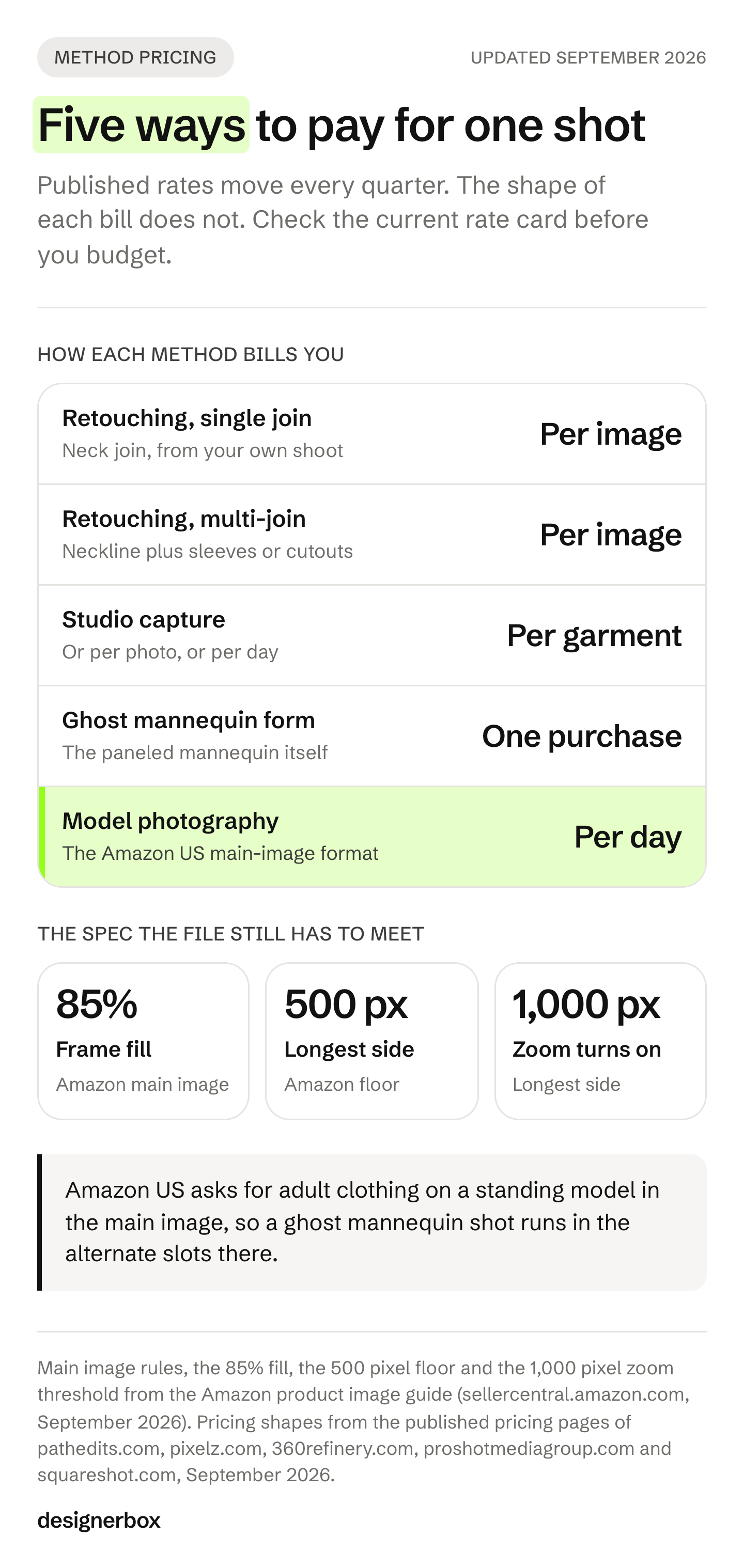
Ghost mannequin photography is billed in two halves. Retouching is priced per image, and capture is priced per garment, per day or as a mannequin form you buy once. Per-image cost only means something once you know how many SKUs you are covering. A studio day amortizes well over 60 pieces and badly over six. Turnaround is the other axis, because ghost mannequin work lands in the retouching queue, and that queue is where a launch calendar quietly loses weeks.
| Method | How it is priced | What it buys |
|---|---|---|
| Retouching, single join | A per-image rate from a retouching service | Neck join on a t-shirt or dress, from your own shoot |
| Retouching, multi-join | A per-image rate for garments with several joins | Neckline plus sleeves, swimwear, jackets, cutouts |
| Retouching, subscription | A per-image rate plus a monthly fee | Retouching on a monthly plan |
| Ghost mannequin form | A one-off equipment purchase | The paneled mannequin itself |
| Studio, per garment or per photo | A rate per garment or per photo, sometimes with a setup fee | Shot and edited by the studio |
| Model photography | A day rate | On-model, the Amazon main-image format for adult apparel |
| AI generation | A monthly plan | Volume varies by plan, check the cap |
Each retoucher and studio lists its current rates on its own pricing page (pathedits.com, pixelz.com, 360refinery.com, proshotmediagroup.com, squareshot.com, September 2026). Check them before you budget.
Compare the fixed costs first. Capture arrives either as a studio invoice per garment or as a mannequin, lights and your own hours. A method that removes the capture step changes that part of the budget.
Watch the equipment line specifically. A general DIY product setup means lights and a backdrop, but a paneled ghost mannequin is a separate purchase on top of that. Budget it as its own item. We break the full production side down in what an apparel photoshoot costs, and set out how far a switch really moves the total in cut fashion photography costs.
Which method fits your catalog
Match the method to volume and to where the images run.
- Under 20 SKUs, own store only. Compare a studio’s per-garment quote for 20 pieces against the price of the mannequin form alone.
- Under 20 SKUs, hero pieces. Book the studio. When a single product carries the season, the control is worth the day rate. Planning a clothing brand photoshoot sorts which shots need the camera.
- 50 to 500 SKUs, marketplace listings. On Amazon US you need an on-model main image for adult clothing, plus off-figure alternates. Use ghost mannequin or flat for the alternates, and keep one treatment across the range.
- Restocks and colorways. Reuse the treatment rather than rebooking. A saved workflow helps most here, because the second run needs no new shoot.
- Tight-fitting kids items, accessories and multipacks. Amazon US asks for these flat, with no model, in the main image. Use flat for the main image and keep ghost mannequin for the alternates.
Whatever you pick, pick one and hold it. A catalog where half the pieces are ghost mannequin and half are flat lay reads as unfinished, and that inconsistency is more visible to a shopper than any single image’s quality.
Where ghost mannequin shots go wrong
Five failure modes account for most rework.
The neck join looks pasted. Almost always a missing interior shadow, or the two frames were shot at different distances. Lock the tripod and paint the gradient.
The garment reads flat. The form was too small for the piece, so nothing filled out the shoulders or chest. Pin the back or size up the mannequin.
Creases survive to the final file. Steaming on the form, after dressing, catches what steaming beforehand misses.
Color drifts across the range. Manual white balance, one session, one light setup. Auto white balance shifts between frames and no amount of editing fully recovers it.
The image gets rejected by the channel. Usually the background is off-white rather than pure white, the product fills less than 85% of the frame, or the file is under the pixel floor. Check the spec before the batch, not after.
Product images are the first thing a shopper interacts with. Baymard Institute found that 56% of users’ first action on a product page is exploring the images, and that 42% try to judge a product’s size from those images (baymard.com, 2020 and 2026). eBay’s own study of 6.8 million listings found that listings with better photo quality were 4.5% more likely to sell (export.ebay.com, undated, accessed September 2026). Getting the shot right is not a cosmetic exercise.
Apparel sits above the all-category figure in these sources. The NRF and Happy Returns estimated that 19.3% of online sales would be returned in 2025 (NRF, 2025 Retail Returns Landscape, accessed September 2026). Coresight Research put the US online apparel return rate at 24.4%, with size and fit cited by 53% of respondents as the primary reason, though that study is from 2023 and was sponsored by a body-measurement vendor (coresight.com, 2023, accessed September 2026). An image that shows real shape and drape is doing work that a flat lay cannot.
FAQ
Does Amazon allow ghost mannequin photos?
Yes, in the alternate image slots. Amazon’s 2021 clothing imaging guide, which Amazon marks as informational, names ghost mannequin as an off-figure image type and lists ghost mannequins under main image DON’Ts. Amazon’s current product image guide asks for adult clothing on a standing model in the main image, and says not to show any part of a mannequin there. So in the US the technique does not fit the adult main slot. Tight-fitting kids items, accessories and multipacks are shown flat, with no model. Rules differ by region.
What is the difference between ghost mannequin and flat lay photography?
A flat lay shows the garment laid flat on a surface, photographed from above. Ghost mannequin shows the same garment holding three-dimensional shape as if worn, with the mannequin removed in post. Flat lay is faster and cheaper. Ghost mannequin shows drape, fit and volume, which matters more on structured pieces like jackets, shirts and dresses. It earns its slot most on outerwear, where the collar roll and shoulder line survive without a body, and jacket photography covers which frame it replaces. On Amazon it cannot hold the main slot for adult apparel, which is why photographing dresses treats it as an alternate frame rather than the hero.
Do you need a special mannequin for ghost mannequin photography?
You need one built from removable panels, so the neck, arms and torso come apart. That is what lets you shoot the interior of the collar separately and composite it in. A standard fixed mannequin can work for simple pieces if you shoot a matching inside frame on a hanger, but the paneled form makes alignment far easier.
How much does ghost mannequin photography cost per image?
Retouching services price ghost mannequin work per image (pathedits.com and pixelz.com, September 2026). Capture carries the fixed costs. Studios charge per garment, per photo or per day, and a paneled mannequin form is a separate purchase before you buy lights. Each provider lists its current rates on its own pricing page.
Can AI do ghost mannequin photography?
Yes. Photoroom and FASHN both ship named tools that generate the invisible-mannequin look from a flat, hanger or on-model source photo (photoroom.com and fashn.ai, September 2026). Output quality tracks the source image more than the prompt. The generated file still has to meet the channel’s background, resolution and frame-fill requirements before it can be listed.
What size should ghost mannequin images be for ecommerce?
For Amazon, at least 500 pixels on the longest side and up to 10,000, with 1,000 pixels or more to turn on zoom. The main image needs a pure white background, and the product should fill 85% of the frame. Shopify accepts up to 5000 x 5000 pixels or 25 megapixels under 20 MB, and suggests 2048 x 2048 for square product images. Check each channel’s current spec before a batch.
Is ghost mannequin the same as invisible mannequin?
Yes. Ghost mannequin, invisible mannequin, hollow man and 3D mannequin all describe the same result: a garment photographed so it holds its shape with nothing visible inside it. Retouching services and marketplaces use the terms interchangeably. Amazon’s UAE style guide uses “invisible” and “ghost” together in the same sentence.
Sources
- Amazon, product image guide, Seller Central, accessed September 2026
- Amazon, “Seller Imaging Guide: Clothing & Accessories, Spring 2021”, marked for informational purposes only, accessed September 2026
- Amazon, Image guidelines for clothing, Seller Central, accessed September 2026
- Amazon.ae, clothing style guide, accessed September 2026
- Shopify Help Center, “Product media types”, accessed September 2026
- eBay, picture policy and adding pictures to listings, accessed September 2026
- Etsy, Listing Image Requirements, accessed September 2026
- Path Edits, ghost mannequin pricing page, pathedits.com, September 2026
- Pixelz, pricing page, pixelz.com, September 2026
- 360Refinery, ghost mannequin photography pricing page, 360refinery.com, September 2026
- ProShot Media, product photography pricing page, proshotmediagroup.com, September 2026
- Squareshot, pricing page, squareshot.com, September 2026
- Photoroom, ghost mannequin tool page, photoroom.com, September 2026
- FASHN, Packshot page, fashn.ai, September 2026
- Baymard Institute, image resolution and zoom research (April 2020) and product page UX best practices (updated March 2026), accessed September 2026
- eBay, seller photo tips, undated, accessed September 2026
- National Retail Federation and Happy Returns, “2025 Retail Returns Landscape”, accessed September 2026
- Coresight Research, “The True Cost of Apparel Returns”, 2023, sponsored by 3DLOOK, accessed September 2026
Amazon, Etsy, eBay and Shopify image rules, and tool features, verified from the sources listed above as of September 2026. Channel specs change; check the current guide for every marketplace you list on before briefing a batch. Individual results vary.