
Higgsfield product photography is a dedicated surface inside Higgsfield’s creative suite. You upload one product photo, then pick a shot type, and it returns studio, lifestyle, on-model and detail images from that one file. Its own page promise is to turn one photo into a full shoot. It fits ecommerce, fashion, beauty and food brands that need many shots per product without booking a studio.
Most shortlists still file Higgsfield as a cinematic video tool. Our own comparison did the same. That framing is out of date. Higgsfield now runs a product photography page headed “Turn One Photo into a Full Shoot”, with a batch catalog feature and a variant-set feature on it (higgsfield.ai/ai-product-photography, September 2026).
A brand with 200 products does not have one photo problem. It has 200 of them, each needing a hero, two angles, a lifestyle scene and a marketplace crop. Product photography runs $25 to $175 an image at market rates (vsco.co/learn/photography-pricing-guide, September 2026).
This guide covers what that surface includes, the question that now sorts these tools, seven alternatives read from each company’s own site, and where DesignerBox fits. We make DesignerBox, so weigh our section with that in mind. No competitor prices are printed here.
| Tool | Built for | Catalog or bulk run | Free plan |
|---|---|---|---|
| Higgsfield | Product stills plus cinematic video and effects | Yes, AI Batch Catalog, named on its own page | Its page says “Start free” |
| DesignerBox | The same creative job run again on every new product | Yes, batch runs one workflow over a whole sheet | Yes, there is a free plan |
| Photoroom | Listing images at catalog scale, pushed to a storefront | Yes, a batch editor plus a product catalog | Yes |
| Claid.ai | Standardising vendor or seller images through code | Yes, through the API, chained in one call | Yes, a free trial |
| Pixelcut | Quick edits on a phone plus a bulk pass over files | Yes, across hundreds of files | Yes |
| Pebblely | One product photo placed into a background scene | Yes, bulk generation, on paid plans | Not published |
| Flair AI | Staging a scene by hand with props before you run it | Named as bulk content generation, no detail page | Yes |
| FASHN | Getting a garment onto a model at publishable fidelity | None published. Volume runs through the API | Yes |
| Freepik, now Magnific | Stills, video, audio, 3D and editor plugins | Yes, Batch Run over many inputs | Not published |
Key Takeaways
- Higgsfield is no longer only a video tool. Its product photography page names studio shots, lifestyle scenes, on-model shots, relighting, background swap, multi-angle, variant sets and a batch catalog (higgsfield.ai/ai-product-photography, September 2026).
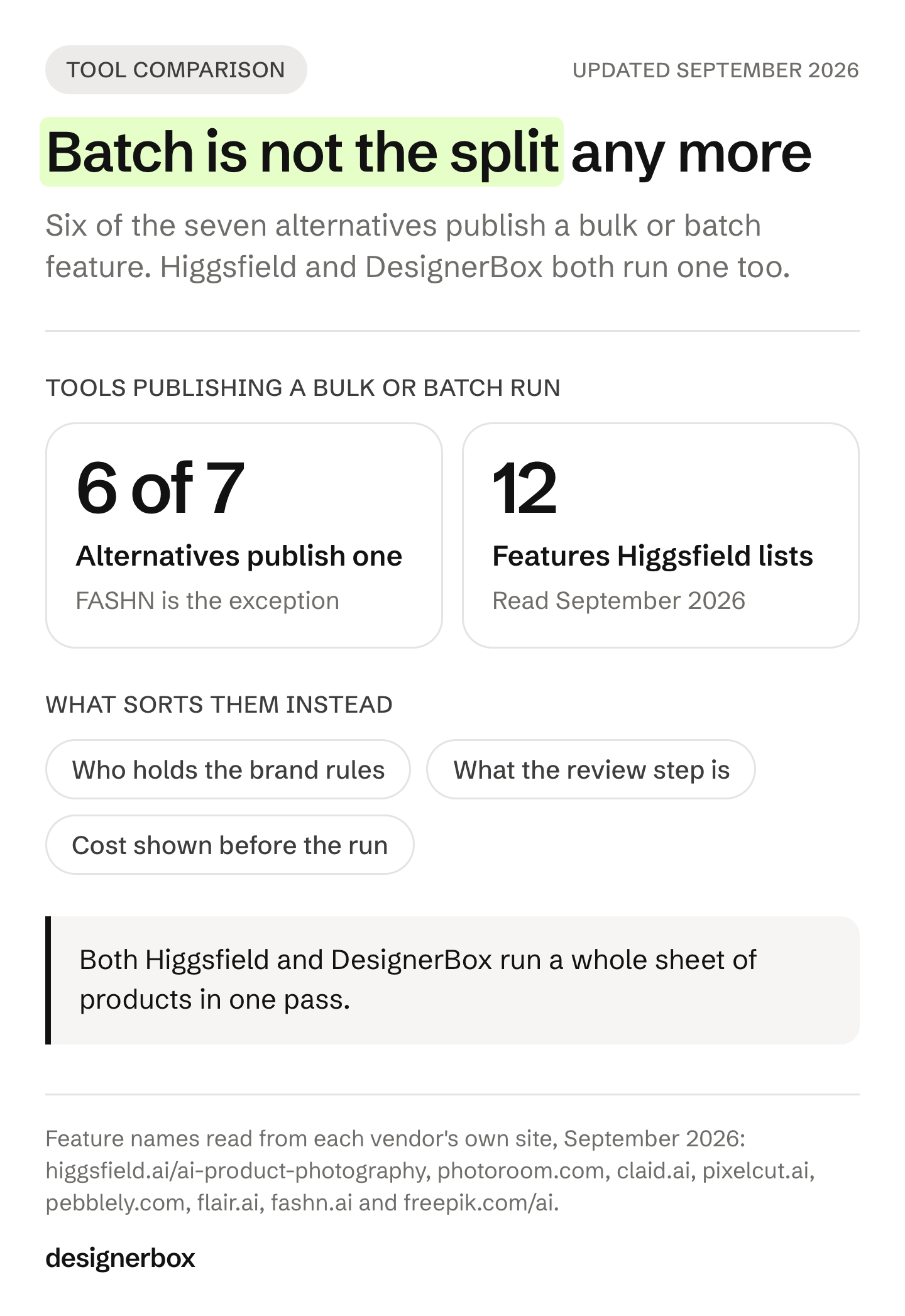
- Batch no longer separates these tools. Higgsfield publishes AI Batch Catalog, and DesignerBox batch runs one workflow over a whole sheet of products. Photoroom and Claid run catalog jobs too. Pick on what the run reads from instead.
- The model roster no longer sorts these tools. Higgsfield names Nano Banana Pro and GPT Image 2 on that page. In DesignerBox the workflow picks the image or video model for each step.
- Sora 2 is removed from OpenAI’s API on 24 September 2026. Higgsfield’s footer still lists Sora 2 among its video models. Both facts are current as of September 2026.
- Six of the seven alternatives publish a bulk or batch feature, in different shapes. Photoroom and Claid run a catalog pipeline. Pixelcut and Pebblely do bulk inside the app. Freepik, now Magnific, batches a saved flow.
- Freepik is now Magnific. Its AI page is headed “Freepik is now Magnific”, with a canonical URL on magnific.com (freepik.com/ai, September 2026). Older comparisons of a Freepik-branded AI suite are stale.
- What separates these tools is what happens after the first good shot. Who holds the brand rules, what the review step is, and whether you see the cost before the run.
What Higgsfield product photography includes
Higgsfield’s product photography page promises studio, lifestyle, on-model and detail shots from one uploaded image. It names twelve features, three steps, and eight models on that one page. Its own summary line reads “One workflow, every shot type, every product, no studio or shoot” (higgsfield.ai/ai-product-photography, September 2026).

The twelve named features are AI Studio Shots, AI Lifestyle Scenes, AI On-Model Shots, AI Product Fidelity, AI Relight and Shadow, AI Background Swap, AI Multi Angle, AI Scene Styling, AI Variant Sets, AI Batch Catalog, AI Photo Upscaler and AI Product Resizer.
Two of those matter most to a brand with a catalog. AI Batch Catalog is described as generating shots across many products with a uniform backdrop and style. AI Variant Sets is described as shooting every colorway with one look across every SKU (higgsfield.ai/ai-product-photography, September 2026).
The three published steps are upload your product, choose the shot, and scale and export. The models named there are Higgsfield Soul, GPT Image 2, Nano Banana Pro, Seedream 4.5, FLUX.2 Max, Kling O1, Grok Imagine and Z-Image.
Higgsfield also says the platform carries “15+ top models, 70+ presets, and a full photo to catalog pipeline in one subscription” (higgsfield.ai/ai-product-photography, September 2026). That is the company’s own description, not a figure verified here.
The wider site is broad. Higgsfield lists Cinema Studio, Marketing Studio, Fashion Factory and UGC Factory in its footer, plus an API, an MCP server and a ChatGPT plugin (higgsfield.ai, September 2026). Its pricing page rendered client-side and returned no readable plan text on 19 September 2026, so check higgsfield.ai/pricing on the day you buy.
What sorts AI product photography tools in 2026
Both sides now do both. Video tools ship product photo surfaces, and photo tools ship video. So the old shortlist question, video tool or product tool, no longer separates them. Three questions do. Who holds the brand rules between runs. What the review step is when 200 results come back. Whether you see the cost before you run.
Brand rules are the first. A prompt you retype by hand is not a rule. A rule is a record the run reads every time. Ask where the brand lives in the product, and what happens when a colleague runs the job next month.
Review is the second, and most lists skip it. Making 500 images is now easy. Reading 500 images is not. Ask what ranks the results and how long a pass takes.
Cost is the third. Credits are not a shared unit, so a credit count at one tool tells you nothing about another. What helps is seeing the price of a run before the run. Our list of the best AI product photography tools applies the same three tests to a wider field.
Higgsfield product photography alternatives by job
Features below were read from each company’s own site in September 2026. No prices are printed. Each vendor lists its plans on its own pricing page.
Photoroom
Photoroom is built to produce listing-ready product images at catalog scale. Its nav holds a group called Scale and Automate, with Batch Processing described as editing thousands at once, and a Product Catalog page stating you can publish your catalog directly to Shopify (photoroom.com/batch and photoroom.com/product-catalog, September 2026). It also names virtual try-on, AI fashion models, ghost mannequin, flat lay, brand kit, team workspaces and an MCP connector. Its pricing page is headed “Start for free”, and several AI tools sit on paid plans (photoroom.com/pricing, September 2026).
It is the only one of the seven publishing both a batch editor over thousands of files and a catalog that pushes finished listings to a storefront. Our Photoroom alternative comparison covers that shortlist.
Best for sellers and catalog teams who need one edit applied across a whole catalog and pushed to a storefront.
Claid.ai
Claid.ai is built to automate product visuals at scale through one API, with a web studio beside it. Its API page names AI Fashion Models, Generate Background, Background Removal, Upscale, Image-to-Video, Shadow Generator and Generative Resize. The business page states 20+ image and video operations, workflow chaining in a single API call, and editing thousands of images in brand style. Its FAQ names batch jobs and async processing, and states customer data is not sold, shared or used for model training (claid.ai/apis and claid.ai/business, September 2026). It offers a free trial (claid.ai, September 2026).
The API is self-serve from a normal account, so a developer can standardise a vendor image pipeline the same day. DesignerBox puts API access on its top plan.
Best for marketplaces and engineering teams standardising seller or vendor uploads through code.
Pixelcut
Pixelcut is built for product images, video and ad creative for online sellers, on web, iOS and Android. It names a Creative Agent, Product Showcase, AI UGC Ads, background removal for image and video, upscale to 16x, batch editing across hundreds of files, an API and a connector for Claude (pixelcut.ai, September 2026). Its free plan carries limited background removal and upscale, and exports without a watermark (pixelcut.ai/pricing, September 2026).
Pixelcut names Nano Banana Pro, Sora 2 and Seedance v2.0 on its own pages. Several platforms carry those vendor models, DesignerBox included.
Best for small sellers who want fast edits on a phone plus a bulk pass over hundreds of files.
Pebblely
Pebblely is built to add backgrounds to an uploaded product image. Its FAQ describes adding backgrounds and matching shadows and reflections to them. It names 100+ templates, product rotation and sizing, image resizing per platform, and bulk generation for multiple products as a paid feature (pebblely.com and pebblely.com/faq, September 2026). No API, no video and no team features appear on the site. No free plan is published, and the free-trial answer on its pricing page did not render, so treat that as unverified (pebblely.com/pricing, September 2026).
Narrowest scope of the seven. One upload, one background, a template list, and nothing else in the way.
Best for a solo seller who wants a background scene and nothing else to learn.
Flair AI
Flair AI is built around a drag-and-drop canvas where you stage a scene with props before you run it. It names reusable templates, fashion photoshoots that preserve patterns and logos, AI human models with chosen hair color and body type, product videos, virtual try-on, upscale and bulk content generation. Its additional-features list names real-time team collaboration and API access (flair.ai, September 2026). It publishes a free plan described as free forever, with caps printed on its pricing page (flair.ai/pricing, September 2026).
You compose the shot before the model runs, and teammates edit the same canvas live. DesignerBox does not offer live team editing below its top plan.
Best for small brand teams who want to stage a scene by hand before generating.
FASHN
FASHN is built for on-model fashion imagery from in-house models. It names Try-On, Product to Model, Packshot, Model Swap, AI Fashion Models, Short Videos and Consistent Models, which keeps one face across every photoshoot. Its API page names nine endpoints with run times, including try-on at up to 4K resolution. It also publishes a research section, a status page and a changelog (fashn.ai and fashn.ai/products/api, September 2026). Every new account starts with a complimentary credit grant (fashn.ai/pricing, September 2026).
FASHN publishes no batch or bulk feature. Volume runs through the API instead. For garment fidelity alone it is the deeper tool, and our guide to AI tools for fashion brands puts it beside that field.
Best for apparel and accessory brands whose only job is the garment on a model.
Freepik, now Magnific
Verify the name before you shortlist it. The page at freepik.com/ai is headed “Freepik is now Magnific”, titled “Magnific Tools”, with a canonical URL on magnific.com (freepik.com/ai, September 2026). It names image generation and editing, upscaling, relight, character and mockup generators, video generation and editing, text to speech, 3D scenes, a node-based canvas called Spaces, MCP, agents, automations, Batch Run over many inputs, flow templates and webhooks. Published plugins cover After Effects, Premiere Pro, Final Cut Pro, DaVinci Resolve, Photoshop and Figma. Its pricing page shows paid tiers only (magnific.com/pricing, September 2026).
Widest surface of the seven, and it reaches into the editor a designer already has open. Its Batch Run applies a saved flow over many inputs rather than a catalog of product files.
Best for teams that want stills, video, audio, 3D and editor plugins on one account.
Does the model roster still separate these tools?
No. The same vendor models appear on several of these platforms at once. Higgsfield names GPT Image 2 and Nano Banana Pro on its product photography page. Pixelcut names Nano Banana Pro and Seedance v2.0. In DesignerBox the workflow picks the image or video model for each step. When two platforms run the same models, the roster cannot be the reason to pick one.
One model fact is worth checking this month. OpenAI notified developers on 24 March 2026 that the Videos API and the Sora 2 model aliases and snapshots are deprecated, and that they are removed from the API on 24 September 2026. The Sora web and app experiences were discontinued on 26 April 2026 (OpenAI API deprecations, accessed September 2026).
Higgsfield’s footer lists Sora 2 among its video models (higgsfield.ai, September 2026). Both facts are true as of September 2026. Read them together, and ask any vendor what a named model means on their platform after that date.
What to check before you commit a catalog
Run a pilot before you move 200 products, and use your hardest product rather than the demo one. Five checks separate these tools faster than any feature table.
- Fidelity on your product. Print the result at listing size. Look for warped prints, garbled logos and missing collar ribbing.
- The brand record. Ask where the brand rules live, and whether a run reads them automatically.
- The review pass. Make 40 results and time how long it takes to accept or reject them. That time, not the render time, is the real cost at 200 products.
- Cost visibility. Ask whether the price of a run appears before the run.
- License and training terms. Check the commercial license, and whether your uploads may train models. Claid states that customer data is not used for model training (claid.ai, September 2026). Ask every vendor the same question in writing.
Our guide to keeping AI images on brand covers the brand record, and what a product photoshoot costs gives you the number to compare against.

Where Higgsfield is ahead today
Be clear about our bias before reading the next section. We make DesignerBox, and there are jobs on this page where Higgsfield is the better answer.
Higgsfield is broader on video and effects. Cinema Studio 4.0 is described as shaping every shot with control over camera, lens and light, and its Genjutsu model transfers motion from one video into a new scene (higgsfield.ai, September 2026). Nothing in DesignerBox does that. If the deliverable is a film rather than a listing, start there.
It is also broader as a suite. Its own site lists an Effects library, a Canvas, a Supercomputer agent, a ChatGPT plugin and an API across 50+ models (higgsfield.ai, September 2026). A team that wants one place to try many models will find more to try.
Batch is not the split. Both products run a whole sheet of products in one pass now, and so do Photoroom and Claid. The split is what the run reads from, and what happens to the results afterwards.
Our companion piece on Higgsfield AI alternatives for video covers the film side, and the agency shortlist for Higgsfield alternatives screens the same field on contract terms. For the direct two-name comparison, read OpenArt vs Higgsfield.
One workflow for every product
DesignerBox is AI creative production for brands and agencies. Anyone can make an AI picture. Making hundreds that still look like your brand is the hard part. That is the job a brand with 20 to 500 products has, and the job an agency does for its clients.
You build a workflow once with your brand, your products and your rules. Then you run it again on the next product instead of rebuilding it. A saved workflow runs the same way every time, so the fortieth item uses the same model, light and framing as the first. You set the brand once, and the workflow reads it on every run.
Review is built in. Three critic steps score the results, and best-of-N keeps the best one. You download the results, or send them with a webhook or an S3 step. Every run shows its cost before you start it.
There are four ways to run the same workflow. Open a product imagery template and add your photo. Build your own workflow. Publish it as an app, so a colleague completes a form and presses Run. Batch runs one workflow over a whole sheet of products, and you keep or discard per row and re-run one row alone.
The commercial license starts on the Pro plan. AI video and virtual try-on start on the Premium plan. Team features, shared brand kits, white label and the API are on the Ultra plan, and every plan below Ultra is one seat. There is a free plan. Plans and credits are on the pricing page.
Two more surfaces matter for product stills. The image editor makes one edit after another, and the picture keeps its detail and resolution. Brand rules hold logos, fonts, palette and rules, plus products with colorways.
The rest sits in the same place, which is the second half of the argument on this page. Templates, workflows, apps, batch, the image editor, the video editor, brand, Assets, the AI models, the MCP server, the Figma plugin, the Chrome extension, the iOS app and the API. The full workflow from the first product photo to the finished ad, in one subscription. Video starts on the Premium plan. DesignerBox has 68 tools over MCP, so an AI chat such as Claude runs the same jobs.
Fit by team type
Match the tool to who is buying, not to the feature count.
An ecommerce brand with a growing catalog wants the same finished set for every product at marketplace spec. That is the job on the ecommerce brands page. Photoroom and Pixelcut fit when the storefront push matters more than the brand record.
An apparel or footwear label wants the garment on a model with the fabric intact. Start with the fashion brands page. FASHN is the deeper single-purpose option for try-on alone.
An agency carrying 20 to 100 brands wants one workflow per brand and the same standard for each client. See the agencies page. Team features and the API sit on the Ultra plan, so price that in.
Furniture and homeware brands, performance marketers, creative studios and solo founders run a version of the same job. Only the product count and the frequency change.
Scale content without limits.
Generate content for your products or services with AI, starting today, and keep your brand on every piece. Start from a template, add your brand and your products, and run it. The cost is shown before the run.
FAQ
What is Higgsfield product photography?
It is a page inside Higgsfield’s creative suite that turns one uploaded product photo into studio, lifestyle, on-model and detail shots. It names twelve features, including relighting, background swap, multi-angle, variant sets and a batch catalog, plus three steps: upload your product, choose the shot, scale and export (higgsfield.ai/ai-product-photography, September 2026).
Is Higgsfield good for ecommerce product photos?
Its product photography page names four use cases: ecommerce and marketplaces, fashion and accessories, beauty and food, and ads and marketing (higgsfield.ai/ai-product-photography, September 2026). Whether it fits your catalog depends on your pilot. Run your hardest product through it, then check fidelity at listing size.
Does Higgsfield do batch product photography?
Yes. AI Batch Catalog is named on its product photography page and described as generating shots across many products with a uniform backdrop and style (higgsfield.ai/ai-product-photography, September 2026). Photoroom publishes a batch editor and a catalog, and Claid runs batch jobs through its API. DesignerBox batch runs one workflow over a whole sheet of products.
What is the best Higgsfield alternative for product photography?
There is no single best one, because the tools do different jobs. Photoroom fits catalog scale with a storefront push. Claid fits code-driven standardisation. FASHN fits garment fidelity. Pebblely fits one background scene. DesignerBox fits brand teams and agencies running the same creative job on every new product.
Do AI product photos keep the real product accurate?
Not always, and this is the check worth doing first. The failure modes are warped prints, garbled logos, wrong material finish and missing details such as collar ribbing. Print a result at listing size before you judge it. In DesignerBox, three critic steps score the results, and best-of-N keeps the best one.
Which AI product photography tools have a free plan?
Photoroom, Pixelcut, Flair AI and FASHN publish free access, and Claid offers a free trial (vendor sites, September 2026). Pebblely publishes no free plan, and the Magnific pricing page lists paid tiers only. DesignerBox has a free plan, and plans and credits are on the pricing page.
Sources
- Higgsfield product photography page promise, twelve features, AI Batch Catalog and AI Variant Sets wording, three steps, eight models, four use cases and its own platform claims (higgsfield.ai/ai-product-photography, September 2026)
- Higgsfield nav, footer studios and factories, video and image models, API and MCP lines, Cinema Studio 4.0, and the pricing page that rendered no plan text (higgsfield.ai and higgsfield.ai/pricing, September 2026)
- Photoroom batch editor, product catalog and Shopify publishing (photoroom.com/batch, photoroom.com/product-catalog and photoroom.com/pricing, September 2026)
- Claid.ai endpoints, chained operations, batch jobs and training-data statement (claid.ai, claid.ai/apis and claid.ai/business, September 2026)
- Pixelcut tools, batch editing, named models and free plan terms (pixelcut.ai and pixelcut.ai/pricing, September 2026)
- Pebblely backgrounds, templates and paid bulk generation (pebblely.com, pebblely.com/faq and pebblely.com/pricing, September 2026)
- Flair AI canvas, bulk generation, team collaboration and free plan (flair.ai and flair.ai/pricing, September 2026)
- FASHN products, nine API endpoints and try-on at up to 4K (fashn.ai, fashn.ai/products/api and fashn.ai/pricing, September 2026)
- The Freepik to Magnific rebrand, tool list and plugins (freepik.com/ai and magnific.com/pricing, September 2026)
- Product photography market rate of $25 to $175 per image (vsco.co/learn/photography-pricing-guide, September 2026)
- OpenAI deprecation notice and the Sora 2 API removal on 24 September 2026: developers.openai.com, accessed September 2026
- DesignerBox plans, credits, feature gating, brand profiles and the image editor (designerbox.ai/pricing), September 2026
Higgsfield, Photoroom, Claid.ai, Pixelcut, Pebblely, Flair AI, FASHN and Freepik features read from each company’s own site in September 2026. No competitor prices are printed. Vendor plans and model rosters change often, so check each page on the day you buy. Individual results vary.