Product photoshoot cost is quoted per image, per day or per project. VSCO’s photography pricing guide puts product photography at $25 to $175 per image and commercial day rates at $800 to $5,000 (vsco.co, 9 September 2026). The quote covers the photographer, studio hire, a stylist, models if the product is worn, and post-production.
Worn categories carry the hand or body model as a separate line, which is why shooting a bracelet range prices differently from shooting a boxed product. Apparel on a model has its own rate card, and what a fashion photoshoot costs breaks it down per look. Published rates like these price one shoot. Your catalog does not stand still.
Your quote assumes a single event. Your business runs a cycle: a new colorway in March, a packaging refresh in June, a marketplace that changes its image spec in September, three SKUs discontinued and four added. Each one sends you back to the studio, and the second shoot rarely gets a volume discount because it is small.
This breaks down what a photoshoot costs in 2026, then reframes it around the unit that governs the budget: cost per SKU per year.
Key Takeaways
- VSCO’s photography pricing guide puts product photography at $25 to $175 per image (vsco.co, 9 September 2026). Shopify’s guide puts per-image pricing at $50 to $350 (shopify.com, 27 January 2026).
- VSCO’s guide puts commercial day rates at $800 to $5,000, and Shopify’s guide puts a product photographer’s day at $500 to $3,000. How many finished images a day yields depends on the product and the set.
- The quote is not the spend. Retouching, shipping products to the studio, usage rights, rush fees, and internal coordination land on top of the headline rate.
- Reshoots are the real cost driver. A per-image rate prices one shoot. Catalog churn means you buy a slice of that catalog again every drop.
- Cost per SKU-year beats cost per image as a planning unit, because it captures the churn the per-image rate hides.
- Making the set with AI from one photo moves the cost from each shoot to a monthly plan. One accurate photo of the real product is still the input.
How much does a product photoshoot cost in 2026?
Product photography pricing comes in three models, and the model matters more than the number. Per-image pricing charges a set fee per delivered shot. Day rates buy the photographer’s time and everything on set. Project pricing quotes the whole job. Per-image is the easiest to compare and the easiest to underestimate, because it says nothing about how many images you need. Our guide to product photography rates compares the structures and shows how to read a quote.
Published ranges, as of September 2026:
| What you are buying | Published range | Source |
|---|---|---|
| Product photography, per image | $25 to $175 | VSCO photography pricing guide (vsco.co, 9 September 2026) |
| Photography priced per image, general | $50 to $350 | Shopify blog, product photography pricing (shopify.com, 27 January 2026) |
| Commercial photography day rate | $800 to $5,000 | VSCO photography pricing guide (vsco.co, 9 September 2026) |
| Product photographer day rate | $500 to $3,000 | Shopify blog, product photography pricing (shopify.com, 27 January 2026) |
| Commercial licensing fees | $250 to $10,000 | VSCO photography pricing guide (vsco.co, 9 September 2026) |
| Rush fees | 25% to 200% of the total job cost | Shopify blog, product photography pricing (shopify.com, 27 January 2026) |
Both are published guides, and neither names the survey or data behind its ranges, so treat them as directional. Studio hire, when it is billed separately, sits on top of the photographer’s rate. Picking the studio is a separate decision, and how to choose an ecommerce photography service lists what each pricing tier buys.
A per-image rate for a flat lay assumes the whole set matches. Our guide to flat lay photography explains the two rules that decide whether it does.
Some quotes price per product. That is convenient, and it understates the job on Shopify, where the image count follows the variant matrix rather than the SKU list. Counting the Shopify variant math first usually changes the quote you should be asking for.
The spread is wide because the inputs are wide. A matte t-shirt and a polished watch are not the same shoot. A Brooklyn studio and a regional one are not the same rate. Ranges this broad are a signal to stop shopping on rate and start counting images. Reflective categories and shots with a model price higher, which handbag product photography shows for bags. Prop-heavy categories carry a different premium, because a decor catalog needs the same styling budget for a $28 candle as for a $900 chair. Furniture adds cost on logistics rather than on the shot, and the furniture cost breakdown sets studio day rates against CGI per render. Beauty stacks both problems, since skincare product photography pays for reflective glass and then pays again for the texture and label frames a packshot cannot supply.
Apparel carries one extra line. The invisible-mannequin composite that fills a clothing catalog is priced separately from the shoot, either as retouching alone or as a studio that shoots and edits it for you. What ghost mannequin work costs per garment covers the difference.
What the quote does not include
The headline rate is the beginning of the invoice. Making the same set with AI moves the spend into a monthly plan, which is the comparison an AI photoshoot is really making. The costs that get added afterwards are predictable, so you can budget for them.
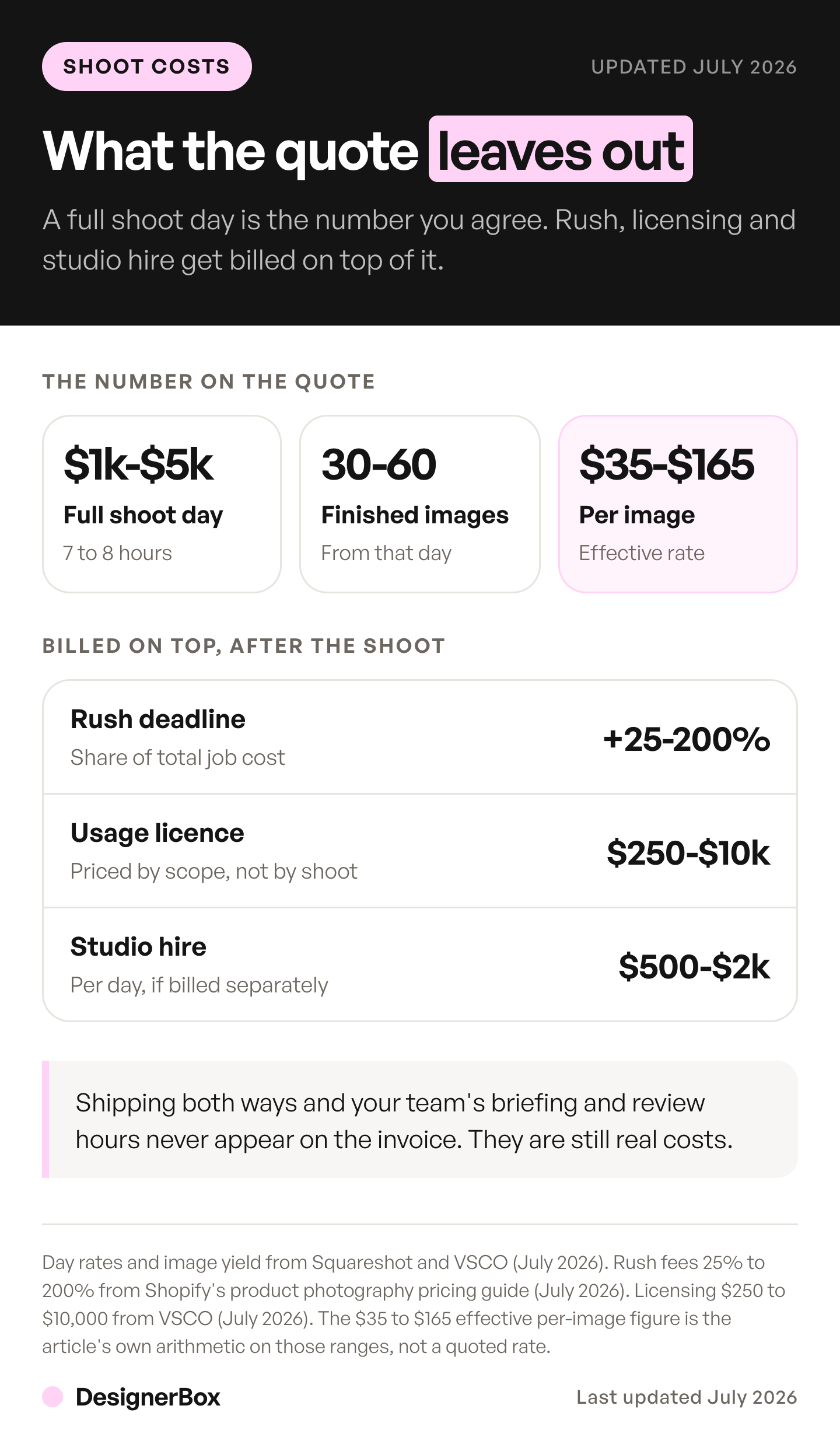
- Retouching. Sometimes bundled at a basic level, charged separately once you want more than dust removal.
- Shipping. Your products have to reach the studio and come back, and someone has to pack them.
- Usage rights. Licensing is priced separately from shooting. VSCO’s guide puts commercial licensing fees at $250 to $10,000 (vsco.co, 9 September 2026). Ask what the quote covers before you run the image as a paid ad.
- Rush fees. Shopify’s guide puts rush fees at 25% to 200% of the total job cost (shopify.com, 27 January 2026, accessed September 2026).
- Coordination. Briefing, scheduling, shot-listing, reviewing, and requesting fixes are hours somebody on your team is paid for. They do not appear on the photographer’s invoice, and they are real.
The point is the unit: a per-image rate leaves these costs out.
Why cost per image is the wrong unit
Cost per image measures a transaction. Your catalog behaves like a subscription you did not sign.
Work an example. Fifty SKUs, seven images each, is 350 images. At an illustrative $40 each, inside VSCO’s published range, that is $14,000, and you shoot it once. Seven is roughly what the types of product photography add up to for one listing. Then the year happens. Two colorways per SKU on a third of the range. A seasonal campaign that needs lifestyle versions of your top twenty. A marketplace that changes its aspect ratio. A hero product that gets repackaged.
None of those is a full reshoot. Every one of them is a small shoot, and a small shoot is hard to price down. A twelve-image top-up is too small to ask for a volume discount, and it still carries any minimum, shipping and another round of coordination.
The useful unit is cost per SKU per year: total annual imagery spend, including reshoots and their overhead, divided by the number of SKUs you sell. It is the number that holds up when the catalog changes.
That unit also exposes a second question the budget never asks, which is which SKUs get any spend at all. Why allocation decides more than cost per image works through the products your shoot calendar has been skipping.
Run it and the picture inverts. The first shoot is rarely what hurts. It is budgeted, approved, and everyone remembers it. The damage is the eleven small ones nobody planned, each too small to negotiate and too urgent to postpone.
Each of those small shoots also re-enters the booking queue, which is the cost the invoice never shows. Where a product launch waits puts numbers on the calendar side of the same cycle.
Some categories generate those small shoots faster than others. A nine-flavor supplement range is one bottle shape and nine label colorways, so the spend scales on flavors rather than on products. What a supplement image set costs works that arithmetic through. A six-flavor drink range does the same thing with a regulated label on top, which bottle product photography prices out.
Knitwear does the same thing seasonally, and colorway multiplication in a knit drop is the line item that grows a season’s shot count. Small leather goods invert it. One wallet is a half-day tabletop job, but what a wallet shoot really bills for is the macro and the glare retouch, not the studio time.
One photo in, a full set out

This argument does not claim AI imagery is free. It moves the cost from a per-shoot variable to a fixed monthly plan, and it removes the reshoot’s setup.
You still need one accurate photo of the real product. That is the constraint, and it stays. It is also what separates this from the other kinds of AI product mockups, where the input is a design file or nothing at all. Check that a model holds your product before you build a catalog on it. What shrinks is the work downstream: most angles, the backgrounds, the lighting and the lifestyle scenes. A new colorway still needs a check against the real product, because color is what buyers notice when the parcel arrives.
There is a free plan, and it runs on sample products. Uploading your own photos and the commercial license start on the Pro plan. The cost of a run depends on the model the workflow uses. You see that cost before you start the run. Plans are on the pricing page. Check what each plan buys before you size one.
Set that against the reshoot cycle rather than against the first shoot, because that is where the comparison is fair. If a vendor quotes a 90% saving, check what that 90% figure counts before it reaches a budget deck. A twelve-image colorway top-up is a studio minimum, a shipping run, and a week of calendar. With AI it is twelve results. Those twelve sit next to the originals on the same page, and holding the model, the light and the crop steady across a drop is its own discipline.
Set the shot list up once and the rest of the catalog is a repeat rather than a new job. You fix your light, your crop, your background and your model choice on the first SKU and save them as a workflow. The saved workflow runs the same way on the next SKU and on every colorway after it, which is the thing a series of small shoots cannot hold. Batch runs one workflow over a whole sheet of products.
Which tool you run that on is a separate question. We compare the field in our roundup of the best AI product photography tools, and look at one tool in detail in seven Photoroom alternatives.
What that does not do is replace the photographer on the shoot that produces your source image. Somebody still has to photograph the real product accurately, and that shot is what everything else is built from. Our guide on whether AI will replace photographers sorts 12 shot types by who should make them. The Photo angles app is built around that constraint. It takes one product photo and returns more angles.
If the worry is that AI imagery reads as generic, that is a real failure mode. It has a specific cause: assets built from a text prompt rather than from your actual product. Everything here starts from the photograph of the real thing, so every result starts from the same product, light and framing. The brand is a record as well, and the workflow reads it on every run. The drop then holds one look across every SKU.
How to budget for it
Stop pricing the shoot. Price the year. Before you count anything, sort the shot list by what each frame takes to produce. The tiers in fashion photoshoot ideas, shoot it or generate it carry very different costs.
- Count the SKUs you will sell, not the ones in the system.
- Count images per SKU. Front, back, three-quarter, detail, scale, in-use, and one per variant. Seven or eight is a realistic full set for most catalogs, and the order they appear in on the page matters as much as the count. How many images each channel allows is in our guide to ecommerce product photography.
- Apply a churn rate. What fraction of the catalog changed last year? Colorways, packaging, discontinuations, platform spec changes. That fraction, times your image count, is next year’s reshoot volume.
- Add the overhead per reshoot event, not per image: minimum charges, shipping, coordination hours.
- Divide by SKUs. That is your cost per SKU-year, and it is the number to compare approaches against.
Run the same count across paid, email and organic and you have the full-year creative requirement, with the catalog as one part of it. The DTC playbook for fashion brands works that out channel by channel.
For many catalogs, step 3 is where the budget lives, and it is the step that never appears on a quote.
Ecommerce brands are one of five team types that use AI creative tools, and each one prices this calculation differently depending on catalog size and reshoot churn. For apparel the cost line is rarely all-or-nothing, because only some gallery slots depend on a model at all.
The templates, the workflows, batch, the image editor, the video editor and the Assets library sit together. If you run a catalog, AI product photography covers the per-product set in more detail.
Start from a template, add your brand and your products, and run it. See the templates.
FAQ
How much does a product photoshoot cost per image?
VSCO’s photography pricing guide puts product photography at $25 to $175 per image (vsco.co, 9 September 2026), and Shopify’s guide puts per-image pricing at $50 to $350 (shopify.com, 27 January 2026). Neither guide names the data behind its range. The spread depends on product complexity, geography, photographer experience, and whether licensing is included.
How much is a full day of product photography?
VSCO’s guide puts commercial photography day rates at $800 to $5,000 (vsco.co, 9 September 2026), and Shopify’s guide puts a product photographer’s day at $500 to $3,000 (shopify.com, 27 January 2026). Studio hire may be billed on top. How many finished images a day yields depends on the product and the set, so ask for the image count in the quote.
Why are reshoots so expensive relative to their size?
Because the cost is per event, not per image. A small top-up is too small to earn a volume discount, so it pays close to full rate. It still incurs any session minimum, shipping both ways, and the same coordination overhead as a large shoot. Twelve images can cost a disproportionate share of a 350-image shoot.
Is AI product photography cheaper than a photoshoot?
It moves the cost from each shoot to a monthly plan, so compare the two per SKU per year. In DesignerBox the cost of each run depends on the model you pick, and it is shown before the run. It does not remove the need for one accurate photo of the real product, which is what the AI set is built from.
For catalog work the unit to price is the set rather than the image, since a template that returns a set per run covers a listing in one pass.
What hidden costs should I expect on a photoshoot quote?
Retouching beyond a basic pass, shipping products to and from the studio, usage and licensing rights, rush fees that Shopify’s guide puts at 25% to 200% of the job (shopify.com, 27 January 2026), and your own team’s coordination hours. Ask specifically what the quote includes and what the license covers before the shoot.
How many images does each product need?
Plan for front, back, three-quarter, side, top, detail, and in-scale shots, plus one per variant. Seven is a reasonable baseline for a complete listing, and marketplaces often set their own minimums and aspect ratios on top. Generative AI fashion imagery has to meet those same minimums. Google, for example, will require product images of at least 500 x 500 pixels from 31 January 2027 (Google Merchant Center Help, accessed September 2026).
What is a realistic annual photography budget for a small catalog?
Take your SKU count, multiply by images per SKU, price at the per-image rates above, then add the reshoot volume implied by last year’s catalog churn plus per-event overhead. The churn portion is the part a shoot quote leaves out, and for brands with frequent drops it can rival the original shoot.
Sources
- VSCO, Photography pricing guide (9 September 2026): product photography at $25 to $175 per image, commercial day rates at $800 to $5,000, and licensing fees at $250 to $10,000 (vsco.co/learn/photography-pricing-guide, accessed September 2026)
- Shopify blog, Product photography pricing (27 January 2026): $50 to $350 per image, $500 to $3,000 per day, and rush fees at 25% to 200% of total job cost (shopify.com/blog/product-photography-pricing, accessed September 2026)
- Google Merchant Center Help, image size requirements from 31 January 2027: Google Merchant Center Help, image too small, accessed September 2026
- DesignerBox plans and the Pro-plan commercial license: DesignerBox pricing page (designerbox.ai/pricing), September 2026
Rates verified from the published pricing guides at vsco.co and shopify.com as of September 2026. Neither guide names the data behind its ranges. Photography rates vary by market, product category, and licensing terms. Individual results vary.