




To make an AI agent creative, connect it to tools that do the visual work it cannot do. Your agent already writes the brief, the copy and the plan. It still needs image and video models, creative skills that know what a product ad or a try-on shot should look like, and your brand rules. One MCP connection can add all of that to Claude, Codex or an agent you built.
Ask Claude Code for a campaign and you get a sharp brief, ten headlines and a shot list. Then the work stops, because “Claude doesn’t generate photos or illustrations the way image-generation tools do” (support.claude.com, read September 2026). Someone copies the brief into another tool, makes the images, downloads them and returns to the chat. An agency that runs that loop for every client brand spends its hours in the gap between the brief and the ad.
This guide covers what a creative agent needs and what it takes to wire image and video models into an agent yourself. It then shows how one MCP server gives the agent you already run creative skills and models without that upkeep. Setup comes near the end, because it takes one command. It is written for agencies and brand teams who already use an AI agent and want it to make ads, product images and video.
Key Takeaways
- Agents write, and tools make the pictures. The language model plans, writes and calls tools. The image or the clip comes from a model the agent reaches through a tool.
- A creative agent needs three things, and a fourth once the job repeats. Image and video models, creative skills that know how an ad or a try-on shot should look, and your brand rules. The fourth is a saved workflow.
- Building it yourself means one integration per model vendor. Each vendor has its own key and request format, and video APIs start a job your code has to wait on.
- Models retire on the vendor’s schedule. OpenAI removed DALL-E 3 in May 2026 and removed Sora 2 from its API on 24 September 2026. Google shut down Veo 2 and Veo 3 on 30 June 2026.
- One MCP server adds the creative jobs and the models. DesignerBox gives an agent 75 tools, including product ads, angles, try-on, avatars and video, with image and video models behind them.
- The know-how comes with the tools. A template runs by reference: its prompt and its settings load on the server, so nobody on your team maintains a prompt library.
- Setup is one command or one settings screen. Claude Code, Codex, Cursor, ChatGPT, Gemini CLI and agents built on an API all use the same server URL.
Why can’t an AI agent make ads on its own?
Most agents run on a language model. The model plans, writes and decides which tool to call. Making an image or a video is a separate job, done by an image or video model. So an agent without creative tools can write a strong ad brief and still hand you no ads. The creative ability comes from the tools the agent connects to, and those tools decide what it can make.

The agents that teams already run show the split. Claude Code can read an image file but cannot make one. Codex makes stills with gpt-image-2 when you include the imagegen keyword, and its documentation has no video generation at all (learn.chatgpt.com, September 2026). A general image tool also knows nothing about your standard set: the angles, the background, the crop and the brand look every product needs.
That is the job this guide is about. Our guide to Claude Code for marketing maps which marketing work a coding agent covers well. Agentic marketing platforms compared by layer shows which ready-made platforms make video themselves. MCP for marketing, by job sorts the servers by what they do: ads data, analytics, CRM, design and creative. The rest of this guide covers the visual half.
What does an AI agent need to be creative?
A creative AI agent needs three things, and a fourth once the job repeats. Models, so it can make the image or the clip. Creative skills, so it knows what a product ad, a new angle or a try-on shot should look like without a new prompt each time. Your brand, so the tenth result matches the first. And a saved workflow, so the same steps run on every new product.
| What the agent needs | Without it | With it |
|---|---|---|
| Image and video models | The agent writes a prompt and stops | The agent makes the image or the clip |
| Creative skills | Every ad starts from a blank prompt | The agent calls a product ad, angle or try-on job that already knows the format |
| Your brand rules | Each result looks like a different brand | The agent reads the palette, voice and logos before it runs |
| A saved workflow | Each product gets a slightly different set | The same steps run on the next product |
“Skill” has a second meaning in 2026: a SKILL.md file that teaches an agent your house rules. Those files add your method on top of the tools. Skills vs MCP explains how the two fit together, with an example skill that calls image tools.
What does it take to connect an agent to image models yourself?
You integrate each model vendor on its own. That means an account and an API key per vendor, a different request format for each, code that waits on video jobs, a place to keep the files, and a code change whenever a vendor retires a model. One model is a small project. For a creative agent that needs several image and video models, it becomes ongoing upkeep.
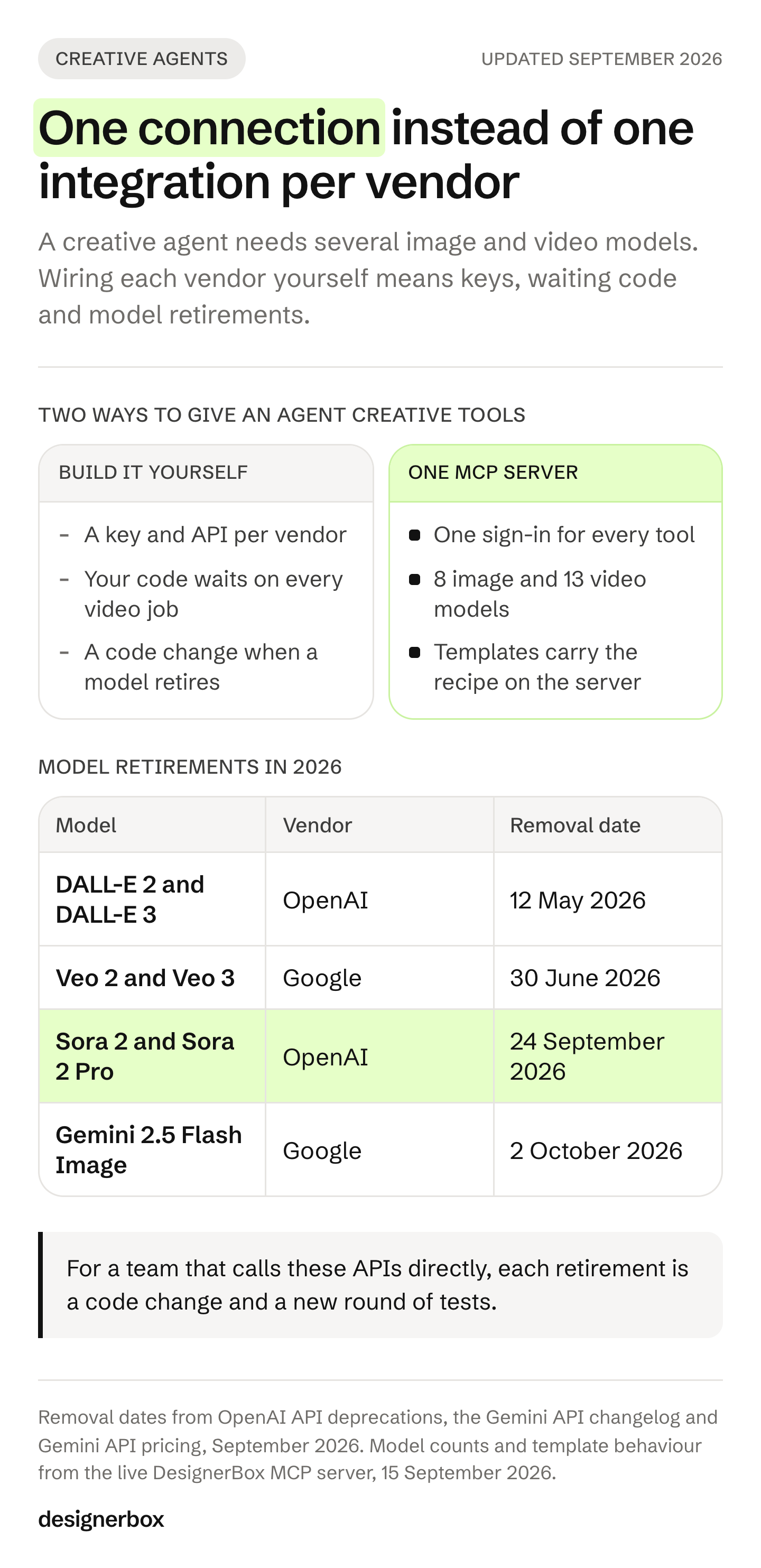
The vendors’ own documentation shows the work. Google’s Veo API “starts a long-running job and immediately returns an operation object”. A clip takes from 11 seconds to 6 minutes at peak, and Google removes the video from its servers after 2 days (ai.google.dev, September 2026). Black Forest Labs returns a polling URL for each FLUX request, and its signed result URLs “are only valid for 10 minutes” (docs.bfl.ai, September 2026). Every vendor your agent uses adds its own version of that code.
Some vendors now host their own MCP server, which removes the API key. Black Forest Labs runs one at mcp.bfl.ai with an OAuth sign-in (docs.bfl.ai, September 2026), and Runway announced a hosted server on 2 September 2026 (runway.com, September 2026). That still leaves one server per vendor, each with its own models and its own tools.
Then the models change. These four retirements all fall in 2026:
| Model | Vendor | Removal date |
|---|---|---|
| DALL-E 2 and DALL-E 3 | OpenAI | 12 May 2026 |
| Veo 2 and Veo 3 | 30 June 2026 | |
| Imagen 4 | 17 August 2026 | |
| Sora 2 and Sora 2 Pro | OpenAI | 24 September 2026 |
Sources: OpenAI API deprecations and Gemini API changelog, September 2026, and Gemini API deprecations, October 2026. For a team that calls these APIs directly, each row is a code change and a new round of tests.
| The work | Build it yourself | Through one MCP server |
|---|---|---|
| Accounts and keys | One per model vendor | One sign-in |
| Request formats | A different one for each vendor | One set of tools the agent reads |
| Video jobs | Your code checks each vendor until the clip is ready | The agent submits the job and checks it with one status tool |
| Result files | You download them before the vendor deletes them | Results come back as file URLs you can download |
| Model retirements | You change and retest the code | The agent reads the current model list before it runs |
| Creative know-how | You write and tune every prompt | Templates and creative jobs carry the prompt and the settings on the server |
Creative skills and models through one MCP server
DesignerBox is AI creative production for brands and agencies. Its MCP server gives an agent 75 tools (DesignerBox MCP page, October 2026). We listed the tools on the live server on 15 September 2026, and the creative ones group into the jobs below.
| Creative job | Tools the agent calls | What the agent gets back |
|---|---|---|
| Product ads and stills | product_ad, photo_angles, flat_lay, spotlight, remove_background, edit_image | An ad image from a product photo, new camera angles, a flat lay from several products, a relit or cut-out shot |
| Fashion and people | virtual_try_on, skin_retouch, create_avatar | A garment on a model, a retouched portrait, an avatar in nine fixed poses |
| Video | generate_video, fashion_video, talking_avatar, create_video_project | A clip from text or a still, garment motion, a talking presenter, a timeline with text and audio |
| Looks and templates | apply_image_template, generate_design | A ready-made look or style applied to your image |
| Brand | list_brand_profiles, list_brand_assets | Voice, themes, logos, fonts and palette |
| Saved work | run_pipeline, run_app | A saved workflow or app, run on the next product |
Models the agent picks per job
Your agent holds no vendor key for any model. It calls list_image_models or list_video_models and reads what each model supports and costs. When the agent calls a tool directly, it picks the model for each step. The hero image and the clip can use different models in the same job. When you build a saved workflow, you pick the model for each step, and every run after that uses it. A template comes with its model already picked. An 8-second clip costs 40 to 560 credits, depending on the model.
Know-how built into the tools
Templates run by reference. The agent passes a template id, and the prompt and the settings load on the server. The live tool description says they are “never returned to you”, so your team gets the look without keeping a prompt library for it. The style skills behind generate_design work the same way. The product_ad tool takes a style, a background and a lighting choice, so the agent picks options where it would otherwise write a long prompt.
Your brand in every run
You set the brand once. The workflow reads it on every run. A brand profile holds voice and themes, and brand assets hold logos, fonts and palette swatches. The agent can read both before it makes anything, so a client’s tenth ad follows the same rules as the first. The brand record itself lives in brand profiles.
Upkeep on your side
Your agent connects to one server. A creative connection needs no ad account, and the three kinds of AI ad agent explains which kind does. You keep no vendor API keys, no request code per vendor and no status loop per video API. When the model list changes, the agent sees the change the next time it reads the list. What you maintain is one connection and one sign-in, and the access token lasts 30 days (DesignerBox MCP documentation, September 2026).
The agent works in the same place your team does. The templates, the workflows, the apps, batch, the image editor, the video editor, the brand and the Assets library sit in one place. The agent’s results land in Assets, so your team opens the same still in the image editor. A client can approve it through Reviews, a link that needs no account. When someone on your team edits the ad, the still the agent made is already there.
What can a creative agent make?
It can make the creative work your team repeats: the standard image set for a new product, versions of an ad that worked, a short vertical clip from a hero image, or a presenter who reads a script. You describe the job in plain words. The agent picks the tools and the models, tells you the cost and runs the job after you say yes.
| The job | Say this to the agent | Tools it will likely use |
|---|---|---|
| The same set for a new product | ”Here is a new product photo. Make our standard set: an ad image, a three-quarter angle and a relit hero. Use our brand profile. Show me the cost first.” | product_ad, photo_angles, spotlight |
| Versions of an ad that worked | ”This ad did best last month. Make four versions with different backgrounds. Keep the product and our colors.” | edit_image |
| A vertical clip from a still | ”Turn this hero image into an 8-second 9:16 clip. Show me the cost on two models before you run it.” | list_video_models, generate_video |
| A presenter for a product video | ”Create a brand avatar, then a presenter clip that reads this script.” | create_avatar, talking_avatar |
The presenter job starts with an avatar run, which returns nine fixed poses of one person.
When forty new products arrive, a saved workflow runs the same way on each one. Batch runs it over a whole sheet of products at once. You keep or discard per row, and re-run one row on its own. Our guide to agentic workflows shows how to test a chain like this on three products before three hundred.
How do you connect it to the agent you already use?
Add one URL, https://mcp.designerbox.ai/api, and sign in once. Command-line agents take one command. Code editors read a short JSON file. Chat apps add the server in settings. Agents you build on an API pass an access token with each request. Every agent then reaches the same tools, models and brand profile.
| Agent | How you add the server | How you sign in |
|---|---|---|
| Claude Code | claude mcp add —transport http | /mcp inside Claude Code |
| Claude.ai and Claude Desktop | Customize, then Connectors, then Add custom connector | Connect, then the browser consent screen |
| Codex CLI and IDE (Codex MCP setup) | codex mcp add NAME —url URL | codex mcp login NAME |
| Cursor | .cursor/mcp.json or ~/.cursor/mcp.json | Cursor runs OAuth for servers that need it |
| VS Code with Copilot | .vscode/mcp.json, or MCP: Add Server | A browser window on first connection |
| ChatGPT | Plugins, then “Add custom MCP server” | OAuth, chosen when you create the plugin |
| Gemini CLI | gemini mcp add —transport http | /mcp auth NAME |
| OpenClaw | openclaw mcp add NAME —url URL | openclaw mcp login NAME |
| Hermes Agent | mcp_servers in ~/.hermes/config.yaml | hermes mcp login NAME |
Each row follows the vendor’s own documentation, read on 15 September 2026, except ChatGPT and the Claude apps, which were re-read in October 2026: Claude Code, Claude apps, Codex, Cursor, VS Code, ChatGPT, Gemini CLI, OpenClaw and Hermes Agent. The commands for the two coding agents:
# Claude Code: add the server, then type /mcp inside Claude Code to sign in
claude mcp add --transport http designerbox https://mcp.designerbox.ai/api

# Codex: add the server, then sign in
codex mcp add designerbox --url https://mcp.designerbox.ai/api
codex mcp login designerbox
OpenAI’s guide says ChatGPT “supports both read and write tools from your server”, and that write actions need your confirmation by default. Workspace permissions and security restrictions apply to custom servers (developers.openai.com, October 2026). The menu path and the permission settings are in how to add an MCP server to ChatGPT. The Claude apps and Claude Code have their own section below.
Agents you build are different. Anthropic’s MCP connector and OpenAI’s Responses API both take a server URL and an access token, and neither runs the sign-in for you. Anthropic’s documentation says “API consumers are expected to handle the OAuth flow and obtain the access token prior to making the API call” (platform.claude.com, September 2026). In n8n, the MCP Client Tool node supports OAuth2 and connects the server to an AI Agent node (docs.n8n.io, September 2026). Our comparison of AI agent builders for marketing teams covers n8n and four other builders. For video jobs, see how n8n and Make wait for an AI video.
Start with a check that spends nothing:
List the DesignerBox tools in the image-generation category.
Then read my plan limits. Do not run anything that uses credits.
We ran this against the live server on 15 September 2026. The tool search listed every tool, and the image-generation category returned four, each with a description of how its cost is set. A long free-text request, “make product photos from one product image”, returned no matches. In that test the category found the tools and the sentence did not, so start with a category.
How to add an MCP server to Claude
In the Claude apps, you add a remote MCP server as a custom connector. You open Customize, then Connectors, and paste the server URL. In Claude Code, you run one command, claude mcp add --transport http, with a name and the URL. Then you sign in from the /mcp panel. Both steps follow Anthropic’s own pages, read in September and October 2026.
Claude on the web and Claude Desktop. Custom connectors using remote MCP work on the Free, Pro, Max, Team and Enterprise plans. Free users are limited to one custom connector (support.claude.com, October 2026). On Pro and Max, open Customize, then Connectors. Click ”+ Add”, then “Add custom connector”. Name the connector and paste the server URL. Click Continue, check the sign-in settings Claude found, and click Continue again. Choose how people sign in, then click Add. On Team and Enterprise plans, an Owner adds the connector under Organization settings, then Connectors, and each member clicks Connect. You turn a connector on for one conversation from the ”+” button in the chat. Claude reaches the server from Anthropic’s cloud, so the server must be on the public internet.
Claude Code. Anthropic calls HTTP servers “the recommended option for connecting to remote MCP servers” (code.claude.com, accessed September 2026). The basic command is claude mcp add --transport http <name> <url>. It saves the server in local scope unless you add --scope project or --scope user. For a server that uses OAuth, sign in from the /mcp panel, or run claude mcp login <name> in the shell. Connectors you added in claude.ai also appear in Claude Code when you log in with the same claude.ai account.
DesignerBox is one example server. The Claude Code command for it is in the section above, and DesignerBox for Claude shows what the tools do once connected.
Plans and limits
- Read tools work on every plan. Tool search, the plan check and the brand profile read spend nothing. Generation tools spend credits.
- Uploading your own photos and the commercial license start on the Pro plan. The free plan runs one run at a time, on sample products.
- AI video, virtual try-on, the image editor and the video editor start on the Premium plan. An agent on a lower plan can still make stills.
- Team features, shared brand kits and white label are on the Ultra plan. Every plan below Ultra is one seat, so an agency where several people run the agent needs the Ultra plan.
- Results do not go into a store listing on their own. You download them, or send them with a webhook or an S3 step.
- Plans and credits are on the pricing page.
The full client list and the connect flow sit on the DesignerBox MCP page.
A first agent job from a template
Start from a template, add your brand and your products, and ask your agent to run it.
FAQ
How do I make my AI agent creative?
Connect it to tools that make images and video, give it creative jobs that already know the format, and let it read your brand rules. The shortest route is one MCP server that carries all three. DesignerBox adds 75 tools to Claude, Codex, ChatGPT or your own agent through one connection and one sign-in.
Can Claude or Codex make ad images on their own?
Claude cannot. Claude Code reads images but does not make them. Codex makes stills with gpt-image-2 and makes no video. Neither one knows your standard set of angles, backgrounds and crops, which is what creative jobs and your brand profile add.
Do I need an API key for each image and video model?
Only if you call each vendor directly. Through DesignerBox MCP, the agent signs in once and reaches image and video models without a vendor key. An agent built on the Claude or OpenAI API passes one access token with each request.
What creative jobs can an agent run through DesignerBox?
Product ads, new camera angles, flat lays, relighting, background removal, virtual try-on, portrait retouching, avatars, video from text or a still, garment motion, talking presenters and timeline edits. The agent can also apply templates and run your saved workflows and apps.
Which AI agents work with DesignerBox MCP?
Any agent that connects to a remote MCP server over HTTP. The vendors document that setup for Claude Code, Claude.ai, Claude Desktop, Codex, Cursor, VS Code, ChatGPT, Gemini CLI, OpenClaw, Hermes Agent and n8n, and for agents built on the Claude and OpenAI APIs.
What does it cost to make creatives through an agent?
The cost is shown before the run, and read tools spend nothing. What a run costs in money depends on the plan you are on.
Does the agent follow my brand?
Yes, once you set a brand profile. The agent reads your voice, themes, logos, fonts and palette before it runs. A saved workflow then runs the same steps on every product, so the set stays consistent from the first product to the fortieth.
Sources
- Claude and image making: support.claude.com, page last updated 16 March 2026, read September 2026
- Codex image generation and no video entry: learn.chatgpt.com/docs/image-generation, accessed September 2026
- Veo long-running jobs, latency and 2-day storage: ai.google.dev/gemini-api/docs/veo, accessed September 2026
- FLUX polling URL and 10-minute result URLs: docs.bfl.ai, accessed September 2026
- Black Forest Labs hosted MCP server: docs.bfl.ai, accessed September 2026
- Runway hosted MCP server: runway.com, 2 September 2026
- DALL-E and Sora 2 removal dates: OpenAI API deprecations, accessed September 2026
- Veo 2 and Veo 3 shutdown: Gemini API changelog, accessed September 2026
- Imagen 4 shutdown: Gemini API deprecations, accessed October 2026
- Agent setup: Claude Code, Claude apps, Codex, Cursor, VS Code, Gemini CLI, OpenClaw, Hermes Agent, all accessed 15 September 2026
- ChatGPT custom MCP servers: developers.openai.com, accessed October 2026
- Adding an MCP server to Claude, re-read for the Claude section: Claude custom connectors, October 2026, and Claude Code MCP, 24 September 2026
- Anthropic MCP connector: platform.claude.com, accessed September 2026
- n8n MCP Client Tool node: docs.n8n.io, accessed September 2026
- DesignerBox tools, model lists and the free check: the live DesignerBox MCP server, 15 September 2026
- DesignerBox sign-in and token lifetime: DesignerBox MCP documentation, September 2026
- DesignerBox plans and gating: DesignerBox pricing, September 2026
Vendor API behavior, model retirement dates and agent setup verified against each vendor’s documentation as of 15 September 2026, except the Imagen 4 date, the ChatGPT steps and the Claude connector steps, which were re-read in October 2026. DesignerBox tool names, model lists and the free check come from the live MCP server on the same date. Vendors change their APIs often, so check current documentation before you build on a detail.














