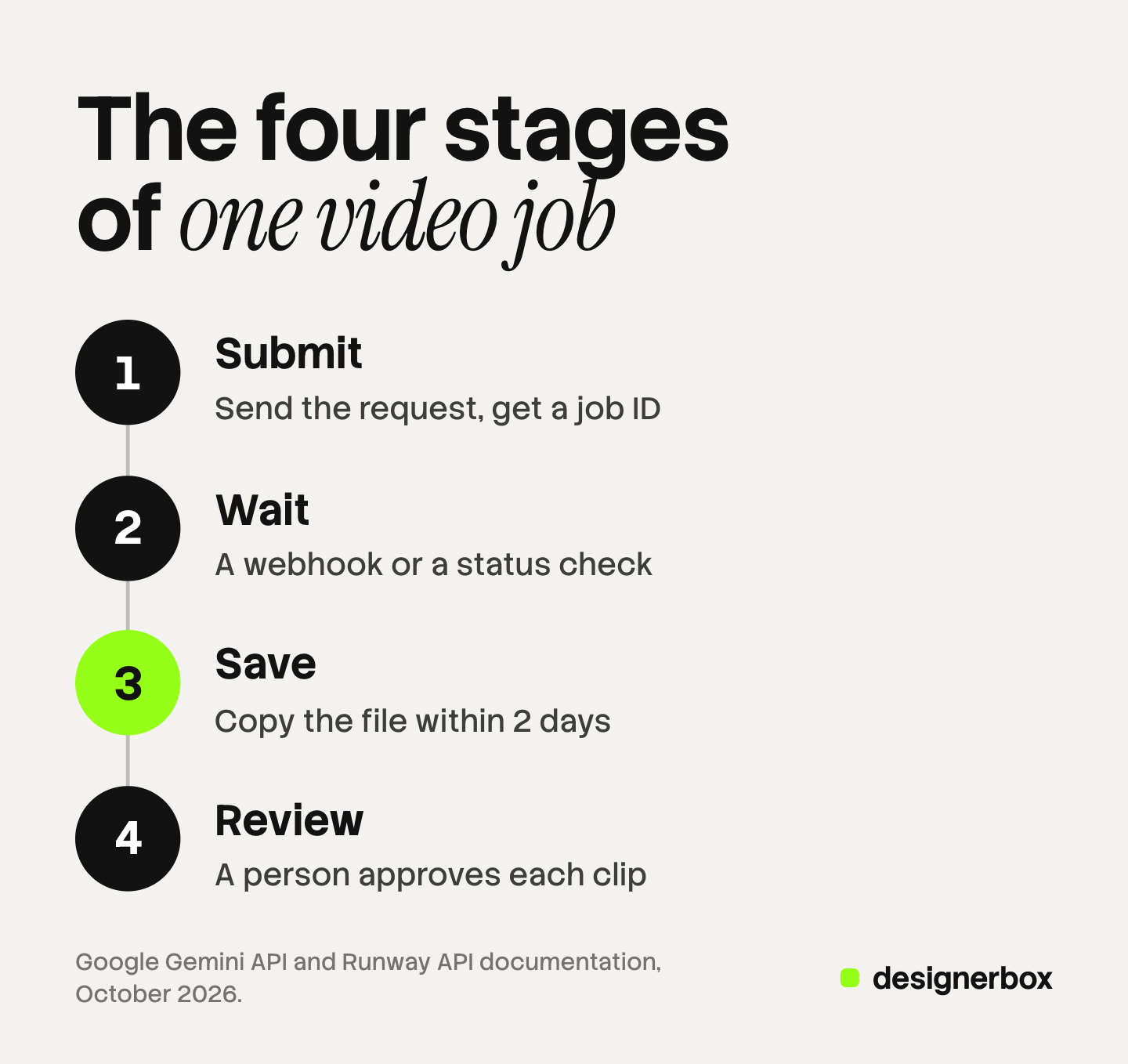
An AI video workflow in n8n or Make has four stages: submit the request, wait for the result, save the file and review it. A video model does not answer in one call. It starts a job and returns an ID. The workflow waits for a webhook or checks the status, then copies the file before the vendor deletes it. Google deletes a Veo file after 2 days.
The first stage is the easy one. You send a request and a clip comes back. Then an agency runs 40 clips for a client, and three things go wrong. A run times out while it waits. A link in last week’s report is dead. A clip with a warped logo reaches the client because no person saw it first.
This guide is for agencies and brand teams that build the workflow themselves. It covers each stage in n8n and in Make, with the limits from each vendor’s own documentation. If you sell that build as a service, see what an AI automation agency sells.
Key Takeaways
- A video job is asynchronous. Google’s Veo API returns an operation, and you check it until it is done. Google lists a request latency of 11 seconds to 6 minutes.
- A webhook is better than a loop. n8n pauses one run and gives it a resume URL. Make receives the callback in a second scenario.
- Save the file in the same run. Google stores a Veo video for 2 days. Runway’s result URLs expire within 24 to 48 hours.
- Two meters run at once. The model bills for seconds of video. n8n bills for executions, and Make bills in credits.
- Review is a stage. A person approves each clip before delivery. The automation does not judge a brand.
- The choice between n8n and Make comes down to hosting. You can self-host n8n. Make runs in the cloud.
What is an AI video workflow?
An AI video workflow is a saved set of steps that turns an input into a finished video clip. The input is a brief, a product photo or a row in a sheet. The steps call a video model, wait for the result, store the file and send it to a person for review. You build the steps once and run them for every new input.
The term covers two different things. Some people mean a production process: brief, storyboard, shots, edit. Our guide to the video production workflow covers that process in six stages. This guide covers the other meaning, the automation that runs inside a tool such as n8n or Make.
Both tools come from business automation. They move a record from one system to another and call a service in the middle. Neither one makes video. Each one calls a video model through its API and manages what happens around that call.
How does an AI video job run inside n8n or Make?
A video job runs in four stages, and the tool you use does not change them. The workflow submits a request and gets a job ID. It waits while the model works. It saves the finished file to storage you own. Then a person reviews the clip. Every limit in this guide belongs to one of those four stages.
Google’s documentation describes the pattern directly: “When you send a request to the API, it starts a long-running job and immediately returns an operation object. You must then poll until the video is ready” (ai.google.dev, October 2026). The same page lists the request latency as “Min: 11 seconds; Max: 6 minutes (during peak hours)”.
| Stage | What the workflow does | What goes wrong |
|---|---|---|
| Submit | Sends the prompt and settings, and gets a job ID | The key sits in a shared step where a client can see it |
| Wait | Receives a webhook, or checks the job status on a timer | The run times out before the clip is ready |
| Save | Copies the file to your own storage | The vendor’s link expires and the clip is gone |
| Review | Sends the clip to a person who approves or rejects it | A clip with an error reaches the client |
One note on the model in that example. Google lists 22 October 2026 as the earliest shutdown date for the Veo 3.1 preview models in the Gemini API, and names Gemini Omni Flash as the replacement (Gemini API deprecations, October 2026). Keep the model name in one setting, so you change it in one place.
How do you wait for a video in n8n?
In n8n you send the request with the HTTP Request node, then pause the run with the Wait node. The Wait node gives each run its own resume URL. You pass that URL to the video vendor as the webhook address. When the clip is ready, the vendor calls the URL and the same run continues.

The n8n documentation explains the mechanism: “The Wait node provides the $execution.resumeUrl variable so that you can reference and send the yet-to-be-generated URL wherever needed” (docs.n8n.io, October 2026). The URL “is unique to each execution”.
Four settings decide whether this holds at volume:
- Import the request. The HTTP Request node can import a curl command from the vendor’s documentation (docs.n8n.io, October 2026). That removes most typing errors.
- Store the key as a credential. Do not type the key into the request body. A credential keeps it out of the run history.
- Set a wait limit. The Wait node has a Limit Wait Time option. Without it, a job that never calls back leaves a run waiting.
- Send the URL in the same run. n8n warns that a partial execution changes the resume URL. Test the whole workflow from the first step.
If the vendor has no webhook, use a loop. Wait a few seconds, check the status, and repeat until the job is done. Google’s Veo API works this way.
How do you wait for a video in Make?
In Make you send the request with the HTTP module and receive the result in a second scenario. The second scenario starts from a custom webhook. Make describes custom webhooks as a way “to create a URL to which you can send any data” (help.make.com/webhooks, October 2026). You pass that URL to the video vendor with the request.
The split matters. The first scenario ends as soon as the request is sent, so it never waits. The second scenario runs only when a clip is ready. You need one shared value to connect them, such as the job ID or your own row number.
A single scenario with a loop is possible, and it has limits. Users on Make’s community forum report that the Sleep step waits at most 300 seconds, and that one scenario run stops after 40 minutes (community.make.com, October 2026). A clip that takes 6 minutes fits. A sheet of 40 clips in one run does not.
Make also holds incoming webhook calls in a queue. The queue size depends on your plan, and Make “rejects all incoming webhook data which is over the limit” (help.make.com/webhooks, October 2026). Check the queue size before you start a large run.
n8n vs Make for AI video
Both tools can run all four stages. They differ in how they wait and where they run. This table uses each vendor’s own pages, read in October 2026.
| Criteria | n8n | Make |
|---|---|---|
| Sending the request | HTTP Request node | HTTP module |
| Waiting for a webhook | Wait node resumes the same run | A second scenario starts from a custom webhook |
| Waiting without a webhook | Wait node on a timer, then a status check | Sleep step, then a status check |
| Hosting | Cloud, or self-hosted on your own servers | Cloud |
| Billing unit | Workflow executions | Credits |
| MCP | MCP Client node, with OAuth2 | MCP Client module |
n8n prices “based on monthly workflow executions, regardless of complexity” (n8n.io/pricing, October 2026). One run that submits, waits, saves and reviews counts once. The n8n documentation says you can “self-host n8n on your own infrastructure, on-premises, or in a private cloud” (docs.n8n.io, October 2026). For an agency that must keep client keys on its own servers, that is the main difference.
Make counts usage in credits (help.make.com/credits, October 2026), and the two-scenario pattern runs two scenarios for each clip. Make suits a team that wants no servers to look after. Our comparison of AI workflow builders covers the billing units of six tools in more detail.
Why must the workflow save the file?
The workflow must save the file because video vendors delete it. The API returns a link, and the link is temporary. If your workflow stores only the link, the clip is gone a few days later. Copy the file to your own storage in the same run, before any other step.
The limits come from the vendors’ documentation:
- Google. “Generated videos are stored on the server for 2 days, after which they are removed” (ai.google.dev, October 2026).
- Runway. The result URLs “are ephemeral: they will expire within 24-48 hours of accessing the API. We expect you to download the data at this endpoint and save it to your own storage” (docs.dev.runwayml.com, October 2026).
Other vendors set other limits. One vendor’s guide to n8n and Make says its files stay available for at least 7 days (higgsfield.ai, October 2026). Read the number for the vendor you use, then build as if it were shorter.
Name the saved file with the client, the product and the run date. A folder of files named after job IDs cannot be reviewed. Runway adds a second reason to copy the file: “do not expose them directly in your product”. A client report should link to your storage, never to the vendor’s link.
Where does the review step go?
The review step goes after the file is saved and before anything is delivered. A person opens each clip and approves or rejects it. The workflow continues only on approval. A workflow that sends a clip straight to the client has skipped the stage the client notices.

A workflow can check facts about a file. It can confirm the length, the size and that the file opens. It cannot tell whether a logo is drawn correctly or whether a product has the right number of buttons. Those are the errors that cost an agency a client.
n8n has a pattern for this. The Wait node can pause on a form, so a reviewer opens a link, watches the clip and submits a decision. In Make, the approval is one more webhook. In both tools, record who approved each clip and when.
Three rules keep review quick:
- Review in sets. Send 10 clips in one message. Do not send 10 messages.
- Reject with a reason. A short list of reasons shows you which prompt to fix.
- Re-run one clip. A rejected clip starts one new job. It does not restart the set.
Our guide to video automation explains where checks belong in each of its three layers.
What does an automated video cost?
An automated video has two meters, and they run at the same time. The video model bills for the footage, usually by the second. The orchestrator bills for the automation: executions in n8n, credits in Make. A rejected clip costs on both meters, and so does a clip you make twice by mistake.
Three habits control the total:
- Count the cost per accepted clip. If 3 clips in 10 are rejected, the real cost of one usable clip is higher than the vendor’s rate.
- Prevent double sends. A retry on a slow request can start a second job. Store the job ID first, and check for it before you send again.
- Test at the lowest setting. Run a new prompt as a short clip at a low resolution. Raise the settings when the prompt works.
Vendor rates change often, so this guide prints none. Read the rate on the vendor’s own page on the day you plan the run.
Brand rules and review in DesignerBox
DesignerBox is AI creative production for brands and agencies. It is a different layer from n8n and Make. They move data between systems. DesignerBox makes the creative work and holds the brand rules.
Anyone can make an AI picture. Making hundreds that still look like your brand is the hard part. A request sent from an orchestrator carries a prompt and nothing else. In DesignerBox you build a workflow once with your brand, your products and your rules. The workflow reads the brand on every run, and the cost is shown before the run.
The four stages are inside the product:
- Submit and wait. A step turns a product photo into a clip, and the workflow picks the model for each step. You do not build a wait step. An 8-second clip costs 40 to 560 credits, depending on the model.
- Save. Results stay in Assets, in your account.
- Review. Critic steps score the results, and best-of-N keeps the best one. With batch, one workflow runs over a sheet of up to 200 products. You keep or discard per row and re-run one row.
- Finish. The video editor is a real timeline, with several tracks, transitions, animated text and audio. Our page on AI video ads shows the result.
The full workflow from the first product photo to the finished ad, in one subscription.
The limits are part of the choice:
- DesignerBox does not have a public API. It has 68 tools over MCP, so an AI chat such as Claude, ChatGPT or Cursor can run your workflows. You cannot call it with an HTTP request.
- n8n’s MCP Client node can “use MCP tools as regular steps in a workflow” and supports OAuth2 (docs.n8n.io, October 2026). DesignerBox MCP also signs in with OAuth. Test the connection with one run before you plan a client job on it.
- DesignerBox does not publish results to a store or an ad channel. You download the results, or send them with a webhook or an S3 step. An orchestrator can take over from that webhook.
- Uploading your own photos and the commercial license start on the Pro plan. AI video, virtual try-on, upscaling, the image editor and the video editor start on the Premium plan. Plans and credits are on the pricing page.
- Every plan below Ultra is one seat. Team features, shared brand kits and white label are on the Ultra plan.
- Other tools also show a cost before a run, so compare on your own job.
If your engineers already run queues, storage and review, a direct model API inside n8n or Make is a sound choice. Our guide to connecting an AI agent to creative tools covers the MCP route step by step.
One workflow for each client
An agency builds one workflow per brand and runs it for every new product. See DesignerBox for agencies
FAQ
Can n8n generate AI video on its own?
No. n8n is an automation tool. It sends a request to a video model through that model’s API, waits for the result and passes the file to the next step. The video comes from the model vendor, and that vendor bills for it separately from n8n.
Is n8n or Make better for an AI video workflow?
Both can run the four stages. n8n waits inside one run with the Wait node, and you can self-host it. Make runs in the cloud and receives the result in a second scenario. Choose n8n if client keys must stay on your own servers. Choose Make if you want no servers to look after.
How long does an AI video take to generate through an API?
It depends on the model and the load. Google lists a request latency for Veo of 11 seconds at the minimum and 6 minutes at the maximum during peak hours. Build the wait step for the maximum, and set a limit so that a failed job does not wait forever.
How long do vendors keep a generated video?
Not long. Google stores a Veo video for 2 days and then removes it. Runway says its result URLs expire within 24 to 48 hours. Copy every file to your own storage in the same run that makes it.
Do I need to write code to automate AI video?
Not for the common path. The request, the wait step and the save step are built from standard parts in both tools. You do need to read the vendor’s API documentation and understand a JSON body. Custom logic, such as renaming files by rule, is easier with a short code step.
Can DesignerBox be called from n8n or Make?
DesignerBox does not have a public API. It has 68 tools over MCP. n8n documents an MCP Client node with OAuth2 sign-in, and Make has an MCP Client module. In DesignerBox, you see the cost of a run before you start it.
Sources
- Google, Generate videos with Veo 3.1 in the Gemini API: ai.google.dev, accessed October 2026
- Google, Gemini API deprecations: ai.google.dev, accessed October 2026
- Runway, API output formats: docs.dev.runwayml.com, accessed October 2026
- n8n, Wait node: docs.n8n.io, accessed October 2026
- n8n, HTTP Request node: docs.n8n.io, accessed October 2026
- n8n, MCP Client node: docs.n8n.io, accessed October 2026
- n8n, hosting documentation: docs.n8n.io, accessed October 2026
- n8n pricing: n8n.io/pricing, accessed October 2026
- Make, webhooks: help.make.com/webhooks, accessed October 2026
- Make, credits: help.make.com/credits, accessed October 2026
- Make, MCP Client: make.com/en/blog/mcp-client, accessed October 2026
- Make community forum, Sleep and scenario time limits: community.make.com, accessed October 2026
- Higgsfield, guide to n8n and Make: higgsfield.ai, accessed October 2026
- DesignerBox batch and MCP pages: designerbox.ai, accessed October 2026
Vendor limits verified from Google, Runway, n8n and Make documentation as of October 2026. This is general information, and limits change. Individual results vary.