




Skills vs MCP is know-how against capability. A skill is a folder with a SKILL.md file that teaches an AI agent how to do a job, and it loads only when that job comes up. An MCP server gives the agent tools it can call, such as an image model or a brand database. A creative agent needs both. The skill holds your standard, and the tool makes the image.
Give an agent only a skill and ask for a product hero set. You get a careful brief and no picture, because Claude reads images and writes text but does not make photos. Give the same agent only an image tool and you get pictures. They follow nobody’s shot list, and the tenth product looks nothing like the first.
This guide explains the skills vs MCP split in plain terms: how each one loads, what each costs in context, and when to use one, the other or both. Then it walks through a working skill that calls image tools over MCP. It is written for agency and brand teams who already run Claude Code, Codex or another agent and want campaign images out of it.
What is MCP?
MCP, the Model Context Protocol, is an open-source standard for connecting AI applications to external systems (modelcontextprotocol.io, accessed October 2026). Through it, an AI application such as Claude or ChatGPT reaches data sources, tools and workflows it cannot reach alone. An MCP server exposes those tools. The agent lists them, calls one and reads the result.
The rest of this guide sets MCP beside skills, the other half of a working creative agent.
Key Takeaways
- A skill is instructions. It is a folder with a SKILL.md file. It needs no code and no server, and it costs about 100 tokens until a task needs it.
- MCP is tools. An MCP server is a program the agent connects to. It runs on your machine or over the internet, and it exposes actions such as “make an image” or “read the brand profile”.
- Neither one makes an image alone. Claude gives back text. The pixels come from a model the agent reaches through a tool.
- Skills are no longer Claude-only. Anthropic published Agent Skills as an open standard in December 2025, and the standard lists Codex, Gemini CLI, GitHub Copilot and Cursor among its clients.
- The context argument has shifted. Claude Code now loads MCP tools on demand by default, so “MCP fills your context window” is less true in September 2026 than older posts say.
- The strongest pattern is a skill that calls MCP tools. The skill says what good looks like and in what order. The tools do the work.
- For the same set on every product, add a saved workflow. The agent reads a skill fresh on each run. A saved workflow runs the same steps every time.
Skills vs MCP: what is the difference?
A skill tells an agent how to do something. An MCP server lets the agent do something. A skill is written knowledge: steps, rules, examples and optional scripts, stored as files the agent reads when a task matches. An MCP server is a running program that exposes tools over a standard protocol. The agent calls those tools to reach systems it cannot reach alone, such as an image model.
Speakeasy put the split in one line: “Skills teach agents how to do things. MCP servers give agents the ability to do things” (speakeasy.com, February 2026). Red Hat’s developer team makes the same point from the other side: “Without MCP, the agent cannot access your systems. Without the skill, the agent has access, but doesn’t know your processes” (developers.redhat.com, May 2026).
| Skill | MCP server | |
|---|---|---|
| What it is | A folder with a SKILL.md file, plus optional scripts and reference files | A program that exposes tools to the agent over the Model Context Protocol |
| What it gives the agent | Know-how: steps, rules, what “done” means | Capability: actions in other systems |
| How it loads | Name and description first, the full file only when a task matches | Tool definitions at connection, or on demand where the client supports tool search |
| What it needs to run | Nothing beyond the agent | A local process or a remote server, often behind a sign-in |
| Who writes one | Anyone who can write clear instructions | A developer, or you connect to one someone else runs |
| In creative work | Your shot list, crop rules, file naming, review checklist | Image and video models, your brand profile, your asset library |
How do skills load into an agent?
A skill loads in three stages. At startup the agent reads only each skill’s name and description, about 100 tokens per skill. When a task matches that description, the agent reads the full SKILL.md body. Bundled files and scripts load only when the instructions point to them, and when a script runs, its result enters the context and its code does not.

That staged loading comes from Anthropic’s documentation (platform.claude.com, October 2026). Its skill authoring guide also recommends keeping the SKILL.md body under 500 lines (platform.claude.com, October 2026). Staged loading is why a team can install many skills and pay the full context cost only for the one a task needs.
The format is small. A SKILL.md file opens with two required fields: a name of up to 64 characters in lowercase letters, numbers and hyphens, and a description of up to 1,024 characters (agentskills.io, September 2026). The description does most of the work. It is the only part the agent reads before it decides whether the skill applies.
Anthropic launched skills in October 2025 and published Agent Skills as an open standard on 18 December 2025 (claude.com, updated December 2025). The standard’s own site lists Claude Code, ChatGPT and Codex, Gemini CLI, GitHub Copilot, VS Code and Cursor among the agents that read it (agentskills.io, September 2026). The folder depends on the agent.
| Agent | Skills for you | Skills for one project |
|---|---|---|
| Claude Code | ~/.claude/skills/ | .claude/skills/ in the repository |
| Codex | $HOME/.agents/skills | .agents/skills in the repository |
Sources for the paths: code.claude.com and learn.chatgpt.com, both September 2026. In the Claude apps you upload a skill in settings, and code execution has to be on (support.claude.com, October 2026).
One limit matters for creative work. Through the Claude API, “Skills cannot make external API calls or access the internet” (platform.claude.com, October 2026). In Claude Code, a skill has the same network access as any other program on your computer. So a skill inside an API-built agent cannot reach an image service by itself. It needs a tool.
How do MCP servers connect tools?
An MCP server exposes tools the agent can call. A local server runs as a process on your machine and talks through standard input and output. A remote server runs on the internet and talks over Streamable HTTP, usually behind an OAuth sign-in. The agent lists the tools, picks one, sends the arguments and reads what comes back.
Anthropic open-sourced the Model Context Protocol on 25 November 2024 (anthropic.com, November 2024). In December 2025 it donated MCP to the Agentic AI Foundation, part of the Linux Foundation (linuxfoundation.org, December 2025). The current specification is version 2026-07-28. It names two standard transports, stdio and Streamable HTTP, and bases authorization for HTTP servers on OAuth 2.1 (modelcontextprotocol.io, September 2026).
The usual complaint about MCP is context. Every tool definition takes tokens, and a few busy servers add up. Anthropic’s documentation gives an example where tool definitions take about 55,000 tokens before any work starts, and says its tool search tool cuts that by over 85% (platform.claude.com, September 2026). Claude Code now turns tool search on by default on Anthropic’s own hosts, so tools load when the agent looks for them (code.claude.com, September 2026).
Anthropic’s engineering team also showed agents writing code to call MCP tools, which cut one task from 150,000 tokens to 2,000 (anthropic.com, November 2025). The context gap between skills and MCP is real. In September 2026 it is smaller than it was in 2025.
When should you use a skill, MCP, or both?
Use a skill when the agent already has the ability and lacks your method. Use MCP when the agent lacks the ability. Use both when a job needs your method and an action in another system, which describes almost every creative job. A brand’s shot list is a skill. The model that renders the shot is a tool.
| The job | Use | Why |
|---|---|---|
| Write captions in the brand voice | Skill | The agent can already write. It lacks your voice rules |
| Name and file results the same way every time | Skill | A house convention, with no outside system |
| Make a product image or a video clip | MCP | The agent gives back text only |
| Read the current brand profile or asset library | MCP | The record lives in another system |
| Make a hero, an angle and a scene to one standard | Both | Your standard, plus a tool that renders |
| Check each result against a review list | Both | The list is a skill. The image comes from a tool |
Why does a creative agent need both?
Creative work needs a standard and a renderer. With a skill alone, the agent writes a good brief and stops, because Claude does not make photos. With a tool alone, the agent makes images, but it invents the framing, the background and the crop each time. Together, the skill decides what to make and the tool makes it.
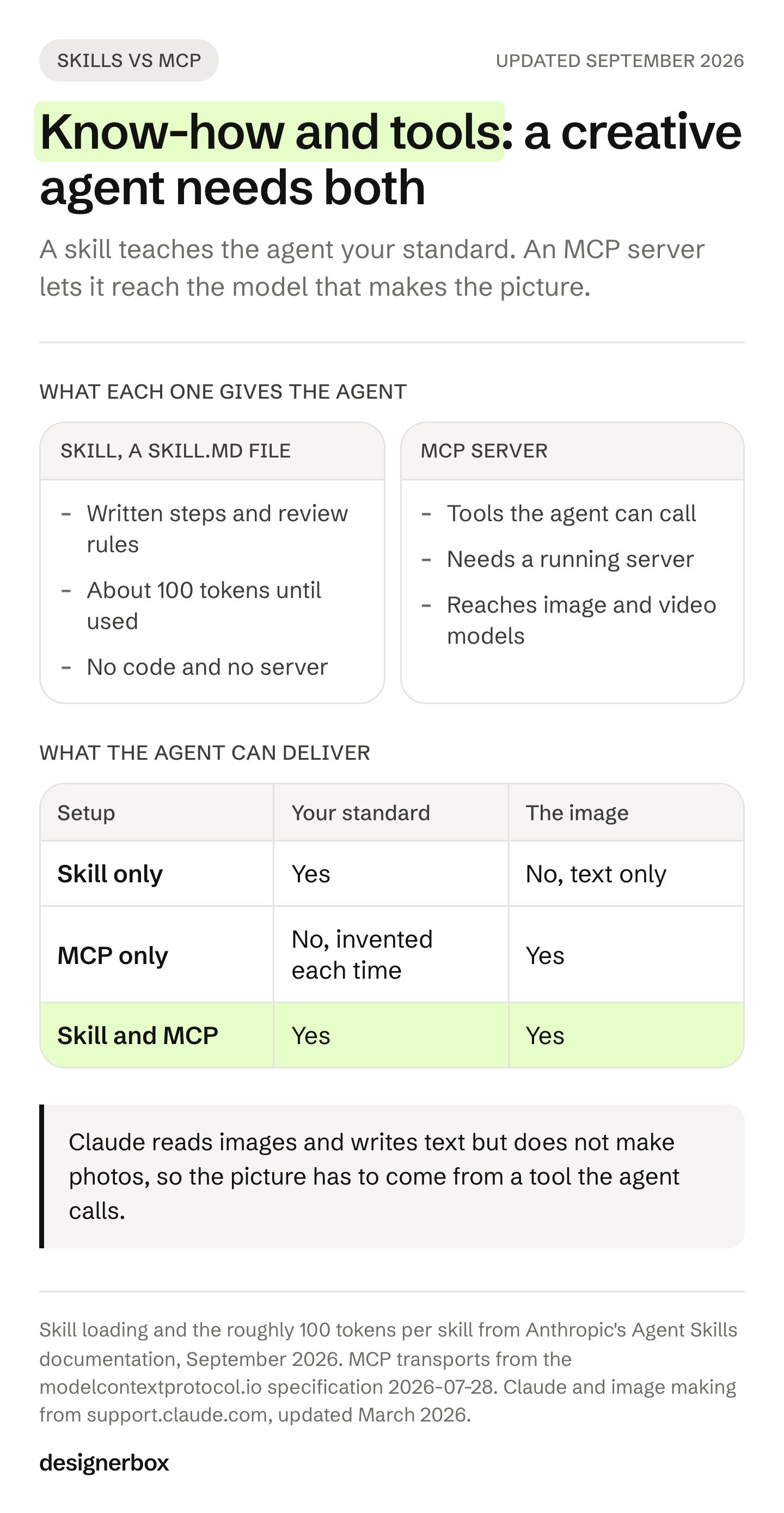
Anthropic’s help center is direct about the first half: “Claude doesn’t generate photos or illustrations the way image-generation tools do” (support.claude.com, page dated March 2026, read October 2026). That is why a Claude AI image generator always means Claude plus a connected image model.
The second half is the one teams find later. An agent with an image tool and no skill treats every request as new. Product one gets a marble counter. Product two gets a beach. The model did what it was asked, and nobody asked for the same thing twice. Our guide to AI brand consistency covers why that drift gets worse as the product count grows.
The skill also carries the review. Name the failures you reject: a warped print, a changed logo, a missing seam or collar rib, text that is not on the real product. Claude can look at each image that comes back and re-run the ones that fail. That list is yours, and no model ships with it.
A skill that calls image tools over MCP
This skill handles one repeat job: three images for each new product. It assumes the agent is connected to the DesignerBox MCP server, and it uses tool names we read from the live server on 15 September 2026. Swap the tool names for any image server you use. For a ready set, the five DesignerBox skills install as one plugin from GitHub.
---
name: product-hero-set
description: Makes the standard three-image set for one product photo, a hero on white, a three-quarter angle and a lifestyle scene. Use when someone asks for product shots, a listing set or a hero image for a new product.
---

# Product hero set

## Before any run
1. Ask for the product photo URL and the product name if either is missing.
2. Call DesignerBox:list_brand_profiles. Use the active profile for background, light and mood.
3. Call DesignerBox:get_plan_limits and DesignerBox:list_image_models.
Tell the user what the set will cost. Wait for a yes.

## Saved workflow first
If DesignerBox:list_pipelines shows a workflow named "Product hero set",
run it with DesignerBox:run_pipeline and skip the steps below.

## The set
1. Hero on white: DesignerBox:edit_image, with the photo as the subject
reference and a plain white studio background.
2. Three-quarter angle: DesignerBox:photo_angles, rotation 45, tilt 10, zoom 5.
3. Lifestyle scene: DesignerBox:edit_image, with the photo as the subject
reference and a setting taken from the brand profile.

## Review before you hand it over
Look at every image. Re-run any image with a warped print, a changed logo,
a missing seam or collar detail, or text that is not on the real product.

## Done means
Three images named <sku>-hero, <sku>-angle and <sku>-scene, and one line
per image saying what you checked.
Four details make this work.
- The description names the job and the words people use for it. The agent reads nothing else before it decides to load the skill, so a vague description means the skill may never run.
- Tool names are fully qualified. Anthropic’s skill guidance asks for the ServerName:tool_name form, so the agent picks the right server (platform.claude.com, October 2026). Claude Code names the same tool mcp__designerbox__photo_angles when you add the server as designerbox, so match the form your agent displays.
- The cost check comes before the first image. The plan check spends no credits, and the model list returns each model’s price, so the agent can state the cost and wait for approval.
- The skill prefers a saved workflow. Instructions leave room for the agent to vary a step. A saved workflow does not, which matters on the fortieth product.
Codex reads the same SKILL.md format, and a Codex skill can also declare an MCP server it depends on in an agents/openai.yaml file (learn.chatgpt.com, September 2026). To use the DesignerBox server in Codex, see DesignerBox for Codex. If your agent has no creative tools yet, how to make your AI agent creative covers the models, the creative jobs and the one-line setup for each agent. For MCP servers that read ad, analytics and CRM data, MCP for marketing groups them by job.
Creative tools over MCP
DesignerBox is AI creative production for brands and agencies. It has 75 tools over MCP (DesignerBox MCP page, October 2026). We read the tool list on the live server on 15 September 2026, and three parts of it matter for a skill like the one above.

Tool search on the server
The search_tools tool filters the tool list by category, query or intent, and it is free on every plan. In our test, the image-generation category returned four tools, and each description says how its cost is set. A long free-text request returned no matches. In that test the category found the tools and the sentence did not, so name a category in the skill.
A third meaning of skill
The server also has a list_skills tool. Here a skill is a style preset for the generate_design tool, which applies a look to a source image. The names include Core Photography, Core Illustration and Core Film & Cinematic. These presets live inside one tool. They are not SKILL.md files, and your agent can use both at once.
Brand, cost and plan
You set the brand once in a brand profile. The workflow reads it on every run. The cost is shown before the run. The agent calls one server for the images, the video and the brand record, and the results land in Assets next to the editors. Read tools spend no credits. Every plan can make pictures from an AI chat (DesignerBox MCP documentation, October 2026).
Uploading your own photos and the commercial license start on the Pro plan. The free plan runs on sample products. AI video and the editors start on the Premium plan. Team features, shared brand kits and white label are on the Ultra plan, and every plan below Ultra is one seat. Plans and credits are on the pricing page.
The saved workflow behind the skill
The agent reads a skill again on every run and interprets it each time. For the same shot on every product, put the steps in a saved workflow and let the skill call it. You can publish it as an app, so a colleague completes a form and presses Run. Batch runs one workflow over a whole sheet of products. The steps themselves are built once in workflows, and our guide to agentic workflows shows how to test one on three products before three hundred. One issue of the AI Creative Production newsletter covers a Claude skill for product images, with the file and the cost.
A product hero set from a template
Start from a template, add your brand and your products, and run it.
FAQ
Are skills replacing MCP?
No. Skills and MCP do different jobs. A skill carries instructions, and through the Claude API it cannot reach another system on its own. An MCP server carries tools and has no idea how your team wants them used. The pattern Anthropic’s own skill guidance describes is a skill that names the MCP tools to call.
Can a skill call an MCP tool?
Yes. A skill can name the tools to call and the order to call them in. Anthropic’s guidance asks for fully qualified names in the ServerName:tool_name form, so the agent picks the right server. A Codex skill can also declare the MCP server it depends on.
Do skills work outside Claude?
Yes. Agent Skills became an open standard in December 2025. The standard’s site lists Codex, Gemini CLI, GitHub Copilot, VS Code and Cursor among the agents that read SKILL.md files. The folder each agent reads from differs, so check your agent’s documentation.
Does MCP use more tokens than skills?
Usually, but less than it did. A skill costs about 100 tokens until a task needs it. MCP tool definitions can be large, and Anthropic’s documentation gives an example of about 55,000 tokens. Tool search now loads tools on demand in Claude Code by default, which removes most of that cost.
Can an AI agent make images with a skill alone?
No. Claude models give back text, so a skill alone produces a brief or a prompt. The image comes from a model the agent calls through a tool, usually an MCP server. In Claude Code a skill script could call an image generation API directly, but that script is a tool you now build and maintain.
Do I need to code to write a skill?
No. A skill is a markdown file with a name, a description and plain instructions. Scripts are optional. Building a new MCP server takes code, but connecting to an existing one takes one command or one settings screen.
What is the difference between a skill and a saved workflow?
A skill is instructions the agent reads and follows, so two runs can differ slightly. A saved workflow is a fixed set of steps that runs the same way each time. For a job you repeat on every product, let the skill call the saved workflow.
Sources
- What MCP is: modelcontextprotocol.io, accessed October 2026
- Skills launch and open standard: claude.com/blog/skills, accessed September 2026
- SKILL.md fields and limits, and the list of agents that read the standard: agentskills.io/specification and agentskills.io, accessed September 2026
- Staged loading and the API network limit: Agent Skills overview, accessed October 2026
- The 500-line recommendation and fully qualified MCP tool names in skills: Agent Skills best practices, accessed October 2026
- Skill folders in Claude Code: code.claude.com/docs/en/skills, accessed September 2026
- Skills in the Claude apps: support.claude.com, accessed October 2026
- Codex skills and MCP dependencies: learn.chatgpt.com/docs/build-skills, accessed September 2026
- MCP open-sourced: anthropic.com, November 2024
- MCP donated to the Agentic AI Foundation: linuxfoundation.org, December 2025
- MCP specification 2026-07-28, transports and authorization: modelcontextprotocol.io, accessed September 2026
- Tool definition size and tool search: tool search tool documentation, accessed September 2026
- Tool search on by default in Claude Code: code.claude.com/docs/en/env-vars, accessed September 2026
- Code execution with MCP, 150,000 to 2,000 tokens: anthropic.com/engineering, November 2025
- Claude and image making: support.claude.com, page dated 16 March 2026, accessed October 2026
- Skills vs MCP framing: speakeasy.com, February 2026, and developers.redhat.com, May 2026
- DesignerBox tool list, search_tools and list_skills: read from the live DesignerBox MCP server, 15 September 2026
- DesignerBox plan gating and generation on paid plans: DesignerBox pricing, September 2026, and DesignerBox MCP documentation, accessed October 2026
Skill and MCP behavior verified against Anthropic, agentskills.io, OpenAI and modelcontextprotocol.io documentation as of September 2026. DesignerBox tool names and plan gating read from the live MCP server and designerbox.ai on 15 September 2026. The Agent Skills overview and best-practices pages, the MCP introduction, the two Claude help articles and the DesignerBox MCP documentation were re-checked on 2 October 2026. Agent features change often, so check your agent’s current documentation before you rely on a detail.














