
Image SEO is the work that helps a search engine find, read and show the images on a page. On a product page, Google documents nine items: the image tag, alt text, file name, format, size, structured data, the image sitemap, lazy loading and AI metadata. Independent research has measured four more facts. The rest of the common advice has no source at Google.
This guide sorts image SEO advice by evidence. Each item goes into one of three groups: documented by Google, measured by independent research, or folklore. It covers product pages only.
Key Takeaways
- Nine items have a Google source. Each one is on a Google Search Central or Merchant Center page, read in October 2026.
- Alt text comes first. Google calls it the most important attribute for giving more metadata about an image.
- WebP is safe in both places. AVIF is not. Google Search reads AVIF. The Merchant Center format list does not include it.
- The size floor moves in 2027. Merchant Center enforces 500 x 500 pixels for all products from January 31, 2027.
- Never lazy-load the main product image. An image is the largest element on 76% of mobile pages, and about 16% of pages still delay it.
What is image SEO for a product page?
Image SEO for a product page has two jobs. The first is discovery: Google has to find the image file and index it. The second is meaning: Google has to know which product the image shows.
A product page adds a third job that a blog post does not have. The same image also travels in a product feed to Google Merchant Center. The feed has its own written rules for size, format and metadata. So one product image answers to two sets of Google pages.
A blog image can be an AVIF file at any size. A product image has a feed to pass. For the wider page around the image, read our guide to the product detail page.
Three kinds of evidence
Every tip in this guide has one of three labels.
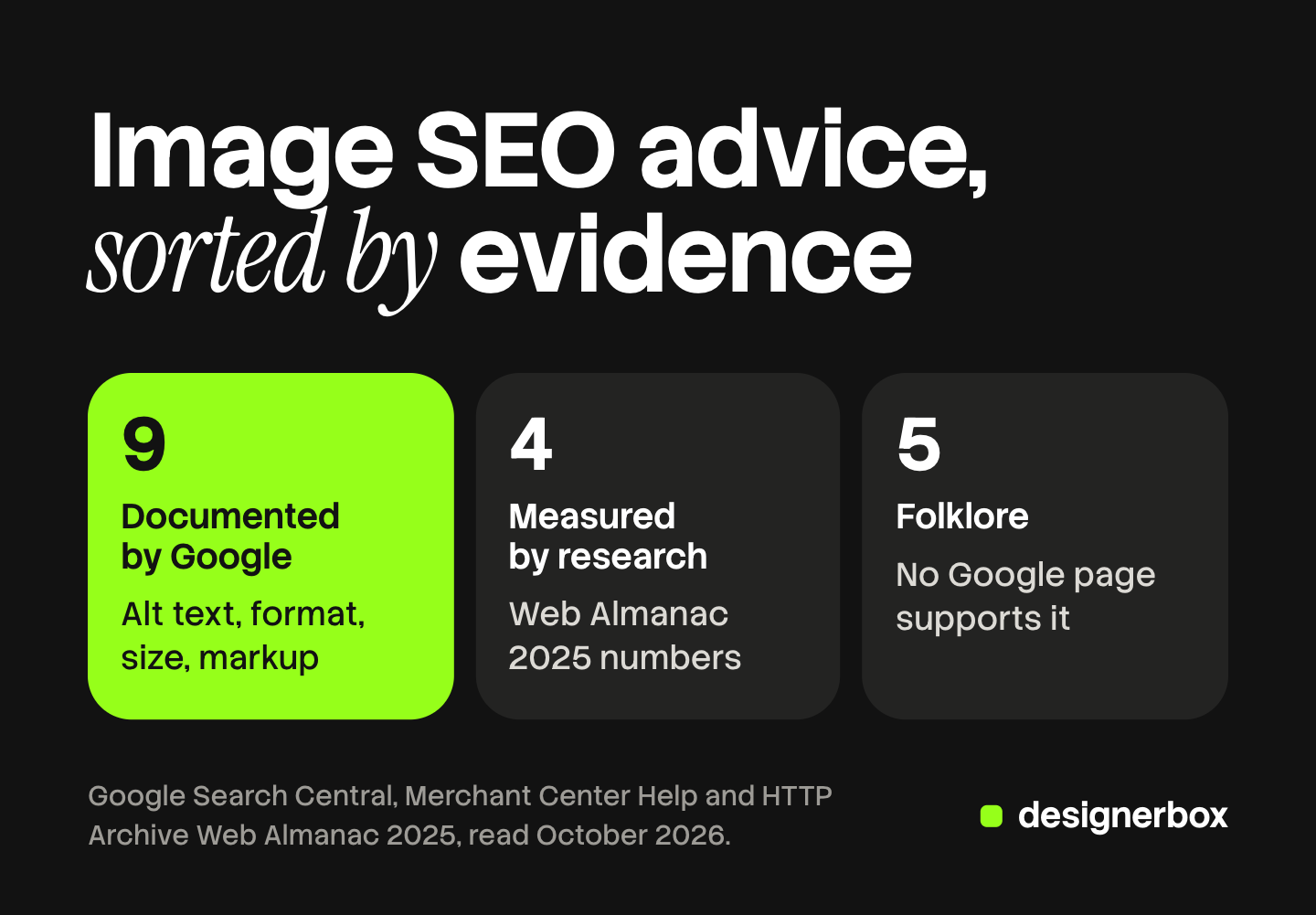
Documented by Google. The rule is on a Google page that you can open. Nine items are in this group.
Measured by independent research. Google does not give the number, but a public dataset does. Four numbers are in this group. All four come from the HTTP Archive Web Almanac, which measures a large sample of real pages each year.
Folklore. The tip is repeated often, and no Google page read for this guide supports it. Five habits are in this group. Some folklore may be true. It stays unproven, so it goes last in the queue.
The nine items Google documents
| Item | What the Google page says |
|---|---|
| Image tag | Google finds images in the src attribute of an img element. It does not index CSS images |
| Alt text | The most important attribute for image metadata |
| File name | A light clue about the subject |
| Format | Search reads seven formats. Merchant Center recommends JPEG and WebP |
| Size | 500 x 500 pixels for all products from January 31, 2027 |
| Structured data | The image property is required for merchant listing markup |
| Image sitemap | A way to tell Google about images it might not otherwise find |
| Lazy loading | Load content when it is visible. Google does not scroll or click |
| AI metadata | Images made with generative AI must contain metadata that says so |
The image tag needs one line only. Put each product image in a plain img element with a src attribute. A product photo set as a CSS background is invisible to Google Images.
Alt text for product images
Google’s image SEO page says alt text is the most important attribute for giving more metadata about an image (October 2026). Google uses it together with computer vision and the text of the page to understand the subject.

The same page gives the rule for writing it. Alt text should be useful and rich in information. It should use keywords in context. Google’s own example moves from “puppy” to “Dalmatian puppy playing fetch”. The better version names what is in the frame.
For a product, that means the product, the variant and the view. For example: “Oak dining chair with a woven seat, front view”. Each image in a gallery then gets a different alt text, because each one shows a different view.
Two things on that page are warnings. Missing alt text is marked as bad. A long string of keywords is also marked as bad, and Google says it may cause your site to be seen as spam.
File names
Google says the file name can give light clues about the subject of an image. Its example prefers a short descriptive name to a camera number such as IMG00023.JPG.
Two smaller rules sit next to that one. The file extension should match the real file type. Merchant Center goes further: a wrong extension leads to an unsupported image type error. And Google asks you to reference one image with the same URL everywhere, so it can cache the file.
The weight is small, so do it once with a pattern. Our guide to an image file naming convention gives the four parts and the order.
Formats: JPEG, WebP and AVIF
Google Search supports seven formats in an img element: BMP, GIF, JPEG, PNG, WebP, SVG and AVIF. No format on the list is said to rank above another.
The feed has a shorter list. The Merchant Center image link page marks JPEG and WebP as recommended. It also accepts PNG, GIF, BMP and TIFF (October 2026). AVIF is not on that list.
An AVIF file is fine on the page. If your store serves AVIF on the page, give the feed a JPEG or WebP URL for the same image.
Search Central also recommends a fallback. Some browsers and crawlers do not understand the picture element or the srcset attribute. Always keep a src attribute on the img element with a file every crawler can read. A platform such as Shopify converts formats for you, as what Shopify serves from one upload explains.
Size and the Merchant Center minimum
Search Central gives no pixel minimum for a normal page image. Merchant Center does.
Until January 31, 2027, the floor is 100 x 100 pixels, or 250 x 250 pixels for clothing. From that date, every product image must be at least 500 x 500 pixels. Google has shown warnings on smaller images since July 2026. The ceiling is 64 megapixels and 16 MB.
Google recommends more than the floor. Its image link page suggests around 1,500 x 1,500 pixels or above for the best performance in all listing formats. The product should fill 75% to 90% of the frame. Each marketplace also sets its own pixel and frame rules. Ecommerce product photography compares the image spec for five channels.
A file under 500 pixels cannot be fixed by scaling it. Merchant Center says to avoid submitting thumbnails or scaled images. Our guide to low resolution product images covers which old files can be saved.
Product structured data image fields
Structured data is where the page and the feed meet. Merchant Center maps its image link attribute to the schema.org property Product.image.
Google’s merchant listing documentation lists image as a required property (October 2026). It adds four rules:
- The image URL must be crawlable and indexable.
- The image must represent the product in the markup.
- The file must be in a format Google Images supports.
- For best results, give several images of at least 50,000 pixels in area, in 16x9, 4x3 and 1x1 ratios.
The same page says Google prefers pictures that show the product clearly, for example on a white background. So the first image in the markup should be the clean product shot.
Image sitemaps
An image sitemap lists image URLs under the page they belong to. Google’s image sitemap page describes it as a way to tell Google about images it might not otherwise find, such as images a site reaches with JavaScript (October 2026).
Three facts on that page matter for a store:
- Each page entry can hold up to 1,000 image tags.
- The image URL can be on another domain, such as a CDN. Google asks you to verify that domain in Search Console.
- Google removed the caption, title, license and geo location tags. Only the image location tag is left.
A sitemap is a discovery tool. If your product images are plain img elements in the HTML, Google can already find them. The sitemap helps most when a gallery loads its images with a script.
Lazy loading and LCP
Lazy loading delays an image until the shopper scrolls near it.
The Search Central lazy-loading page says Google Search does not interact with a page (October 2026). It does not scroll or click. An image that loads only after a click may never be seen. The same page says not to add lazy loading to content that is visible when the page opens.
That second rule is about speed. Largest Contentful Paint, or LCP, is the time until the largest visible element is drawn. A good LCP is 2.5 seconds or less for at least 75% of visits (web.dev, October 2026). On a product page the largest element is usually the main product image.
Google’s web.dev team is direct about it: never lazy-load your LCP image (web.dev, October 2026). It suggests the fetchpriority attribute, set to high, on the one image likely to be the LCP element.
Speed has a documented link to ranking. Google’s page experience document says its ranking systems use Core Web Vitals. It also says good scores do not guarantee a top position.
The IPTC field for AI images
IPTC photo metadata is a set of fields stored inside the image file. One field is Digital Source Type. It records how the image was made.
Merchant Center requires it for AI images. All images created with generative AI must contain metadata that says so, for example the value TrainedAlgorithmicMedia. The page also says not to remove that tag. IPTC defines the value as “Created using Generative AI” (IPTC, October 2026).
Google Search reads the same field. Its image metadata page lists four supported values (October 2026). One of them covers a real photo edited with generative AI, such as inpainting.
The risk is in the export step. A compression tool that removes all metadata also removes this tag. Check one finished file before a large upload. This is general information about platform rules, not legal advice. Our guide to AI disclosure in advertising covers the laws that sit beside this rule.
What independent research measured
Google gives rules. It does not say how many sites follow them. The 2025 HTTP Archive Web Almanac does (performance chapter and accessibility chapter, published January 2026, read October 2026).
| Measurement | Number | What it means for a product page |
|---|---|---|
| Mobile pages where an image is the LCP element | 76% | The main product image often sets the LCP time |
| Pages that lazy-load their LCP image | About 16% | One page in six delays its own main image |
| LCP images served as WebP | 11% | JPG holds 57% and PNG 26%. AVIF is under 2% |
| Images that pass the Lighthouse alt text check | 69% | Almost a third of images fail the check |
One more detail from the accessibility chapter is useful. About 8.5% of alt texts end in a file extension such as .jpg. The Almanac says this typically happens when a tool inserts the file name as alt text. Check your theme for that before you write anything new.

These numbers describe the whole web. They show where the common errors are, and they do not prove that one fix raises a ranking.
Folklore: five habits with no Google source
Each habit below is common advice. None of the Google pages read for this guide supports it.
- A fixed alt text length. Many checklists give a character limit. The image SEO page gives no number. It asks for useful text in context.
- A modern format as a ranking signal. Google lists seven supported formats. It does not rank them. A smaller file can help speed, and speed is the documented part.
- An image sitemap for every store. Google describes the sitemap as help for images that are hard to find. No Google page lists it as a requirement.
- Location data inside the file. The image SEO page and the image metadata page do not mention GPS or camera data. Google also removed the geo location tag from image sitemaps.
- A perfect speed score. Google’s page experience document says a perfect score for SEO reasons may not be the best use of your time.
Do the nine documented items first. Fix the four measured errors next. Leave the rest.
Images, ads and video on brand
Anyone can make an AI picture. Making hundreds that still look like your brand is the hard part.
Image SEO starts before any tag. A brand or an agency needs the same frame, size and background on every image, every ad and every video.
DesignerBox is AI creative production for brands and agencies. You build a workflow once with your brand rules: colors, fonts, products and reference pictures. The workflow then makes the images, the ads and the video clips from the same inputs. For product pictures, the AI product photography page shows the kinds of shot.
A batch runs one workflow over a sheet of up to 200 rows. Row one and row two hundred read the same rules. The cost is shown before the run.
The full workflow from the first product photo to the finished ad, in one subscription.
The limits are plain. DesignerBox makes the pictures. It does not send finished work to a store, so alt text, structured data and the sitemap stay in your store platform. You download the results, or send them with a webhook or an S3 step. Check the metadata of any AI image before upload, whichever tool made it. Every plan below Ultra is one seat.
Uploading your own photos and the commercial license start on the Pro plan. AI video, virtual try-on, upscaling, the image editor and the video editor start on the Premium plan. Plans and credits are on the pricing page.
There is a free plan, and it runs on sample products.
FAQ
What is image SEO?
Image SEO is the work that helps a search engine find an image, understand what it shows and display it in results. It covers the image tag, alt text, file name, format, size, structured data, sitemaps and loading. On a product page it also covers the rules of the product feed.
How do I write alt text for product images?
Name the product, the variant and the view in one short sentence. Google’s example prefers “Dalmatian puppy playing fetch” to “puppy”. Give each gallery image a different alt text. Do not repeat a list of keywords: Google says that may cause a site to be seen as spam.
Is WebP or AVIF better for ecommerce images?
Both are supported by Google Search, and Google does not rank one above the other. WebP is the safer choice for a product image. Merchant Center lists WebP as a recommended format, and AVIF is not on its list. A page can serve AVIF and still send a WebP or JPEG URL in the feed.
What size should product images be for Google?
Merchant Center enforces at least 500 x 500 pixels for all products from January 31, 2027. Google recommends around 1,500 x 1,500 pixels or above. For structured data, Google suggests images of at least 50,000 pixels in area.
Should product images be lazy-loaded?
Lazy-load the images below the first screen. Load the main product image at once. That image is usually the largest element on the page, and web.dev says never to lazy-load the LCP image. Use a method that loads images when they enter the viewport, because Google does not scroll or click.
Do AI product images need a label for Google?
In the product feed, yes. Merchant Center says all images created with generative AI must contain metadata that says so, such as the IPTC Digital Source Type value TrainedAlgorithmicMedia. It also says not to remove that tag. This is general information, not legal advice.
Sources
- Google Search Central, image SEO best practices: the img element, CSS images, supported formats, fallback src, file names, alt text, keyword stuffing, one URL per image (developers.google.com, last updated March 2, 2026, read October 7, 2026)
- Google Search Central, image sitemaps: purpose, 1,000 image tags per page entry, other domains, removed tags (developers.google.com, read October 7, 2026)
- Google Search Central, merchant listing structured data: image as a required property, crawlable URLs, 50,000 pixels, three ratios (developers.google.com, last updated September 8, 2026, read October 7, 2026)
- Google Search Central, image metadata: the four supported Digital Source Type values (developers.google.com, read October 7, 2026)
- Google Search Central, fix lazy-loaded content: Google does not interact with a page, no lazy loading for visible content (developers.google.com, read October 7, 2026)
- Google Search Central, page experience: Core Web Vitals in ranking systems, no guarantee from good scores (developers.google.com, read October 7, 2026)
- Google Merchant Center Help, image link attribute: formats, extension matching, 1,500 pixels recommended, 75% to 90% framing, Product.image, AI image metadata (support.google.com, read October 7, 2026)
- Google Merchant Center Help, image too small: current minimums, 500 x 500 pixels from January 31, 2027, warnings since July 2026, 64 megapixels and 16 MB (support.google.com, read October 7, 2026)
- web.dev, Largest Contentful Paint: 2.5 seconds at the 75th percentile (web.dev, read October 7, 2026)
- web.dev, optimize Largest Contentful Paint: never lazy-load the LCP image, fetchpriority (web.dev, read October 7, 2026)
- HTTP Archive, Web Almanac 2025, performance chapter: LCP content types, LCP image formats, lazy-loaded LCP images (almanac.httparchive.org, published January 15, 2026, read October 7, 2026)
- HTTP Archive, Web Almanac 2025, accessibility chapter: 69% alt text pass rate, 8.5% of alt texts ending in a file extension (almanac.httparchive.org, read October 7, 2026)
- IPTC, Digital Source Type NewsCodes: the definition of trainedAlgorithmicMedia (cv.iptc.org, read October 7, 2026)
- DesignerBox batch, brand and pricing pages: 200 rows a sheet, brand rules, plan gates (designerbox.ai, October 2026)
Google, web.dev, HTTP Archive and IPTC facts verified on each publisher’s own page on October 7, 2026. The folklore group lists advice that those pages do not support, which is not proof that the advice is false. Platform rules change often, so check each page before a large upload. Individual results vary.