The Shopify product image size that displays best is 2048 x 2048 px for square shots. The platform accepts anything up to 5000 x 5000 px or 25 megapixels, under 20 MB per file. That is the upload spec. Shopify then re-encodes every file on its own CDN and serves it at a width your theme picks, so the upload number is only half the answer.
A merchant can follow that spec exactly and upload a 2048 x 2048 square in an accepted format. Then they open the collection page and find the top of the bottle cropped off, and the file arriving as WebP when they exported a PNG.
Neither of those is a bug. Both are documented behavior that the upload spec does not describe. This guide covers what Shopify accepts, what Shopify delivers, why the two differ, where the theme takes over, and the second spec set that applies the moment your catalog reaches Google Shopping.
Key Takeaways
- The upload ceiling is 5000 x 5000 px or 25 megapixels, under 20 MB. Shopify says 2048 x 2048 px usually displays best for square product images (help.shopify.com, accessed September 2026).
- Shopify picks the delivered format, not you. The CDN detects what the browser supports and selects the format for best quality and file size, so a PNG or JPEG upload can reach a modern browser as WebP or AVIF (shopify.dev, accessed September 2026).
- The delivery ceiling is 5760 px. Shopify’s image_url filter serves up to 5760 px on either axis, above your 5000 px upload cap, so a 2048 px square is never the limiting factor on a retina zoom (shopify.dev, accessed September 2026).
- Cropping is a theme decision, and focal points are the override. A focal point always stays in frame when a theme crops, and you get one per image (help.shopify.com, accessed September 2026).
- Google Shopping will require 500 x 500 px from 31 January 2027. Today the floor is 250 x 250 for apparel and 100 x 100 for everything else (support.google.com, accessed September 2026).
- Alt text is capped at 512 characters, with 125 or fewer recommended (help.shopify.com, accessed September 2026).
- Target roughly 300 KB per product photo. Shopify’s blog puts product photos around that figure, and cites Google’s finding that lossy WebP runs 24% to 34% smaller than JPEG at equal quality (shopify.com, accessed September 2026).
What size should Shopify product images be?
Set your Shopify product image size to 2048 x 2048 px for squares. Shopify says that size usually displays best for square product images. The hard limits sit well above it: 5000 x 5000 px or 25 megapixels, whichever you hit first, and under 20 MB per file. Those are the upload limits on Shopify’s help page, so keep every master inside them.
The reason 2048 is the working number rather than 5000 is that oversized files buy nothing. Shopify resizes on delivery, so a 5000 px master and a 2048 px master reach the same shopper as the same rendered file. The 5000 px version only costs you upload time and storage.
One caveat sits under the megapixel limit. It is a separate ceiling from the file size, so a heavily compressed 3 MB file at 6000 x 4500 px fails on pixels while a 15 MB file at 2048 x 2048 px passes. Check both numbers before a bulk import.
Shopify’s upload limits, in one table
| Spec | Limit | Practical note |
|---|---|---|
| Recommended square size | 2048 x 2048 px | 4.2 MP. The number to standardize on |
| Maximum dimensions | 5000 x 5000 px | The upload limit, so keep masters inside it |
| Maximum resolution | 25 megapixels | A separate ceiling from file size |
| Maximum file size | 20 MB | Rarely the binding constraint |
| Target file size | Around 300 KB | Shopify’s own guidance for product photos |
| Preferred formats | PNG, then JPEG | Also PSD, TIFF, BMP, GIF, SVG, HEIC, WebP |
| Media per product | 250 files | Images, video and 3D models share the pool |
| Alt text | 512 characters max | 125 or fewer recommended |
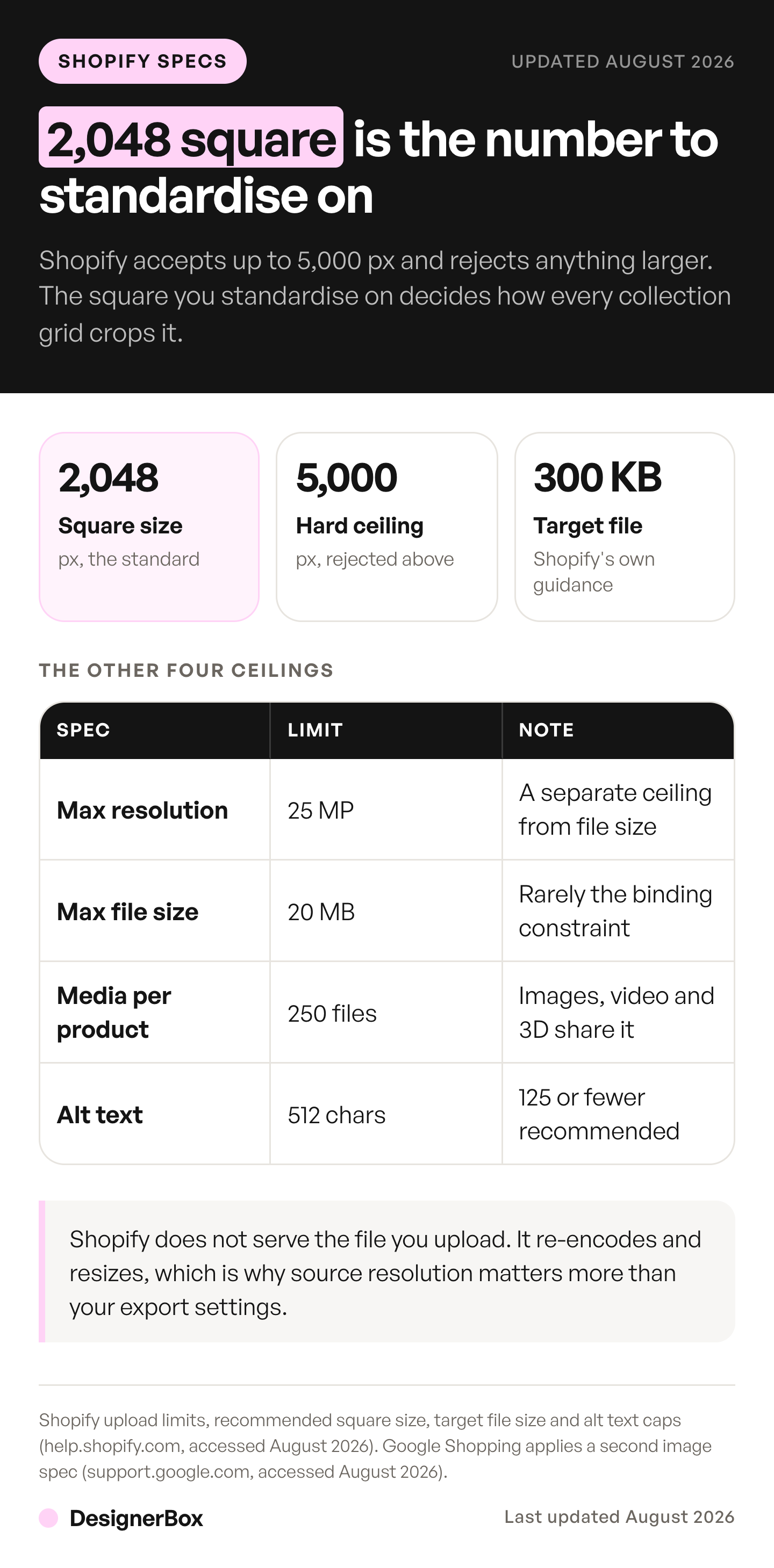
Two rows in that table do real work and the rest are trivia. The 2048 recommendation decides whether your images survive a zoom, and the 250-file cap decides whether your plan for a wide catalog is possible at all. That second number is the one that breaks on large variant matrices, and the 250-media cap against Shopify’s 2,048 variants works through where it stops being theoretical.
If you are standardizing a folder of mixed exports, a free image resizer will square them in one pass, and running the set through a compressor before upload is what moves a 4 MB export down to the 300 KB that Shopify’s blog suggests.
Shopify does not serve the file you upload
Shopify does not serve the file you upload. Its CDN re-encodes every product image, picks the delivered format and renders the width your theme asks for. That explains most of the confusion around Shopify image quality.
Every product image is served through Shopify’s CDN, and the CDN chooses the delivered format. Shopify’s documentation states it detects which formats the client supports, then selects the format for optimal quality and file size. A browser that supports WebP or AVIF can get WebP or AVIF, whatever you uploaded.
So the PNG you carefully exported is a transport format, not a delivery format. Uploading PNG is still the right call, because it is lossless going in and Shopify names it first among accepted types. It just will not be a PNG by the time a shopper loads it.
The delivered dimensions are chosen the same way. Shopify’s image_url filter, which is what themes call to build every product image tag, accepts a width and a height up to a maximum of 5760 px on either axis. Your theme requests the width it needs for each slot, and the CDN renders that size on demand.
Two consequences follow, and both are useful:
- You cannot control delivered file size directly. Compressing a 2048 px JPEG from 800 KB to 300 KB changes what you store, not what ships. The CDN re-encodes either way. Compress for upload speed and storage hygiene, not for page weight.
- Delivery has more headroom than upload. The 5760 px delivery ceiling sits above the 5000 px upload ceiling, so the platform is never the bottleneck on a zoom interaction.
That last point is the one worth acting on. If a product needs a deep zoom, the fix is a larger source, not a theme setting. Where the source is a legacy file that was never sharp to begin with, upscaling adds pixels but not information, and an upscaler app helps only when the detail was captured and something downstream destroyed it.
Why a perfect square still gets cropped
A 2048 x 2048 square still gets cropped because the theme, not the file, sets the card shape. On most themes the collection card is portrait, or it adapts to the first image’s ratio, and your square is cropped to fit.

That crop is a theme setting, not an image problem. Shopify’s image_url filter takes a crop parameter with six values: top, center, bottom, left, right and region. It decides which part of the image survives when the requested dimensions do not match the source ratio. Themes set it, and the filter’s default is center.
Center works for a bottle standing in the middle of a frame. It fails for a shoe photographed at an angle in the lower third, and it fails for anything where the product sits deliberately off-center.
The override is a focal point. You set one per image in the admin, and Shopify keeps it in frame whenever a theme crops. Recent versions of Shopify’s free themes support focal points. For a third-party theme, check its documentation. You can set them from Content then Files, from the theme editor, or from a product’s media section. Shopify notes the focal point might not sit visually centered depending on how the theme crops and resizes, so check the result rather than assuming it.
Three rules make this manageable across a catalog:
- Keep one aspect ratio across every featured image. Mixed ratios are what make a grid look ragged, and no focal point fixes it. The featured image is also the file five separate surfaces reuse, so it is the one worth getting right first.
- Shoot or generate with crop room. Leave margin on all four sides so a portrait crop and a square crop both work from the same file.
- Set focal points only where center fails. On a clean packshot the default is already correct, and one focal point per image is all you get.
Google Shopping is the second spec, and it changes in January 2027
The moment your catalog syncs to Google Shopping, a second rulebook applies to the same files, and it is stricter than Shopify’s in one direction and looser in another.
Google Merchant Center currently requires at least 250 x 250 px for apparel and 100 x 100 px for everything else, with a ceiling of 64 megapixels or 16 MB (support.google.com, accessed September 2026). Those floors are so low that almost nothing fails them today.
That changes. Google has announced a minimum of 500 x 500 px for all product images, with enforcement beginning on 31 January 2027. Google announced the change on 14 April 2026, and Merchant Center shows warnings for images under 500 x 500 before enforcement starts (support.google.com, accessed September 2026).
A 2048 px square clears both the current and the future floor with room to spare, which is the practical reason to standardize there instead of at some lower number that happens to look fine on a phone. Merchants running variant swatch images or thumbnail-sized secondary assets are the ones with exposure here, because those are the files that live in the 200 to 400 px range.
Google is one of several parties with a rule about your product photos, and none of them is Shopify. Which rulebooks bind a Shopify store covers the disclosure side of the same question, and the image spec for five sales channels covers the marketplaces where the numbers get tighter than either. A store on PrestaShop has the same one-file problem, and one master for every PrestaShop size covers it.
What to upload, shot by shot
The Shopify product image size is one number for every slot in the gallery. What changes per slot is the framing.
| Slot | Framing | Why the spec matters here |
|---|---|---|
| Main image | Product centered, even margin | Gets cropped by every collection grid |
| Second angle | Same distance, rotated | Ratio must match slot one or the grid jumps |
| Detail crop | Close on texture, closure or finish | The only slot where zoom resolution is tested |
| In-scale shot | Product against a known reference | Prevents the returns a spec sheet does not |
| Lifestyle or on-model | Product in use | Widest crop tolerance, so focal points earn their place |
| Variant swatch | Tight on the color or finish | The slot most likely to fail Google’s 2027 floor |
Two of those rows carry the risk. The detail crop is the only image where a shopper can out-zoom your source file, so it deserves the largest original you have. The variant swatch is the one people export small out of habit, and it is the one Google’s new minimum will catch.
Everything else can run at 2048 x 2048 without thought. Consistency across the set matters more than any individual file. The six slots should read as one shoot. The glossary has a short definition of a Shopify product image.
Alt text and file names survive the re-encode
The CDN rewrites your file. It does not rewrite the metadata you attach in the admin, which makes alt text the most durable thing you control. Alt text is one of nine fields covered in the guide to Shopify product page optimization.

Shopify caps alt text at 512 characters and recommends 125 or fewer. The recommendation is the real number. Screen readers read the whole string, and a 400-character description of a t-shirt is a worse experience than a 90-character one.
Write what the image shows, not what the product is called. “Charcoal merino crew neck, front view on a white background” describes an image. “Merino Crew Neck | Premium Wool | Free Shipping” describes a listing and helps nobody who cannot see the photo.
Rename files before upload for the same reason. The file name becomes part of the image URL. You can change it later in Content > Files by editing the URL handle, but the old URL then stops working (help.shopify.com, accessed September 2026). The guide to a Shopify bulk image upload covers the alt text and position columns in a product CSV.
Where generated images meet the same spec
Generated product images clear these numbers or they do not ship. Check output resolution first, and realism second.
The relevant threshold is 2048 x 2048. A tool returning 1024 px squares produces files that look correct on a collection grid and go soft the moment a shopper zooms, and no amount of upscaling recovers detail the generator never produced. Check the output dimensions before you check the output quality. If the catalog syncs to Google Shopping, keep the AI metadata in the file. Google Merchant Center requires AI-made product images to carry metadata that says so, such as the IPTC DigitalSourceType value TrainedAlgorithmicMedia (support.google.com, September 2026).
In DesignerBox a workflow starts from your own product photo. Packshots, extra angles and styled scenes all come from the same source file through AI product photography, which helps a gallery stay consistent across slots. Check each result against the 2048 px target before upload. The how it works page shows the four ways to run one workflow: template, workflow, app and batch. The page for Shopify stores shows the set, and the Shopify product photos guide shows the steps.
The full workflow from the first product photo to the finished ad, in one subscription. There is a free plan, and you see the cost of a run before you start it. Uploading your own photos and the commercial license start on the Pro plan. AI video, virtual try-on, upscaling, the image editor and the video editor start on the Premium plan. Plans and credits are on the pricing page.
The workflow that matters for Shopify is boring and it works: one well-lit source photo per product, generated variations from it, one aspect ratio across the set, 2048 px square on upload, focal points only where center crops badly.
Get that right once and it stops being a per-product decision. Your brand rules, the framing, the ratio and the output size become a saved workflow that runs the same way on the next product, and batch runs it over the whole sheet at once. A collection grid that reads as one shoot at 40 products is a shoot you planned once. A grid that still reads that way at 400 is a workflow. Start from the templates, set your 2048 px square, and run it on one product.
FAQ
What size should Shopify product images be?
Use 2048 x 2048 px for square product images, which Shopify says usually displays best. The platform accepts up to 5000 x 5000 px or 25 megapixels, under 20 MB per file (help.shopify.com, accessed September 2026). Going above 2048 buys nothing, because Shopify resizes on delivery.
Does Shopify compress product images?
Yes. Every product image is served through Shopify’s CDN, which re-encodes the file and selects a format based on what the browser supports, delivering WebP or AVIF where available (shopify.dev, accessed September 2026). Compressing before upload saves storage and upload time, not page weight.
Do Shopify product images have to be square?
No, but every featured image should share one aspect ratio. Themes crop images to fit their layout, so a mix of square and portrait sources produces an uneven collection grid. Square is the common choice for Shopify product image size because it survives crops in both directions with the least loss.
Why does Shopify crop my product images?
The theme requests a specific aspect ratio, and Shopify’s image_url filter crops to it using a crop parameter whose default is center (shopify.dev, accessed September 2026). Set a focal point on the image to keep the important area in frame (help.shopify.com, accessed September 2026).
What is the maximum file size for a Shopify product image?
20 MB. A separate limit caps resolution at 5000 x 5000 px or 25 megapixels, and an image can fail on pixels while passing on file size (help.shopify.com, accessed September 2026). Shopify’s blog suggests aiming for around 300 KB per product photo.
How many images can one Shopify product have?
250, covering images, video and 3D models combined (help.shopify.com, accessed September 2026). Shopify allows up to 2,048 variants per product, and each variant can use one media item from that list. That makes 250 the binding constraint on catalogs with a wide color or finish range.
What image size does Google Shopping require?
At least 250 x 250 px for apparel and 100 x 100 px for other products, up to 64 megapixels or 16 MB. Google has announced a 500 x 500 px minimum for all product images with enforcement starting 31 January 2027 (support.google.com, accessed September 2026). A 2048 px square clears both.
Sources
- Shopify Help Center, Product media types: upload limits, formats and the 2048 x 2048 square size, accessed September 2026
- Shopify Help Center, Add media: 250 media per product, accessed September 2026
- Shopify Help Center, Adding variants: 2,048 variants and one media item per variant, accessed September 2026
- Shopify Help Center, Theme images: focal points, accessed September 2026
- Shopify Help Center, Add alt text: 512-character cap, accessed September 2026
- Shopify Help Center, Uploading and managing files: renaming a file through its URL handle, accessed September 2026
- Shopify developer documentation, image_url filter: format selection, the 5760 px ceiling and crop values, accessed September 2026
- Shopify blog, Website image size guidelines: the 300 KB product photo figure, accessed September 2026
- Google Merchant Center Help, Image link requirements, image size change and April 2026 announcement, accessed September 2026
- DesignerBox pricing page (designerbox.ai/pricing), September 2026
Shopify and Google Shopping image rules verified from primary sources as of September 2026. Individual results vary.