
Riverflow Batch is the part of Sourceful’s Riverflow platform that applies one AI edit to a whole set of images at once. You choose an action, select the images, and the edits run in parallel. An AI judge then scores each result, and a person approves, rejects or retries it. The approved set exports as a zipped folder (riverflow.ai/research, October 2026).
This guide uses Riverflow Batch as a worked case for batch AI image editing. Making the pictures is the cheap part. Review is the cost. So we test a batch tool on four questions about review.
A note on bias. This is DesignerBox’s blog, and DesignerBox has its own batch feature. The last section answers the same four questions for it, with its limits.
Key Takeaways
- Riverflow Batch runs one action across many images in parallel. Its distinct part is an AI judge that scores each result.
- Review is the real cost of a batch. A sheet of 200 rows with two pictures each is 400 decisions for a person.
- Read any judge score with care. One study found image judges close to people in pair comparison, and further from people in scoring.
- Four questions test any batch tool. How rows get in, what checks a result first, how a person approves, and how the approved set gets out.
- Test 20 rows before 200. Use your hardest products, and count the minutes of review.
What is Riverflow Batch?
Riverflow is the AI creative platform from Sourceful, and Batch is one feature of it. Sourceful published its launch post on 7 May 2026 and updated it on 7 September 2026. The post describes Batch as a way to apply AI actions “across large sets of assets in one go” (riverflow.ai/research, October 2026).
Riverflow’s help center lists the actions a batch can run. They include a background color change, a new aspect ratio, a product swap into an approved scene, a recolor of one element and a free prompt applied to every image (help.riverflow.ai, October 2026).
Riverflow AI alternatives covers the whole platform and the tools next to it. This guide stays with Batch.
One note on sources. We found no independent press test of Riverflow Batch in October 2026. Every Riverflow fact here comes from its launch post, its help center and one model listing on OpenRouter.
Why is review the real cost of a batch?
A batch moves the work from making pictures to checking them. Riverflow’s launch post says this well. It names the human time around the model as the largest cost: the wait, the check and the retry.
Here is an illustrative count. A sheet has 200 rows, and each row makes two pictures. That is 400 pictures. At 15 seconds a picture, one person spends 100 minutes on review.
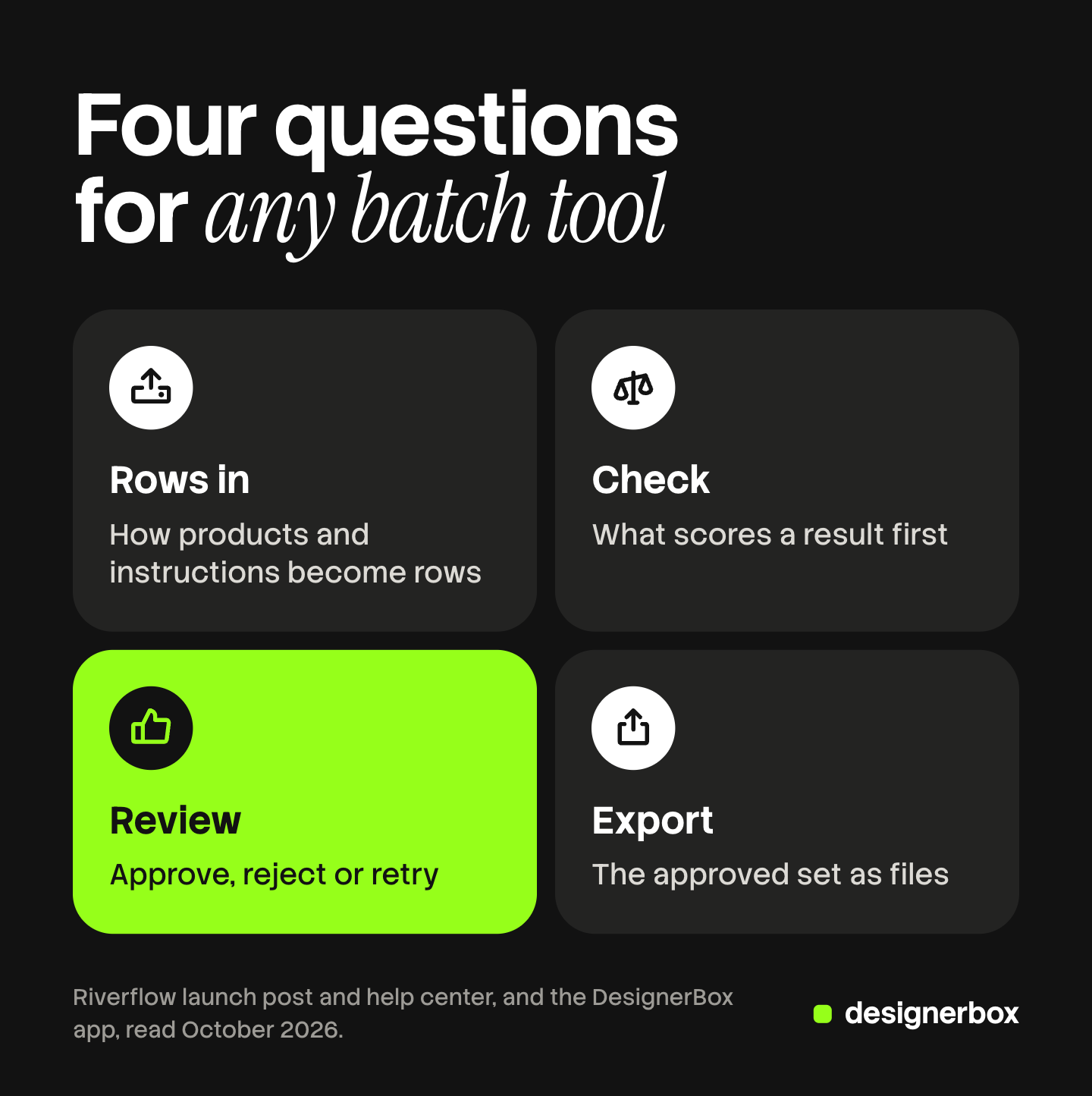
So the price of the model run tells you little about the price of the job. Four questions tell you more:
- Rows in. How products and instructions become rows.
- Check. What scores a result first, before a person sees it.
- Review. How a person can approve, reject or retry.
- Export. How you get the approved set as files.
Bulk image editing covers the edit types themselves.
How do rows get into a batch?
Three things matter here: where the inputs come from, how many results each input makes, and what you see before the run starts.
Riverflow’s help center says you can select images from folders, earlier photoshoots, earlier batch results, products and uploaded assets. Each selected input becomes one batch item. An output plan then sets how many results each item makes. Its own example is 10 input images with 3 variants each, which makes 30 results (help.riverflow.ai, October 2026).
Before a job starts, Riverflow lists the action, the number of items, the expected results and a credit estimate. You can leave the page, and Riverflow sends an email when results are ready.
The help center adds advice that holds for every batch tool: group similar inputs together.
What checks a result before a person sees it?
This is where Riverflow says the most. According to its launch post, an independent AI judge can assess each result against the original image and the requested action. The judge returns a recommendation, a score and a short assessment. When a result does not meet the standard, Riverflow says the system can use that signal to correct it before a person sees it (riverflow.ai/research, October 2026).
Riverflow also says the judge is separate from the step that makes the image. A model listing gives a second view. OpenRouter’s page for Riverflow V2.5 Pro says higher reasoning levels “do more editing passes and apply a stricter internal judge”, and that developers can pass their own scoring rubric (openrouter.ai/sourceful, October 2026).
How reliable is an AI judge for images?
Research on AI judges asks for care with scores. Neither of these two papers tested Riverflow’s judge.
- Judges compare better than they score. A 2024 benchmark of multimodal judges found them close to people in pair comparison. It found “a significant divergence from human preferences” in scoring and in batch ranking (Chen et al., MLLM-as-a-Judge, October 2026).
- Edits are harder to judge than new images. The VIEScore paper reports a 0.4 correlation between its GPT-4o judge and human ratings, where two humans reach 0.45. The authors add that the metric “struggles in editing tasks” (Ku et al., VIEScore, October 2026).
A batch edit is an editing task with a score on it, the setting where both papers found the widest gap. So use a judge score to sort the queue, and keep the approval with a person. Riverflow’s own post agrees: it says the aim is to focus human judgment, and it makes no claim to replace it.
How does a person approve or reject?
Look for three things: a way to compare each result with its source, filters that show only what needs a decision, and a retry that touches one item.

Riverflow’s review screen has all three, by its own description. A Before/After slider compares the original and the result. Tabs filter the queue into To Review, Flagged, Approved, Rejected and All. For each finished result, the reviewer chooses Approve, Reject, or Retry after a rejection (help.riverflow.ai, October 2026).
There is also an Approve all button. The help center says it follows the active filter, so check which tab you are on before you confirm. That warning applies to every tool with a bulk approve button.
Consistent product images explains what a reviewer should check on each picture.
How does the approved set get out?
An approved picture has no value until it is in a folder, a feed or a store.
Riverflow says reviewed assets export as a zipped folder. You can export the approved set, the rejected set or all reviewed results (help.riverflow.ai, October 2026).
Ask every vendor two things here. Do file names keep the product reference? Can the set go to another system without a manual download? Bulk product images covers the file side of a catalog run.
A 20-row test before 200 rows
Run this test on any batch tool, Riverflow and DesignerBox included. Riverflow’s help center gives the same advice: start with a small test batch.

- Pick 20 products. Include your 5 hardest: small label text, a reflective surface, a pattern, a white product, an odd shape.
- Write one instruction. Say what must change and what must stay the same.
- Note the estimate the tool shows, then start a timer.
- Review every picture yourself. Record the minutes, the rejects and the retries.
- If the tool has a judge, compare its scores with your decisions. Count the pictures where you disagree.
- Export the approved set. Check the file names and where the files land.
- Multiply your review minutes by ten. That is your estimate for 200 rows.
DesignerBox Batch on the same four questions
DesignerBox is AI creative production for brands and agencies. Its batch feature runs one workflow, app or image model over a sheet of rows. Anyone can make an AI picture. Making hundreds that still look like your brand is the hard part.
| Question | Riverflow Batch, as Riverflow states it | DesignerBox Batch, as the app states it |
|---|---|---|
| How do rows get in? | Select images from folders, photoshoots, products or uploads. Each input is one item | Type rows, paste a list, or upload a folder of photos. Each photo becomes a row. 200 rows a sheet |
| What checks a result first? | An independent AI judge gives a recommendation, a score and a short assessment | No judge per row. Critic steps with best-of-N exist inside a workflow |
| How does a person approve? | Before/After slider, filter tabs, Approve, Reject, Retry | You judge each picture and keep the good ones. You can run a row again |
| How does the set get out? | A zipped folder: approved, rejected or all reviewed | Download the kept pictures, send them for review, or download the sheet as CSV |
The second row is the main difference in scope. DesignerBox Batch has no AI judge that scores each row. A check exists one level down, inside a workflow: three critic steps score the results, and best-of-N keeps the best one. A batch that runs an image model on its own has no check before you.
The same honesty applies to brand rules. You write them on the Brand page, and a workflow reads them before every prompt. The app then says: “Nothing checks the result.” A person still reviews.
Review is manual. The Batch page in the app says: “Run them all, then judge each picture. Keep the good ones.” Our guide to DesignerBox Batch walks through the sheet.
The export side has one choice an agency will use. You can send the kept pictures for review, as a page your client opens with no account. DesignerBox Reviews explains it. DesignerBox does not publish to a store. You download the results, or send them with a webhook or an S3 step.
So choose by scope. If a score on every result matters most to you, Riverflow describes that and DesignerBox Batch does not. If you need your own saved steps on each row and a client review link, DesignerBox Batch fits.
The limits are these. The cost is shown before the run. Batch is on every plan, and uploading your own photos starts on the Pro plan. The free plan runs on sample products. Every plan below Ultra is one seat. Plans and credits are on the pricing page.
The full workflow from the first product photo to the finished ad, in one subscription. Run the 20-row test on a short sheet first. Get started free.
FAQ
What is Riverflow Batch?
Riverflow Batch is a feature of Sourceful’s Riverflow platform. It applies one AI edit action across a set of images in parallel. An AI judge can score each result, and a reviewer approves, rejects or retries it.
What does the AI judge in Riverflow Batch do?
According to Riverflow, the judge compares each result with the original image and the requested action. It returns a recommendation, a score and a short assessment. A person still approves or rejects each result.
Can an AI judge replace human review of images?
Not on the current evidence. A 2024 benchmark found image judges close to people in pair comparison, and further from people in scoring. Use a judge score to sort the review queue. Keep the final approval with a person who knows the product.
Does DesignerBox Batch have an AI judge?
No. DesignerBox Batch has no AI judge per row. You judge each picture and keep the good ones. Inside a workflow, three critic steps score the results and best-of-N keeps the best one. The cost is shown before the run.
How should I test a batch AI image editing tool?
Run 20 rows before 200. Include your five hardest products, write one instruction, and time your own review. Multiply the review minutes by ten to estimate a 200-row sheet.
Sources
- Sourceful, “Introducing Riverflow Batch”, published 7 May 2026, updated 7 September 2026 (riverflow.ai/research, October 2026): parallel actions, the AI judge, the Before/After slider, approve, reject and retry, the zipped export
- Riverflow Help Center, “Batch Edit” (help.riverflow.ai, October 2026): the action list, input sources, the output plan, the credit estimate, review tabs, Approve all, export choices
- OpenRouter, Sourceful model listing (openrouter.ai/sourceful, October 2026): reasoning levels, the internal judge and the custom scoring rubric of Riverflow V2.5 Pro
- Chen et al., MLLM-as-a-Judge: Assessing Multimodal LLM-as-a-Judge with Vision-Language Benchmark, 2024, read October 2026
- Ku et al., VIEScore: Towards Explainable Metrics for Conditional Image Synthesis Evaluation, 2023, read October 2026
- The DesignerBox app, Batch and Brand pages, read October 2026; DesignerBox Batch page (designerbox.ai/product/batch), October 2026
- DesignerBox pricing page (designerbox.ai/pricing), October 2026: plan gates
Riverflow facts come from Sourceful’s own pages, read in October 2026. We found no independent test of Riverflow Batch. The review count in this guide is illustrative. Features and limits change, so check each vendor’s page before you choose. Individual results vary.