




Can Claude generate images? Not by itself. A Claude AI image generator is Claude connected to a real image model over the Model Context Protocol. Claude writes the prompt and calls the tool. Nano Banana Pro, GPT Image 2 or FLUX renders the pixels. Claude itself renders nothing, and Anthropic says so directly: “Claude doesn’t generate photos or illustrations the way image-generation tools do” (support.claude.com, updated March 2026).
Three things decide whether this is useful to a brand. The connected model bills you per image and the rate moves with the model you pick. The output is only your product if you supply your product. And the review step behaves differently from video.
This guide covers what Claude contributes, what the connected model contributes, what sets the price of a shot, and the one advantage the image loop has over the video one. It is written for marketing and ecommerce teams who want product visuals from a chat window and want the real mechanics first.
Anyone can make an AI picture. Making hundreds that still look like your brand is the hard part. The connected server has to carry that job: the models, the brand rules, the editors and the asset library in one place, with no separate key for each provider.
Key Takeaways
Claude renders nothing. It plans, writes prompts and calls tools. Every pixel comes from a separate image model reached over a connector.
Native visuals are layouts, not photographs. Claude builds diagrams, charts and interactive visuals in HTML, and Anthropic says these “aren’t photos or illustrations” (support.claude.com, updated April 2026). Claude Design makes layouts, slides and prototypes. Anthropic’s launch post says marketers create campaign visuals in it, “then loop in designers to polish” (anthropic.com, April 2026).
Connectors work on every plan. Custom connectors using remote MCP run on Free, Pro, Max, Team and Enterprise, with Free capped at one (support.claude.com, accessed October 2026).
Claude can see what came back. It reads JPEG, PNG, GIF and WebP (platform.claude.com, accessed September 2026), so the generate, review and regenerate loop closes inside the chat. The video version of this loop cannot.
One photo in beats one prompt in. A text-only brief invents a product that resembles yours. Editing from your real packshot keeps the item that ships to the customer.
Can Claude generate images by itself?
No. Claude does not generate photos or illustrations by itself, and Anthropic’s help center says so (support.claude.com, updated March 2026, accessed October 2026). Claude is a text and reasoning model with vision for reading images you upload. There is no diffusion model and no render step inside it.
What it does make natively is narrower and often misunderstood. Claude builds custom diagrams, charts and interactive visuals directly in a conversation. Anthropic draws the line clearly: “Custom visuals aren’t photos or illustrations. Claude builds them using HTML, the same building blocks as web pages, so they’re interactive and specific to your question rather than static images” (support.claude.com, updated April 2026).
That is useful for a chart in a deck. It is not a product photograph.
Anthropic Labs also ships Claude Design. It launched in research preview in April 2026 for Pro, Max, Team and Enterprise subscribers (anthropic.com, April 2026). Since 16 September 2026 it is available on every Claude plan, including Free (Claude release notes, accessed October 2026). It creates designs, prototypes, slides and one-pagers, and exports to PPTX, PDF or HTML (claude.com, accessed October 2026). The launch post describes the marketing use: “Marketers can create landing pages, social media assets, and campaign visuals, then loop in designers to polish.”
Read the end of that sentence. Claude Design arranges a layout. It does not photograph a product, put a garment on a model, or light a scene.
Claude does plenty of visual work. Every bit of it composes or transforms assets that already exist. A shot that does not exist yet still needs a camera or a generation model.
What a Claude AI image generator means in practice
A Claude AI image generator is Claude plus an image model, joined by a connector. The connection layer is what changed, not Claude.

The Model Context Protocol is an open standard Anthropic published for building two-way connections between AI tools and outside systems (anthropic.com, November 2024). A remote MCP server exposes a set of tools with descriptions. Claude reads those descriptions, decides which one fits your request, fills in the arguments and calls it.
If one of those tools runs an image model, asking Claude for a packshot returns a packshot. Claude still did not make it. It commissioned it.
This is why the phrase is confusing. Every “Claude AI image generator” on the market is a different company’s model behind a connector. What you choose is the model and the workspace, not Claude.
What each layer contributes
In a Claude AI image generator, Claude does four language jobs and the connected model does the pixels.
It turns a sentence into a shot brief. You say “our ceramic mug, on a kitchen counter, morning light, room for a headline on the left”. Claude returns a structured prompt with the surface, the light direction, the lens feel and the negative space. Briefs are the thing image models are worst at receiving from humans.
It writes in the model’s dialect. Each model responds to different phrasing. Claude translates intent into something a specific model handles well. Without Claude, you learn that skill by spending credits on failed tries. If you would rather learn it by hand, the template directory shows finished product-photography jobs and the settings behind them.
It picks the tool. Given several image models with different strengths, Claude reads the tool descriptions and routes the brief to a fast draft model, or to the one that renders legible text.
It runs the batch. Ask for one product across six angles and Claude issues six calls, tracks them and reports back. It is boring work, and it is useful.
The connected model contributes everything you can see. Resolution, texture, how the light falls, whether the label reads. No prompt can give the model a skill it does not have.
Which model renders what
Claude routes the brief from the tool descriptions, and that default is usually right. Override it when the shot has a specific demand. These are the claims each provider makes on its own pages, not our benchmarks.
| Shot demand | Ask for | What the provider states |
|---|---|---|
| Packaging, labels, any legible type in frame | Nano Banana Pro | Google calls it “the best model for creating images with correctly rendered and legible text directly in the image”, at up to 4K (blog.google, November 2025) |
| A set that keeps the same product or person across frames | Nano Banana Pro | Uses “up to 14 images and maintaining the consistency and resemblance of up to 5 people” (blog.google, November 2025) |
| Editing from a photograph you already own | GPT Image 2 | ”Supports flexible image sizes and high-fidelity image inputs”, and processes every image input at high fidelity automatically (developers.openai.com, accessed September 2026) |
| Cut-outs for a PDP or a composite | GPT Image 2 | Transparent backgrounds entered preview in August 2026 (developers.openai.com, accessed September 2026) |
Carry two provider caveats into a brief. OpenAI’s image guide states the GPT Image 2 limits plainly: the maximum edge length is 3840px, both edges must be multiples of 16px, the long-to-short ratio must not exceed 3:1, and “although significantly improved, the model can still struggle with precise text placement and clarity” (developers.openai.com, accessed September 2026). The same guide gives the same size rules for the newer GPT Image 2.5 models, and GPT Image 2 API pricing covers what 2.5 changes for a catalog. If the packaging copy has to be readable, that is the reason to route the shot elsewhere.
Google has also changed its own model line-up. Nano Banana 2 shipped in February 2026. It replaced Nano Banana Pro as the default across the Fast, Thinking and Pro tiers of Google’s own app, and Pro stayed for specialized work (blog.google, February 2026). Google then released Nano Banana 2.1, an update to Nano Banana 2, on 6 October 2026 (Gemini API changelog, October 2026). This is normal for the category. Model specs move monthly, so check each provider’s page before you plan a catalog around one model. Nano Banana 2 vs Nano Banana Pro for product photos compares Google’s two models shot by shot.
The image models are listed at designerbox.ai/models, with what each one is for. Run the same brief on two of them and compare the results on your own product before you commit a catalog to either.
Connector limits for image work
Four constraints decide whether this works on real jobs. All four come from Anthropic’s own connector documentation.
A four minute ceiling per call. The tool call timeout on Claude and Claude Desktop is 240 seconds (claude.com, accessed October 2026). Single images finish well inside that. A request that grows into a large set of images can exceed it. Send a large job as several calls, not one.
A result size cap. Around 150,000 characters per tool result on Claude and Claude Desktop, and 25,000 tokens in Claude Code (claude.com, accessed October 2026). Well-built servers return a link to the asset rather than the asset itself, so this limit rarely matters. It is also why a connector returns a URL instead of a giant file.
Your server must be on the public internet. Claude connects to a remote MCP server from Anthropic’s cloud, not from your laptop (support.claude.com, accessed October 2026). A local server on your own machine is not reachable this way.
Images come back as real image content. The protocol defines an image content type for tool results (modelcontextprotocol.io, accessed September 2026). Anthropic’s connector documentation lists text and image-based tool results as supported (claude.com, accessed October 2026). That is the mechanism behind the review loop below.
Where the image loop beats the video loop
The image loop beats the video loop because Claude can look at a returned image and correct it. That is the strongest practical reason to start with images.
Claude reads images. Its vision support covers JPEG, PNG, GIF and WebP (platform.claude.com, accessed September 2026). So when a generated image comes back, Claude can look at it, compare it against your brief, notice that the logo is warped or the shadow direction is wrong, and issue a corrected call.
That closes the loop inside one conversation. Generate, inspect, adjust, regenerate.
Video does not work this way. Claude cannot watch a rendered clip, so a person has to open the file and review it. Our companion piece on the Claude AI video generator covers that limit and the per-second pricing that makes it expensive to iterate blind.
So approve a still first, then animate the approved frame. That moves the retries onto the cheap asset and keeps the expensive render for a frame you already approved.
Claude’s review has two limits. It judges composition, framing, obvious artifacts and whether the brief was followed. It is not a color-managed proof, and it will not catch a subtle brand tint being off. Keep a person on final approval for anything customer facing.
What it costs
Making images through Claude means two separate bills. Keep them apart when you budget.
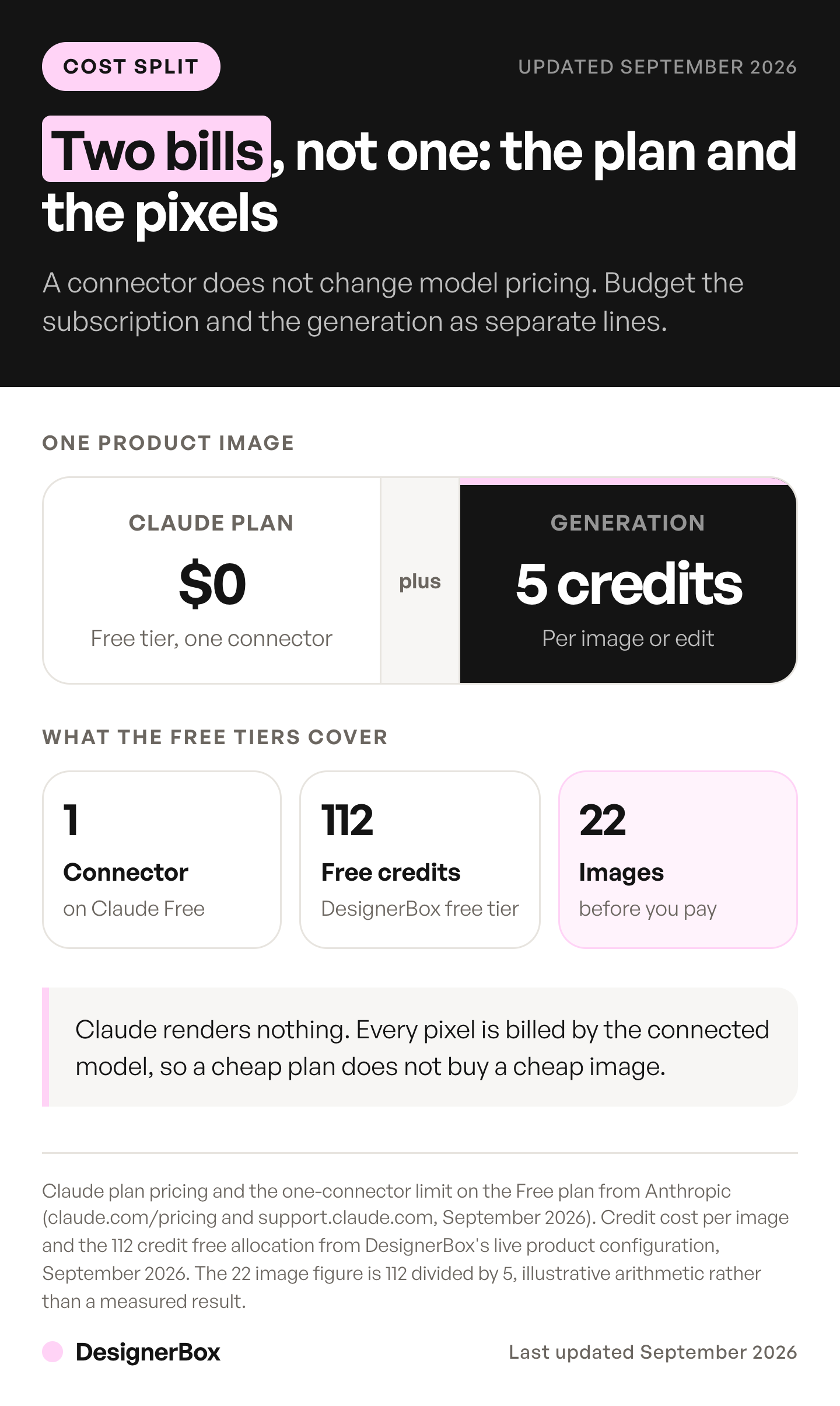
The Claude plan charges for the chat. Claude’s own Free plan includes connectors with remote MCP, capped at one, so the connection itself costs nothing to try.
The connected server charges for the pixels. The connector does not change model pricing. In DesignerBox that is credits, and there is no flat per-image rate. The model that runs the shot sets the rate, and the cost of the run is shown before the run.
The models sit at different price points, and each one is good at something different.
| Image model | What it is usually picked for |
|---|---|
| Seedream 5 | Fast drafts and volume passes |
| FLUX Pro 1.1 | Clean product renders |
| Kontext Multi | Edits that have to hold the original |
| Nano Banana 2 | General image work |
| FLUX 2 Flex | Control over composition and aspect |
| Nano Banana Pro, the DesignerBox default | Legible text on packaging, and the same product across frames |
| GPT Image 2 | Edits from a photograph you already own, and cut-outs |
Plan against the spread between models, because the model sets most of the cost. Routing a rough draft to one model and the packaging shot to another changes the bill on the same brief. When the answer matters, tell Claude which model a job needs.
There is a free plan, and it runs on sample products. You can use it to test whether the connection fits your workflow.
Uploading your own photos and the commercial license start on the Pro plan. Plans and credits are on the pricing page.
Connection steps
For an individual on Pro or Max, Anthropic’s help page lists these steps (support.claude.com, accessed October 2026):
- Open Customize, then Connectors.
- Click ”+ Add”, then “Add custom connector”.
- Name the connector, enter the remote MCP server URL and click Continue.
- Check the sign-in settings Claude detected, click Continue, and choose how people sign in.
- Click Add, then enable the connector per conversation from the plus menu.
On Team and Enterprise plans an owner adds the connector under Organization settings first. Members then connect individually. The same server URL works in ChatGPT as a custom MCP server, and connecting an MCP server to ChatGPT covers that client. If you want more than images in the chat, MCP servers and connectors for marketing, by job shows which server covers which job. A chat is not the only route to an image model. An AI image generator Chrome extension puts one in the browser, and ComfyUI alternatives covers running open-weight models on your own GPU.
DesignerBox has 75 tools over MCP. Claude, ChatGPT, Cursor, Claude Code and VS Code can run them. The client setup and server address live at designerbox.ai/mcp/connect, and DesignerBox for Claude covers what the tools do once connected. Our MCP launch walkthrough runs the whole connection start to finish. To add the rules as well as the tools, a Claude image generation skill quotes the cost and asks once before any paid call.
The difference between a lookalike and your product
Your own product photo is what makes a Claude AI image generator useful to a brand. Model quality does not decide it.

Ask any image model for “a ceramic mug on a counter” and you get a ceramic mug. Not yours. The handle is wrong, the glaze is wrong, and the logo is invented. For a mood board that is fine. For a product detail page it is unusable, and for a paid ad it is a claim about a product you do not sell.
The fix is to start from the real photograph. Upload your packshot and use an edit or scene operation rather than a text-to-image one. The model then relights, reframes, re-angles or re-stages the object you ship. The result shows your real product. Our guide gives a repeatable method for creating AI images.
Two things make that repeatable across a catalog. The first is a brand profile that the workflow reads on every run, so the tenth image matches the first. Our guide on AI brand consistency covers that drift problem in full. The second is a saved workflow for the sequence, so the next SKU runs the same steps rather than a fresh conversation. The written half of that setup can live in a skill that calls image tools, which tells Claude the order and the review rules. A published DesignerBox app is a pre-built version of exactly that job, and an AI chat can run it over MCP.
That is the difference between a chat trick and a production step. Build the job once with your brand and your product photo, then run the same steps on row two and row two hundred. The image generation template is a starting point for the generation side. If the question is the whole marketing workflow, our piece on Claude for marketing maps which stages Claude serves well and where the production gap sits.
FAQ
Why can’t Claude generate images?
Claude is a text and reasoning model with vision for reading images you upload. It has no diffusion model and no render step inside it. Anthropic’s help center states Claude does not generate photos or illustrations the way image tools do. It builds diagrams, charts and interactive visuals in HTML instead. To get a photograph, you connect an image model over MCP.
Is there a free Claude AI image generator?
The connector itself is free. Custom connectors using remote MCP work on the Claude Free plan, limited to one connector. The generation is what costs money, because the connected server bills per image and the rate depends on the model. DesignerBox has a free plan, so you can test the connection before you pay anything.
How do I generate images in Claude?
Add a remote MCP server that exposes image tools, then ask in plain language. Open Customize, then Connectors, add the custom connector URL, authorize it, and enable it in the conversation. After that “make three packshots of this mug on a white background” is a valid instruction and Claude routes it to the model.
Which image model should I use from Claude?
Let Claude route it from the tool descriptions, then override when you have a reason. The choice depends on the shot: editing fidelity on an existing photograph, legible text rendering on packaging, or raw speed for drafts. Price is the second reason to override, because the model on the step sets the rate and the cost is shown before the run. The models are listed at designerbox.ai/models.
Can Claude edit an image I already have?
Yes, through the connected server rather than natively. Claude reads the image you upload, describes what needs to change, and calls an edit tool with your file as the input. This is the mode that matters for product work, because the output keeps your actual item instead of generating a lookalike.
Will the images be mine to use commercially?
That depends on the server you connect, not on Claude. Check the license terms of whichever generation service sits behind the connector. In DesignerBox the commercial license starts on the Pro plan, so check that your plan covers the use before you run paid media with the output.
Can Claude review the images it generated?
Yes, and this is the real advantage over video. Claude reads JPEG, PNG, GIF and WebP, so it can inspect a returned image, compare it to the brief and issue a corrected call. Treat it as a first pass on composition and obvious errors, not as a color proof. Final approval stays with a person.
Sources
- Anthropic, “Can Claude produce images?” (support.claude.com, updated March 2026)
- Anthropic, “Custom visuals in chat” (support.claude.com, updated April 2026)
- Anthropic, “Claude Design” (anthropic.com, April 2026) and (claude.com, accessed October 2026)
- Anthropic, Claude release notes, 16 September 2026: Claude Design on every plan (support.claude.com, accessed October 2026)
- Anthropic, “Get started with custom connectors using remote MCP” (support.claude.com, accessed October 2026)
- Anthropic, “Introducing the Model Context Protocol” (anthropic.com, November 2024)
- Anthropic, “Vision” developer documentation (platform.claude.com, accessed September 2026)
- Anthropic, “Pricing” (claude.com, accessed September 2026)
- Anthropic, “Building connectors” (claude.com, accessed October 2026)
- Model Context Protocol, “Tools” specification, version 2026-07-28 (modelcontextprotocol.io, accessed September 2026)
- Google, “Nano Banana Pro” (blog.google, November 2025) and “Nano Banana 2” (blog.google, February 2026), and the Gemini API changelog (ai.google.dev, October 2026)
- OpenAI, “GPT Image 2” (developers.openai.com, accessed September 2026) and “Image generation guide” (developers.openai.com, accessed September 2026)
- DesignerBox plan gates, the avatar price and the video credit range: DesignerBox pricing page (designerbox.ai/pricing), September 2026
Claude capabilities, plan availability and pricing verified against Anthropic’s own documentation as of September 2026. The connector steps and the Claude Design facts were re-checked on 2 October 2026. The images and custom visuals help pages and the connector limits were re-read on 7 October 2026. DesignerBox plan gates, the avatar price and the video credit range from the DesignerBox pricing page (designerbox.ai/pricing), September 2026. This category changes monthly. Individual results vary.














