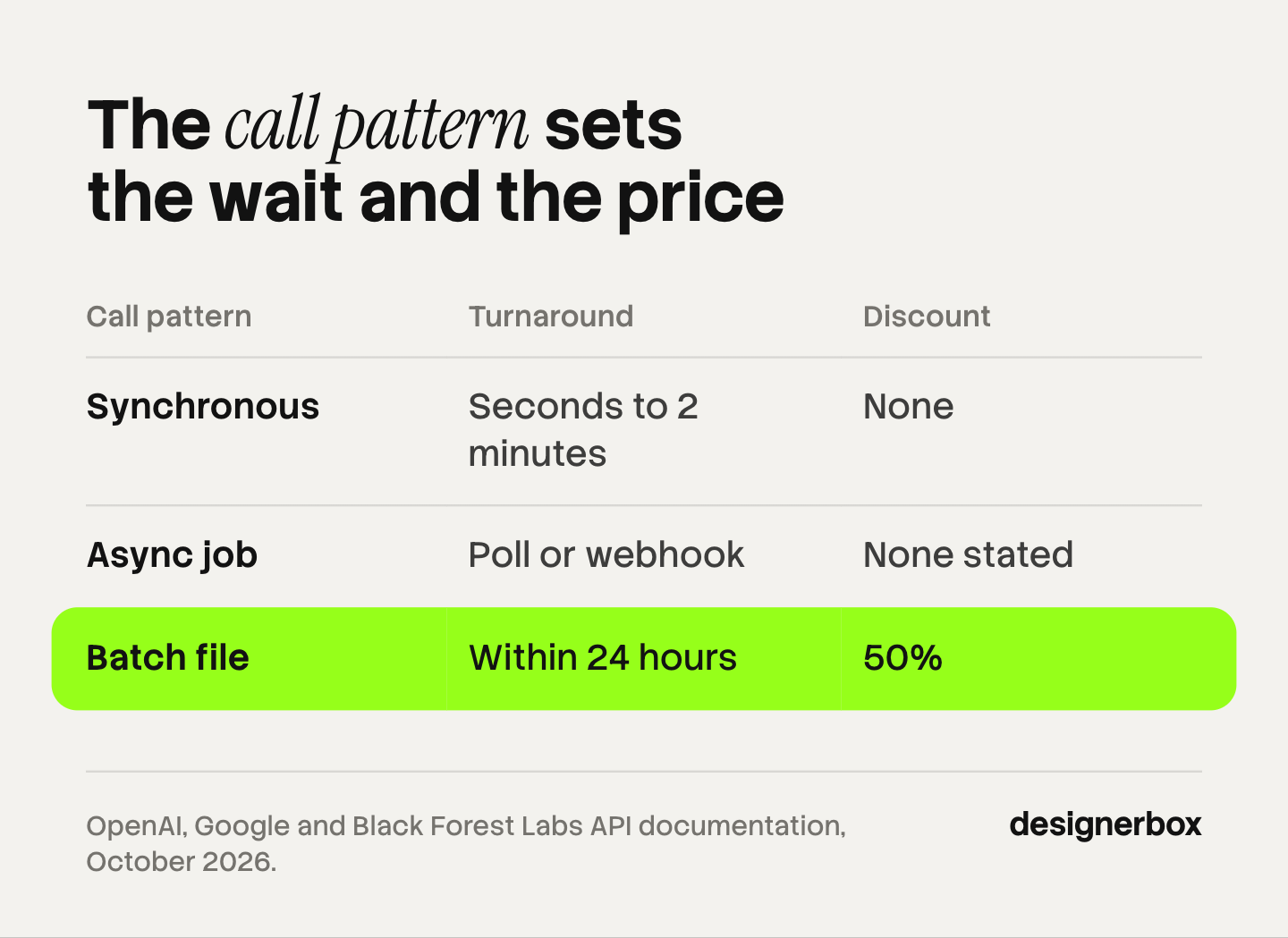
An image generation API can be called three ways. A synchronous call sends one request and waits for one image. An async job returns an ID, and your code polls or receives a webhook. A batch file holds thousands of requests, costs 50% less at OpenAI and Google, and finishes within about 24 hours. For a bulk run, the call pattern matters more than the model.
Take a job of 200 products with five images each. The model is the smaller choice. The larger choice is how your code sends 1,000 requests, how long it waits, and what it does when request 412 fails.
This guide explains the three call patterns and says which vendors document which. It then lists seven checks to run before you send a whole catalog. Every vendor fact comes from that vendor’s own documentation, read on 4 October 2026. It ends with how a batch in DesignerBox runs one workflow over a sheet, for a team that does not want to write the calling code.
Key Takeaways
- Three call patterns. Synchronous, async job, and batch file. Each one trades speed for volume and price in a different way.
- A batch file is half price. OpenAI and Google both list batch work at 50% of the standard cost, with a 24-hour window or target.
- Rate limits decide a synchronous run. OpenAI lists 5 images a minute on Tier 1 and 250 on Tier 5 for GPT Image 2.5 Flare.
- Results do not wait for you. A Black Forest Labs result link expires after 10 minutes. An OpenAI batch result file is deleted after 30 days.
- A catalog needs image input. A text to image API draws a product from words. A catalog needs an endpoint that takes your product photo.
What is an image generation API?
An image generation API is a web address that your code sends a request to and receives an image from. The request holds a model name, a prompt, and often one or more input images. The vendor runs the model and returns the picture, or a link to it. A text to image API is the same thing with a prompt as the only input.
The API gives you one image per request, with no queue, review screen or file storage. Our guide to build vs buy for AI creative production lists the seven parts a team builds around the model call.
Three ways to call an image generation API
The three patterns differ in when the answer arrives and who waits for it. Pick the pattern first.
| Call pattern | How it works | Turnaround | Discount | Best for | Vendors that document it |
|---|---|---|---|---|---|
| Synchronous | One request, and the connection stays open until the image returns | Seconds, and up to 2 minutes for a complex prompt at OpenAI | None | Previews, one product at a time, small sets | OpenAI Image API, Gemini API |
| Async job | Submit a request, get an ID, then poll or receive a webhook | Set by the queue, with no fixed window in the docs read | None in the docs read | Medium runs inside your own queue | Black Forest Labs, fal, Replicate |
| Batch file | Upload one file of requests, then collect one file of results | Within 24 hours at OpenAI, a 24-hour target at Google | 50% | A whole catalog that is not urgent | OpenAI Batch API, Gemini Batch API |
Sources: the vendor pages listed under each section below, read on 4 October 2026.
The patterns work together. Test five products with synchronous calls, then send the full catalog as a batch file overnight. Video endpoints use the async job pattern only, as our guide to the AI video generation API explains.
How does a synchronous call work?
A synchronous call is one request and one answer. Your code sends the prompt and waits. The image returns in the same connection. This is the simplest pattern to write, and the vendor’s rate limit bounds it. The rate limit sets how many images you can request each minute, so it sets how long a large run takes.

OpenAI’s Image API works this way. Its guide says the Image API returns base64-encoded image data, and that complex prompts may take up to 2 minutes to process (OpenAI image generation guide, October 2026). The current models are GPT Image 2.5 Flare (gpt-image-2.5-flare) and GPT Image 2.5 Sunburst (gpt-image-2.5-sunburst).
OpenAI measures image limits in images per minute. Limits rise with your usage tier, which rises with your spend (OpenAI rate limits guide, October 2026). For GPT Image 2.5 Flare, the model page lists these limits:
| Usage tier | Images per minute | Time for 1,000 images |
|---|---|---|
| Free | Not supported | Not possible |
| Tier 1 | 5 | 3 hours 20 minutes |
| Tier 2 | 20 | 50 minutes |
| Tier 3 | 50 | 20 minutes |
| Tier 4 | 150 | About 7 minutes |
| Tier 5 | 250 | 4 minutes |
Source: OpenAI model page for GPT Image 2.5 Flare, read 4 October 2026. The time column is our arithmetic at the full limit with no failed requests. It is not a measured result.
Google uses the same idea, and applies limits per project, not per API key. It adds that “specified rate limits are not guaranteed and actual capacity may vary” (Gemini API rate limits, October 2026).
On a new account, 1,000 images take an afternoon. On a high tier, they take minutes.
How does an async job with polling or a webhook work?
An async job splits the request from the answer. Your code submits the request and gets an ID back at once. The vendor puts the job in a queue. Your code then asks for the status every few seconds, which is called polling. Or the vendor sends the result to a web address you gave it, which is called a webhook. Video models use the same pattern, and our guide to an AI video workflow in n8n or Make shows how each tool waits for the result.
Black Forest Labs. The FLUX API is built on this pattern. The first response holds a polling address, and the docs say you must use that returned address to check the request. Webhooks are the other route. The docs set a maximum of 24 concurrent requests for most endpoints, and they tell you to use exponential backoff after a 429 response (Black Forest Labs integration guidelines, October 2026).
The same page has a rule every new build must handle: “Generated images expire after 10 minutes and become inaccessible.” Your code has to download and store each image within those 10 minutes.
fal. fal hosts many vendors’ models. Its docs call asynchronous inference the recommended way to call models. A request goes into a persistent queue, and you poll for status or receive a webhook. If a runner fails during processing, the request is put back in the queue and retried up to 10 times. fal may retry a failed webhook delivery, so its docs say to use the request ID for idempotency (docs.fal.ai, October 2026).
Replicate. Replicate also hosts many models, and offers webhooks or polling. Its docs state that input and output files are automatically deleted after an hour for predictions made through the API (replicate.com/docs, October 2026).
The async pattern fits a run of a few hundred images inside a system you already own. You get each result as soon as it is ready. You also write the queue, the retry rule and the download step.
How does a batch API work?
A batch API takes one file with many requests and returns one file with many results. You give up speed. In return, the vendor charges less and counts the work against a separate rate limit. OpenAI and Google both document a batch endpoint that accepts image requests, both at 50% of the standard cost, with a 24-hour window or target.

OpenAI Batch API
The OpenAI Batch API takes a .jsonl file with one request per line. The list of accepted endpoints includes /v1/images/generations and /v1/images/edits. OpenAI’s guide states that GPT Image 2.5 supports batch image generation and editing with both model IDs (OpenAI Batch API guide, October 2026). The same page lists these terms:
- Discount: a “50% cost discount compared to synchronous APIs”.
- Window: each batch completes within 24 hours. The completion window can only be set to 24h.
- Size: up to 50,000 requests in one batch, and an input file of up to 200 MB.
- One model per file. Each input file can only include requests to a single model.
- Separate limits. Batch work does not consume your standard per-model rate limits. You can create up to 2,000 batches an hour.
- Results: the result file is deleted 30 days after the batch completes.
A batch that does not finish in time expires, and you pay only for the completed requests. What one image costs through this route is in our guide to GPT Image 2 API pricing.
Gemini Batch API
Google’s Batch API processes requests “at 50% of the standard cost”, and its target turnaround is 24 hours (Gemini Batch API docs, October 2026). You can send a small batch inline, under 20 MB in total. For a large batch, Google recommends a JSONL input file of up to 2 GB.
Google’s image guide says all the image capabilities on its page can also run as batch jobs. It names the models as Nano Banana 2 (gemini-3.1-flash-image) and Nano Banana Pro (gemini-3-pro-image) (Gemini image generation docs, October 2026). Our comparison of Nano Banana 2 and Nano Banana Pro covers which one fits which shot.
Two more lines matter for a catalog. A batch job that runs or waits for more than 48 hours expires, and it has no results to collect. Google also supports webhooks for batch jobs, so your server gets a message when a batch succeeds.
Video APIs follow the same patterns. Our guide to the Wan 2.5 API covers one.
Seven checks before you send a whole catalog
Run these seven checks on the vendor’s docs and on five test products.
- Rate limit tier. Find your tier in the vendor’s dashboard. On OpenAI, the free tier cannot call the image models at all.
- Images per minute. Divide the catalog by the limit. This is the shortest possible time for a synchronous run.
- Completion window. A batch file can take 24 hours. Send it a day before the launch, not the same morning.
- Retries and idempotency. Decide what happens when a request fails, and make sure a retry cannot create the same image twice.
- Result expiry. Know how long the result lives: 10 minutes, one hour or 30 days, by vendor.
- Content filter refusals. Some requests may be blocked. Log each one against its product.
- Reference image input. Check that the endpoint takes your product photo, and count how many images it accepts.
Three of these need more detail.
Retries and idempotency. OpenAI’s guide says to retry rate limit and server failures with backoff. It says not to retry quota errors or user errors automatically. In a batch file, each request carries a unique custom ID, and the result lines may not come back in the order you sent them. Match results to products by that ID, never by line number.
Google’s batch docs add a warning: “The creation of a batch job is not idempotent. If you send the same creation request twice, two separate batch jobs will be created.” A script that times out and runs again can send, and bill, the whole catalog twice.
Content filter refusals. At OpenAI, a blocked request returns the error code moderation_blocked. The guide says not to retry these errors without changing the prompt or the input images. In a Google batch file, each result line is either a response or a status object with an error, so your code has to read every line.
Reference image input. A text to image API draws a product that matches your words. It does not show your product. A catalog needs the real item in the frame, so the request must carry the product photo. OpenAI’s batch route accepts the edits endpoint, which takes input images. Google’s image guide says its Gemini 3 image models can mix up to 14 reference images. A Google batch file can point to files you uploaded first.
When the code passes all seven, the run still needs a person. Our guide to where a bulk product image run breaks covers approval and delivery.
One workflow over a sheet, with no calling code
Anyone can make an AI picture. Making hundreds that still look like your brand is the hard part.
An API call does not solve that. Each request in a batch file stands alone.
DesignerBox does not have a public API. It has 68 tools over MCP. It is the route for a team that does not want to write and maintain the calling code.
You save the steps once as a workflow: the cutout, the scene, the light, the crop. The workflow reads your brand rules on every run. A batch then runs that workflow over a sheet, one product per row, up to 200 rows in a sheet (DesignerBox batch page, October 2026).
Review happens in the sheet. You keep or discard each result, and you re-run one row without touching the rest. You see the cost of the whole sheet before you press Run.
An AI chat such as Claude, ChatGPT or Cursor can run your workflows and apps over MCP. The chat asks you to confirm each run. For delivery, you download the results, or send them with a webhook or an S3 step.
The full workflow from the first product photo to the finished ad, in one subscription.
Batch, templates, apps and brand rules are on every plan. Uploading your own photos and the commercial license start on the Pro plan. AI video, virtual try-on, upscaling, the image editor and the video editor start on the Premium plan. Plans and credits are on the pricing page.
When a vendor API fits better
- Your engineers own a pipeline. A team that already runs queues, storage and review can add an image API as one more service.
- Your volume is beyond a sheet. A batch file at OpenAI holds up to 50,000 requests. A DesignerBox sheet holds 200 rows.
- The result must land inside your own system. DesignerBox does not publish to a store or a channel. A direct API call returns the image to your code.
- Your team needs several seats. Every plan below Ultra is one seat. Team features, shared brand kits and white label are on the Ultra plan.
- You need try-on for shoes. Virtual try-on in DesignerBox works on garments only.
If your rows are prompts and you want a no-code tool, our guide to the bulk image generator compares prompt lists with one workflow.
A free plan for your first run
Start from a template and run it once before you plan a whole sheet. The free plan runs on sample products.
FAQ
What is a batch API?
A batch API accepts one file with many requests and returns one file with many results. It is slower than a normal call and costs less. OpenAI and Google both list batch work at 50% of the standard cost, with a 24-hour window or target.
Does the OpenAI Batch API support image generation?
Yes. OpenAI’s Batch guide lists the image generation and image edits endpoints among the endpoints a batch file can target. It states that GPT Image 2.5 Flare and GPT Image 2.5 Sunburst support batch image generation and editing. One batch holds up to 50,000 requests.
Does the Gemini Batch API support image models?
Yes. Google’s image guide says every image capability on its page can run as a batch job. Its Batch API docs include a section on generating images in batch with Nano Banana models. The cost is 50% of the standard rate, and the target turnaround is 24 hours.
How many images per minute can an image API make?
It depends on the vendor and your usage tier. For GPT Image 2.5 Flare, OpenAI lists 5 images a minute on Tier 1 and 250 on Tier 5. Google sets limits per project and shows them in AI Studio. Batch work uses separate limits at both vendors.
Does DesignerBox have an API?
DesignerBox does not have a public API. It has 68 tools over MCP, so an AI chat such as Claude, ChatGPT or Cursor can run your saved workflows. In DesignerBox the cost is shown before the run.
Sources
- OpenAI Batch API guide: accepted endpoints including image generation and edits, 50% discount, 24-hour window, 50,000 requests, 200 MB file, one model per file, 2,000 batches an hour, custom ID, result order, 30-day result file, expired batches, GPT Image 2.5 batch support (developers.openai.com, read 4 October 2026)
- OpenAI image generation guide: base64 results, up to 2 minutes for complex prompts, content moderation, the moderation_blocked error, retry rules, reference images (developers.openai.com, read 4 October 2026)
- OpenAI rate limits guide: images per minute as a limit type, usage tiers, backoff (developers.openai.com, read 4 October 2026)
- OpenAI model page, GPT Image 2.5 Flare: images per minute by tier, free tier not supported (developers.openai.com, read 4 October 2026)
- Gemini Batch API docs: 50% of standard cost, 24-hour target, inline requests under 20 MB, JSONL file up to 2 GB, 48-hour expiry, webhooks, job creation is not idempotent, images in batch (ai.google.dev, last updated 17 September 2026, read 4 October 2026)
- Gemini API rate limits: limit types, per-project limits, capacity not guaranteed, the separate batch limits (ai.google.dev, read 4 October 2026)
- Gemini image generation docs: model names and IDs, up to 14 reference images, batch support (ai.google.dev, read 4 October 2026)
- Black Forest Labs integration guidelines: polling address, webhooks, 10-minute expiry, no CORS, 24 concurrent requests, backoff on 429 (docs.bfl.ai, read 4 October 2026)
- fal queue documentation: asynchronous inference recommended, polling and webhooks, up to 10 retries, request ID for idempotency (docs.fal.ai/model-apis/model-endpoints/queue, read 4 October 2026)
- Replicate webhooks documentation: webhook events, polling, files deleted after an hour (replicate.com/docs/topics/webhooks, read 4 October 2026)
- DesignerBox batch: one product per row, up to 200 rows, keep or discard per row, cost of the sheet, plan coverage: DesignerBox batch page (designerbox.ai/product/batch), October 2026
- DesignerBox MCP: 68 tools, the clients, confirmation of each run: DesignerBox MCP page (designerbox.ai/mcp), October 2026
Vendor limits, discounts and model names verified on each vendor’s own documentation on 4 October 2026. They change often, so read each page before a large run. The time-for-1,000-images column is example arithmetic, not a measurement. DesignerBox publishes this article and sells a different route from a direct API call. Individual results vary.