
Claid AI is a product photo tool from Let’s Enhance, sold three ways: a web app, an API and a done-for-you service. It is strongest where image quality work meets volume: upscaling, background and light fixes, AI scenes and on-model shots, with an API that has batch requests and webhooks. Its public pages list no team seats or roles, and Claid says its SOC 2 Type II work is still in preparation.
This Claid AI review reads Claid’s own pages, help center, API docs and terms, all on 1 October 2026. If you already want the two products side by side, DesignerBox compared with Claid.ai is on the main site.
Claid’s product is wider than its start as a photo-quality tool. Its pricing page lists 2K results on paid web plans and 4K on its upper plans (claid.ai/pricing, October 2026). It also has AI Photoshoot for new scenes, and it makes short video with sound (help.claid.ai, October 2026). So this review quotes Claid’s current pages and gives the date for each fact.
It prints no Claid price, because Claid lists its plans on its own pricing page. It quotes no user reviews. DesignerBox publishes this article and sells a different product, so read that section with the bias in mind.
Key Takeaways
- Claid is three products. A web app, an API with “20+ image and video operations”, and a service where Claid’s team builds the pipeline for you.
- The API is the deep part. Synchronous, batch and async requests, webhooks, and storage connectors for AWS S3 and Google Cloud Storage.
- Batch is on the web app too. Claid’s pricing page lists batch processing, a priority queue and brand kits on its Pro and Business plans.
- Video runs on an outside model. Claid says xAI’s Grok Imagine is “the engine behind image to video”.
- Security is stated, and one part is in progress. Claid states GDPR and CCPA compliance and encryption. It says it is “Preparing for SOC 2 Type II”.
- Training has two wordings. Claid’s business page says customer data is not used for model training. Its 2023 terms keep a license to use de-identified content “to improve our products and services”.
- Claid’s public pages do not list seats, roles or an IP indemnity. Ask before you sign for a team.
What is Claid AI?
Claid AI is a set of AI tools for product and fashion images, run by Let’s Enhance, Inc. Its own summary: “Generate realistic product scenes, place items on AI fashion models, enhance and upscale images, create product videos. Via API, through the web platform, or with our team handling it for you” (claid.ai/business, October 2026).
The company’s story “started in 2017” with “low-quality product photos for e-commerce platforms” (claid.ai/about-us, October 2026). Its story starts with photo quality. Today image enhancement and upscaling sit next to scene generation, fashion models and video.
Three ways to buy it:
- The web app. Upload an image, pick a tool, adjust and download. Claid offers a free trial, and its paid web plans are on its pricing page (claid.ai/pricing, October 2026).
- The API. Claid sells a dedicated API plan, and you “do not need to buy a paid Web plan” to get it.
- Done-for-you. Claid’s “forward-deployed creatives create custom pipelines for catalog imagery”.
A review of Claid has to say which of the three it is judging. Most of this one covers the web app and the API, because those have public documentation.
Claid AI review: what each part does
The web app
Claid’s help center, updated on 15 September 2026, lists the tools in the web app (help.claid.ai, October 2026).
| Job | Claid tool | What Claid says |
|---|---|---|
| A new scene for a product | AI Photoshoot | Five modes: Precise, Creative, Inspiration, Background and Product Swap |
| The same background on many products | AI Backgrounds with templates | ”still best for certain tasks like batch standardization with templates” |
| A garment on a model | AI Fashion Models | ”Upload a flatlay or ghost mannequin shot. Claid generates on-model photos” |
| A short clip from a photo | Image to Video | ”a 5- or 10-second video with motion, speech and sound”, at 720p |
| A fix by prompt | AI Edit | Listed in the help center’s tool list |
| A cleaner source photo | Remove Background, Fix Light and Colors, Add Shadows | Several background removal modes, HDR and manual controls |
| A larger file | Improve Quality and Upscale | ”2× and 4× enlargement”, with several upscaler options |
| A new shape | Resize and Expand | Presets for “Instagram, YouTube, Meta, Amazon, Shopify” |
Claid says all paid web plans share “the same powerful tools and features, including our new high-quality 2K resolution”. The plans differ in credits and in “access to our highest 4K resolution”. The Pro and Business plans add “batch processing, priority queue, and brand kits”.
The API
Claid describes “API with 20+ image and video operations”. The docs show three ways to call it: “synchronous calls for simpler edits, batch requests for larger sets, and async jobs with webhooks for high-volume processing” (claid.ai/api-workflows, October 2026).
What the docs state:
- Batch from storage. The batch endpoint takes “a cloud Storage directory as input”, or a list of public URLs.
- Storage connectors. “Currently, Claid supports AWS S3 and Google Cloud Storage.”
- Webhooks. Claid retries each notification “up to 4 times”.
- Formats. Input in “BMP, GIF, JPEG, PNG, TIFF, WEBP, AVIF, and HEIC”. Output in “JPEG, PNG, TIFF, WEBP and AVIF”, with CMYK for print.
- Size. “The API currently supports outputs up to 559 MP”.
- Rate limit. By default, “up to 120 requests per minute and 4 request per second”.
- Result storage. By default a result sits “in a temporary bucket with a lifespan of 24 hours”.
One limit to plan for: “You can combine any operations within the same area in one API request. Combining operations from two different areas requires two separate API requests” (claid.ai/apis, October 2026).
The done-for-you service
Claid offers to “design and deploy a custom solution” when a workflow “requires custom models, dedicated infrastructure, strict brand rules, complex input logic, or a done-for-you integration”. This part has no public feature list.
How does Claid handle product accuracy?
This review has no test images of ours. One prompt on one product proves little. What Claid publishes is more useful: its own advice on when the product stays exact.

Two modes, two promises. “Precise mode lets you position your product on the canvas and keeps its exact shape and angle. Creative mode gives you freedom to explore: you can experiment with different angles and compositions” (claid.ai/product/ai-photoshoot, October 2026).
Text and logos. “For products with important text or logos, we recommend using ‘Precise mode’ with the 2MP output resolution.”
Fashion limits. For on-model shots, Claid says the tool “might not work well with some categories of products (clothes with see-through fabrics, underwear) or accessories”. Its API docs add that “Swimwear and lingerie may be flagged by safety filters.”
Video keeps the garment. “The tool animates the outfit already shown in the photo. It does not change one garment into another or dress a person in a new item.”
Claid’s homepage says its AI “is trained on product photography and preserves logos, branding and product shapes”. That is Claid’s claim about itself. We found no accuracy rate on its pages. Whatever tool you use, check the label, the color and the shape on every result. Our guide to AI product photo accuracy lists the checks.
Which AI models does Claid run?
For video, Claid names an outside model: “Grok Imagine is xAI’s model. Claid uses it as the engine behind image to video, then adds the product workflow around it” (claid.ai/grok-imagine, October 2026).
For still images, Claid describes its own AI and names no outside model. Its API offers versioned models, and it calls the newer one “Our latest model: native 2K resolution, faster, more accurate prompt following, better texture realism and product preservation”.
So a description of Claid as a single-model tool does not match its current pages. It names one outside model, for video.
Security, data and rights at Claid
Read this section before you send a client’s catalog to any tool. This is general information, not legal advice.
What Claid states. “We’re GDPR and CCPA compliant, encrypt data at rest and in transit, and don’t use customer data for model training. We’re currently working toward SOC 2 Type II certification” (claid.ai/business, October 2026). Enterprise plans “can include data isolation, SLAs, regional processing, and DPA agreements”.
The training wording differs between two pages. The business page says “Customer data is not sold, shared, or used for model training”. Claid’s terms, effective 10 August 2023, grant Claid a license to use your content “solely in de-identified form, to improve our products and services” (claid.ai/terms, October 2026). Both are Claid’s own text. If training matters for a client, ask Claid which one governs your account, and get the answer in writing.
Ownership. The terms say: “WE CLAIM NO OWNERSHIP RIGHTS OVER YOUR CONTENT.” That clause covers what you supply. The terms do not name generated results. Claid’s pricing FAQ adds: “No, images generated using Claid are not subject to copyright.” For commercial use of fashion results, Claid says yes, “provided you have rights to the input product images and any custom model images you upload”.
Your name and logo. The terms say: “You consent to Claid’s use of your name and logo and a general description of your relationship with Claid in press releases and other marketing materials.” You can opt out by email. An agency that works under a client’s confidentiality clause should do that at the start.
Retention. API results are kept 24 hours by default. The privacy policy sets a ceiling of “no longer than 12 months after the closing of your account” for your information.
What Claid’s public pages leave open
These are the points we could not find on claid.ai, docs.claid.ai or help.claid.ai on 1 October 2026. A missing page is no proof that a feature is missing. It tells you what to ask.
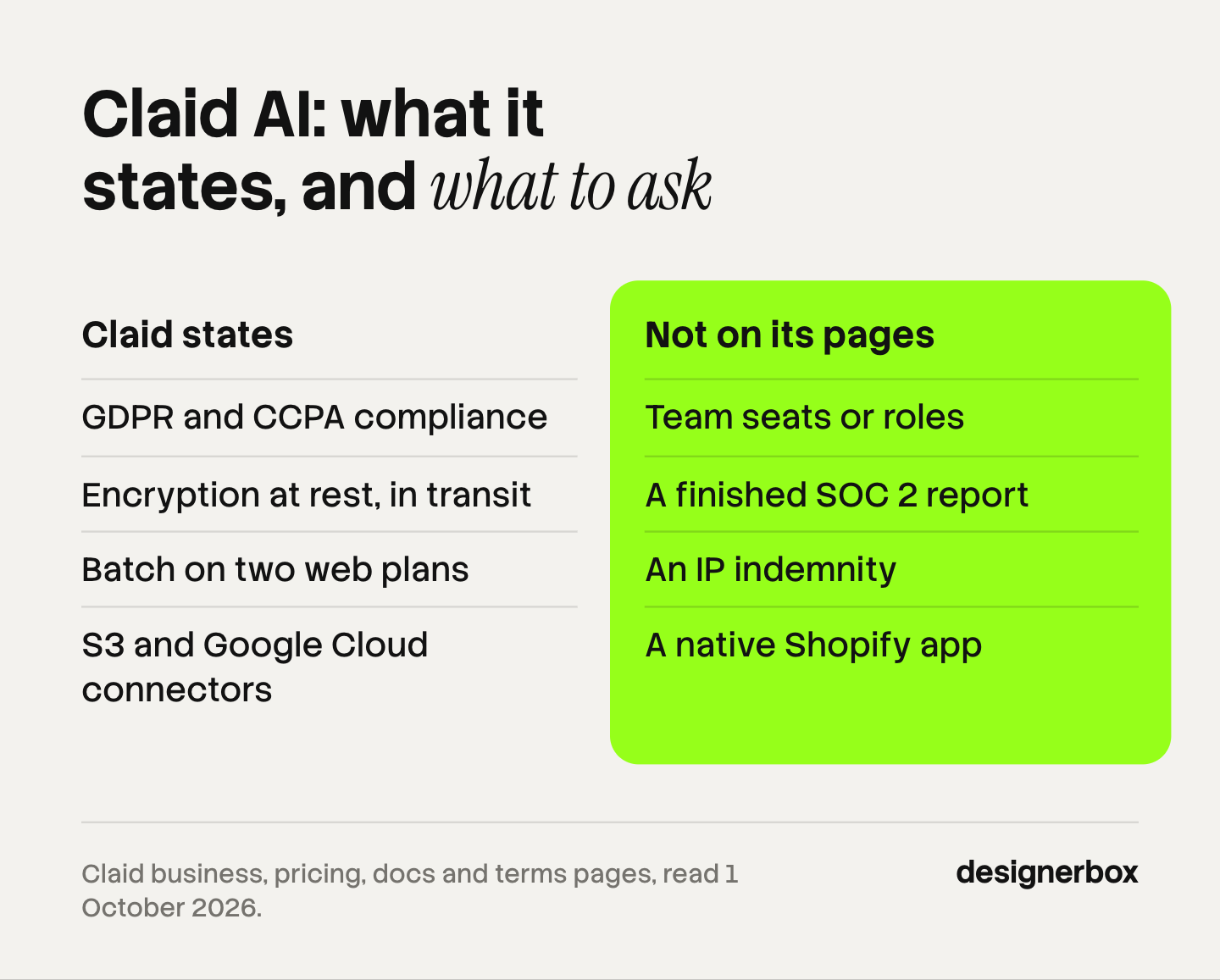
- Team seats, shared workspaces and roles. No page states a seat count or a role system.
- A finished SOC 2 report. Claid says it is preparing for one.
- An IP indemnity for AI results. The only indemnity in the terms runs from the customer to Claid.
- A native Shopify app. Claid’s own pages name Shopify as a Zapier trigger and as an export size. Its Zapier integration is available on one plan.
- A web batch size. The pricing page lists batch processing on two plans. No help page shows how it works or how many images it takes.
- Where data is processed. Regional processing is an enterprise option.
- An MCP server. No Claid page mentions one.
For a solo seller, most of this list does not matter. For an agency or a brand team, the first three decide the purchase.
5 Claid AI alternatives by job
Each tool below fits a different job. The facts come from each vendor’s own pages, read on 1 October 2026.

1. Photoroom: high-volume editing with apps and a Shopify app
Photoroom describes itself as “The future-ready product visual solution for e-commerce”. Its batch tool runs AI edits “on one image or up to 250 images at once” in the web app, and it has an API (photoroom.com/batch, October 2026). It lists a Shopify app, AI fashion models, a product video generator and an MCP connector for Claude. Its security page says it “holds a SOC 2 Type 2 attestation scoped to our API service” (photoroom.com/platform/security, October 2026).
Fits: teams that edit many listing photos in a web or mobile app and want a store connection. Our guide to Photoroom alternatives covers the wider field. For catalog-wide photoshoots with a review step, see the Riverflow alternatives guide.
2. Pixelcut: 10,000-image batches and team seats in the plan
Pixelcut says its “bulk photo editor processes up to 10,000 images in a single batch, applying the same edit to every file automatically” (pixelcut.ai/bulk, October 2026). It has APIs for background removal, upscaling, backgrounds and try-on, an MCP server for Claude, and plans where “each plan includes a set number of team members”.
Fits: teams that apply one edit to a large set and need several seats.
3. Flair: real-time team work, with trained models
Flair’s site describes real-time work with a team, bulk generation of “images, videos, and text”, and on-model shots “with patterns and logos preserved”. It says you can train models on your own product or style. Its API is “only for Enterprise/Scale clients” (flair.ai/resources/faq, October 2026).
Fits: teams that work on product content together and want models trained on their own products. See Flair AI alternatives.
4. Deep-Image.ai: enhancement and upscaling first
Deep-Image.ai is the closest match for Claid’s enhancement and upscaling tools. It upscales “up to 300 megapixels”, makes “marketplace-ready product photos in bulk with presets”, and has an API with “Multiple image operations” in one call (deep-image.ai, October 2026). Its pages list no on-model tool and no video.
Fits: teams whose problem is the quality of existing photos. Our guide to Magnific AI alternatives covers upscalers in detail.
5. DesignerBox: the same set for every product
DesignerBox is the fifth option, and the next section describes it with its limits.
Claid and the alternatives, side by side
| Tool | Web batch | API | On-model shots | Video | AI chat connection |
|---|---|---|---|---|---|
| Claid | Listed on Pro and Business | Yes | Yes | Yes, 5 or 10 seconds | None on its pages |
| Photoroom | Up to 250 images | Yes | Yes | Yes | MCP for Claude |
| Pixelcut | Up to 10,000 images | Yes | Try-on | Yes | MCP for Claude |
| Flair | Bulk generation | Enterprise and Scale only | Yes | Yes, paid plans | None on its pages |
| Deep-Image.ai | Bulk packshots | Yes | None on its pages | None on its pages | None on its pages |
| DesignerBox | A whole sheet of products | No public API | Yes, from Premium | Yes, from Premium | 74 tools over MCP |
Source: each vendor’s own pages, read 1 October 2026. “None on its pages” means we did not find it there.
Prices are left out on purpose. Each vendor lists its own, and the units differ. Compare the cost of the finished set for the job you run.
The same set for every product
Anyone can make an AI picture. Making hundreds that still look like your brand is the hard part.
DesignerBox is AI creative production for brands and agencies. Scale your images, ads and video with AI and keep your brand on every piece. Build the workflow once with your brand rules, run it on every product, and see the cost before each run.
Claid is at its best on image operations run at volume through an API. DesignerBox is built for the whole set. You save the job as a workflow: the packshot, the angles, the scene, the on-model shot and the ad. Batch runs it over a whole sheet of products, and you keep or discard each row and re-run one row alone. In the image editor, one edit follows another and the picture keeps its detail and resolution.
The full workflow from the first product photo to the finished ad, in one subscription.
Here are the limits, because Claid is ahead on several points:
- DesignerBox does not have a public API. It has 74 tools over MCP, so an AI chat such as Claude, ChatGPT or Cursor can run your workflows. If your own software must call an image endpoint, Claid’s API is the right kind of tool.
- Print and large files. Claid’s API lists CMYK output and results up to 559 megapixels. DesignerBox does not make that claim.
- Storage connectors. Claid’s API connects to AWS S3 and Google Cloud Storage. In DesignerBox you download the results, or send them with a webhook or an S3 step.
- Seats. Team features, shared brand kits and white label are on the Ultra plan, and every plan below Ultra is one seat.
Uploading your own photos and the commercial license start on the Pro plan. AI video, virtual try-on, upscaling, the image editor and the video editor start on the Premium plan. Plans and credits are on the pricing page. The feature-by-feature view is on the Claid.ai comparison page.
How to choose
Read down the list and stop at the first line that fits.
- Your software must enhance or generate product images through an API. Start with Claid, and read the rate limit and the 24-hour result storage.
- You need print files or large upscales. Claid or Deep-Image.ai.
- You edit listing photos in an app and send them to Shopify. Photoroom.
- You apply one edit to thousands of files. Pixelcut.
- You work on product content as a team and want trained models. Flair.
- You run the same full set on every new product and review it by row. DesignerBox.
- You are an agency. Ask each vendor three questions in writing: seats, training on client content, and indemnity.
Before you compare tools, set the baseline. Our breakdown of what a product photoshoot costs is the number each of these tools competes with, and the best AI product photography tools guide covers the wider field. To test a shortlisted tool on your own catalog, run an AI proof of concept before you sign.
Scale content without limits.
Generate content for your products or services with AI, starting today, and keep your brand on every piece.
FAQ
Is Claid AI good for ecommerce product photos?
Claid is built for them. It covers background removal, light and color fixes, upscaling, AI scenes, on-model shots and short video, in a web app and through an API. It suits a team that needs image operations at volume. Its public pages do not list team seats or roles (claid.ai, October 2026).
Is Claid AI free?
Claid has a free trial, and its pricing page labels it a trial, not a free plan. Paid web plans and a separate API plan are listed on the same page. Claid also offers free API credits “to test workflows” (claid.ai/pricing and claid.ai/enterprise-api, October 2026).
Does Claid AI have an API?
Yes. Claid describes “20+ image and video operations”, with synchronous, batch and async requests, webhooks, and connectors for AWS S3 and Google Cloud Storage. An API key comes with its Pro plan, and a dedicated API plan can be bought without a web plan.
Does Claid train AI models on my images?
Claid’s business page says customer data is not used for model training. Its terms, effective 10 August 2023, keep a license to use de-identified content “to improve our products and services”. Ask Claid which wording applies to your account. This is general information, not legal advice.
Who owns Claid AI?
Let’s Enhance, Inc. Claid’s footer carries the Let’s Enhance copyright line, and its API page says “Claid API is a product by Let’s Enhance”. The two products use separate accounts and credits.
Can Claid AI batch process images in the web app?
Claid’s pricing page lists batch processing on its Pro and Business web plans. No help page describes the web batch screen or a batch size. The API batch endpoint is documented in full and takes a cloud storage folder or a list of URLs as input.
What are the best Claid AI alternatives?
The Claid AI alternatives are Photoroom, Pixelcut, Flair, Deep-Image.ai and DesignerBox, and each fits a different job. Photoroom fits app-based listing edits with a Shopify app. Pixelcut fits large batches. Flair fits team work with trained models. Deep-Image.ai fits enhancement and upscaling. DesignerBox fits the same full set on every product. The comparison page on the main site lists more pairs.
Sources
Competitor pages are cited by domain and date, not linked.
- Claid’s positioning, the three ways to buy, security statements and “Preparing for SOC 2 Type II”: (claid.ai/business, October 2026)
- Let’s Enhance, the 2017 origin and the team: (claid.ai/about-us and claid.ai/apis, October 2026)
- Web app tools and upload rules: (help.claid.ai, updated 15 September 2026, read October 2026)
- AI Photoshoot modes, Precise and Creative, and the 2MP advice: (claid.ai/product/ai-photoshoot, October 2026)
- Fashion models and the category limits: (claid.ai/fashion and claid.ai/fashion/flatlay-to-model, October 2026)
- Video length, resolution and the garment note: (claid.ai/blog/article/ai-video-upgrade, October 2026). Grok Imagine as the video engine: (claid.ai/grok-imagine, October 2026)
- 2K on paid web plans, 4K on upper plans, batch processing, priority queue, brand kits, the free trial, the API plan and the copyright FAQ: (claid.ai/pricing, October 2026)
- API modes, batch, webhooks, storage connectors, formats, rate limit and result storage: (docs.claid.ai and claid.ai/api-workflows, October 2026). Output up to 559 MP: (claid.ai/api-products/upscale-image, October 2026)
- Enterprise options, DPA and free API credits: (claid.ai/enterprise-api and claid.ai/api-products/generate-background, October 2026)
- Terms on ownership, the de-identified content license, name and logo use, and indemnity: (claid.ai/terms, effective 10 August 2023, read October 2026). Retention: (claid.ai/privacy-policy, October 2026)
- Zapier integration: (claid.ai/zapier, October 2026)
- Photoroom batch, API, Shopify app, MCP, fashion models, video and SOC 2: (photoroom.com/batch, photoroom.com/api, photoroom.com/integrations, photoroom.com/platform/security, October 2026)
- Pixelcut bulk editor, APIs, MCP and team members: (pixelcut.ai/bulk, pixelcut.ai/api, pixelcut.ai/claude, pixelcut.ai/pricing, October 2026)
- Flair bulk generation, on-model shots, trained models and API: (flair.ai and flair.ai/resources/faq, October 2026)
- Deep-Image.ai upscaling, bulk packshots and API: (deep-image.ai and deep-image.ai/about-api, October 2026)
- DesignerBox plan gates, MCP tools and the cost shown before each run: DesignerBox pricing page and MCP page (designerbox.ai/pricing, designerbox.ai/mcp), October 2026
Claid features, data terms and plans verified from Claid’s own pages on 1 October 2026. Alternatives verified from each vendor’s own pages on the same day. Claid’s security statements on claid.ai/business were re-checked on 2 October 2026. Features change often, so check the vendor’s page before you buy.