
Ecommerce image editing turns a raw product photo into a file each sales channel accepts. It is six edits in a fixed order: cull, cut out, clean up, correct color, crop to size and export. Each channel writes its own rules for the result. Amazon wants pure white and an 85% fill. Google Shopping rejects overlays and borders. Shopify sets size limits, and Etsy recommends sizes. Edit once, then export one file per channel.
Forty products came back from the shoot on Monday. Each one needs a white main image for Amazon, a square for the Shopify grid and a first photo that Etsy can crop to a thumbnail. Google Shopping needs a version with nothing on top of the product. The shoot was one job. The editing is four, and each has its own rulebook.
This guide covers the six edits in order, the rules each channel writes down, and the point where an edit starts to change the product. It ends with three ways to get the work done: in software, with an AI tool, or through a service.
Key Takeaways
- Six edits, one order: cull, cut out, clean up, correct color, crop to size, export. Keep a full-size master and export one file per channel from it.
- Amazon’s main image: pure white (RGB 255, 255, 255), the product at 85% of the frame, 500 to 10,000 px on the longest side, and zoom from 1,000 px (Amazon Seller Central, September 2026).
- Google Shopping: no watermarks, logos or promotional text on the image, and no border. From 31 January 2027 the minimum is 500 x 500 px.
- Shopify product images can be up to 5,000 x 5,000 px or 25 megapixels, under 20 MB. Other images you upload to Shopify stop at 20 megapixels.
- Etsy recommends 2,000 px or more on each side, and room around the product for a square, portrait or landscape crop.
- An edit may not change the product. Amazon asks for the real scale, quantity and color. A fully AI-made person needs a metadata tag on Amazon, and Google asks you to keep AI metadata.
- Pick the route by volume: desktop software for a few hero shots, an AI tool for repeat edits, a service for steady monthly volume.
What ecommerce image editing includes
Ecommerce image editing is the work between the camera and the product page. It covers six edits: choose the usable frames, remove the background, clean dust and creases, match the color to the real product, crop and size for each channel, and export the right file type. Retouching skin or building a scene sits outside this list. The six edits make a photo accurate and accepted.
Each edit exists because a rule or a shopper needs it. The table maps them.
| Edit | What it fixes | The rule behind it |
|---|---|---|
| Cull | Soft focus, bad angles, near-duplicates | Amazon’s main image shows the product once, from one view |
| Cut out | Studio floor, stand, hanger, clutter | Amazon: pure white main image. Google recommends white or transparent |
| Clean up | Dust, lint, fingerprints, loose threads | Amazon: a “realistic, professional-quality image” |
| Correct color | White balance drift, a gray cast | Amazon: show the real color of the product |
| Crop and size | Uneven fill, wrong ratio, small files | Amazon 85% fill; Etsy 2,000 px; Google 500 x 500 px from 2027 |
| Export | Wrong color mode, heavy files | Amazon: RGB, JPEG recommended; Shopify: 20 MB cap |
Clean-up and color need care. Amazon names fewer returns from “mismatched expectations” as one reason to send accurate images. The guide to fixing product photo lighting covers which color casts and exposure problems you can still fix after the shoot.
The edits each channel requires
Each channel publishes its own image rules, and they differ on background, size, overlays and AI. One master file can feed all four, but one export cannot. Here are the rules as each channel writes them, read on 24 September 2026.
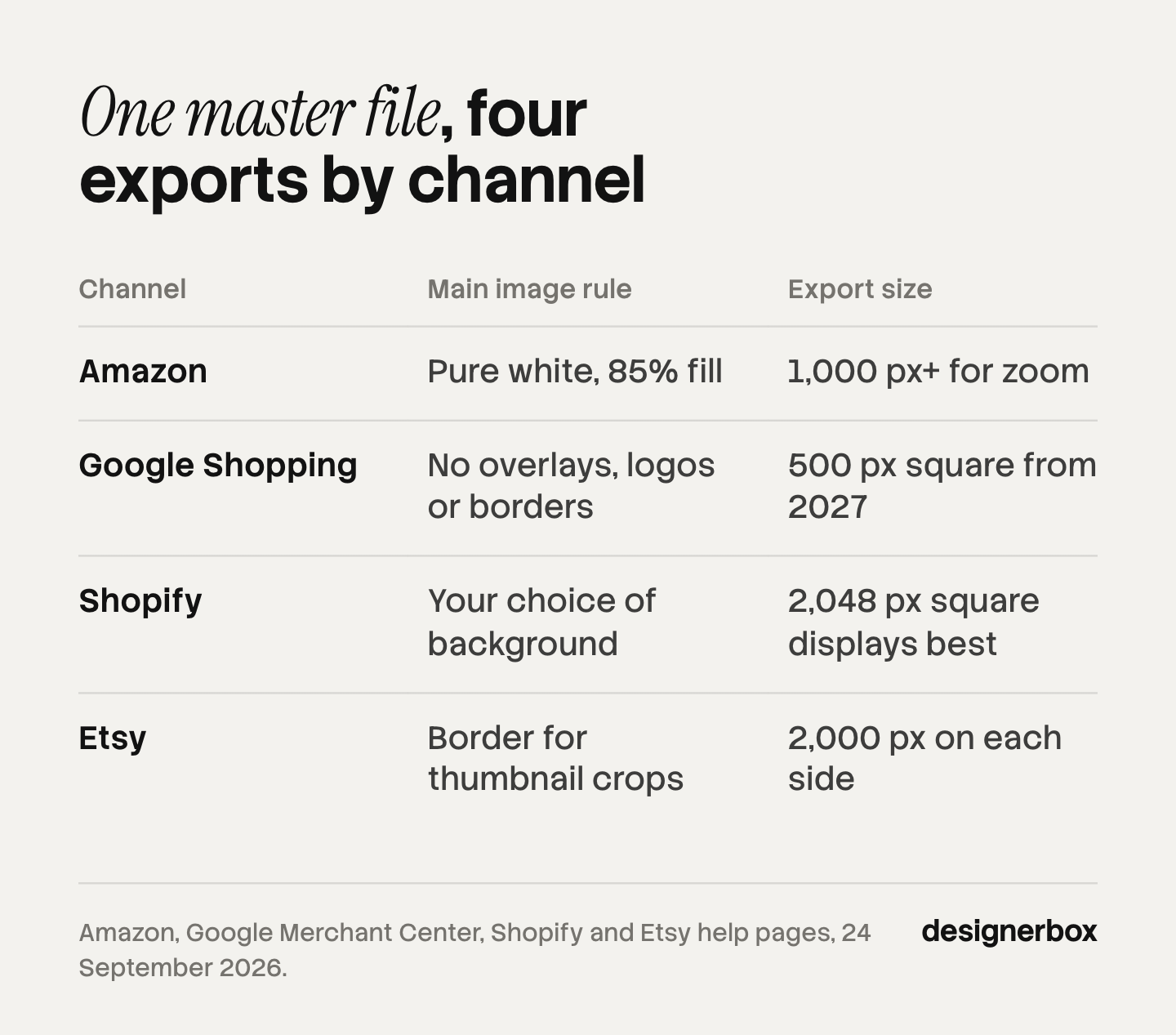
| Rule | Amazon | Google Shopping | Shopify | Etsy |
|---|---|---|---|---|
| Background | Pure white, RGB 255 (main image) | White or transparent recommended; lifestyle accepted | Your choice | Your choice |
| Size | 500 to 10,000 px on the longest side; zoom from 1,000 px | 100 x 100 px now (250 x 250 for clothing); 500 x 500 px from 31 January 2027 | Up to 5,000 x 5,000 px; 2,048 x 2,048 px square “usually displays best” | At least 2,000 px wide and high recommended |
| File limit | JPEG, TIFF, PNG or non-animated GIF | Under 64 MP and 16 MB | Under 20 MB and up to 25 MP for product images | Over 1 MB may not finish uploading |
| Overlays | No review stars, badges or claims such as free shipping | No watermarks, logos, promo text or borders | Your choice | Your choice |
| AI rule | Tag fully AI-made people | Keep AI metadata in the file | None written for images | Original photos of the actual product |
Amazon
The main image needs a pure white background, RGB 255, 255, 255. The product should fill 85% of the frame. The whole product must be in frame, shown once, with no props that are not included (Amazon product image requirements, read 24 September 2026). Adult clothing goes on a standing model, and no part of a mannequin may show. The ghost mannequin guide covers the edit that removes it.
Amazon’s file guide asks for RGB. It calls CMYK “not preferred” and says not to rely on ICC color profiles for accurate color (Amazon technical image file requirements, read 24 September 2026). The same guide asks for minimal or no compression. The main guide also says: “Do not artificially enlarge small images.” A 400 px supplier photo stretched to 1,000 px passes the upload check. It still looks soft when the shopper zooms.
Google Shopping
Google Merchant Center rejects images with promotional elements. It lists watermarks, brand names and logos as overlays, unless the logo is part of the product. It also rejects borders (Google Merchant Center image requirements, read 24 September 2026). Google recommends a white or transparent background and accepts lifestyle images that show the product clearly.
One detail catches light-colored products. Google warns that a transparent background on a light product “might show with a black background”. Export white or cream products on solid white for Merchant Center. The size floor also rises: from 31 January 2027 Google requires 500 x 500 px (Google image size change, read 24 September 2026).
Shopify
Shopify’s product media page says images can be up to 5,000 x 5,000 px or 25 megapixels, under 20 MB. It adds that a 2,048 x 2,048 px square “usually displays best” (Shopify product media types, read 24 September 2026). Shopify’s general page on uploading images sets a lower cap of 20 megapixels and 20 megabytes. It adds that product images have different limits (Shopify uploading images, read September 2026).
So a 5,000 x 5,000 px product photo is fine, but the same file fails as a theme banner. A 4,000 x 4,000 px master is 16 megapixels and fits both limits. Shopify also converts images to WebP or AVIF when the shopper’s browser supports them, so you can upload JPEG. The Shopify product image guide covers aspect ratios for theme grids.
Etsy
Etsy recommends listing photos at least 2,000 px wide and high. The first photo should be at least 635 px, or it may appear lower in search. Etsy crops thumbnails to square, portrait and landscape, so leave a border around the product (Etsy listing photo help, read 24 September 2026). The same page warns that files over 1 MB may not finish uploading on a slow connection. That pulls against the 2,000 px advice, so compress Etsy exports harder than the rest. Etsy does not support transparent PNG files, and transparent parts show as black.
Where an edit starts to change the product
Every channel allows editing. None allows a photo that misleads the shopper. Amazon asks every image to “accurately represent the product.” For the main image, it asks for “the real scale, quantity, and color of the product.” Background removal, color correction and light fixes stay inside that rule. Changing the product’s shape, adding a feature it lacks, or making it look larger crosses it.
AI edits sit on the same line, with extra paperwork in two places.
- Amazon, simple AI edits. An Amazon staff member wrote on the seller forums that “Simple AI retouching, like background removal, color correction, lighting adjustments, are generally treated the same as traditional photo editing” (Amazon seller forums, read September 2026). That is a forum reply, not a policy page.
- Amazon, AI people. If an image shows a photorealistic person made fully by AI, add the keyword contains-synthetic-performer to the file’s XMP dc:subject field before upload. A real model edited with AI does not need the tag (Amazon G1881).
- Google, AI metadata. Images made with generative AI must keep their AI metadata, such as the IPTC DigitalSourceType value TrainedAlgorithmicMedia. Google says not to remove it, and it can disapprove the product (Google Merchant Center, 6324350).
- Etsy, actual product. Etsy requires original photos of the product the buyer receives, not renderings or stock photos, with narrow exceptions for mockups (Etsy listing image requirements, read September 2026).
One practical trap follows from the Google rule. Some export steps strip metadata to make files smaller. If an image was made or changed with generative AI, check the exported file still carries its AI metadata before it reaches Merchant Center. The marketplace rules guide covers the disclosure rules in more detail. This section is general information, not legal advice.
How to edit product photos, step by step
Edit a full-size master first, then export per channel. That order means you correct the color once and crop four times, instead of doing all of it four times.
- Cull. Pick one frame per view. Reject soft focus at 100% zoom, not at thumbnail size.
- Cut out. Remove the background on the master and keep the mask. Check edges at 200% zoom on hair, lace, fur and clear glass. A halo of the old background shows on white.
- Clean up. Remove dust, lint, fingerprints and loose threads. Leave real features alone, such as a seam, a grain or a slub in linen.
- Correct color. Set white balance from a gray card or a known neutral in the frame. Then compare the screen with the product in daylight. If you shot a color checker, use it.
- Check the white. On the Amazon export, sample the background. Every corner should read 255, 255, 255. A value of 250 looks white to the eye and is not pure white.
- Crop and size. Set the fill per channel: 85% for Amazon’s main image, and a margin for Etsy’s thumbnail crops. Resize down from the master. Never scale a small file up to pass a minimum.
- Export. Use RGB and JPEG for photos. Use PNG only where you need transparency. Name files by product. For bulk uploads, Amazon asks for the product ID, the variant code and the file type (B000123456.MAIN.jpg).
For your own site, WebP is worth the switch. Google reports that lossy WebP files are 25 to 34% smaller than comparable JPEGs at equal quality (Google WebP, read 24 September 2026). On Shopify the platform converts for you. On other stores, export WebP yourself.
Fine edges are the hard part of a cutout. The background remover comparison tests how tools handle hair, glass and fine edges. For supplier files below the size floor, the low-resolution product image guide covers when an upscale is honest and when a reshoot is the only fix.
Software, an AI tool or a service
Three routes do this work. The right one depends on how many images arrive each month and how many of them repeat the same edits. For hundreds of files at once, our guide to bulk image editing sorts the edits a script can check from the ones a person must see.
| Route | Best for | Where it gets slow |
|---|---|---|
| Desktop software | A few hero images and campaign shots where every pixel is checked | Every image is hand work, so time grows with volume |
| AI editing tools | Repeat edits on many products: cutouts, shadows, light fixes, resizing | Fine edges and color still need a check by eye |
| An editing service | Steady monthly volume sent to a written spec | Minimums, turnaround and a revision loop |
Desktop software gives full control and costs the most time per image. It is the right tool for the hero image a campaign rests on.
AI editing tools automate the repeat edits. Claid lists background removal and clean-up, enhancement for low-resolution photos and AI product photography, with APIs to connect them to a store (claid.ai/ecommerce, September 2026). Google’s Product Studio is a free set of AI tools inside Merchant Center (Google Product Studio, read September 2026). For portrait and skin work, the AI photo retouching tools comparison sorts seven tools by the job each one does. For general AI photo editing tools, from Photoshop to chat editors, see the best AI photo editor comparison.
An editing service returns images to your spec, usually priced per image with volume plans. The product photo editing service guide covers what drives the cost and where the price rises.

You can mix the three. An AI tool handles the cutout and resize on every product. A person handles color and the hero shots. A service takes the overflow in a launch month. The guide to batch editing photos sorts which edits to batch and which to keep by hand.
The same edits on every product
DesignerBox is AI creative production for brands and agencies. Scale your images, ads and video with AI and keep your brand on every piece: build the workflow once with your brand rules, run it on every product, see the cost before each run, and keep everything from the first product photo to the finished ad in one place. The Edit an image app takes a picture and one line of text and returns the edited photo.
Anyone can make an AI picture. Making hundreds that still look like your brand is the hard part. Editing has the same problem. The fortieth product has to get the same cutout, the same white and the same fill as the first. So you save the edits as a workflow once. You set the background, light and framing in its steps. Your brand rules sit in a brand profile the workflow reads on every run.
The image editor makes one edit after another. Retouch, relight, change the angle or swap the background, and the picture keeps its detail and resolution. Batch runs one workflow over a whole sheet of products. You review the results in one pass, keep or discard per row, and re-run one row alone. Critic steps score the results of a run, and best-of-N keeps the best one. The cost is shown before you press Run.
The full workflow from the first product photo to the finished ad, in one subscription. Templates, workflows, apps, batch, the image editor, the video editor, brand profiles and Assets sit in one place. For marketplace work, the Amazon seller page shows the listing set.
The limits, stated plainly (DesignerBox pricing, September 2026):
- It starts from a photo of the real product. The channel rules above still apply to every result.
- Color is still your check. Compare results with the physical product before they reach your store.
- Delivery is a download. You can also send results with a webhook or an S3 step. You add the results to your store yourself.
- Plan gates apply. Uploading your own photos and the commercial license start on the Pro plan. The image editor starts on the Premium plan. Team features, shared brand kits and white label are on the Ultra plan, and every plan below Ultra is one seat.
Plans and credits are on the pricing page.
A free plan for your first run
Start from a template, add your brand and your products, and see the cost before you run it.
FAQ
What is ecommerce image editing?
Ecommerce image editing prepares product photos for a store or marketplace. It covers six edits: choosing the best frames, removing the background, cleaning dust and creases, correcting color, cropping and sizing for each channel, and exporting the right file. The goal is an accurate image that each channel accepts.
What size should ecommerce product images be?
Edit a master of about 4,000 x 4,000 px, then export per channel. Amazon needs 500 to 10,000 px on the longest side, with zoom from 1,000 px. Shopify says 2,048 x 2,048 px usually displays best. Etsy recommends at least 2,000 px. Google requires 500 x 500 px from 31 January 2027.
Can I use AI to edit product photos for Amazon?
Yes, within Amazon’s accuracy rule. An Amazon staff reply on the seller forums says simple AI edits, such as background removal, color correction and lighting fixes, are treated like normal editing. If the image shows a photorealistic person made fully by AI, add the contains-synthetic-performer tag before upload.
Should product photos be JPEG, PNG or WebP?
Use JPEG for most product photos, and it is Amazon’s recommended format. Use PNG when you need a transparent background. For your own site, lossy WebP files are 25 to 34% smaller than comparable JPEGs, according to Google. Shopify converts images to WebP or AVIF for browsers that support them.
What background should an edited product photo have?
Amazon’s main image needs pure white, RGB 255, 255, 255. Google recommends white or transparent, and it accepts clear lifestyle images. On Google, put light-colored products on solid white, since a transparent background may display as black. On your own store, any background works if every product uses the same one.
Do I have to disclose AI-edited product images?
The answer changes by channel and by edit. Google Merchant Center asks you to keep the AI metadata in images made with generative AI. Amazon asks for a metadata tag when a fully AI-made person appears. Etsy requires photos of the actual product. Simple edits such as background removal carry no extra rule on Amazon.
How do I keep edited product photos consistent?
Write the edits down once: the background value, the fill, the crop ratio, the color target and the export settings. Then apply the same spec to every product, in the same order. The consistent product images guide covers the six layers that make a catalog grid look like one brand.
Sources
- Amazon product image requirements: pure white main image, 85% fill, 500 to 10,000 px, zoom from 1,000 px, no artificial enlargement, file naming, and the contains-synthetic-performer tag (sellercentral.amazon.com, read 24 September 2026)
- Amazon technical image file requirements: RGB color mode, CMYK not preferred, ICC profiles, minimal compression (sellercentral.amazon.com, read 24 September 2026)
- Amazon seller forums, staff reply on simple AI retouching (sellercentral.amazon.com, read September 2026)
- Google Merchant Center image requirements: promotional elements, overlays, borders, backgrounds, transparent light products and AI metadata (support.google.com, read 24 September 2026)
- Google Merchant Center image size change: 500 x 500 px from 31 January 2027 (support.google.com, read September 2026)
- Google Product Studio in Merchant Center (support.google.com, read September 2026)
- Google WebP: lossy WebP 25 to 34% smaller than comparable JPEGs (developers.google.com, read 24 September 2026)
- Shopify Help Center, product media types: 5,000 x 5,000 px or 25 MP, 20 MB, 2,048 x 2,048 px square (help.shopify.com, read 24 September 2026)
- Shopify Help Center, uploading images: 20 megapixels and 20 megabytes for general uploads, different limits for product images, WebP and AVIF delivery (help.shopify.com, read September 2026)
- Etsy Help, listing photos: 2,000 px, 635 px first photo, 1 MB upload warning, thumbnail crops (help.etsy.com, read 24 September 2026)
- Etsy listing image requirements: original photos of the actual product (etsy.com, read September 2026)
- Claid ecommerce page: background removal and clean-up, enhancement for low-resolution photos, AI product photography, APIs (claid.ai/ecommerce, September 2026)
- DesignerBox brand, batch, image editor and pricing pages (DesignerBox, September 2026)
Channel rules verified from each platform’s own help pages on 24 September 2026. No competitor price appears in this guide. Platform rules change often, so check each page before a large upload. Individual results vary.