Jewelry retouching is the editing done to a photo of a piece after the shoot. It removes dust and scratches, cleans the background, tidies reflections, and corrects metal and stone color to match the real piece. A safe retouch fixes the photo. An unsafe one changes what the photo claims: the size of a stone, the color of the metal, or the number of stones.
A macro lens shows the dust on a band, a fingerprint on a bezel, and the photographer in a polished dome. So most jewelry photos get retouched, and most of that work is honest cleaning.
The risk is in a small set of edits. A stone made a little whiter or a little larger is a different product on screen. This guide lists the eight standard edits, sorts the safe ones from the rest, and ends with a QA checklist.
Key Takeaways
- Eight edits, one order. Cleanup, background, reflections, metal color, stone color, focus stack, shadow, then export. Color work comes before the composite steps.
- Clean the photo, keep the piece. Dust came from the room, so remove it. An inclusion in a stone came with the stone, so keep it.
- The FTC text names color, size and quantity. Section 23.1 of the Jewelry Guides lists them among the things a seller must not misrepresent.
- Amazon has its own jewelry numbers. Its jewelry page asks for 80 percent fill and a longest side of 500 to 2,100 pixels.
- QA is a comparison. The person who checks the retouch needs the physical piece, or the untouched camera file, beside the result.
What is jewelry retouching?
Jewelry retouching is post-production for photos of rings, earrings, necklaces, bracelets and watches. A retoucher starts with a camera file and returns a clean, color-correct image at the size each sales channel asks for. The same job is called jewelry photo editing or jewelry image editing.
It differs from general product photo editing in three ways. The subject is a mirror, so the room shows in the metal. The subject is small, so one frame is rarely sharp from front to back. And the color is part of the product description.
Good retouching starts with a good file. For the light, the surround and the four-shot set, read our guide on how to photograph jewelry.
The eight jewelry retouching edits, in order
The order matters. Color corrections go early, on the full file. Shadow and export go last, because they depend on everything before them.
| Step | Edit | What the retoucher does | What to watch |
|---|---|---|---|
| 1 | Dust and scratch cleanup | Removes dust, fibers, fingerprints and handling marks | A design feature, such as a hammered finish, removed as a flaw |
| 2 | Background and clipping path | Draws a path around the piece and places it on white or a set color | Thin chains and prong tips cut off by the path |
| 3 | Reflections | Removes the camera and the room from the metal, and evens the gradients | The dark edge line removed, so the metal looks flat |
| 4 | Metal color | Corrects yellow gold, white gold, rose gold and silver to the real alloy | One gold tone drifting toward another |
| 5 | Gemstone color and clarity | Corrects stone hue and removes dust from the stone’s surface | Inclusions erased, or a stone made whiter or more saturated |
| 6 | Focus stack | Joins several frames, each sharp at a different depth, into one sharp image | Doubled prongs or a soft band where frames join |
| 7 | Shadow and reflection | Builds one soft shadow or a mirror reflection under the piece | Shadow direction that differs between products |
| 8 | Resize and export | Crops, pads and saves one file per channel | Upscaling a small file, or a wrong color profile |
Reflections and the black line. Polished metal has no color of its own in a photo. It shows the room. A retoucher removes the camera, the tripod and stray color from the metal. The thin dark line along an edge stays. That line is a reflection of a dark card, and it is what tells the eye where the metal turns. Remove it and a band looks like a flat sticker.
Metal color. Gold alloys differ in color because of the metals mixed with the gold. A camera’s white balance can push yellow gold toward green or rose gold toward orange. The retoucher corrects each tone against a reference frame shot with a gray card. Silver and white gold should read neutral.
Focus stacking. At macro distances, only a few millimeters are sharp in one frame. The photographer shoots several frames at different focus points, and the retoucher joins them. Every pixel still comes from the real piece.
Export. Keep one large master file. Resize down for each channel, never up. Our guide to ecommerce image editing lists the export steps for five channels.
Which edits are safe, and which change a claim?
Use one test. Ask whether the edit fixed something about the photo or something about the piece.

Dust, a fingerprint, a color cast and the camera’s reflection all came from the shoot. Removing them makes the photo closer to the piece. An inclusion, a small stone, a pale color and a thin band belong to the piece. Changing them makes the photo show a product that does not exist.
| Safe: it fixes the photo | It changes a claim |
|---|---|
| Remove dust, fibers and fingerprints | Remove inclusions from inside a stone |
| Remove the camera and the room from the metal | Make a stone larger in relation to its setting |
| Correct a color cast to match the real alloy | Shift white gold to a brighter white than the piece |
| Correct stone hue to match the stone | Add saturation the stone does not have |
| Join focus frames of the same piece | Add, remove or move a stone or a prong |
| Rebuild a shadow under the piece | Thicken a band or a chain |
| Straighten a chain that the stylist left twisted | Remove a hallmark, or draw one |
| Pad and crop to a channel’s ratio | Paste one stone’s photo into many settings |
One row needs a note. A stone that fills the frame in a macro shot is normal. The problem starts when the edit changes the stone’s size against the band or the prongs.
AI edits follow the same table. A model that redraws part of the image can change a prong count or a facet pattern without a warning. Our guide on what to check before you ship a product photo covers that test for any product.
What the FTC Jewelry Guides say about pictures
In the United States, the FTC Jewelry Guides at 16 CFR Part 23 cover how jewelry is described and marketed. The text below was read in the eCFR in October 2026. This section is general information, not legal advice.
Pictures are claims. Section 23.0(c) says the Guides apply to claims made “directly or by implication, through words, symbols, emblems, logos, illustrations, depictions, product brand names, or through any other means” (16 CFR 23.0, October 2026). A product photo is a depiction.
The general rule lists what a retouch can change. Section 23.1 says it is unfair or deceptive to misrepresent the “type, kind, grade, quality, quantity, metallic content, size, weight, cut, color, character, treatment” or any other material aspect of a product (16 CFR 23.1, October 2026). Quantity, size, cut and color are all things a retoucher can alter.
Enlarged stones need a stated size. Note 3 to the same section says a depiction of a gemstone “in greater than its actual size may mislead consumers, unless a disclosure is made about the item’s true size.” A macro image can stay if you put the dimensions beside it.
Metal words have rules, and the picture should agree with them. Section 23.3 says the word “Gold” for an alloy may mislead unless the karat fineness comes directly before it. Section 23.7 says it is unfair or deceptive “to fail to disclose a surface-layer application of rhodium” on a product described as precious metal (16 CFR 23.7, October 2026). Rhodium is the plating that makes much white gold bright white. If the photo shows that bright white, the listing text should explain it.
Clarity is a graded property. Section 23.13 limits the word “flawless” to a diamond that shows no flaws or inclusions under a 10-power magnifier (16 CFR 23.13, October 2026). A photo with the inclusions removed can say the same thing without the word. Color works the same way. GIA says the correct way to evaluate diamond color is “under controlled lighting”, against masterstones (GIA, October 2026). A retouch that whitens a diamond suggests a grade nobody assigned.
The Guides do not bind the FTC or the public. Section 23.0(d) says the Commission may still take action under the FTC Act if a claim is inconsistent with them. It must then prove the claim is unfair or deceptive.
Marketplace image rules for jewelry
Each channel adds its own rules to the retouch brief. These three were read on each platform’s own help page in October 2026.
| Channel | Size and framing | What it says about accuracy |
|---|---|---|
| Amazon, jewelry page | Longest side 500 to 2,100 pixels. At least 1,000 pixels turns on zoom. Product fills at least 80 percent | Main image on pure white, RGB 255, 255, 255. “Show the actual product (not a graphic or illustration).” No mannequin or model |
| Google Merchant Center | Product takes up 75 to 90 percent of the image | The photo “accurately reflects the exact color, pattern, finish, and material” of each variant |
| Etsy | 2,000 pixels or more on each side recommended | Etsy converts images to sRGB, so convert first and check the color |
Three points follow for a retoucher.
Amazon has two pages, and they differ. The jewelry page asks for 80 percent fill and caps the longest side at 2,100 pixels. The general product image guide asks for 85 percent and allows up to 10,000 pixels. It also says the image should show “the real scale, quantity, and color of the product.” A piece framed at 85 percent on a 2,000 pixel file passes both pages.
Amazon tells the retoucher how to crop a close-up. Where part of a pendant necklace runs past the image edge, the jewelry page says to fade the product at the edge so the border stays white. The same page tells sellers to follow the FTC guidelines for the jewelry industry.
Google wants one image per metal color. Its image requirements say not to reuse one general photo across variants. So a ring sold in yellow, white and rose gold needs three images. If the retoucher recolors one photo to make the other two, each result must match the real alloy. Google also says images created with generative AI must keep their AI metadata tag.
In-house, a retouching service or AI editing
Three routes do this work. Most brands with 20 to 500 products use two of them.
| Route | Suited to | What to check |
|---|---|---|
| In-house retoucher | Hero images, high-value pieces, and anyone who has the piece on the desk | Time per image, and one written standard so two people retouch the same way |
| Jewelry retouching service | Steady volume of packshots on white, clipping paths and focus stacks | A written spec, a sample of your own pieces first, and the revision terms |
| AI editing | Background, shadow, scene and resize across a whole collection | Stone count, prong count and metal color on every result, beside the source |
In-house. The retoucher can hold the piece next to the screen. That is the best color reference there is. The limit is hours per image.
A jewelry retouching service. A service edits the files you send to a written spec. A jewelry photo editing service cannot see the piece, so the spec has to carry the facts: the alloy, the stone count, the finish, and a reference frame with a gray card. Our guide to product photo editing services covers what to send, the minimums and the revision loop.
AI editing. AI tools are fast at the edits around the piece: the background, the shadow, the scene. Edits that redraw the piece need a person to check them. For tools sorted by listing slot, see the best AI jewelry product photography tools. Amazon’s main image must show the actual product, so a redrawn piece does not fit that slot.

The QA checklist for jewelry retouching
Hand this list to whoever retouches, and use it again when the files come back. Check each result beside the physical piece. If the piece is not there, use the untouched camera file.
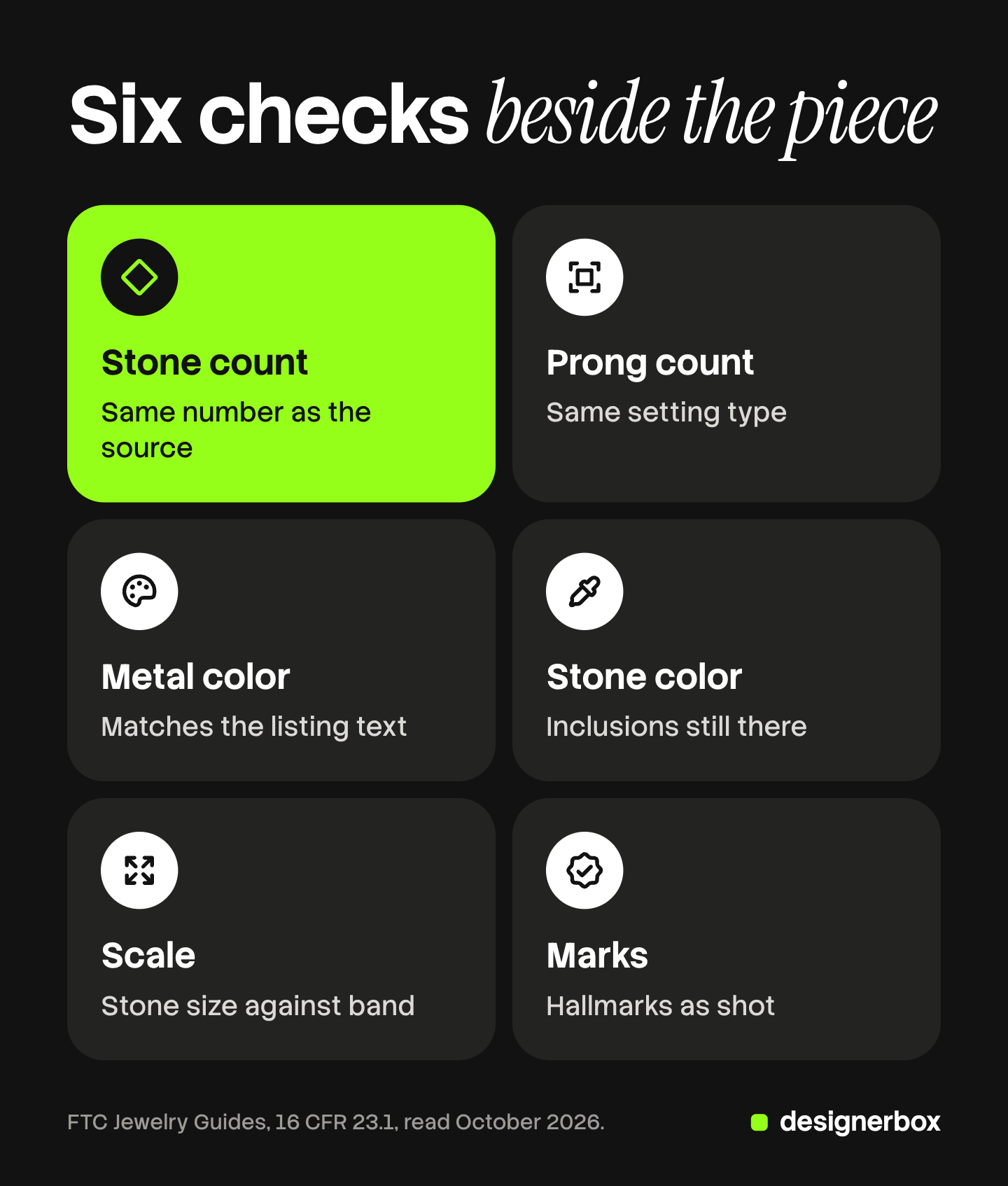
- Stone count. Count the stones in the source and in the result. The numbers match.
- Prong count and setting. Count the prongs on each stone. The setting type is the same.
- Metal color. The color matches the piece and the listing text, such as 14 karat rose gold.
- Stone color and clarity. Hue and saturation match the stone. Inclusions that the camera saw are still there.
- Scale. The stone is the same size against the band and the prongs. Band and chain width are unchanged.
- Marks. Hallmarks, stamps and engravings are as shot. None were added.
- Edges. Chains, prong tips and earring posts are whole. No halo sits around the piece.
- File. Pixel size, fill, background white and color profile match the channel table.
Checks 1 to 6 protect the claim. Checks 7 and 8 protect the listing. Rings need one more look at band width, and the ring shot list shows which frames prove it.
Brand images, ads and video from one workflow
Anyone can make an AI picture. Making hundreds that still look like your brand is the hard part.
DesignerBox is AI creative production for brands and agencies. It makes images, ads and video, and a product photo is one of the inputs. For jewelry, the retouched packshot is that input. Finish the retouch and the QA first.
You save the steps once as a workflow: the background, the light, the shadow, the crop. A batch runs that workflow over a sheet, one piece per row, up to 200 rows a sheet. Every row reads the same brand rules, so row one and row two hundred share one look. The cost is shown before the run.
For one picture that needs several changes, the image editor makes one edit after another. The picture keeps its detail and resolution.
A step that redraws part of an image can change a stone or a prong, so run the QA checklist on every result. Nothing publishes to a store or a marketplace. You download the results, or send them with a webhook or an S3 step. Every plan below Ultra is one seat.
The full workflow from the first product photo to the finished ad, in one subscription.
Uploading your own photos and the commercial license start on the Pro plan. AI video, virtual try-on, upscaling, the image editor and the video editor start on the Premium plan. Plans and credits are on the pricing page.
There is a free plan, and it runs on sample products. Get started free
FAQ
What is jewelry retouching?
Jewelry retouching is the editing done to a jewelry photo after the shoot. It removes dust and scratches, cleans the background and the reflections, corrects metal and stone color, and exports the file for each sales channel.
What does a jewelry photo editing service do?
A jewelry photo editing service edits the files you send to a written spec. Typical jobs are dust cleanup, a clipping path, a white background, metal color correction and a rebuilt shadow. Send the alloy, the stone count and a reference frame, because the service cannot see the piece.
Is it legal to retouch jewelry photos?
Retouching is common, and the question is what the edit changes. The FTC Jewelry Guides say it is unfair or deceptive to misrepresent the quantity, size, cut or color of a product, and they apply to depictions as well as words (16 CFR 23.0 and 23.1, October 2026). An edit that removes dust leaves those facts alone. An edit that changes them is the risk. This is general information, not legal advice.
Can you remove inclusions from a gemstone photo?
Remove dust on the surface of the stone. Keep inclusions inside the stone, because the buyer receives them. The FTC Jewelry Guides limit the word “flawless” to a diamond that shows no flaws under a 10-power magnifier. A photo with the inclusions erased suggests that grade without the word.
How do you edit white gold, yellow gold and rose gold in photos?
Shoot a reference frame with a gray card, then correct the white balance against it. Yellow gold should not drift green, and rose gold should not drift orange. White gold and silver should read neutral. Compare the result with the piece.
Can AI retouch jewelry photos?
AI editing suits the background, the shadow, the scene and the resize. It can also redraw part of the piece, so count the stones and prongs on every result. Google Merchant Center asks that images created with generative AI keep their AI metadata. In DesignerBox the cost is shown before the run.
Sources
- FTC Jewelry Guides, 16 CFR Part 23: scope and depictions (23.0), deception and Note 3 on stone size (23.1), gold content (23.3), rhodium (23.7), the word flawless (23.13) (ecfr.gov, read October 2026)
- Amazon Seller Central, Jewelry: pure white main image, actual product, no model, 500 to 2,100 pixels, 80 percent fill, fade at the image edge, FTC guidelines (sellercentral.amazon.com, read October 2026)
- Amazon Seller Central, product image guide: 85 percent, up to 10,000 pixels, real scale, quantity and color (sellercentral.amazon.com, read October 2026)
- Google Merchant Center, image link requirements: one image per variant, exact color and finish, 75 to 90 percent framing, AI metadata (support.google.com, read October 2026)
- Etsy Help, requirements for images: 2,000 pixels recommended, sRGB conversion (help.etsy.com, read October 2026)
- GIA, diamond color: color is evaluated under controlled lighting against masterstones (4cs.gia.edu, read October 2026)
- DesignerBox batch, brand and image editor: DesignerBox product pages (designerbox.ai/product), October 2026
FTC text and platform image rules were read on the sources’ own pages in October 2026. This is general information, not legal advice. Platform rules change often, so check each page before a large upload. Individual results vary.