
A product photography setup is a fixed rig of eight parts: a surface, a backdrop, a light, diffusion, a reflector, a camera, a tripod and a color target. Each part prevents one known fault. Place the parts once, mark their positions and write the camera settings down. The next product then matches the last one, whoever takes the photo.
A shopping list tells you what to buy. It does not tell you where each part stands. This guide treats the setup as a document. It is written for brands with 20 to 500 products and for one-person shops.
Key Takeaways
- Eight parts, eight faults. Every part prevents one fault, such as blur, a hard shadow or a color cast.
- Three levels. Window light and a sweep, a light box or two softboxes, and a permanent corner.
- Three layouts. Small, mid-size and large products need different distances and the same logic.
- Fixed settings. Set white balance, aperture and ISO once for the whole session.
- One clean photo per product. AI cannot recover what blur, clipped highlights, unknown color or a missing angle leave out of the file.
- A written record. A one-page setup sheet lets a second person repeat the first person’s result.
What is a product photography setup?
A product photography setup is the arrangement of surface, backdrop, light, camera and supports that you use to photograph products. A good setup is fixed. Every part has a marked position, and every camera setting has a written value.
The reason is consistency. A catalog is photographed over months, often by more than one person. If the setup lives in one person’s memory, the light and the framing change a little with every session.
The eight parts of a product photography setup
The table lists the product photography equipment by job.
| Part | What it does | The fault it prevents |
|---|---|---|
| Surface or table | Holds the product at a fixed height and place | Framing that changes between products |
| Backdrop or sweep | Gives one plain background with no visible corner | A horizon line and clutter behind the product |
| Light source | Lights the product from one known direction | Shadows that fall a different way in each photo |
| Diffusion | Makes the light source larger and softer | Hard shadow edges and small bright hot spots |
| Reflector | Returns light to the dark side | A black edge where the shape disappears |
| Camera or phone | Records the frame at enough resolution | A file too small to crop or zoom |
| Tripod and remote | Holds the camera still and in one position | Blur, and a viewpoint that moves |
| Color target | Gives a known white or gray to correct against | A color cast nobody can measure later |
Surface. A product photography table needs to be stable, matte and larger than the sweep. A shiny surface adds reflections that you then have to remove.
Backdrop. A sweep is a sheet of paper or vinyl that curves from the wall to the table. The curve hides the line where wall and table meet. White is the common backdrop, because most marketplaces ask for a white main image. Our guide to product photography backdrops compares the materials. Amazon’s seller guide suggests “large white craft paper taped against a wall to create a seamless sweep” (Amazon, October 2026).
Light, diffusion and reflector. These three work as one unit. One large, soft light on one side and a white card on the other side suit most products. Our guide to product photography lighting explains the positions in detail.
Camera, tripod and remote. Amazon’s guide advises a phone “with a 12-megapixel camera or more”. It adds that a tripod “can help keep your camera still and avoid blurry pictures”. A remote or a timer lets you take the photo without touching the camera.
Color target. A gray card or a color checker goes in the first frame of every session. One common chart is the ColorChecker Classic, which its maker describes as “an array of 24 scientifically formulated colors” (calibrite.com, October 2026).

Layouts for three product sizes
The parts stay the same for every product size. The distances change.
| Product size | Examples | Surface and backdrop | Light | Camera |
|---|---|---|---|---|
| Small tabletop | Jewelry, cosmetics, mugs | A table with a paper sweep, or a light box | One diffused light close to the product | Close, with the lens at the middle height of the product |
| Mid-size | Bags, shoes, lamps | A larger table and a paper roll wider than the product | A larger diffuser, placed further back | Further back, at the same height rule |
| Large or worn | Furniture, clothing on a person | A sweep on stands that reaches the floor | Two lights on stands | Several steps back, with marks on the floor |
Keep the light close to a small product. A light that is large compared with the product gives soft shadow edges. For a mid-size product, the sweep must be wider than the product at every angle you shoot.

Amazon’s guide recommends a “stand-mounted sweep” for larger items such as furniture. The marks move from the table to the floor. Clothing has a rule of its own. On Amazon, the main image must show the product “on a model if the product is clothing in adult sizes” (Amazon Seller Central, October 2026).
Three levels of product photography setup
Each level uses the same eight parts. The levels differ in how constant the light is, and in how long the rig stays built.
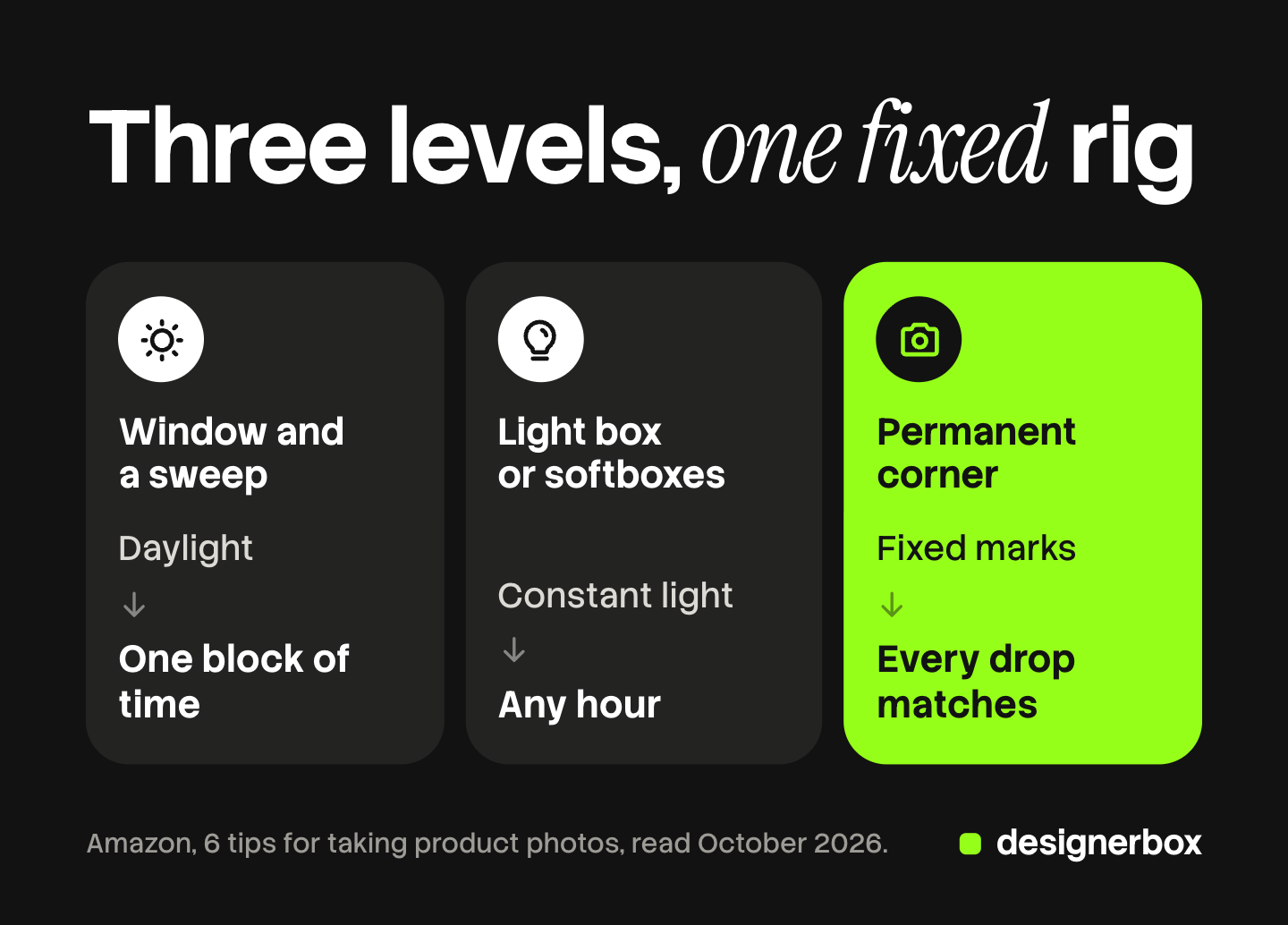
Level 1: window light and a sweep. A table stands beside a window. White paper is the sweep, a white card is the reflector, and a thin curtain is the diffusion. This level costs the least. Its limit is the light, which changes through the day. Shoot one batch in one block of time, and turn the room lights off. Our guide on how to take product photos covers this level step by step for a phone.
Level 2: a light box or two softboxes. Lamps replace the window, so the light is the same at any hour. Amazon’s guide describes a light box as “a wireframe box with translucent walls that helps evenly distribute light around the object in focus”. A product photography light box suits small products, because the box is the sweep and the diffusion in one. Two softboxes on stands suit mid-size products.
Level 3: a permanent corner. The rig stays built between sessions. Tape marks the position of the table, the lights and the tripod. The camera connects to a computer, so each photo appears on a large screen. It gives the fastest session, because nobody rebuilds anything.
The level matters less than the record. A level 1 setup with written positions beats a level 3 setup that changes every month.
Camera settings that keep a set consistent
Automatic modes choose new settings for every photo. Two products shot one minute apart can then differ in brightness and color. Fix these settings for the whole session.
White balance. Set it once, for the light you use. Canon’s manual says custom white balance sets the white balance “for the specific light source of the shooting location”. It adds that a gray card gives a more accurate result than a white object (Canon, October 2026). Nikon’s manual gives the same method: place “a neutral gray or white object under the lighting that will be used in the final photograph” (Nikon, October 2026).
Aperture. Canon’s manual states that a higher f-number “will make more of the foreground and background fall within acceptable focus” (Canon, October 2026). Choose one f-number that keeps your deepest product sharp, and keep it.
ISO. Sony’s guide states that “the higher the ISO value, the more noise will appear on the images” (Sony, October 2026). The camera is on a tripod and the product does not move. A slow shutter speed is therefore safe, and the ISO can stay low.
Exposure. Use manual mode, so the brightness does not change when a dark product follows a light one. On a phone, the lock does the same job. Apple’s guide says to “touch and hold the focus area until you see AE/AF Lock” (Apple, October 2026).
What the setup has to deliver when AI does the rest
AI editing has changed the job of the setup. The setup no longer has to produce the finished listing image. It has to produce one clean record of each product: sharp, evenly lit, true in color and large enough to crop. Our guide to the source product photo explains each of the four.
Four faults stay in the file, whatever tool comes next.
- Blur. A soft edge holds no detail, so a tool has to invent it. The tripod prevents this.
- Clipped highlights. A pure white patch on the product holds no texture. Diffusion and a fixed exposure prevent it.
- Unknown color. Software can shift a color. It cannot know what the true color was. The color target is the only record.
- A missing angle. A printed back or a clasp that no photo shows has to be invented. One extra frame prevents it.
This is also why a plain table in a stockroom or a warehouse can be enough. If every product sits in the same place, under the same light, with the camera in the same position, the photos differ only in the product. Background, position and shadow can then be matched across the whole range in editing.
A generated scene copies the faults of its source. Our guide to AI product photo accuracy lists what to check in each result.
What marketplaces ask of the setup
Marketplace rules describe the finished image. Most of them trace back to one part of the setup. All rows were read on the platform’s own help page in October 2026.
| Platform rule | The part of the setup that meets it |
|---|---|
| Amazon: a pure white background, with RGB values of 255, 255, 255 | A white sweep with even light. Editing then takes the white to the exact value |
| Amazon: the product shows as 85% of the image, with no part cut | A marked camera distance for each product size |
| Amazon: the image represents the real scale, quantity and color | The color target and a fixed white balance |
| Amazon: 1,000 pixels or more on the longest side turns on zoom | A sharp frame from a 12-megapixel camera |
| Google Merchant Center: at least 500 x 500 pixels from January 31, 2027, with 1500 x 1500 recommended | The same camera, with room left to crop |
| Google Merchant Center: a unique image for each variant | Every color variant goes on the mark |
Google’s rules are in its image link specification. The specs for five channels are in our guide to ecommerce product photography.
The setup sheet: write the rig down
The setup sheet is one page. It lets a second person, or you in three months, rebuild the same rig.
- A photo of the rig from above and from the side.
- The surface and backdrop: which table, where it stands, and the backdrop material and width.
- The light: which lamp or window, its height, its side and its distance from the product mark.
- The diffusion and reflector: what each one is, and where it stands.
- The product mark: a tape cross for each product size.
- The tripod mark: position, lens height and distance for each product size.
- The camera settings: lens, white balance, aperture, ISO, shutter speed and file format.
- The color target: which card, in the first frame of every session.
- The frame rule: how much of the frame the product fills.
Test the sheet once. Give it to a person who has not seen the rig, and compare their photo with yours. Where the two photos differ, the sheet has a gap. The look of the finished images belongs in a product photography style guide.
From one source photo to images, ads and video
DesignerBox is AI creative production for brands and agencies. It makes images, ads and video, and a product photo from your setup is one of the inputs. Anyone can make an AI picture. Making hundreds that still look like your brand is the hard part.
The setup sheet solves that problem at the shoot. A brand record solves it after the shoot. It holds your logo, colors, fonts and rules, and every workflow reads it on each run. For the product side of the job, see AI product photography.
A workflow is a set of steps that you build once. A batch runs it over a sheet with one product per row, from row one to row two hundred. The cost is shown before the run. The same source photo can become a scene, a static ad or a short video. That is the full workflow from the first product photo to the finished ad, in one subscription.
The limits are plain. DesignerBox does not take the photo, and it cannot repair the four faults above. It does not send finished work to a store. You download the results, or send them with a webhook or an S3 step. Every plan below Ultra is one seat. There is a free plan, and it runs on sample products.
Uploading your own photos and the commercial license start on the Pro plan. AI video, virtual try-on, upscaling, the image editor and the video editor start on the Premium plan. Plans and credits are on the pricing page.
Build the setup first, then see what the workflow does with a sample product. Get started free
FAQ
What do I need for a product photography setup?
You need eight parts: a stable surface, a backdrop or sweep, one light source, diffusion, a reflector, a camera or phone, a tripod and a color target. A window can be the light, and white paper can be both the sweep and the reflector.
What is the best backdrop for a product photography setup?
A white sweep is the common choice. It is a sheet of paper or vinyl that curves from the wall to the table, so no corner shows behind the product. Amazon requires a pure white background on the main image.
When does a product photography light box help?
A light box helps with small products such as jewelry, cosmetics and mugs. Its translucent walls spread the light around the product. Products that do not fit inside the box need a table sweep and softboxes on stands.
Which camera settings keep product photos consistent?
Fix white balance, aperture, ISO and exposure for the whole session. Set a custom white balance from a gray card under your own light. Choose one f-number that keeps the deepest product sharp, and keep the ISO low.
Can AI fix a photo from a poor setup?
Only in part. AI can change a background, a crop or a scene. It cannot recover blur or clipped highlights, because the detail is not in the file. It cannot know the true color without a reference frame.
Sources
- Amazon product image requirements: pure white background, 85% of the image, accurate scale and color, pixel limits and zoom, clothing on a model: Amazon Seller Central, product image requirements, accessed October 2026
- Tripod, bounce cards, light box, sweep and phone camera advice: Amazon, 6 tips for taking product photos, accessed October 2026
- Google Merchant Center image rules: the 500 x 500 pixel minimum from January 31, 2027, the 1500 x 1500 recommendation and a unique image for each variant: Google Merchant Center Help, image link, accessed October 2026
- Custom white balance and the gray card note: Canon, EOS R3 Advanced User Guide, custom white balance, accessed October 2026
- Aperture and the area in focus: Canon, EOS R3 Advanced User Guide, aperture-priority AE, accessed October 2026
- Preset manual white balance with a neutral gray or white object: Nikon, D850 online manual, preset manual, accessed October 2026
- ISO and image noise: Sony, ILCE-7RM3A Help Guide, ISO, accessed October 2026
- AE/AF Lock on iPhone: Apple, iPhone User Guide, accessed October 2026
- ColorChecker Classic, 24 colors: Calibrite product page (calibrite.com), October 2026
- DesignerBox brand, batch and plan gates: DesignerBox product and pricing pages (designerbox.ai), October 2026
Amazon, Google, Canon, Nikon, Sony and Apple facts verified on each publisher’s own page, October 2026. DesignerBox features verified on designerbox.ai, October 2026. Camera menus differ by model, so check the manual for your own camera. Individual results vary.