
A product photography backdrop is the surface behind and under the product. Choose it in two steps. First, name the slot the image fills: a marketplace main image, a gallery image, an ad or a social post. Second, look at the product surface. Matte products suit most backdrops. Glossy, clear and white products need a backdrop that controls reflections and keeps the edge visible.
A marble board is a good backdrop for a gallery image and a rejected one for an Amazon main image. The slot decides what is allowed. The product decides what works inside that limit.
This guide covers six backdrop materials, color choice, and the written background rules on five marketplaces. It is for brands with 20 to 500 products and the agencies that shoot for them.
Key Takeaways
- The slot comes first. Amazon and Walmart ask for white on the main image. Google, eBay and Etsy name no required color.
- The surface comes second. Glossy and clear products reflect the backdrop, so the backdrop becomes part of the product in the photo.
- Six materials cover most shoots. Seamless paper, vinyl, acrylic, fabric, wood and stone each solve a different problem.
- A colored backdrop can tint the product. Light reflects from the backdrop onto the product. Distance between the two reduces it.
- A generated background is fair where the rules allow a scene. It is not a way around a white main image rule.
What is a product photography backdrop?
A product photography backdrop is any surface that fills the frame around the product. The base is the surface the product stands on. The back is the surface behind it. In a flat lay, the camera looks down, so the base is the whole backdrop.
The backdrop separates the product edge from the frame, and it sets the color that reflects onto the product. Light matters as much as the material. Our guide to product photography lighting explains why a white surface does not always produce white pixels.
How to choose a backdrop: slot first, then surface
Start with the slot, because the slot has written rules. The table shows the four common slots and what each one allows.
| Slot | What the backdrop must do | Usual choice |
|---|---|---|
| Marketplace main image | Meet the channel rule | White, or a cutout placed on white |
| Gallery and product page images | Show scale, use and detail | A surface or scene that fits the product |
| Ads | Stop the viewer and carry the brand | A brand color or a scene |
| Social posts | Fit the brand look in a feed | A brand color, a texture or a scene |
Then look at the product surface.
- Matte and opaque. Cotton, cardboard and wood take almost any backdrop. Choose for contrast.
- Glossy or metallic. Polished metal and glazed ceramic act as mirrors, so the backdrop color appears in the product. eBay’s photo tips say a darker background may work better for shiny or reflective items like jewelry (eBay Help, October 2026).
- Clear. Glass and clear plastic show the backdrop through the product, so keep it plain.
- White or very light. A white product on a white backdrop loses its edge. A light gray backdrop keeps the outline, and the background can be changed to white later.
Many teams shoot on a neutral backdrop and replace it afterward. Our guide to AI background removal covers which products cut out cleanly and which do not.
Six backdrop materials compared
Six materials cover most product shoots. Each one has a best use and one thing to watch.
| Backdrop | Best for | Watch for |
|---|---|---|
| Seamless paper | Plain color behind small and medium products | Marks and tears. The used part is cut off |
| Matte vinyl | Food, liquids, cosmetics and repeat shoots | Glare under hard light, and curl after storage |
| Acrylic sheet | Reflections under jewelry, bottles and electronics | Dust, scratches and the camera in the reflection |
| Fabric | Soft goods, jewelry and gift products | Creases and lint. Texture can pull attention from the product |
| Wood surface | Food, homeware, handmade and leather goods | A warm color cast. Strong grain behind small products |
| Stone or tile | Skincare, fragrance, drinks and kitchen products | Weight, cold tone and shine on polished stone |
Seamless paper. Paper comes on a roll, so one sheet runs under and behind the product with no join. Savage Universal, a paper maker, describes its paper as a non-reflecting surface. It says the used portion can be cut off when it gets torn or dirty (savageuniversal.com, October 2026).
Matte vinyl. Vinyl wipes clean, and printed vinyl can copy wood, stone or plaster. Check a printed surface at full zoom, because a repeated pattern shows in a close crop.
Acrylic sheet. A glossy acrylic sheet under the product gives a mirror reflection. Clean it before every frame, because every dust point shows.
Fabric. Linen and velvet add texture without a hard pattern. Steam the fabric first. A crease takes longer to retouch than to remove before the shoot.
Wood and stone. A wood board suggests a home or a kitchen, and marble or slate suggests a bathroom or a bar. Both reflect their own color onto the product base, so check white packaging for a tint.
Props can stand on any of these surfaces, but check the channel rule first. Amazon’s main image must not show props that are not included with the product (Amazon Seller Central, October 2026).
The sweep: one surface for base and back
A sweep is a backdrop that curves from the table up to the wall. The curve removes the line where the base meets the back, so the product appears to stand in an endless space.

Paper and vinyl both bend into a sweep. Tape one end to the table and the other end to a wall or a stand. Keep the curve gentle, because a tight curve shows as a dark band behind the product. The backdrop also has to fill the frame with room on every side.
An L shape uses two boards and keeps a visible line, which reads as a table against a wall. For a first setup at home, our guide on how to take product photos lists the five things you need.
Background color for product photography and color cast
Pick the backdrop color for contrast first and brand second. The product edge has to stay visible at thumbnail size. Four color groups cover most needs.
- White. The rule on some main images, and the plainest record of the product.
- Neutral gray. Keeps the edge of white products and adds no tint. A good base for later background replacement.
- Black. Suits metal, glass and lit screens.
- A brand color. Works for ads and social posts, where no marketplace rule applies.
Light hits a colored backdrop and reflects onto the product. A green backdrop adds green to the sides of a white box. This tint is called a color cast, and glossy and white products show it most.

Three steps reduce a color cast.
- Add distance. Move the product away from the back surface. B&H Photo’s guide to clean backgrounds also advises distance between subject and background (bhphotovideo.com, October 2026).
- Block the light. Place a black or white card between the backdrop and the product side.
- Check the color. Amazon requires the image to accurately represent the real color of the product (Amazon Seller Central, October 2026).
For color-critical products such as cosmetics and fabric, use a neutral base and keep the color behind the product.
Which marketplaces require which backdrop
Two of the five marketplaces we read require white on the main image. Three name no required color. Our guide to ecommerce product photography gives the image size and file spec for five channels. If a finished photo misses that white, the guide on how to make a background white compares three ways to fix it.
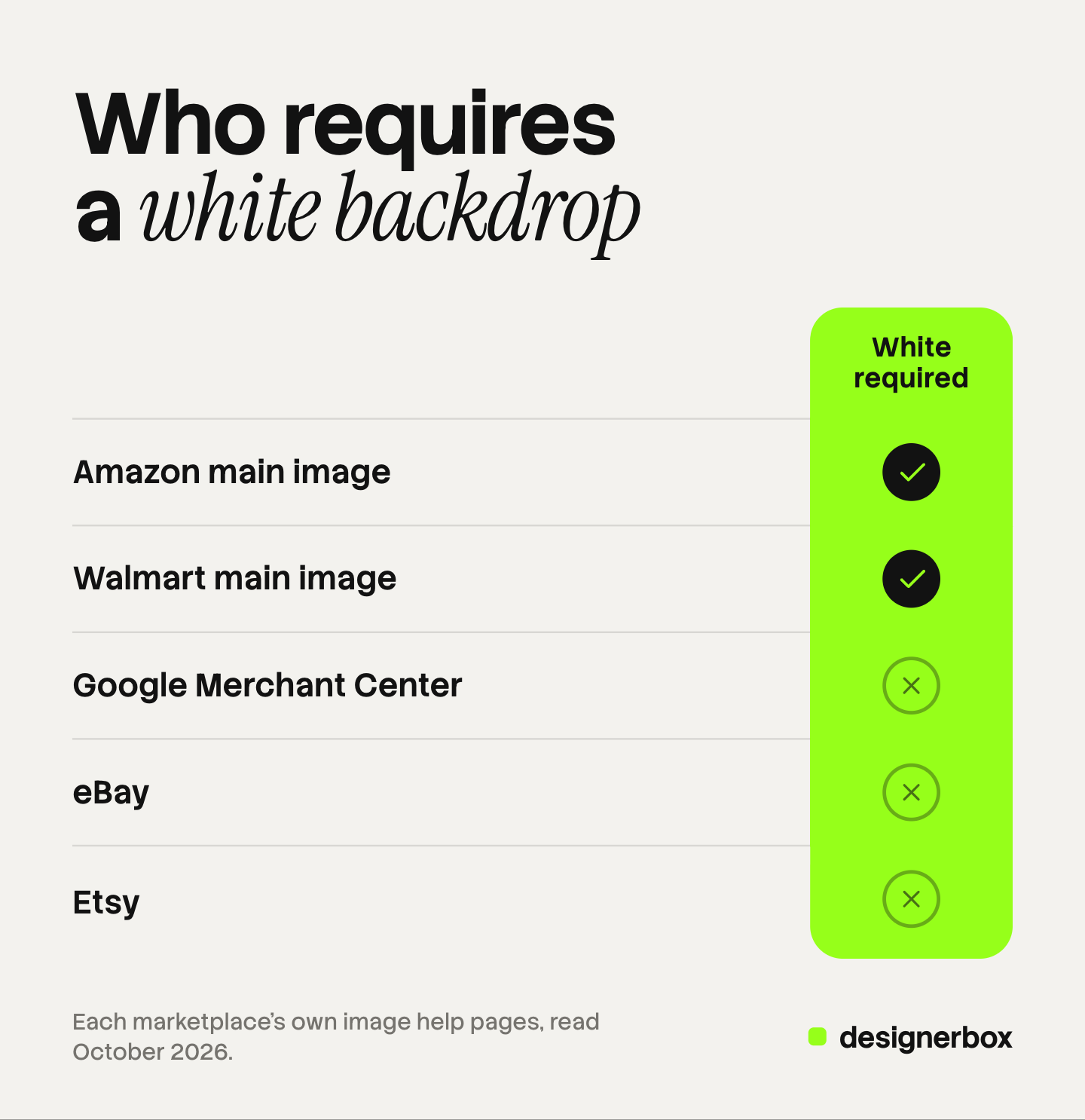
| Marketplace | Main image background | What else the page says |
|---|---|---|
| Amazon | Pure white, RGB 255, 255, 255 | Product shown as 85% of the image. A limited number of product types may use a lifestyle main image |
| Walmart | Seamless white, RGB 255/255/255 | Larger items may appear in an expected environment |
| Google Merchant Center | No color named | Solid white or transparent is recommended for clothing and accessories. No borders |
| eBay | No color required | A neutral backdrop is advised, and white is “generally best” |
| Etsy | No color named | The first photo should be horizontal or square, because thumbnails are cropped |
Amazon gives the exact RGB values, and the full list is in our guide to Amazon image requirements. Walmart allows one exception: images of larger items may feature the item in an expected environment (Walmart Marketplace Learn, October 2026).
Google’s image link page names no background color and bars an image with a border (Google Merchant Center Help, October 2026). Its clothing and accessories guide recommends solid white or transparent (Google Merchant Center Help, October 2026). Google also has a separate lifestyle image field, and that page names products shown with vivid background colors as one fit for it (Google Merchant Center Help, October 2026).
eBay’s picture policy bars borders, added text and watermarks, and sets no background color (eBay picture policy, October 2026). Etsy’s image help names no background color and recommends photos at least 2000 pixels wide and tall (Etsy Help, October 2026). Etsy has a separate rule about where a listing photo comes from, covered in our guide to Etsy product photos.
These pages change. Read each one again before a large upload, and write the date beside the rule in your product photography style guide.
When a generated background is a fair replacement
A generated background replaces the physical backdrop after the shoot. You photograph the product on a neutral surface, remove the background, and place the product on a new one. It is a fair replacement in three cases.
- The slot allows a scene. Gallery images, ads and social posts have no white rule.
- The product is matte and opaque. The real backdrop left little reflection on it, so the product fits a new surface.
- You need many backdrops for one product. Ten scenes from one approved photo take less time than ten physical sets.
It is a poor replacement in three other cases.
- The rule asks for white. A scene on an Amazon or Walmart main image breaks the written rule. A cutout placed on true white is the route there.
- The product is glossy or clear. Its reflections still show the real shoot. A chrome kettle shot on gray paper will not show a generated kitchen in its surface.
- The scene changes what the shopper expects. Walmart says images generated by artificial intelligence must be truthful, accurate and not misleading (Walmart Marketplace Learn, October 2026).
Google adds a technical rule. Images made with generative AI must keep metadata that says so (Google Merchant Center Help, October 2026). Our guide to AI product photos and marketplace rules covers disclosure on each channel. This is general information, not legal advice.
Check every generated background against the source photo. The shadow has to fall in one direction, and the product has to touch the surface.
Backdrops as a brand rule
DesignerBox is AI creative production for brands and agencies. It makes images, ads and video, and a product photo is one input among several. Anyone can make an AI picture. Making hundreds that still look like your brand is the hard part.
In DesignerBox you record the look once in your brand rules, and a saved workflow reads them on every run. The same surface, light and color then apply to every product. The page on AI product photography backgrounds shows the background options, with the light and shadow each one needs.
For a whole range, batch runs one workflow over a sheet, from row one to row two hundred. The cost is shown before the run. You keep or discard each result yourself. The same workspace makes the ad and the video from those images: the full workflow from the first product photo to the finished ad, in one subscription.
DesignerBox does not replace the shoot of the real product. It does not send finished work to a store or a marketplace. You download the results, or send them with a webhook or an S3 step. Every plan below Ultra is one seat.
Uploading your own photos and the commercial license start on the Pro plan. AI video, virtual try-on, upscaling, the image editor and the video editor start on the Premium plan. Plans and credits are on the pricing page.
There is a free plan, and it runs on sample products. Get started free
FAQ
What is the best background for product photography?
White is the safest background for a marketplace main image, and Amazon and Walmart require it. For gallery images, ads and social posts, choose a surface that gives contrast with the product and fits the brand.
Does a product photo need a white background?
Only where the channel says so. Amazon requires pure white on the main image, and Walmart asks for seamless white. Google names no color on its image link page, eBay advises a neutral backdrop, and Etsy’s image help names none. Your own store sets its own rule.
What color backdrop works for white products?
Use light gray or a darker color, so the product edge stays visible. A white product on white paper loses its outline in the photo. If the channel needs white, shoot on gray, remove the background, and place the product on white afterward.
How do I stop a colored backdrop from tinting the product?
Move the product farther from the backdrop, and place a black or white card beside the product to block reflected light. Use a neutral base under the product and keep the color behind it.
Can I use an AI-generated background on a marketplace listing?
Often on gallery images, where the rules allow a scene. The main image on Amazon and Walmart still needs white. Every image has to represent the product accurately, and Google asks you to keep the metadata that marks an image as AI-generated.
Sources
- Amazon main image rules: pure white background at RGB 255, 255, 255, the product as 85% of the image, lifestyle main images for a limited number of product types, props, and accurate color: Amazon Seller Central, product image requirements, accessed October 2026
- Walmart main image rules: seamless white background, larger items in an expected environment, and the rule for images generated by artificial intelligence: Walmart Marketplace Learn, image guidelines and requirements, accessed October 2026
- Google image rules: no border, and metadata on images made with generative AI: Google Merchant Center Help, image link, accessed October 2026
- Google recommendation of a solid white or transparent background for clothing and accessories: Google Merchant Center Help, clothing and accessories, accessed October 2026
- Google lifestyle image field and vivid background colors: Google Merchant Center Help, lifestyle image link, accessed October 2026
- eBay picture rules: no borders, added text or watermarks: eBay picture policy, accessed October 2026
- eBay photo tips: a neutral backdrop, white generally best, a darker background for shiny items: eBay Help, adding pictures to your listings, accessed October 2026
- Etsy image guidance: 2000 pixel recommendation, a horizontal or square first photo, cropped thumbnails: Etsy Help, requirements and best practices for images, accessed October 2026
- Seamless paper as a non-reflecting surface, and cutting off the used portion: Savage Universal, seamless background paper page (savageuniversal.com), October 2026
- Distance between subject and background, and flagging light: B&H Photo, Tips for Clean Backgrounds (bhphotovideo.com), October 2026
- DesignerBox brand rules, batch and background options: DesignerBox brand, batch and AI product photography backgrounds pages (designerbox.ai), October 2026
- DesignerBox plan gates: DesignerBox pricing page (designerbox.ai/pricing), October 2026
Amazon, Walmart, Google, eBay and Etsy rules verified on each platform’s own help page, October 2026. Savage Universal and B&H Photo notes read on their own pages, October 2026. DesignerBox features verified on designerbox.ai, October 2026. Individual results vary.