Apparel mockup software shows a clothing design on a garment before you photograph a real one. It comes in five groups: template generators, print-on-demand generators, 3D mockup generators, 3D garment design software and AI tools that start from a photo of a real sample. The right group depends on one question. Does the garment exist yet?
That question matters because marketplaces answer it for you. Etsy allows a mockup when a partner prints your design onto a blank t-shirt. It asks for a real photo when you designed the garment itself and a partner made it. Amazon allows only photos as the main image for clothing. So a tool can make a good image that your listing is not allowed to use.
This guide is for clothing brands, print-on-demand shops and the agencies that make their listing images. It sorts 15 tools by the stage the garment is at, and checks each one on its own website on 24 September 2026. DesignerBox publishes this guide, and one group includes DesignerBox, so we are not neutral. We say which group fits when you have no garment yet.
Key Takeaways
- Pick the group before the tool. A printed design on a blank, a garment you designed, and a garment already sewn each need a different kind of software.
- Etsy splits the two cases. A design printed onto a blank may use a mockup. A garment you designed and a partner made needs a real photo of the finished item (Etsy, September 2026).
- Amazon wants photos for clothing. Its clothing guide bars sketches, drawings and graphic representations as the main image, and says the color must match the product.
- Google accepts a mockup only as an extra image. Merchant Center asks for the actual product in the main image and allows other images in the additional image field.
- Free plans differ on commercial use. Printful says its mockups are free to use in ads and on your site. VirtualThreads keeps its free plan for personal use. Kittl’s free plan needs attribution.
- 3D garment design software is a development tool. CLO 3D, Browzwear and Style3D simulate a garment from its patterns. They help you approve a style before a sample. They do not make a listing mockup.
- Once a sample exists, start from its photo. One photo of the real garment can become flat lays, on-model shots and angles, and the image shows what the buyer gets.
What is apparel mockup software?
Apparel mockup software places a design, a logo or a whole garment into an image of clothing, without a photoshoot. Most tools take a flat design file and put it on a photo or 3D model of a blank garment. Others simulate a garment from its sewing patterns, or start from a photo of a real sample. The result is a product image, a preview for approval, or both.
The word covers three different jobs, and most tool lists mix them. A seller who prints designs on blank t-shirts wants a listing image of a product that does not exist until someone orders it. A designer wants to check fit and color before paying for a sample. A brand with a finished sample wants more images of it than one photoshoot gives.
AI product mockups covers the same split for every product type. This guide covers clothing only, where the listing rules are stricter.
Which mockup can a clothing listing use?
The marketplace decides this before you pick a tool. Etsy, Amazon and Google Merchant Center all ask for an image that shows the product the buyer receives. Each one allows a mockup in some places and not others. The table below quotes their rules, read on 24 September 2026.
| Platform | Mockup allowed | Real photo required | Source |
|---|---|---|---|
| Etsy | Your original design printed onto a base item by a production partner. Computer-generated mockups in additional images | A garment you designed that a partner manufactures. No blank product or placeholder text as the main image | Etsy Listing Image Requirements |
| Amazon | Not as the clothing main image | Main image: “Only photos are allowed.” Color must match the product, adult clothing shown on a model | Amazon clothing image guidelines, Amazon product image requirements |
| Google Merchant Center | Graphics and illustrations in the additional image field | The main image shows the actual product, with the correct color, pattern and material | Google Merchant Center image requirements |
Two more rules apply to AI images. Google says every image made with generative AI must carry metadata that says so, such as the IPTC DigitalSourceType tag. Amazon asks you to tag images that include photorealistic AI-generated people. Etsy asks sellers to say in the listing description when an item is created with AI, and to disclose a production partner (Etsy Creativity Standards, September 2026).

This is general information, not legal advice. Each platform updates its rules, so read the current page before you publish.
Template mockup generators
A template mockup generator puts your design file onto a photo of a blank garment. You upload a PNG, choose a template, change the garment color and download the image. This is the fastest route for a printed design, and the most common one. Seven tools fit here.
- Placeit. A template library for t-shirt designs and mockups, with photos of models, hangers and scenes, and video mockups. Its license allows commercial use of the images. It does not allow you to offer its templates to your own customers as a made-to-order service (placeit.net/license, September 2026).
- Mockup Mark. A browser generator with lifestyle shots, flat lays and studio shots. It offers colorable mockups on blanks from brands such as Bella + Canvas and Gildan, and you can start without an account (mockupmark.com, September 2026).
- Mock It. Templates for 45+ clothing brands, with six views for each set, color and fabric libraries, and exports at 2,400 by 2,400 pixels. Mockups made during an active subscription may be used commercially. It offers a 7-day free trial (mock-it.co, September 2026).
- Canva. Mockups inside the Canva editor. You drag an image into a t-shirt mockup. Canva’s help page says exported mockups can be used in commercial and client projects, including merchandise for ecommerce (canva.com/help/mockup-design, September 2026).
- Adobe Express. Template-based t-shirt design with mockup previews, and a free option (adobe.com/express, September 2026). It fits a team that already works in Adobe apps.
- Kittl. Mockups inside the Kittl design canvas, on a model or flat, front or back, in any color. Free accounts export at preview resolution, and the free plan needs attribution. Full commercial rights come with a paid plan (kittl.com, September 2026).
- Mockey. A library of flat, 3D and video templates, with a Shopify app, an Etsy app and a Figma plugin. It offers bulk downloads, so one design can come out in many templates at once (mockey.ai, September 2026).
These tools are built for printed graphics. The garment in the image is a stock blank, so the drape, fabric and fit are the template’s, not yours. That is fine for a print-on-demand listing on Etsy. It is not a photo of a garment you designed.
Print-on-demand mockup generators
A print-on-demand fulfiller’s generator makes mockups from its own catalog. The blank in the image is the blank the fulfiller prints. That is the main reason to use it: the print area, the colors on offer and the garment match what ships.
- Printful. A free generator for the Printful catalog, with studio and lifestyle settings, several angles and embroidery mockups. Printful says its mockups are free to use on your website, social media, apps, ads and email (printful.com/mockup-generator, September 2026).
- Printify. A generator for its product catalog, with flat lays, lifestyle scenes and several angles. The page says downloads are free and without a watermark. Printify connects to Etsy, Shopify, TikTok Shop, Amazon and eBay (printify.com/mockup-generator, September 2026).
Use your fulfiller’s generator for the main image, and a template tool for extra scenes. If the two show different blanks, the buyer sees a drape and weight they will not receive. Print on demand product images covers the four ways a fair mockup becomes an inaccurate one: color, print area, the blank and the finish. If the design itself is not finished yet, AI tools for print on demand covers the artwork, the lettering and the print file.
3D clothing mockup generators
A 3D clothing mockup generator wraps your design around a 3D model of a garment. You can turn the garment, change the light and the material, and export a still or a video. Three browser tools fit here.
- Pacdora. 3D mockups for hoodies, t-shirts, polos and hats. You change the angle, scene, light, background, material and color, and export 4K images or MP4 videos. Pacdora says its core function is free (pacdora.com, September 2026).
- Morflax Studio. 3D hoodie and t-shirt mockups with image and video export up to 4K on the paid plan. You can also upload your own 3D model. The paid plan lists a commercial license (studio.morflax.com, September 2026).
- VirtualThreads. 3D mockups and videos with wind and walking animations, garment color changes and custom backgrounds. Your files stay on your own computer. The free plan is for personal use only, and commercial use comes with the Pro plan (virtualthreads.io, September 2026).
A 3D mockup is a clear rendering, and a buyer can often tell. That makes it useful for social posts, a launch teaser or an extra listing image. It does not meet Amazon’s photo-only rule for a clothing main image.
3D garment design software
3D garment design software simulates a garment from its sewing patterns and fabric data. It shows fit, drape and silhouette before anyone cuts fabric. Designers use it to approve a style, test colorways and send fewer physical samples to the factory. It is a development tool, and it is not built for listing images. The guide to fashion design software for beginners shows where 3D fits after the flat and the pattern.
- CLO 3D. Simulates fabric, fit and silhouette from patterns, for virtual sampling. It offers a free trial (clo3d.com, September 2026).
- Browzwear VStitcher. Simulates patterns and fabrics with fit data, and outputs renders, tension maps, tech packs and pattern files. Access starts with a demo request (browzwear.com, September 2026).
- Style3D. Style3D Studio simulates garments and makes renders and runway animations. Style3D AI is a separate design tool with a free trial (style3d.com, September 2026).
These tools need patterns and skill. A brand without a pattern maker gets little from them. AI pattern making software compares the drafting and 3D fit tools in more detail.
Images from a real sample
Once a sample exists, a mockup is the wrong tool. You have the real garment, and Etsy and Amazon both want to see it. The job changes. You need a full image set from one photo, in the same look for every product in the drop, without booking a studio for each one.
That is the job DesignerBox does. Anyone can make an AI picture. Making hundreds that still look like your brand is the hard part. You start from a photo of the real garment:
- Clothing catalog turns one garment into four shots: front, three-quarter, back and a fabric close-up.
- Virtual try-on and the Dress my model app put the garment on a model. They start on the Premium plan.
- Flat lays and ghost mannequin shots come from the same photo. Ghost mannequin photography and flat lay photography cover what each shot needs.
- The image editor changes the background, the light or the angle. The picture keeps its detail and resolution.
You build this once as a workflow, with your brand, your background and your framing. It runs the same way on the next garment. Batch runs the same workflow over a whole drop, and you review the results in one pass. The cost is shown before each run. It is the full workflow from the first product photo to the finished ad, in one subscription.
Where DesignerBox fits less well. DesignerBox starts from a photo of a garment. If you have only a design file and no garment, a template or print-on-demand generator is the right tool. The commercial license starts on the Pro plan. Plans are on the pricing page.
How to choose apparel mockup software
Start from the stage the garment is at, then from where the image goes. The table matches each stage to a group of tools and to the listing slot the result can fill.
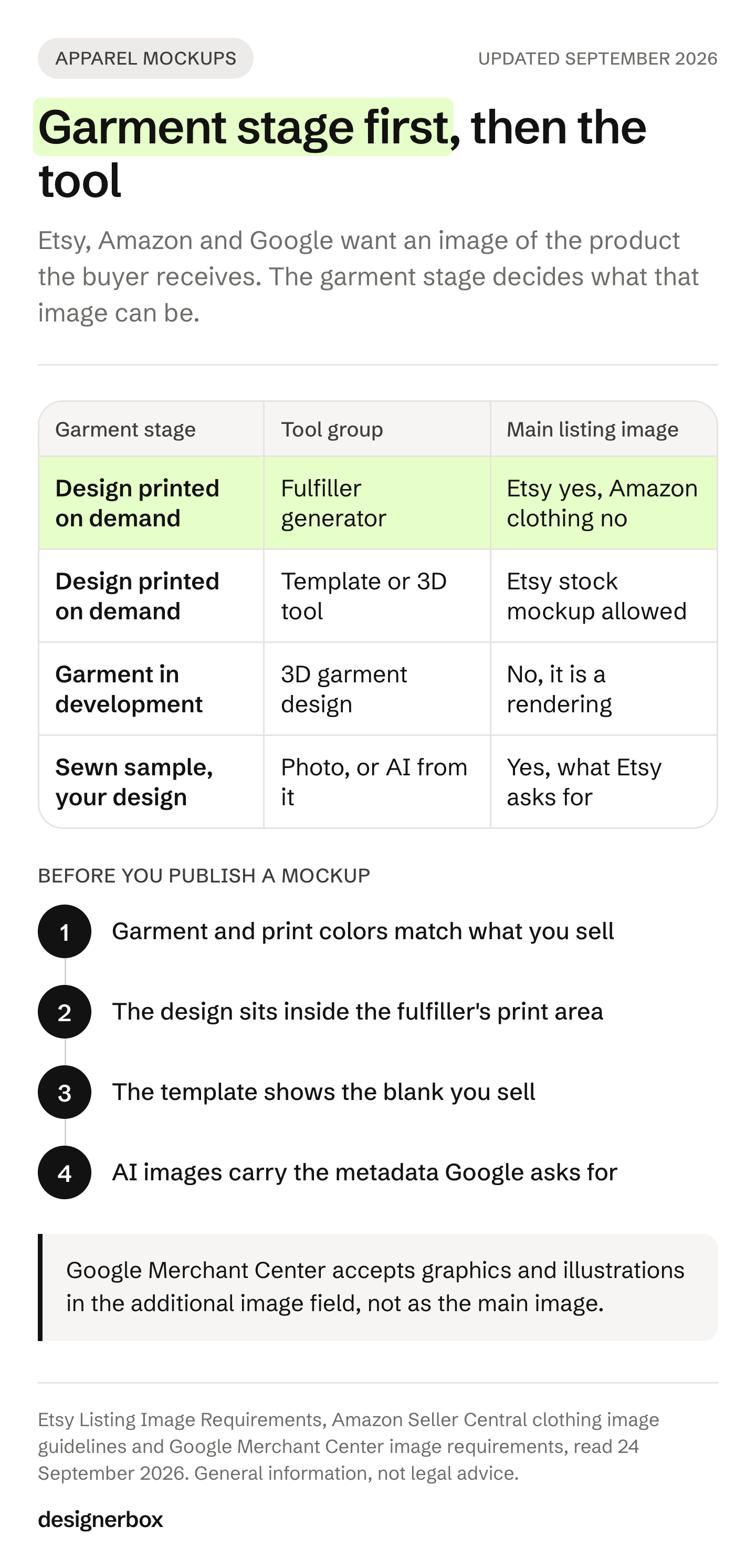
| Garment stage | Tool group | Main listing image | Extra images and ads |
|---|---|---|---|
| A design file, printed on demand | Print-on-demand generator | Yes on Etsy. Not the Amazon clothing main image | Yes |
| A design file, printed on demand | Template or 3D generator | Etsy allows a stock photo mockup of a printed design | Yes, check the free-plan license |
| A garment in development | 3D garment design software | No, it is a rendering | Internal review, sometimes a teaser |
| A sewn sample of your own design | A photo, or AI images from the photo | Yes, this is what Etsy and Amazon ask for | Yes |
Then check volume. A drop of 12 designs in 5 colors is 60 images. A tool that makes one mockup at a time turns that into an afternoon of uploads. Mockey offers bulk downloads, fulfiller generators work from the catalog, and a saved workflow runs the same steps on each garment. For a whole shop, keep the same background, light and framing on every image. Consistent product images sets out the six things to hold fixed.
Last, read the license for the plan you use. Three free plans in this guide allow different things: free commercial use, attribution, or personal use only.
A clothing mockup that matches what ships
A mockup is a promise about the garment. Five checks keep it accurate.
- Color. The garment color and the print color in the image match the blank and the print method you sell. Amazon and Google both ask for the correct color.
- Print area. The design sits where the fulfiller can print it, at a size it prints on every garment size.
- The blank. The template shows the same garment you sell, with the same fit, weight and neckline.
- The finish. Embroidery, puff print or foil appear only when the order includes that method.
- Labels. AI images carry the metadata Google asks for, and your Etsy listing says when AI made an item.
For a sewn garment, add one more check: the image shows your garment and not a stock blank. How to take photos of clothes to sell covers the photo you start from. Etsy product photos covers Etsy’s slots in detail.
A free plan for your first run
Start from a template, add your brand and your products, and see the cost before you run it.
FAQ
What is the best apparel mockup software?
It depends on the garment stage. For a design printed on demand, use your fulfiller’s generator, such as Printful or Printify, so the blank matches what ships. For extra scenes, a template tool such as Placeit or Mock It fits. For a garment in development, use CLO 3D, Browzwear or Style3D. For a sewn sample, start from a photo of it.
Is there a free clothing mockup generator?
Yes. Printful says its mockups are free to use on your site and in ads. Printify says downloads are free and without a watermark. Pacdora says its core function is free. VirtualThreads has a free plan for personal use only, and Kittl’s free plan needs attribution. Read the license before you use a free result commercially.
Can I use a mockup as my Etsy main image?
Yes, if a production partner prints your original design onto a base item such as a t-shirt. Etsy then allows a stock photo mockup. A photo of the blank product or a mockup with placeholder text is not allowed as the main image. If you designed the garment itself and a partner made it, Etsy asks for a real photo of the finished item.
Does Amazon allow clothing mockups?
Not as the main image. Amazon’s clothing image guidelines list sketches, drawings and graphic representations as prohibited main images, and say only photos are allowed. The color must match the product, and adult clothing is shown on a model. Mockups and graphics can go in the other image slots.
What is a 3D clothing mockup?
A 3D clothing mockup wraps a design around a 3D model of a garment, so you can turn it and change the light and material. Pacdora, Morflax Studio and VirtualThreads make them in a browser, as images and videos. They suit social posts and extra listing images. 3D garment design software such as CLO 3D goes further and simulates the garment from its patterns.
Can AI make a clothing mockup from a photo of my garment?
Yes. AI image tools can put a photographed garment on a model, on a flat lay or in a new scene. The result shows your real garment, which is what Etsy and Amazon ask for when you designed it. Check the print, the logo and the seams against the sample. Tag the image as AI-generated where the platform asks for it.
Do I need Photoshop for apparel mockups?
No. Every tool in this guide runs in a browser or its own app. Photoshop mockup files still work if your team uses them, but a template generator does the same job without the software. A print-on-demand generator also matches the blank you sell.
Sources
- Etsy Listing Image Requirements, accessed September 2026
- Etsy Creativity Standards, accessed September 2026
- Amazon Seller Central, image guidelines for clothing (G200498950), accessed September 2026
- Amazon Seller Central, product image requirements (G1881), accessed September 2026
- Google Merchant Center, image link requirements, accessed September 2026
- Tool pages, read 24 September 2026: placeit.net/t-shirt-mockups and placeit.net/license, mockupmark.com, mock-it.co, printful.com/mockup-generator, printify.com/mockup-generator, canva.com/help/mockup-design, adobe.com/express, kittl.com/tools/mockups/t-shirts, mockey.ai, pacdora.com/mockups/apparel-mockups, studio.morflax.com, virtualthreads.io, clo3d.com, browzwear.com/products/v-stitcher, style3d.com
- DesignerBox features and plans (DesignerBox pricing, September 2026)
Tool features and marketplace rules verified from each company’s own pages as of September 2026. Features and terms change, so check the current page before you rely on one.