An AI photoshoot generates product images from a model instead of a camera. You upload one clean source photo, then generate the angles, backgrounds and scenes a listing needs. On DesignerBox the model you pick sets the cost of a run, and you see it before the run. Shopify puts a camera shoot at $50 to $350 an image. Accuracy rules still apply.
Search for the term and you get two completely different products back. Half the results generate a portrait of a person from selfies. The other half generate a product on a backdrop from a packshot. Google’s own summary of the query splits into “of Yourself” and “Product” and treats them as the same job.
They are two different jobs. The input differs, the cost differs, and since July 2026 the disclosure rules differ too. This guide covers the product side: what the workflow is, what it costs, what Amazon and Shopify require, and where it still fails.
Key Takeaways
One source photo, many outputs. The model does not invent your product. It re-lights, re-angles and re-stages the one you upload, which is why the source shot decides the ceiling.
Check what “free” covers. On DesignerBox the commercial licence starts at Pro, $35 a month billed monthly. Results on the free plan carry a watermark.
The model sets the cost, and you see it before you run. Each model costs a different number of credits, and DesignerBox shows the cost before the run. Pro includes 1,000 credits a month.
Amazon’s image guide has no rule against AI product images. Its AI rule covers photorealistic AI-generated people. The rule that bites is older and simpler: images must accurately represent the product as a realistic, professional-quality image, and the product should fill 85% of the frame (sellercentral.amazon.com, September 2026). For clothing, Amazon says only photos are allowed.
The new disclosure duty covers people. Amazon’s synthetic-performer tag applies to photorealistic people generated entirely by AI. A bottle on a backdrop does not trigger it.
We found no image-accuracy rule in Shopify’s Acceptable Use Policy, as of September 2026. Its published image requirements are dimensions and file size, and its terms make you responsible for your store content. What constrains you there is consumer law and your return rate.
Images are the first thing shoppers look at. 56% of test subjects began by exploring product images before reading titles or descriptions (baymard.com, September 2026).
What is an AI photoshoot?
An AI photoshoot is a session where an image model produces the photographs, working from a reference you supply rather than from a camera and a set. You upload one clean shot of the product. The model generates the additional angles, backgrounds, lighting setups and lifestyle scenes that a listing or a campaign needs. The output is a set of files, not a single image.
The word “photoshoot” is doing real work in that sentence. A single generated image is not a photoshoot. What brands actually need is a coherent set: a white-background main image, several detail angles, something in scale, and a styled scene or two, all of which look like the same product photographed on the same day.
The two things people mean by “AI photoshoot”
These two jobs share a name and almost nothing else. Sorting which one you are doing decides your tool, your budget and your legal exposure.
| Photoshoot of a person | Photoshoot of a product | |
|---|---|---|
| Input | Selfies or a face reference | One clean packshot |
| Typical use | Headshots, portraits, profile pictures | Listings, PDPs, ads, catalogues |
| Buyer | Mostly consumer | Brands, sellers, agencies |
| Disclosure duty | Yes, if photorealistic and synthetic | No, a product is not a performer |
| Accuracy risk | Low, it is your own likeness | High, it has to match what ships |
The disclosure row is the one that changed recently. In July 2026, Amazon told sellers to tag images that show a photorealistic person generated entirely by AI with the keyword “contains-synthetic-performer” before upload (Amazon Seller Central, product image guide, September 2026). CNBC reports the change followed New York’s synthetic performer law (cnbc.com, September 2026). That law has applied since 9 June 2026. It defines a synthetic performer as a digital asset made to look like a human performing, where the person is not recognisable as any real performer. It sets civil penalties of $1,000 for a first violation and $5,000 for each later one (nysenate.gov, September 2026). This is general information, not legal advice.
Read the trigger carefully, because it is easy to misread. The duty attaches to a synthetic human. Generating a marble backdrop behind a candle does not create a performer. If your shoot has no people in it, this rule does not reach you.
How to do an AI photoshoot, step by step
The sequence below is the product workflow. It assumes you have the physical item and a phone.
- Shoot one clean source photo. Even lighting, plain background, product sharp and fully in frame. This single file sets the quality ceiling for everything downstream, which is why it is worth the twenty minutes the source shot deserves.
- Remove the background. You want the product isolated before you start staging it, so the model composes around it rather than fighting the original room.
- Generate the main image first. Pure white, product filling the frame, no props. This is the most constrained shot and the one with the least creative latitude.
- Generate the angles. Front, back, side, top, detail, in scale. A listing needs several specific angles before it is complete, and generating them together keeps the lighting consistent across the set.
- Generate the styled scenes last. Lifestyle and context shots have the widest tolerance, so they are the cheapest place to experiment once the compulsory shots are banked.
- Check every file against the physical product. Colour, logo, texture, proportions, count. This step is not optional, and a person has to do it.
Step six is where most sets fail review. The model is optimising for a plausible image, not a truthful one, so a label can drift, a seam can move, and a strap can gain a buckle it never had.
What an AI photoshoot costs
On DesignerBox each model costs a different number of credits, so the model you pick sets the cost of the run. The cost is shown before the run, so you check a six-shot set against your plan first. Pro includes 1,000 credits a month for $35 billed monthly. Route the plain matte goods through a lower-cost model and save the higher-cost one for the shots that carry a label.
Two gates matter more than the credit maths. The commercial licence starts on Pro. Virtual try-on and AI video start on Premium, $75 a month billed monthly. The free plan’s 112 credits a month are real, and its results carry a watermark, which makes them useful for testing the look before a live listing.
Set that against a camera. Shopify puts product photographers at $500 to $3,000 a day, or $50 to $350 for each product shot (shopify.com, September 2026). A six-shot set at those rates is $300 to $2,100 for one product. The comparison is only rough, because a studio day covers many products and delivers files you never have to fact-check. The honest framing is that generation moves the cost from the shoot to the review. For a fuller breakdown of the studio side, including the reshoot cycle that inflates it, see what a product photoshoot actually costs.
What the marketplaces actually require
Amazon and Shopify are often described as having AI image policies. Amazon’s AI rule covers images of AI-generated people, and Shopify’s image requirements do not mention AI. The difference between them is worth knowing before you plan a set.
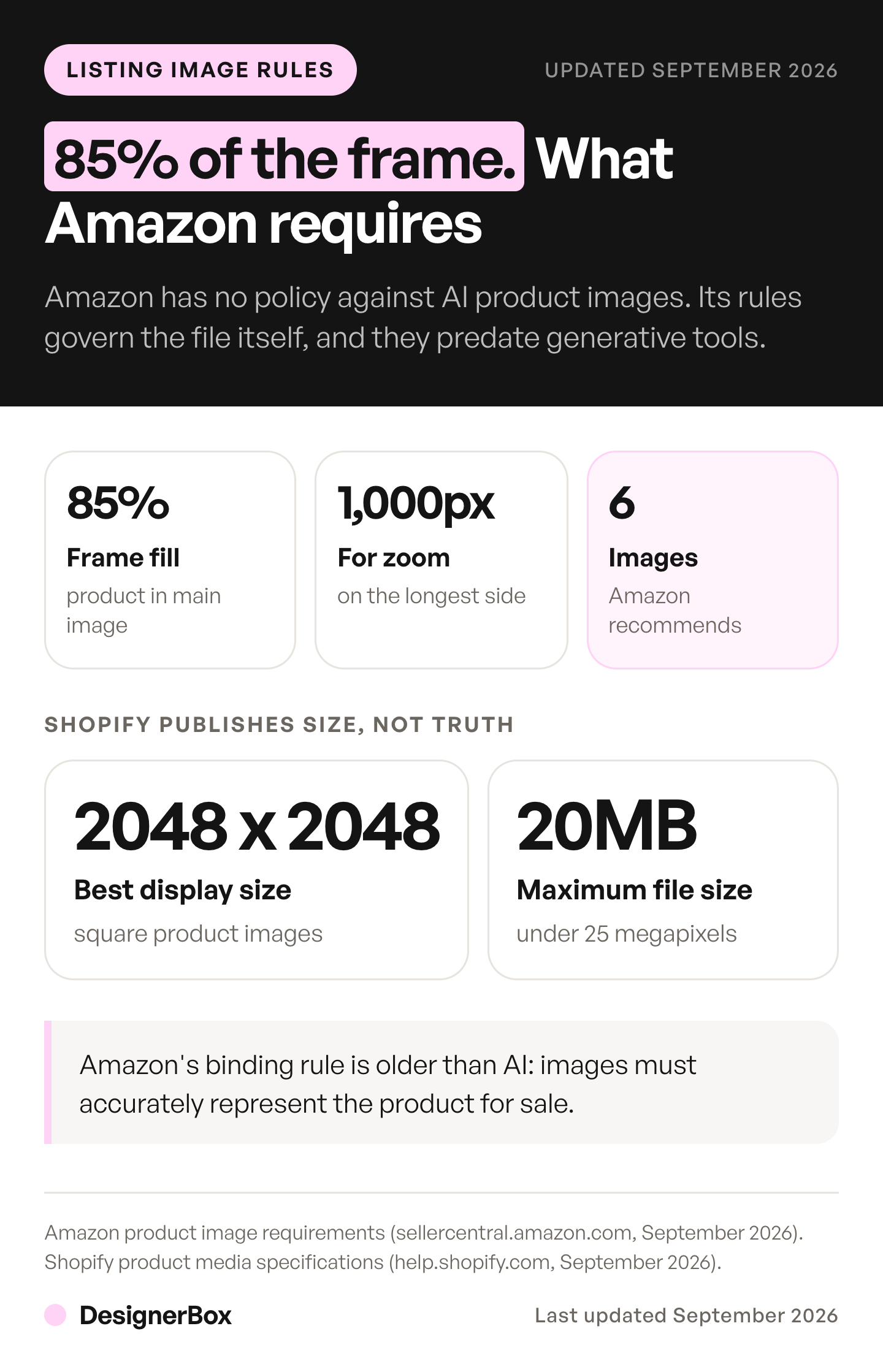
Amazon’s general constraints are about the image. All images must accurately represent the product as a realistic, professional-quality image. The product should fill 85% of the frame. Main images need a pure white background at RGB 255,255,255, with no text, logos, borders or watermarks, and the product shown outside its packaging. Files run from 500 to 10,000 pixels on the longest side, and 1,000 pixels or more turns on zoom. Amazon recommends a main image plus at least six more images and one video (sellercentral.amazon.com, September 2026). For clothing, Amazon’s clothing guide says only photos are allowed, and it does not say whether a photorealistic AI image counts as a photo.
Shopify publishes dimensions and nothing about truthfulness. Square images display best at 2048 by 2048 pixels, up to 5000 by 5000 or 25 megapixels, under 20MB, with PNG preferred and JPEG next (help.shopify.com, September 2026). We found no accuracy clause in its Acceptable Use Policy, as of September 2026, and its Terms of Service make you responsible for your store and your content (shopify.com/legal/terms, September 2026). On your own store the limits are consumer protection law and the returns your images cause. We cover how that plays out on a Shopify store separately.
The accuracy rule is the one to design around. It applies whether the image came from a camera or a model, and it is the reason step six above exists.
Where generation still breaks
Failure is not random across a catalogue. It tracks the material, because the properties that are hard to render are physical ones: transparency, reflectivity, fine repeating texture, and precise text on a label.
Clear glass, mirrored metal, knitted fabric and anything carrying dense small type are the categories that need the most correction, and sometimes need a camera. Matte, opaque goods with simple shapes come through cleanest. The practical move is to sort the catalogue by material rather than by product category and route only the reliable half through generation on the first pass.
Model choice helps at the margins. Nano Banana Pro generates at 1K, 2K and 4K and accepts up to six high-fidelity object images (ai.google.dev, September 2026). Nano Banana 2 takes up to ten. OpenAI says GPT Image models “can still struggle with precise text placement and clarity” (developers.openai.com, September 2026), which is a useful warning for label work. What each model is best for sits on the model list.
When to book a photographer instead
Generation is the wrong call in three situations, and saying so is cheaper than a suppressed listing.
Book a camera when the product is the hard-material case above and the shot is the main image, because that is the slot with the least tolerance for drift. Book one when you are launching a hero product whose photography is the brand, where the point is a specific art direction rather than coverage. And book one when you do not yet have a usable source photo, since generation cannot rescue a bad original. It can only repeat its flaws.
The realistic pattern for most catalogues is both. Photograph the hero products and the awkward materials. Generate the long tail, the angle variants, the seasonal restages and the ad crops. A DesignerBox product photography workflow fits that split. Build the pass once on one product and check it against the physical item. A saved workflow runs the same way on the next SKU, so you do not start from a blank prompt every time, and you see the cost before each run.
The free plan gives 112 credits a month and takes no card. Start from a template on your own product before you plan a catalogue around it.
FAQ
How do you do an AI photoshoot?
Upload one clean, evenly lit photo of the product, remove its background, then generate the main image, the required angles, and the styled scenes in that order. Check every output against the physical item for colour, logo and proportion before you publish. The source photo sets the quality ceiling for the whole set.
Can I do an AI photoshoot for free?
Partly. The DesignerBox free plan gives 112 credits a month and takes no card, which is enough to judge the look. Results on the free plan carry a watermark, and the commercial licence begins at Pro, $35 a month billed monthly. Check any tool that advertises a free session on those two points.
Are AI product photos allowed on Amazon?
Amazon’s general image guide does not ban AI-generated product images, as of September 2026. Its images must accurately represent the product, and main images must meet the white-background, 85% frame fill and no-text rules, however the image was produced. For clothing, Amazon says only photos are allowed. Since July 2026, images showing a photorealistic person generated entirely by AI must carry the contains-synthetic-performer tag.
What does an AI photoshoot cost?
It depends on the model. On DesignerBox each model costs a different number of credits, and the cost is shown before the run. Pro is $35 a month billed monthly for 1,000 credits. Shopify puts traditional product photography at $50 to $350 an image, or $500 to $3,000 a day.
How many photos does a product listing need?
Amazon recommends a main image plus at least six more images and one video. Practically, a complete set is a white-background main image, three or four angles, one detail shot, and something that communicates scale. 42% of shoppers try to judge a product’s size from its images, so the in-scale shot earns its slot.
Will the images look fake?
It depends on the material more than the model. Matte, opaque products with simple shapes come through convincingly. Clear glass, polished metal, fine knits and dense label text are where artefacts appear. Sorting the catalogue by material before you start is what keeps the visible failures out of the set.
Is an AI photoshoot the same as an AI headshot?
No. They share a name and little else. A headshot generates a person from selfies and, when photorealistic, can trigger disclosure duties on some platforms. A product photoshoot generates objects from a packshot and carries an accuracy obligation instead.
Sources
- Amazon image requirements, including the accuracy rule, 85% frame fill, main-image prohibitions, the 500 to 10,000 pixel range, the 1,000 pixel zoom threshold, the image recommendation and the contains-synthetic-performer tag: Amazon Seller Central, product image guide, September 2026
- Amazon’s July 2026 notice to sellers and its link to New York law: cnbc.com, September 2026
- New York S.8420-A, the synthetic performer definition and the $1,000 and $5,000 penalties: nysenate.gov, September 2026
- Shopify merchant responsibility for store content: Shopify Terms of Service, September 2026
- Shopify product image dimensions, the 25 megapixel and 20MB limits and accepted formats: help.shopify.com, September 2026
- Product photography day rates and per-image rates: shopify.com, September 2026
- Shoppers exploring product images before titles or descriptions, and gauging scale from images: baymard.com, September 2026
- Nano Banana Pro and Nano Banana 2 resolutions and object reference limits: ai.google.dev, September 2026
- GPT Image text placement limitation, quoted verbatim: developers.openai.com, September 2026
- DesignerBox plan allocations, the watermark on the free plan and plan gates: DesignerBox pricing page (designerbox.ai/pricing), September 2026
Marketplace requirements, model specifications and photography rates verified from platform, vendor and research documentation as of September 2026. Platform image policies change without notice. Verify current requirements on each marketplace before publishing a listing. This is general information, not legal advice. Individual results vary.