
The best Shopify apps are the ones that do a job your product page cannot do yet. There are five such jobs, in this order: product images and listing content, reviews, upsell, search and recommendations, and bulk product data. Shopify already covers part of four of them. Start with images, because every other app shows the product photo.
A ranking by popularity does not help a store with 40 products and one person who runs it. This guide orders the jobs instead, and it names well-known apps for each one as examples. Every feature comes from the app’s own Shopify App Store listing, read on 7 October 2026. It prints no prices. We make DesignerBox, which does the image job, so read that section as our own case.
Key Takeaways
Pick an app by its job. A product page has five jobs an app can do: images, reviews, upsell, search and recommendations, and bulk data.
Check Shopify first. Shopify’s own tools cover part of four of the five jobs. Its list of first-party apps names no product review app.
Images come first. The first media item appears on collection pages, the cart, the checkout and the home page. Review, upsell and search apps all display it.
Upsell can start without an app. Shopify lets you select up to 10 complementary products for each product.
Every app has a cost in speed. Shopify says each feature you add can affect your store’s web performance.
What are the best Shopify apps for a new store?
The best Shopify apps for a new store are few. A store needs one tool for each job it cannot do with Shopify alone. The table shows the five jobs, the point where each one starts to matter, and what Shopify gives you before any install.
| Job | You need it when | Shopify’s own tool | App examples |
|---|---|---|---|
| 1. Product images and listing content | From the first product | File editor, Sidekick | Photoroom AI Listing Assistant, DesignerBox |
| 2. Reviews | Customers have received orders | None on Shopify’s own app list | Judge.me, Loox, Yotpo |
| 3. Upsell and bundles | Some products are bought together | Shopify Bundles, complementary products | Selleasy, ReConvert |
| 4. Search and recommendations | Shoppers filter and search the catalog | Search & Discovery | Boost AI Search & Filter, Wiser AI |
| 5. Bulk product data | One change touches many products | Bulk editor, CSV import | Matrixify |
The examples are well-known apps in each category, and they are not a ranking. This guide stays on the product page. If you sell apparel, the guide to Shopify apps for clothing stores covers size charts, returns and support.
What Shopify includes before any app
A new store already has a tool for most of these jobs, and the explainer on how Shopify works lists what the platform runs. Shopify says apps made by Shopify “are usually free and are supported by Shopify” (help.shopify.com, October 2026).
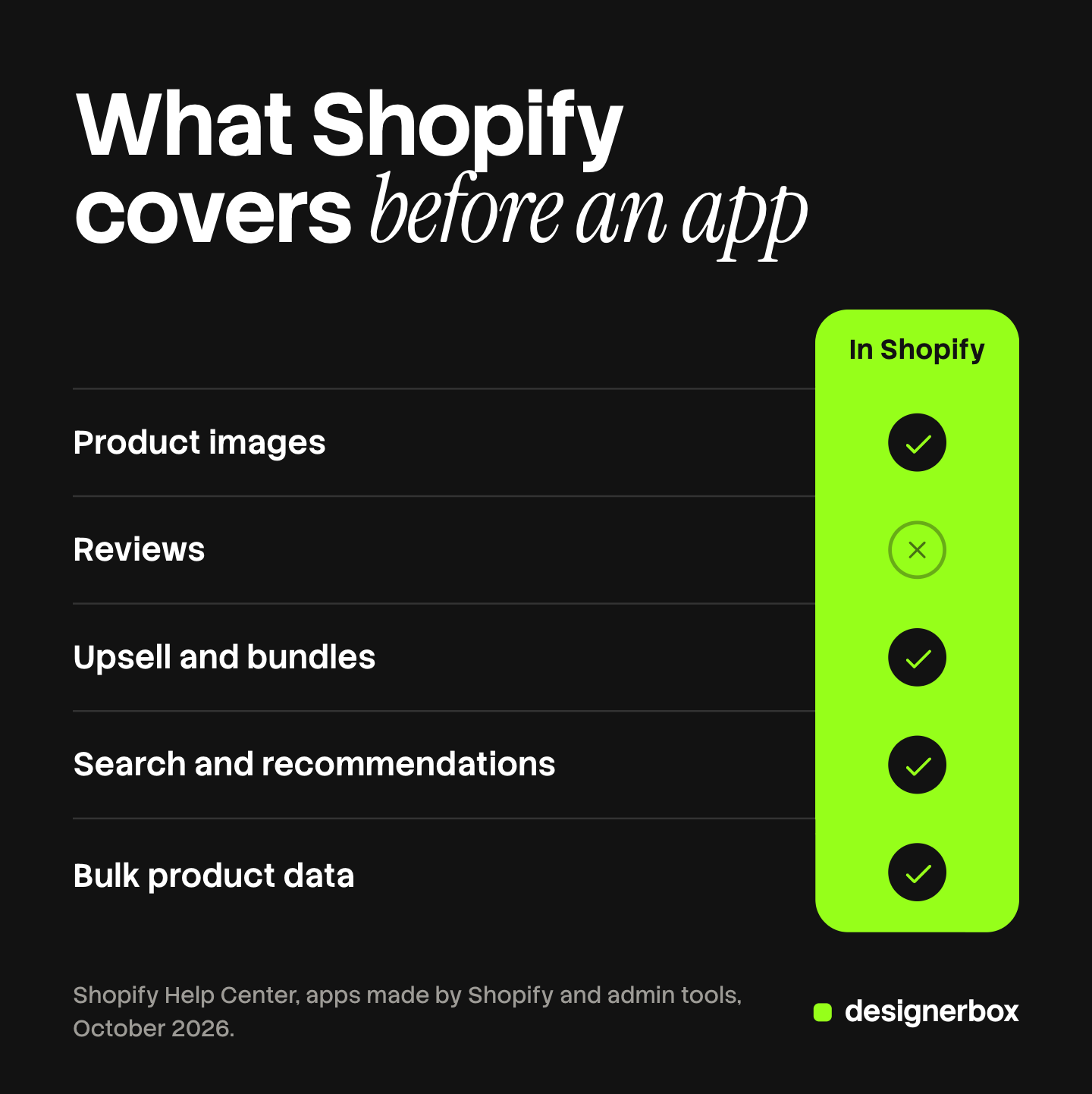
Here is what the admin and Shopify’s own apps cover for the five jobs:
- Listing text. Sidekick writes product descriptions inside the admin (help.shopify.com, October 2026).
- Image edits. The file editor replaces a background with a color, changes an image from a text prompt and extends the frame. Shopify says the feature is available on all plans at no additional cost “for a limited time” (help.shopify.com, October 2026).
- Bundles. Shopify Bundles is “a free first-party bundles app” for fixed bundles and multipacks, available on all Shopify plans (help.shopify.com, October 2026).
- Search, filters and recommendations. The Search & Discovery app sets filters, synonym groups, and related and complementary products.
- Bulk edits. The bulk editor changes many products and variants at the same time.
One job has no first-party tool. Shopify’s list of its own apps, read in October 2026, includes no product review app. Reviews are the first job where a store needs a third-party app.
Job 1: product images and listing content
Images come first for a practical reason. Every other app on the page displays them. A review widget sits next to the photo. An upsell block shows a small picture of each add-on. Search results and recommendations are rows of product pictures.
Shopify confirms how far one image travels. The first media item for a product “is displayed on collection pages, the cart page, the checkout page, and your home page” (help.shopify.com, October 2026). An unclear first image is unclear in all of those places.
When you need it: from the first product.
Three kinds of tool do it:
- Shopify’s file editor suits single edits. It changes the background of the image you open, inside the admin.
- Photoroom AI Listing Assistant works across a catalog from inside Shopify. Its listing says it imports your products, creates visuals in bulk and exports them back to your store. It names virtual models, backgrounds and shadows, and it generates SEO descriptions and alt text (apps.shopify.com/photoroom-production, October 2026).
- DesignerBox runs one saved set of steps on every product photo, so each product gets the same shots. It is not a Shopify app. You download the results and add them to the product.
Whichever tool you use, compare each result with the real product. The guide to Shopify product images covers how each part of the store crops the first image. The rules for generated images come from outside Shopify, and they are set out in the guide to AI photos on Shopify.
Listing content is the second half of this job. The guide to Shopify product page optimization goes through each field and its limit.
Job 2: product reviews
When you need it: after customers have received orders. A review app sends its requests after delivery, so install it when the first orders ship.

Three well-known examples, each from its own listing:
- Judge.me Product Reviews App collects reviews with photos and videos, and its listing describes them as unlimited. It sends review requests after fulfillment or delivery. It also imports reviews from Amazon, Etsy and other review apps (apps.shopify.com/judgeme, October 2026).
- Loox centers on photo and video reviews. Its listing says its AI sorts the best visual reviews first, highlights key quotes and translates reviews for international shoppers (apps.shopify.com/loox, October 2026).
- Yotpo: Product Reviews App collects reviews, photos and videos with review requests inside the email. Its listing names Google Seller Ratings and a link to Yotpo’s loyalty product (apps.shopify.com/yotpo-social-reviews, October 2026).
The differences are scope: text-first or photo-first, and how much sits around the reviews. One review app is enough.
Job 3: upsell and bundles
When you need it: when some of your products are bought together, such as a lamp and its bulbs.
Start with what Shopify includes. In the Search & Discovery app you can “select up to 10 complementary products” for each product. Shopify defines them as “products often bought in addition to a selected product” (help.shopify.com, October 2026). Your theme needs a complementary products section to show them. Shopify Bundles then covers fixed bundles of up to 30 components.
A Shopify upsell app adds more places and more rules:
- Selleasy shows frequently bought together bundles and add-ons on the product page. Its listing also names offers in the cart, at checkout, after purchase and on the thank you page (apps.shopify.com/upsell-cross-sell-kit-1, October 2026).
- ReConvert builds upsell offers for the product page, the cart and the step after purchase. Its listing says its checkout upsell is for Shopify Plus only (apps.shopify.com/reconvert-upsell-cross-sell, October 2026).
Job 4: search and recommendations
When you need it: when shoppers have to search. As a rule of thumb, that starts when a collection no longer fits on one screen. A store with 12 products needs clear collections more than a search app.
Shopify’s own app covers a lot here. Shopify generates related product recommendations for each product in your store, and you can select up to 10 complementary products of your own. The Search & Discovery app also sets filters, synonym groups and product boosts in search results.
Two examples of apps that go further:
- Boost AI Search & Filter returns “real-time search results, even with typos or unclear search terms”. Its listing names filters by tag, metafield and variant, and the option to pin or reorder products (apps.shopify.com/product-filter-search, October 2026).
- Wiser AI places recommendations on the home page, product pages, the cart, the checkout and after purchase. Its listing names related and recently viewed products and frequently bought together bundles (apps.shopify.com/recommended-products-wiser, October 2026).
Many apps cover two jobs, as Wiser does. Check for that overlap before you install a second app.
Job 5: bulk product data
When you need it: when one change touches many products. A seasonal price change on 300 variants is the usual first case.
Shopify’s bulk editor handles the first stage. It makes changes “to multiple products and product variants at the same time”. For bigger jobs, Shopify points to CSV files, which “bulk edit a larger number of list items” (help.shopify.com, October 2026).
Matrixify is the well-known app for the stage after that. Its listing says it imports, exports and updates store data with Excel, CSV or Google Sheets, in files up to 20 GB. It also migrates data from Magento, WooCommerce, BigCommerce, Lightspeed and WordPress, and it can schedule and repeat a job (apps.shopify.com/excel-export-import, October 2026).
Images are part of bulk data too. The guide to Shopify bulk upload images covers the routes by image count.
How many apps a store needs
There is no fixed list of must have Shopify apps. A store needs one app for each job that Shopify does not cover for it, and no more. A new store can leave apps until after the Shopify launch checklist is done.

Shopify gives the reason in its own words. Your store is made of “theme code, apps, images, videos, carousels, social media feeds, and analytics”, and “each feature that you add to your online store can impact your store’s web performance” (help.shopify.com, October 2026).
A simple order for a brand with 20 to 500 products:
- Complete the image set and the listing fields for every product.
- Add one review app when orders start to ship.
- Set complementary products in Search & Discovery. Add an upsell app when you need offers in the cart or after purchase.
- Add a search app when shoppers filter a large catalog.
- Add a bulk data app when the bulk editor and CSV files take too long.
After each install, open the product page on a phone and check that it still loads quickly.
One image workflow for every product
Four of the five jobs end when you install a tool and set it up. The image job returns with every new product. Anyone can make an AI picture. Making hundreds that still look like your brand is the hard part.
DesignerBox is AI creative production for brands and agencies. For a brand with 20 to 500 products, or the agency that runs its store, the job is the same shot for every product. You build the image set once as a workflow: the background, the light, the framing and the list of shots. Your brand rules sit in a brand profile, and the workflow reads them on every run.
Batch runs that workflow over a sheet of products. Row one and row two hundred get the same set. You keep or discard each row, and you can re-run one row alone. The cost is shown before the run.
You download the results, or send them with a webhook or an S3 step, and then add them to each product in Shopify.
Uploading your own photos and the commercial license start on the Pro plan. AI video, virtual try-on, upscaling, the image editor and the video editor start on the Premium plan. Plans and credits are on the pricing page. Every plan below Ultra is one seat.
The same product photo also feeds the ad and the video. The full workflow from the first product photo to the finished ad, in one subscription. There is a free plan, and it runs on sample products. Get started free.
FAQ
What are the best Shopify apps for a small store?
The best Shopify apps for a small store are one tool for each job the store has today. Start with product images and listing content. Add a review app when orders ship. Use Shopify’s own Search & Discovery and Shopify Bundles before you add a search or upsell app.
What are the must have Shopify apps?
No app is required for every store. Shopify’s own tools cover part of images, bundles, search and bulk edits. A product review app is the first one most stores have to add, because Shopify’s list of first-party apps names none.
Does Shopify have a built-in product review app?
Shopify’s help page that lists apps made by Shopify does not include a product review app, as of October 2026. Stores use a third-party app such as Judge.me, Loox or Yotpo. Each one collects reviews after an order and shows them on the product page.
Do I need a Shopify upsell app?
Not at the start. In the Search & Discovery app you can select up to 10 complementary products for each product, and Shopify Bundles makes fixed bundles. A Shopify upsell app adds offers in the cart, at checkout and after purchase. Add one when those places matter to you.
Do Shopify apps slow down a store?
They can. Shopify says each feature you add to your online store, apps included, can affect its web performance, such as loading speed or visual stability. Install one app for each job, and remove apps you no longer use.
Sources
- Shopify Help Center, Apps made by Shopify: the list of first-party apps and who supports them, read October 2026.
- Shopify Help Center, AI-powered tools: Sidekick, the AI features in the admin and the caution on AI results, read October 2026.
- Shopify Help Center, Media generation in the file editor: the image edits and plan availability, read October 2026.
- Shopify Help Center, Adding product media: where the main media item appears, read October 2026.
- Shopify Help Center, Customize product recommendations with Shopify Search & Discovery: related and complementary products and the limit of 10, read October 2026.
- Shopify Help Center, Shopify Bundles: fixed bundles, multipacks and the 30 component limit, read October 2026.
- Shopify Help Center, Bulk editing: the bulk editor and CSV files, read October 2026.
- Shopify Help Center, Online store web performance: how added features affect performance, read October 2026.
- Shopify App Store listings, read 7 October 2026, not linked: apps.shopify.com/photoroom-production, apps.shopify.com/judgeme, apps.shopify.com/loox, apps.shopify.com/yotpo-social-reviews, apps.shopify.com/upsell-cross-sell-kit-1, apps.shopify.com/reconvert-upsell-cross-sell, apps.shopify.com/product-filter-search, apps.shopify.com/recommended-products-wiser, apps.shopify.com/excel-export-import.
- DesignerBox workflows, batch and pricing pages, October 2026.
App features verified on each app’s own Shopify App Store listing on 7 October 2026, and Shopify features from the Shopify Help Center. Apps change often, so read each listing before you install. Individual results vary.