
Agentic commerce is online shopping in which an AI system finds, compares and recommends products for a shopper, and in some cases places the order. ChatGPT, Google AI Mode and Gemini are the main examples in 2026. These systems do not read your store the way a person does. They read a product feed, your product pages and your image files.
You do not need a long audit to prepare a catalog for it. OpenAI, Google and Shopify each publish what their systems read, field by field. Your catalog either matches those pages or it does not.
This guide is for brands with 20 to 500 products and the agencies that manage their catalogs. It defines agentic commerce, names the two protocols behind it, and covers where the AI gets product data, the fields the OpenAI and Google feeds share, and 12 checks taken from the published specs as of October 2026.
Key Takeaways
- Two protocols sit under it. OpenAI’s Agentic Commerce Protocol serves ChatGPT, and Google’s Universal Commerce Protocol serves AI Mode and Gemini.
- Three sources feed the answer. The AI reads a product feed, a catalog network such as Shopify Catalog, and your public product pages.
- One feed covers most of two specs. OpenAI’s feed and Google’s feed ask for the same core fields under different names.
- Google reuses your Merchant Center feed. Google says AI Mode runs on the Shopping Graph, with more than 50 billion product listings.
- Google’s size floor rises. From 31 January 2027, every product image must be at least 500 x 500 pixels.
- AI images carry a tag. Google Merchant Center requires metadata that marks an image as AI-generated.
- No check guarantees a place. OpenAI states that eligibility does not guarantee display.
What is agentic commerce?
Agentic commerce is commerce in which software acts for the shopper. Google describes it as commerce “where AI completes tasks on people’s behalf”. The shopper writes a request in plain language, such as a ceramic gift under a set budget. The AI returns a short list with images, prices and reasons. Some systems can also complete the order.
Three examples show the range in October 2026:
- ChatGPT. Shopping research in ChatGPT asks follow-up questions, compares products side by side and returns a buyer’s guide with links to merchants (help.openai.com, read October 2026).
- Google AI Mode and Gemini. Google says AI Mode is powered by the Shopping Graph, which holds more than 50 billion product listings, 2 billion of them updated every hour (blog.google, 13 November 2025).
- Shopify agentic storefronts. Shopify sends eligible stores’ products to ChatGPT, Google AI Mode and Gemini, Microsoft Copilot and Meta (help.shopify.com, read October 2026).
The word “agent” promises more than most of these systems do today. Most of them recommend, and the shopper still buys on the merchant’s site. Shopify’s help page describes ChatGPT as a “discovery-focused referrer platform”: the buyer completes the purchase in your own store checkout. OpenAI wrote that the first version of its Instant Checkout did not offer the flexibility it wanted, and that merchants can use their own checkout (openai.com, read October 2026).
Buying inside the chat is newer. Google launched the Universal Commerce Protocol on 11 January 2026 with Shopify, Etsy, Wayfair, Target and Walmart. It started with direct buying from eligible US retailers in AI Mode and Gemini (blog.google, 11 January 2026). Eight months later Google said the protocol “already enables direct checkout for hundreds of thousands of brands and retailers across Google” (blog.google, 16 September 2026).
Which protocols does agentic commerce run on?
The two largest systems each name an open protocol, as of October 2026. A protocol here is a shared format for product and order data.
| Protocol | Company | Where it is used | What it covers |
|---|---|---|---|
| Agentic Commerce Protocol (ACP) | OpenAI | ChatGPT | Product discovery from merchant feeds |
| Universal Commerce Protocol (UCP) | Google, with Shopify, Etsy, Wayfair, Target and Walmart | AI Mode in Search and Gemini | Discovery, buying and post-purchase support |
OpenAI calls ACP “the open infrastructure for AI-native commerce in ChatGPT” (chatgpt.com, read October 2026). Google says UCP is compatible with existing industry protocols. Most stores never touch either one directly. A store on Shopify is connected by Shopify, and other stores connect through a product feed.
Where do AI systems get product data?
They get it from three places, and each place has an owner in your team. OpenAI lists the three for ChatGPT shopping research: merchant product data provided through the Agentic Commerce Protocol, publicly available product information, and other retail sources.
| Source | What it holds | How your catalog reaches it |
|---|---|---|
| Product feed | One row per item: title, price, image, availability | You upload a file to OpenAI, or to Google Merchant Center |
| Catalog network | The same data, sent for you | Shopify Catalog sends eligible products by default |
| Public product page | The page, its markup and its images | Crawlers read it, if you allow them |
The feed is the part you control most. OpenAI’s merchant page says a feed lets you share data that is complete, current and under your control. Google’s guide to the Universal Commerce Protocol says it uses your existing Merchant Center shopping feeds (developers.google.com, read October 2026).
The catalog network is the easy route on Shopify. Shopify says agentic storefronts are active by default for eligible stores. Shopify Catalog lists each product with its title, description, options, images, price and availability. OpenAI confirms that Shopify product data is already integrated into ChatGPT through Shopify Catalog, with no additional work from the merchant.
The public page is the fallback. OpenAI says shopping research reads product pages directly, and that some retailers block automated access to their sites. OpenAI’s crawler for search is OAI-SearchBot. A site that opts out of it is not shown in ChatGPT search answers (developers.openai.com, read October 2026).
Which fields do the OpenAI and Google feeds share?
They share the core of a product record: an ID, a title, a description, a page link, a main image, a price, a stock status and a brand. OpenAI’s feed reference asks for one row for each purchasable item or variant, with public product and image URLs (developers.openai.com, read October 2026). The ChatGPT side on its own, with its three routes in, is covered in the guide to ChatGPT shopping.
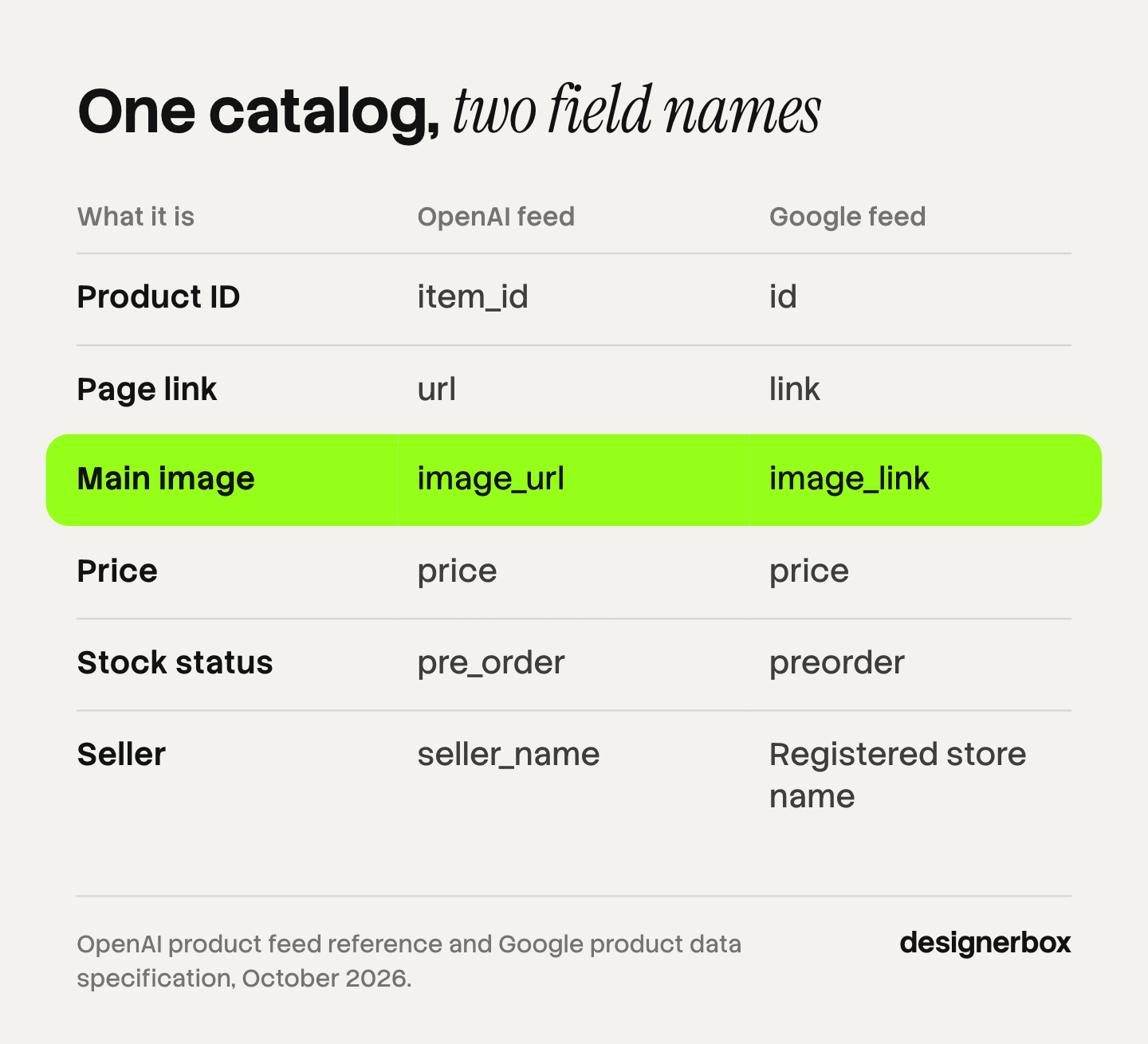
If you already keep a Google Merchant Center feed, most of the work is done. The two specs ask for the same things under different names. OpenAI also accepts a Google-compatible feed, but only after it confirms that format for your registered feed.
| What it is | OpenAI feed field | Google feed field |
|---|---|---|
| Product ID | item_id | id |
| Title | title | title |
| Description | description | description |
| Page link | url | link |
| Main image | image_url | image_link |
| Price | price | price |
| Stock status | pre_order | preorder |
| Brand | brand | brand |
| Seller | seller_name | Registered store name |
The stock status row shows one value, the pre-order value, because it is the one that differs in spelling. Both feeds also accept in stock, out of stock and backorder. Only OpenAI’s own format accepts “unknown”.
Three rules in the OpenAI reference are easy to miss:
- No placeholder text. Do not write “null”, “unknown” or “n/a” in a field. Leave an optional field out.
- Titles and descriptions have a target length. Aim for at most 150 characters in a title and 5,000 in a description. Google sets the same two limits.
- Dates do not change anything. A sale date or an availability date in the feed does not schedule a price or stock change. You update the feed when the price changes.
12 catalog checks from the published specs
Run these on a sample first. Pick your three best sellers, one product from each category, and at least two products with variants. Each check is a pass or a fail, and each one comes from a published rule.
Product data
1. Each variant has its own row. OpenAI asks for a separate row for each selection, with its own item ID, a shared group ID, and its own price, availability, URL and images. A blue mug and a green mug in one row fail.
2. Every required field is filled. A missing or unrecognized availability value rejects the row in OpenAI’s format.
3. The title names the product and the variant. OpenAI’s example is “Trail running shoes, black, size 10”. A title that only works beside your logo fails. The guide to product descriptions covers the text fields.
4. Identifiers are real. Google says a product with an assigned GTIN that is submitted without one may have limited visibility. Both specs say the same thing about invented values: do not make them up (support.google.com, read October 2026).
5. Price and stock match the page. The feed, the product page and the checkout show the same offer today. OpenAI tells shoppers to rely on the retailer’s site for the final price, so a mismatch is visible to them.
Images
6. The main image shows the exact variant. OpenAI describes the main image as “showing this variant”. Google asks for a unique image for each variant and only one variant in each image.
7. The image URL opens for anyone. It is a direct link to a JPEG or PNG file, with no login. For Google, your robots.txt file must allow Googlebot and Googlebot-image.
8. The image is large enough. Google will require at least 500 x 500 pixels for all products from 31 January 2027. It recommends 1,500 x 1,500 pixels or more, with no file over 16 MB or 64 megapixels (support.google.com, read October 2026).
9. The main image is clean. No price, no “Shop now”, no watermark, no added logo and no border. Google also advises that the product takes up between 75% and 90% of the frame.
10. AI images keep their tag. Google Merchant Center says all images created with generative AI must contain metadata that marks them as AI-generated. It names the IPTC digital source type tag and says not to remove it (support.google.com, read October 2026).
Reach
11. The connection is live. On Shopify, look under Sales channels, then Agentic, in your admin. Elsewhere, check that the feed is accepted in Merchant Center or by OpenAI. A product set to Unlisted in Shopify is hidden from AI channels.
12. The product page has valid markup. For Google’s merchant listings, Product markup needs a name, an image and an offer with a price and a currency (developers.google.com, read October 2026). On a Shopify store, the fields that fill that markup are in the guide to Shopify product page optimization.
Five of the 12 checks are about images. The image rules on their own are in the guide to product images for AI shopping agents. The sizes for each large channel are in the guide to ecommerce product photography specs, and the Shopify numbers are in Shopify product image size.
Do AI-generated product images work in these feeds?
Yes on Google, with a condition. Google accepts AI-generated images in the main image, the additional images and the lifestyle image, as long as the file keeps its AI metadata. Some export and compression tools remove metadata, so open one finished file and confirm the tag is still there. A title written with generative AI goes in Google’s structured title attribute, and a description in the structured description attribute.
OpenAI’s feed reference, read in October 2026, does not mention AI-generated images. It sets the same rule for every image: the main image shows the item and the variant in that row.
That rule is the real test for a generated image. A new background is fine. A changed color, label or shape means the image no longer shows the item in the row. The checks for that are in the guide to AI product photo accuracy. Shopify’s own position on generated images is in can I use AI photos on Shopify.
This is general information, not legal advice. Each platform’s own policy page is the rule.
What the checks cannot do
A catalog that passes all 12 checks is eligible. It is not chosen. OpenAI’s feed reference says it in one line: “Eligibility does not guarantee display.” The system still weighs the shopper’s request, the price, the stock and what it knows about the shopper.

Two more limits are worth knowing before you promise a result to a client:
- The answer changes with the shopper. OpenAI says ChatGPT matches products to people based on their preferences and past interactions. Two people who type the same request can see different products.
- Not everything is open to you. Google’s direct buying is for eligible, participating merchants, and it started in the US. New merchants apply through an interest form (support.google.com, read October 2026). Shopify’s agentic storefronts support direct-to-consumer sales only.
So measure what you can see. After a catalog change, look at the feed status in the dashboard first. A few days later, ask the system a real buyer’s question and note whether the new price or image appears. Keep the same five questions each month, so the results compare.
The checks also decay. Every new product is a new row, a new set of images and a new chance to miss a field. The repeat work behind that is in the guide to a product photography workflow. Which of these jobs the platform does for you, and which stay with the store, is in the guide to agentic commerce optimization.
The image half of the catalog
Five of the 12 checks are image checks, and they repeat for every product and every variant. A store with 200 products and three colors each needs 600 correct main images before any extra angle. That is plain arithmetic for one example store.
Anyone can make an AI picture. Making hundreds that still look like your brand is the hard part. DesignerBox is AI creative production for brands and agencies. You build the image set once as a workflow, with your brand, your products and your rules. Then you run it on every product.
- One standard on every row. Batch runs one workflow over a sheet of up to 200 products. Row one and row two hundred get the same light, framing and background. You keep or discard each row, and re-run one row on its own.
- Brand rules set once. Background, crop and colors live in your brand profile. The workflow reads it on every run.
- Review inside the run. Critic steps score the results of a run, and best-of-N keeps the best one. You still compare each image with the real product.
- One place for the set. The full workflow from the first product photo to the finished ad, in one subscription.
The cost is shown before each run. Uploading your own photos and the commercial license start on the Pro plan. AI video, virtual try-on, upscaling, the image editor and the video editor start on the Premium plan. Plans and credits are on the pricing page.
DesignerBox covers the image checks and nothing else on the list. It does not write your feed, your titles or your GTINs. It does not send your products to ChatGPT shopping, Merchant Center or Shopify Catalog. You download the results, or send them with a webhook or an S3 step, and you upload them to your store. Check that the uploaded file still carries its AI metadata. Every plan below Ultra is one seat. The page for Shopify stores shows the image set for one store.
A free plan for your first run
Start from a template, add your brand and your products, and see the cost before you run it.
FAQ
What is agentic commerce?
Agentic commerce is online shopping in which an AI system searches, compares and, in some cases, buys for the shopper. Google describes it as commerce where AI completes tasks on people’s behalf. For a store, it means software reads the product feed and the product page before a person sees them.
What is the Agentic Commerce Protocol?
The Agentic Commerce Protocol, or ACP, is the open protocol OpenAI uses for commerce in ChatGPT. Merchant product data provided through ACP is one of the sources ChatGPT shopping research uses. Google’s counterpart is the Universal Commerce Protocol, launched on 11 January 2026.
Is agentic commerce live today?
Partly. Product discovery is live in ChatGPT, Google AI Mode and Gemini. Buying inside the AI is narrower. Google’s direct buying is for eligible, participating merchants, and new merchants apply through an interest form. In ChatGPT the shopper completes the purchase in the merchant’s own checkout.
Is one product feed enough for ChatGPT and Google?
Mostly. The two specs share the core fields: ID, title, description, page link, main image, price, stock status and brand. The field names differ, and OpenAI’s own format adds a seller name. OpenAI accepts a Google-compatible file only after it confirms that format for your feed.
Do I need a separate feed for Google AI Mode?
No. Google’s AI surfaces use the Shopping Graph and your existing Merchant Center feed. Google’s guide to the Universal Commerce Protocol says the same feed is used for direct buying, which is open to eligible, participating merchants.
Do product images matter in agentic commerce?
Yes. The main image is a required field in both OpenAI’s and Google’s feeds, and both ask that it shows the exact variant in the row. Google adds a size minimum, a ban on text and logo overlays, and a metadata rule for AI-generated images.
Does passing every check guarantee my products appear?
No. OpenAI’s feed reference states that eligibility does not guarantee display. The system also weighs the shopper’s request, price, stock and personal context. The checks remove reasons to be left out. They do not rank you.
Sources
- OpenAI Developers, product feed reference: developers.openai.com, read October 2026
- OpenAI Help Center, using shopping research in ChatGPT: help.openai.com, read October 2026
- OpenAI, powering product discovery in ChatGPT: openai.com, read October 2026
- OpenAI, ChatGPT for merchants: chatgpt.com, read October 2026
- OpenAI Developers, overview of OpenAI crawlers: developers.openai.com, read October 2026
- Google Merchant Center Help, image link attribute: support.google.com, read October 2026
- Google Merchant Center Help, AI-generated content: support.google.com, read October 2026
- Google Merchant Center Help, unique product identifiers: support.google.com, read October 2026
- Google Merchant Center Help, product data specification: support.google.com, read October 2026
- Google Search Central, merchant listing structured data: developers.google.com, read October 2026
- Google for Developers, Universal Commerce Protocol guide: developers.google.com, read October 2026
- Google, agentic checkout and AI shopping: blog.google, 13 November 2025
- Google, agentic commerce updates for the holiday season: blog.google, 16 September 2026
- Google Merchant Center Help, about the Universal Commerce Protocol: support.google.com, read October 2026
- Google, Universal Commerce Protocol announcement: blog.google, 11 January 2026
- Shopify Help Center, agentic storefronts: help.shopify.com, read October 2026
- Shopify Help Center, Shopify Catalog and product discovery: help.shopify.com, read October 2026
- DesignerBox pricing, October 2026
Feed and image rules verified from OpenAI, Google and Shopify pages as of October 2026. The 600-image count is an example. Individual results vary.