





Shopify product page optimization means completing nine fields in the product admin, in order: title, description, media, category, variants, variant images, alt text, file names and the search engine listing. Shopify publishes a limit or a rule for each one. Media takes the most work, because 56% of shoppers in Baymard’s testing looked at the images before they read anything else.
The usual advice on this topic is general: write better copy, add reviews, show trust badges. That advice is fair, and it leaves out the part you control today. A product page is built from fields, and each field has a rule you can read.
This guide goes through the nine fields with Shopify’s and Google’s own documentation, read in October 2026. It is written for a brand with 20 to 500 products and no time to treat each listing as a new project.
Key Takeaways
A product page is nine fields. Each one sits in the product admin, and each one has a published limit or rule.
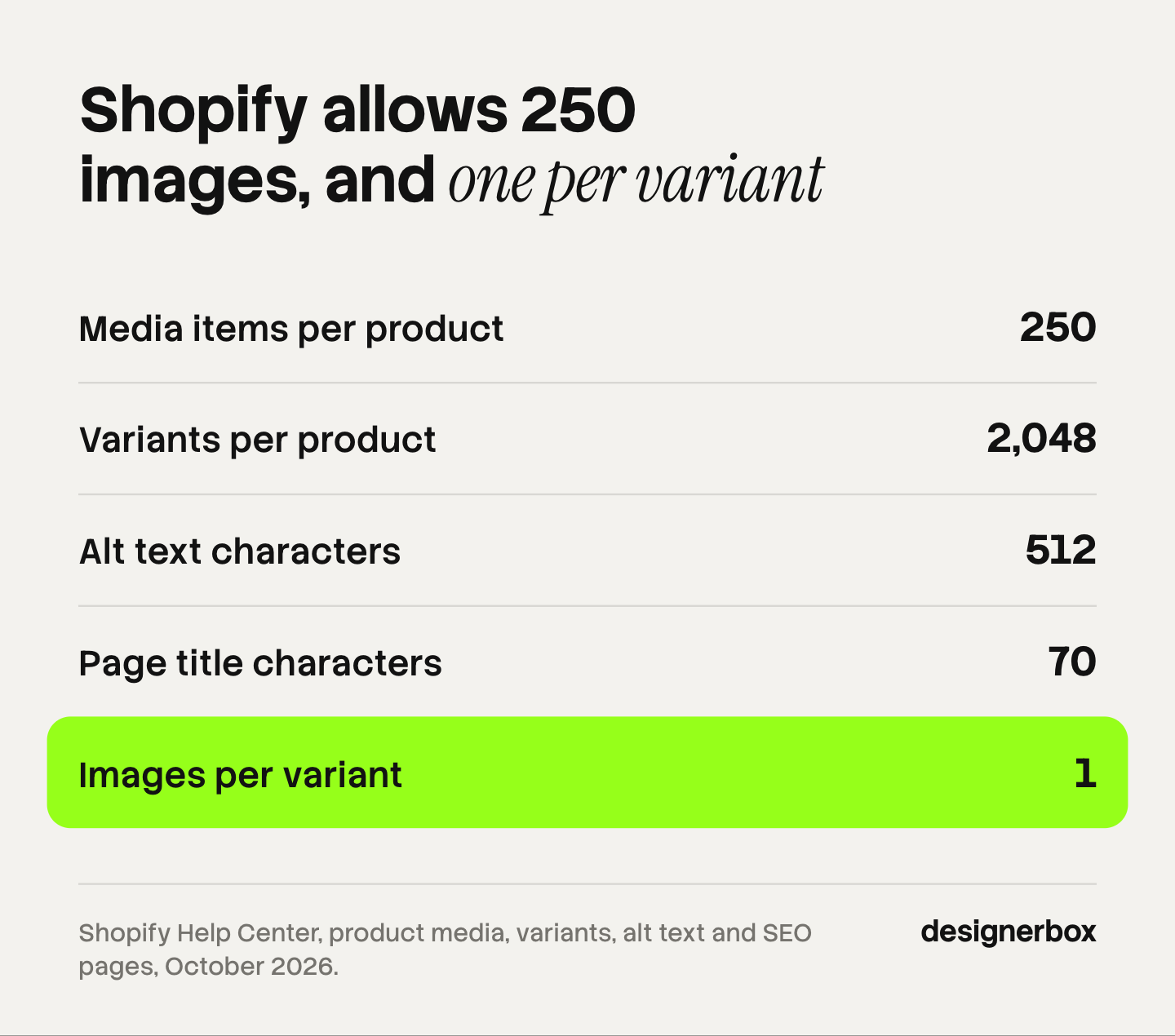
Shopify caps the page title at 70 characters. It suggests 60 or fewer, and it recommends 160 characters for the meta description.
Alt text can hold 512 characters. Shopify recommends 125 or fewer. Google calls alt text the most important attribute for image metadata.
The first media item does five jobs. It is the featured image on the product page, collection pages, the cart, the checkout and the home page.
Each variant takes one image. That image must come from the product’s own media list, which holds up to 250 items.
One source photo makes new presentations. It cannot show a side, an inside or a detail that the camera never saw.
What is Shopify product page optimization?
Shopify product page optimization is the work of completing every field on a product listing so that a shopper can decide and a search engine can read the page. It covers the title, the description, the images, the variants and the search fields. On Shopify, all of them sit on one screen in the admin, which Shopify calls the product details page.
The reason to treat it as field work is practical. Baymard Institute’s product page benchmark found that only 48% of desktop sites and 38% of mobile sites have a “decent” or “good” product page experience (baymard.com, October 2026). Most of the gaps it lists are missing content: no image that shows scale, no image on a person, no return policy on the page.
A missing field is the cheapest problem to fix. You do not need a redesign or a new app. You need the field completed, the same way, on every product.
The nine fields of a Shopify product listing
Here is the whole list, with the rule that applies to each field and where the rule comes from.
| Field | The rule | Who sets it |
|---|---|---|
| 1. Title | Name the product as a shopper would search for it | Shopify, Google |
| 2. Description | Give at least a title and 2 features if you generate it | Shopify |
| 3. Media | Up to 250 items. The first one is the featured image | Shopify |
| 4. Category | One category for each product, from Shopify’s standard list | Shopify |
| 5. Variants | Up to 2,048 variants and 3 options | Shopify |
| 6. Variant images | One image for each variant, from the product’s media | Shopify |
| 7. Alt text | 512 characters at most, 125 or fewer recommended | Shopify |
| 8. File names | Short and descriptive, set before you upload | Google, Shopify |
| 9. Search engine listing | Page title up to 70 characters, description of 160 | Shopify |
The order matters. Fields 1 to 6 decide what the shopper sees. Fields 7 to 9 decide what a search engine reads. The first group has to be right before the second group is worth your time.
Title, description and category
Title. Shopify defines the title as “the name for your product that you want to display to your customers” (help.shopify.com, October 2026). Write the product type into it. A title such as “Washington” tells a shopper nothing. “Washington round eyeglasses” tells them what the product is.
Description. Shopify’s admin can draft a description for you. The feature is part of Shopify Magic, which Shopify describes as free on every plan. Shopify’s guidance is specific: “At a minimum, provide a product title and at least 2 product features or keyword items before generating a description” (help.shopify.com, October 2026). Read the draft against the real product before you save it. A generated sentence about a material or a size is a claim you are making to a buyer.
Category. Each product takes one category from Shopify’s Standard Product Taxonomy. Shopify says the category makes it easier “to sell products on other channels that require a standardized product type, such as Facebook or Google” (help.shopify.com, October 2026). It also opens the category metafields. For a shirt, those include size, neckline, fabric and color. This field takes one minute, and many stores leave it empty.
Media: the field that takes the most work
Images are the first thing a shopper uses. In Baymard’s product page study, 56% of participants began with the product images, before they read the title or the description (baymard.com, October 2026).

Shopify allows up to 250 media items on a product. The first one matters most. Shopify states that the main media item “is displayed on collection pages, the cart page, the checkout page, and your home page” (help.shopify.com, October 2026). Our guide to Shopify product images covers how each of those places crops it.
After the first image, think in questions. Each image answers one thing the shopper still does not know.
| The shopper asks | The image that answers |
|---|---|
| What is it? | The product alone on a plain background |
| What does the other side look like? | A second angle |
| What is it made of? | A close detail of the material |
| How big is it? | The product next to a person or a known object |
| How does it look in use? | The product in a room or in a hand |
| How does it fit? | The product worn by a person |
| Which option am I buying? | One image for each color or style |
Two of those rows are the ones stores skip. Baymard found that 42% of shoppers try to judge a product’s size from its images, and that 37% of the sites it benchmarked show no image with scale. For products that are worn, 23% of sites show no image on a person.
The right number of images is the smallest set that answers every row that applies to your product. A candle may need four. A handbag may need seven: outside, inside, detail, scale, carried, and two colors. The order of the set is covered in the guide to PDP images that convert, and the upload spec in the guide to Shopify product image size.
What one source photo can and cannot produce
You do not need a separate shoot for every row in that table. An AI image model can take one accurate photo of the product and draw a new presentation of it. It cannot report facts the photo does not contain.
| From one front photo you can make | You need another real photo for |
|---|---|
| A clean image on a plain background | The back or the underside |
| A new background or surface | The inside of a bag, a box or a drawer |
| The product in a room or on a table | A close detail the first photo did not resolve |
| Different crops and shapes for each channel | A variant with a different shape or structure |
| A color variant, when only the color differs | Any label or print on a side the camera did not see |
The rule is simple. If the shopper needs to see something physical, a camera has to see it first. A model asked for the back of a jacket will draw a plausible back. It may not be your jacket’s back.
So plan the source photos from the table of shopper questions. Count the rows that need a new physical fact. That count is the number of photos to take. Everything else can come from those. The guide to the source product photo covers what each frame has to get right, and the checks to run on each result are in the guide to AI product photo accuracy.
The rules that apply to generated images on a store come from outside Shopify. They are set out in the guide to AI photos on Shopify.
Variants and their images
Shopify allows up to 2,048 variants on a product, built from up to 3 options (help.shopify.com, October 2026). The image rule is much tighter. Shopify states that “you can only add one image to each product variant”, and that image must come from the product’s media list (help.shopify.com, October 2026).
Shopify’s own method for showing more than one image of a variant has three steps:
- Add every image of the variant to the product’s media gallery.
- Arrange the gallery so that related images sit together.
- Assign one image to the variant. The shopper sees it when they select the option.
Only options that change how the product looks need their own image. Color and pattern do. Size usually does not. The guide to AI product images for Shopify works through the numbers for a product with many options.
Alt text, file names and the search listing
These three fields are small, and a shopper never sees two of them.
Alt text. Shopify’s limit is 512 characters, “but 125 or less is recommended” (help.shopify.com, October 2026). Describe what is in the image: “Tan leather card holder, front view, with one row of stitching”. Google warns against filling alt text with keywords, because it “results in a negative user experience and may cause your site to be seen as spam” (developers.google.com, October 2026).
File names. Name the file before you upload it. Google says a file name gives it “very light clues about the subject matter of the image”, and that a descriptive name is better than “IMG00023.JPG”. Shopify adds one practical point. If a file with the same name is already in your store, Shopify may add a unique identifier to the new file’s name (help.shopify.com, October 2026). Give every file a unique name, such as the product, the color and the view.
Search engine listing. Shopify lets you enter up to 70 characters in the page title, and suggests 60 or fewer so that search engines do not shorten it. For the meta description, it recommends 160 characters (help.shopify.com, October 2026). Put the product type near the start of the title.
What Google reads from the page
Google does not promise to show what you type. Three statements from its documentation set the right expectations.
Google says there is no limit on the length of a title element, and that it shortens the title link “as needed, typically to fit the device width” (developers.google.com, October 2026). Shopify’s 60-character advice is a way to stay inside that.
Google says its snippets are “primarily created from the page content itself” (developers.google.com, October 2026). It uses your meta description only when that describes the page better. So the product description on the page matters more than the meta description.
For product results with a price and a photo, Google reads structured data. A merchant listing requires three properties: the name, an image and an offer. Google prefers “pictures clearly showing the product (for example, against a white background)” (developers.google.com, October 2026). That is one more job for the first image.
A check before you publish
Open the finished listing and go through it once, in this order.
- Title. Does it name the product type?
- Description. Is every sentence true of the product in the box?
- First image. Is the product clear on its own, at the size of a small thumbnail?
- Gallery. Does one image answer each shopper question that applies?
- Generated images. Compare each with the source photo: color, shape, label text and count of parts.
- Variants. Does each color select the right image?
- Alt text. Does each image have a plain description of 125 characters or fewer?
- Search listing. Is the page title 60 characters or fewer, with the product type first?
A page that passes this list is complete. Reviews, delivery details and the return policy sit outside the product fields, in your theme and your apps. Baymard’s benchmark covers those, and they are worth a second pass.
One workflow for every listing
Eight of the nine fields are text, and you complete them in Shopify. The third field, media, is where the hours go. Anyone can make an AI picture. Making hundreds that still look like your brand is the hard part.
In DesignerBox you build the image set once as a workflow. You choose the background, the light, the framing and the list of shots. Your brand rules sit in a brand profile, and the workflow reads them on every run. Product forty gets the same set as product one.
Three critic steps score the results of a run, and best-of-N keeps the best one. You still compare each result with the source photo. Batch runs the workflow over a whole sheet of products, and you keep or discard each row. The cost is shown before the run.
DesignerBox does not publish to a store. You download the results and upload them to Shopify, then complete the alt text and the variant images in the admin. The same product photo also feeds the ad and the video: the full workflow from the first product photo to the finished ad, in one subscription.
Uploading your own photos and the commercial license start on the Pro plan. Plans and credits are on the pricing page. The page for Shopify stores shows the image set for a listing.
A free plan for your first run
Start from a template, add your brand and your products, and see the cost before you run it. Get started free.
FAQ
How do I optimize a Shopify product page?
Complete nine fields in the product admin: title, description, media, category, variants, variant images, alt text, file names and the search engine listing. Start with the first image, because it appears on the collection page, the cart and the checkout as well. Then check that one image answers each question a shopper has about the product.
How many images should a Shopify product page have?
Shopify allows up to 250 media items for each product, and it sets no minimum. The useful number is the smallest set that shows the product alone, a second angle, the material, the scale, the product in use and each color. For many products that is five to eight images.
What is the character limit for a Shopify page title?
Shopify lets you enter up to 70 characters in the page title of the search engine listing. It suggests 60 characters or fewer, because search engines shorten longer titles. Google states that it has no fixed limit and shortens a title to fit the width of the device.
Does alt text help Shopify SEO?
Shopify says alt text can help your store’s SEO, and Google calls it the most important attribute for image metadata. Its first job is access: a screen reader reads it to a shopper who cannot see the image. Write a plain description of 125 characters or fewer and do not repeat keywords.
Can one photo make every image a Shopify listing needs?
One photo can make every image that shows the same side of the product in a new way: a plain background, a room scene, a new crop or a new color. It cannot make an image of a side, an inside or a detail that the photo does not contain. Take one more real photo for each of those.
Can Shopify write product descriptions with AI?
Yes. Shopify Magic drafts a product description inside the product admin, and Shopify describes Shopify Magic as free on every plan. Shopify advises giving it a product title and at least two features or keywords. Check each generated sentence against the real product before you save it.
What does it cost to make the image set with AI?
The cost depends on the model and on how many results you ask for. In DesignerBox you see the cost of a run before you start it, so you can price the image set for one listing before you make it.
Sources
- Shopify Help Center, Product details page: title, description, category and the search engine listing preview, read October 2026.
- Shopify Help Center, Shopify’s Standard Product Taxonomy: one category for each product and category metafields, read October 2026.
- Shopify Help Center, Generating product descriptions with Shopify Magic and Shopify Magic: the minimum prompt and plan availability, read October 2026.
- Shopify Help Center, Adding product media: the 250 media limit and the main media item, read October 2026.
- Shopify Help Center, Adding variants and Adding images to product variants: 2,048 variants, 3 options and one image for each variant, read October 2026.
- Shopify Help Center, Adding alt text to media: the 512-character limit, read October 2026.
- Shopify Help Center, Uploading and managing files: file names and unique identifiers, read October 2026.
- Shopify Help Center, Adding keywords for SEO: page title and meta description lengths, read October 2026.
- Google Search Central, Image SEO best practices, title links, snippets and merchant listing structured data, read October 2026.
- Baymard Institute, Product Page UX 2026: 10 Pitfalls and Best Practices and All Products Need at Least One “In Scale” Image, read October 2026.
- DesignerBox pricing, October 2026.
Shopify and Google rules verified from their own documentation as of October 2026, and product page statistics from Baymard Institute’s published research. Platform rules change often. Individual results vary.

