
The strongest Magnific AI alternatives in 2026 are Topaz for faithful photographic upscaling, Krea for creative enhancement with an API, Upscayl and Clarity AI for free local runs, Let’s Enhance for catalog work, Cloudinary for delivery pipelines, and DesignerBox when enhancement is one step inside a repeatable workflow. Pick on the job, not the tool.
Freepik now carries the Magnific name. freepik.com/pricing redirects to magnific.com/pricing, and the company presents itself as “Magnific (formerly Freepik)” (magnific.com, October 2026). Its pricing page linked the old product as “Looking for magnific.ai? Go to the legacy service” when we read it (magnific.com/pricing, September 2026). So “Magnific” now means a full creative suite, not a single upscaler, and a shortlist built against the old product answers the wrong question.
We make DesignerBox, and it is on this list. Read the comparison with that bias in mind. Every competitor fact below comes from that company’s own page or repository, checked in September 2026. No competitor prices appear here, because each company lists its plans on its own pricing page.
Key Takeaways
- Magnific is now the name over the whole Freepik suite. Its own site lists image generation, an image editor, image and video upscalers, relight, background removal, skin enhancer, 3D, an API, MCP and plugins (magnific.com/pricing, September 2026).
- Topaz sits underneath several rivals. Krea’s API lists Topaz Generative, Topaz Bloom and Topaz Wonder 3.5 among its enhancers, and the Magnific plans list “Magnific & Topaz upscalers” (krea.ai/docs and magnific.com/pricing, September 2026).
- Two credible free options are open source under AGPL-3.0: Upscayl, which runs on your own machine, and Clarity AI, which self-hosts. Upscayl was last pushed on 15 September 2026; the Clarity repository was last pushed in March 2025 (github.com, September 2026).
- For faithful photographic work, Topaz reaches up to 22K through the Krea API and is described there as “best for photos” (krea.ai/docs, September 2026).
- DesignerBox fits when the enhance step has to run the same way on the next product. You build the workflow once, and the cost of each run is shown before you start it.
What Magnific covers in 2026
Magnific built its reputation on creative upscaling: adding texture and detail during the enlargement instead of sharpening what is already there. The original service still runs at magnific.ai/legacy, but only for existing users. New accounts open on magnific.com. Its FAQ says upscaling, style transfer, relighting and generation still work there (magnific.ai/legacy, September 2026).
The wider product is where the change sits. The Magnific site now lists an image generator, an image editor, an image upscaler, an image extender, variations, cinematic shot, a background remover, a skin enhancer, relight and change camera. On the video side it lists a video generator, a project editor, a clip editor, a video upscaler and video relight. It also lists audio generation, 3D, design tools, Spaces, MCP, agents, plugins, a desktop app and a mobile app (magnific.com/pricing, September 2026).
That matters for a shortlist in two ways. Anyone who wanted only an upscaler now signs up to a suite. Anyone comparing on model access will find the same names on both sides: the Magnific plans list Nano Banana 2, Nano Banana Pro, Kling and Veo, which are models DesignerBox runs too. Model access is not a reason to pick one tool over another in 2026.
The 7 best Magnific alternatives in 2026
1. Topaz
Best for: faithful photographic upscaling, and anything headed for print.
Topaz sells Gigapixel for image upscaling “up to 16x pixels”, alongside Topaz Photo, Topaz Video, a browser version, a mobile version, an API and enterprise plans. Its plans list “Unlimited local rendering” and “Unlimited cloud image rendering” (topazlabs.com, September 2026).
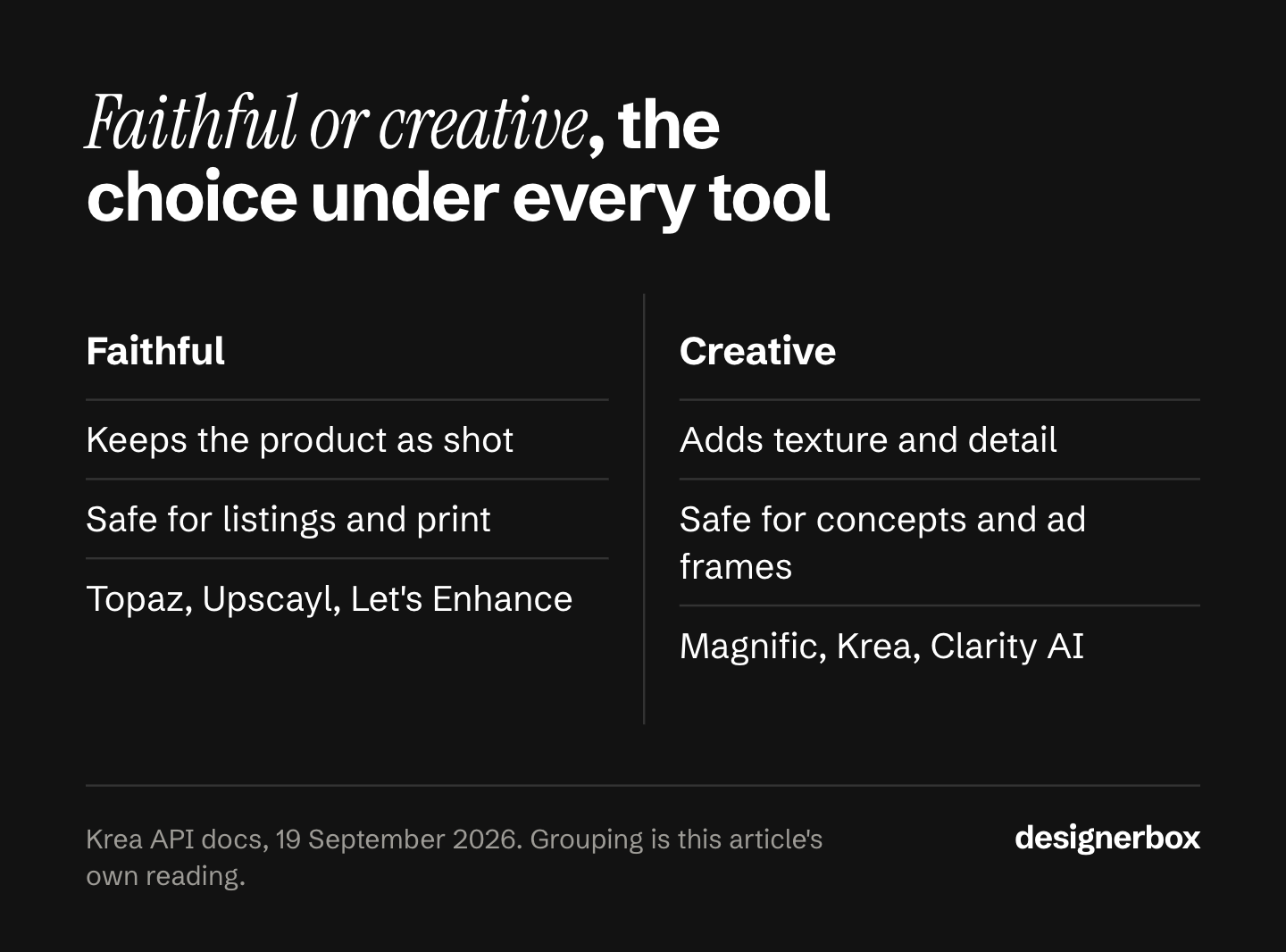
Its character is the opposite of the creative upscaler. Through the Krea API, the plain Topaz model is documented as a “powerful faithful upscaler. Up to 22K resolution. Best for photos”, while the Topaz Generative model is listed as the “most powerful creative enhancer” at max 16K (krea.ai/docs, September 2026). That split is the choice you are really making: keep the picture you have, or let the model add detail it invented.
For a product photo, faithful is usually correct. Invented stitching on a garment is a returned order.
2. Krea
Best for: teams who want several enhancers behind one API.
Krea describes itself as “an AI creative suite for generating, editing, enhancing, and animating images and videos with professional controls” (krea.ai/docs, September 2026). Its Enhancer is documented as upscale and refine “while preserving composition for high-resolution delivery”.
The API is the interesting part. Krea’s image enhance endpoints list Krea Enhance at max 8K, Krea Legacy at max 4K, Topaz Generative at max 16K, Topaz at up to 22K, Topaz Bloom and Bloom 2 at max 10K, and Topaz Wonder 3.5 at max 16K. Video enhance lists Topaz Video, Starlight, Starlight 2.5, Astra, Astra 2, Hyperion 2.5 and SeedVR2 (krea.ai/docs, September 2026).
Use it to test several enhancers on the same file without buying each one separately.
3. Upscayl
Best for: free runs on your own machine, with no upload.
Upscayl is an open-source desktop upscaler for Linux, macOS and Windows, licensed under AGPL-3.0. Its repository was last pushed on 15 September 2026, so it is actively maintained (github.com/upscayl/upscayl, September 2026).
Two properties make it worth a slot. It runs locally, so unreleased product photos never leave the building, which answers a real procurement question. And it has no per-image cost, so the failed attempts cost nothing but time.
The trade is that it does one job. There is no catalog view, no brand rules and no review step.
4. Clarity AI
Best for: teams who want to self-host and read the code.
Clarity AI describes itself on its own repository as an “AI Image Upscaler & Enhancer - free and open-source Magnific Alternative”, licensed under AGPL-3.0 (github.com/philz1337x/clarity-upscaler, September 2026). A hosted version runs at clarityai.co, which titles itself “AI Image Upscaler & Enhancer”.
One fact to weigh before you build on it: that repository was last pushed in March 2025 (github.com, September 2026). Self-hosting means you own the maintenance either way, and an older codebase is fine for a fixed job. Check the commit history yourself before it goes near a production pipeline.
5. Let’s Enhance
Best for: catalog images where several operations run on the same file.
Let’s Enhance lists an Enhancer, an Upscaler that increases resolution “up to 512 MP for print and web”, a Sharpener, a Restorer, background removal, image to video, a video upscaler and an API for business. Its interface offers “Edit 20 at once”, and it lists a free start (letsenhance.io, September 2026).
For product and fashion catalogs the company points to its own separate product, Claid.ai, which its site describes as handling “quality, resolution, backgrounds, and consistency for ecommerce teams” (letsenhance.io, September 2026). If your job is catalog operations rather than single images, read that page first.
6. Cloudinary
Best for: engineering teams where images are already served through a pipeline.
Cloudinary runs a free browser upscale tool and a free API for programmatic upscaling, inside a wider media platform covering image and video delivery, asset management and low-code workflow automation. Its AI transformations include generative fill, generative object removal and generative replace (cloudinary.com/tools/image-upscale, September 2026).
The reason to look here is placement, not picture quality. If every product image already passes through a delivery pipeline, adding the enhance step to that pipeline costs less work than adding another tool to the team.
7. DesignerBox
Best for: agencies and brand teams where the same enhance step has to run on every new product.
DesignerBox is AI creative production for brands and agencies. You set the brand rules, the model, the light and the framing once, and save them as a workflow. A saved workflow runs the same way on the next product, because the rules live in the workflow rather than in someone’s memory. You can start from a template, or publish a workflow as an app: a form a colleague completes before pressing Run. Batch runs one workflow over a whole sheet of products, and you keep or discard per row. The comparison pages set DesignerBox next to other tools, one at a time.
Upscaling is a step in that workflow rather than a separate stop. The catalog holds image and video models, including SeedVR Upscale from ByteDance, and each one runs as a step. The image editor makes one edit after another, and the picture keeps its detail and resolution, which is the property that decides whether a retouch, a relight and a crop can be chained without losing quality.
Three critic steps score the results and best-of-N keeps the best one. The templates, the workflows, the apps, batch, the image editor, the video editor, the brand record and the Assets library sit in one place. The full workflow from the first product photo to the finished ad, in one subscription.
Plans and credits are on the pricing page. Annual plans grant the same monthly allocation, and it resets each month.
Where Magnific is the better pick: one-off creative upscaling with fine control over how much detail the model invents, and a single subscription that also covers stock assets. Where DesignerBox costs you: the commercial license starts on the Pro plan. Upscaling, the image editor, virtual try-on and AI video start on the Premium plan. Every plan below Ultra is one seat, which matters for agencies.
Which alternative fits your team
| Team | Pick | Why |
|---|---|---|
| Agencies | Krea or Cloudinary for the API, DesignerBox for per-client rules | Many client brands need separation. A brand profile the workflow reads on every run stops one client’s look reaching another |
| Brand teams | DesignerBox | The same standard on every piece is a rules problem, not a resolution problem |
| Performance marketers | None of them, on their own | Enhancement rarely limits ad output. The job is new variants from your winners, which is a generation step |
| Creative studios | Topaz | Local rendering and faithful output suit finished sets sold under your own name |
| Ecommerce brands | Let’s Enhance, or Claid for catalog operations | Several operations run on one file, and the batch view is the point |
| Fashion brands | Topaz, with a fabric check | Creative enhancers invent weave and stitching. Compare a close crop against the real garment before it ships |
| Furniture and homeware brands | Topaz | Room scenes often go to large print, and print is where resolution is real |
| Solo founders | Upscayl | Free, local, and enough for the handful of files a week a one-person shop produces |
Two honest lines in that table. Performance marketers are usually solving the wrong problem when they buy an upscaler, and fashion brands carry the highest risk from a creative one, because invented texture on a garment reads as a different product.

Which alternative fits the work
| Use case | Pick | Note |
|---|---|---|
| Product imagery | Topaz or Let’s Enhance | Faithful first. Check the logo and the label at 100% |
| Static ads | Krea or Magnific | Creative enhancement suits an ad frame, where the product still has to stay accurate |
| Video ads | Topaz Video, or Krea’s video enhancers | Image upscalers do not do video. Krea lists Starlight, Astra and SeedVR2 for this (krea.ai/docs, September 2026) |
| User-generated content | Usually nothing | A polished frame reads as an ad, which is the opposite of what the format is for |
| Social creatives | Cloudinary | The job is resize and deliver at volume, not detail recovery |
| Campaign concepts | Krea | At concept stage, invented detail costs nothing, because nothing ships |
| Brand assets | Topaz | Logos and wordmarks must not be reinterpreted. Faithful only |
| Automations | Cloudinary, Krea API, or DesignerBox over MCP | DesignerBox has 68 tools over MCP |
The free and open-source options
Three routes cost nothing to try, and they are not the same offer.
Upscayl is free with no account and no upload, because it runs on your machine. That is the strongest option for anyone whose files cannot leave the network.
Clarity AI is free to self-host under AGPL-3.0, with a hosted version at clarityai.co. Read the license before it goes into a commercial pipeline: AGPL carries obligations that a permissive license does not.
Cloudinary lists a free browser tool and a free API tier for programmatic upscaling (cloudinary.com/tools/image-upscale, September 2026).
The DesignerBox free plan covers a first look at the product. It cannot make video.
Free tiers elsewhere change often, so check the current terms on each company’s own pricing page before you commit a workflow to one.
Where the enhance step belongs
Every tool above treats the enhanced picture as the finish line. On a catalog it is the middle.

A real job reads: take the supplier photo, remove the background, set the light, place the product in the scene, enhance, crop for four marketplaces, then check it against the brand rules. Run that by hand and the enhance step is one of seven stops, each with its own login and its own idea of what your brand looks like. Run it as a workflow and the enhance step is one line in a file that runs the same way next week.
That is the difference worth testing. Other tools sell the generation. DesignerBox sells the run, the review and the delivery, and shows the cost before the run.
Two features carry most of the weight here. The image editor makes one edit after another while the picture keeps its detail and resolution, so a retouch does not have to be undone before a relight. And the brand is a record the workflow reads on every run, so the light and the framing do not drift between the first product and the fiftieth.
Where the source file is genuinely too small, no tool on this list will save it. We covered that line in low resolution product images: upscaling adds pixels, not information. If the camera never recorded the detail, the honest answer is a reshoot.
The first job, built once
Start from a template, add your brand and your products, and run it. The cost is shown before the run.
FAQ
What is the best free Magnific AI alternative?
Upscayl, if you can run software locally. It is open source under AGPL-3.0, runs on Linux, macOS and Windows, and was last pushed on 15 September 2026 (github.com/upscayl/upscayl, September 2026). Nothing uploads, so unreleased product photos stay on your machine. Clarity AI is the self-hosted option, and Cloudinary lists a free browser tool and API tier.
Is Magnific the same as Freepik now?
freepik.com/pricing redirects to magnific.com/pricing, and the company presents itself as “Magnific (formerly Freepik)” (magnific.com, October 2026). Its pricing page linked the older product as a legacy service when we read it (magnific.com/pricing, September 2026). So Magnific is the name over a full creative suite covering image, video, audio, 3D and design, and magnific.ai continues as a legacy service for existing users only. Check both pages before you compare.
Does upscaling make a low resolution product photo usable?
Sometimes. If the detail was captured and something later destroyed it, a resize or a bad export, an upscaler can recover a usable file. If the camera never recorded the detail, the model invents it, and invented detail on a product is a returns risk. Sort the catalog on that distinction first. Our guide on low resolution product images sets the triage rule.
Which upscaler is safest for fashion and product images?
A faithful one, such as the plain Topaz model. Creative enhancers like Topaz Generative are built to add detail (krea.ai/docs, September 2026). On a garment, added detail means invented weave and stitching. Compare a close crop against the real product before the image reaches a listing.
Do I need an upscaler if my images come from an AI model?
Often not. Current image models render at usable resolution, and a second pass through a creative enhancer can change the product. The more common failure is that the picture does not match the real item, which is a briefing problem rather than a resolution problem. We cover the fixes in how to make AI images that don’t look AI-generated.
Can one tool cover upscaling, relighting and retouching?
Several claim to. The Magnific suite lists relight, a skin enhancer and an upscaler on one site (magnific.com/pricing, September 2026), and Let’s Enhance lists enhance, sharpen and restore (letsenhance.io, September 2026). The question is whether the passes hold quality when chained. In DesignerBox the image editor makes one edit after another and the picture keeps its detail and resolution. For the retouching-specific shortlist, see our AI skin and photo retouching tools comparison.
Sources
- Magnific pricing and product list, magnific.com/pricing (freepik.com/pricing redirects there), accessed 26 September 2026. The home page presents the company as “Magnific (formerly Freepik)” (magnific.com, October 2026).
- Magnific legacy service, magnific.ai/legacy, accessed 26 September 2026. Existing users only.
- Topaz product range and Gigapixel description, topazlabs.com, accessed 19 September 2026.
- Krea documentation and image and video enhance model list, krea.ai/docs, accessed 19 September 2026.
- Upscayl repository, license and last push date, github.com/upscayl/upscayl, accessed 19 September 2026.
- Clarity AI repository, license and last push date, github.com/philz1337x/clarity-upscaler, accessed 19 September 2026. Hosted version at clarityai.co.
- Let’s Enhance product list and Claid reference, letsenhance.io, accessed 19 September 2026.
- Cloudinary image upscale tool and API, cloudinary.com/tools/image-upscale, accessed 19 September 2026.
- DesignerBox plans, credits and feature gating, DesignerBox pricing, September 2026.
Competitor pages are named as plain text with the date so the claim stays checkable. We do not link them, and we do not publish their prices. Individual results vary.