The right eBay image size is about 1600 x 1600 pixels. eBay sets the minimum at 500 pixels on the longest side and recommends 1600. Each file can be up to 12MB, in JPEG, PNG, GIF, TIFF, BMP, WEBP, HEIC or AVIF. A standard listing holds up to 24 photos, and the first one appears in search results.
This guide gives the eBay photo size numbers first, each one read on eBay’s own pages. It then covers resizing, the photo count for each listing type, and a shot list by item type. It is written for resellers, brands and agencies that list many items.
Key Takeaways
- 1600 x 1600 pixels is the target. eBay’s minimum is 500 pixels on the longest side.
- 12MB is the file limit on eBay’s help page. eBay’s seller site for exporters says 7MB, so stay under 7MB.
- The photo count depends on the listing. A standard listing holds 24, a variation holds 12, and a vehicle listing holds 20, 30 or 40.
- eBay makes smaller copies of your file. eBay accepts a file smaller than those copies, and says the quality of that picture is likely to be degraded.
- Used items need their own photos. A stock photo is not allowed on a used, damaged or defective item.
What is the right eBay image size?
The right eBay image size is about 1600 x 1600 pixels. eBay’s help page says images should have a minimum resolution of 500 x 500 pixels, and it recommends images that are about 1600 x 1600 (eBay, Adding pictures to your listings, October 2026). The picture policy states the minimum as 500 pixels on the longest side.
| Setting | What eBay states | Where |
|---|---|---|
| Minimum size | 500 pixels on the longest side | Picture policy |
| Recommended size | About 1600 x 1600 pixels | Help page and Seller Center |
| Aspect ratio | 1:1 or 16:9 generally look best | Help page |
| File size | Up to 12MB in the photo uploader | Help page |
| File formats | JPEG, PNG, GIF, TIFF, BMP, WEBP, HEIC or AVIF | Help page |
| Photos in a listing | At least 1, up to 24 | Help page |
| Item in the frame | 80% to 90% of the frame | Seller site for exporters |
| Video | One for each listing, MP4 or MOV, up to 150MB | Video help page |
Two eBay pages give slightly different numbers. Seller Center says “at least 1600 x 1600” (eBay Seller Center, Take great photos, October 2026). The seller site for exporters says 800 to 1,600 pixels on the long side, and a 7MB limit in the uploader (eBay, Photo tips, October 2026). A 1600 pixel file under 7MB meets all three pages. The same numbers answer the eBay photo size and eBay picture size questions, because eBay uses all three words for the same file.
What does eBay do with the file you upload?
eBay does not show your original file. Its picture service makes smaller copies and shows the copy that fits each screen. eBay’s developer guide says the service “downscales and compresses the picture and stores it at the different sizes in the image set” (eBay Developers Program, Managing images, October 2026).
This explains why a small file looks weak. The same guide says an upload smaller than a stored size is still accepted. For that picture, eBay says the image quality “is likely to be degraded”.
eBay shows the main photo at several sizes:
- Search results. The standard size is 96 pixels.
- Gallery Plus. A buyer who hovers over the item sees a larger picture, up to 400 x 400 pixels.
- The listing page. The buyer can enlarge the photo. eBay says small photos get blurry when enlarged.
As of October 2026, eBay’s pages do not name a pixel number that turns zoom on. Amazon does: its guide says images with 1,000 pixels or more on the longest side enable zoom. For eBay, the recommended 1600 pixels is the number to follow.
There is also an upper limit. The developer guide gives an example in which height plus width cannot pass 15,000 pixels, so an 8000 x 8000 file fails.
How do you resize a photo for eBay?
You resize a photo for eBay in four steps: crop to a square, set the longest side to 1600 pixels, save as JPEG, and check the file size.
- Crop first. Crop to 1:1 with the item in the center. eBay’s exporter page says the item should take 80% to 90% of the frame.
- Set the long side to 1600 pixels. A square file becomes 1600 x 1600. A 16:9 file becomes 1600 x 900.
- Save as JPEG. eBay accepts eight formats. JPEG keeps the file small, and other marketplaces accept it.
- Check the file size. A 1600 pixel JPEG is usually far under 7MB. A camera original or an uncompressed TIFF may not be.
Resize down, never up. Enlarging a 400 pixel photo to 1600 pixels adds pixels and no detail. If the source is too small, take the photo again.
Most phones already pass the minimum. eBay says “most cameras and camera phones will exceed this minimum”. Its advice is to set the phone camera to the highest resolution.
How many photos does an eBay listing hold?
A standard eBay listing holds up to 24 photos, and every listing needs at least one. Two listing types have their own counts. A listing with variations holds a maximum of 12 pictures for each variation, according to eBay’s developer guide. A vehicle listing holds 20, 30 or 40 photos.
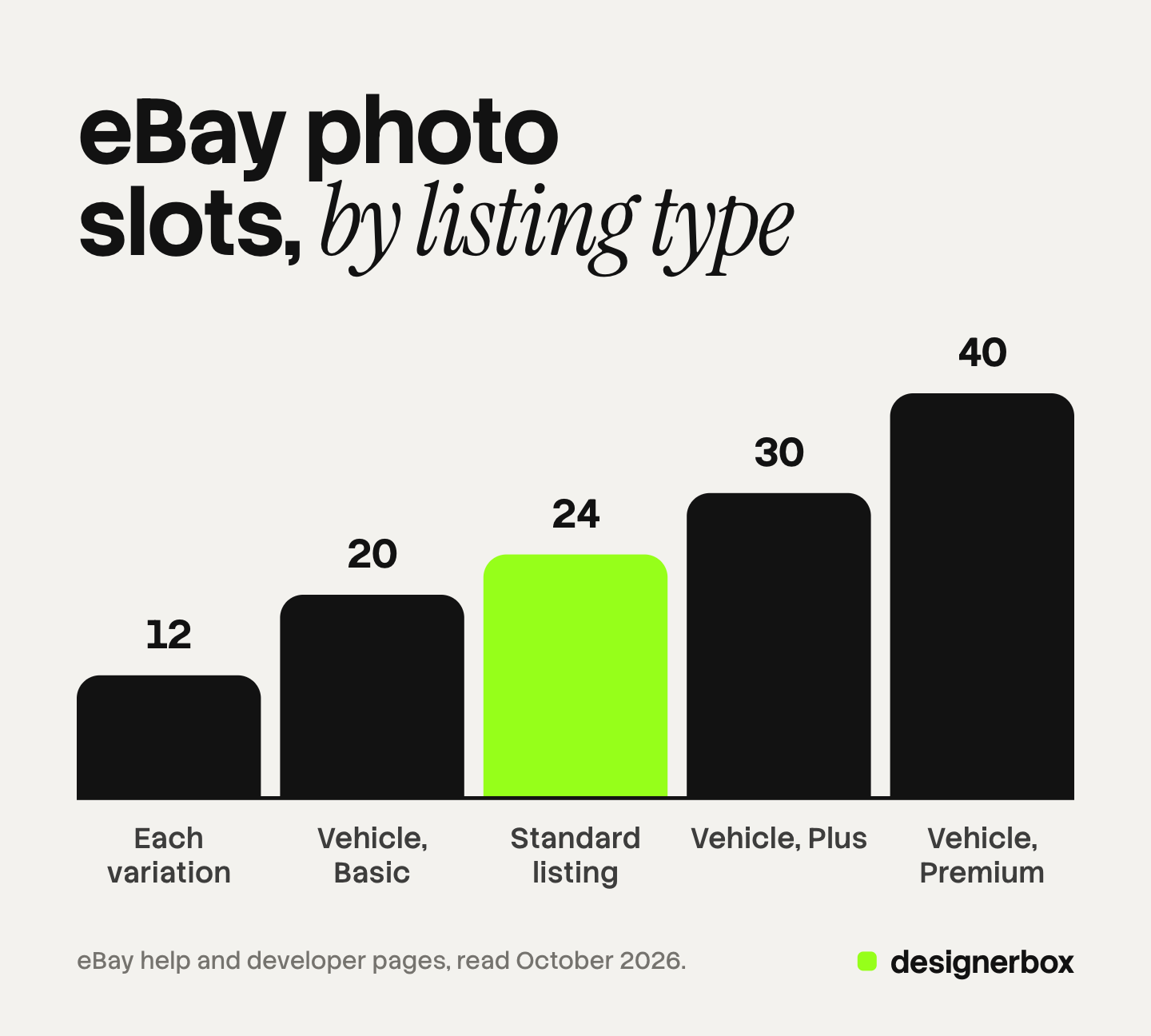
The vehicle count depends on the package the seller chooses. eBay’s fee page lists 20 photos in the Basic package, 30 in the Plus package and 40 in the Premium package (eBay, Motors fees, October 2026).
A listing can also hold one video. eBay asks for an MP4 or MOV file with a 150MB limit, or about one minute long (eBay, Adding a video to your listing, October 2026). The maximum upload resolution is 1080p.
The first photo matters most. eBay calls it the main photo, and it appears next to the title in search results. eBay says it should show the whole item face-on.
What does eBay ban in a picture?
eBay’s picture policy bans six things: inaccurate photos, placeholder images, stock photos on used, damaged or defective items, added borders, added text or artwork, and watermarks (eBay, Picture policy, October 2026). eBay may remove a listing that breaks the policy.
eBay gives background advice and sets no background rule. It asks for an uncluttered space and a neutral backdrop. eBay says white backgrounds are generally best, and that a darker background may work better for shiny items such as jewelry.
eBay has its own background tool. In the web listing form, it replaces the background with solid white. In the eBay app, sellers can also pick a solid color or an AI-generated scene. Seller Center advises using a generated scene for only a few photos.
This guide covers the size side. Our guide to eBay image requirements explains each banned item, the rights rules for other people’s photos, and what happens after a removal.
Where do the photo rules differ by category?
The numbers stay the same across most categories, and three groups have their own rules.

Used items. eBay does not allow a stock photo on a used item. The exporter page adds one detail. Catalog images are acceptable, but not as the primary photo for pre-owned items, except in the Books, Movies, Music and Video Game categories.
Vehicles, parts, books and tickets. The exporter page says items in Vehicle Parts & Accessories, Cars, Bikes, Boats, Books and Tickets “may be exempt from some of the photo requirements”. It does not list which ones. Treat the standard rules as the default.
Graded trading cards. In the eBay app, a seller can add a photo of a PSA graded card as the first picture. eBay then fills in listing details from a matched card, including the grade and the certificate number.
Variations. Seller Center says to show only the variant that is being sold.
How to take pictures for eBay: a shot list by item type
eBay’s own tips give the base shots: the whole item, several angles, close photos of details, clear photos of flaws, and a size reference such as a coin or a ruler. The table applies those shots to six item types. The fashion rows follow eBay’s fashion tips, and the other rows are our suggestions.
| Item type | Main photo | Shots to add |
|---|---|---|
| Clothing | Whole garment on a model, dress form or mannequin | Front, back, sides, close photos of fabric and trims, tags and labels, any wear |
| Shoes and bags | Whole item or pair, face-on | Top, sides, bottom, inside and outside, hardware, original box |
| Electronics | Whole item, face-on | Each side, ports, screen turned on, accessories included, any scratch |
| Collectibles | Whole item, face-on | Each side, maker marks, a coin or ruler for size, every flaw up close |
| Bundles | Every item in the bundle together | Each item alone, then the details of each |
| New products from a brand | Whole product, face-on | Angles, close details, pack contents, size reference |
A few habits from eBay’s tips apply to every row:
- Light. Turn off the flash and use soft, even light. Set white balance to auto so the color is true.
- No props. eBay does not recommend props, because they can confuse buyers about what is included.
- Numbered file names. eBay suggests names with a number, so the files upload in the order you want.
The shot order changes on live selling, covered in Whatnot product photos. Sellers who never hold the stock face a rights question first, covered in dropshipping product photos.

One master file for eBay and other channels
One square file of 1600 pixels or more can serve eBay and Amazon. The table compares eBay with Amazon, read on each company’s own page (Amazon Seller Central, product image requirements, October 2026).
| Rule | eBay | Amazon |
|---|---|---|
| Minimum size | 500 pixels on the longest side | 500 pixels on the longest side |
| Recommended size | About 1600 x 1600 pixels | 1,000 pixels or more |
| Zoom | No pixel number stated | 1,000 pixels or more on the longest side |
| Main photo background | Neutral, white generally best | Pure white, RGB 255, 255, 255 |
| Item in the frame | 80% to 90% | 85% of the image |
Build the master file to the strictest row. A square 1600 pixel JPEG on pure white, with the item at about 85% of the frame, meets every row in both columns.
Amazon image requirements covers the main image in detail, and Etsy product photos covers Etsy’s sizes and crops. The specs for five channels side by side are in ecommerce product photography. For generated or edited images, marketplace rules for AI product photos compares the policies. This is general information, not legal advice.
eBay photos and brand content in DesignerBox
DesignerBox is AI creative production for brands and agencies. It makes images, ads and video from your brand, and your products are one input. Anyone can make an AI picture. Making hundreds that still look like your brand is the hard part.
You build a workflow once with your brand, your products and your rules. It returns the same set for each product, such as a front image on a plain background, extra angles and a scene. AI product photography shows that side of the work.
Batch runs one workflow over a sheet of up to 200 rows. Row one and row two hundred read the same brand rules. You keep or discard each result, and you re-run one row alone. The cost is shown before the run.
The same product photos can become ad sizes and short video. The full workflow from the first product photo to the finished ad, in one subscription.
The limits matter for eBay. DesignerBox does not replace photos of a used item, because eBay requires the real item and its flaws. It does not check eBay’s policy for you. It does not send finished work to eBay, so you download the results, or send them with a webhook or an S3 step. Every plan below Ultra is one seat. The free plan runs on sample products.
Uploading your own photos and the commercial license start on the Pro plan. AI video, virtual try-on, upscaling, the image editor and the video editor start on the Premium plan. Plans and credits are on the pricing page.
Start from a template and see how a workflow runs. Get started free
FAQ
What is the best image size for eBay?
About 1600 x 1600 pixels. That is the size eBay recommends on its help page and in Seller Center. The minimum is 500 pixels on the longest side. A square 1600 pixel file stays sharp when a buyer enlarges it.
What is the minimum eBay photo size?
The minimum is 500 pixels on the longest side. eBay’s picture policy states it that way, and the help page states it as 500 x 500 pixels. eBay warns that small photos get blurry when enlarged.
How do I make a picture 500 pixels for eBay?
Open the photo in any editor and read its pixel dimensions. If the longest side is under 500 pixels, take the photo again at a higher resolution. Enlarging a small file adds no detail. If the photo is larger, export a copy at 1600 pixels on the longest side.
What is the maximum file size for eBay photos?
eBay’s help page says the photo uploader takes images up to 12MB each. eBay’s seller site for exporters says up to 7MB each. Keep each file under 7MB to meet both pages.
How many pictures can I add to an eBay listing?
Up to 24 in a standard listing, and at least one. A listing with variations holds a maximum of 12 pictures for each variation. A vehicle listing holds 20, 30 or 40 photos, depending on the package. Each listing can also hold one video.
Sources
- eBay, Adding pictures to your listings: the 500 x 500 minimum, the 1600 x 1600 recommendation, 12MB, aspect ratios, formats, 24 pictures, the main photo, Gallery Plus sizes, the background tool, graded cards and photo tips, accessed October 2026
- eBay, Picture policy: 500 pixels on the longest side and the six things not allowed, accessed October 2026
- eBay Seller Center, Take great photos: “at least 1600 x 1600”, one item in each photo, variants, and the background options in the app, accessed October 2026
- eBay, Photo tips: 800 to 1,600 pixels, the 7MB limit, 80% to 90% of the frame, catalog images on pre-owned items, exempt categories, phone, lighting, fashion and file name tips, accessed October 2026
- eBay Developers Program, Managing images: stored sizes, degraded small uploads, the 15,000 pixel example, 12 pictures for each variation and vehicle packages, accessed October 2026
- eBay, Motors fees: 20, 30 and 40 photos by vehicle package, accessed October 2026
- eBay, Adding a video to your listing: one video, MP4 or MOV, 150MB, 1080p and review, accessed October 2026
- Amazon Seller Central, Product image requirements: pixel limits, zoom, pure white background and 85% of the image, accessed October 2026
- DesignerBox batch page (designerbox.ai/product/batch) and pricing page (designerbox.ai/pricing), October 2026
eBay and Amazon facts verified on each company’s own pages in October 2026, on the US sites. eBay sites in other countries can differ, and the rules change. This is general information, not legal advice. Individual results vary.