
The eBay image requirements are short. Each listing needs at least one photo, and each photo must be at least 500 pixels on the longest side. eBay recommends about 1600 x 1600 pixels, accepts files up to 12MB and allows up to 24 pictures in a listing. Its picture policy bans borders, added text, watermarks and photos that do not show the item accurately.
The size rule is the easy part. Almost every phone photo passes 500 pixels. Listings get into trouble for other reasons: a logo in the corner, a “free shipping” badge, a supplier photo on a used item, or a file that the uploader refuses.
This guide lists the eBay image size and format rules, the six things the picture policy does not allow, and the two file size limits eBay states. It then shows how to check a whole catalog before upload. It is for brands, resellers and agencies that list many products on eBay and on other channels.
Key Takeaways
- 500 pixels is the minimum. eBay measures the longest side. It recommends about 1600 x 1600 pixels.
- 24 pictures for each listing. The first one is the main photo, and it appears in search results.
- Eight formats are accepted. JPEG, PNG, GIF, TIFF, BMP, WEBP, HEIC and AVIF.
- Six things are banned. Inaccurate photos, placeholders, stock photos on used items, borders, added text and watermarks.
- eBay states two file sizes. Its help page says 12MB. Its seller site for exporters says 7MB in the uploader. Stay under 7MB and both are met.
- A white background is advice, not a rule. eBay asks for a neutral backdrop and says white is generally best.
What are the eBay image requirements in 2026?
eBay requires at least one picture in each listing, at least 500 pixels on the longest side, in one of eight file formats and no larger than 12MB. It allows up to 24 pictures. The picture policy adds content rules: no borders, no added text, no watermarks, and no photo that misrepresents the item.
| Requirement | What eBay states |
|---|---|
| Minimum size | 500 pixels on the longest side |
| Recommended size | About 1600 x 1600 pixels |
| Aspect ratio | 1:1 or 16:9 generally look best |
| File formats | JPEG, PNG, GIF, TIFF, BMP, WEBP, HEIC or AVIF |
| File size | No larger than 12MB each |
| Pictures in a listing | At least 1, up to 24 |
| Main photo | The first picture, shown in search results |
| Background | Neutral backdrop, white generally best |
| Storage | eBay stores pictures for 90 days after a listing ends |
Every row comes from eBay’s own help pages (eBay, Adding pictures to your listings, and eBay, Picture policy, October 2026). eBay changes these pages without notice, so read them again before a large upload.
The size numbers in short
The right eBay image size is about 1600 x 1600 pixels. That is eBay’s own recommendation. The minimum is 500 pixels on the longest side, and eBay warns that small photos get blurry when a buyer enlarges them. A square file at 1600 pixels works in the listing, in search results and in zoom. Resize steps and photo counts by listing type are in the eBay image size guide.
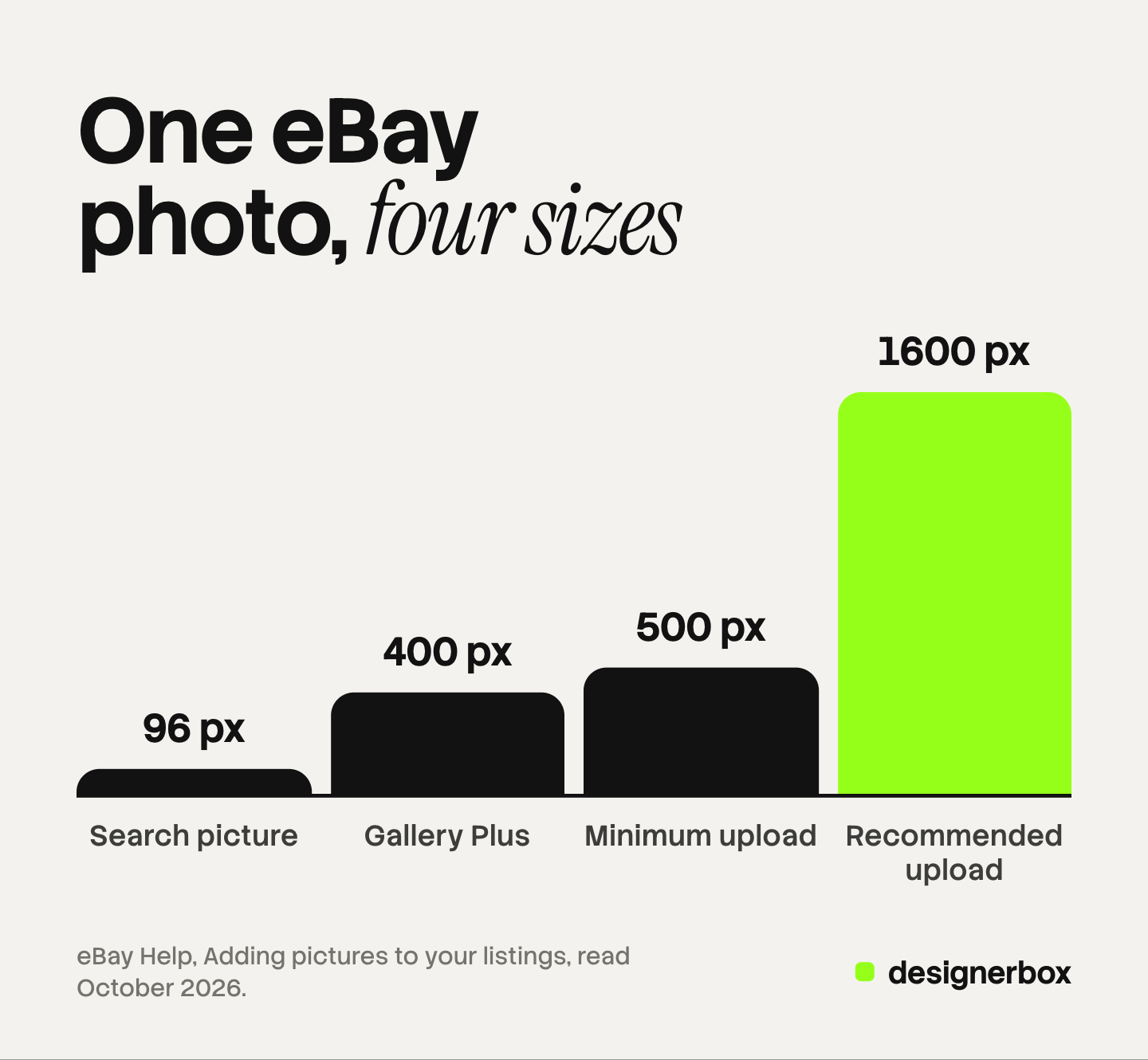
One photo appears at several sizes on eBay. In search results the main photo is shown at a standard size of 96 pixels. With Gallery Plus, a buyer who hovers over the item sees a larger picture, up to 400 x 400 pixels. On the listing page, the buyer can enlarge the photo further. A 500 pixel file is enough for the first two and weak for the third.
eBay’s seller site for exporters gives a slightly different target. It says to make the photo 800 to 1,600 pixels on the long side (eBay, Photo tips, October 2026). Both pages agree on the top number, so 1600 is the safe choice.
For aspect ratio, eBay says 1:1 or 16:9 generally look best. Square is the better default for a catalog, because the same file then fits other marketplaces. eBay also says to show the item in an uncluttered space against a neutral backdrop. White is “generally best”, and a darker background may suit shiny items such as jewelry.
What does eBay not allow in a picture?
eBay’s picture policy lists six things that are not allowed. Four are about what you add to the photo. Two are about what the photo shows. A listing that breaks one can be removed.
- Photos that do not accurately represent the item. The picture must show what the buyer will receive.
- Placeholder images used to convey messages. No “photo coming soon” graphic.
- Stock photos for used, damaged or defective items. A used item needs a photo of that item.
- Photos with added borders. A border is allowed only when it is a natural part of the photo, such as the edge of a backdrop.
- Photos with added text, artwork or marketing material. No “free shipping” label and no seller logo.
- Watermarks of any type. That includes a watermark that names the owner of the photo.
eBay gives two reasons. It says “high-quality images improve the buying experience, so listings that follow these rules are more likely to sell”. It also says the rules make sure your photos follow the rules of popular internet search engines. That second reason is real: Google Merchant Center also rejects promotional overlays and watermarks on product images (Google Merchant Center Help, October 2026).
The help page adds a softer warning about graphics. It says badges, logos and copyright notices “can affect your listing’s placement in search results”. So a small badge can cost you ranking even when nobody removes the listing.
The two file size limits: 12MB and 7MB
eBay states two file size numbers, and both are current. The main help page says the photo uploader takes images up to 12MB. The seller site for exporters says each file should be no larger than 7MB in the uploader, and that a photo copied from a web address can be 12MB.
The pages do not explain the difference. The practical answer is to export under 7MB. A 1600 x 1600 pixel JPEG is usually a small part of that, so the limit only matters for camera originals and uncompressed TIFF or PNG files.
If an upload fails, eBay’s own list of causes starts with the file. Check that the format is one of the eight accepted formats, and that each file is under the limit. Then check the age of the picture: eBay stores pictures for 90 days, so an old hosted image may have expired.
Can you use stock photos or other people’s photos on eBay?
You can use a stock or catalog photo on eBay only for a new item, and only when you have the right to use it. For a used, damaged or defective item, eBay does not allow stock photos at all. The buyer must see the real item and its condition.

Rights are a separate rule. eBay’s images, videos and text policy says sellers should take their own photos. It says you cannot use images from a manufacturer’s website, even when the page is public (eBay, Images, videos and text policy, October 2026). You need explicit written permission from the rights owner. Without it, the owner can have the listing removed through eBay’s Verified Rights Owner program.
Two sources are allowed without extra permission. One is content you created yourself. The other is the eBay product catalog, which sellers can use through the “Sell one like this” feature.
For a brand that sells its own new products, this is simple. You own the photos. For a reseller, each used item needs its own photos. Photos of clothes to sell covers that case, and the same care applies on Depop and Poshmark.
Do AI-edited images meet eBay’s rules?
AI-edited images can meet eBay’s rules when they still show the item accurately. eBay offers its own tool for this. In the listing form, the background tool replaces the background with solid white. In the eBay app, sellers can also choose AI-generated backgrounds named Studio, Surface and Outside.
So a changed background is accepted by eBay itself. The first rule of the picture policy still applies: the photo must accurately represent the item. An edit that changes the color of the product, removes a scratch on a used item or changes the shape of the item breaks that rule, with or without AI.
A fully generated image of a new product is a harder case, and it differs by marketplace. Marketplace rules for AI product photos compares eBay with Amazon, Etsy, Walmart and TikTok Shop. This is general information, not legal advice.
What happens when a picture breaks the policy?
When a picture breaks the policy, eBay may remove the listing, issue a warning, restrict your activity or suspend the account. The picture policy lists those actions as examples. For most sellers the first sign is a removed or hidden listing.
eBay points sellers to Seller Help, where you can find details of any policy issue on your account or listings. The fix is to replace the picture, not to argue about it. You can delete an uploaded photo and add a new one from the revise screen.
One timing rule matters. You can change the main photo on a fixed price listing if there are no offers. On an auction, you can change it only when there are no bids and more than 12 hours are left.
How do eBay’s rules differ from other channels?
eBay’s rules are looser on size and background than most channels, and strict on text and watermarks. That matters when one file has to work in several places. A file made for the strictest channel usually passes eBay. A file made for eBay does not always pass the others.
| Rule | eBay | Google Merchant Center |
|---|---|---|
| Minimum size | 500 pixels on the longest side | 500 x 500 pixels for all products from 31 January 2027 |
| Recommended size | About 1600 x 1600 pixels | About 1500 x 1500 pixels or more |
| File size | 12MB (7MB in the uploader, by one eBay page) | 16MB |
| Product in the frame | Whole item, face-on, in the main photo | Between 75% and 90% of the image |
| Text and watermarks | Not allowed | Not allowed |
The practical rule is one master file. The full kit for five channels is in selling on multiple marketplaces. Make a square image of at least 1600 pixels on a plain light background, with the product filling 75% to 90% of the frame and nothing added. That file fits the eBay and Google rules in the table. Amazon has its own stricter main image rule, covered in Amazon image requirements, and the image spec for five channels shows one master file exported five ways.
How do you check a whole catalog before upload?
You check a catalog with two kinds of test. The first kind is a measurement, and a script can do it. The second kind needs a person or a model to look at the picture. Most teams run the first kind and skip the second, and the second kind is where eBay removes listings.
Checks a script can run on each file:
- The longest side is at least 500 pixels, and ideally 1600.
- The file is under 7MB.
- The format is one of the eight that eBay accepts.
- The ratio is 1:1, or 16:9 when you chose that on purpose.
- Each listing has a first picture.
Checks that need a look:
- No border, text, badge, logo or watermark was added.
- The main photo shows the whole item, face-on.
- A single item listing shows one item. A bundle listing shows every item in the bundle.
- A used item has photos of that item, with clear close photos of any flaw.
- The color and shape match the real product.
Run the script checks on every file. Then look at every main photo, and at a sample of the others. When a file fails, fix the source and export again. Do not patch the one file by hand, because the same fault will return with the next product. Where a bulk catalog run breaks covers the review step for larger runs.
eBay pictures in DesignerBox
DesignerBox is AI creative production for brands and agencies. Anyone can make an AI picture. Making hundreds that still look like your brand is the hard part. An eBay catalog is that problem in a small form: each listing can hold 24 pictures, and each one should look like the same shop.
- One set for each product. You build a workflow with your brand, your products and your rules. It returns the same set each time, such as a front image on a plain background, extra angles and a scene. AI product photography backgrounds shows the background options.
- A sheet of products. Batch runs one workflow over a sheet of up to 200 rows. You keep or discard per row and re-run one row.
- Review. Critic steps score the results, and best-of-N keeps the best one. You still compare each image with the real item.
- Cost. The cost is shown before the run.
The full workflow from the first product photo to the finished ad, in one subscription. The same product photos can become ad sizes and short video for the channels where you advertise the listing.
The limits are important here. DesignerBox suits new products that you photograph once. It does not replace photos of a used item, because eBay requires the real item and its flaws. It does not check eBay’s policy for you, and it does not publish to eBay. You download the results, or send them with a webhook or an S3 step. There is a free plan, and it runs on sample products. Uploading your own photos and the commercial license start on the Pro plan. AI video starts on the Premium plan. Plans and credits are on the pricing page.
A free plan for your first run
There is a free plan. Start from a template and see how a workflow runs. Get started free
FAQ
What size should eBay images be?
About 1600 x 1600 pixels. That is the size eBay recommends. The minimum is 500 pixels on the longest side. A square file at 1600 pixels stays sharp when a buyer enlarges it, and it fits other marketplaces too.
Is 500 pixels the minimum picture size on eBay?
Yes. eBay’s picture policy says photos must be at least 500 pixels on the longest side. The help page for adding pictures states the same minimum as 500 x 500 pixels. eBay still recommends larger photos, because small ones look blurry when enlarged.
What picture format is best for eBay?
eBay accepts JPEG, PNG, GIF, TIFF, BMP, WEBP, HEIC and AVIF. It does not name a best one. JPEG is the practical choice for product photos, because the files are small and every other channel accepts them.
How many pictures can you add to an eBay listing?
Up to 24. Every listing needs at least one. The first picture is the main photo, and it appears next to the title in search results. You can change the order after upload by moving another photo to the first position.
Does eBay require a white background?
No. eBay asks for an uncluttered space and a neutral backdrop. It says white backgrounds are generally best, and that a darker background may work better for shiny items such as jewelry. A white background is still the safest choice for a file you also use on other channels.
Can you put text or a watermark on eBay photos?
No. The picture policy does not allow added text, artwork, marketing material, borders or watermarks of any type. eBay also says badges and logos can affect a listing’s placement in search results. Put the details in the title and the description.
Can you use stock photos on eBay?
Only for new items, and only with the right to use them. eBay does not allow stock photos for used, damaged or defective items. It also does not allow photos copied from a manufacturer’s website without written permission.
Sources
- eBay, Picture policy: the 500 pixel minimum, the six things not allowed, the possible actions and the reasons for the policy, accessed October 2026
- eBay, Adding pictures to your listings: up to 24 pictures, the 1600 x 1600 recommendation, the 12MB limit, aspect ratios, formats, the background tool, Gallery Plus sizes, 90 day storage and the main photo rules, accessed October 2026
- eBay, Photo tips: the 800 to 1,600 pixel target, the 7MB uploader limit and the natural border exception, accessed October 2026
- eBay, Images, videos and text policy: own photos, the eBay product catalog, manufacturer images and the Verified Rights Owner program, accessed October 2026
- Google Merchant Center Help, Image link: size, file size, framing and overlay rules, accessed October 2026
- DesignerBox pricing page (designerbox.ai/pricing), October 2026
eBay rules verified from eBay’s own help and seller pages as of October 2026, on the US site. eBay sites in other countries can differ, and the rules change. This is general information, not legal advice. Individual results vary.