
Meta ad specs for image ads come down to three sizes. Meta recommends 1440 x 1800 pixels at 4:5 for Facebook Feed and Instagram Feed. It recommends 1440 x 2560 pixels at 9:16 for Stories and Reels. Square placements such as Marketplace, the right column and carousel cards take 1:1 at 1080 x 1080 pixels or above. Meta recommends JPG or PNG files, with a 30 MB maximum.
Each placement also has its own text lengths, minimum widths and safe zones.
Every number below was read on Meta’s Ads Guide and Meta Business Help Center in October 2026. This guide covers image ads on Facebook and Instagram only. For video, see the guide to Facebook video ad specs.
Key Takeaways
Feed is 4:5. Meta’s Ads Guide recommends 1440 x 1800 pixels for an image ad in Facebook Feed and in Instagram Feed.
Stories and Reels are 9:16. The recommended size is 1440 x 2560 pixels, with 14% at the top, 35% at the bottom and 6% on each side kept clear.
The file rule is the same on almost every placement. Meta recommends JPG or PNG, and the maximum image file size is 30 MB.
Text lengths change by placement. A Facebook Feed headline is 27 characters. Instagram Reels primary text is 44 characters.
A missing ratio gets filled for you. Meta uses padding, media expansion, cropping and AI features, and you can turn each one off.
Meta ad specs for image ads at a glance
Three rules hold on every placement in this guide.
- File type. Each Ads Guide page lists JPG or PNG. Meta’s help page lists 17 formats that upload, from BMP to WEBP, and adds: “For best results, we recommend using a JPG or PNG file” (Meta Business Help Center, October 2026).
- File size. The maximum image file size is 30 MB. The right column page is the one exception: it lists no file cap.
- Resolution. Meta treats its pixel numbers as a floor. Its help page says to “use the highest resolution images available” (Meta Business Help Center, October 2026).
One term appears on most pages: aspect ratio tolerance. Meta does not define it there. We read it as how far a file may sit from the stated ratio. It is 3% on Facebook Feed and 1% on Instagram Feed, so export Instagram files at the exact ratio.
Facebook ad specs and Instagram ad specs for feed
Feed is where most image ads run. Meta recommends the same pixel size on both apps, and the text lengths differ.
| Spec | Facebook Feed | Instagram Feed |
|---|---|---|
| Ratio | 4:5 | 4:5 |
| Resolution | 1440 x 1800 pixels | 1440 x 1800 pixels |
| File type | JPG or PNG | JPG or PNG |
| Maximum file size | 30 MB | 30 MB |
| Minimum width | 600 pixels | 500 pixels |
| Aspect ratio tolerance | 3% | 1% |
| Primary text | 50 to 150 characters | 125 characters |
| Headline | 27 characters | 40 characters |
Sources: the Meta Ads Guide pages for Facebook Feed and Instagram Feed, October 2026.
Three details sit behind the table.
Facebook ad image size at 1:1. A square still runs in Facebook Feed. Meta’s minimum for a 1:1 image there is 1080 x 1080 pixels.
Instagram ad size range. Instagram Feed accepts ratios from 4:5 to 1.91:1. The Ads Guide writes this as a minimum aspect ratio of 400 x 500 and a maximum of 191 x 100. Instagram Explore home has the same specs as Instagram Feed.
Meta’s two pages disagree on Instagram Feed. The Ads Guide recommends 4:5. Meta’s help page on aspect ratios says both 1:1 and 4:5 are supported in feed, and that “1:1 is recommended for single-image ads to be delivered to Instagram Feed” (Meta Business Help Center, October 2026). Both ratios are accepted, so check the preview in Ads Manager and pick one for the whole set.
Facebook video feeds also take image ads. That page lists a ratio range of 1.91:1 to 4:5, with 1440 x 1440 pixels at 1:1 and 1440 x 1800 pixels at 4:5 (Meta Ads Guide, October 2026).
Stories and Reels: image size and safe zones
The Instagram Story ad size is 1440 x 2560 pixels at 9:16. Facebook Stories, Instagram Reels and Facebook Reels use the same size. The text lengths are where they differ.
| Spec | Facebook Stories | Instagram Stories | Instagram Reels | Facebook Reels |
|---|---|---|---|---|
| Ratio | 9:16 | 9:16 | 9:16 | 9:16 |
| Resolution | 1440 x 2560 pixels | 1440 x 2560 pixels | 1440 x 2560 pixels | 1440 x 2560 pixels |
| Maximum file size | 30 MB | 30 MB | 30 MB | 30 MB |
| Minimum width | 500 pixels | 500 pixels | 500 pixels | 600 pixels |
| Aspect ratio tolerance | 1% | 1% | 1% | 3% |
| Primary text | 125 characters | 125 characters | 44 characters | 40 characters |
| Headline | 40 characters | Not listed | Not listed | 55 characters |
Sources: the Meta Ads Guide pages for Facebook Stories, Instagram Stories, Instagram Reels and Facebook Reels, October 2026.

The app covers part of a 9:16 image with the profile icon and the call to action. Meta gives one safe zone for all four placements. The Instagram Stories page says: “Consider leaving roughly 14% of the top, 35% of the bottom, and 6% on each side of your asset free from text, logos, or other key creative elements.”
Meta gives the safe zone in percent only. On a 1440 x 2560 file, our arithmetic puts it at about 358 pixels at the top, 896 at the bottom and 86 on each side.
Two more rules come from Meta’s safe zone page (Meta Business Help Center, October 2026):
- Disclaimers need more room. If a Reels ad carries a disclaimer, Meta says to leave the bottom 40% free of text and logos.
- Feed has a safe zone too. For Instagram Feed ads at 1:1 or 4:5, keep the bottom and side edges free of key elements.
Ads Manager shows the safe zone as the area inside a yellow overlay. How to design inside it is covered in the guide to Facebook ad design.
Right column, search results and Marketplace
These placements are square. Meta gives a floor of 1080 x 1080 pixels and no higher recommended size.
| Placement | Ratio | Resolution | Primary text | Headline | Description |
|---|---|---|---|---|---|
| Facebook right column | 1:1 | At least 1080 x 1080 pixels | Not listed | 40 characters | Not listed |
| Facebook search results | 1.91:1 to 1:1 | At least 1080 x 1080 pixels | 125 characters | 40 characters | 30 characters |
| Facebook Marketplace | 1:1 | At least 1080 x 1080 pixels | 125 characters | 40 characters | 30 characters |
| Facebook Business Explore | 1.91:1 to 1:1 | At least 1080 x 1080 pixels | 125 characters | 27 characters | 27 characters |
| Ads on Facebook Reels | 1:1 | At least 1080 x 1080 pixels | 60 characters | 10 characters | Not listed |
Sources: the Meta Ads Guide pages for Facebook right column, Facebook search results, Facebook Marketplace, Facebook Business Explore and Ads on Facebook Reels, October 2026.
The right column is a desktop-only format with a minimum of 254 x 133 pixels. Meta’s page says: “Due to the small image size, we recommend not adding text on images.”
Ads on Facebook Reels is a different placement from Facebook Reels. It is a static overlay on a reel, shown as a banner or a sticker. Its aspect ratio tolerance is 0%, so the file has to be an exact square.
Search results and Business Explore are the only placements here that list 1.91:1. Meta’s image pages give no separate pixel size for that wide ratio. The stated floor is still 1080 x 1080 pixels.
Facebook carousel ad size and Instagram carousel specs
The Facebook carousel ad size is 1:1, at 1080 x 1080 pixels or above, with 2 to 10 cards. Instagram Feed differs: Meta lists 4:5 for a carousel that holds only images.
| Placement | Ratio | Resolution | Primary text | Headline | Description |
|---|---|---|---|---|---|
| Facebook Feed | 1:1 | At least 1080 x 1080 pixels | 80 characters | 20 characters | 18 characters |
| Instagram Feed | 4:5 for images only | At least 1080 x 1080 pixels | 125 characters | Not listed | Not listed |
| Instagram Stories | 9:16 | At least 1080 x 1920 pixels | 125 characters | 40 characters | Not listed |
| Instagram Reels | 9:16 | At least 1080 x 1080 pixels | Not listed | Not listed | Not listed |
| Facebook Marketplace | 1:1 | At least 1080 x 1080 pixels | 125 characters | 40 characters | 20 characters |
Sources: the Meta Ads Guide carousel pages for Facebook Feed, Instagram Feed, Instagram Stories, Instagram Reels and Facebook Marketplace, October 2026.
Each image card can be up to 30 MB. The Facebook Feed, Instagram Feed and Instagram Reels pages all state 2 to 10 cards. The two feed pages also list a landing page URL as required.
The Instagram Feed page adds a limit: “Currently, for carousels containing videos, only 1:1 is supported.” So a carousel that mixes images and video is square on Instagram.
Card structures and specs on other platforms are in the guide to carousel ads.
Catalog and Advantage+ catalog ad images
Advantage+ catalog ads take their images from your product catalog. Meta says they “look like other single image, carousel or collection ads”, and the products shown change for each person (Meta Business Help Center, October 2026). So the ad size rules above still apply, and the catalog adds its own file rules.
| Catalog image rule | What Meta states |
|---|---|
| Format | JPEG or PNG |
| Maximum file size | 8 MB |
| Minimum size for the main image | 500 x 500 pixels |
| Shops display | Square 1:1, 1024 x 1024 pixels recommended |
| Images for each product | At least one. Meta recommends 4 or more |
| Ratio across the catalog | All 1:1 or all 4:5 |
Sources: Meta’s pages on product image specifications for catalogs and product data specifications, October 2026.
Mixed ratios cause automatic changes. Meta says that if a catalog holds images in different ratios, they “may be automatically adjusted” in the carousel format. Its fix is to “provide all images in the same aspect ratio (1:1 or 4:5)”.
Commerce Manager has three cropping options for catalog images. The default, Fill frame with image, zooms in on the product.
A collection ad in Facebook Feed is a cover image or video followed by 3 product images. The cover takes a ratio from 1.91:1 to 1:1, at 1080 x 1080 pixels or above (Meta Ads Guide, October 2026). The feed fields behind these ads are in the guide to catalog ads.
Primary text, headline and description lengths
Meta’s lengths are recommendations. Its help page says: “Text in your ad may be truncated if it exceeds the character limitation” (Meta Business Help Center, October 2026).
The same page gives the general rule. For most placements, Meta recommends 125 characters of primary text, a 40-character headline and a 25-character description. It also says primary text should span 1 to 3 lines at most.
The Ads Guide pages are tighter in four places:
- Facebook Feed. The headline is 27 characters, and primary text is 50 to 150 characters.
- Instagram Reels. Primary text is 44 characters.
- Facebook Reels. Primary text is 40 characters.
- Facebook Feed carousel. Primary text is 80 characters, with a 20-character headline.
If one text has to work on every placement, write to the shortest field you run.
What Meta does when a ratio is missing
Meta fills the gap. Its help page on aspect ratios says: “When you create an ad in Ads Manager, your media is automatically adjusted to fit more placements.”

Ads Manager has an aspect ratios view. It shows four variations of an ad: square, vertical, portrait and horizontal. Meta describes what happens when one is absent: “If you don’t provide all four aspect ratio variations, the system helps fill the gaps using adjustment options such as padding, media expansion, cropping and additional AI-enabled features.”
Four facts from Meta’s pages help here.
- You can upload up to 10 images or videos for a single ad. So each ratio can be its own file.
- You can turn adjustments off. Meta says you can turn off padding, media expansion or any other adjustment for individual variations.
- A crop does not limit delivery. Meta’s wording is: “Cropping alone won’t restrict delivery.” Use placement opt-outs for that.
- Expansion makes new pixels. Visual touch-ups in Advantage+ creative “automatically crops and expands your chosen media to fit more placements”, and it generates new pixels when it expands (Meta Business Help Center, October 2026).
This guide lists the specs only. How to build one concept in every ratio is covered in the guide to ad resizing, and the steps from the offer to the test are in how to make an ad.
The four ratios a product brand makes
The tables above name many placements and only four ratios. A brand that makes these four files for each concept covers every placement in this guide.
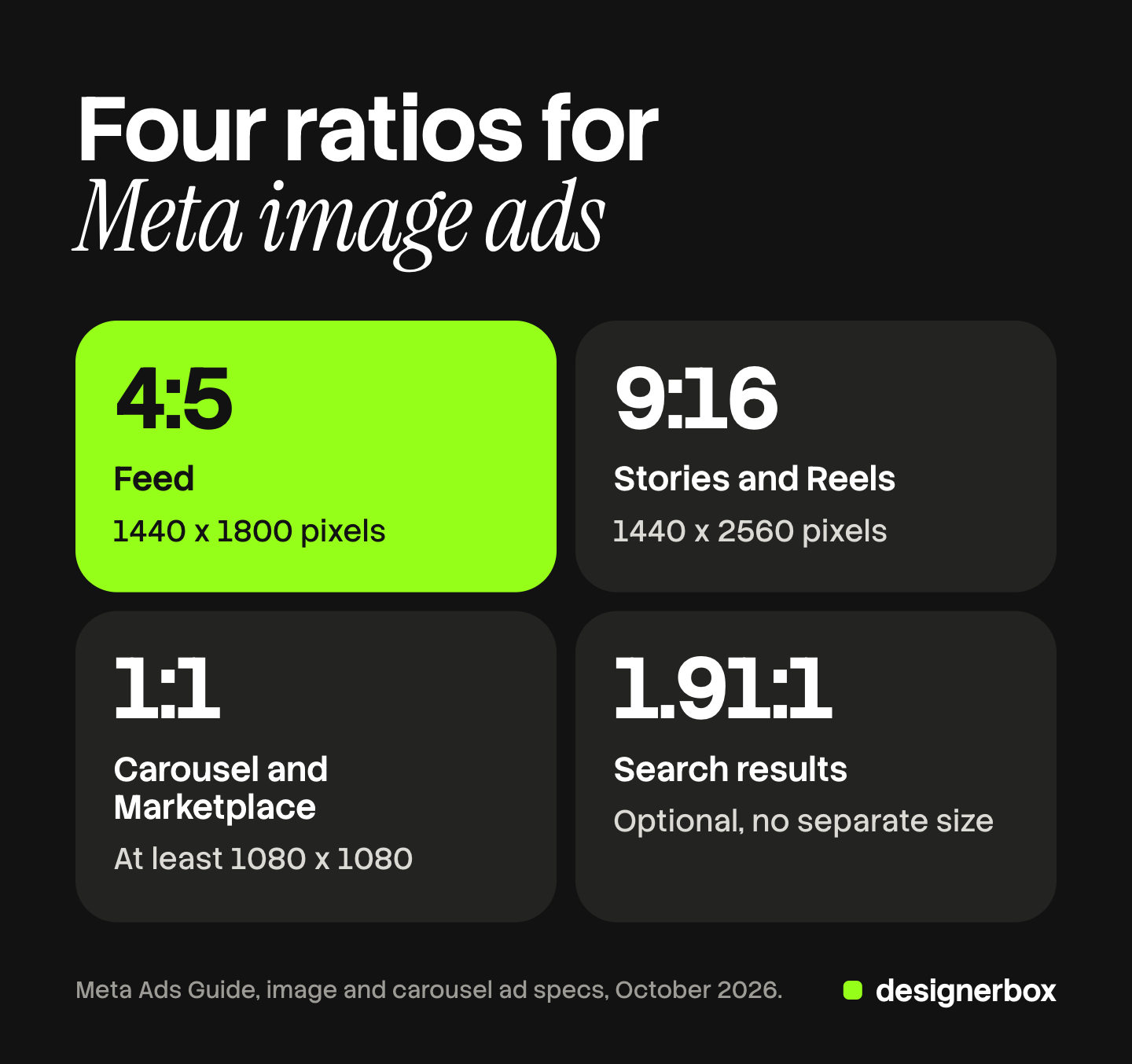
| Ratio | Size Meta states | Where it runs |
|---|---|---|
| 4:5 | 1440 x 1800 pixels | Facebook Feed, Instagram Feed, Instagram Explore home, Instagram Feed image carousel |
| 9:16 | 1440 x 2560 pixels | Facebook and Instagram Stories, Facebook and Instagram Reels |
| 1:1 | At least 1080 x 1080 pixels | Carousel cards, Marketplace, right column, catalog images, Ads on Facebook Reels |
| 1.91:1 | No separate size on the image pages | Search results, Business Explore, a collection cover |
The first three are the working set for most accounts. The wide 1.91:1 file is optional, because every placement that lists it also accepts 1:1.
For how these sizes look in live placements, see the guide to Instagram ad examples.
Ad image sets in DesignerBox
Four ratios for one ad is a small job. Four ratios for 200 products, in a brand’s own look, is a production job for a brand team or an agency. Anyone can make an AI picture. Making hundreds that still look like your brand is the hard part.
DesignerBox makes images, ads and video for your brand. Its AI ad generator page describes a workflow that builds finished ad images from a product photo and a short brief. Your logos, fonts, colors and rules sit in a brand record, and the workflow reads that record on every run. Batch runs one workflow over a sheet of up to 200 products, one product in each row. Row one and row two hundred get the same look. The cost is shown before the run, and you keep, discard or re-run each result on its own. The page for performance marketers covers weekly ad tests.
The limits matter for a spec article. DesignerBox does not send finished work to a Meta ad account. You download the results, or send them with a webhook or an S3 step, and then upload them in Ads Manager. A person still checks each file against the tables above, and sets the Advantage+ options there. The same product photo also feeds the video: the full workflow from the first product photo to the finished ad, in one subscription.
Uploading your own photos and the commercial license start on the Pro plan. AI video, virtual try-on, upscaling, the image editor and the video editor start on the Premium plan. Plans and credits are on the pricing page.
There is a free plan, and it runs on sample products. Get started free.
FAQ
What are the Meta ad specs for an image ad?
Meta recommends 1440 x 1800 pixels at 4:5 for Facebook Feed and Instagram Feed, and 1440 x 2560 pixels at 9:16 for Stories and Reels. Square placements take 1:1 at 1080 x 1080 pixels or above. Meta recommends JPG or PNG, and the maximum image file size is 30 MB.
What is the Instagram ad size for feed?
Meta’s Ads Guide recommends a 4:5 image at 1440 x 1800 pixels for Instagram Feed. The minimum width is 500 pixels, and the accepted ratio range runs from 4:5 to 1.91:1. Meta’s help page on aspect ratios also supports 1:1 in feed.
What is the Instagram Story ad size?
The recommended Instagram Story ad size is 1440 x 2560 pixels at 9:16. Meta says to keep about 14% of the top, 35% of the bottom and 6% of each side free of text and logos. The minimum width is 500 pixels.
What is the Facebook carousel ad size?
A Facebook Feed carousel card is 1:1, at 1080 x 1080 pixels or above. A carousel holds 2 to 10 cards, and each image can be up to 30 MB. Meta recommends 80 characters of primary text, a 20-character headline and an 18-character description.
What happens if I upload only one ratio?
Meta adjusts the image to fit other placements. Its help page names padding, media expansion, cropping and AI features. You can review each variation in the aspect ratios view in Ads Manager, and you can turn each adjustment off.
How do DesignerBox results reach Ads Manager?
You download the results, or send them with a webhook or an S3 step. Then you upload the files in Ads Manager yourself. DesignerBox makes the ad images and does not send finished work to a Meta ad account. The cost is shown before the run.
Sources
- Meta Ads Guide, image ad specs for Facebook Feed, Instagram Feed, Instagram Explore home and Facebook video feeds, read October 2026.
- Meta Ads Guide, image ad specs for Facebook Stories, Instagram Stories, Instagram Reels and Facebook Reels, read October 2026.
- Meta Ads Guide, image ad specs for Facebook right column, Facebook search results, Facebook Marketplace, Facebook Business Explore and Ads on Facebook Reels, read October 2026.
- Meta Ads Guide, carousel ad specs for Facebook Feed, Instagram Feed, Instagram Stories, Instagram Reels and Facebook Marketplace, read October 2026.
- Meta Ads Guide, collection ad specs for Facebook Feed, read October 2026.
- Meta Business Help Center, Best practices for aspect ratios: recommended ratios, the aspect ratios view and automatic adjustments, read October 2026.
- Meta Business Help Center, Recommended minimum image pixel requirements across placements and Supported image formats for ads, read October 2026.
- Meta Business Help Center, About text overlays and the safe zone for ads, read October 2026.
- Meta Business Help Center, Creative best practices for text in ads: recommended text lengths and truncation, read October 2026.
- Meta Business Help Center, About Advantage+ creative: visual touch-ups, read October 2026.
- Meta Business Help Center, Product image specifications for catalogs, Product data specifications for catalogs and About Advantage+ catalog ads, read October 2026.
- DesignerBox AI ad generator page, batch page and pricing page, October 2026.
Meta ad specifications verified from Meta’s Ads Guide and Meta Business Help Center as of October 2026. Meta changes these pages often, and specs can vary by objective. Check the linked page before you build a set.