





Facebook video ads are paid videos that Meta shows in Feed, Reels, Stories, in-stream and Marketplace. Meta’s Ads Guide recommends a 4:5 video for Feed and a 9:16 video for Reels and Stories. Each of those placements accepts MP4 or MOV files up to 4 GB. Meta’s general advice is to keep the video at 15 seconds or less and to design it for viewing with the sound off.
One product video is rarely one file. A brand with 40 products needs a Feed cut and a vertical cut for each one. Then the ad account needs new versions when the first ones stop working.
Every spec below comes from the Meta Ads Guide or the Meta Business Help Center, read on 4 October 2026. The second half covers three ways to make the video versions: filmed, edited from product photos, or made with AI.
Key Takeaways
- Two ratios cover most placements. Meta recommends 4:5 for Facebook Feed and 9:16 for Reels and Stories.
- Length limits are wide, and Meta’s advice is short. Feed accepts up to 241 minutes. Meta recommends 15 seconds or less.
- Vertical video needs a safe zone. Keep text and logos out of the top 14%, the bottom 35% and 6% on each side.
- Plan for sound off. Meta says to use text, graphics and captions. Automated captions work in English only.
- Meta has its own AI video features. Video generation builds a multi-clip video from images, and you must review each version.
- Three routes make the versions. Filming, editing from product photos, and AI generation each fit a different job.
What are Facebook video ads?
Facebook video ads are ads where the main asset is a video. You create them in Meta Ads Manager, or you boost a Page post that contains a video. Meta’s help page says video ads “appear in multiple placements across Facebook, Messenger, Instagram, Meta Audience Network” (facebook.com, October 2026).

A single video works with six campaign objectives: awareness, traffic, engagement, app promotion, leads and sales. On Facebook, the supported placements are Feed, Marketplace, Stories, in-stream reels and search results. The same video can also run on Instagram, Threads, Messenger and WhatsApp Status (facebook.com, October 2026).
One change matters for anyone who reads older guides. Meta says: “In June 2025, the Videos tab on Facebook was renamed to the Reels tab. All videos posted to Facebook are now shared as reels” (facebook.com, October 2026). So the vertical cut now does more of the work on Facebook.
Facebook ad design covers the layout rules for still ads. This guide stays with video.
Facebook video ad specs by placement
Meta publishes one spec page per placement in its Ads Guide (October 2026). The table shows the recommendations and limits for the main ones. Each page is linked under Sources.
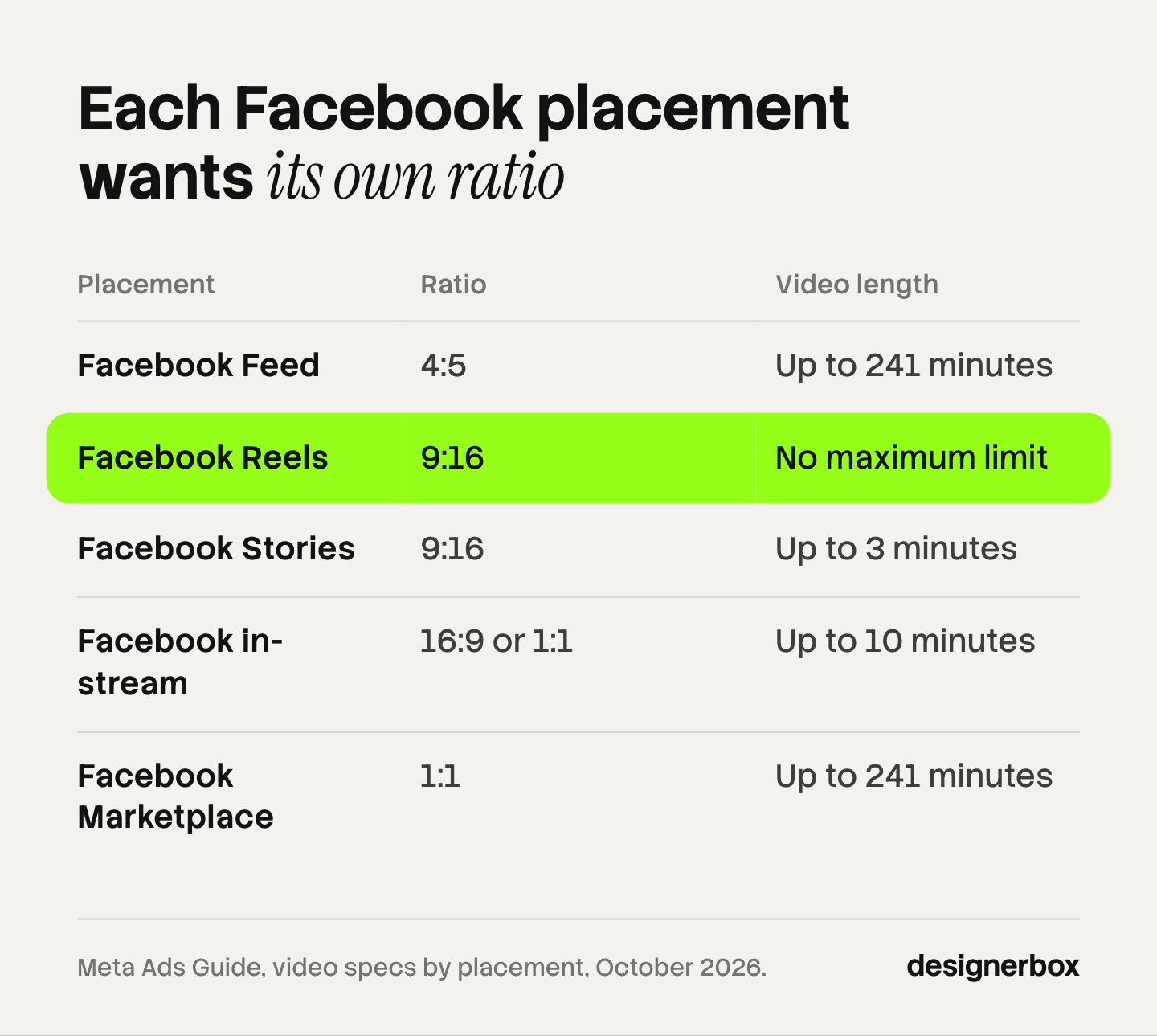
| Placement | Recommended ratio | Recommended resolution | Video length | Text limits |
|---|---|---|---|---|
| Facebook Feed | 4:5 | 1440 x 1800 pixels | 1 second to 241 minutes | Primary text 50 to 150 characters, headline 27 |
| Facebook Reels | 9:16 | 1440 x 2560 pixels | No maximum limit | Primary text 40 characters, headline 55 |
| Facebook Stories | 9:16 | 1440 x 2560 pixels | 1 second to 3 minutes | Primary text 125 characters, headline 40 |
| Facebook in-stream | 16:9 or 1:1 | At least 1080 x 1080 pixels | 5 seconds to 10 minutes on mobile | Primary text 125 characters, headline 40 |
| Facebook Marketplace | 1:1 | At least 1080 x 1080 pixels | 1 second to 241 minutes | Headline 25 characters |
| Instagram Reels | 9:16 | 1440 x 2560 pixels | Up to 15 minutes | Primary text 44 characters |
Two details are easy to miss:
- File settings. Each page lists the file type as MP4, MOV or GIF, with a maximum file size of 4 GB. Instagram Reels lists MP4 and MOV only. Meta asks for H.264 compression, a fixed frame rate and stereo AAC audio at 128 kbps or more.
- The Feed footer. With the awareness objective, the headline, description and button are not displayed on Facebook Feed on mobile. The video has to carry the message alone.
Ad resizing for every platform size lists the numbers for stills and other platforms.
How long should a Facebook video ad be?
Short. The technical limits are wide, but Meta’s own advice is narrow. Its page on mobile video says: “Keep your video length 15 seconds or shorter so people will watch until the end” (facebook.com, October 2026). The same page says to put the most compelling part of the video in the first 3 seconds.
Length also changes how the video replays. On Facebook, a video of 30 seconds or less loops for up to about 90 seconds. A longer video does not loop. On Instagram, every video loops while it is visible (facebook.com, October 2026). A 15-second cut should therefore end on a frame that also works as a start.
Meta’s advice does not tell you which length sells your product. Ad creative testing explains how to compare two lengths so the result can be read.
Sound, captions and text on screen
Meta’s spec pages mark sound as “Optional, but recommended” for Feed and Stories. For Reels and in-stream they say “Optional, but strongly recommended”. Captions are “Optional, but recommended” in each case.
The reason is in Meta’s mobile video guidance: “People choose to watch videos with sound off in many situations. Use text, graphics and captions whenever possible.” Write the video so it makes sense in silence.
Ads Manager gives two ways to add captions (facebook.com, October 2026):
- Upload a SubRip file. The file name must follow the format “filename.[language code]_[country code].srt”. Meta says captions do not upload if the name is wrong.
- Generate automated captions. Meta creates them and you review and edit them. Meta notes: “Automated captions are only available in English and can only be used on Facebook and Instagram.”
Meta adds captions to the video itself. If two ads use the same video, an edit to the captions appears in both.
Safe zones for Reels and Stories ads
A safe zone is the part of the frame that the app’s interface does not cover. On a 9:16 ad, the profile icon, the caption and the button sit on top of the video.
For Facebook Reels and Instagram Stories, Meta’s wording is the same: “Consider leaving roughly 14% of the top, 35% of the bottom, and 6% on each side of your asset free from text, logos, or other key creative elements.” The Instagram Reels page gives the same three numbers. The Facebook Stories page gives a smaller zone: about 14% of the top, or 250 pixels, and 20% of the bottom, or 340 pixels.
Meta’s help page on safe zones adds three points (facebook.com, October 2026):
- A 9:16 video ad in Instagram Feed uses the same safe zone as Reels and Stories.
- If a Reels ad includes a disclaimer, leave the bottom 40% free of text and logos.
- Ads Manager has a “Safe zone guardrail” switch. Turn it on to see the zone as an overlay on your creative.
AI Facebook ads: what Meta makes inside Ads Manager
Meta has generative AI features for video inside Advantage+ creative. Each one has limits that Meta states on its help pages for Advantage+ creative and video generation (October 2026).
| Feature | What Meta says it does | Stated limit |
|---|---|---|
| Video generation | Turns “multiple, single images into a dynamic multi-clip video, with text overlays and music” | Works for seven predicted languages and selected verticals only |
| Add animation | Adds movement such as panning and zooming to an image | Single image ads only |
| Video touch-ups | Crops or expands a video to fit 9:16 or 4:5 | Expansion covers up to the first 15 seconds, in Facebook Feed and Facebook Reels |
| Video subtitles | Writes subtitle overlays from the audio | English voiceovers, Instagram Reels placement |
Video generation starts from your website or product URL and the images in your ad account. Meta says several versions are made and adds: “You are required to review the generated videos, make edits if needed and choose the ones that you want to use.” The seven languages are English, French, German, Italian, Korean, Japanese and Chinese.
A label applies to all of this. Meta says it adds an AI info label when you use features such as Add Animation. For video made in other software, Meta “uses industry-standard detection methods, such as C2PA” and labels what it detects (facebook.com, October 2026). In the European Region, California, New York, India and Taiwan, advertisers may also get the option to disclose AI use themselves. AI disclosure in advertising covers the laws behind those regions.
Three ways to make the video variants
A brand or an agency has three routes to a video, and most teams use more than one.
| Route | What you need | Fits this job | Check before you run it |
|---|---|---|---|
| Filmed | A person, a product sample and a camera or phone | A real person who uses or explains the product | Rights to the footage, and time for each new version |
| Edited from product photos | Approved product photos, text and music | Price, offer and catalog ads where the product must stay exact | The safe zone and caption text in each ratio |
| AI-generated | A product photo and a written brief | New scenes and motion without a shoot | The product in each clip against the real photo, and the AI label |
Filmed video is the strongest route when the claim needs a person. A hand that opens the box shows scale and use. Each new hook needs a new take or a new edit.
Edited video starts from product photos you already approved. The product stays exact because nothing redraws it. Product photo to video ad shows a four-shot build that starts from one image.
AI-generated video makes motion and scenes from a photo and a brief. The model can also change a label, a color or a shape, so compare each clip with the real product.

The routes combine well. A filmed hook of 3 seconds can open an edited product sequence. TikTok video ads made with AI covers the same choice under TikTok’s rules.
Video ad variants as a saved workflow
DesignerBox is AI creative production for brands and agencies. For video ads, the job it fits is new versions of ads that already work. Anyone can make an AI picture. Making hundreds that still look like your brand is the hard part.
In DesignerBox you build a workflow once with your brand, your products and your rules. The workflow reads the brand profile on every run. Batch runs the same workflow over a whole sheet of products, so row one and row two hundred get the same framing and text style. You keep or discard each row, and you can run one row again alone.
Three parts matter for Facebook video ads. The AI video ads page shows the workflows that turn a product photo into a short clip. The ads resizer makes the 4:5 and 9:16 versions. The video editor is a real timeline, with several tracks, transitions, animated text and audio. The full workflow from the first product photo to the finished ad, in one subscription.
You see the cost of a run before you press Run. An 8-second clip costs 40 to 560 credits, depending on the model.
Here are the limits. DesignerBox does not connect to your ad account. You download the results, or send them with a webhook or an S3 step, and then upload the files in Ads Manager. Every plan below Ultra is one seat. Uploading your own photos and the commercial license start on the Pro plan. AI video, virtual try-on, upscaling, the image editor and the video editor start on the Premium plan. Plans and credits are on the pricing page.
An agency builds one workflow per client brand and runs it for each new product. See DesignerBox for agencies
FAQ
What size should a Facebook video ad be?
Meta recommends a 4:5 ratio at 1440 x 1800 pixels for Facebook Feed. For Facebook Reels and Stories it recommends 9:16 at 1440 x 2560 pixels. In-stream video uses 16:9 or 1:1. The maximum file size is 4 GB (Meta Ads Guide, October 2026).
How long can a Facebook video ad be?
It depends on the placement. Facebook Feed accepts 1 second to 241 minutes. Stories accept up to 3 minutes. Reels have no maximum limit. Meta’s general advice is 15 seconds or less (Meta Ads Guide and Meta for Business, October 2026).
What is the safe zone for Facebook Reels ads?
Meta asks you to keep text and logos out of roughly the top 14%, the bottom 35% and 6% on each side of a 9:16 ad. If the ad has a disclaimer, keep the bottom 40% free. (Meta Business Help Center, October 2026).
Can Meta make a Facebook video ad with AI?
Yes, within limits. Video generation in Advantage+ creative builds a multi-clip video from images, with text overlays and music. Meta says it works for seven predicted languages and selected verticals, and you must review each version before you use it (Meta Business Help Center, October 2026).
Where do DesignerBox video results go?
To you. DesignerBox makes the video files. You download the results, or send them with a webhook or an S3 step, and upload them in Ads Manager. The cost of a run is shown before the run. AI video starts on the Premium plan.
Sources
- Meta Ads Guide, video ad specs for Facebook Feed: facebook.com, October 2026
- Meta Ads Guide, video ad specs for Facebook Reels: facebook.com, October 2026
- Meta Ads Guide, video ad specs for Facebook Stories: facebook.com, October 2026
- Meta Ads Guide, video ad specs for Facebook in-stream video: facebook.com, October 2026
- Meta Ads Guide, video ad specs for Facebook Marketplace: facebook.com, October 2026
- Meta Ads Guide, video ad specs for Instagram Reels: facebook.com, October 2026
- Meta Ads Guide, video ad specs for Instagram Stories: facebook.com, October 2026
- Meta Business Help Center, About video ads: facebook.com, October 2026
- Meta Business Help Center, Supported objectives and placements for video ads: facebook.com, October 2026
- Meta Business Help Center, About video length and looping: facebook.com, October 2026
- Meta Business Help Center, Add captions to your video ad: facebook.com, October 2026
- Meta Business Help Center, About text overlays and the safe zone for ads in Stories and Reels: facebook.com, October 2026
- Meta Business Help Center, About Advantage+ creative: facebook.com, October 2026
- Meta Business Help Center, About video generation in Meta Ads Manager: facebook.com, October 2026
- Meta Business Help Center, About AI info on ads created or edited with generative AI tools: facebook.com, October 2026
- Meta Business Help Center, Tips and best practices for Facebook Reels: facebook.com, October 2026
- Meta for Business, mobile-first video ads: facebook.com, October 2026
- DesignerBox plans and feature gating: DesignerBox pricing page (designerbox.ai/pricing), October 2026
Meta ad specs and features checked against Meta’s own pages as of October 2026. Meta changes them often, so confirm each number in the Ads Guide before you export. This is general information, not legal advice. Individual results vary.


