Image ads are paid ads built on one still picture, with a short text and one link. Every large ad platform sells them, but each one means a different file. Meta wants a 4:5 portrait for the feed. Google builds the ad from your landscape and square images. LinkedIn recommends a square. Pinterest wants 2:3. TikTok only shows images in its feed as a carousel with music.
So “make one image ad” is five jobs. A 40-product brand that runs one image on five platforms needs about 200 files before it tests a second concept. Most of the work is the same picture in a new shape, with the text moved so the interface does not cover it.
This guide lists what an image ad is on each platform, with specs read from each platform’s own help page on 1 October 2026. It then covers when one image beats a carousel or a video, and what changes when AI made the image. It is written for agencies and brand teams who ship ads every week.
Key Takeaways
- One format, five shapes. Facebook and Instagram feed take 4:5, Google Display takes 1.91:1 and 1:1, LinkedIn recommends 1:1, Pinterest 2:3, and TikTok vertical carousel images are 720 x 1280.
- TikTok has no single still ad in its feed. TikTok describes the Carousel Ad as the format that supports images for in-feed ads. It needs 2 to 35 images and music.
- Google Display is two formats. A responsive display ad is built from your assets. An uploaded image ad is a fixed-size file of 150 KB or less.
- One image wins on one message. Use a single image when the ad has one product, one claim and one link. Use a carousel for a set or a sequence, and video when the product has to move.
- The label rules differ. TikTok asks you to label fully AI-made images. Meta, Pinterest and LinkedIn read the file’s metadata and add a label themselves.
- The product stays true. AI may change the scene around the product. It may not change the label, the color, the shape or the scale.
What are image ads?
Image ads are ads where one still image carries the message. The platform adds your text, a link and a call to action around it. There is no motion and no sound. Marketers also call them static image ads, single image ads or static ads.
The name changes by platform. Meta calls the format “Image”. LinkedIn calls it a “single image ad”. Google has “responsive display ads” and “uploaded display ads”. Pinterest calls it a “standard” ad. The idea is the same in all four: one picture, one link.
Three things separate an image ad from the other formats. It has one frame, so it can make one point. It loads at once, so the point has to be readable in the first second. It is the cheapest unit to make, so it is where most teams test new claims. The cost argument is covered in static ads vs video, and it is not repeated here.
Image ad specs on each platform
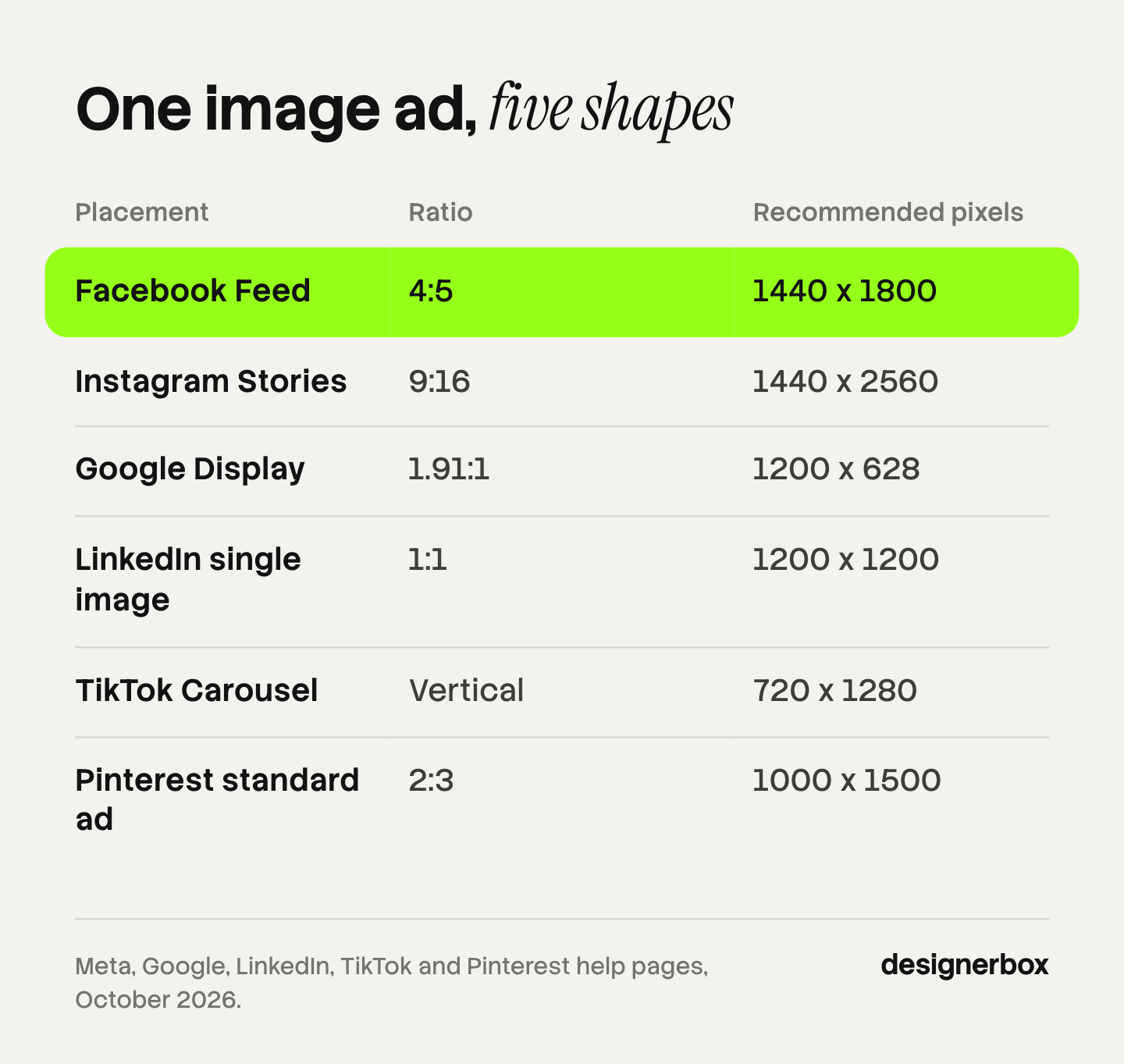
The table shows the image each platform recommends for its main placement. Each row was read from the platform’s own page on 1 October 2026. Specs change, so check the linked page on the day you build.
| Platform and placement | Ratio | Recommended pixels | File type and size |
|---|---|---|---|
| Facebook Feed | 4:5 | 1440 x 1800 | JPG or PNG, up to 30 MB |
| Instagram Feed | 4:5 | 1440 x 1800 | JPG or PNG, up to 30 MB |
| Instagram Stories | 9:16 | 1440 x 2560 | JPG or PNG, up to 30 MB |
| Google responsive display | 1.91:1 and 1:1 | 1200 x 628 for landscape | 1 to 15 images per ratio |
| LinkedIn single image | 1:1 | 1200 x 1200 | JPG, PNG or GIF, up to 5 MB |
| TikTok Carousel | Vertical | 720 x 1280 | JPG or PNG, 100 KB or less suggested |
| Pinterest standard ad | 2:3 | 1000 x 1500 | PNG or JPEG, up to 20 MB on desktop |
Facebook image ads and Instagram image ads
Meta lists the image format for Facebook Feed, Stories, Reels, Marketplace and search results, and for Instagram Feed, Stories, Reels and Explore (Meta Ads Guide, October 2026). The feed image is a 4:5 portrait at 1440 x 1800 pixels on both apps.
The text limits are short and they differ. For Facebook Feed, Meta recommends primary text of 50 to 150 characters and a headline of 27 characters, with a minimum image width of 600 pixels. For Instagram Feed it recommends primary text of 125 characters and a headline of 40 characters, with a minimum width of 500 pixels. Instagram Feed accepts ratios from 4:5 to 1.91:1.
Stories is a different file. It is 9:16, and the interface sits on top of it. Meta’s Instagram Stories page recommends keeping about 14% of the top and 35% of the bottom of the frame free of text and logos. A feed image stretched to 9:16 puts the headline under the profile icon.
Google image ads
Google Display has two image formats. In a responsive display ad, you upload images, headlines and descriptions, and Google builds the ad for each slot. Google asks for a landscape image at 1.91:1 (1200 x 628 recommended, 600 x 314 minimum) and a square image at 1:1 (300 x 300 minimum). You can add 1 to 15 images in each ratio. Headlines are 30 characters, and the long headline and descriptions are 90 characters each (Google Ads Help, October 2026).
An uploaded image ad is the old banner. You deliver a finished file in a fixed size, such as 300 x 250, 728 x 90, 160 x 600 or 320 x 50. Google accepts GIF, JPG and PNG, and the file must be 150 KB or less (Google Ads Help, October 2026). That limit is about 200 times smaller than Meta’s 30 MB, so a file exported for Meta fails here.
Google is moving Display campaigns into Demand Gen. A migration tool has been rolling out since June 2026, and Google lists responsive display ads and uploaded display ads among the formats there (Google Ads Help, October 2026).
LinkedIn single image ads
LinkedIn accepts three shapes. Square is 1:1 at 1200 x 1200 pixels. Horizontal is 1.91:1 at 1200 x 628. Vertical is 4:5 at 720 x 900. Files are JPG, PNG or GIF, up to 5 MB. LinkedIn says “paid vertical assets will only serve on mobile devices”, so a 4:5 image alone does not reach desktop readers (LinkedIn Marketing Solutions Help, October 2026).
LinkedIn recommends 150 characters of introductory text and a 70-character headline. The maximums are far higher, at 3,000 and 200 characters, but longer text is cut in the feed. Which format fits each buying stage is covered in B2B ads.
TikTok image ads
TikTok describes the Carousel Ad as “an ad format that supports images for TikTok-in-feed ads” (TikTok Ads Manager help, last updated September 2026). A Standard Carousel takes 2 to 35 JPG or PNG images. TikTok lists 720 x 1280 for vertical, 640 x 640 for square and 1200 x 628 for horizontal. Music is required, and all images share one caption, one call to action and one link (TikTok carousel specifications, last updated September 2026).
Single still images run outside the TikTok app. TikTok publishes single image specs for the Global App Bundle placements, which its page lists in CapCut and Fizzo, and for the TikTok Ad Network, which was called Pangle (Global App Bundle specifications and TikTok Ad Network specifications, both last updated September 2026). Both accept JPG and PNG files up to 100 MB.
Pinterest image ads
A Pinterest standard ad is one image at a 2:3 ratio, and Pinterest recommends 1000 x 1500 pixels. Files are PNG or JPEG, up to 20 MB on desktop and 32 MB in the app. The title can be 100 characters, and Pinterest says the first 40 may show in the feed. The description can be 800 characters, but it does not appear in the home feed or search feed (Pinterest Business help, October 2026).
That last point changes the design. On Pinterest the image and the first 40 characters of the title do all the work.
When does a single image beat a carousel or a video?
A single image wins when the ad has one job. One product, one claim and one link fit in one frame, and a viewer can read them without a swipe or a wait. Use a carousel when the message is a set or a sequence. Use video when the product has to move for the claim to be believed.

The platforms’ own formats point the same way. A carousel exists to hold several things. LinkedIn carousels take 2 to 10 cards (LinkedIn Marketing Solutions Help, October 2026), and TikTok carousels take 2 to 35 images. If you have one thing to say, the extra cards are empty space.
| The ad has to show | Format | Reason |
|---|---|---|
| One product and one claim | Single image | One frame is read in a second, with no swipe |
| An offer with a date or a price | Single image | The whole offer is on screen at once |
| A range, a set or several colors | Carousel | Each item gets its own card |
| Steps, or a before and an after | Carousel | The swipe is the sequence |
| Fit, motion, texture or sound | Video | A still cannot prove movement |
| Any message on the TikTok feed | Carousel or video | TikTok has no single still format in its feed |
Three practical rules follow from the specs above.
- Start a new claim as a single image. It is the cheapest file to make, so you can test more claims with the same budget. When a claim wins, build the carousel and the video from it.
- Do not cut one image into carousel cards. A carousel made of one picture in slices has one idea in it. It tests the same thing as the single image and takes longer to read.
- Let the placement decide on mobile. A LinkedIn 4:5 image does not serve on desktop. A Stories image loses about half its height to the safe zone. Check where the ad will run before you pick the shape.
No public dataset ranks the three formats for every account. The honest method is a test with enough results to read, which ad creative testing explains. For layouts to test, see 30 static ad examples and 7 product ad examples.
What changes when AI makes the image
Two things change. The platform may put a label on the ad, and the risk moves from the photo shoot to the product itself. The specs do not change. An AI image is still a 4:5 or a 2:3 file with the same size limits.
AI label rules for image ads
Each platform handles AI images in its own way. The rules below were read in October 2026, except where a date is given. This is general information, not legal advice.
| Platform | What the platform says | What you do |
|---|---|---|
| TikTok | Ads with images that are “completely AI-generated” need the AI label or your own clear disclaimer. Changes to lighting, color or the background count as minor edits. Undisclosed AI ads are “rejected or restricted” | Label a fully AI-made image. A real product photo on a new background needs no label |
| Meta | Meta adds an “AI info” label when you use its own AI tools, or when it detects signals of a third-party AI tool, such as C2PA metadata | Expect the label. Leave the metadata in the file |
| Google Ads | Since July 2026, advertisers can add an AI label to image ads, in the creative or with a setting. Google says the setting does not guarantee compliance with any law | Use it where your market or your client expects a label |
| Pinterest reads IPTC metadata and runs its own classifiers. On an ad, the AI disclosure shows when a person clicks the menu next to the Pin. You can appeal a label | Check your ads after launch, and appeal a wrong label | |
| LinkedIn shows a Content Credentials icon on single image ads when the uploaded file carries C2PA data | Know that the icon can show how the image was made |
Sources: TikTok ads policy (last updated April 2026), Meta Business Help Center (read September 2026), Google Ads policy update, Pinterest Help and LinkedIn Help.
The pattern is clear. Four of the five platforms read the file itself, so removing the metadata is not a plan. Laws add to these rules in some markets, and AI disclosure in advertising covers them.
The product has to stay true
An image ad is a claim about a product. If the AI redraws the product, the ad shows something you do not sell. The common failures are easy to name: a warped print, a garbled logo, a changed color, a missing seam, a bottle that is the wrong size next to a hand.
The safe rule is short. AI may change the scene, the light and the background. It may not change the product. Check the label text, the logo, the color, the shape and the scale against the real item before launch. AI product ads lists the five checks in full. For prompts that state the ratio and the product facts, see advertising prompts for AI images.
Text is the second risk. Image models often misspell words inside the picture. Put the headline, the price and the legal line on the image as real type, in a layout step, after the image is made. AI campaign assets explains that step.
How to build one image ad for five platforms
Build the image in layers and export it five times. A crop of a finished feed ad fails, because the text and the product move out of the frame.
- Make the master at the tallest shape. Start at 9:16 with the product in the middle third. Every other shape is cut from inside it.
- Keep product, text and background apart. The product stays the same size. The background grows or shrinks. The text moves to the free area.
- Export the shapes in this order. 9:16 for Stories, 4:5 for Meta feed, 2:3 for Pinterest, 1:1 for LinkedIn and Google, 1.91:1 for Google and LinkedIn desktop.
- Make the small files last. Google’s uploaded banners must be 150 KB or less, and TikTok suggests 100 KB or less per carousel image. Compress these on their own.
- Write the text per platform. A 27-character Facebook headline and a 70-character LinkedIn headline are two different sentences.
Ad resizing covers the layered master and the file count in detail.

Image ads as a workflow
Anyone can make an AI picture. Making hundreds that still look like your brand is the hard part. Five shapes for each product, on every product, every week, is production work.
DesignerBox is AI creative production for brands and agencies. You build the image ad once as a workflow: your product photo in, the scene, the layout, the headline, then the size each platform needs. The AI ad generator starts from your own product photo, so the product in the ad is the product you sell. You set the brand once in Brand, and the workflow reads it on every run. The ads resizer makes the other shapes from one approved ad.
Batch runs one workflow over a whole sheet of products, and you review the results in one pass. You keep or discard per row. Three critic steps score the results, and best-of-N keeps the best one. You still check each product against the real item yourself. The cost is shown before each run. The full workflow from the first product photo to the finished ad, in one subscription.
Here are the limits. DesignerBox does not publish into Meta, Google, LinkedIn, TikTok or Pinterest. You download the results, or send them with a webhook or an S3 step. Uploading your own photos and the commercial license start on the Pro plan. Team features, shared brand kits and white label are on the Ultra plan, and every plan below Ultra is one seat. Plans and credits are on the pricing page.
A free plan for your first run
There is a free plan, and it runs on sample products. Start from a template and see the cost before you run it. Get started free.
FAQ
What is an image ad?
An image ad is a paid ad made of one still image, a short text and one link. It has no motion and no sound. Meta calls the format Image, LinkedIn calls it a single image ad, Google calls it a responsive or uploaded display ad, and Pinterest calls it a standard ad.
What size are Facebook image ads?
Meta recommends 1440 x 1800 pixels at a 4:5 ratio for a Facebook Feed image ad. The file is a JPG or PNG of up to 30 MB, and the minimum width is 600 pixels. Meta recommends primary text of 50 to 150 characters and a 27-character headline. Stories uses 9:16, so it needs a second file.
Can you run a single image ad on TikTok?
Not in the TikTok feed as one still. TikTok describes the Carousel Ad as the format that supports images for in-feed ads, and it needs 2 to 35 images with music. Single image ads run on the Global App Bundle placements and on the TikTok Ad Network, which sit outside the TikTok app.
What are static image ads?
Static image ads are image ads. The word static means the frame does not move. People use it to separate still ads from video and from animated formats. A carousel made of still images is often called static too, but it is a different format with its own specs.
Are image ads better than video ads?
Neither format wins for every account. An image ad is cheaper to make and is read in a second, so it suits one clear claim and early tests. Video suits claims that need motion, such as fit or texture. Test both on your own account before you move the budget.
Do AI images for ads need a label?
It depends on the platform and on how much the AI changed. TikTok asks for a label or a disclaimer on images that are completely AI-generated, but not on a background change. Meta, Pinterest and LinkedIn can add a label themselves when the file carries AI metadata. Google lets advertisers add an AI label.
How many image ad sizes does one product need?
Five shapes cover the five platforms in this guide: 9:16, 4:5, 2:3, 1:1 and 1.91:1. Google’s fixed banner sizes add more if you upload finished files. In DesignerBox the cost of a run is shown before you press Run, so you can price the set first.
Sources
- Meta Ads Guide, image format, Facebook Feed, Instagram Feed and Instagram Stories: facebook.com/business/ads-guide, accessed October 2026
- Google Ads Help, “Responsive display ads specs and format requirements”: support.google.com/google-ads/answer/17090561, accessed October 2026
- Google Ads Help, “Uploaded display ads specifications”: support.google.com/google-ads/answer/1722096, accessed October 2026
- Google Ads Help, “Google Display Ads campaigns have a new home in Demand Gen”: support.google.com/google-ads/answer/17051545, accessed October 2026
- LinkedIn Marketing Solutions Help, “Single image ads advertising specifications”: linkedin.com/help/lms/answer/a426534, accessed October 2026
- LinkedIn Marketing Solutions Help, “Carousel Ads advertising specifications”: linkedin.com/help/lms/answer/a427022, accessed October 2026
- TikTok Ads Manager help, “About Carousel Ads” and “Specifications for Carousel Ads”: ads.tiktok.com, last updated September 2026, accessed October 2026
- TikTok Ads Manager help, Global App Bundle and TikTok Ad Network image specifications: ads.tiktok.com, last updated September 2026, accessed October 2026
- Pinterest Business help, “Review ad specs”: help.pinterest.com, accessed October 2026
- TikTok Ads Policy, misleading and false content, AI-generated content: ads.tiktok.com, last updated April 2026, accessed October 2026
- Meta Business Help Center, AI info labels on ads: facebook.com/business/help/1010479435004531, read September 2026
- Google Ads policy, “Updates to AI labeling requirements (July 2026)”: support.google.com/adspolicy/answer/17257106, accessed October 2026
- Pinterest Help, “Gen AI labels”: help.pinterest.com, accessed October 2026
- LinkedIn Help, “Content Credentials”: linkedin.com/help/linkedin/answer/a6282984, accessed October 2026
- DesignerBox pricing: designerbox.ai/pricing, October 2026
Image ad specifications verified from the Meta, Google, LinkedIn, TikTok and Pinterest help pages as of October 2026. Individual results vary.