
To make an ad, work through seven steps in order. Choose one offer and one audience. Write one message. Pick the format and the size for the placement. Make the visual. Write the copy to the character limits. Check the ad against the platform’s review rules. Then test it against one other version. AI can speed up the visual, the copy and the sizes. It cannot supply the offer or the proof.
Most ads fail before anyone opens a design tool. The shop owner starts with the picture, adds three messages so nothing is left out, and uploads a file in the wrong shape. The platform crops it, cuts the text short, or rejects it a day later. Each of those problems has a step where you prevent it.
This guide is for a one-person shop or a small brand team that makes its own ads. It covers each step, the AI route at each step, and the four jobs that stay with you. Platform specs and rules were checked on the platforms’ own help pages on 1 October 2026.
Key Takeaways
- Seven steps, in this order: offer and audience, one message, format and size, visual, copy, review rules, test. The order matters because each step limits the next one.
- One ad carries one message. Meta says that communicating what you want people to do at a glance is the most important goal of an ad.
- The shape comes before the picture. A Meta feed image is 4:5. Stories and Reels are 9:16. A file built in the wrong ratio gets cropped.
- Copy has hard limits. Meta recommends 125 characters of primary text and a 40-character headline. A Google search headline holds 30 characters.
- Review takes about a day. Meta and TikTok say most ads are reviewed within 24 hours. Google says within one business day.
- AI speeds up three steps: the visual, the copy and the sizes. The offer, the proof, the true product and the disclosure stay with you.
How to make an ad: the seven steps
The seven steps of making an ad are: decide the offer and the audience, write one message, choose the format and size, make the visual, write the copy, check the review rules, and test. The table shows what you decide at each step, where AI helps, and what you still do yourself.
| Step | What you decide | Where AI helps | What stays with you |
|---|---|---|---|
| 1. Offer and audience | What you sell, to whom, at what price | Summarizing reviews and customer questions | The offer itself |
| 2. One message | The single thing the ad says | Drafting several angles to choose from | The choice, and the proof behind it |
| 3. Format and size | Image or video, and the ratio | Resizing one approved ad to every ratio | Checking each crop |
| 4. The visual | What the viewer sees first | Scenes, backgrounds, people and motion around your product | The product staying true |
| 5. The copy | Primary text, headline, button | Variants inside the character limits | Every claim being true |
| 6. Review rules | Whether the ad can run | Almost nothing | Policy, truth and disclosure |
| 7. The test | Which version runs next | Making the second version | Reading the result |
The same steps apply if you want to know how to make an advertisement for print or a shop window. Only steps 3 and 6 change, because the sizes and the rules belong to the place where the ad runs.
Step 1: The offer and the audience
Start with one product, one offer and one group of people. Write it as a sentence: “Hand-poured soy candles, three for the price of two, for people buying a gift this month.” If you cannot write that sentence, you are not ready to make the ad.

The offer is the reason to act now: a price, a bundle, free delivery, a new arrival, a deadline. The audience is who has that reason. A good ad for the wrong offer still loses money, because a picture cannot fix a price nobody wants.
The AI route. An AI chat can read your reviews and customer emails and list the reasons people give for buying. That is useful input. It cannot decide your price, your stock or your margin. Treat its list as questions to answer, and write the offer yourself.
Step 2: One message
An ad has room for one message. Pick the single thing a stranger should understand in two seconds, and remove the rest. Meta’s guidance on ad text says: “Communicating what you want people to do at a glance is the most important goal of your ad” (Meta Business Help Center, accessed October 2026).

A message has three parts: who it is for, what they get, and why they should believe it. The third part is proof. Proof is something the viewer can check: the product in use, a number you measured, a real review, a guarantee you honor.
Write three or four candidate messages, then choose one. The others become later ads. For how a message turns into an idea you can reuse across formats, see what a creative concept is.
The AI route. Ask an AI chat for ten angles on your offer: the price angle, the gift angle, the problem angle. This is fast and it is a good use of the tool. You make the choice, and you remove every angle that needs proof you do not have.
Step 3: The format and the size
Choose the placement first, then the format, then the size. The placement decides the shape of the file. If you build the picture first and the shape second, the platform crops your ad for you.
| Placement | Format | Ratio and size | Source |
|---|---|---|---|
| Facebook and Instagram feed | Image | 4:5, 1440 x 1800 pixels recommended, JPG or PNG, up to 30 MB | Meta Ads Guide |
| Instagram Stories | Image | 9:16, 1440 x 2560 pixels recommended, at least 500 pixels wide | Meta Ads Guide |
| TikTok In-Feed | Video | 9:16 recommended, at least 540 x 960 pixels, up to 500 MB | TikTok Business Help Center |
| Google Search | Text | Up to 15 headlines and 4 descriptions | Google Ads Help |
All four pages were accessed in October 2026. The TikTok page was last updated in June 2026.
For a vertical file, keep the edges clear. Meta recommends leaving about 14% of the top, 35% of the bottom and 6% of each side of a Stories image free from text and logos, because buttons and profile icons sit there.
If the budget covers only one file, make the 4:5 feed image. If it covers two, add the 9:16. For the full list, see one concept in every platform size. The still formats on Meta, Google, LinkedIn, TikTok and Pinterest are compared in image ads. For ideas on what a still ad can look like, see these static ad examples.
The AI route. Resizing is the step where AI saves the most time. A tool can extend a background so a 4:5 image fills a 9:16 frame. Check each new size yourself: the product must stay whole, and the headline must stay inside the safe area.
Step 4: The visual
The visual has one job: show the product and the message before the viewer scrolls on. Make the product the largest thing in the frame. Use one focal point. If you add text to the image, use a few large words.
You have three ways to make it:
- Your own photo. A phone photo in window light is enough for a first ad. It is true by default.
- A designed layout. Your photo plus a headline and a price, built in a design tool or from a template.
- An AI scene around your photo. The tool keeps your product photo and builds a new background, a person or a short clip around it.
How to choose between a shoot, stock and AI is covered in ad visuals.
The AI route. There are several kinds of tool here, and what an AI ad generator is explains them. Many advertisers can start with the free tools inside their ad account, which the guide to the best AI ad generator covers.
One rule applies to every AI visual. The AI may change the scene. It may not change the product. A label with one wrong letter or a bag in a color you do not sell is an ad for a product you cannot ship. The full method is in AI product ads.
Step 5: The copy
Write the copy to the limits of the placement, shortest version first. Text that runs past the limit gets cut, usually in the middle of your offer.
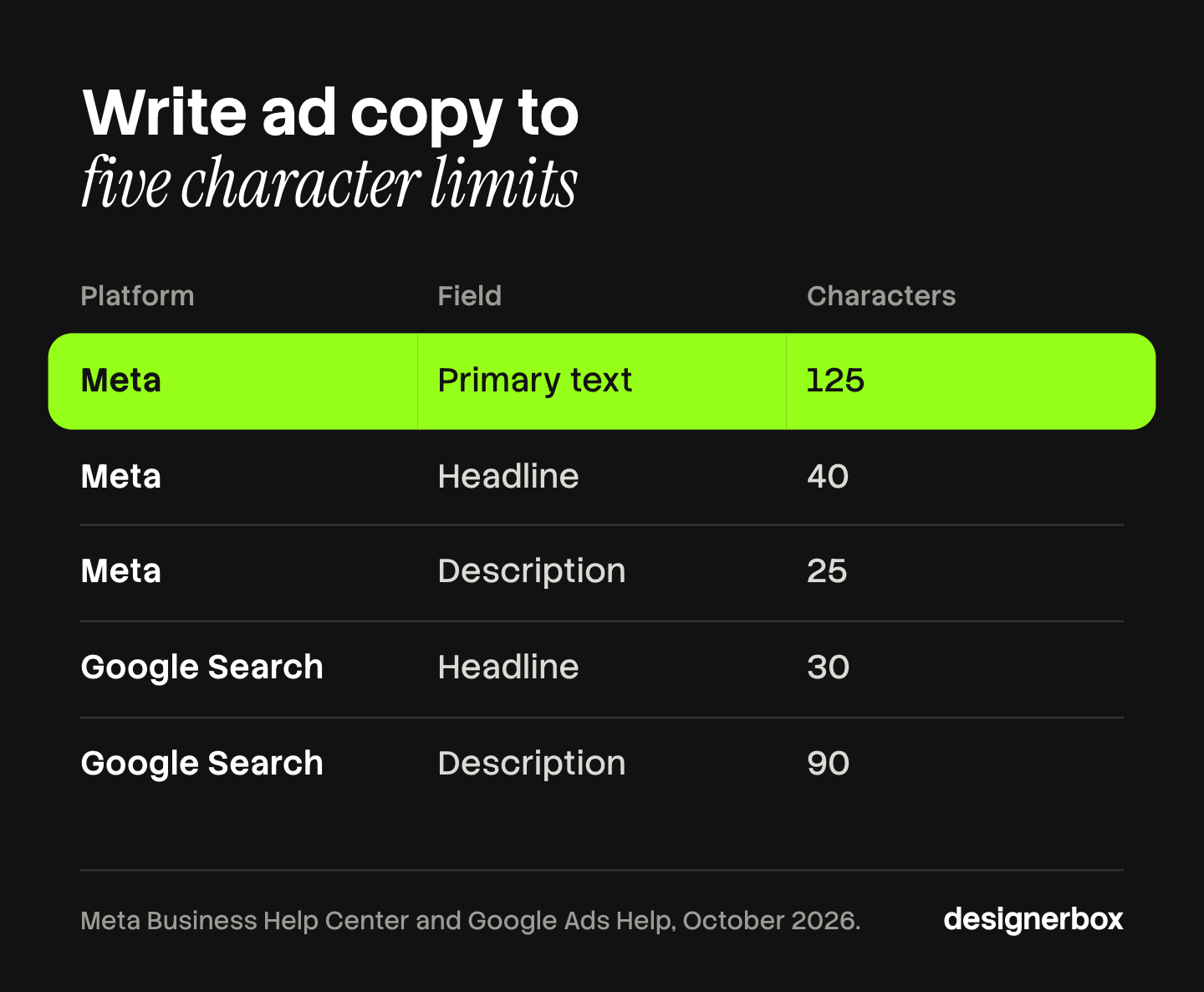
Meta says the recommended text length for most placements is 125 characters for the primary text, 40 characters for the headline and 25 characters for the description. It also says primary text should span one to three lines at most (Meta Business Help Center, accessed October 2026). Google’s responsive search ads allow up to 30 characters in a headline and 90 in a description (Google Ads Help, accessed October 2026).
A simple order works for most small ads:
- Primary text: who it is for, and the offer, in one or two sentences.
- Headline: the offer again, in five words or fewer.
- Button: the one action, such as “Shop now”.
The AI route. AI is good at this step. Give it your message, the limits and your brand’s tone, and ask for ten versions. Then check every version against two questions. Is each claim true? Can you prove it? Remove any number, award or customer quote that you did not supply.
Step 6: The review rules
Every platform reviews an ad before it runs, and the review covers more than the picture. Plan for about one day, and check three things yourself first: the platform’s policy, the truth of your claims, and whether the ad needs an AI label.
How long review takes. Meta says most ads are reviewed within 24 hours, although some take longer. The review can also cover the targeting information and the ad destination, which is the page your ad sends people to. If you edit the image, text, link or video of a running ad, Meta starts a new review. A change to the budget or the bid does not (Meta Business Help Center, accessed October 2026).
Google says most ads are reviewed within one business day. It reviews the headline, description, keywords, destination, images and video (Google Ads Help, accessed October 2026). TikTok says most ads are reviewed within 24 hours. It checks the caption, the images, the audio, the consistency between the ad and the landing page, and whether the landing page works (TikTok Business Help Center, last updated February 2025, accessed October 2026).
So the landing page is part of the ad. If the ad says “three for two” and the page does not, expect a rejection.
Truth. In the United States, the Federal Trade Commission states the basic rules this way: “Advertising must be truthful and non-deceptive; Advertisers must have evidence to back up their claims; and Advertisements cannot be unfair.” It adds that customer statements are usually not enough to support a health or safety claim (FTC, accessed October 2026). TikTok’s ad policy also does not allow ads that promise or exaggerate a product’s results (TikTok ads policy, last updated April 2026, accessed October 2026). Other countries have their own regulators and rules.
AI labels. The rules differ by platform:
- TikTok asks you to apply its AI-generated content label or your own clear disclaimer. It says an ad with undisclosed AI content “will be rejected or restricted”. Changing a background or adjusting lighting counts as an insignificant edit (TikTok ads policy, last updated April 2026, accessed October 2026).
- Meta adds an “AI info” label itself when you use its generative AI tools, or when it detects that a third-party AI tool made or edited the ad (Meta Business Help Center, accessed October 2026).
- Google has let advertisers add an AI label to image and video ads since July 2026, in the creative or through a setting (Google Ads policy, accessed October 2026).
Laws in the EU and in New York add their own duties. They are explained in AI disclosure in advertising. This section is general information, not legal advice.
The AI route. This is the step AI helps with least. A tool can list the rules. It cannot know whether your claim is true or whether your landing page matches. One person reads the ad and the page together before upload.
Step 7: The test
Run the ad against one other version and change one thing: the visual, the headline or the offer. If you change three things, you learn nothing about any of them.
Use the platform’s own test tool where your budget allows it. Meta describes its A/B test this way: “We show each version to a segment of your audience and ensure nobody sees both.” It recommends the same budget for both versions. It also advises against informal testing, such as turning ad sets on and off by hand, because that can lead to overlapping audiences and unreliable results (Meta Business Help Center, accessed October 2026).
A small budget often cannot reach a clear result. In that case, run the two versions, keep the one with the lower cost per sale after a full week, and treat it as a hint. The guide to ad creative testing explains how many impressions a readable test needs. For video ads, hook rate tells you whether the first three seconds work.
The AI route. AI makes the second version cheap. That is the trap. Ten versions in one ad set split a small budget ten ways. Make two, and read them properly.
What AI cannot do when you make an ad
You can create ads with AI faster than by hand, and four jobs still stay with you. Each one is a place where a fast ad becomes an expensive one.
| Job | Why it stays with you |
|---|---|
| The offer | AI does not know your stock, your margin or what you can deliver this week |
| The proof | A tool can write “loved by thousands”. Only you know whether that is true and whether you can show it |
| The product staying true | Image models can change a label, a color or a shape. The buyer receives the real one |
| The disclosure | The label rules apply to the advertiser. The tool does not accept them for you |
A quick check before you publish any ad made with AI: read every number and every quote in the copy, and compare the product in the picture with the product on your shelf.
One ad workflow for every product
The seven steps take an afternoon for one ad. The cost appears when you repeat them for every product, every week. Anyone can make an AI picture. Making hundreds that still look like your brand is the hard part.
DesignerBox is AI creative production for brands and agencies. You build the ad steps once as a workflow, with your product photo, your formats and your copy slots. Then you run it on the next product.
- Brand rules. You set the logos, fonts, colors and rules once in your brand profile. The workflow reads them on every run.
- Sizes and languages. The ads resizer makes each placement size from one approved ad. The ad localizer rebuilds an ad in another language and redraws the layout.
- Review. Critic steps score the results of a run, and best-of-N keeps the best one. You still check the product, the claims and the label rules yourself.
- The whole catalog. Batch runs one workflow over a sheet of products, and you review the results in one pass.
The full workflow from the first product photo to the finished ad, in one subscription. The cost is shown before each run. Uploading your own photos and the commercial license start on the Pro plan, and AI video starts on the Premium plan. Plans and credits are on the pricing page.
Here are the limits. DesignerBox does not post to your ad account: you download the results, or send them with a webhook or an S3 step. It does not write your offer or check your claims. Every plan below Ultra is one seat. The ad side of the product is on the AI ad generator page.
A free plan for your first run
There is a free plan, and it runs on sample products. Start from a template and see the cost before you run it.
FAQ
How do you make an ad for a small business?
Follow seven steps: choose one offer and one audience, write one message, pick the format and size for the placement, make the visual, write the copy to the character limits, check the platform’s review rules, and test against one other version. One product photo and one clear offer are enough for a first ad.
How do you make an advertisement with AI?
Decide the offer and the message yourself first. Then use AI for three steps: the visual around your real product photo, copy variants inside the character limits, and the extra sizes. Check that the product is unchanged and that every claim is true before you upload.
What size should an ad be?
It depends on the placement. Meta recommends 1440 x 1800 pixels at 4:5 for a feed image and 1440 x 2560 pixels at 9:16 for Stories. TikTok recommends 9:16 for In-Feed video. Check the platform’s ad guide on the day you build, because the numbers change.
How long does ad review take?
Meta and TikTok say most ads are reviewed within 24 hours. Google says most ads are reviewed within one business day. Some reviews take longer. Editing the creative of a running Meta ad starts a new review.
Can I create ads with AI for free?
Often, yes. Meta, Google and TikTok include AI creative tools inside their ad accounts. Paid tools make sense when you need the same ad set for many products, or files you can use outside one ad account. In DesignerBox, the cost is shown before each run.
Do I have to label an ad made with AI?
It depends on the platform and the country. TikTok asks for a label on AI-generated ad content and treats a changed background as an insignificant edit. Meta applies its own label when it detects AI. Google lets you add one. Check the rules where your ad runs.
Sources
- Meta Business Help Center: creative best practices for text in ads, accessed October 2026
- Meta Business Help Center: about ads in review, accessed October 2026
- Meta Business Help Center: about A/B testing, accessed October 2026
- Meta Business Help Center: AI info on ads created or edited with generative AI tools, accessed October 2026
- Meta Ads Guide: Facebook feed image and Instagram Stories image, accessed October 2026
- Google Ads Help: about the ad review process, accessed October 2026
- Google Ads Help: about responsive search ads, accessed October 2026
- Google Ads policy: updates to AI labeling requirements, July 2026, accessed October 2026
- TikTok Business Help Center: auction In-Feed ads, last updated June 2026, accessed October 2026
- TikTok Business Help Center: advertising on TikTok, first things to note, last updated February 2025, accessed October 2026
- TikTok ads policy: misleading and false content, last updated April 2026, accessed October 2026
- Federal Trade Commission: advertising FAQs, a guide for small business, accessed October 2026
- DesignerBox brand, pricing and AI ad generator pages (designerbox.ai), October 2026
Platform specs and rules verified on the platforms’ own help pages as of October 2026. Individual results vary.