
Selling on multiple marketplaces means you list the same product on two or more of them, such as Amazon, Walmart, eBay, Etsy and Google Shopping. The work that repeats is the listing. You need one fact sheet and one image master for each product. Then you make a small number of changes for each marketplace: the title length, the image count, the file and the AI rule.
Most advice on multichannel selling is about stock and orders. This guide is about the listing kit. Every rule below was read on the marketplace’s own page in October 2026. The one exception is the Etsy image policy, which was read in an archived copy dated 22 September 2026.
Key Takeaways
- One master image fits five marketplaces. A 2,200 x 2,200 px square on pure white, with the product at 85% of the frame, meets the main image size rule on all five.
- Seven image rules differ. Background, fill, pixel size, text, image count, file limits and the AI rule each change by marketplace.
- Titles differ most. Amazon allows 75 characters on a new listing. eBay allows 80, Etsy 140 and Google 150.
- The GTIN ties the kit together. Amazon and Walmart both accept it in image file names, and Google requires it where the manufacturer assigned one.
- AI rules are not the same rule. Amazon asks for a metadata tag on AI-made people. Google asks you to keep AI metadata. Etsy asks for original photos of the actual product.
What does selling on multiple marketplaces involve?
Selling on multiple marketplaces involves four jobs: listings, stock, orders and customer service. Stock and orders need software that counts. Listings need content: a title, a description, product details and images. This guide covers the content.

Multichannel selling and multichannel ecommerce are wider terms that include your own store and social shops. A multichannel listing is one product listed in several places from one set of data.
Treat the content as a kit. Two files stay the same everywhere:
- The fact sheet. One row per product: brand, product name, GTIN, color, size, material, dimensions, weight, and five to eight plain facts about the product.
- The image master. One large, clean file per shot, made to the strictest rule in your list of marketplaces.
Should you sell on more than one marketplace?
Add a marketplace when your kit can meet its rules and your team can keep the listings correct. Reach is the reason to do it. Upkeep is the cost.
Count the upkeep first. 100 products on five marketplaces is 500 listings. With six images each, that is 3,000 image slots. These numbers are example arithmetic, not a measurement. A price change, a new color or a new photo now has to reach every one of them.
Four questions decide whether a marketplace fits.
- Does every product have a GTIN? Google requires the GTIN for all products that have one assigned by the manufacturer (Google Merchant Center Help, October 2026). Collect the numbers before you start.
- Can your main image pass? Amazon may remove a listing from search until it has a main image that meets its requirements (Amazon product image guide, October 2026).
- Are your photos real photos? Etsy requires original photos of the actual product that buyers will receive (Etsy Listing Image Requirements, read October 2026 in a September 2026 web.archive.org copy). A rendered main image does not fit there.
- Who updates the listings? Name one person. A listing with last season’s photo on one marketplace is a wrong listing.
If any answer is no, fix the kit before you add the marketplace.
Listing fields that stay the same everywhere
Most of a listing is the same on every marketplace. Keep these in the fact sheet and never retype them:
- Brand and manufacturer
- The core product name: what it is, with the model or style
- GTIN, the number under the barcode
- Color, size, material and the other variant details
- Dimensions and weight
- What is in the box
- Five to eight facts a buyer needs, in plain sentences
The GTIN does more than identify the product. It can also name your image files. Amazon’s bulk upload reads a product identifier, a variant code and the file extension, such as B000123456.MAIN.jpg, and it accepts a UPC, EAN or GTIN as the identifier. Walmart recommends the 14-digit GTIN in the image file name (Walmart Marketplace Learn, October 2026).
Name every master file by GTIN and shot, and each export keeps its link to the product. Our guide to bulk image editing covers the rename step in a batch.
Listing fields that change per marketplace
The title changes most. Each marketplace sets its own character limit, and the limits are far apart.
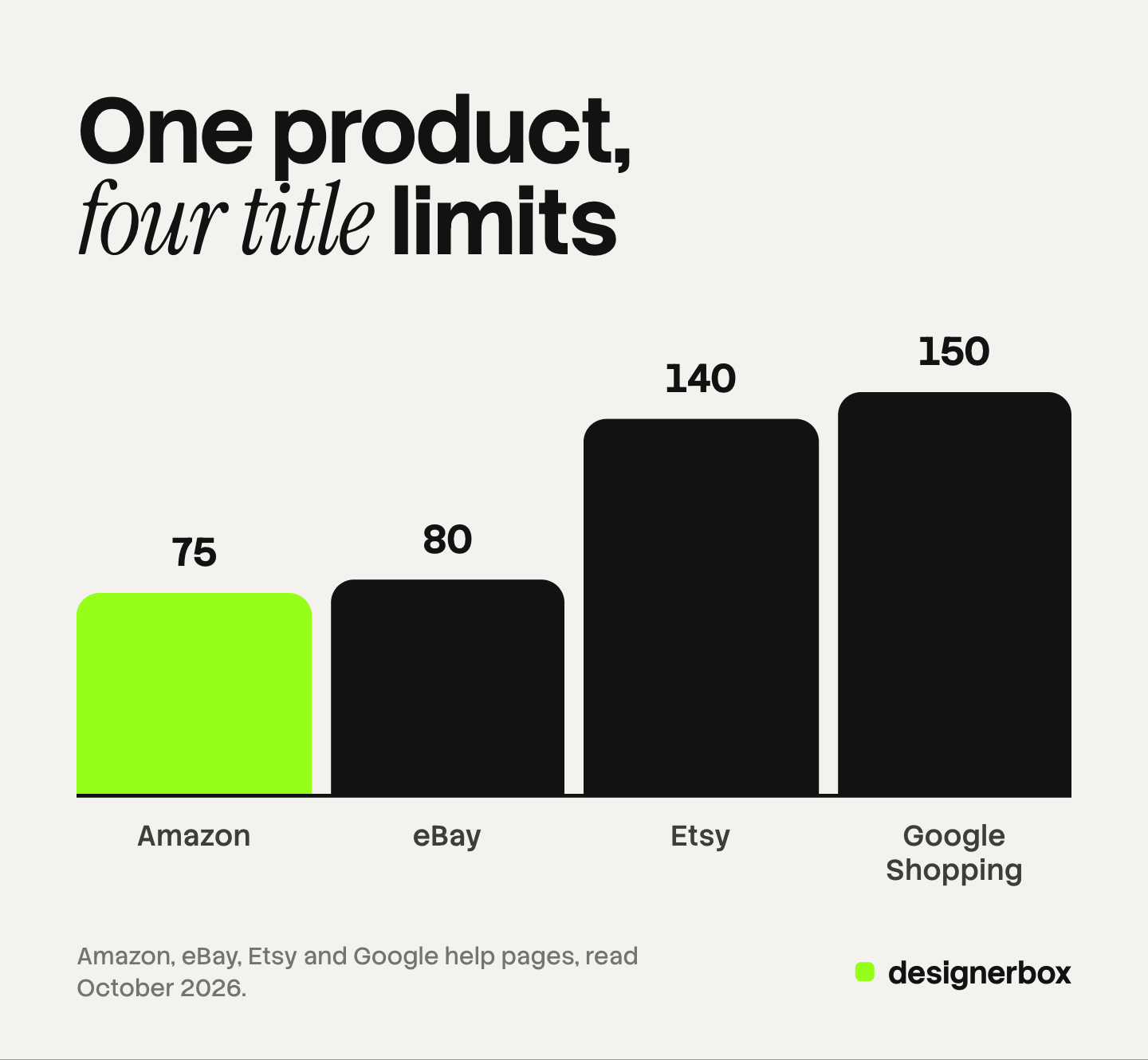
| Marketplace | Title limit | Source, read October 2026 |
|---|---|---|
| Amazon | 75 characters, spaces included, on a new listing | Amazon product title requirements |
| eBay | 80 characters | eBay Help |
| Etsy | 140 characters | Etsy Help |
| Google Shopping | 150 characters | Google Merchant Center Help |
Amazon’s limit applies to all product types except media. Amazon adds a second field, item highlights, with 125 more characters for details such as materials.
Write the 75-character title first, with the brand, the product and the one detail that separates it. Then add words for the longer limits. Google says users usually notice only the first 70 or fewer characters of a title.
Two more fields change. Each marketplace has its own category tree, so map each product once and save the mapping in the fact sheet. Variants are grouped in different ways, so keep one row per variant.
Seven image rules, five marketplaces
Seven image rules differ. This table has each one, as each marketplace’s own page states it.
| Rule | Amazon | Walmart | eBay | Etsy | Google Shopping |
|---|---|---|---|---|---|
| Main image background | Pure white, RGB 255, 255, 255 | Seamless white, 255/255/255 | White is generally best | Not set in the image policy | No color set on the image page |
| Product fill | 85% of the image | Cropped as close as possible to the frame | No number | No number | 75% to 90% of the image |
| Pixel size | 500 px minimum on the longest side, 1,000 px for zoom | 2,200 x 2,200 px, 1,500 x 1,500 px minimum for zoom | 500 x 500 px minimum, about 1,600 x 1,600 px recommended | At least 2,000 px wide recommended | 500 x 500 px for all products from January 31, 2027 |
| Text and overlays | No claims, review images or Amazon badges | No claims or promotional language. No watermark or logo on the main image | No added text, borders or watermarks | Not set in the image policy | No promotional overlays, watermarks or borders |
| Image count | 1 main image, 6 more and a video recommended | At least 4 recommended | Up to 24 | Up to 20 photos and 2 videos | 1 main image and up to 10 more |
| File | JPEG recommended | JPEG, JPG, PNG or BMP. No GIF. 5 MB or less | Up to 12 MB | See Etsy’s photo page | Under 16 MB and 64 megapixels |
| AI rule | Metadata tag for photorealistic AI-made people | AI images must be truthful, accurate and not misleading | The seller is responsible for AI-made listing content | Original photos of the actual product | AI-made images must keep their AI metadata |
Sources, all read in October 2026: the Amazon product image guide, Walmart’s image guidelines linked above, eBay’s picture help and picture policy, Etsy’s listing help and image policy linked above, and Google’s image requirements, size notice and additional image page.
Read the table by row. The strictest cell in each row is the rule for your master.
Each marketplace has more rules than seven. The single-marketplace guides go deeper: Amazon image requirements, eBay image requirements, Etsy product photos and Google Shopping image requirements.
One image master for five marketplaces
Take the strictest cell in each row, and you get one file.
- Size: 2,200 x 2,200 px, square. That is Walmart’s number, and it is above every other minimum in the table.
- Background: pure white, RGB 255, 255, 255. Amazon and Walmart both ask for it.
- Fill: the product at 85% of the frame. That is Amazon’s number, and it sits inside Google’s 75% to 90%.
- Content: the product only. No text, no logo, no border, no watermark, no badge.
- File: JPEG, 5 MB or less. Walmart’s limit is the lowest in the table.
- Origin: a real photo of the real product. That is the only kind Etsy’s image policy accepts.
Make this file once per shot. Then every marketplace export is a smaller copy. Never enlarge a small file to reach a size. Amazon says not to artificially enlarge small images, and Walmart says not to resize smaller images to fill space.

The secondary images follow the same idea. Shoot or make a set of eight: the main image, three angles, one detail, one scale shot and two in-use scenes. Amazon recommends seven images and Walmart at least four. Eight covers both, and eBay, Etsy and Google have room for all eight.
Keep text off every image in the set. An image with a claim on it breaks the rules of Walmart, eBay and Google at once.
The changes each marketplace still needs
The master does not remove every difference. Five changes remain, and each is small.
- Cut the title. Start from the 75-character version and extend it for eBay, Etsy and Google.
- Choose the image count. Send all eight where there is room. Put the four strongest first, because Walmart’s recommendation is four.
- Name the files. Use the identifier, the variant code and the extension for Amazon’s bulk upload. Use the GTIN for Walmart.
- Check the file. Stay at 5 MB or less for Walmart. Export a smaller JPEG where upload speed matters.
- Apply the AI rule. This one differs most.
Amazon asks for the keyword contains-synthetic-performer in an image’s metadata when the image shows a photorealistic person made entirely by AI. Google requires AI-made images to keep metadata that says so, and tells sellers not to remove it. Walmart asks that AI images are truthful, accurate and not misleading. eBay’s User Agreement makes the seller responsible for listing content made with generative AI tools (eBay User Agreement, October 2026).
Our guide to marketplace rules for AI product photos compares the disclosure rules in full. This is general information, not legal advice.
Social shops add their own rules on top. TikTok Shop, for example, needs a square listing image and a tall feed crop, covered in TikTok Shop product images.
Listing tools by job
Four kinds of tool help with a multichannel listing.
- Each marketplace’s own bulk tools. Amazon has a bulk image upload that reads file names. Walmart accepts a spreadsheet for many items. Google takes a product feed. These cost nothing extra and cover one marketplace each.
- Multichannel listing software. It holds one catalog and sends listings to several marketplaces. Most products of this kind also sync stock and orders.
- Feed tools. They reshape one product file into the format each marketplace reads.
- Image production tools. They make the master and the exports. The other three kinds move the images but do not make them.
Images, ads and video in DesignerBox
DesignerBox is AI creative production for brands and agencies. It makes images, ads and video from your brand rules, and products are one of the inputs.
Anyone can make an AI picture. Making hundreds that still look like your brand is the hard part.
A listing kit is the same problem. One good main image is easy. The same frame, white and light on every product is the job.
You save the steps once as a workflow: the cutout, the white background, the frame, the scene. A batch then runs that workflow over a sheet, one product per row, up to 200 rows in one sheet. Every row reads the same brand rules, so row one and row two hundred have the same look. The cost is shown before the run.
The full workflow from the first product photo to the finished ad, in one subscription.
DesignerBox does not send finished work to a store or a marketplace. You download the results, or send them with a webhook or an S3 step. Every plan below Ultra is one seat.
Uploading your own photos and the commercial license start on the Pro plan. AI video, virtual try-on, upscaling, the image editor and the video editor start on the Premium plan. Plans and credits are on the pricing page.
There is a free plan, and it runs on sample products.
FAQ
Can you sell the same product on multiple marketplaces?
Yes. You can list the same product on Amazon, Walmart, eBay, Etsy and Google Shopping at the same time, if the product meets each marketplace’s rules. Each listing has its own title limit, image rules and category. Keep one fact sheet and one image master, and make each listing from them.
What image size works on every marketplace?
A 2,200 x 2,200 px square works as a master. That is Walmart’s stated size. It is above Amazon’s 1,000 px zoom line, eBay’s recommended 1,600 px, Etsy’s recommended 2,000 px width and the 500 x 500 px minimum Google enforces from January 31, 2027.
How long can a product title be on each marketplace?
Amazon allows 75 characters on a new listing, spaces included. eBay allows 80 characters. Etsy allows 140, and Google Shopping allows 150. Write the 75-character title first, then extend it for the longer limits.
Do AI product images work on every marketplace?
The rules differ. Amazon asks for a metadata tag when an image shows a photorealistic AI-made person. Google requires AI-made images to keep their AI metadata. Walmart asks that AI images are truthful and accurate. Etsy requires original photos of the actual product.
Does DesignerBox list products on marketplaces?
No. DesignerBox makes the images, ads and video. You download the results, or send them with a webhook or an S3 step. In DesignerBox the cost is shown before the run.
Sources
- Amazon, product image guide: one main image, six more and a video recommended, 500 to 10,000 px, zoom from 1,000 px, JPEG recommended, 85% fill, pure white, no claims or badges, file naming and identifiers, no artificial enlargement, the AI people tag, removal from search (sellercentral.amazon.com, read October 2026)
- Amazon, product title requirements and guidelines: 75 characters including spaces for a new listing, media product types excepted, 125 characters of item highlights (sellercentral.amazon.com, read October 2026)
- Walmart Marketplace Learn, image guidelines and requirements, last updated May 12, 2026: file formats, 5 MB, 2,200 x 2,200 px, 1,500 x 1,500 px for zoom, square, seamless white, GTIN in the file name, at least four images, no claims, the AI sentence (marketplacelearn.walmart.com, read October 2026)
- eBay, adding pictures to your listings: up to 24 pictures, 500 x 500 px, about 1,600 x 1,600 px, 12 MB, white backgrounds, no badges or watermarks (ebay.com, read October 2026)
- eBay, picture policy: no added borders, text or watermarks (ebay.com, read October 2026)
- eBay, optimize listings for Best Match: a title of no more than 80 characters (ebay.com, read October 2026)
- eBay, User Agreement: seller responsibility for content made with generative AI tools (ebay.com, read October 2026)
- Etsy Help, how to create a listing: up to 20 photos and 2 videos, a title of up to 140 characters, images at least 2,000 px wide (help.etsy.com, read October 2026)
- Etsy, Listing Image Requirements: original photos of the actual product (etsy.com, read October 2026 in a web.archive.org copy dated September 22, 2026)
- Google Merchant Center Help, image link: 75% to 90% fill, 16 MB, 64 megapixels, no overlays, watermarks or borders, AI metadata (support.google.com, read October 2026)
- Google Merchant Center Help, image size notice: 500 x 500 px for all products from January 31, 2027 (support.google.com, read October 2026)
- Google Merchant Center Help, additional image link: up to 10 additional images (support.google.com, read October 2026)
- Google Merchant Center Help, title: 1 to 150 characters, the first 70 characters (support.google.com, read October 2026)
- Google Merchant Center Help, GTIN: required for products with a GTIN assigned by the manufacturer (support.google.com, read October 2026)
- DesignerBox batch: one product per row, up to 200 rows in a sheet: DesignerBox batch page (designerbox.ai/product/batch), October 2026
Marketplace rules verified on each marketplace’s own US help pages in October 2026, except the Etsy image policy, which was read in an archived copy dated 22 September 2026. The 500-listing and 3,000-image figures are example arithmetic, not measurements. Rules change often, so read each page before a large upload. This is general information, not legal advice. Individual results vary.