





Visual commerce is the use of images, video, 3D models and augmented reality to help a shopper judge a product online and buy it. It covers six formats: product images, lifestyle images, product video, 360 spins and 3D models, augmented reality, and shoppable content. Each format answers one shopper question, and each platform sets its own rules for the file.
Most guides to visual commerce stop at the list of formats. The list is the easy part. The work starts when you count the files. A store with 200 products needs the same set for every product, in the sizes each channel accepts, and the set has to look like one brand.
This guide is for brands with 20 to 500 products and the agencies that produce for them. It defines visual commerce, gives the platform rule for each of the six formats as of October 2026, and shows how to count the files before you plan the work.
Key Takeaways
- Visual commerce has six formats. Product images, lifestyle images, product video, 360 spins and 3D models, augmented reality, and shoppable content.
- Images come first. In Baymard Institute’s testing, 56% of test subjects began a product page visit with the images.
- The camera is a search box. Google says Lens handles nearly 20 billion visual searches every month.
- Photos can become a spin. Google builds a 180 or 360 spin from at least five photos of a product, for merchants in the US.
- 3D and AR have narrow limits. Google’s 3D model link works for home goods and shoes only, in five countries.
- AI images carry a label in the file. Google Merchant Center requires metadata that marks an image as AI-generated.
- The hard part is the count. Eight files per product is 1,600 files for a store with 200 products.
What is visual commerce?
Visual commerce is every visual a shopper uses to decide on a product they cannot touch. In a physical shop, a buyer picks the item up, turns it over and holds it against their body. Online, the files do that job. The term covers the photo on a product page, the clip in a social feed, the 3D model on a search result and the tagged product in a video.
The reason it matters is the order in which people read a product page. Baymard Institute found that 56% of test subjects’ first action on a new product page was to explore the product images, before they read the title or the description (baymard.com, published May 2017, read October 2026). The study is from 2017, so read it as a direction and not a current measurement.
Pictures also start the search now. Google says Lens is used for nearly 20 billion visual searches every month, and that its Shopping Graph holds information on more than 45 billion products (blog.google, October 2024). A shopper points a camera at a backpack, and the result is a product listing. Your product image is what that search matches against. The same image appears on the product card when a shopper searches in a chat, as the guide to ChatGPT shopping explains.
The six formats of visual commerce
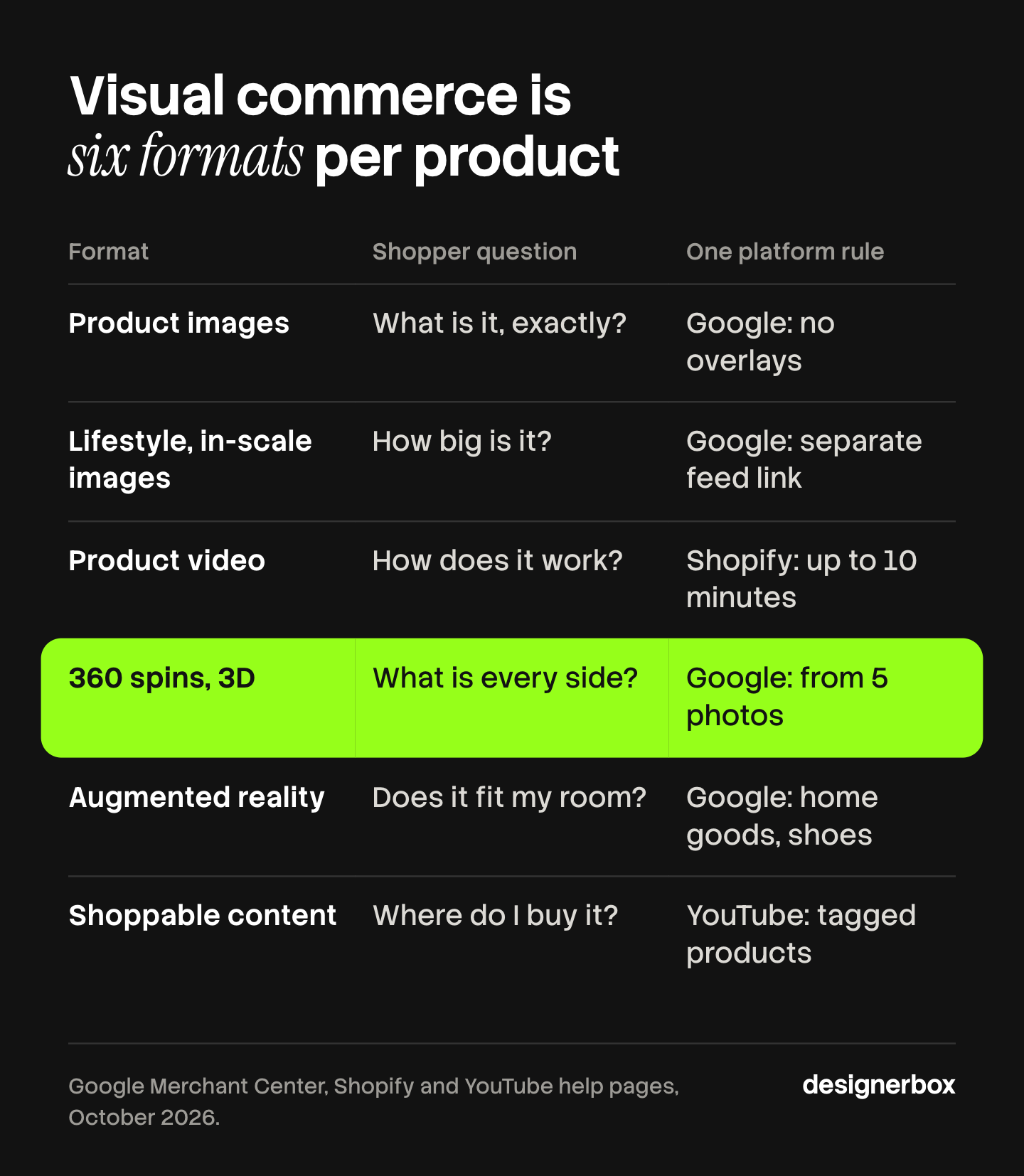
Each format answers a different question. The table gives the question and one platform rule for each, read from the platform’s own help pages in October 2026.
| Format | Shopper question | One platform rule |
|---|---|---|
| Product images | What is it, exactly? | Google: at least 500 x 500 pixels from 31 January 2027, and no text or logo overlays |
| Lifestyle and in-scale images | How big is it, and how does it look in use? | Google takes a separate lifestyle image link in the product feed |
| Product video | How does it move or work? | Shopify: up to 10 minutes, 1 GB and 4K per uploaded video |
| 360 spins and 3D models | What does every side look like? | Google builds a spin from at least 5 photos, for US merchants |
| Augmented reality | How does it look in my room? | Google: home goods and shoes only, in five countries |
| Shoppable content | Where do I buy what I am looking at? | YouTube: tag products in videos, Shorts and live streams |
Product images
The main image and its extra angles are the base of visual commerce. Every other format starts from them. Google Merchant Center will require images of at least 500 x 500 pixels for all products from 31 January 2027, and it recommends 1,500 x 1,500 pixels or more. A file may not be larger than 64 megapixels or 16 MB. The main image may not carry prices, promotional words, watermarks, added logos or a border (support.google.com, read October 2026).

Shopify accepts product images up to 5,000 x 5,000 pixels and under 20 MB (help.shopify.com, read October 2026). The sizes for the other large channels are in the guide to ecommerce product photography specs.
Lifestyle and in-scale images
A lifestyle image shows the product in use. An in-scale image shows it next to something of a known size, such as a hand or a chair. Baymard found that 42% of users try to judge the size of a product from its images. Among 60 large ecommerce sites it reviewed, 28% gave no in-scale image, even for best-selling products (baymard.com, May 2017).
Google gives this image its own place. The main image goes in the image link attribute, extra angles go in the additional image link, and an in-context image goes in the lifestyle image link attribute. The order of the images on your own product page matters too. The six slots are in the guide to PDP images.
Product video
Video shows what a still cannot: how a fabric moves, how a lid opens, how loud a blender is. Shopify accepts uploaded product videos up to 10 minutes long, up to 1 GB and up to 4K, as MP4, MOV or WebM files. It also accepts YouTube and Vimeo links. Your theme has to support video for it to appear on the product page.
How much a video adds to sales depends on who measured it and how. The published numbers and their sources are in the guide to product video conversion rates.
360 spins and 3D models
A spin lets the shopper turn the product. A 3D model lets them turn it and zoom in from any angle. Google states that products with 3D imagery have 50 percent more user engagement than products with 2D images. That is Google’s own figure, and the page gives no method for it (support.google.com, read October 2026).
A 3D model used to be the only way to get a spin. Google now builds a 180 or 360 spin with AI from still photos. You need at least five high-resolution images of one product, with views from the front, back, left, right and top. Google says the photos work best when they come from the same shoot. The feature is available to merchants in the US, the spin can take up to two weeks to appear, and extra photos do not guarantee one.
On your own store, Shopify takes 3D models as GLB or USDZ files up to 500 MB. A product holds a maximum of 250 images, 3D models and videos combined (help.shopify.com, read October 2026).
Augmented reality
Augmented reality, or AR, places a 3D model of the product in the shopper’s own space through a phone camera. It answers a question a photo cannot: will this sofa fit under that window?
AR needs a 3D model, and the rules are narrow. On Google, the 3D model link attribute works for home goods and shoes only. It is limited to products sold in the US, Australia, Canada, Japan and India. 3D models can appear in Shopping ads, but AR is not supported there yet (support.google.com, read October 2026). On Shopify, an uploaded model is converted so that both a USDZ and a GLB version exist, which covers iOS and Android phones.
AR shows shape, size and style. It does not show fit on a body. For shoes, the limits are in the guide to virtual try-on for shoes.
Shoppable content
Shoppable content is an image or a video with the product attached, so the viewer can go from the picture to the product in one step. On YouTube, eligible channels connect a store and tag products in videos, Shorts and live streams. Tagged products appear in the description and on a product shelf under the video (support.google.com, read October 2026).
On Pinterest, product Pins show the current price, availability, title and description from your site (help.pinterest.com, read October 2026). Creators can also add commission links to Pins, and our guide to affiliate links on Pinterest covers the rules. Both platforms read the product data from your store or your feed. AI shopping systems read the same data, and the guide to preparing a catalog for agentic commerce covers that side. So shoppable content depends on the same clean feed and the same product images as everything above.
Why does visual commerce matter for returns?
A shopper who cannot judge a product from its pictures has two choices: leave, or buy and find out. The second choice is expensive. The National Retail Federation estimated that 19.3% of online sales would be returned in 2025, against 15.8% of all retail sales. It put total returns at $849.9 billion (nrf.com, 15 October 2025).
No public study in this guide proves that a given format cuts returns by a given amount. The honest claim is smaller. An in-scale image answers the size question before the order, and a spin answers the “what is on the back” question. The evidence for one format is weighed in does virtual try-on reduce returns.
Where do AI images fit in visual commerce?
AI now makes several of the six formats. Google’s spins are generated from photos. Lifestyle scenes can be built around a product photo without a location shoot. Two rules apply.
The file carries a label. Google Merchant Center says all images created with generative AI must contain metadata that shows the image was AI-generated, for example the IPTC digital source type tag for trained algorithmic media. It also says not to remove that metadata from images made with generative AI tools. Check that your export settings keep it.
The product must stay the product. A generated scene may change the room. It may not change the color, the label or the shape of the item. The checks for that are in the guide to AI product photo accuracy. Where AI pays most in a catalog is covered in generative AI in ecommerce.
This is general information, not legal advice. Each platform’s own policy page is the rule.
How many files does visual commerce need per product?
Count the files before you plan the work. Here is one example set, built from the rules above:
- Five product photos. Front, back, left, right and top. These are the same five views Google asks for to build a spin.
- One in-scale image. The product next to a hand, a body or a piece of furniture.
- One lifestyle image. The product in use, for the lifestyle image link and for social.
- One short video. For the product page and for shoppable posts.
That is eight files per product. A store with 200 products needs 1,600 files, before any variant colors and before any ad sizes. This is plain arithmetic for one example store, not a measured benchmark.

Three things make the count hard:
- It repeats. Every new product needs the full set, every season.
- It has to match. The 150th product needs the same light, framing and background as the first, or the store stops looking like one brand.
- Someone has to check it. Each file is compared with the real product before it goes live.
A workable visual commerce strategy starts from this count, not from the newest format. Cover every product with the first seven files, then add 3D and AR for the products where size and fit in a room decide the sale. The repeat costs behind the count are in ecommerce creative production.
One workflow for the whole set
Anyone can make an AI picture. Making hundreds that still look like your brand is the hard part. DesignerBox is AI creative production for brands and agencies. You build the image set once as a workflow, with your brand, your products and your rules. Then you run it on every product.
- The set starts from your own photo. The workflow builds the angles, the in-scale image and the lifestyle scene around your product photo. Critic steps score the results of a run, and best-of-N keeps the best one. You still compare each file with the real item.
- You set the brand once. Light, framing, colors and rules live in your brand profile. The workflow reads it on every run.
- The catalog runs in one pass. Batch runs one workflow over a whole sheet of products. You keep or discard each row, and re-run one row on its own.
- Stills and video share one place. The full workflow from the first product photo to the finished ad, in one subscription.
The cost is shown before each run. Uploading your own photos and the commercial license start on the Pro plan, and AI video starts on the Premium plan. Plans and credits are on the pricing page.
DesignerBox has clear limits in visual commerce. It does not build 3D models, and it does not run AR or any viewer on your store. It does not send files to your store or your product feed: you download the results, or send them with a webhook or an S3 step. Every plan below Ultra is one seat. The page on AI product photography shows the image side of the job.
A free plan for your first run
Start from a template, add your brand and your products, and see the cost before you run it.
FAQ
What is visual commerce?
Visual commerce is the use of images, video, 3D models and augmented reality to help a shopper judge a product online and buy it. It covers product images, lifestyle images, product video, 360 spins and 3D models, AR and shoppable content. Each format answers one question a shopper would settle by touch in a physical shop.
What are examples of visual commerce?
Common visual commerce examples are a product page gallery with an in-scale image, a 360 spin on a Google search result, a 3D model of a chair placed in a living room through a phone camera, a product video on a Shopify product page, and a YouTube Short with the product tagged under it.
What is shoppable content?
Shoppable content is an image or a video with a product attached to it, so the viewer can reach the product in one step. YouTube lets eligible channels tag products in videos, Shorts and live streams. Pinterest product Pins show the price and availability from your site.
What is a visual commerce platform?
A visual commerce platform is software that makes, hosts or displays product visuals for an online store. The term covers several kinds of tool: 3D and AR viewers, product configurators, tools that collect customer photos, and tools that produce product images and video. Check which of the six formats a tool covers before you compare it with another.
Do I need 3D models for visual commerce?
No. Product images, an in-scale image, a lifestyle image and a video cover most products. On Google, the 3D model link works for home goods and shoes only, in five countries. For US merchants, Google can build a 360 spin from at least five photos, with no 3D model.
Can I use AI-generated images on product listings?
Google Merchant Center accepts them with a condition. Images created with generative AI must contain metadata that marks them as AI-generated, and you should not remove that metadata. The main image still has to show the product clearly, with no text or logo overlays. Other platforms set their own rules, so read each policy page.
Sources
- Google Merchant Center Help, image link attribute: support.google.com, read October 2026
- Google Merchant Center Help, 180 and 360 spins with Google AI: support.google.com, read October 2026
- Google Merchant Center Help, products in 3D and augmented reality: support.google.com, read October 2026
- Google, Search and Lens update: blog.google, October 2024
- YouTube Help, YouTube Shopping: support.google.com, read October 2026
- Shopify Help Center, product media types: help.shopify.com, read October 2026
- Shopify Help Center, adding product media: help.shopify.com, read October 2026
- Pinterest Business Help, rich Pins and product Pins: help.pinterest.com, read October 2026
- Baymard Institute, in-scale product images: baymard.com, May 2017
- National Retail Federation, 2025 returns estimate: nrf.com, 15 October 2025
- DesignerBox pricing, October 2026
Platform rules verified from Google, YouTube, Shopify and Pinterest help pages as of October 2026. The Baymard figures are from 2017 and the Lens figure is from 2024. The file count is an example. Individual results vary.

