





ChatGPT shopping is the product search inside ChatGPT. A shopper describes what they want, and ChatGPT shows products with an image, a price, reviews and a link to the store. Products reach it in three ways: your public product page, a Shopify or Etsy catalog, or a product feed you send to OpenAI. The shopper pays on your own site.
The 2025 version let the shopper pay inside the chat. OpenAI changed that in March 2026. It also keeps direct feeds behind an application and a waitlist. So a store with 200 products needs to know which of the three routes it is on before it changes one title.
This guide is for brands with 20 to 500 products and the agencies that produce for them. It covers how ChatGPT shopping works as of October 2026, what OpenAI’s feed specification requires, and how many images the feed asks for once you count the variants.
Key Takeaways
- Three routes in. Your public product page, the Shopify or Etsy catalog, or a direct product feed to OpenAI.
- Checkout is on your site. OpenAI says it is moving away from a standalone Instant Checkout, and that it charges no fee on purchases made on your site or app.
- Direct feeds need approval. OpenAI’s developer guide says feed onboarding is open to approved partners. Other merchants apply and wait.
- A feed has nine required fields. One of them is the main image, and it has to show the variant in that row.
- Results are not ads. OpenAI says product results are selected independently and that ads are separate.
- OpenAI publishes no ranking formula. It names relevance to the request, price, availability, reviews and quality. It promises no placement.
- Variants set the image count. A store with 120 products in four colors needs 480 main images.
What is ChatGPT shopping?
ChatGPT shopping is the set of features that show products inside a ChatGPT conversation. When a question suggests the person wants to buy something, ChatGPT can show product options with imagery, product details and links to sites where the person can learn more or buy (help.openai.com, read 2 October 2026).
It has two modes. The first is the quick answer: a row of product cards inside a normal reply. The second is shopping research, which OpenAI launched on 24 November 2025. It asks the shopper questions about budget and features, reads retail sites for a few minutes, and returns a buyer’s guide with the top products and the differences between them (openai.com, 24 November 2025).
In March 2026, OpenAI made the results more visual. Shoppers can browse product cards, compare products side by side on price, reviews and features, and upload an image to find similar items (openai.com, March 2026). For clothes and accessories, a product listing can carry a “Try on” button that builds an image from a photo of the shopper. OpenAI notes that these images do not guarantee fit or size.
Two limits matter for a seller. OpenAI’s merchant page says shopping is live for ChatGPT users in the US. And OpenAI warns shoppers that the model can make mistakes about price and availability, and tells them to check the merchant’s site.
How does a product get into ChatGPT shopping?
There are three routes. Each one gives ChatGPT a different amount of information about your product, and each one asks for a different amount of work.
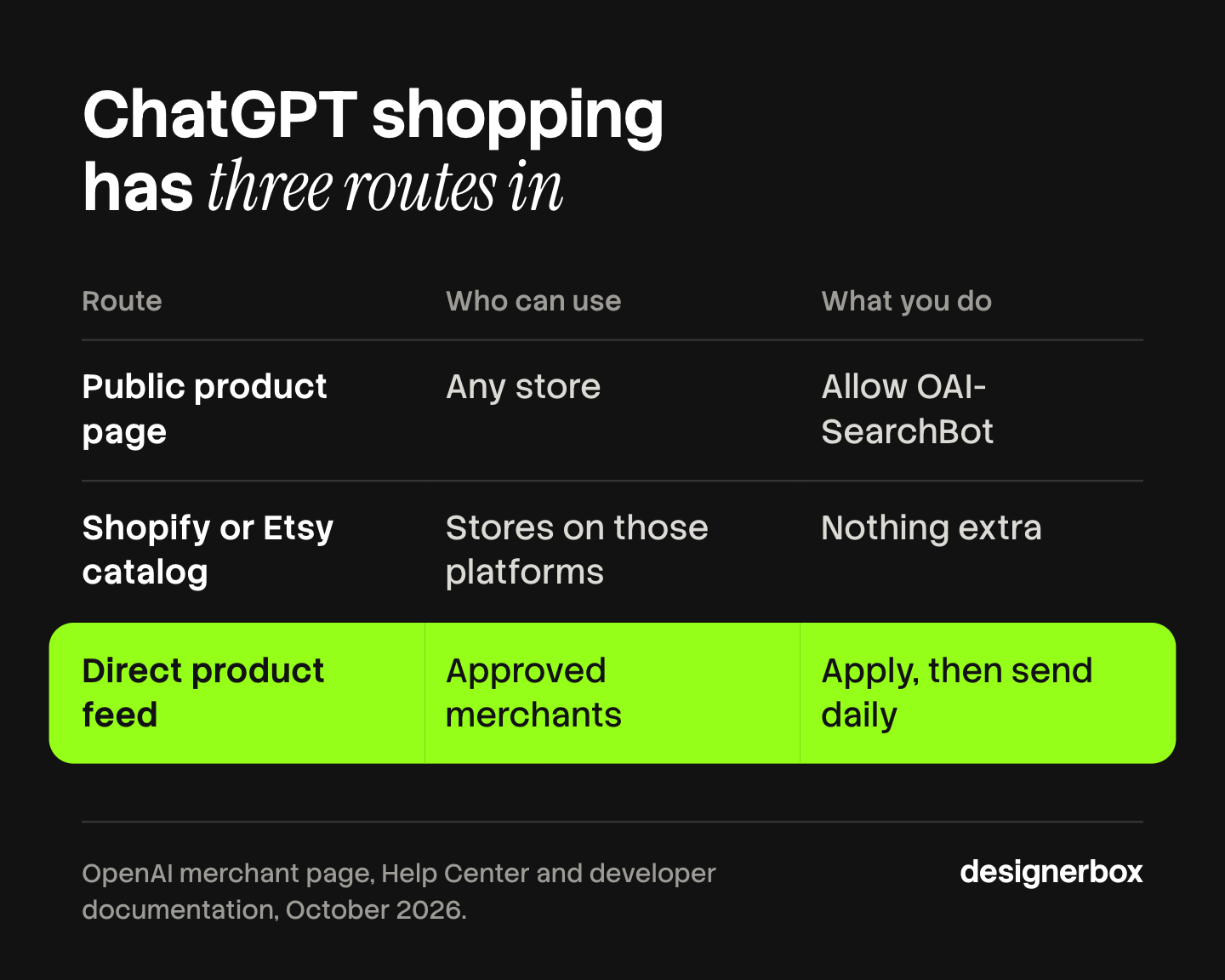

| Route | Who can use it | What you do |
|---|---|---|
| Public product page | Any store | Let OpenAI’s search crawler read your site |
| Shopify or Etsy catalog | Stores on those two platforms | Nothing extra. OpenAI says the catalog is already integrated |
| Direct product feed | Merchants OpenAI has approved | Apply, then send a full feed at least once a day |
Route 1: your public product page
Shopping research reads retail sites directly. OpenAI says its results are “organic and based on publicly available retail sites”. So the first route needs no agreement with OpenAI. It needs a product page that a crawler can read.
OpenAI’s search crawler is called OAI-SearchBot. OpenAI says sites that opt out of it will not be shown in ChatGPT search answers, and it recommends allowing the crawler in your robots.txt file (developers.openai.com, read 2 October 2026). This crawler is separate from GPTBot, which collects training data. A store can block GPTBot and still allow OAI-SearchBot.
Route 2: a Shopify or Etsy catalog
OpenAI’s merchant page says: “If you sell through Shopify or Etsy, your catalog is already integrated, and no additional setup or application is required” (chatgpt.com, read 2 October 2026). For Shopify, the data comes through Shopify Catalog.
Integrated does not mean shown. ChatGPT reads the product record you already keep on the platform: the title, the variants, the images and the stock. If that record is thin, the card is thin. The image side of a Shopify record is covered in the guide to Shopify product images.
Route 3: a direct product feed
A feed is a file or an API connection that sends your catalog to OpenAI in a fixed format. OpenAI built it on the Agentic Commerce Protocol, an open standard it developed with Stripe. Retailers such as Target, Sephora, Nordstrom, Lowe’s, Best Buy, The Home Depot and Wayfair send feeds this way, according to OpenAI’s March 2026 post.
This route is not open to everyone yet. The developer guide states that onboarding product feeds “is currently available to approved partners” (developers.openai.com, read 2 October 2026). The merchant page says that a merchant who has applied is on the waitlist, and that OpenAI is building a self-serve merchant platform for later this year. OpenAI’s pages do not say that any merchant can submit a feed today.
Where does the shopper pay?
On your site. This is the largest change since launch.
In September 2025, OpenAI launched Instant Checkout. A shopper could buy from US Etsy sellers inside the chat, and merchants paid a fee on completed purchases (openai.com, 29 September 2025). In March 2026, OpenAI wrote that the first version “did not offer the level of flexibility that we aspire to provide”, and that merchants would use their own checkout while OpenAI works on product discovery. CNBC reported the change on the same day (cnbc.com, 24 March 2026).
The merchant page now states the position in one paragraph: “We’re moving away from a standalone Instant Checkout experience in ChatGPT”. It says shoppers find and compare products in ChatGPT and complete the purchase on the merchant’s website or app. It also says there are no fees for purchases made on your site or app.
OpenAI’s pages do not fully agree with each other. On 2 October 2026 the Help Center still said that ChatGPT may show an Instant Checkout option for some eligible products and merchants. The feed specification also keeps checkout fields, and says checkout “requires a separately enabled integration”. Plan for the shopper to arrive on your product page. Treat checkout inside the chat as something OpenAI has to turn on for you.
That makes the product page the place where the sale is won or lost. The card brings the shopper in. The page has to match the card: the same price, the same variant and the same image.
What does a ChatGPT product feed need?
The feed specification asks for one row per item you can buy, so one row per variant. Each row has nine required fields (developers.openai.com, read 2 October 2026).
| Field | What OpenAI asks for |
|---|---|
| item_id | A stable ID, unique per item or variant. Never reuse it |
| title | The product name, with the variant where relevant. Aim for 150 characters or fewer |
| description | A factual description in plain text. Aim for 5,000 characters or fewer |
| url | The product page for that item, with the variant selected when possible |
| brand | The brand as shown on the product page |
| seller_name | The seller of this offer. A real name, not a placeholder |
| image_url | The main image, showing this variant. A direct JPEG or PNG link |
| availability | In stock, out of stock, pre-order, backorder or unknown. An empty value rejects the row |
| price | The regular price with a currency code |
Optional fields add what a shopper asks about in a conversation: material, color, size, dimensions, weight, extra images, shipping, returns, the review count and the star rating. The specification says to leave a field out when you do not know the value. Placeholder text such as “n/a” is not accepted.
Three rules in the specification are easy to miss:
- Send the whole catalog every day. OpenAI recommends a full snapshot at least daily, with API updates during the day.
- A missing product is not removed at once. OpenAI keeps the last record of a product for up to 14 days after it drops out of the feed. To hide a product at the next update, set its search flag to false.
- Eligible is not shown. The specification says “Eligibility does not guarantee display”.
If you already send a feed to Google Merchant Center, the structure will look familiar. OpenAI supports a Google-compatible format, but only after it confirms that format for your feed.
Which products does ChatGPT show first?
OpenAI publishes no ranking formula, and no seller can buy a place in the product results. The Help Center says product results “are selected independently by ChatGPT and are not ads”. Ads in ChatGPT are a separate product.
What OpenAI does name is this:
- Relevance to the request. ChatGPT reads the question and the context, including the shopper’s memory and custom instructions. If the shopper sets a budget, price counts for more.
- Structured product data. Price, description and other fields from the merchant or from third-party providers.
- Reviews. ChatGPT shows summaries of reviews from public websites. OpenAI does not verify them.
- The merchant. When several stores sell one product, OpenAI ranks them on “availability, price, quality, and whether they are the maker or primary seller of that item”.
Two details change how your product appears. ChatGPT may write a simpler title and description than yours. It may also add a label such as “Budget-friendly” to the image. OpenAI says these labels are generated by the model and are not verified statements.
So no title formula wins a place. The work a seller controls is plainer. A shopper asks for a carry-on bag under a set price that fits a budget airline’s size limit. ChatGPT can only match your bag if the dimensions and the price are in the record. Fill the fields a shopper would name in a question.
What do product images do in ChatGPT shopping?
OpenAI publishes no image ranking factor. Any guide that says a cleaner photo ranks higher is guessing. Three things are on the record.
The main image is required, and it is per variant. The specification describes the main image as showing “this variant”, and asks that the color field be “consistent with the product image”. A row for a green bag with a photo of the beige bag is a wrong record. Google’s feed asks for the same thing, and the guide to product images for AI shopping agents compares the two rules.
The image has to load. Product and image links must be public. A link that needs a sign-in, or that points to a page and not to the image file, gives the card nothing to show.
The image is how the shopper compares. Products appear side by side with competing products, and a shopper can upload a photo to find similar items. A small card leaves room for one clear view of the product. A photo where the product is hard to see makes the shopper work harder than the card next to it. That is a judgment about shoppers, not a rule from OpenAI.
The practical standard is the one the large marketplaces already set: the product alone, well lit, filling the frame, with no text on it. The sizes per channel are in the guide to ecommerce product photography, and the slots each marketplace shows are in AI product listing images. If a main image is made or edited with AI, it still has to show the real item. The checks are in the guide to AI product photo accuracy.
How many images does a feed need?
Count the rows first. The feed takes one row per variant, and the specification’s own example gives two sizes of one black shoe the same image. So sizes can share an image. Colors cannot.
Here is the arithmetic for one example store:
- 120 products.
- Four colors each. That is 480 color variants, and 480 main images.
- Five sizes per color. That is 2,400 rows in the feed, each with its own ID, price and stock value.
- Three extra views per color, for the additional images field. That is 1,440 more files.
The example store needs 1,920 image files for 2,400 rows. This is plain arithmetic for one invented store, not a benchmark.
The count is also the reason the work repeats. Every new product adds its colors, and every color needs the same framing and light as the 480 before it. A ChatGPT card puts your image next to a competitor’s image. It also puts your image next to your own other products when a shopper asks for options from one brand. How to plan that volume is in the guides to bulk product images and the product photography workflow.
A seller checklist for ChatGPT shopping
Work in this order. The first three steps need no approval from anyone.
- Check the crawler. Open your robots.txt file and confirm that OAI-SearchBot is allowed.
- Fix the product page. Each variant needs its own URL or a selected state, with the right price, stock and image. The card sends the shopper there.
- Fill the attributes. Material, color, size, dimensions and weight, in their own fields and not only in the description.
- Match the image to the variant. One main image per color, in the same framing across the catalog.
- Know your route. On Shopify or Etsy, your catalog is already integrated, so the product record is your feed. On another platform, apply on OpenAI’s merchant page and plan for a wait.
- Keep price and stock current. OpenAI admits a delay between a merchant’s update and what the shopper sees. A daily feed with API updates shortens it.
- Track the visits. OpenAI suggests adding a tracking parameter to the product link in your feed so you can count the clicks.
The same work serves Google’s and Shopify’s shopping agents. The guide to agentic commerce optimization sorts it into the jobs the platform handles and the four jobs the store keeps.
Catalog images at one standard
Anyone can make an AI picture. Making hundreds that still look like your brand is the hard part. DesignerBox is AI creative production for brands and agencies. It covers the image part of this job: one main image per color, in the same light and framing, for every product.
- You build the set once. A workflow holds the steps for the main image and the extra views. A saved workflow runs the same way on the next product.
- You set the brand once. Light, framing, colors and rules live in your brand profile. The workflow reads it on every run.
- The catalog runs from a sheet. Batch runs one workflow over a sheet of products. Row one and row two hundred get the same standard. You keep or discard each row, and re-run one row on its own.
- Review is a step. Critic steps score the results of a run, and best-of-N keeps the best one. You still compare each image with the real item.
The cost is shown before each run. The full workflow from the first product photo to the finished ad, in one subscription. Uploading your own photos and the commercial license start on the Pro plan. Plans and credits are on the pricing page.
The limits are clear. DesignerBox does not build a product feed, and it has no connection to OpenAI’s merchant program. It does not send images to your store: you download the results, or send them with a webhook or an S3 step. Titles, prices and stock stay in your commerce platform. Every plan below Ultra is one seat. The page for Shopify stores shows the image work for one platform.
A free plan for your first run
Start from a template and see the cost before you run it. The free plan runs on sample products.
FAQ
Can you use ChatGPT for shopping?
Yes. When a question suggests you want to buy something, ChatGPT shows product options with images, prices, reviews and links to stores. For a harder choice, the shopping research mode asks questions and builds a buyer’s guide in a few minutes. OpenAI’s merchant page says shopping is live for ChatGPT users in the US.
How do I get my products on ChatGPT shopping?
There are three routes. Let OpenAI’s search crawler, OAI-SearchBot, read your product pages. Sell through Shopify or Etsy, where OpenAI says the catalog is already integrated. Or apply on OpenAI’s merchant page to send a direct product feed. Direct feeds are open to approved partners, and other applicants wait.
Does it cost money to sell through ChatGPT shopping?
OpenAI’s merchant page says shoppers are sent to your site or app by default, with no fees for purchases made there. The earlier Instant Checkout charged merchants a fee on completed purchases. OpenAI now says it is moving away from a standalone Instant Checkout. Check the merchant page for the current terms.
Are ChatGPT shopping results ads?
No. OpenAI’s Help Center says product results are selected independently by ChatGPT and are not ads. It also says they are not influenced by OpenAI’s partnerships. Ads in ChatGPT are a separate product with their own product feed rules.
What is a ChatGPT product feed?
A ChatGPT product feed is a file or an API connection that sends your catalog to OpenAI in a fixed format. It has one row per variant and nine required fields: an ID, a title, a description, a product link, a brand, a seller name, a main image, availability and a price. OpenAI recommends a full update at least once a day.
Do Shopify stores need to set anything up for ChatGPT?
No application is needed. OpenAI says product data from Shopify merchants is already integrated through Shopify Catalog. ChatGPT reads the product record you keep in Shopify, so the titles, variants, images and stock in that record decide what the product card shows.
Do product images affect ChatGPT shopping results?
OpenAI publishes no image ranking factor. The feed specification requires a main image for every row and says it should show that variant. Images appear on the product card and in side-by-side comparisons, so they shape what the shopper picks. They are not a documented ranking signal.
Can shoppers still buy inside ChatGPT?
Mostly no. OpenAI’s merchant page says purchases are completed on the merchant’s website or app. On 2 October 2026 the Help Center still described an Instant Checkout option for some eligible products and merchants. The feed specification says checkout needs a separately enabled integration.
Sources
- OpenAI, merchant page for shopping in ChatGPT: chatgpt.com, read 2 October 2026
- OpenAI, Powering product discovery in ChatGPT: openai.com, March 2026
- OpenAI, Introducing shopping research in ChatGPT: openai.com, 24 November 2025
- OpenAI, Buy it in ChatGPT: openai.com, 29 September 2025
- OpenAI Help Center, Shopping with ChatGPT Search: help.openai.com, read 2 October 2026
- OpenAI developer documentation, product feed specification: developers.openai.com, read 2 October 2026
- OpenAI developer documentation, get started with product feeds: developers.openai.com, read 2 October 2026
- OpenAI developer documentation, feed file upload: developers.openai.com, read 2 October 2026
- OpenAI developer documentation, overview of OpenAI crawlers: developers.openai.com, read 2 October 2026
- CNBC, OpenAI revamps shopping experience in ChatGPT: cnbc.com, 24 March 2026
- DesignerBox pricing, October 2026
ChatGPT shopping facts verified from OpenAI’s merchant page, Help Center and developer documentation as of 2 October 2026. OpenAI changes this product often, so check its pages before you act. The image count is an example. Individual results vary.

