Product images for AI shopping agents come from the same place as your prices: the product feed. Two feed specifications state the image rule in writing. OpenAI requires a main image “showing this variant” on every row. Google requires a separate image for each variant, and it raises its minimum size to 500 x 500 pixels on 31 January 2027.
Most advice on this topic says to make images clear and consistent. That is true, and it is hard to test. The feed specifications are narrower and easier to check. They ask one question per row: does this image show the exact item this row sells?
This guide covers the image fields only: where AI shopping agents get product images, what the OpenAI and Google specifications say, the rule for AI-generated images, and a seven-step check for a catalog. It is written for brands and operators with 20 to 500 products and several variants of each.
Key Takeaways
- The feed is the source. OpenAI’s product feed has nine required fields, and the main image is one of them (OpenAI Developers, Products feed reference, October 2026).
- Both specifications require the image to match the variant. OpenAI describes the field as the main product image “showing this variant”. Google says to submit a unique image for each variant.
- Google’s size floor rises. Google requires at least 500 x 500 pixels for all products beginning 31 January 2027, and recommends 1,500 x 1,500 pixels or more (Google Merchant Center Help, Image link, October 2026).
- A group photo fails the variant rule. Google says to show one variant per image and to avoid photos that show several colors together.
- AI-generated images need their metadata. Google requires images made with generative AI to keep the IPTC tag that says so.
- Nobody publishes the weighting. No platform in this guide says how much an image counts in a recommendation. Treat the image as a required field, and do not treat it as a ranking trick.
How do AI shopping agents use product images?
AI shopping agents use a product image as one field of a product record. The shopper states a need in plain language, for example a black waterproof jacket under a set budget. The agent matches that request against records and returns a short list. A product record is the title, price, availability, attributes and images of one item, and the image has to agree with the rest.
The term covers several products. ChatGPT shows products inside a conversation. Google’s AI Mode pairs Gemini with the Shopping Graph, which Google said holds more than 50 billion product listings, with more than 2 billion of them refreshed every hour (Google, The Keyword, May 2025). Amazon runs Rufus inside its own store.
For a seller, the practical change is small. The shopper may now see a short list before they see your product page, and the short list is built from your product data. The non-image fields, from titles to identifiers, are covered in agentic commerce: 12 catalog checks, and the ChatGPT side in ChatGPT Shopping for sellers. The work that stays with the store is in agentic commerce optimization: the four jobs the store keeps.
Where do AI shopping agents get product images?
AI shopping agents get product images from product feeds and product pages that the seller already maintains. No platform in this guide asks for a new kind of image. Each one reads an image URL from a product record, next to the title, the price and the variant options. So the image work is a data task as much as a photo task.
| Surface | Where the image comes from | Source |
|---|---|---|
| ChatGPT | A product feed you upload. The field is image_url, with optional additional_image_urls | OpenAI Developers, October 2026 |
| Google AI Mode and Google Shopping | Merchant Center product data. The attribute is image_link, with up to 10 additional images | Google Merchant Center Help, October 2026 |
| Shopify agentic storefronts | Shopify Catalog. Shopify names ChatGPT, Google AI Mode, Gemini, Microsoft Copilot and Meta as channels | Shopify Help Center, October 2026 |
| Amazon Rufus | Amazon’s own listing. Amazon says Rufus answers from listing details, customer reviews and community Q&As | About Amazon, July 2024 |
Two notes on that table. Shopify says agentic storefronts is active by default for eligible stores (Shopify Help Center, October 2026). So a Shopify store may already send its product images to AI channels.
And Amazon’s own description of Rufus does not name images. It names product listing details, customer reviews and community Q&As (About Amazon, July 2024). Many seller guides say Rufus reads listing images. Amazon’s page does not confirm or deny that, so this guide does not repeat it as fact. The Amazon image rules you can check are in Amazon image requirements.
There is also a shared standard. The Universal Commerce Protocol is an open specification for agentic commerce, and its site lists Google, Shopify, Etsy, Wayfair, Target and Walmart among the companies behind it (ucp.dev, October 2026).
What does the ChatGPT product feed say about images?
OpenAI’s feed reference asks for one row per purchasable item or variant, with nine required fields. One of the nine is the main image. OpenAI describes it as the main product image, showing this variant, at a direct image URL such as a JPEG or PNG. Product and image URLs must be publicly accessible.
The nine required fields are the item ID, title, description, product URL, brand, seller name, image URL, price and availability. Four more statements in the reference matter for images:
- Each variant is its own row. OpenAI says each row carries its own price, availability, URL and images.
- The color field points at the image. OpenAI describes the color attribute as the selected color, consistent with the product image.
- Extra views are optional. The field additional_image_urls takes a list of additional views of the same item.
- Checkout is separate. OpenAI says checkout requires a separately enabled integration, and Ads feeds follow their own guide.
The reference does not print a minimum pixel size on the page read in October 2026. It also says that its format guidance is not a guarantee that every invalid value is rejected at upload. A wrong image can pass the upload and still be wrong.
What does Google Merchant Center require from the image?
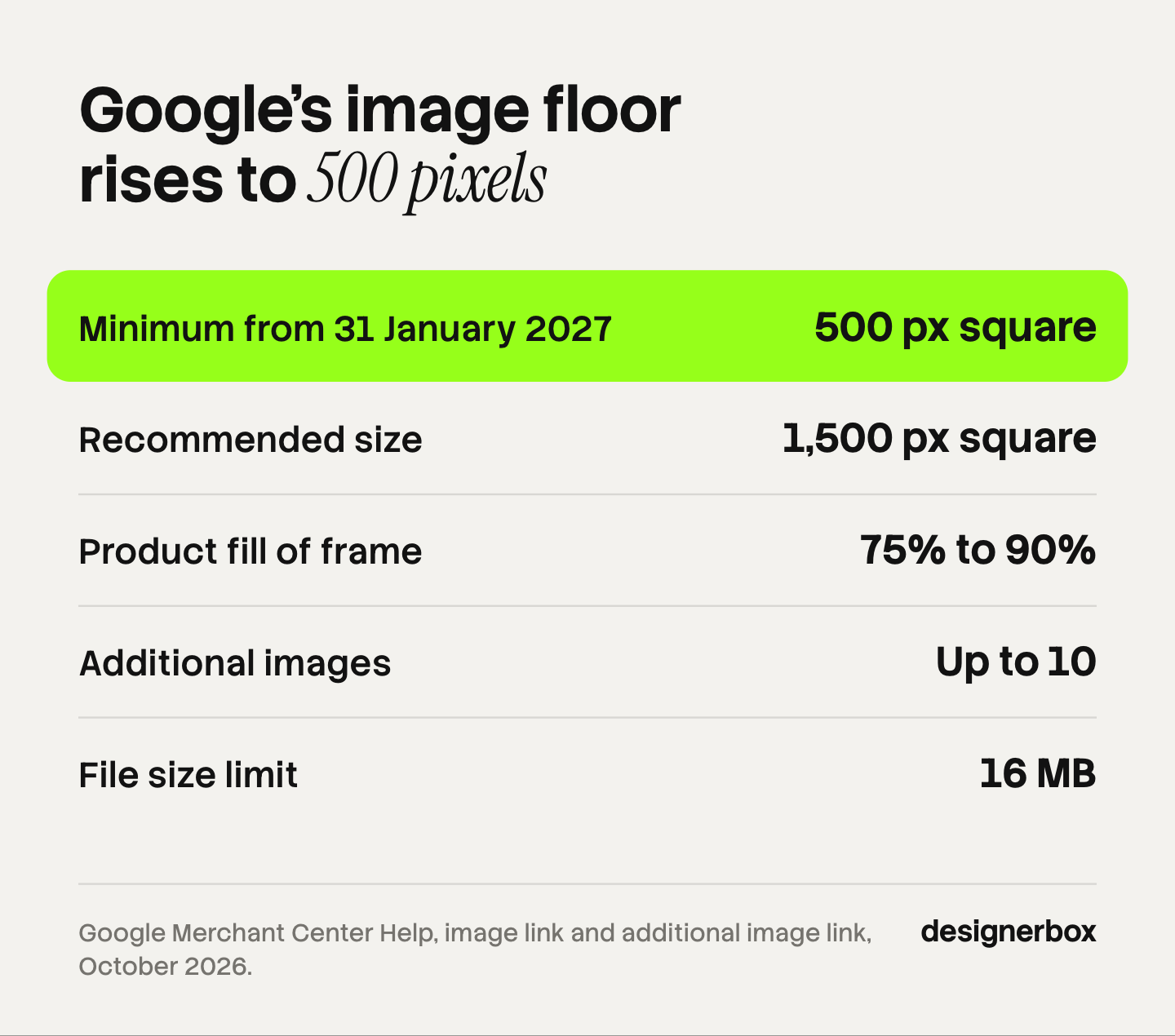
Google Merchant Center requires a main image for every product, at a URL Google can crawl. The image must be at least 500 x 500 pixels for all products beginning 31 January 2027. No image may exceed 64 megapixels or 16 MB. Google recommends 1,500 x 1,500 pixels or more, in JPEG or WebP.
Here are the rules from Google’s image link page, as read in October 2026.
| Rule | What Google says |
|---|---|
| Minimum size | At least 500 x 500 pixels for all products beginning 31 January 2027 |
| Recommended size | Around 1,500 x 1,500 pixels or more |
| Upper limits | 64 megapixels and 16 MB per file |
| Formats | JPEG and WebP recommended. PNG, GIF, BMP and TIFF accepted |
| Framing | The product takes up no less than 75% and no more than 90% of the image |
| Overlays | No promotional text, price, watermark, added logo or border |
| Placeholders | No generic image or placeholder in place of the product |
| Crawl access | robots.txt must allow Googlebot and Googlebot-image |
| More images | Up to 10 through the additional image link attribute |
Three details are easy to miss. Google asks for stable image URLs, with no parameters that change on every feed submission. Google may crop your image to frame the item. And the framing rule conflicts with Amazon, which wants the product to fill 85% of the main image. One master file with room to crop covers both, as ecommerce product photography specs explains. If your files are too small for the new floor, read what to do with low resolution product images before you enlarge anything.
Which image rule do both feeds share?
Both feeds share one rule: the image on a row must show the item that row sells. OpenAI writes it as a main image “showing this variant”. Google writes it as a unique image for each variant, matching the exact color, pattern, finish and material, with only one variant in each image.
This is the rule that most catalogs break, and they break it for a simple reason. A shoot produces one hero photo per product. The catalog then sells that product in five colors. The feed needs five rows, and four of them reuse the hero. Google names this case directly. It says not to reuse one general photo across different variations, and to avoid group photos that show several colors together.
The cost of a mismatch is already measured on the shopper side. In Salsify’s 2026 survey of 2,712 online shoppers in the United States, Canada and the United Kingdom, 45% had returned an online purchase because of incorrect or misleading information (Salsify, 2026 consumer research press release, January 2026). In its 2025 report, a survey of 1,910 shoppers in the United States and the United Kingdom that ran in October 2024, 54% dropped a purchase because of conflicting information (Salsify, 2025 consumer research press release, January 2025). The two surveys asked different questions. Salsify sells product content software and ran both surveys itself.
An agent adds one step before that. It compares the request with the record. If the title says navy, the color field says black and the image shows gray, the record disagrees with itself. No platform publishes what happens next. The safe reading is the simple one: fix the row.
What happens to AI-generated product images?
Google requires every image created with generative AI to carry metadata that says so. The example Google gives is the IPTC DigitalSourceType tag with the value TrainedAlgorithmicMedia. Google also says not to remove that embedded metadata from images made with generative AI tools.
Google lists three IPTC values to keep (Google Merchant Center Help, AI-generated content, October 2026):
- TrainedAlgorithmicMedia. The image was created using a model derived from sampled content.
- CompositeSynthetic. The image is a composite that includes synthetic elements.
- AlgorithmicMedia. The image was created by an algorithm with no sampled training data.
Google allows AI-generated images in the main image, additional image and lifestyle image attributes. The practical risk sits in your own export step. Many image tools and content delivery networks strip metadata when they resize or compress a file. Check one exported file before you send a catalog.
This is a platform rule, and it sits beside the marketplace and legal rules in AI product photos: marketplace rules and disclosure.
How do you audit product images for AI shopping agents?
Audit the image field of the feed, row by row, on a sample first. Pull 20 rows: some bestsellers, some new products, some slow sellers, and at least one product with many variants. Open the image URL on each row next to the row’s own title and attributes. Then run seven checks.
- Variant match. The image shows the color, pattern, finish and material named on the row.
- One variant per image. No group photo of several colors on a single-color row.
- Size. The file is at least 500 x 500 pixels, and 1,500 x 1,500 pixels where you can supply it.
- Clean main image. No price, promotional text, watermark, added logo or border.
- Open URL. The image URL loads without a login, and robots.txt allows the image crawlers.
- Stable URL. The URL does not change on every export.
- Metadata. An AI-generated image still carries its IPTC digital source tag after export.
Count the failures by check. A sample that fails check 1 or 2 on most multi-variant products has a production gap: the variant images do not exist. A sample that fails checks 5 to 7 has an export problem, and no new image fixes it.
That split decides the work. Missing variant images are a volume job, and the methods are in bulk product images and the AI clothes color changer guide. Keeping the set uniform across the catalog is covered in consistent product images.
What is still unknown
Three things are not published by any platform in this guide, as of October 2026.
- The weight of an image. No specification says how much an image counts when an agent ranks or picks a product.
- A pixel minimum for ChatGPT. OpenAI’s feed reference names formats and a public URL, and no size.
- Whether Rufus reads images. Amazon’s public description names listing details, reviews and Q&As.
So be careful with any guide that promises a better position from a better photo. The documented case is narrower. A missing or wrong image breaks a required field, and a record that disagrees with itself is harder to match to a request.
Variant images in DesignerBox
DesignerBox is AI creative production for brands and agencies. For this topic, the job it does is the missing variant image: the same product shot again for each color, made the same way each time.
You build a workflow once with your brand rules, your background and your framing. A saved workflow runs the same way on the next product, and batch runs it over the whole sheet at once, so the standard on row one is the standard on row two hundred. Anyone can make an AI picture. Making hundreds that still look like your brand is the hard part. The product colorways app changes the color and keeps the shape, the light and the shadow, and batch shows the sheet.
Review is part of the run. Critic steps score the results and best-of-N keeps the best one, and in batch you keep or discard each row and run one row again. The cost is shown before the run.
The limits matter here. DesignerBox does not build or submit a product feed, and it does not publish to a store or to Merchant Center. You download the results, check the metadata and the file size yourself, and attach each image to its row. A generated colorway is also a rendering of a color. Compare it with the real product before you list it.
There is a free plan, and it runs on sample products. Uploading your own photos and the commercial license start on the Pro plan. Upscaling and the image editor start on the Premium plan. Every plan below Ultra is one seat. Plans are on the pricing page. The variant image, the lifestyle image and the ad that follows them come from one place: the full workflow from the first product photo to the finished ad, in one subscription.
Start from a template, add your brand and your products, and run it.
FAQ
Do AI shopping agents look at product images?
They receive them. OpenAI’s product feed makes the main image a required field, and Google requires an image for every product in Merchant Center. Neither platform publishes how much the image counts in a recommendation. What both state in writing is that the image must show the exact variant on the row.
What image size do AI shopping agents need?
Google requires at least 500 x 500 pixels for all products beginning 31 January 2027, and recommends 1,500 x 1,500 pixels or more (support.google.com, October 2026). OpenAI’s feed reference names no pixel size on the page read in October 2026. A 1,500 pixel square master covers both.
Does every product variant need its own image?
Yes, on both feeds. Google says to submit a unique image for each variant and to show one variant per image. OpenAI asks for one row per variant, each with a main image showing that variant. A group photo of all colors does not meet either rule.
Can I use AI-generated images in a product feed?
Google allows AI-generated images in the main, additional and lifestyle image attributes. The image must keep metadata that marks it as AI-generated, such as the IPTC DigitalSourceType tag. Do not strip that tag when you resize or compress the file.
Is my Shopify store already visible to AI shopping agents?
It may be. Shopify says agentic storefronts is active by default for eligible stores, and it makes products available to AI channels through Shopify Catalog (help.shopify.com, October 2026). Check the setting in your Shopify admin, then check that each variant in the catalog has its own image.
How is agentic commerce different from normal ecommerce SEO?
The input is the product record, and a page is only one source of it. Ranking a page depends on content and links. An agent matches a request against fields: title, price, availability, variant options and image. Feed accuracy does more of the work, so a wrong field costs more.
What does a set of variant images cost in DesignerBox?
You see the cost before you press Run. It depends on the model behind each step. Plans are on the DesignerBox pricing page.
Sources
- OpenAI Developers, Products feed reference: the nine required fields, the image URL and additional image fields, variant rows, the color attribute and the checkout note, accessed October 2026
- Google Merchant Center Help, Image link: the 500 x 500 pixel requirement from 31 January 2027, size limits, formats, framing, overlays, variant images and crawl access, accessed October 2026
- Google Merchant Center Help, Additional image link: up to 10 additional images, accessed October 2026
- Google Merchant Center Help, AI-generated content: IPTC metadata for images made with generative AI, accessed October 2026
- Google, The Keyword, Shopping in AI Mode: the Shopping Graph listing count and refresh rate, published May 2025, accessed October 2026
- Shopify Help Center, Agentic storefronts: the named AI channels and the default status, accessed October 2026
- About Amazon, Rufus is available to all US customers: what Rufus answers from, published July 2024, accessed October 2026
- Universal Commerce Protocol, ucp.dev: the open specification and the companies listed, accessed October 2026
- Salsify, 2026 consumer research press release: the 45% figure and the survey method (2,712 shoppers, October 2025), published January 2026, accessed October 2026
- Salsify, 2025 consumer research press release: the 54% figure and the survey method, published January 2025, accessed October 2026
- DesignerBox pricing page (designerbox.ai/pricing), October 2026
OpenAI, Google, Shopify and Amazon statements verified from each company’s own pages as of October 2026. Feed rules change, so read the current page before a catalog-wide export. This is general information, not legal advice. Individual results vary.