




Claude for marketing covers briefs, campaign plans, brand reviews, competitive positioning, performance reports, SEO audits and email sequences. Anthropic’s own Marketing plugin ships exactly seven commands and every one of them writes or analyzes text (claude.com, accessed October 2026). None of them produces an image. That gap matters if your team ships visuals as well as copy.
Read any guide on the subject and you get the same list: draft the blog post, review the copy, audit the site, read the CRM export. All useful, all text. Then Thursday arrives and you need nine ad frames in three aspect ratios, a packshot on a clean background and a garment on a model. The chat window has nothing to offer.
This guide covers what Claude does for a marketing team today, what Anthropic itself says it cannot do, and how the connector layer closes the gap. It is written for marketing leads and agency teams who already use Claude for copy and want the production half in the same window.
Key Takeaways
Claude does not render photos. Anthropic’s help center states that “Claude doesn’t generate photos or illustrations the way image-generation tools do” (support.claude.com, updated March 2026). Anthropic’s launch post for Claude Design says marketers make campaign visuals, “then loop in designers to polish” (anthropic.com, April 2026, re-read October 2026).
The official Marketing plugin is seven text commands. Draft content, campaign plan, brand review, competitive brief, performance report, SEO audit, email sequence (claude.com, accessed October 2026).
Copywriting is already a top use. Content creation and copywriting was the second largest category of Claude Cowork sessions at 16.4%, measured across 1.2 million sessions from more than 600,000 organizations (claude.com, July 2026).
AI use collapses before launch. In a survey of more than 380 DTC marketers, 82% use AI at ideation and 7% use it at launch (motionapp.com, accessed September 2026). The drop happens where assets get made.
The visual side is arriving as plugins. Anthropic’s marketplace now lists Adobe for Creativity, a plugin made by Adobe that edits, resizes and varies assets you already have (claude.com, accessed October 2026).
Connectors are the fix and they are five clicks. Custom connectors using remote MCP work on Free, Pro, Max, Team and Enterprise, with Free capped at one (support.claude.com, accessed October 2026). The Claude connectors setup guide has the steps for each plan.
What Claude does for marketing teams today
Anthropic publishes a Marketing plugin built in house and carrying an “Anthropic verified” badge. It installs into Claude Cowork. The full command list is the clearest statement anyone has made about the intended scope of Claude for marketing.
| Command | What it produces | Asset type |
|---|---|---|
| /draft-content | Blog posts, social, email, landing pages, press releases, case studies | Text |
| /campaign-plan | Objectives, channel strategy, content calendars, success metrics | Text |
| /brand-review | Content checked against your brand voice and style guide | Text |
| /competitive-brief | Competitive positioning briefs | Text |
| /performance-report | Marketing performance reports | Text |
| /seo-audit | Site audits | Text |
| /email-sequence | Multi-email nurture sequences | Text |
Source: claude.com, accessed October 2026.
Seven commands, seven text outputs. The plugin description never mentions images, photography or video. Its one route to anything visual is a single line telling you to “connect tools like Slack, Canva, Figma, HubSpot, Amplitude, Ahrefs, and Klaviyo via MCP for a richer workflow.”
That line is the whole argument of this article, printed on Anthropic’s own page. The visual half arrives through a connector or it does not arrive.
The marketplace has started to fill that gap. It now lists Adobe for Creativity, an “Anthropic verified” plugin made by Adobe that “brings together Adobe Creative Cloud tools for images, vectors, design, and video”. Its page shows headshot refinement, an Instagram story built from a design library, video resized for YouTube Shorts, social variations of a post, batch photo edits and a 30-second highlight cut (claude.com, accessed October 2026). Every example on that page starts from an asset the team already has. The product shot that does not exist yet still needs a generation step.
Brand control follows the same shape. The plugin asks you to “configure your brand voice and style guide in local settings for automatic brand standards enforcement.” Voice and style, held as text. Not a product photo, not a color-managed logo file, not a reference shot of the garment.
What Anthropic’s own marketing team automated
The most useful case study on Claude for marketing comes from Anthropic’s growth marketing team, and it is more instructive than the headline suggests.

They cut ad creation from 30 minutes to 30 seconds. The mechanism was not image generation. They used Claude Code to build a Figma plugin that duplicates a frame and swaps the headline copy across variations (claude.com, January 2026). The terminal side of this, including how Codex compares and the four routes to a generated asset, is covered in Claude Code for marketing.
Read that again. Claude wrote the tool. The tool moved text around inside a file. The pixels underneath, the photograph, the product, the composition, all came from a designer’s Figma file that already existed. Figma AI tools covers what Figma builds in and what its plugins add. AI product photography in Figma covers which product shots are generated before they reach the canvas.
Other numbers in the same post follow the pattern. Influencer marketing freed more than 100 hours a month. Customer marketing took case studies from 2.5 hours to 30 minutes. Product marketing saved 5 to 10 hours per launch. Every one is a text, coordination or analysis win.
None of them is a shot that did not exist before.
The drop-off is measurable
The pattern is not specific to Anthropic. It shows up in outside survey data: teams adopt AI heavily at the thinking end of the workflow and barely at all at the shipping end.
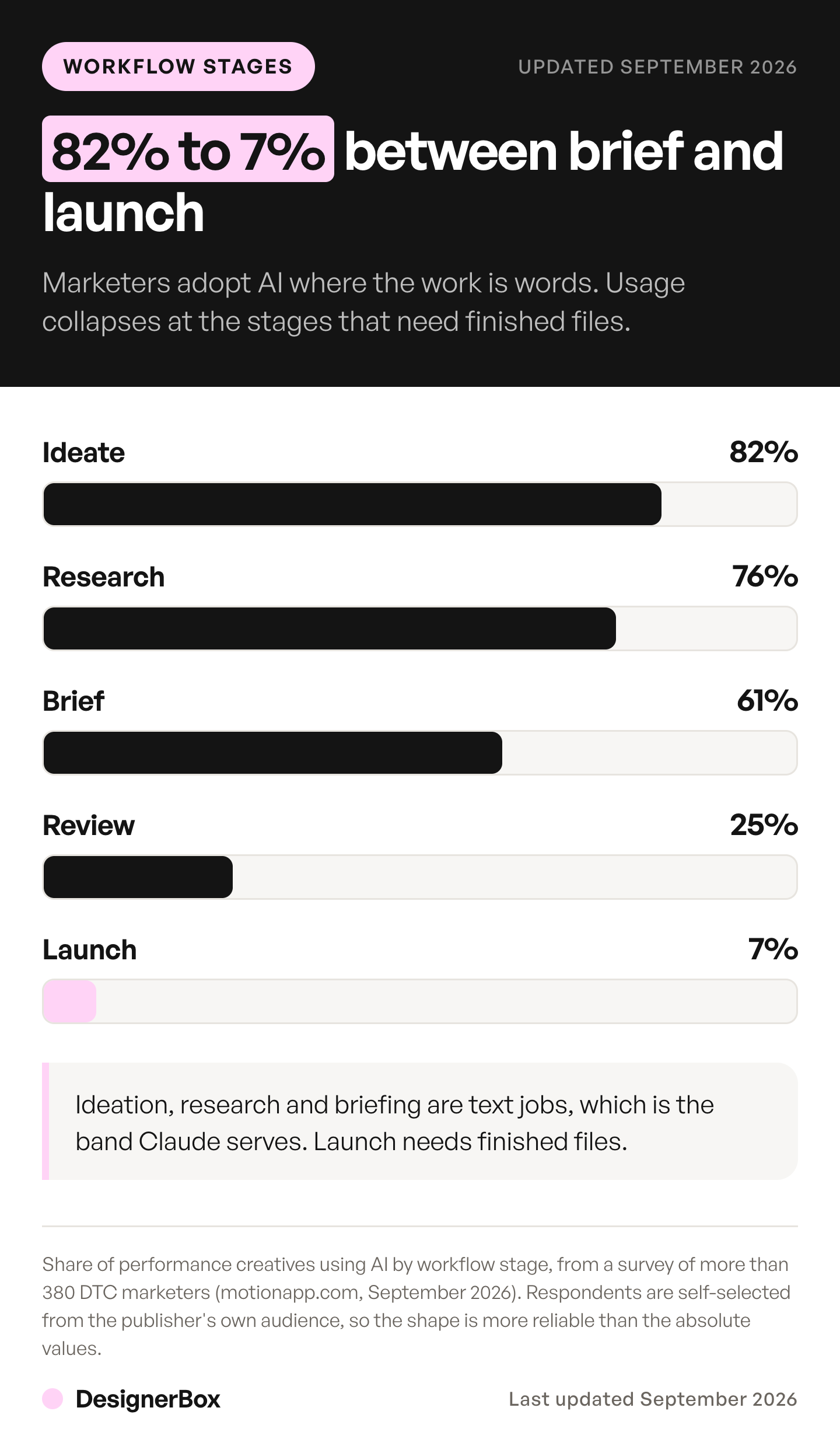
Motion surveyed more than 380 DTC marketers on where AI enters their creative process. Usage by stage:
| Workflow stage | Share using AI |
|---|---|
| Ideation | 82% |
| Research | 76% |
| Briefing | 61% |
| Evaluation | 25% |
| Launch | 7% |
Source: motionapp.com, accessed September 2026. Respondents are self-selected from Motion’s own audience, so read the shape rather than the absolute values.
A 75 point fall between ideation and launch is the shape worth noticing. Ideation, research and briefing are text jobs, and that is precisely the band Claude serves well. Evaluation and launch need finished files.
The broader adoption numbers agree on the front half. In The CMO Survey’s 35th edition, content creation was the most common marketing use of AI at 73.9% among companies using it. The survey has 308 responding US marketing leaders, 97% of them VP level or above, and it was fielded in January 2026. IAB reports 83% of ad executives saying their company has deployed AI in the creative process, up from 60% in 2024. The base is 104 executives at companies spending $1M or more on media (January 2026).
Claude’s own tools are part of that shift. In NP Digital’s monthly panel of the same 100 marketers, Claude Code use rose from 16% in February 2026 to 26% in March and 33% in April (neilpatel.com/marketing-stats, accessed October 2026). It is a small panel, so read the direction more than the exact figure.
Adoption at the top of the funnel is settled. The production step is where the workflow still leaves the chat window.
Where the workflow stops
Claude for marketing stops at the photograph. Claude is a text and reasoning model with vision for reading images you upload. It makes two kinds of visual, and both are layouts rather than shots. For paid campaigns, Claude ads shows who does each step.
What it makes natively. Claude builds diagrams, charts and interactive visuals directly in a conversation. Anthropic is careful about what those are: “Custom visuals aren’t photos or illustrations. Claude builds them using HTML, the same building blocks as web pages, so they’re interactive and specific to your question rather than static images” (support.claude.com, updated April 2026).
What Claude Design adds. Anthropic Labs shipped Claude Design in April 2026, in research preview for Pro, Max, Team and Enterprise subscribers (anthropic.com, April 2026). Since 16 September 2026, Anthropic’s release notes list it on every plan, including Free (Claude release notes, accessed October 2026). The product page says it is included in all paid plans. It makes designs, prototypes, slides and one-pagers, and it exports to PPTX, PDF or HTML (claude.com, accessed October 2026).
Be precise about what that covers. The launch post lists “Marketing collateral: Marketers can create landing pages, social media assets, and campaign visuals, then loop in designers to polish” (anthropic.com, April 2026, re-read October 2026). The concession sits inside the sentence. It composes a layout and hands it on.
So the honest version of the limit is narrow and worth stating carefully. Claude composes, arranges, exports and reviews. It never produces the shot. Every visual capability Anthropic ships transforms assets that already exist somewhere.
For a marketing team, the assets that do not exist yet are the expensive ones. The product on a clean white background. The same product in a styled scene. The garment on a model in three sizes. The 15 second clip for Reels. Those need a photoshoot, or a generation model.
Two companion guides cover the mechanics of closing that gap: the Claude AI image generator and the Claude AI video generator. They include what a shot costs and where each loop breaks.
The connector layer, and why it is five clicks
Anthropic does not need to ship image generation for Claude to drive it. The Model Context Protocol is an open standard Anthropic published for building two-way connections between AI tools and outside systems (anthropic.com, November 2024). A remote MCP server exposes a set of tools. Claude reads their descriptions, picks one, fills in the arguments and calls it. The servers a marketing team connects, grouped by job, are in MCP for marketing.
Custom connectors are available on Free, Pro, Max, Team and Enterprise plans, with Free users limited to one (support.claude.com, accessed October 2026). For an individual on Pro the setup is short:
- Open Customize, then Connectors.
- Click the plus, then “Add custom connector”.
- Enter a name and the remote MCP server URL, then click Continue.
- Review the sign-in settings Claude detected, and change them if the server needs something different.
- Click Add, then enable it per conversation from the plus menu.
On Team and Enterprise an owner adds the connector under Organization settings first, and members connect individually after that.
DesignerBox has 75 tools over MCP. Claude, ChatGPT, Cursor, Claude Code and VS Code can run them. The server address and the client setup live at designerbox.ai/mcp/connect. Our DesignerBox MCP launch post walks the connection start to finish.
So Claude has a documented, first-party way to close the image and video gap. You connect a generation server as a custom connector. Our guide on how to make your AI agent creative covers the same connection for Codex and for an agent you built. The Codex setup for DesignerBox is on the DesignerBox for Codex page.
What a full loop looks like
Once a generation server is connected, the marketing workflow stops splitting across tabs. Here is the shape of it, with the layer that owns each step.
| Step | Owner | Output |
|---|---|---|
| Campaign angle and audience | Claude | Brief |
| Copy, headlines, CTA variants | Claude | Text |
| Product shot, flat lay, styled scene | Connected image model | Image |
| Garment on a model | Connected image model | Image |
| 15 second cut for Reels | Connected video model | Video |
| Frame sizing for each placement | Claude plus connector | Files |
| Brand check against the profile | Brand profile on the server | Pass or fail |
| Performance read after launch | Claude | Report |
Two details decide whether this holds together in practice.
The source image. A text-only brief makes the model invent a product that resembles yours. Upload the real packshot and edit from it, and the object in the ad is the object that ships. This is the difference between creative you can run and creative your ops team rejects.
The brand profile. Voice held as text in a settings file governs copy. It does nothing to a photograph. A brand profile that travels with the generation request keeps the tenth asset looking like the first. Our guide on AI brand consistency covers that failure in detail.
For teams that want the loop pre-built rather than assembled by hand, DesignerBox has apps such as Social media ads and Versions of an ad, and the Static ad skill in Create. Each runs the brief-to-variants sequence as one job. The tools Claude can call are listed on the DesignerBox MCP page.
The value only shows up on the second run. Getting one good asset out of a chat is a novelty; getting the same asset out for the next 40 SKUs is the job a marketing team has. So build the loop once, with your brand profile, your source photos and your placement sizes fixed, then hand it the rest of the catalog. The fortieth product gets the same treatment as the first, because nobody is making those decisions again. Batch runs that same workflow over a whole sheet of products.
A brief to paste into Claude
Once a generation server is connected, the first message decides most of the result. This brief works for a set of static ads. Change the words in brackets.
Use the DesignerBox connector. Find the brand profile for [brand name] and use its logo, colors and rules. Use the product photo of [product] from that brand. Make four static ads for [placement]: the product on a plain background, the product in [setting], the product in a hand, and the product with the headline “[headline]”. Keep the product exactly as it is in the photo: same shape, color, label and logo. Tell me the credit cost before you run anything. After the run, list each result with its model.
Three lines in it do most of the work. The brand profile line brings the logo and rules with it. The keep line protects the product, which is the part a shopper checks. The cost line asks Claude to stop and show the cost before it spends credits. When a result is approved, ask for the same set in other sizes, or with new headlines, in the same chat.
What it costs
Two bills, and they are unrelated. Claude charges for the assistant. The connected model charges for the pixels.

Claude plans. Anthropic sells Free, Pro, Max, Team and Team Premium. Free allows one custom connector. Pro includes Claude Code and Cowork, and Claude Design is on every paid plan. Max is the higher-usage individual plan. Team is sold per seat, for 2 to 150 people, and it is where an owner manages shared connectors. Anthropic lists the current rates on its own pricing page (claude.com/pricing, September 2026).
Generation is billed separately by whatever server you connect. In DesignerBox that is credits, and the rate is set by the step rather than by the request. The image model in the step sets the image rate, and the cost is shown before the run. An 8-second clip costs 40 to 560 credits, depending on the model, and that fourteenfold spread is the number to plan against.
Uploading your own photos and the commercial license start on the Pro plan. AI video, the image editor and the video editor start on the Premium plan. Plans and credits are on the pricing page.
The rest sits in the same place: the image editor, the video editor, Brand and Assets. The ads, the cut videos and your brand rules come from one account, so a campaign never leaves it. Our breakdown of ad variants at scale has the volume math for a normal testing month.
Three jobs to delegate first
Do not connect everything at once. These three have the clearest before and after.
Resize an approved campaign. One approved frame into every placement size. It is mechanical, it eats a designer’s afternoon, and a wrong output is obvious in a second.
Variant sweeps on a winner. When an ad works, you want ten more of it with a different headline, background or model. Claude writes the variants and the connected model renders them from the same source image. Size the batch to your spend tier rather than to a headline number. Motion’s Creative Benchmarks 2026 puts the smallest Meta spend tier at 2.80 new creatives a week and the largest at 18.85, across 578,750 creatives and 6,015 accounts (motionapp.com, accessed September 2026).
Catalog backfill. New SKUs arrive without lifestyle shots. One packshot in, a set of angles and scenes out, applied across the batch rather than one product at a time.
Keep a person on anything where a mistake ships quietly. Hero imagery for a launch, anything with a face and a license attached, and any claim a regulator would read. Keep a person on the approval for each of those, because the judgment belongs with a person whatever the tool.
FAQ
Is Claude good for marketing?
For text and analysis, yes, and Anthropic’s own numbers back it. Content creation and copywriting was the second largest category of Claude Cowork use at 16.4% of 1.2 million sessions across more than 600,000 organizations. For visual production it needs a connector, because Claude does not render photographs by itself.
Can Claude generate images for my campaign?
Not on its own. Anthropic’s help center states that Claude does not generate photos or illustrations the way image tools do. It builds diagrams and charts in HTML, and Claude Design composes layouts and slides. To get a product photograph or a video ad you connect an image or video model over MCP.
Is ChatGPT or Claude better for marketing?
They split differently on visuals. ChatGPT can make images inside the chat with OpenAI’s own image model (OpenAI Help, accessed October 2026). Claude does not generate photos on its own. Both can connect outside tools over MCP, so either one can drive an image or video server such as DesignerBox. Our ChatGPT MCP guide covers the ChatGPT side. For copy, briefs and analysis, test both on your own work before you pick.
What is the Claude Marketing plugin?
An Anthropic-built plugin for Claude Cowork with seven commands: draft content, campaign plan, brand review, competitive brief, performance report, SEO audit and email sequence. It covers content and analysis. For visual assets it points you to connect external tools via MCP.
Which Claude plan do I need for marketing work?
Free covers text drafting and one custom connector, which is enough to test a generation server. Pro adds Claude Code and Cowork. Team is the plan where shared organization connectors are managed. The current rates are on Anthropic’s own pricing page (claude.com/pricing, September 2026).
Can Claude keep my brand consistent?
For copy, yes, by reading a voice and style guide from settings. For imagery, text rules do not reach the pixels. Consistency across generated assets comes from the generation layer holding a brand profile and from working off your real product photo rather than a written description.
Does Claude work with Figma for marketing creative?
Yes, through Figma’s own MCP server, which is a design and code bridge. Its toolset reads design context and writes layers, variables and diagrams back to the canvas, and it can upload images into a file. It does not generate a photograph. Anthropic’s growth marketing team used Claude Code to build a Figma plugin that swapped copy across duplicated frames.
How do agencies use Claude for marketing across clients?
The pattern that holds is one brand profile per client on the generation side, with Claude handling briefs and variants. Separation matters more than speed, because the failure mode is one client’s look bleeding into another’s. Our guide on creative for multiple clients covers the operating model.
Sources
- Anthropic, “Marketing Plugin” (claude.com, accessed October 2026)
- Anthropic, “Can Claude produce images?” (support.claude.com, updated March 2026)
- Anthropic, “Custom visuals in chat” (support.claude.com, updated April 2026)
- Anthropic, “Claude Design” (anthropic.com, April 2026, re-read October 2026) and (claude.com, accessed October 2026)
- Anthropic, Claude release notes, 16 September 2026: Claude Design on every plan (support.claude.com, accessed October 2026)
- Anthropic, “How Anthropic’s Growth Marketing team uses Claude” (claude.com, January 2026)
- Anthropic, “How people are using Claude Cowork” (claude.com, July 2026)
- Anthropic, “Get started with custom connectors using remote MCP” (support.claude.com, accessed October 2026)
- Anthropic, “Introducing the Model Context Protocol” (anthropic.com, November 2024)
- Anthropic plan names and rates: claude.com/pricing, read September 2026
- Figma, “Guide to the Figma MCP server” (help.figma.com, accessed September 2026)
- AI usage by creative workflow stage, survey of 380+ DTC marketers, and creative volume per Meta spend tier from Creative Benchmarks 2026 (motionapp.com, accessed September 2026)
- The CMO Survey, 35th edition, Duke University Fuqua School of Business with Deloitte and the American Marketing Association (cmosurvey.org, March 2026)
- IAB and Sonata Insights, “The AI Ad Gap Widens” (iab.com, January 2026)
- Adobe for Creativity plugin page, made by Adobe (claude.com, accessed 22 October 2026)
- NP Digital, Claude Code adoption among a panel of 100 marketers, February to April 2026 (neilpatel.com/marketing-stats/claude-code-adoption, accessed October 2026)
- OpenAI Help, ChatGPT Images (help.openai.com, accessed October 2026)
Claude features, plan availability and pricing verified against Anthropic’s own documentation as of September 2026. The Marketing plugin page, the image help article, the custom connector steps and the two Claude Design pages were re-checked on 2 October 2026. The Marketing plugin page (now at claude.com/marketplace/plugins/marketing), the Claude Design product page and the Anthropic marketing post were re-read on 7 October 2026. On 22 October 2026 we re-read the Marketing plugin page, the image help article and the connector steps, and added the Adobe for Creativity plugin and the NP Digital panel. This category changes monthly. Individual results vary.














