
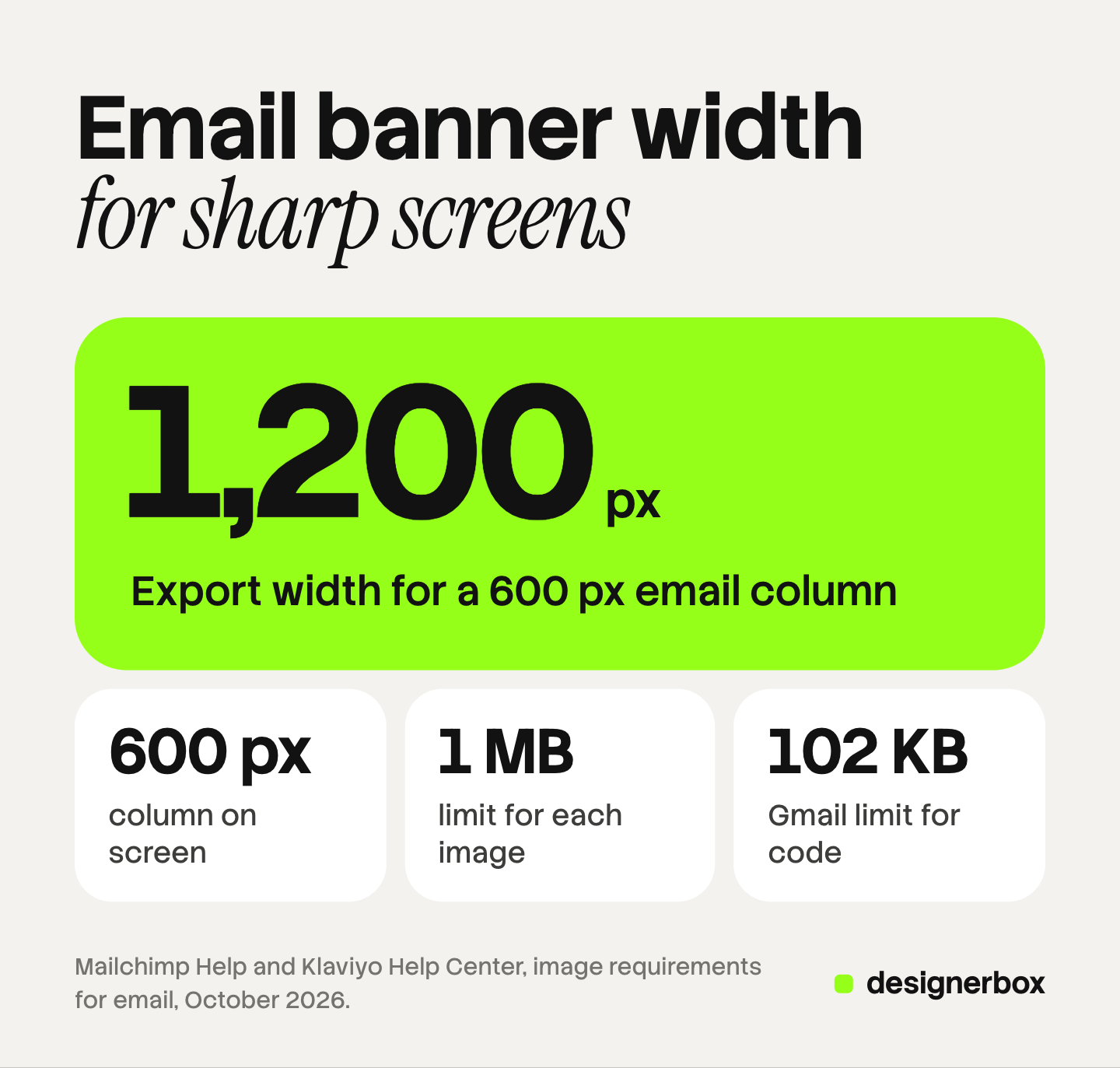
The standard email banner size is 600 px wide, the width of a common email column. Export the file at twice that width, 1,200 px, so it stays sharp on high-density screens. A header banner of 1,200 x 400 px and a hero image of 1,200 x 800 px are safe working sizes. Keep each file at 1 MB or less.
Advice on email banner size often gives a fixed height. No email platform documents one. The platforms document a column width, a file weight and three formats.
This guide separates what the platforms and the email clients document from what is a convention. It covers six image types, the file specs, and how Gmail, Outlook and Apple Mail treat images.
Key Takeaways
- The column sets the width. Mailchimp’s legacy templates are 600 px wide and its new builder is 660 px wide. Klaviyo advises 600 to 1,000 px for a full-width image.
- Export at twice the display width. A 600 px column takes a 1,200 px file. Both platforms describe this method for high-density screens.
- No platform documents a banner height. Every height in this guide is a convention, with its reason stated.
- Keep each image at 1 MB or less. Mailchimp and Klaviyo give the same number.
- The 102 KB Gmail limit counts code. Mailchimp defines message size as the underlying code of the email. Image files are separate.
- Classic Outlook blocks pictures by default. Alt text and live text carry the message until the reader downloads them.
What size should an email banner be?
An email banner is as wide as the email’s content column. Mailchimp states the two widths it uses: “Mailchimp’s legacy email templates are 600 pixels wide, while templates in the new builder are 660px wide” (Mailchimp Help, October 2026). For the file itself, Mailchimp advises 600 to 1,200 px in the legacy builder and 660 to 1,320 px in the new builder.
Klaviyo gives a similar range. Its help page says to keep full-width images “between 600 and 1000 px in width and less than 2000px in height” (Klaviyo Help Center, October 2026). An image narrower than the full column can be smaller than 600 px.
The upper end of each range exists for sharp screens. Klaviyo describes the method: insert an image at twice the wanted size, then reduce its display size in the template. Mailchimp says the same in other words: use a higher resolution photo and constrain the dimensions. A 600 px column therefore takes a 1,200 px file.
Neither platform states a height for a banner or a header. The heights below are conventions.
| Image type | What the platforms document | Working export size (a convention) | Why |
|---|---|---|---|
| Header banner | Full-width minimum: 564 px legacy, 660 px new builder (Mailchimp) | 1,200 x 400 px, shown at 600 x 200 px | A 3:1 strip leaves the first screen for the headline |
| Hero image | 600 to 1,000 px wide, under 2,000 px high (Klaviyo) | 1,200 x 800 px, shown at 600 x 400 px | A 3:2 frame holds a product and still shows the button on a laptop |
| Full-width product image | The same full-width ranges | 1,200 x 1,200 px, shown at 600 x 600 px | A square matches most store product photos |
| Two-column tile | Minimum 264 px legacy, 330 px new builder (Mailchimp) | 660 x 660 px | Twice the larger minimum |
| Three-column tile | Minimum 164 px legacy, 220 px new builder (Mailchimp) | 440 x 440 px | Twice the larger minimum |
| Logo | No size stated on the pages we read | 400 px wide PNG, shown at 200 px | Transparent, and twice the display width |
Sources: Mailchimp and Klaviyo help pages, read October 2026. The third column is our arithmetic from those widths.
If your template uses the 660 px builder, scale the full-width sizes by 1.1. A 1,320 x 440 px header keeps the same 3:1 shape.
What is the right email header size?
An email header is the strip at the top of the message, usually a logo or a short banner. The width rule is the same: the column width on screen, twice that in the file. The height is your choice, and a short strip is the safer one.
The reason is the phone. Gmail supports standard CSS media queries, so a responsive template can scale an image to the screen (Google for Developers, October 2026). On a phone 390 px wide, a 600 px banner shows at about 390 px. That is 65% of its desktop size, by arithmetic.
Everything inside the picture shrinks by the same amount. Lettering that looks 20 px high on a laptop looks 13 px high on that phone. A 600 x 200 px header becomes about 390 x 130 px.
Three choices follow from that arithmetic:
- Keep the header short. A 3:1 strip costs 130 px of a phone screen. A square header costs 390 px and pushes the message off the first screen.
- Keep words out of the picture. Type the headline as live text in the email. Live text wraps on a phone and stays at a readable size.
- Center the subject. A logo or product in the middle of the strip survives any crop a template applies.
A store banner follows other rules, because a theme crops it by height. Our guide to Shopify banner size covers that case.
How heavy can an email image be?
Both platforms give one number. Mailchimp says: “We recommend a maximum file size of 1MB for images.” Klaviyo accepts uploads up to 10 MB and recommends 1 MB or smaller, because larger images can load slowly.
Klaviyo states the trade-off. It notes that a full-width image will often be larger than 1 MB, and that reducing it too far can make it visibly blurry. A 1,200 px wide JPG of a product usually sits well under the limit. A 1,200 px PNG of a photo often does not.
The other number you will meet is 102 KB. It belongs to the code, and it does not apply to an image file. Mailchimp explains it: “Gmail clips emails that have a message size larger than 102KB” and hides the rest behind a “View entire message” link (Mailchimp Help, October 2026). Mailchimp defines the message as the underlying code: the text, the link URLs, the tracking code and the HTML.
So a 400 KB banner does not cause clipping. A long email with many sections and pasted formatting can. Mailchimp adds that clipping also cuts the code that tracks opens.
| Spec | What the platforms document | Source |
|---|---|---|
| File weight | 1 MB or less for each image | Mailchimp, Klaviyo |
| Upload limit | 10 MB | Klaviyo |
| Formats | JPG, PNG and GIF | Mailchimp, Klaviyo |
| Transparency | Use PNG | Mailchimp |
| Images with text | PNG files display best across devices | Klaviyo |
| Color mode | RGB. CMYK does not render accurately online | Mailchimp |
| Resolution | 72 DPI is generally enough | Mailchimp, Klaviyo |
| Alt text | Add it to every image | Mailchimp, Klaviyo |
| Message code | Under 102 KB, or Gmail clips the email | Mailchimp |
Klaviyo also accepts a WebP upload and converts it to PNG. It does not convert animated WebP files, and its compression step does not apply to GIFs. If your source photo is larger than you need, our guide to resizing an image without losing quality covers the export step. For product photos, the 2,200 px master in ecommerce product photography is a safe file to scale down.
How do email clients treat images?
An email client is the app that opens the message. Three families matter most. Litmus counted over 1 billion opens in July 2026: Apple took 62.26%, Gmail 27.03% and Outlook 5.83% (Litmus, October 2026). Each one handles images in its own way.
| Client | What it does with images | Source |
|---|---|---|
| Gmail | Shows images automatically by default. Asks first if it thinks a sender or message is suspicious | |
| Gmail | Clips a message whose code is larger than 102 KB | Mailchimp |
| Classic Outlook | Blocks automatic picture downloads by default. The reader can unblock one message or a trusted sender | Microsoft |
| Classic Outlook | Plays animated GIFs by default. Shows only the first frame when animations are turned off | Microsoft |
| Apple Mail | Mail Privacy Protection hides the reader’s IP address and stops senders seeing whether a message was opened | Apple |
Blocked images. Microsoft’s support page says that Outlook “is configured by default to block automatic picture downloads from the Internet” (Microsoft Support, October 2026). Gmail takes the opposite default: “when you get an email with an image, you’ll see the image automatically” (Gmail Help, October 2026). Klaviyo’s advice covers both cases: always add alt text, so a reader who sees no picture still learns what it shows.
Animated GIFs. Microsoft states that Outlook plays animated graphics by default. If only the first frame appears, the reader has animations turned off in Outlook or in Windows (Microsoft Support, October 2026). Put the offer in the first frame, and the GIF works in both states.
Dark mode. Litmus groups clients by behavior in its dark mode guide, with a support chart dated February 2025 (Litmus, October 2026). Gmail on desktop changes no colors. Apple Mail changes none unless the email carries dark mode meta tags. Outlook.com inverts light backgrounds only. The Gmail app on iOS and Outlook 2021 on Windows invert light and dark areas alike.
A photo stays as it is in each of these modes. A transparent PNG is the file at risk. A dark logo on a transparent background can sit on a background the client has turned dark. Litmus advises a light, translucent outline around dark artwork in a transparent PNG. The outline is invisible in light mode.
Open tracking. Apple’s Mail Privacy Protection “prevents senders from seeing if you’ve opened the email message they sent you” (Apple Support, October 2026). That changes how you read open rates. It does not change the image sizes.
Which email design rules follow from these limits?
Good email marketing design starts from what the clients do, and four rules come straight from the sources above.
- Design for the picture not loading. Classic Outlook blocks pictures by default. The headline, the offer and the button belong in live text, with alt text on every image.
- Use one column for the main message. A single 600 px column scales to a phone at 65%. Three tiles side by side each show at about 130 px wide on a 390 px phone.
- Choose the format by the content. A photo is a JPG. A logo, or a picture with lettering or transparency, is a PNG. Motion is a GIF with the offer in frame one.
- Check dark mode with a transparent logo. Add the light outline before you send.
One more rule is about the work itself. Email design repeats. A weekly campaign needs a header, a hero and a row of product tiles, in the same sizes, every week. Set the sizes once and reuse them. Our guide to content batching shows how to make a week of posts in one sitting.
The same picture often runs in an ad as well. For the ad sizes, see our guide to one ad concept in every platform size. For seasonal sends, our list of holiday marketing ideas pairs each idea with the pictures it needs.
A month of email images from one brand record
A brand that sends custom emails needs new pictures every month: a header, a hero and product tiles for each send. Made by hand, that set costs design time on every send. The brand also runs out of fresh pictures between shoots.
Anyone can make an AI picture. Making hundreds that still look like your brand is the hard part.
In DesignerBox you save the job once as a workflow. You set the three shapes, 3:1, 3:2 and 1:1, and the workflow makes the picture in each one. Your logo, colors, fonts and rules sit in your brand record, and the workflow reads them before every run. Our guide to AI brand consistency explains why that record matters more than the prompt.
A batch runs that workflow over a sheet, one product per row and up to 200 rows a sheet. Row one and row two hundred read the same rules. You keep, discard or re-run each result on its own. The cost is shown before the run.
The full workflow from the first product photo to the finished ad, in one subscription.
The limits are plain. DesignerBox does not send emails, does not build the email’s HTML and does not send finished work to an email platform. You download the results, or send them with a webhook or an S3 step, and add them in your email builder. Check each file’s weight there before you send. Every plan below Ultra is one seat.
Uploading your own photos and the commercial license start on the Pro plan. AI video, virtual try-on, upscaling, the image editor and the video editor start on the Premium plan. Plans and credits are on the pricing page.
There is a free plan, and it runs on sample products. Start from a template and look at the set it returns.
FAQ
What is the best email banner size?
A banner 600 px wide fits a common email column. Export it at 1,200 px wide so it stays sharp on high-density screens. A working size for a header banner is 1,200 x 400 px. No email platform we read documents a banner height.
What size is an email header?
An email header is as wide as the column, 600 px in Mailchimp’s legacy templates and 660 px in its new builder. A common shape is 3:1, so 600 x 200 px on screen and 1,200 x 400 px in the file. The height is a convention.
What is the best email image size?
Mailchimp advises 600 to 1,200 px wide for its legacy builder, and Klaviyo advises 600 to 1,000 px wide for a full-width image. Keep the file at 1 MB or less. Smaller tiles in a two-column row need at least 264 to 330 px.
Should an email image be JPG, PNG or GIF?
Mailchimp and Klaviyo both support JPG, PNG and GIF. Use JPG for photos. Use PNG for transparency and for pictures with lettering. Use GIF for motion, and put the offer in the first frame.
Does Gmail clip emails with large images?
Gmail clips a message when its code is larger than 102 KB, according to Mailchimp. The code is the text, links, tracking and HTML. Image files are loaded separately. A long email with many sections is the usual cause.
Can DesignerBox make email banners?
A DesignerBox workflow makes the same picture in the shapes you set, such as 3:1, 3:2 and 1:1, and reads your brand record on every run. It does not send emails or build email HTML. You download the results and add them in your email builder.
Sources
- Mailchimp Help, image requirements for email: template widths of 600 and 660 px, the recommended image ranges, minimum widths by column, the 1 MB file size, formats, RGB, alt text, high-definition screens (mailchimp.com, read October 7, 2026)
- Mailchimp Help, Gmail is clipping my email: the 102 KB message size, what the message size counts, the effect on open tracking (mailchimp.com, read October 7, 2026)
- Klaviyo Help Center, images in emails reference: the 600 to 1,000 px width and 2,000 px height, the 10 MB upload limit and 1 MB recommendation, formats, WebP conversion, the 2x method, alt text (help.klaviyo.com, read October 7, 2026)
- Gmail Help, turn images on or off in Gmail: images shown automatically by default, the exception for suspicious senders (support.google.com, read October 7, 2026)
- Google for Developers, Gmail CSS support: media queries are supported (developers.google.com, read October 7, 2026)
- Microsoft Support, block or unblock automatic picture downloads in classic Outlook: pictures blocked by default (support.microsoft.com, read October 7, 2026)
- Microsoft Support, the animated graphic in my e-mail message doesn’t work: animated GIFs play by default, first frame when animations are off (support.microsoft.com, read October 7, 2026)
- Apple Support, use Mail Privacy Protection on iPhone: hidden IP address and opens (support.apple.com, read October 7, 2026)
- Litmus, email client market share, July 2026 report: shares for Apple, Gmail and Outlook from over 1 billion opens (litmus.com, read October 7, 2026)
- Litmus, the ultimate guide to dark mode for email marketers, dated February 27, 2025: the three dark mode behaviors, the client examples, the outline for transparent PNGs (litmus.com, read October 7, 2026)
- DesignerBox brand, batch and workflow pages: DesignerBox product pages (designerbox.ai/product/brand, designerbox.ai/product/batch, designerbox.ai/product/workflows), October 2026
Email facts verified on Mailchimp, Klaviyo, Google, Microsoft, Apple and Litmus pages on October 7, 2026. Every height and every working export size in the tables is a convention with its reason stated, and the phone figures are arithmetic for a 390 px wide screen, not measurements. Email clients change their behavior with each release, so send a test to your own inboxes before a campaign. Individual results vary.